Claude vs Claude Code: Which One a Non-Developer Needs
Claude vs Claude Code for non-developers: which marketing jobs stay in the Claude app, which need Claude Code working in your folders, and what each plan costs.
A Search Console export joined to the 159 markdown posts live on this site as of 25 September 2026 draws the Claude vs Claude Code line clearly: the export is a CSV of URLs that earned impressions, and the posts are files in a folder on my laptop.
A plain chat handles half of that job: upload the CSV and it parses the file with code execution, which Anthropic’s pricing page lists on every plan, Free included. The posts are where it stops. Anthropic allows “up to 20 files per chat”, and there are 159; a Project could hold them if they fit the context window, and on paid plans Cowork in the Claude app can reach a connected folder, but either way the commands run on Anthropic’s servers, not on the laptop where the repo’s scripts, build and git history live.
Claude Code starts inside the folder. Run there on 26 September 2026, the join read the export (157 URLs, from a window that closed on 31 August) and every published post file, and found 35 posts with no row: 25 were published after the window closed and the other 10 between 15 and 31 August, which points to recency rather than posts Google skipped. The same session can then edit, rebuild and commit, because a local Claude Code session runs commands on my machine.
I route marketing work by that line, and this page sorts a non-developer marketer’s jobs into the Claude app or Claude Code. What I say about working in Claude Code comes from my own setup, VS Code on Windows 11 with custom commands, MCP servers and auto memory; its other surfaces, its pricing and Cowork come from Anthropic’s documentation, and I have not used Cowork.
What Is the Difference Between Claude and Claude Code?
Claude is Anthropic’s chat app for web, desktop and mobile: you bring it questions, files and connected apps, and it answers or builds a deliverable. Claude Code is an agent that works inside a project folder, reading and editing files and running commands. Every paid plan includes both.
Routing table, as of September 2026, from Anthropic’s pricing page, help center and Claude Code docs:
| Surface | Where it runs | What it can touch | Who it is for | Plan needed |
|---|---|---|---|---|
| Claude app (chat) | Anthropic’s servers, opened on web, desktop, iOS and Android | Files you upload (up to 20 per chat), Projects, connectors, web search | Anyone drafting, analysing or researching | Free and up; Free caps Projects at 5 |
| Cowork, now part of the Claude app | Anthropic’s servers, in a cloud mode Anthropic labels beta | Folders you connect, reached through the Claude Desktop app, plus connectors | Knowledge workers handing off multi-step tasks with no terminal | Paid plans: Pro, Max, Team, Enterprise |
| Claude Code | Your machine (terminal, VS Code, JetBrains, the desktop app’s Code tab) or Anthropic’s cloud (claude.ai/code) | The project folder, your shell, git, and the MCP servers you configure | Anyone maintaining something made of files: a site, scripts, a data pipeline | Any paid plan, or pay-as-you-go API credits through a Console account |
Anthropic’s own docs describe Claude Code as “an agentic coding tool that reads your codebase, edits files, runs commands, and integrates with your development tools” (Claude Code overview). The word “coding” is in that sentence, but the folder does not have to hold an app. This one holds a blog.
If your question is which chatbot to use in the first place, that is a separate comparison of Claude and ChatGPT. This guide assumes you already use Claude and want to know when to open Claude Code instead.
Claude App vs Claude Code: Where Each One Can Reach
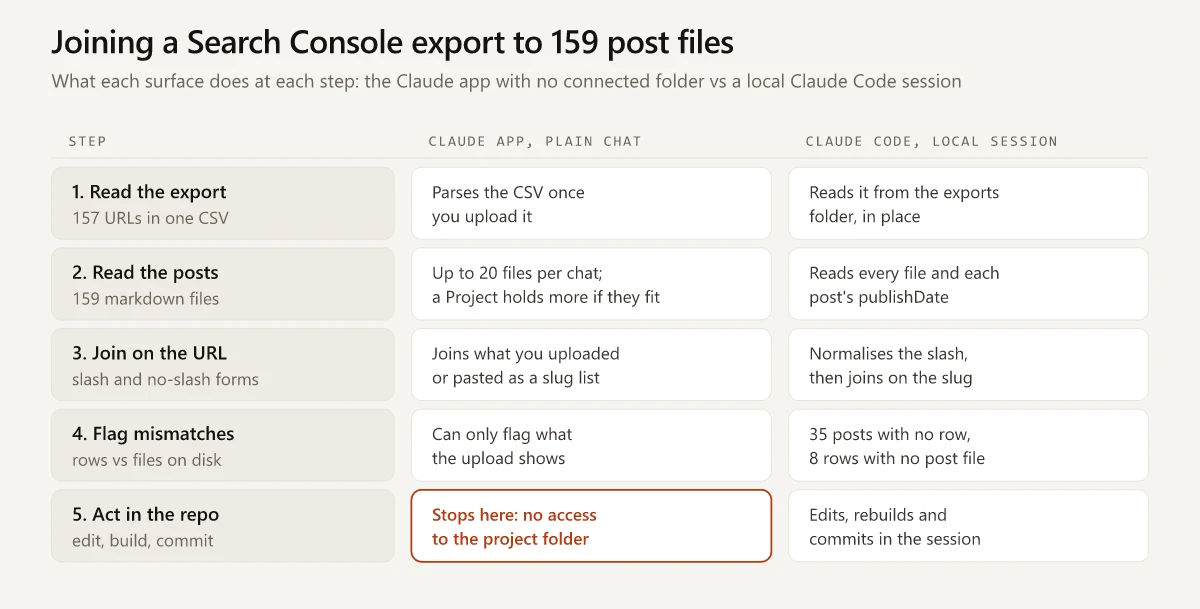
The diagram is the opening job step by step. Besides the 35 posts with no row, the join caught 6 posts listed twice, with and without a trailing slash, and 8 rows with /blog/ in the URL but no post file behind them: the blog index, two category pages, three old tag pages, one removed post and an image. The full Search Console picture for this site, clicks and impressions by position, is in my SEO without link building breakdown.
The difference sits in the first two rows below: a plain chat works on copies you upload, and a local Claude Code session works on the originals. The rows after those exist on both sides in different forms.
| Capability | Claude app (chat) | Claude Code |
|---|---|---|
| Your files | Uploads: up to 20 per chat; Projects hold more as long as the total fits the context window | Reads and edits the project folder in place |
| Running code | ”Create and edit files with code execution”, on the files you uploaded | Runs commands in your shell, on your machine, in a local session |
| Outside data | Connectors, on every plan | MCP servers you configure, which the docs say can “read your design docs in Google Drive, update tickets in Jira, pull data from Slack” |
| Memory | ”Memory across conversations” | CLAUDE.md files plus auto memory, kept per project on your machine (how Claude Code memory works) |
| Repeatable steps | Skills | Skills and custom slash commands (Claude Code commands for marketers) |
| What you get back | Artifacts, plus Docs, Slides and Design in beta on paid plans | Changed files in your project, and git commits if you ask |
Sources: Claude pricing and plan comparison, upload files to Claude, Claude Code overview, and, for the beta status of Docs, Slides and Design, Anthropic’s 16 September announcement. On git, the Claude Code docs say it “stages changes, writes commit messages, creates branches, and opens pull requests”, which is what lets a non-developer undo a bad change by going back one commit.
Skills exist on both sides, and what a Claude skill is and how to write one covers the format. A skill in the Claude app still works on what you upload. The same skill in Claude Code can run against every file in the folder.
Routing Marketing Jobs Between Claude and Claude Code
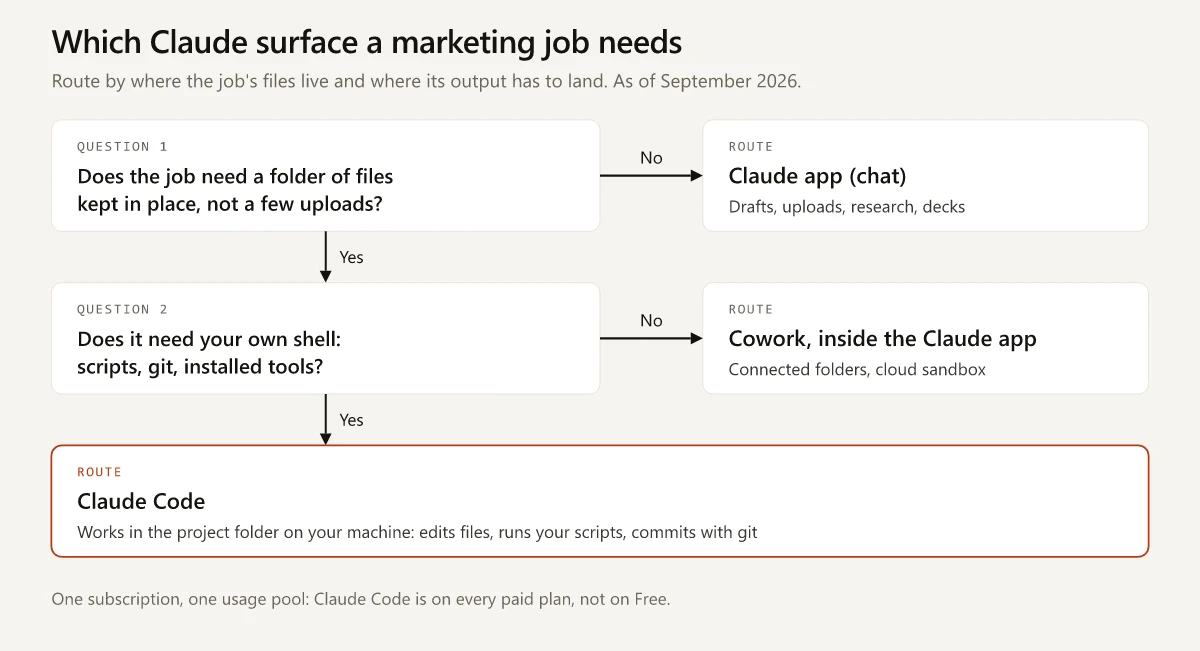
The diagram routes a job on whether it needs a folder of files kept in place, more than you would upload, and if it does, whether it also needs your own shell: scripts, git or tools you installed. The table applies that test to jobs a marketer runs every month.
| Marketing job | Send it to | Why |
|---|---|---|
| Draft positioning, launch emails or ad variants | Claude app | Text in, text out; nothing on disk is involved |
| Analyse one exported CSV (a campaign report, one Search Console export) | Claude app | Upload it and code execution handles the maths |
| Competitor research brief from public sources | Claude app | Web search is on every plan; Research is on paid plans |
| Turn meeting notes into a deck or a document | Claude app | Slides and Docs, in beta on paid plans per Anthropic’s announcement |
| A report assembled from connected apps on a schedule | Cowork in the Claude app | Anthropic’s Cowork guide says “With scheduled tasks, Claude can complete work for you automatically” |
| Summarise or reorganise a folder of local documents without a terminal | Cowork in the Claude app | It reads and writes folders you connect through the Desktop app, and returns “formatted documents, organized files, synthesized research” |
| Join an export to files on disk, as in the opening job | Claude Code | It reads the folder in place and runs the join on your machine |
| Build or change a page on your own site | Claude Code | It edits the repo, runs the build and commits |
| Pull keyword data from an SEO API and check it against your own posts | Claude Code with MCP servers | The keyword data has to meet post files on disk; my setup pulls it from Ahrefs and Semrush inside Claude Code |
| Run a script you already own, such as an image converter or an IndexNow ping | Claude Code | The script and its installed packages are on your machine |
| A job you will repeat weekly with the same steps | Claude Code command or a Claude skill | Both package the steps; Claude Code can also run them against local files |
The two Cowork rows come from Anthropic’s documentation, not from my own use. Moving from the top half of that table to the bottom half is the jump from using AI for single tasks to running workflows on it, which is roughly the move between the middle stages of the AI maturity curve for marketers.
Claude Code vs Claude Desktop and Chat
“Claude Code vs Claude Desktop” compares a product with the app that contains it. As of September 2026, Anthropic’s desktop docs say “The Claude Desktop app has three tabs: Chat for conversations, Cowork for Dispatch and longer agentic work, and Code for software development” (Claude Code desktop docs). The merge is folding Chat and Cowork together, so that layout may differ on accounts that already have the new Claude. The Code tab is Claude Code, and per the overview, “The app includes Claude Code, so you don’t need to install the CLI separately.”
The same engine opens in several places, and the docs say “your repo’s CLAUDE.md files, settings, and MCP servers work across all of them”:
| Where you open Claude Code | Where the session runs | When a marketer would pick it |
|---|---|---|
| Desktop app, Code tab | Local (“runs on your machine with direct access to your files”), cloud, SSH or WSL | You want Claude Code without a terminal window |
| VS Code, Cursor or JetBrains extension | Your machine | You already keep your site or notes in an editor; this is my setup |
| Terminal (the CLI) | Your machine | Scripting, piping one command into another, scheduled runs |
| Browser at claude.ai/code | Anthropic’s cloud | Work on a repo you do not have locally |
| Claude app on iOS or Android | Anthropic’s cloud | Start or check a long task away from your desk |
So “Claude Code vs Claude chat” in the desktop app is a choice between the conversation side of one window, which answers from what you give it, and the Code tab, which works on a folder you choose; both draw on the same subscription. Claude Design sits on the conversation side too: Anthropic’s announcement says it “now works inside your conversations too”, and it is in beta on paid plans (Claude Cowork and chat are now one Claude).
Claude Cowork vs Claude Code After the September 2026 Merge
Anthropic’s help center says “Claude Cowork uses the same agentic architecture that powers Claude Code, with no terminal required” (Get started with Claude Cowork). The same article describes where that work happens: “Claude’s work runs on Anthropic’s servers, in an isolated environment,” a cloud mode Anthropic still labels beta, and when a task needs a local file, “Claude reaches it through the Claude Desktop app on that computer.”
Then the product changed. Anthropic’s announcement of 16 September 2026 opens: “Starting today, Claude Cowork and chat are merging into one Claude” (Claude Cowork and chat are now one Claude). The rollout details, as of late September 2026:
- Pro and Max get the merged app first, “over the next few weeks”, on web, desktop and mobile
- “Team and Free plans will follow soon”
- Enterprise admins hear from Anthropic “at least 30 days before anything changes”
- The pricing page banner now reads “Claude Cowork is now just Claude.”
On Pro and Max, that turns the three-way “Claude vs Claude Code vs Claude Cowork” question back into a two-way one, and Team and Free follow later. What is left between Cowork and a local Claude Code session is whose machine runs the commands.
| Cowork, inside the Claude app | Claude Code | |
|---|---|---|
| Where you start | The Claude message box | A project folder or session |
| Where commands run | Anthropic’s servers, separate from your computer and network (cloud mode in beta) | Your machine in a local session, Anthropic’s cloud in a web session |
| Local files | ”folders you’ve connected”, through the Desktop app | The project folder |
| Terminal | None required | Optional: the desktop Code tab and editor extensions exist |
| Usage | Your plan’s shared pool; multi-step tasks use more of it, and auto mode “consumes more of your usage limit than the other modes” | Your plan’s shared pool, the same one your chats use |
| Plans | Pro, Max, Team, Enterprise | Every paid plan, or API credits |
My Search Console script reads its sign-in files from a folder inside the project and runs with packages installed on my laptop, so a job built on it goes to Claude Code. A folder of briefs and call notes that needs summarising, with no script involved, is closer to the work Anthropic describes for Cowork.
Claude vs Claude Code Pricing
Claude Code does not need a plan of its own. Anthropic’s pricing FAQ says “Claude Code is included in all paid plans. It shares the same usage limits as the rest of your plan, so your work in the terminal and your chats draw from one pool” (Claude pricing). The help center repeats it: “all activity in both tools counts against the same usage limits” (Use Claude Code with your Pro or Max plan), so a long Claude Code session eats into the same allowance as your drafting in chat.
Plans and prices as of September 2026:
| Plan | Price | Claude app | Claude Code | Usage, per Anthropic |
|---|---|---|---|---|
| Free | $0 | Yes, Projects capped at 5 | No | ”Free covers everyday questions” |
| Pro | $20 a month, or $17 a month billed annually ($200 up front) | Yes | Yes | ”at least 5x more usage per 5-hour session than Free” |
| Max | From $100 a month, billed monthly | Yes | Yes | 5x or 20x the usage of Pro per 5-hour session |
| Team | Standard seat $20 a month billed annually or $25 monthly; Premium seat $100 or $125 | Yes | Yes | Premium seats get “5x more usage than standard seats” |
| Enterprise | $20 per seat a month billed annually, plus usage at API rates | Yes | Yes | Usage cost “scales with model and task” |
The usage terms behind those prices:
- Limits reset on a rolling window. The pricing FAQ says “Every plan has usage limits that reset on a rolling five-hour session window, and paid plans add weekly limits on top.”
- API billing is the overflow route. The pricing page says heavy coding sessions can “switch to pay-as-you-go API credits through a Console account”, and paid plans can turn on usage credits “to keep working at standard API rates”.
If you are on the Free plan, the Claude app is all you have, and my roundup of free AI tools for marketing covers what else fits a zero budget.
Do I Need Claude Code If I Am Not a Developer?
Only if the work you want done lives in files you maintain and needs your own scripts or git. For drafting, research and one-off analysis of an export, the Claude app is enough.
I am a marketer, not a developer, and this site is built with Claude Code: as of 25 September 2026, 159 posts, 9 free tools and 84 commits, the first in March 2026. The move off WordPress is its own story, told in my WordPress to Astro migration write-up. All of it lives as files on disk.
Each question below asks whether the job needs your own shell on top of a folder, so a single yes sends it to Claude Code:
- Does the output have to be built, published or committed from a folder you maintain, such as a website repo?
- Does the job need a script or a tool installed on your machine?
- Do you want every change recorded in git so you can roll it back?
What you do need is the habit of reviewing. As of September 2026, current versions of Claude Code start terminal and VS Code sessions in auto mode by default. In auto mode, a second model reviews actions instead of you (permission modes). Manual mode asks before it edits a file or runs a shell command outside a built-in read-only set (Claude Code permissions), which makes every step visible while you learn what it does.
The terminal is optional now: the desktop Code tab and the VS Code extension both run Claude Code without a terminal window, and the install docs send first-timers to a guide: “If you haven’t used a terminal before, the terminal guide shows how to open one and paste the command.” Marketers who go further and build their own data and automation tooling are doing what a GTM engineer does for a living.
The Claude Code Setup Behind This Site
This is the setup behind every first-hand Claude Code statement above. Each piece exists because the job touches files on my machine.
| Piece | Where it lives | Why it needs Claude Code |
|---|---|---|
| The Claude Code extension in VS Code, on Windows 11 | My editor | Every session opens in the project folder |
| Two project slash commands, two user-level ones | .claude/commands/ and ~/.claude/commands/ | They run the same research steps and pre-publish checks against the repo each time |
| Auto memory: a MEMORY.md index plus topic files, and no CLAUDE.md in the four locations checked | ~/.claude/projects/<project>/memory/ | House rules such as WebP-only images and no em-dashes load every session |
| Ahrefs MCP server and a Semrush connector | Claude Code’s user MCP config (Ahrefs); a claude.ai connector (Semrush) | Keyword data arrives in the same session that can read the posts on disk |
| Research scripts: a Search Console CLI, a Semrush CLI, an IndexNow pusher | scripts/ in the repo | They run with Node on my laptop against the repo, and the Search Console CLI also needs the Google API packages installed there |
| 20 installed third-party design skills at project level, plus 3 general skills at user level | .claude/skills/ and ~/.claude/skills/ | Project-level skills sit in the repo, next to the files they work on |
| A permissions allowlist | .claude/settings.json | Pre-approved commands and fetch domains, so routine steps do not stop for a prompt |
Every row assumes commands running on my machine, inside the project folder. Cowork runs shell commands on Anthropic’s servers, separate from my computer, while the scripts, their installed packages and the git history in this table live on my laptop, which is why this setup stays in Claude Code. Skills and connectors travel further: Anthropic says a plugin you add “works in chat and Claude Code as well as Cowork”, and plugins with local MCP servers work through the Desktop app only (Get started with Claude Cowork).
Claude vs Claude Code: Route by Where the Job’s Files Live
The whole Claude vs Claude Code decision comes down to where the job’s files live and where its output has to land. Words you will paste somewhere belong in the Claude app. Changes to files you maintain, built or committed with your own scripts and git, belong in Claude Code, whose local sessions work where those files already are. A folder of documents with no script involved sits in between, where Anthropic’s docs place Cowork, and on Pro and Max that route now lives inside the Claude app.
Pick one recurring job, name the folder its files live in, and open the surface that can work there.
Frequently Asked Questions
Is Claude Code included with a Claude Pro subscription?
Yes. Anthropic's pricing page says Claude Code is included in all paid plans, Pro at $20 a month among them, and that it shares one usage pool with your chats. That pool resets on a rolling five-hour window, and paid plans add weekly limits on top. The Free plan does not include Claude Code.
What is the difference between Claude Cowork and Claude Code?
Cowork brings Claude Code's agentic capabilities to knowledge work with no terminal. It runs tasks on Anthropic's servers, in a cloud mode Anthropic labels beta, and reaches local files through the Claude Desktop app. Claude Code works inside a project folder and, in a local session, runs commands on your own machine. Since 16 September 2026, Anthropic has been merging Cowork into the main Claude app, starting with Pro and Max.
Is Claude Code the same as Claude Desktop?
Claude Desktop is the app, and Claude Code is its Code tab. The same Claude Code engine also runs in a terminal, in VS Code and JetBrains editors, and in a browser at claude.ai/code.
Can I use Claude Code if I am not a developer?
Yes, if you are willing to review what it does. Current versions start terminal and VS Code sessions in auto mode by default, where a classifier reviews actions; Manual mode makes it ask before most file edits and commands. The desktop app's Code tab runs it without a terminal window. I am a marketer, and this site is built with Claude Code.