Claude Command Not Found: Find Your Install, Then Fix PATH
Getting zsh: command not found: claude after installing Claude Code? Find which install put claude where your shell is not looking, prove it, then fix PATH.

The installer runs, prints a few lines, and hands back the prompt. You type claude, press Enter, and the shell answers: zsh: command not found: claude on a Mac, bash: claude: command not found on Ubuntu. That is the claude command not found error in its two most common forms, and the cause is often already printed a few lines up, under Setup notes:, in the installer’s own output: Native installation exists but ~/.local/bin is not in your PATH.
Anthropic’s install troubleshooting page explains that line. The native installer places claude at ~/.local/bin/claude on macOS and Linux, and “prints the fix with that note but doesn’t change PATH itself.” The program is on disk. Your shell searched every folder listed in PATH and that folder was not among them.
My read after working through Anthropic’s install docs for this guide: “command not found” is almost never a failed install. It is a lookup problem, so find where your claude came from before you reinstall, because a reinstall by the same route puts the file back in the same folder your shell skips.
| What you see | Likely cause | First command to run |
|---|---|---|
zsh: command not found: claude right after the native installer on a Mac | ~/.local/bin is not in zsh’s PATH | ls -la ~/.local/bin/claude |
bash: claude: command not found on Linux or inside WSL | ~/.local/bin is not in bash’s PATH, or Claude Code was installed on the Windows side only | which -a claude |
Native installation exists but ~/.local/bin is not in your PATH. in the installer output | The installer printed the fix but did not edit PATH | The two Step 4 commands for your shell |
| Not found, and the VS Code extension is the only thing you installed | The extension’s copy of the CLI is private and never goes on PATH | Run the standalone installer |
Error: claude native binary not installed. | An npm install skipped the postinstall step or the binary download that puts the binary in place | npm --version |
zsh: command not found: brew as well | Homebrew’s own folder is not on PATH, so nothing it installed is found | ls -la /opt/homebrew/bin/claude (Apple Silicon) |
Sources: Anthropic’s error table and npm binary section, the VS Code guide, and Homebrew’s docs, all read on 4 November 2026.
On Windows the same failure reads 'claude' is not recognized as an internal or external command, and its fixes sit in the errors table of my guide to running Claude Code on native Windows or WSL. For zsh and bash on macOS, Linux and WSL, work through the five steps below in order.
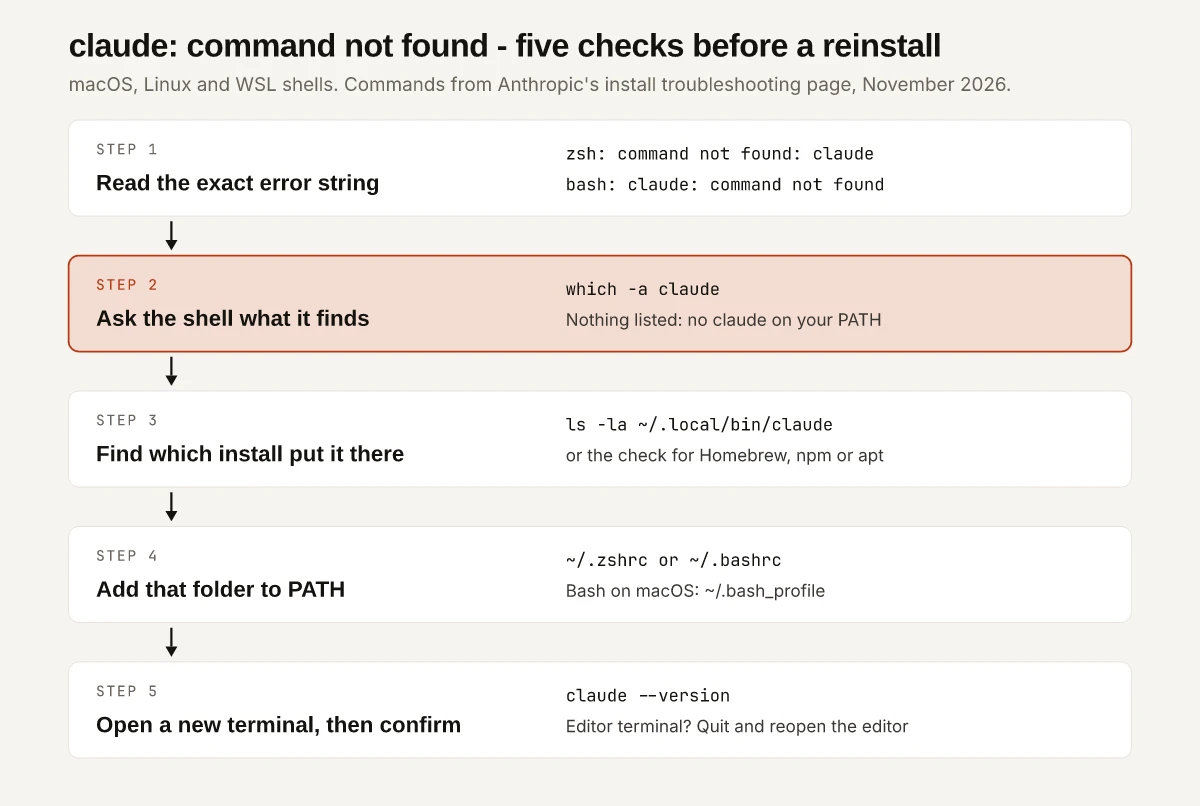
Step 1: Read the Exact Claude Command Not Found Message
On macOS and Linux the first word of the error names the shell that searched, and that shell decides which file you edit in Step 4. Anthropic’s after-installation section lists the wording per platform:
| Platform | Error message | Shell file you will edit |
|---|---|---|
| macOS (zsh is the default shell) | zsh: command not found: claude | ~/.zshrc |
| Linux | bash: claude: command not found | ~/.bashrc |
| macOS with Bash | bash: claude: command not found | ~/.bash_profile |
| Windows CMD | 'claude' is not recognized as an internal or external command | User PATH (see the Windows guide linked above) |
| PowerShell | claude : The term 'claude' is not recognized as the name of a cmdlet | User PATH |
If you are unsure which shell you are in, run echo $0, the check Anthropic gives for a PATH line saved to the wrong file.
Some messages look similar but have other causes, and each has its own fix on the same troubleshooting page:
zsh: permission denied: /Users/you/.zshrc: the PATH line could not be saved (covered in Step 4 below).Error: claude native binary not installed.: an npm install that never finished (Step 3).cannot execute binary file: Exec format errorin WSL: a WSL 1 problem, listed in the Windows guide’s table.
Step 2: Ask the Shell What It Finds
which -a claude lists every claude your shell can find on PATH, in the order it searches. Anthropic’s conflicting installations check starts here:
which -a claude| What it prints | What it means | Next step |
|---|---|---|
claude not found, a no claude in line, or nothing | No claude is on PATH in this shell | Step 3: find the file on disk |
| One path | This shell finds claude; the window that failed was opened before PATH changed, or runs a different shell | Step 5: test in a new window |
| Two or more paths | More than one install, and the first one listed is the one that runs | Keep one install; Anthropic recommends the native one at ~/.local/bin/claude |
An empty result says nothing about whether Claude Code is installed, only that no folder in PATH holds it.
Step 3: Find Which Install Put Claude There
Each install route writes claude to a different folder, so the folder tells you the route, and the route tells you the fix. Run the proving command for the route you remember using; if you do not remember, run them top to bottom.
| Install route | Where claude lives | Command that proves it | Fix |
|---|---|---|---|
| Native installer (macOS, Linux, WSL) | ~/.local/bin/claude, a symlink into ~/.local/share/claude/versions/ | ls -la ~/.local/bin/claude | Add ~/.local/bin to PATH (Step 4) |
Homebrew cask claude-code or claude-code@latest | $HOMEBREW_PREFIX/bin/claude; the default prefix is /opt/homebrew on Apple Silicon and /home/linuxbrew/.linuxbrew on Linux | brew list --cask and look for claude-code | Add Homebrew’s brew shellenv line to your shell file; if no cask is listed, brew update, then brew install --cask claude-code |
| npm global install | {prefix}/bin, where npm prefix -g prints the prefix | npm -g ls @anthropic-ai/claude-code | Add that bin folder to PATH, or move to the native installer |
| npm under nvm | ~/.nvm/versions/node/<version>/bin, one folder per Node version | node -v, then ls ~/.nvm/versions/node/*/bin/claude | Load nvm in your shell file, or make the version that has claude the default |
| Legacy local npm install from older Claude Code versions | ~/.claude/local/ | ls -la ~/.claude/local/ | Install natively, then remove it with rm -rf ~/.claude/local |
| apt or dnf package | Wherever the claude-code package’s file list puts it | dpkg -L claude-code or rpm -ql claude-code | If the package is not listed, install it with Anthropic’s Linux package steps |
| VS Code extension only | A private copy inside the extension’s folder, never on PATH | ls -la ~/.local/bin/claude prints No such file or directory | Run the standalone installer |
| Installed on Windows, typed in WSL | WSL keeps its own install inside the distribution | which -a claude inside the WSL terminal | Run the Linux installer inside the distribution |
Sources: Anthropic’s troubleshooting page and setup page, the claude-code cask record, Homebrew’s installation docs, npm’s folders reference, and the dpkg and rpm manuals.
The ls commands print No such file or directory when nothing is installed at that location. Anthropic notes that this is not an error, only a sign to move to the next check. If ~/.local/bin/claude exists but which -a claude did not list it, the folder is missing from PATH and Step 4 fixes it.
The VS Code Extension Bundles Its Own Copy
Anthropic’s VS Code guide is direct about it: “Installing the extension does not put claude on your shell PATH.” The extension carries a private copy of the CLI for its chat panel. So a panel that works while the integrated terminal says claude is not found is the expected result of an extension-only install.
I build this site with the Claude Code extension in VS Code on Windows 11, with Git Bash and PowerShell as shells. On a machine that also has the standalone CLI, both copies sit side by side: the panel runs the bundled copy, and claude typed in a terminal runs the standalone install. Everything else that differs between the two surfaces is in my comparison of the VS Code extension and the terminal CLI.
npm and nvm Installs
An npm install can fail in two ways that both end with no working claude:
- The bin folder is off PATH. npm’s docs say global executables “are linked into {prefix}/bin on Unix” and to “Ensure that path is in your terminal’s PATH environment to run them.” Run
npm prefix -gand add thebinfolder under the path it prints. - The binary never arrived. Per Anthropic’s npm troubleshooting, the package fetches the native binary as a per-platform optional dependency, and
claudestays “a placeholder script” until the postinstall step replaces it. npm 12 skips that step by default, and so do--ignore-scriptsand some pnpm configurations;--omit=optionalstops the download itself.
For an npm 12 install, Anthropic gives two exits: switch to the native installer, or allow the step and reinstall. If npm --version prints 12.0.x, update npm to 12.1 or later first. Then run npm config get allow-scripts, since the set command replaces the whole value:
npm config set "allow-scripts=@anthropic-ai/claude-code" --location=user
npm install -g @anthropic-ai/claude-code
nvm adds one more layer. Each Node version has its own global bin folder under ~/.nvm/versions/node/, and nvm’s README documents --reinstall-packages-from for carrying global packages from one version to the next. It also says “New shells will start with the default version of node”, so a claude installed under a version that is not the default is off PATH in every new window. nvm alias default <version> makes that version the default. Anthropic’s WSL notes name an unloaded nvm as the most common cause of nvm conflicts and give the loader lines for ~/.bashrc or ~/.zshrc:
export NVM_DIR="$HOME/.nvm"
[ -s "$NVM_DIR/nvm.sh" ] && \. "$NVM_DIR/nvm.sh"
The setup page lists Node.js 22 or later for the npm package. The placeholder script belongs to the npm package; the native installer is the install Anthropic recommends when you keep a single copy.
Homebrew on a Mac
The cask record shows the claude-code cask linking claude to $HOMEBREW_PREFIX/bin/claude, so a Homebrew install is found only when Homebrew’s own folder is on PATH. Homebrew’s post-installation steps put it bluntly: the installer prints directions for your shell config, and “If you don’t follow those directions, Homebrew will not work.” On Apple Silicon the line is:
eval "$(/opt/homebrew/bin/brew shellenv)"Two cask problems come from Anthropic’s Homebrew section:
| What Homebrew prints | Fix |
|---|---|
Error: Cask 'claude-code' is unavailable: No Cask with this name exists | The local cask index is stale: run brew update, then brew install --cask claude-code |
Error: Cask 'claude-code@latest' is not installed. | You installed the other cask: brew list --cask shows which one to upgrade |
The claude-code cask tracks the stable channel, “typically about one week behind the latest release”, and claude-code@latest gets each release as it ships.
Linux Packages and WSL
Anthropic’s apt and dnf repositories both install a package named claude-code. dpkg -L claude-code (Debian, Ubuntu) or rpm -ql claude-code (Fedora, RHEL) lists the package’s files, which shows whether it is installed and where claude went. In WSL, Anthropic’s setup page says “You install and launch claude inside the WSL terminal, not from PowerShell or CMD”, so a Windows install does not count. An npm install in WSL that picks up the Windows Node.js from /mnt/c/ is a separate failure, covered in the Windows guide’s errors table.
Step 4: Add the Folder to the Right Shell File
First confirm the folder is missing from PATH. For the native install, Anthropic’s check is:
echo $PATH | tr ':' '\n' | grep -Fx "$HOME/.local/bin"No output means it is missing. Append the export line to the file your shell reads, then source that file to apply it to the window you are in. Swap in the folder from Step 3 if your route was npm or nvm.
| Shell | File | Commands |
|---|---|---|
| zsh (macOS default) | ~/.zshrc | echo 'export PATH="$HOME/.local/bin:$PATH"' >> ~/.zshrc, then source ~/.zshrc |
| Bash on Linux | ~/.bashrc | echo 'export PATH="$HOME/.local/bin:$PATH"' >> ~/.bashrc, then source ~/.bashrc |
| Bash on macOS | ~/.bash_profile | Same line, appended to ~/.bash_profile |
| fish, Nushell | The shell’s own config | Add ~/.local/bin with that shell’s syntax, then restart the terminal |
The macOS Bash row has a reason: per Anthropic’s PATH section, Terminal starts Bash as a login shell, which ignores ~/.bashrc and reads only the first of ~/.bash_profile, ~/.bash_login or ~/.profile that exists. If you already have ~/.bash_login or ~/.profile and no ~/.bash_profile, put the line in that existing file.
~/.zshrc or ~/.zprofile on a Mac?
The guides disagree. Anthropic’s docs use ~/.zshrc. mac.install.guide’s command-not-found page, updated June 2026, says “On macOS, set PATH in ~/.zprofile, not ~/.zshrc”. Homebrew’s docs give ~/.bashrc or ~/.zshrc as examples of the file to edit.
The zsh manual settles what each file does:
| File | Read when | Order |
|---|---|---|
~/.zprofile | The shell is a login shell | Before ~/.zshrc |
~/.zshrc | The shell is interactive | After ~/.zprofile |
A shell that is both login and interactive reads both files, so either line works there. The rule I would follow: if your Homebrew brew shellenv line already lives in ~/.zprofile, put the claude line beside it, so PATH is set in one file. Otherwise use ~/.zshrc, as Anthropic does, since every interactive zsh reads it. Add the line to one file, once.
Permission Denied When Saving the Line
If the echo prints zsh: permission denied: /Users/you/.zshrc or bash: /home/you/.bashrc: Permission denied, nothing was saved. Anthropic’s fix: run ls -l ~/.zshrc and read the owner in the third field. If another user such as root owns it, run sudo chown $(whoami) ~/.zshrc; if you own it, the file is read-only, and chmod u+w ~/.zshrc makes it writable. Then run the two PATH commands again.
Step 5: Open a New Terminal and Confirm the Version
claude --versionA working install prints a version number such as 2.1.211 (Claude Code), per the setup page. If claude is still not found, Anthropic lists three causes:
- The terminal predates the change. A window that was already open keeps its old PATH, and a terminal inside an editor such as VS Code takes its PATH from the editor. Open a new window, or quit and reopen the editor.
- The line was not saved.
grep -n '.local/bin' ~/.zshrc, with your shell’s file name, prints the line with its line number when it is there. - The line went to another shell’s file. Run
echo $0and repeat Step 4 for that shell.
Once claude --version answers, claude doctor prints read-only install and settings diagnostics without starting a session. It sits with the other CLI commands in my Claude Code commands cheat sheet.
When Claude Command Not Found Does Mean Reinstall
Reinstall only when every Step 3 check comes back empty: no ~/.local/bin/claude, no claude-code in brew list --cask, nothing from npm -g ls @anthropic-ai/claude-code, no ~/.claude/local/, and no package in dpkg -L or rpm -ql. That is the one claude command not found case where nothing is on disk to put on PATH. Anthropic’s native installer for macOS, Linux and WSL is:
curl -fsSL https://claude.ai/install.sh | bashRead the Setup notes: lines it prints before you clear the screen, since that is where it reports a PATH gap. If which -a claude then lists two copies, keep one: Anthropic recommends the native install, and my Claude Code update guide shows how to tell which copy runs and how each one updates.
Every other time, the file is already on disk and the fix is one line in one shell file. Run which -a claude before you reach for the installer.
Frequently Asked Questions
Why does it say claude command not found after installing Claude Code?
Usually the install worked but its folder is not on your PATH. Anthropic's native installer puts claude at ~/.local/bin/claude on macOS and Linux and prints a setup note with the fix, but it does not change PATH itself. Add ~/.local/bin to PATH in your shell file and open a new terminal.
How do I fix zsh: command not found: claude on a Mac?
Run ls -la ~/.local/bin/claude. If the file is there, append the export PATH line for $HOME/.local/bin to ~/.zshrc, run source ~/.zshrc, then claude --version. If you installed with Homebrew instead, check brew list --cask for claude-code and make sure Homebrew's brew shellenv line is in your shell file.
Should the Claude Code PATH line go in .zshrc or .zprofile?
Either works when zsh starts as a login shell that is also interactive, because zsh reads ~/.zprofile and then ~/.zshrc. Anthropic's docs use ~/.zshrc, which every interactive zsh reads; mac.install.guide recommends ~/.zprofile. Pick one file and add the line once.
Why is claude not found after installing the VS Code extension?
The extension bundles a private copy of the Claude Code CLI for its chat panel and does not add claude to your PATH. To type claude in a terminal, including VS Code's integrated terminal, run Anthropic's standalone installer as well.
What does Error: claude native binary not installed mean?
It comes from an npm install whose postinstall step never ran or whose platform binary was never downloaded, so claude is still a placeholder script. npm 12 skips the postinstall step by default, --ignore-scripts skips it too, and --omit=optional stops the download. Switch to the native installer, or add Claude Code to npm's allow-scripts setting and reinstall.