Claude Code WSL vs Windows: Which Setup Fits Your Repo
Claude Code WSL vs Windows, as of September 2026: where your repo lives decides it. Compare native PowerShell, Git Bash, WSL 2 and Desktop, and what IT can block.
Where does your repo live: on the C: drive, or inside a Linux distribution? That one answer settles most of the Claude Code WSL vs Windows choice.
Run Claude Code natively on Windows when the repo lives on a Windows drive: it installs from PowerShell with no admin rights. Use WSL 2 when the repo already lives in the Linux filesystem or the work needs Linux tooling or the sandbox. On a managed work laptop, first confirm that IT allows WSL.
| Your situation | Where to run Claude Code | Documented basis |
|---|---|---|
| Repo on C: or another Windows drive | Native Windows | Anthropic’s Windows setup table matches native Windows to “Windows-native projects and tools” |
Repo in the Linux filesystem, such as /home/you/site | WSL 2 | Opening those files from Windows “goes through a network filesystem, which is slow and breaks file watching” (Claude Code Desktop in WSL) |
| A Linux toolchain, such as packages installed with apt, or sandboxed commands | WSL 2 | The sandbox docs say it “runs on macOS, Linux, and WSL2. Native Windows is not supported” |
| No local admin rights, or IT has switched WSL off | Native Windows | The PowerShell and CMD installers need no admin rights, while wsl --install runs from an administrator PowerShell (Microsoft’s WSL install guide) |
| You would rather not use a terminal | Claude Desktop, Code tab | The Desktop quickstart runs sessions locally or inside a WSL 2 distribution |
For a marketer’s repo on a Windows work laptop, native Windows should be the default, because it never depends on IT’s WSL switch or a second copy of your settings; WSL 2 is the exception, justified by one of the WSL rows above.
I build this site with Claude Code v2.1.283 or later in the VS Code extension, running natively on Windows 11 with Git Bash and PowerShell as shells. Every row in the setups table below, the native ones included, comes from Anthropic’s and Microsoft’s documentation as of 30 September 2026.
Claude Code WSL vs Windows: Four Setups Compared
WSL, the Windows Subsystem for Linux, runs Linux distributions such as Ubuntu on Windows. Under WSL 2, the default, they run inside “a lightweight utility virtual machine (VM)”, and each distribution keeps its files in “an isolated Linux file system” of its own (Microsoft Learn: What is WSL?).
Four common ways to run Claude Code on a Windows machine, with what each adds and the gaps Anthropic documents as of September 2026:
| Setup | How it installs | Shell Claude uses | What it adds | Watch for |
|---|---|---|---|---|
| Native, PowerShell only | PowerShell or CMD installer, no admin rights needed; or WinGet | The PowerShell tool, “enabled automatically” when Git Bash is absent | The baseline: nothing beyond Claude Code itself | No sandbox; the PowerShell tool is still a preview that does not load PowerShell profiles; no Bash tool for .sh scripts |
| Native with Git for Windows | The same installers, plus Git for Windows | PowerShell as the primary shell for claude.ai and Console sign-ins, with Git Bash behind the Bash tool for POSIX scripts | Bash scripts and POSIX tools | No sandbox; if Claude Code can’t find Git Bash, set CLAUDE_CODE_GIT_BASH_PATH |
| WSL 2 CLI | wsl --install in an administrator PowerShell, then the Linux installer inside the distribution | Bash inside the distribution; the PowerShell tool is opt-in there and needs pwsh | The sandbox, once bubblewrap and socat are installed, and Linux toolchains | A repo under /mnt/c/ means slower reads and fewer search matches; npm installs can pick up the Windows npm and Node.js |
| Claude Desktop, Code tab | The Desktop installer for Windows x64 or ARM64 | Windows shells in a Local session, as in the native rows; the distribution’s Linux tools in a WSL session, with git installed there | Claude Code without opening a terminal; parallel sessions, diff review and worktrees also work in WSL sessions | WSL sessions lack the integrated terminal, connectors and plugins, session forking, the file browser pane and @ file suggestions; they are off by default on managed devices |
Sources: the setup page, Desktop quickstart, Desktop in WSL page and Microsoft’s WSL install guide linked in the opening table; the PowerShell tool reference for the shell column; and Anthropic’s install troubleshooting page for the WSL npm caveat.
WSL 1 is still in Anthropic’s setup table for machines where WSL 2 is unavailable, with no sandbox and a native-binary regression. Anthropic documents two fixes; the errors table below lists both.
Should You Run Claude Code in WSL or on Windows?
Run Claude Code natively on Windows unless the repo already lives in the Linux filesystem or the work needs a Linux toolchain or the sandbox. Anthropic’s setup page frames the choice the same way: “Pick based on where your projects are located and which features you need.”
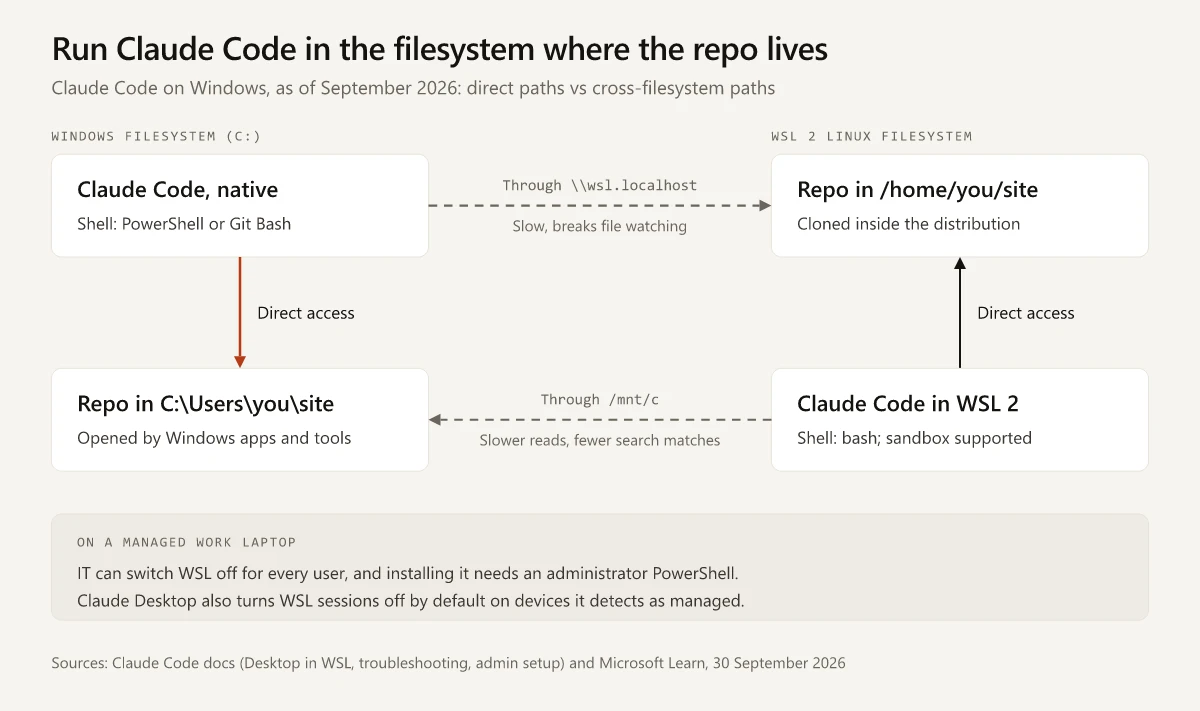
The dashed crossing paths in the diagram are the ones Microsoft and Anthropic warn about. Microsoft’s WSL guidance says “We recommend against working across operating systems with your files” and, for work in PowerShell or Command Prompt, to “store your files in the Windows file system” (Microsoft Learn on WSL file systems).
For Claude Code in WSL reaching a repo on C: through /mnt/c/, Anthropic’s WSL search troubleshooting says disk read penalties “may result in fewer-than-expected matches”, notes that claude doctor still shows Search as OK in that state, and lists running Claude Code natively on Windows among its fixes.
This site sits on the native side of that diagram: the repo is on the C: drive, and every push to main deploys it on Vercel.
Its Node scripts, among them a Search Console CLI and an IndexNow pusher, run on Windows Node.js, so a move to WSL 2 would mean installing Node inside the distribution (the exec: node: not found row in the errors table); the rest of that setup is in my comparison of Claude and Claude Code. What I give up by staying native is the sandbox.
Claude Code WSL vs Windows on a Managed Work Laptop
If your employer manages the laptop, a second question comes before the repo one: may WSL run on this machine at all? These controls decide it:
| Control | Who sets it | What it means for Claude Code |
|---|---|---|
| The Intune policy “Allow the Windows Subsystem For Linux” | IT | Set to disabled, it “disables access to the Windows Subsystem For Linux for all users on the machine”, so neither WSL route is available (Microsoft’s Intune settings for WSL) |
| Local admin rights | IT | wsl --install runs from “PowerShell in administrator mode” and ends with a restart; the PowerShell installer needs neither |
| Claude Desktop’s managed-device check | Claude Desktop by default, with an IT override | Claude Desktop “turns off WSL sessions by default on devices it detects as organization-managed”, for example when C:\Program Files\ClaudeCode\managed-settings.json exists; IT turns them back on with a disableWslSessions registry value set to false, on Desktop v1.19367.0 or later (Anthropic’s admin guide) |
| Where managed settings apply | IT | ”By default, WSL reads only the Linux file path at /etc/claude-code”, so the Windows policy reaches WSL sessions only if IT sets wslInheritsWindowsSettings: true, per the same admin guide |
The same admin guide warns IT teams that “Processes inside the WSL 2 utility VM aren’t visible to Windows-side endpoint detection sensors” and points them to their endpoint detection vendor’s Linux sensor for the distribution.
IT’s Windows controls still reach a native install: Claude Code reads the Windows managed-settings locations listed in the settings table below, and it starts PowerShell with an execution-policy bypass at process scope only, which the PowerShell tool reference says “doesn’t override Group Policy MachinePolicy or UserPolicy, so enterprise policies still apply”.
If Claude Code still cannot use Git Bash after you set a correct path, the install troubleshooting page points to endpoint security such as AppLocker, Group Policy software restriction policies or EDR agents, and tells you to ask IT to allowlist claude.exe and the processes it spawns.
Check your own machine first. In PowerShell, wsl -l -v lists installed distributions and shows whether each runs WSL 1 or WSL 2 (Microsoft’s WSL install guide). In Claude Desktop, a WSL session that fails “with a message that the device is managed” is blocked by your administrator, per Anthropic’s WSL page. The admin guide adds a log check: open Help > Troubleshooting > Show Logs in Explorer and search main.log for [wslPolicyGate] denying WSL session, where the reason follows in parentheses, such as (cli-file-present).
Questions to send IT before you install. The first applies to a native install too; the rest matter once WSL is in the plan:
- Are
claude.exeand the processes it spawns, includingcmd.exeandbash.exe, allowlisted in endpoint protection? - Is WSL allowed on this device, and will you install it, since
wsl --installneeds admin rights? - If I use Claude Desktop’s WSL sessions, can you set
disableWslSessionstofalseunderHKLM\SOFTWARE\Policies\Claude, the Claude Desktop policy key (separate from theClaudeCodekey that carries Claude Code’s managed settings)? - Should WSL sessions follow the same Claude Code policy as Windows, through
wslInheritsWindowsSettings: true? - Does our endpoint detection vendor have a Linux sensor we can run inside WSL 2 distributions?
Claude Code Git Bash vs PowerShell on Windows
If you searched for a “requires git-bash” error, the answer depends on your version. The rule behind it ran from July 2025 to April 2026, and Anthropic’s dated Claude Code changelog records the main steps:
| Date | Version | What changed |
|---|---|---|
| 11 July 2025 | 1.0.51 | ”Added support for native Windows (requires Git for Windows)“ |
| 26 March 2026 | 2.1.84 | ”Added PowerShell tool for Windows as an opt-in preview” |
| 9 April 2026 | 2.1.98 | The VS Code extension stopped showing a false “requires git-bash” error when Git sat in a default folder or CLAUDE_CODE_GIT_BASH_PATH was set |
| 16 April 2026 | 2.1.111 | ”Windows: PowerShell tool is progressively rolling out”, with CLAUDE_CODE_USE_POWERSHELL_TOOL to opt in or out |
| 28 April 2026 | 2.1.120 | ”Git for Windows (Git Bash) is no longer required”, and PowerShell becomes the shell tool when it is absent |
| 1 May 2026 | 2.1.126 | With the PowerShell tool on, Claude “treats PowerShell as the primary shell instead of defaulting to Bash” |
| 18 July 2026 | 2.1.214 | > and >> in Windows PowerShell 5.1 stopped “writing UTF-16LE files that other tools couldn’t read as UTF-8” |
| 24 July 2026 | 2.1.219 | A CLAUDE_CODE_GIT_BASH_PATH that is not a bash or sh binary is “now ignored with a warning” |
Shell details the setups table leaves out, as of September 2026:
- If your company deploys Claude Code through Amazon Bedrock, Google Cloud’s Agent Platform or Microsoft Foundry, Anthropic’s setup page and tools reference say that, with Git Bash installed, those sessions need
CLAUDE_CODE_USE_POWERSHELL_TOOL=1for the PowerShell tool;0turns the tool off. - The claude.ai and Console default comes from a feature flag Claude Code fetches from Anthropic, so a session that sets
DISABLE_TELEMETRY,DO_NOT_TRACK,DISABLE_GROWTHBOOKorCLAUDE_CODE_DISABLE_NONESSENTIAL_TRAFFICroutes shell commands through Git Bash unless you also setCLAUDE_CODE_USE_POWERSHELL_TOOL=1(feature-flag notes in the environment variables reference). Anthropic’s admin guide names that last variable as the managed-settings telemetry opt-out, so on a managed laptop with Git for Windows installed, expect Git Bash once IT applies that opt-out, unless IT also setsCLAUDE_CODE_USE_POWERSHELL_TOOL.
Claude Code looks for PowerShell 7 (pwsh.exe) and falls back to Windows PowerShell 5.1 (powershell.exe). Either way, the PowerShell tool does not load PowerShell profiles, and the Desktop docs on local sessions say Claude Desktop “does not read PowerShell profiles” either, so set any variables Claude needs as Windows environment variables or in the env block of settings.json.
Reasons to install Git for Windows even though it is optional:
- Anthropic’s setup page recommends it “so Claude Code can use the Bash tool”.
- Some skill installers ship as bash scripts. The GEO SEO skill in my roundup of Claude marketing skills needs Git Bash and a separate
install-win.shon Windows. - Claude Desktop sessions that “run in their own worktree need Git”, per the Desktop troubleshooting section.
Fixing the Claude Code Requires Git Bash Error on Windows
Today the message reads “Claude Code on Windows requires either Git for Windows (for bash) or PowerShell”, and it means Claude Code found neither shell. The fixes on the install troubleshooting page, in order:
- Put Windows PowerShell back on your PATH (its default folder is
C:\Windows\System32\WindowsPowerShell\v1.0\), or install PowerShell 7, which providespwsh. - Or install Git for Windows, selecting “Add to PATH” during setup, then restart your terminal.
- If Git is installed but not found, run
where.exe gitand pointCLAUDE_CODE_GIT_BASH_PATHat that install’sbin\bash.exe. A path to thegit-bash.exelauncher is ignored.
{
  "env": {
    "CLAUDE_CODE_GIT_BASH_PATH": "C:\\Program Files\\Git\\bin\\bash.exe"
  }
}
If PowerShell commands keep stopping for approval, that is a permissions setting rather than a shell problem, and why Claude Code keeps asking for permission covers it.
Native and WSL Installs Keep Separate Settings
Switching between native Windows and WSL 2 means a second install with its own files. Where each side keeps them, from the uninstall steps on Anthropic’s setup page, the admin guide, the WSL page and the memory docs:
| Item | Native Windows | WSL 2 |
|---|---|---|
The claude binary | %USERPROFILE%\.local\bin\claude.exe from the PowerShell or CMD installer; WinGet manages its own copy (remove it with winget uninstall Anthropic.ClaudeCode) | ~/.local/bin/claude inside the distribution |
| User settings and state | %USERPROFILE%\.claude and %USERPROFILE%\.claude.json | ~/.claude and ~/.claude.json inside the distribution |
| Organization policy | HKLM\SOFTWARE\Policies\ClaudeCode or C:\Program Files\ClaudeCode\managed-settings.json | /etc/claude-code/managed-settings.json, unless IT turns on wslInheritsWindowsSettings |
| Folder trust in Claude Desktop | Granted per folder | Granted per distribution and folder, and not shared with the same path on Windows |
| Updates | The PowerShell and CMD installers update in the background; WinGet installs do not auto-update by default (run winget upgrade Anthropic.ClaudeCode, or set CLAUDE_CODE_PACKAGE_MANAGER_AUTO_UPDATE=1) | The Linux installer (install.sh) updates in the background |
Auto memory splits the same way, because it lives under ~/.claude/projects/ on whichever side wrote it. My guide to Claude Code memory shows how a repo on C: maps to its memory folder under %USERPROFILE%, and where an organization CLAUDE.md sits on Windows and in WSL. Plan to recreate user-level settings and memory if you move a repo from one side to the other.
How to Install Claude Code on Windows
These steps follow Anthropic’s install instructions and terminal guide for Windows. The native route needs Windows 10 version 1809 or later (or Windows Server 2019 or later), 4 GB of RAM and an x64 or ARM64 processor.
- Open Windows PowerShell from the Start menu, not the entry marked (x86), which runs as a 32-bit process.
- Run the PowerShell installer below; it needs no admin rights.
- Open a new terminal window and run
claude --version. The errors table further down covers aclaudethat is not recognized. - Optionally install Git for Windows, keeping the recommended option on its “Adjusting your PATH environment” screen.
- Run
claude doctorfor install and settings diagnostics. The rest of the commands worth knowing are in my Claude Code commands reference. - Open a terminal in the repo folder, run
claudeand sign in through the browser.
# Windows PowerShell
irm https://claude.ai/install.ps1 | iex

# or WinGet
winget install Anthropic.ClaudeCode

# in a new window
claude --version
claude doctor
In CMD, the installer is curl -fsSL https://claude.ai/install.cmd -o install.cmd && install.cmd && del install.cmd, and it needs no admin rights either.
Whether to drive it from the VS Code extension or from a terminal is a separate choice, compared in Claude Code in VS Code vs the terminal.
How to Set Up Claude Code in WSL 2
- In an administrator PowerShell, run
wsl --installand restart. It installs Ubuntu unless you name another distribution with-d. - Open the distribution, install git, and clone the repo under your Linux home (
/home/<you>/), not under/mnt/c/. - Install Claude Code with the Linux installer and launch it from the WSL terminal. Anthropic’s setup page puts it as “inside the WSL terminal, not from PowerShell or CMD”.
- If sign-in stalls because the browser callback cannot reach localhost inside WSL,
claude auth loginaccepts the pasted code from v2.1.126 on. - For sandboxed commands, install
bubblewrapandsocat, restart Claude Code and run/sandbox. On Ubuntu 24.04 or later, also runsysctl kernel.apparmor_restrict_unprivileged_userns; if it prints1, add the AppArmor profile from Anthropic’s sandbox setup for Linux and WSL2. - In VS Code, open the folder through Microsoft’s WSL extension, which “runs commands and other extensions directly in WSL”. An extension that has to run there appears dimmed under Local - Installed until you install it in WSL (VS Code’s WSL docs).
# inside the WSL distribution
sudo apt-get update && sudo apt-get install git curl bubblewrap socat
curl -fsSL https://claude.ai/install.sh | bash
cd ~/site && claude
In Claude Desktop, start a new session in the Code tab, open the environment picker and choose the distribution from its WSL section. Anthropic’s WSL page lists git inside that distribution as a requirement.
Claude Code Windows Errors and Their Fixes
Symptoms specific to Windows and WSL, with the cause and fix Anthropic documents, as of September 2026:
| Symptom | Cause | Fix |
|---|---|---|
'irm' is not recognized | The PowerShell installer was pasted into CMD | Open PowerShell, or run the CMD installer |
The token '&&' is not a valid statement separator | The CMD installer was pasted into PowerShell | Run the PowerShell installer instead |
Claude Code does not support 32-bit Windows on a 64-bit PC | Windows PowerShell (x86) was opened | Reopen PowerShell from the entry without (x86) |
claude is not recognized after installing | The installer’s %USERPROFILE%\.local\bin is not on PATH yet | Open a new terminal, and add the folder to PATH if it persists |
running scripts is disabled on this system | The execution policy blocks npm’s .ps1 launchers | Run claude.cmd, or reinstall with the PowerShell installer |
Typing claude opens Claude Desktop | An older Claude Desktop registered a Claude.exe that wins on PATH | Update Claude Desktop |
| Ctrl+V does not paste a screenshot | Image paste on Windows is bound to Alt+V | Press Alt+V; in WSL, Ctrl+V is bound too |
Files written with > look garbled to other tools | Windows PowerShell 5.1 wrote UTF-16LE before v2.1.214 | Update Claude Code |
exec: node: not found after an npm install in WSL | WSL is running the Windows Node.js from /mnt/c/ | Install Node inside the distribution with its package manager or nvm |
cannot execute binary file: Exec format error in WSL | The distribution runs WSL 1 | Run wsl --set-version <DistroName> 2 from PowerShell, or, to stay on WSL 1, add Anthropic’s dynamic-linker claude() function to ~/.bashrc |
| Claude Desktop says “Git is required” | A worktree session needs Git, or Claude Desktop is older than 1.49585.0 | Install Git for Windows for worktree sessions; otherwise update Claude Desktop |
Sources: the install troubleshooting error index, the interactive mode shortcuts for image paste, the Windows encoding notes in the tools reference for the UTF-16LE fix, and the Desktop troubleshooting section for the Git prompt.
Start Native, Then Add WSL 2 When the Repo Needs It
For the Claude Code WSL vs Windows decision on a marketer’s work laptop, native Windows is the default: the PowerShell installer needs no admin rights, and the Windows-side managed settings, execution policy and endpoint rules IT already runs still apply to it. The main thing it gives up is the sandbox. Move to WSL 2 when the repo already lives in a distribution or needs the sandbox or a Linux toolchain, and plan to rebuild your settings and memory on that side. On a managed laptop, send IT the five questions in the managed-laptop section before you install, since the first one, allowlisting claude.exe, applies to native installs too.
Frequently Asked Questions
Can Claude Code run natively on Windows without WSL?
Yes. Anthropic's system requirements list Windows 10 version 1809 or later and Windows Server 2019 or later, and the PowerShell and CMD installers need no admin rights; WinGet is a third route. WSL 2 is optional and adds Linux toolchains and the sandbox, which native Windows does not support.
Does Claude Code still need Git Bash on Windows?
No. Since version 2.1.120, dated 28 April 2026 in Anthropic's changelog, Git for Windows is optional, and Claude Code runs shell commands through its PowerShell tool when Git Bash is missing. Installing Git for Windows adds the Bash tool for bash scripts.
How do I install Claude Code on Windows?
Open Windows PowerShell, not the (x86) entry, and run irm https://claude.ai/install.ps1 | iex, or run winget install Anthropic.ClaudeCode. Open a new terminal, check the install with claude --version, then run claude inside your project folder and sign in.
Should I use WSL2 or PowerShell for Claude Code?
Use native Windows with PowerShell when the repo lives on a Windows drive and its tools run on Windows. Use WSL 2 when the repo lives in the Linux filesystem, needs a Linux toolchain, or needs the sandbox, which runs in WSL 2 and not on native Windows.
Can the Claude desktop app run Claude Code in WSL?
Yes. On Windows 10 or 11 with WSL 2, the Code tab can start a session inside a WSL 2 distribution. As of September 2026 those sessions lack the integrated terminal, connectors and plugins, session forking, the file browser pane and @ file suggestions, and Claude Desktop turns them off by default on organization-managed devices.