Figma Student Plan: Free, How Long, and What Happens After
The Figma student plan gives verified learners the Professional plan free for 6 months to 2 years. Who qualifies, AI credits, and what happens when it expires.
The Figma student plan is Figma’s Professional plan, which costs a paying customer $20 a month for a Full seat billed monthly ($16 billed annually) on figma.com/pricing, and a verified student pays $0 for it. It lasts one year for a high school or college student, two years for an educator and six months for a bootcamp or online-course student, and then you reapply where Figma allows it, or your team falls back to the free Starter plan.
The sign-up gets the attention, but the date your status lapses decides what happens to your work: a team owner who misses it with 4 or more files on an education team finds that team locked. So the first date to write down is the day your status lapses.
I read Figma’s education page, its help article Figma for Education and the pricing page logged out, from an Indian connection, on 31 October 2026. I did not sign in, apply or verify an account. Prices, AI credits and Make access are the rows most likely to have changed since then; each table names the page it came from.
Is Figma Free for Students?
Yes. Figma’s education page says “Verified students and educators get free access to Figma”, and its help article gives high school, college and approved bootcamp learners the Professional plan free for six months to two years (a K-12 school sets its own). An April 2026 headline said otherwise, but only a pricing-page note was removed.
The education page’s FAQ goes further: “Figma & FigJam are 100% free for students, educators and schools. No freemium or hidden upgrades, ever.” Schools that teach children under 13 take a separate route, a school agreement that gives “free access to the Figma Enterprise tier”.
Figma Student Plan by Learner Type
Every cell comes from Figma’s help article Figma for Education as it read on 31 October 2026.
| Learner type | Tier | Length | Verification route | AI tools, Figma Make, agent | Figma Sites | At the end of the term |
|---|---|---|---|---|---|---|
| K-12 class through a school or district | Enterprise | Set by the domain administrator | The school applies at figma.com/education/k-12 | No | No | Set by the administrator |
| High school student | Professional | 1 year | School-issued email at figma.com/education/apply, institution type High school | No | No | Reapply if still a student |
| High school educator | Professional | 2 years | Same as the student | No | No | Reapply if still teaching |
| Higher education student | Professional | 1 year | School-issued email, institution type Higher ed, then SheerID | Yes, 3,000 AI credits a month | One Site file, no custom domain | Reapply if still a student |
| Higher education educator | Professional | 2 years | Same as the student | Yes, 3,000 AI credits a month | One Site file, no custom domain | Reapply if still teaching |
| Bootcamp or online-course student | Professional | 6 months | The bootcamp admin verifies you; you cannot apply yourself | Yes, 3,000 AI credits a month | One Site file, no custom domain | Not stated in the help article |
| Bootcamp or online-course teacher | Professional | 2 years | The bootcamp admin verifies you | Yes, 3,000 AI credits a month | One Site file, no custom domain | Reapply if still teaching |
Figma’s help article uses “reapply” and “reverify” for the same step, and this post follows its wording in each place.
Rules for anyone who applies on their own (every row except the K-12 school route and bootcamp learners and teachers, whose admin applies):
- You must be “Old enough to consent (by yourself and not by a parent or guardian) to use the services” and apply with your school email.
- School staff in non-teaching roles do not qualify.
- Your status is tied to the email you verified: “If you update the email address on your Figma account after verification, your education status will be revoked.”
The bootcamp student’s last cell says “not stated” on purpose. The help article gives teachers a reapply rule but says nothing about extending a bootcamp student’s six months. On 9 July 2025, a Figma Community Support account replied on Figma’s forum that bootcamp and online-course users get “an initial period of six months, with the option for one additional six-month extension” and no second extension on the same account. Treat that as a forum answer from 2025, not as the policy page.
Did Figma End Student Plans in April 2026?
No. Figma’s own pages still offered the plan when I checked. One dated record of an April change comes from a pricing tracker: PricingSaaS, a third-party service, compared captures of figma.com/pricing from 6 and 13 April 2026, recorded “student/educator free-access note removed” from the page, and filed the change under the headline “Figma Drops Free Student Plans, Adds Paid Viewer Requirements”.
What each page showed when I checked on 31 October 2026:
| Page | What it said about students |
|---|---|
| figma.com/pricing | No student note on the plan cards. Its FAQ still asks “Do you have a discount for schools or classrooms?” and answers “Yes! Learn more on figma.com/education.” |
| figma.com/education | ”Verified students and educators get free access to Figma.” The FAQ says self-serve applicants get “free access to the Figma Professional tier”. |
| Help article | Full eligibility rules, lengths of access and expiry rules, as in the table above. The article’s old address, ending “Verify-your-eligibility-for-Figma-s-Education-plan”, now redirects here. |
| PricingSaaS diff | The same page’s FAQ says “No list-price increase was recorded” in that window, and the change it describes is one removed note, which its summary calls footer messaging. |
The headline overstates what the tracker recorded. A note left the pricing page, and on 31 October 2026 the education page, the help article and the pricing FAQ all still offered the plan.
AI Credits, Figma Make and Sites on the Education Plan
Figma’s help article lists “AI tools, including Figma Make and the agent in Figma Design” as available only to higher education and bootcamp Education users, and says they are not available to K-12 or high school Education users.
For those who get it, Figma’s article AI credits on the Education plan sets the rules:
- 3,000 AI credits per month for each Education plan user.
- Credits “Are assigned to each person (they are not shared across teammates)”.
- They “Reset monthly and don’t roll over”.
- When you run out, AI features that need credits stop until the monthly reset, or until you move to a plan with more options for extra credits.
The Figma for Education help article adds that visual search inside the Figma editor is not available to Education users, while visual search for Community resources is.
Figma Sites on the Education plan is capped at one published Site file per eligible user, and “Custom domains are not available.”
If you are a college student and Figma Make or Sites does not appear, the help article gives two causes: you are on a K-12 or high school account, or you have not completed what it calls “the updated verification process”, which Education team members need before they can open Figma Make or Figma Sites.
Figma Education Plan vs Professional Plan
The Education plan is the Professional tier with education rules attached. Here is how it compares with a paid Professional Full seat, from the pricing page and the two help articles, read 31 October 2026:
| Education plan (higher ed or bootcamp) | Paid Professional, Full seat | |
|---|---|---|
| Price | $0 | $20 a month billed monthly, or $16 a month billed annually |
| Who can buy or join | Verified students and educators only | Anyone |
| How long | 6 months to 2 years, then reapply where Figma allows it | As long as you pay |
| AI credits | 3,000 a month per person, no rollover | 3,000 a month per Full seat; paid plans can buy more credits |
| Figma Sites | One Site file, no custom domain | Sites beta is available on Full seats |
| Who can share a team | Free Education members only; they cannot share a Professional team with paid non-Education members | Paid seats and free viewers |
The free Starter plan, where an expired team lands, gives 150 AI credits a day up to 500 a month. The Dev and Collab seats on paid plans cost less than a Full seat, and how Figma splits its paid plans into three seat types covers those prices.
Upgrading changes who can work with you. The AI credits article says that if you upgrade your existing Education team, other Education members can no longer collaborate on it for free. Its suggested route for a student who still works with classmates is to create a separate Professional team and move only the files that need more AI there.
How Figma Student Verification Works
The route depends on the institution type you pick at figma.com/education/apply:
- High school: sign in with a school-issued email; “Non-school emails will be auto-rejected.” If your school’s domain is not recognised, the help article points you to a form so Figma can add it. Homeschool students and educators contact Figma Support with proof of status.
- Higher education: “Figma partners with SheerID to verify all student and educator applications.” Your email domain must match your institution’s domain.
- Bootcamp or online course: “Bootcamp students and educators can’t self-verify.” The bootcamp’s admin applies to Figma’s list of trusted partners and submits the learner list.
The help article’s troubleshooting list for SheerID covers the failures it expects:
- A personal email instead of a school email. Change the email on your Figma account first, then reapply.
- A VPN. The article says “Ensure you are not on a VPN.”
- The wrong document. “For document uploads, do not send course syllabuses. Your documents must prove your enrollment in the school.”
- Repeated resubmissions. After a rejection, the article says to work with SheerID’s support team instead of resubmitting; after a “Verification Limit Exceeded” error, SheerID’s support team can reset the limit.
Grammarly’s student discount also verifies through SheerID, where Grammarly says the process can take up to seven business days, as the Grammarly price guide for India records.
What Happens When Your Figma Student Plan Expires
Figma’s help article splits the outcome by your role on the education team and by the team’s file count.
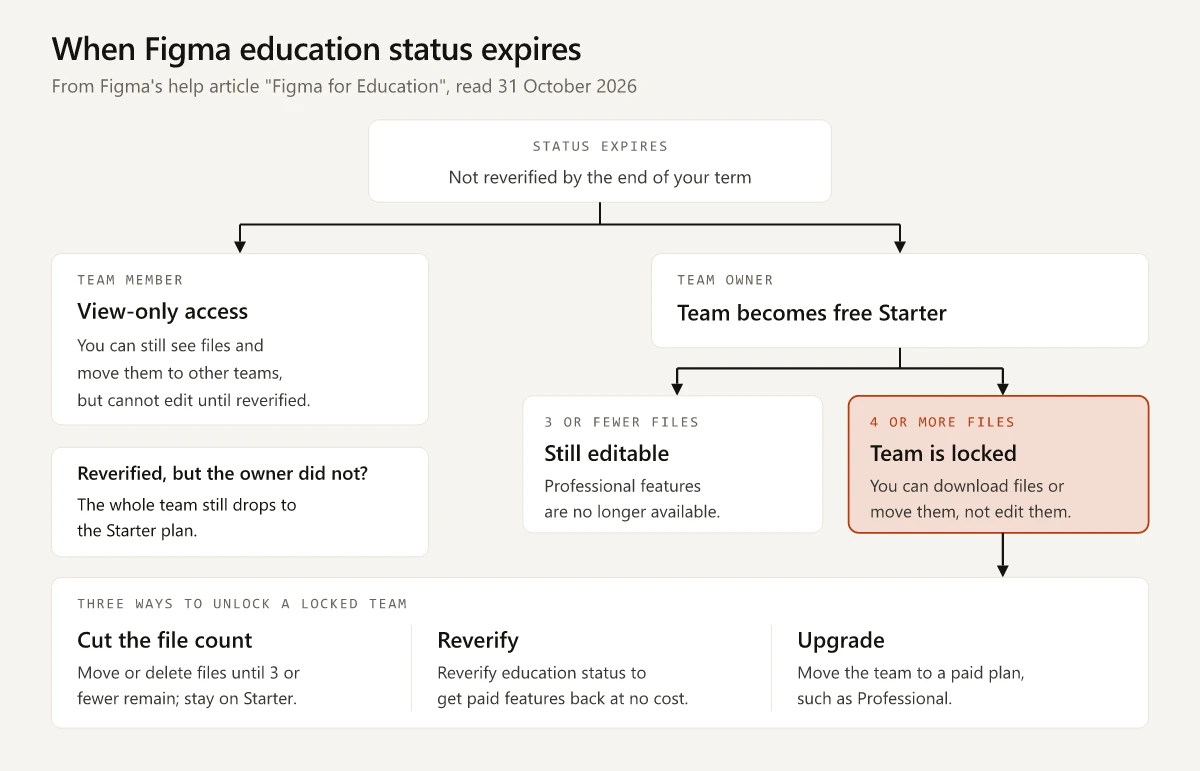
| Your situation at expiry | What Figma does | Your options |
|---|---|---|
| Team member, not the owner | ”You will be downgraded to view-only access on any education teams you were part of.” | Reverify, or move files to another team you belong to |
| Team owner, 3 or fewer files | The team becomes a free Starter team; you can still access and edit files, but Professional features end | Stay on Starter, reverify or upgrade |
| Team owner, 4 or more files | The team becomes a free Starter team “and locked”; you can still download files or move them to another team | Cut the team to 3 files or fewer, reverify “at no cost”, or upgrade to a paid plan |
| You reverified, but the owner did not | ”If your team owner hasn’t reverified their education status, the entire team will downgrade to the Starter plan”, even if your own status is current | Ask the owner to reverify, or move or duplicate the files you own to your drafts or another team |
| You graduated | Paid features end when your status expires, and education teams move to Starter | Upgrade to Professional, or reduce each team to 3 files |
The fourth row catches students who did everything right. If a classmate created the group project’s team and lets their status lapse, everyone on a team of 4 or more files loses edit access, so the owner’s expiry date matters as much as yours.
Is Figma Free for Students in India?
The four Figma pages I read do not name India either way. The education page, read from an Indian connection, showed the free offer, while the help article says the plan is “only available in select regions” without listing them. The education page’s FAQ on age rules has entries for the United States, the United Kingdom and Japan, and under “Internationally” says only that “Figma may only be used by students above the age of consent in their jurisdiction.” The pricing page showed “Prices in USD” from India, with no rupee price, so the figures in this post are Figma’s US dollar prices.
For the online courses many Indian learners take, Figma’s rules turn on how the course is taught:
| Your course | Qualifies? | Figma’s wording |
|---|---|---|
| College or university degree, including post-graduate | Yes, through SheerID | ”Universities, post-graduate institutions, trade schools, polytechnics, or colleges” |
| Bootcamp or online course with a teacher or mentor | Only if its admin is an approved partner | ”Structured, curriculum-based instruction with a teacher or mentor-led model” |
| Recorded course you work through alone | No | ”Self-directed education” is on the list of what does not qualify |
| One-to-one tutoring outside a formal programme | No | ”Independent tutoring” is a listed disqualification |
| Training run for a company’s own staff | No | ”Trains commercial partners” is a listed disqualification |
A bootcamp admin applying to Figma’s partner list needs, among other requirements, a public website showing curriculum, instructors, admissions and tuition, Figma as a core part of the curriculum, and “At least 10 students per cohort.” If your verification does not come through, the help article tells students to reach out to their bootcamp admin, since you cannot apply yourself.
Other design tools treat Indian students differently:
- Canva’s own free student routes run only through a school or a university that has bought Canva Campus, set out in the student section of the Canva Pro price guide for India.
- Adobe sells a discounted student plan in India that you pay for, with a higher second-year price; Adobe’s student pricing in rupees has the two-year total.
- Framer gives students a free Basic plan for a year; the Framer student plan terms list what you send.
For AI tools, Google’s student plan has its own deadline and renewal price, and Claude has no student price but other routes for a student in India.
Figma Student Plan: Put the Expiry Date First
The Figma student plan is still free; the April 2026 headline came from one removed note on the pricing page. The cost arrives at expiry. A lapsed owner with 4 or more files on the team gets a locked Starter team, and a team on Starter has the AI allowance Figma’s pricing page lists for that plan, 150 credits a day up to 500 a month, in place of the Education plan’s 3,000 a month.
On the day you are verified, note when your status lapses and check who owns each team your coursework lives in. A month before that date, cut any team you own to 3 files or move your files, so a gap before your reapplication is approved cannot lock them.
Frequently Asked Questions
Is Figma free for students?
Yes. On 31 October 2026 Figma's education page said verified students and educators get free access to Figma, and its help article said high school, higher education and approved bootcamp learners get the Professional plan at no cost. You need a school-issued email, or a bootcamp admin who verifies you.
How long does the Figma student plan last?
Figma's help article lists one year for high school and higher education students, two years for educators and bootcamp teachers, and six months for verified bootcamp or online-course students. K-12 access through a school or district lasts as long as the domain administrator sets. High school and higher education students who are still enrolled must reapply at the end of the term; the help article gives no renewal rule for bootcamp students.
What happens when the Figma education plan expires?
Team members drop to view-only access on education teams. A team owner's education team becomes a free Starter team, and if it holds 4 or more files it is also locked until the owner cuts it to 3 files, reverifies at no cost or upgrades to a paid plan.
Is Figma free for students in India?
Figma's education page loaded with the free offer from an Indian connection on 31 October 2026, but its help article says the plan is only available in select regions and does not list them. The pricing page showed prices in USD only, with no rupee figure.
Does the Figma student plan include AI features?
Only for higher education and bootcamp users. Figma's help article says they get AI tools, Figma Make and the agent in Figma Design, with 3,000 AI credits per person per month that do not roll over. K-12 and high school users get no AI tools, Figma Make or Figma Sites.