Grok API Key: How to Get One and What It Costs to Use
A Grok API key is created in the xAI Console, not the Grok app or an X plan. Here are the steps, how prepaid credits work, the Indian card rule and rate limits.
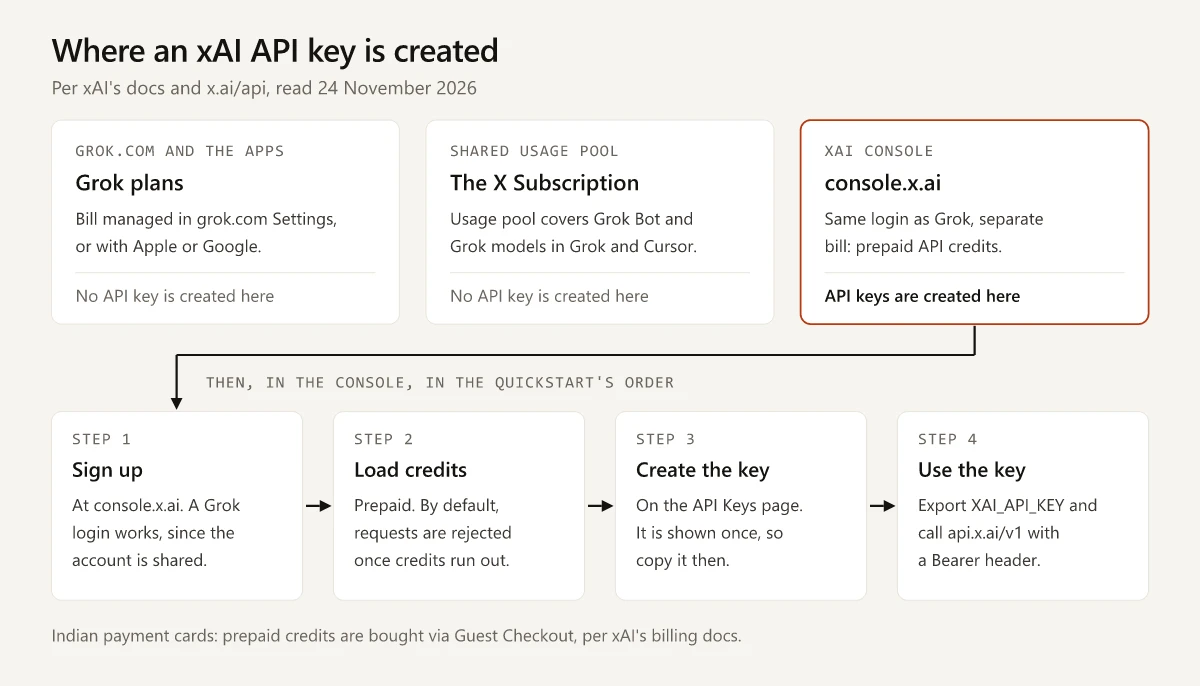
A Grok API key is created in the xAI Console at console.x.ai, not in the Grok app, on grok.com or through an X subscription. The quickstart puts it in two lines: “Sign up for an account at console.x.ai, then load it with credits to start using the API”, then “Create an API key via the API Keys page”.
The steps, in the order xAI’s quickstart gives (November 2026):
- Sign up at console.x.ai. An existing Grok login works, because the account is shared.
- Buy prepaid credits under Billing > API spend management.
- Open the API Keys page and create a key. Copy it straight away: x.ai’s API page says keys are shown once at creation.
- Export it as
XAI_API_KEY. - Call
https://api.x.ai/v1with the headerAuthorization: Bearer $XAI_API_KEY.
The key is free and x.ai’s API page says signing up and creating one “takes about a minute”. Whether it works is a billing question, because by default xAI rejects every request once the team’s prepaid credits hit zero. xAI’s accounts FAQ says “the account is shared between Grok and xAI API” and, one paragraph later, “the billing is separate for Grok and xAI API”. Most of this page is about that balance, including the rule xAI sets for Indian payment cards.
Groq, spelled with a q, is a different company with its own API keys. This page covers xAI’s Grok only; for the other one, see how to get a Groq API key at console.groq.com.
How to Get a Grok API Key in the xAI Console
The quickstart (footer: “Last updated: November 13, 2026”) covers the route in two steps: create the account and load it with credits, then create the key on the API Keys page. The accounts FAQ, the team FAQ and x.ai’s API page describe what the Console does around them.
Create the Account and the Key
| Stage | What xAI’s pages say |
|---|---|
| Sign up | Create the account at console.x.ai. “To link your X account automatically to your xAI account, choose to sign up with X account.” |
| Same email, second sign-in method | xAI asks whether to create a new account or link the existing one, and warns that it “will not be able to merge the content, subscriptions, etc. of different accounts” |
| Team | ”When you sign up for SpaceXSI, you’re automatically assigned to a Personal Team”. Teams are “the level at which SpaceXSI tracks API usage, processes billing, and issues invoices” |
SpaceXSI in those quotes is the company name xAI’s docs use in places; the console, the accounts site and the environment variable still say xAI, so this page says xAI Console and xAI API.
Beyond the table:
- To avoid a second account, sign in to the Console with the same method you use on grok.com.
- The key belongs to the team. xAI’s Management API reference says “API keys are bound to teams and are associated with the user who created them”, and the team FAQ adds: “If a user is removed, their API keys remain with the team.”
- xAI’s examples show keys that begin
xai-. The Grok Build overview writesexport XAI_API_KEY="xai-...".
Set XAI_API_KEY and Send a First Request
The quickstart gives two ways to store the key. As a shell variable:
export XAI_API_KEY="your_api_key"Or in a .env file in the project directory:
XAI_API_KEY=your_api_keyIts curl test calls grok-4.7, which x.ai’s API page calls “the latest flagship” as of November 2026:
curl https://api.x.ai/v1/responses \
  -H "Authorization: Bearer $XAI_API_KEY" \
  -H "Content-Type: application/json" \
  -d '{
    "model": "grok-4.7",
    "input": "Fix this function and explain the bug: function median(a){a.sort();return a[a.length/2]}"
  }'
Notes on that setup:
- The quickstart, the Grok Build overview and the security FAQ all use
XAI_API_KEY; none of them usesGROK_API_KEY. Check which name your library reads before you copy a guide that sets the second one. - The quickstart’s installs are
pip install xai-sdk,pip install openai,npm install openaiandnpm install ai @ai-sdk/xai zod. With the OpenAI SDK you set the base URL tohttps://api.x.ai/v1, and x.ai’s API page says of an existing OpenAI or Anthropic SDK setup that “Most integrations need no other changes.” - Model ids change. The models page says that in general
<modelname>“is aliased to the latest stable version” and<modelname>-<date>refers to one release “for workflows that demand consistency”; the grok-4.7 model page lists only the namegrok-4.7, so recheck the models page before you hard-code an id.
Per-Key Limits: Models, Endpoints, Rate Caps and Expiry
xAI documents a key’s properties in the Management API reference, xAI’s route for managing keys with code, which needs a separate management key from the Console’s Settings > Management Keys, per the Management API guide.
| Key property | What the reference says |
|---|---|
name | Required. “Human-readable name for the API key.” |
acls | The endpoints and models the key may call. For a key created through this API, “By default API keys don’t have access to anything”, and api-key:endpoint:* with api-key:model:* grants everything |
qps, qpm | Limits the key to a set number of queries per second or per minute |
tpm | Limits the tokens the key may produce or consume per minute |
expireTime | ”If set and in the past, the key is rejected.” |
Every key on a team spends the same prepaid balance, so a per-key cap is worth setting on any key that leaves your machine. The same reference has a rotate endpoint for replacing a key’s secret: the old secret keeps working for 24 hours unless you set another time, which “Must not be more than 7 days from now”.
Does a Grok Plan or The X Subscription Include an API Key?
None of xAI’s accounts FAQ, its Grok apps FAQ or The X Subscription pages lists an API key or API credits as part of a plan. Each bill sits in a different place:
| What you pay for | Where the bill is managed | What it covers, per xAI’s docs | Creates an API key? |
|---|---|---|---|
| A Grok plan (SuperGrok) bought on grok.com | grok.com > Settings > Billing | ”one shared weekly usage pool” across Grok products | No |
| A Grok plan bought through the App Store or Google Play | ”directly with Apple/Google” | The Grok plan you bought there | No |
| The X Subscription | grok.com/dashboard | A pool for “Grok Bot usage, and Grok models across Grok and Cursor” | No |
| The xAI API | xAI Console > Billing | Per-token API usage, deducted from the team’s prepaid credits | Yes, on the API Keys page |
Sources: the accounts FAQ, the Grok apps FAQ, and The X Subscription’s overview and pricing page.
- The X Subscription’s pricing page does not mention the API anywhere. What its plans cost, next to the original X Premium tiers at India’s app stores, is in my X Premium price breakdown for India.
- One line in the Grok apps FAQ reads differently. It says Settings > Usage shows “A percentage breakdown by product (API, Build, Chat, image & video generation, Voice)”, and the docs do not say what the API row counts. The accounts FAQ’s billing sentence is the explicit one, so I would budget for Console credits.
- An X account is a third thing. The accounts FAQ says “the xAI account is different from the X account”, and that “SpaceXSI cannot assist you with X account issues”.
- Grok models inside Cursor are covered by The X Subscription’s pool, per the pricing line quoted in the table. Cursor’s prices in India sets out those plans.
- Grok Build, which the docs call “a coding agent for the terminal”, signs in through the browser on your own machine and takes
XAI_API_KEYfor “CI and scripts”, per the same overview. (For the same sign-in choice in another coding agent, see what an API key turns off in Claude Code.) - For Anthropic’s version of this split, see where a Claude API key comes from.
- OpenAI also bills API usage separately from ChatGPT plans, and which ChatGPT plans come with OpenAI API credits sets out the exceptions.
Is a Grok API Key Free?
Creating the account and the key costs nothing, and every request made with the key is billed. x.ai’s API page asks “Is Grok free to use through the API?” and answers: “API usage is billed per token rather than free, but the Playground comes with every Console account, so you can test the latest Grok models before adding billing.”
| Item | Free? | The line on xAI’s page |
|---|---|---|
| Console account | Yes | ”Create a free Console account” |
| Playground inside the Console | Yes | ”Free Playground on console.x.ai to test Grok models before you buy” |
| API requests made with a key | No | ”billed per token rather than free” |
| Promo code | Only if you hold one | xAI’s billing docs say you can “use a promo code if you have one” |
What that leaves for someone hunting a free key:
- None of the xAI pages I read on 24 November 2026 (the quickstart, billing page, billing FAQ, pricing page, models page, rate-limits page and x.ai/api) mentions a free tier for the API, sign-up credits, or credits in return for sharing data. The one free tier the pricing page names belongs to Grok Build. If a guide promises free API credits, look for them under Billing in your own Console before you plan around them.
- The docs print no promo code, and I am not listing any.
- A key copied from a public repo or a list of free keys bills someone else’s team, so do not use one. xAI’s API security FAQ says “Do not share keys between teammates”, and that xAI “partners with GitHub’s Secret Scanning program to detect leaked keys. If a leak is found, we disable the key and notify you via email.”
- If you need a free key for prototyping, Google offers one; my Gemini API key free tier guide covers its limits.
Paying for the Grok API: Prepaid Credits and the $0 Default
Prices and tiers below were read on 24 November 2026 and change often. xAI’s billing page (footer: “Last updated: October 10, 2026”) gives two options:
| Option | How it works | Default state |
|---|---|---|
| Prepaid credits | ”Pre-purchase credits for your team. API consumption will be deducted from this credit balance.” | The standard route: “the most common way to use the API” |
| Monthly invoiced billing | Usage beyond your credits is charged to your default payment method at the end of the month, up to an invoiced billing limit you set | ”Monthly invoiced billing is disabled by default”, with the limit at $0 |
The consequence is one sentence on that page. With a $0 invoiced billing limit, “Your API requests will be automatically rejected once your prepaid credits are depleted.”
The rest of the billing rules, each from xAI’s pages:
- Credits are bought under Billing > API spend management, which also shows the balance. A bank transfer “will take 2-3 business days to process”, and the credits arrive after that.
- Auto top-up buys more credits when the balance drops to a threshold you set. You choose the trigger balance, the top-up amount (“minimum $5”) and a monthly maximum, and the Console warns you at 80% of that monthly limit.
- Refunds are limited. xAI’s billing FAQ says “we are not able to offer refunds on any prepaid credit purchase unless in regions required by law”. The Grok apps FAQ puts it more flatly: “xAI API credits are non-refundable.” Treat a credit purchase as final unless your region’s law says otherwise.
- “Deleting a team removes its prepaid credits”, per the team FAQ.
- Invoices cannot be reissued (“We are not able to regenerate the invoices at the moment”), so enter the billing address correctly before the first purchase.
- Every response reports its own cost. The cost tracking page describes a
cost_in_usd_ticksfield in theusageobject, where “1 USD = 10,000,000,000 ticks”.
A $5 Top-Up on Grok 4.7: Worked Example
The prices come from xAI’s pricing page, which says “All prices are in USD”:
| grok-4.7, per 1M tokens | Input | Cached input | Output |
|---|---|---|---|
| Prompt under 200k tokens | $2.00 | $0.50 | $6.00 |
| Prompt of 200k tokens or more | $4.00 | $1.00 | $12.00 |
A request whose prompt reaches 200k tokens is “billed at the higher rate for all tokens in the request”. The arithmetic below is mine, from the first row, and uses $5 because that is the smallest auto top-up amount the billing page allows:
| What $5 pays for | Calculation | Result |
|---|---|---|
| Input tokens only | 5 / 2.00 x 1M | 2.5M tokens |
| Output tokens only | 5 / 6.00 x 1M | About 833,000 tokens |
| One request of 2,000 input and 500 output tokens | (2,000 x $2.00 + 500 x $6.00) / 1M | $0.007 |
| Requests of that size | 5 / 0.007 | 714 |
The table counts plain text tokens only. Server-side tools add their own charges (the pricing page lists Web Search at $5 per 1k calls), the Batch API takes “20% off standard rates” on grok-4.7, and Priority Processing bills at twice the standard rates.
Buying Grok API Credits With an Indian Card
xAI’s docs carry a rule for Indian cards in two places, both read from India on 24 November 2026:
- The billing page’s prepaid credits section, in a note headed “For Indian payment cards:”, says “Currently you can only purchase prepaid credits via Guest Checkout due to regulatory requirements.”
- The billing FAQ, under the question “I’m having payment issues with an Indian payment card”, says “Due to regulatory requirements, Indian payment cards cannot be saved for later charges. Purchase prepaid credits via Guest Checkout instead.”
The third column below is my reading of those two lines, not something I have tested:
| xAI billing feature | What it relies on | With an Indian card, by that rule |
|---|---|---|
| Prepaid credits | A one-off purchase | Bought through Guest Checkout |
| Auto top-up | A later charge when the balance drops | A card that cannot be saved cannot take a later charge, so plan to top up by hand |
| Monthly invoiced billing | A “default payment method” charged at the end of the month | The same obstacle; the billing page’s contact for invoiced billing is sales@x.ai |
What else an India buyer can take from the pages:
- Prices are in dollars. None of the billing, pricing, models or rate-limits pages I read shows a rupee price, a GST line or UPI.
- xAI’s docs do not describe the Guest Checkout screen or the currency the card is charged in.
- The billing address form takes tax details: “you can optionally add your organization’s tax information”, which then appears on invoices.
- With no automatic refill, check the balance under Billing > API spend management before a launch or a scheduled job.
- The billing page’s line opens with “Currently”, so read it again before a large purchase.
Grok API Rate Limits by Spend Tier
Every team has per-model limits on requests per second (RPS) and tokens per minute (TPM). Both rise with a tier that xAI’s rate-limits page (footer: “Last updated: November 13, 2026”) says is “based on cumulative spend on the xAI API since January 1, 2026”.
| Tier | Cumulative spend | grok-4.7 RPS | grok-4.7 TPM |
|---|---|---|---|
| Tier 0 | $0 (default) | 150 | 50M |
| Tier 1 | $50 | 172 | 53M |
| Tier 2 | $250 | 208 | 60M |
| Tier 3 | $1,000 | 312 | 74M |
| Tier 4 | $5,000 | 500 | 100M |
| Enterprise | ”Available on request” | Not listed | Not listed |
How the tiers behave, per the same page unless noted:
- Spend means “total revenue received through prepaid credit purchases or successfully fulfilled invoices”, so buying credits moves the tier, and “tiers never downgrade”.
- Cached prompt tokens “still count toward TPM, though they are billed at a reduced rate”.
- The tiers apply to “text, embedding, and voice models”. For higher image and video model limits, the page says to contact sales@x.ai.
- grok-4.6 and grok-4.5 have the same numbers as grok-4.7. grok-4.3 starts lower, at 37 RPS and 10M TPM on Tier 0.
- Batch API requests “don’t count towards rate limits”, per the pricing page.
- For higher limits without more spend, the page says to submit a request through the Console.
Filling Tier 0’s 50M tokens a minute with uncached grok-4.7 input, in prompts under 200k tokens, would cost $100 a minute at the $2.00 list rate (50 x $2.00, my arithmetic). A project that spends a few dollars a day will not reach that cap.
Key Errors: 400, 401, 403 and 429
From xAI’s debugging page:
| Status | Cause, in xAI’s words | Fix |
|---|---|---|
| 400 Bad Request | ”An incorrect API key was supplied.” is one listed cause, next to an invalid request body | Check the key value first, then the request |
| 401 Unauthorized | ”No authorization header or an invalid authorization token was provided.” | Supply an Authorization: Bearer <XAI_API_KEY> header |
| 403 Forbidden | ”Your API key or team doesn’t have permission to perform the action.” or “Your API key or team is blocked." | "Ask your team admin for permission.” |
| 429 Too Many Requests | ”You are sending requests too frequently and have reached the rate limit.” | Reduce the request rate, or raise the limit in the Console |
The table has no row for an empty balance. The billing page says such requests are “automatically rejected” and names no status code, so look at the credit balance when a key that worked yesterday starts failing.
If a Key Leaks
The steps in xAI’s API security FAQ:
- Log in to the Console and confirm you are viewing the right team, because “API keys are tied to specific teams”.
- Open the API Keys section from the sidebar.
- Click the three dots next to the key, then choose “Disable key” to pause it or “Delete key” to remove it.
- Click “Create API Key” and update your applications with the new key.
The same FAQ says to rotate keys regularly, to store them in “environment variables or secret management tools”, and to avoid committing them to public repositories.
Data Retention for Requests Made With Your Key
Also from the API security FAQ, as of November 2026:
- 30 days by default. “By default, all API requests and responses are stored on our servers (encrypted at rest) for 30 days for auditing purposes”, and the data “is automatically deleted after 30 days”.
- No training without permission. “SpaceXSI never trains on your API inputs or outputs without your explicit permission.”
- Zero Data Retention is per team. “There is no ability to enable ZDR for specific API keys.” It also switches off features that depend on stored data, including the Batch API, and xAI writes: “For most customers, we do not recommend enabling ZDR”.
- A US-only endpoint exists. Per the regional endpoints page, “Token usage on the US endpoint costs 10% more than on the global endpoint”, and “your existing API keys work on both endpoints”.
A Grok API Key Stops Working at a Zero Balance
A Grok API key comes from the API Keys page of the xAI Console, and with the default $0 invoiced billing limit it works only while the team holds prepaid credits. Buy credits under Billing > API spend management before you ship anything that calls the key; with an Indian card, by xAI’s Guest Checkout rule, plan each top-up by hand. Write down the balance at which you will buy the next one.
Frequently Asked Questions
How do I get a Grok API key?
Sign up at console.x.ai, load the account with prepaid credits, then create a key on the API Keys page of the xAI Console. xAI's quickstart says to export it as XAI_API_KEY and send requests to https://api.x.ai/v1 with an Authorization: Bearer header.
Is the Grok API key free?
Creating a Console account and a key is free, but x.ai's API page says API usage is billed per token rather than free. The Playground in the Console is free for testing models. The xAI pages read on 24 November 2026 mention no free API tier and no sign-up credits.
Does SuperGrok or The X Subscription include API access?
No xAI page read on 24 November 2026 lists an API key or API credits in a Grok plan or The X Subscription. xAI's accounts FAQ says the account is shared between Grok and the xAI API but the billing is separate, and API billing is managed in the xAI Console.
What does an xAI API key look like?
The examples in xAI's docs show keys that start with xai-. x.ai's API page says keys are shown once at creation, and xAI's examples read the key from the XAI_API_KEY environment variable and send it as a Bearer token.
Can I buy Grok API credits with an Indian card?
Yes, as prepaid credits. xAI's billing docs say Indian payment cards cannot be saved for later charges because of regulatory requirements, so credits are bought through Guest Checkout. Prices are listed in US dollars.