Claude Code API Key vs Subscription: What the Key Turns Off
Claude Code API key vs subscription: an approved ANTHROPIC_API_KEY outranks your login and switches off Remote Control and connectors. Here is how to check.
An approved ANTHROPIC_API_KEY switches off Remote Control, claude.ai connectors and /usage-credits in your local Claude Code, even while you stay signed in to a Pro or Max plan. It also hides /schedule and makes claude --cloud and claude --teleport fail, and Chrome integration, artifact publishing and voice dictation drop out with them. Anthropic’s docs tie each of those features to a claude.ai login, and an approved key outranks that login. For the Claude Code API key vs subscription choice, my first filter is that feature list; price comes second, and only for readers who need none of it.
I build this site with the Claude Code extension in VS Code on Windows 11, so the shell commands cover PowerShell and Git Bash as well as macOS and Linux.
Claude Code API Key vs Subscription: Which Should You Use?
Use your claude.ai subscription login if you rely on Remote Control, routines, cloud sessions or claude.ai connectors, or want a flat monthly fee. Use an API key for pay-per-token billing with no plan limits, occasional use, or commercial data terms without a Team or Enterprise seat. Once approved, ANTHROPIC_API_KEY outranks the login.
As of 2 October 2026:
| claude.ai subscription login | ANTHROPIC_API_KEY | |
|---|---|---|
| Bills to | Your Pro, Max, Team or Enterprise plan | Your Claude Console organization, per token at API rates |
| Usage limits | Plan limits shared between Claude and Claude Code | No plan limits; you can cap spend per Console workspace |
| 1M context on Fable, Sonnet 5 and later, and Opus 4.7 and later | Every plan, Pro included | Yes |
| When you run out | Wait for the reset, or turn on usage credits | Add Console credits, or turn on auto-reload |
Remote Control, claude.ai connectors, /usage-credits | Available | Unavailable |
| Routines and cloud sessions from the CLI | Available | /schedule hidden; claude --cloud and claude --teleport fail |
| Chrome integration, artifacts, voice dictation | Available | Unavailable |
claude --bare scripts | Can’t use the login | Need the key or an apiKeyHelper |
| Model training on your prompts and code | Pro and Max: your privacy setting decides; Team and Enterprise: commercial terms | Commercial terms: no training unless your organization opts in |
| Fits | Daily work and sessions you steer from a phone | Occasional use and scripted runs |
The precedence comes from Anthropic’s authentication docs, the shared limits from its Pro and Max help article (updated 19 August 2026), 1M context from the model configuration page, and training from the data usage page. Every Claude Code fact on this page comes from Anthropic’s docs and help center as checked on 2 October 2026. The next section sources each feature row with Anthropic’s rule, and the error you see where the docs give one.
What an API Key Turns Off in Claude Code
Anthropic’s admin setup page names four of the rows below, plus Code Review, in one sentence: “Cloud sessions, Routines, Code Review, Remote Control, and the Chrome extension aren’t available through Console API keys or cloud-provider credentials alone.” Code Review is a Team and Enterprise feature in research preview, so for a Pro or Max user the list reads like this, with what each feature does once a key is in use:
| Feature | With an approved API key | What Anthropic’s docs say |
|---|---|---|
| Remote Control | Won’t connect | ”API keys are not supported.” Signed in with a key set, the error reads Remote Control requires claude.ai subscription auth. and names the cause, such as ANTHROPIC_API_KEY is set, so this session is using API-key auth |
Routines and /schedule | /schedule hidden in the CLI; claude.ai/code/routines still works | ”/schedule requires a claude.ai subscription login”; with a Console key, submitting it points you to Claude for Enterprise |
| Cloud sessions | claude --cloud and claude --teleport fail; sessions started at claude.ai/code still run on your plan | The commands fail “with Unable to get organization UUID or a message that API key authentication is not sufficient” |
| claude.ai connectors | Not loaded | Fetched “only when your active authentication method is a claude.ai subscription login” |
/usage-credits | Unavailable | ”the command isn’t available with API key authentication” |
| Chrome integration | Kept off, even with --chrome | ”the browser extension can’t authenticate with those credentials” |
Artifacts, including /design and /slides | Can’t publish | ”Sessions using an API key, gateway token, or cloud-provider credential cannot publish” |
| Voice dictation | Off, in the CLI and in the VS Code extension | Not available “when Claude Code is configured to use an Anthropic API key directly” |
| Plan usage bars | Replaced by session cost | The VS Code Account & usage dialog “shows the session’s own cost and token usage instead” |
The artifacts row is also why /design needs a claude.ai login, a requirement my Claude Design vs Claude Code routing guide lists next to each command.
Two of those rows would hit this site’s setup. My user settings set remoteControlAtStartup to true, so every interactive session connects to Remote Control on its own, and my agent push notifications depend on that connection; my settings map for Claude Code in VS Code lists both settings. My Semrush keyword data reaches Claude Code as a claude.ai connector, listed in the setup table of my Claude vs Claude Code comparison. With a key approved, Remote Control, those pushes and the Semrush tools would all stop. For a session where Remote Control is unavailable, my guide to Claude Code alerts at the desk and away from it lists the routes to a phone that Anthropic documents, next to the two push toggles.
Other Differences Between a Key and a Login
| Behavior | claude.ai subscription login | ANTHROPIC_API_KEY |
|---|---|---|
claude -p runs | Used when no key is set | ”the key is always used when present”, even a key you declined in an interactive session |
claude --bare | Never read: bare mode “doesn’t use your subscription login” | Read, and so is an apiKeyHelper passed in the --settings JSON |
| Prompt cache for the main conversation | One hour by default, within plan usage | Five minutes by default; setting promptCacheTtl to 1h (v2.1.242 or later) changes it |
The older Opus 4.6 and Sonnet 4.6 [1m] variants | Need usage credits: both on Pro, Sonnet 4.6 on every plan | Full access |
Sources: bare mode, cache lifetime, and, linked above, the authentication docs for -p and the model configuration page for the [1m] variants. If you script Claude Code on a subscription, watch the headless page: it says --bare “will become the default for -p in a future release”.
Claude Code Authentication Precedence: The Seven Credentials in Order
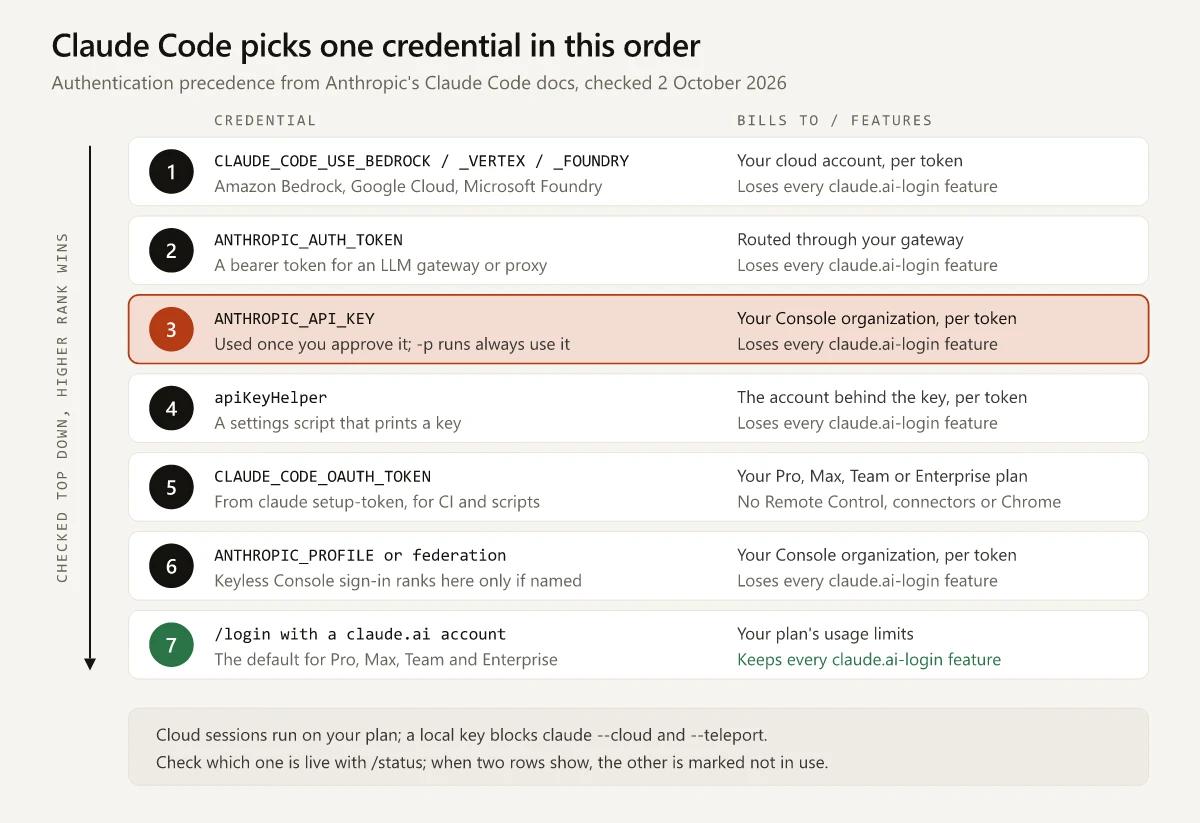
The precedence section of the authentication docs opens with “When multiple credentials are present, Claude Code chooses one in this order”, and the table below adds what each one bills to and what it loses, as of 2 October 2026:
| Rank | Credential | How it gets set | Bills to | Unavailable with it |
|---|---|---|---|---|
| 1 | Cloud provider | CLAUDE_CODE_USE_BEDROCK, CLAUDE_CODE_USE_VERTEX or CLAUDE_CODE_USE_FOUNDRY | Your cloud account, per token | Everything in the feature table above |
| 2 | ANTHROPIC_AUTH_TOKEN | An environment variable, sent as a bearer token to an LLM gateway or proxy | Depends on the gateway or proxy | Everything in the feature table above |
| 3 | ANTHROPIC_API_KEY | An environment variable; interactive sessions ask you to approve it once | Your Console organization, per token | Everything in the feature table above |
| 4 | apiKeyHelper | A settings key that runs a script printing a key | The account behind that key | Everything in the feature table above |
| 5 | CLAUDE_CODE_OAUTH_TOKEN | A one-year token from claude setup-token, for CI and scripts | Your Pro, Max, Team or Enterprise plan | Remote Control, claude.ai connectors, Chrome; bare mode ignores it |
| 6 | Anthropic profile or federation credentials | ANTHROPIC_PROFILE, the federation variables, or an active profile set up for Workload Identity Federation | Your Console organization | Everything in the feature table above |
| 7 | Subscription login | /login with your claude.ai account | Your plan’s usage limits | Bare mode only |
Every row of the feature table needs a claude.ai login, and a credential at ranks 1 to 6 is chosen ahead of that login, so ranks 1 to 4 and 6 lose every one of those features. For ANTHROPIC_AUTH_TOKEN, Anthropic’s gateway overview says setting it “turns off subscription login for that session”. Rank 5 bills to your plan: the setup-token “authenticates with your Claude subscription”, per the long-lived token section, but it “can only make model requests”, which rules out Remote Control and claude.ai connectors, and the Chrome page rules out Chrome as well. The other feature pages don’t say how it fares on their rows. The docs add these rules around the order:
- Interactive sessions ask once: “you are prompted once to approve or decline the key, and your choice is remembered.” The “Use custom API key” toggle in
/configchanges that choice later, and it only appears while the variable is set. - The keyless Console sign-in, from v2.1.242, stores an Anthropic profile instead of a key, and it “signs you out of any claude.ai login stored on the machine”. Its profile ranks at 6 only when
ANTHROPIC_PROFILEnames it; otherwise it ranks below a working/login. - Cloud sessions sit outside the order once they run: they “always use your subscription credentials”, and a key set in the cloud environment “doesn’t override” them. A key on your own machine still stops
claude --cloudandclaude --teleportfrom starting or pulling one. - A signed-in Claude apps gateway session, which an organization self-hosts, also sits outside the list and outranks all seven.
Which Credential Is Claude Code Using Right Now?
Run /status: a Login method row such as Claude Max account means your subscription is in use, and an API key row means “your requests bill to a Claude Console organization”, per Anthropic’s note on where fast mode spend appears. With a login and a key both configured, /status marks the one that isn’t in use.
| Where | Run | What it tells you |
|---|---|---|
| Claude Code CLI | /status | A Login method, API key or Profile row |
| VS Code extension | /status, or Status in the Customize section | Version, account, model and MCP servers, on v2.1.280 or later |
| Any terminal, outside a session | claude auth status --text | Your sign-in state; the JSON form’s authMethod reads none, claude.ai, oauth_token, api_key, api_key_helper or third_party |
| A shell | echo $env:ANTHROPIC_API_KEY in PowerShell, echo %ANTHROPIC_API_KEY% in Command Prompt, echo $ANTHROPIC_API_KEY in Git Bash, macOS or Linux | Whether the variable is set in that shell |
Sources: the VS Code guide, the CLI reference, and Anthropic’s help article on managing API key environment variables, updated 5 May 2026. The claude commands need the standalone CLI, since the VS Code extension doesn’t put claude on your PATH.
These messages point at a key that has taken over:
Credit balance is too lowon a Pro, Max, Team or Enterprise plan, where the error reference says to “run/statusand check theAPI keyrow”Your ANTHROPIC_API_KEY belongs to a disabled organization, from an old key that still overrides your login- A connector you added at claude.ai missing from
/mcp, which the MCP docs say to check with/status
How to Make Claude Code Use Your Subscription Instead of an API Key
- Decline the key in interactive sessions. In the CLI, turn off “Use custom API key” in
/config. Runs withclaude -pstill use the key. - Remove it from the current shell. Run
unset ANTHROPIC_API_KEYin Git Bash, macOS or Linux,Remove-Item Env:ANTHROPIC_API_KEYin PowerShell, orset ANTHROPIC_API_KEY=in Command Prompt. - Remove it where it is set for good. Check your shell profile (
~/.bashrc,~/.bash_profileor~/.zshrc, or in PowerShell the profile script whose path$PROFILEholds), the Windows Environment Variables dialog under both User variables and System variables, theenvblock of each Claude Code settings file, anyapiKeyHelpersetting, and the VS Code extension’senvironmentVariablessetting. - Restart the terminal and VS Code. Anthropic’s environment-variable article lists “Not restarting your terminal after changing environment variables” as a common issue, and its VS Code guide notes that VS Code may not inherit a shell’s environment unless you launch it from that shell with
code .. - Run
/loginand choose your claude.ai account. If you signed in to Claude Code with a Console account, the Pro and Max help article says/loginswitches you to your plan. An approved key in your environment takes precedence over the login, per the 401 error entry, so/loginalone won’t move you off it. - Confirm with
/status. TheLogin methodrow should name your plan, and anAPI keyrow, if one still shows, should be marked as not in use.
To stop Claude Code offering API credits when you reach a plan limit, the same Pro and Max article says to log out and log back in with only your plan credentials: “Avoid adding any Claude Console credentials during the login process.”
How to Log In to Claude Code With an API Key
- A Claude plan doesn’t come with API access. Anthropic’s help center says a paid subscription “doesn’t include access to the Claude API or Console”, so a key means a separate Console account.
- For one session, set the key in that shell only and close it afterwards:
$env:ANTHROPIC_API_KEY="your-api-key-here"in PowerShell, orexport ANTHROPIC_API_KEY='your-api-key-here'in bash. - To pay through the Console without storing a key, use the keyless sign-in: at the
/loginprompt, pick the Anthropic Console account, then “Sign in with your Console account”. claude auth login --consolealso signs in from a terminal “for API usage billing instead of a Claude subscription”. The CLI reference doesn’t say whether that stores a key or a profile, so check/statusafterwards for anAPI keyorProfilerow.- To keep a work Console account apart from a personal plan, give each its own
CLAUDE_CONFIG_DIR. Each directory keeps “its own settings, session history, and claude.ai login or API key”, so in the work directory choose “Create an API key” at the Console sign-in, which stores the key with that directory’s credentials. Don’t use the keyless sign-in for the work side: separate directories don’t isolate it, because Claude Code stores it outside the configuration directory, and it would sign you out of the personal claude.ai login. - To run CI or cron jobs on your plan, generate a token with
claude setup-tokenand set it asCLAUDE_CODE_OAUTH_TOKEN. - To cap a scripted run, pass
--max-budget-usd, which stops a print-mode run at a dollar amount.
Claude Code Data Terms: Consumer Plans vs Commercial Accounts
Anthropic’s data training policy splits accounts into consumer and commercial, and the line doesn’t fall between a subscription and a key: a Team seat signed in with /login sits on the commercial side with the API.
| Account | Training on Claude Code prompts and code | Retention |
|---|---|---|
| Free, Pro, Max (consumer) | Used to train new models “when this setting is on (including when you use Claude Code from these accounts)“ | 5 years with model improvement allowed, 30 days without |
| Team, Enterprise (commercial) | Not used, unless your organization opts in | 30 days standard; zero data retention for qualified Enterprise accounts |
| API key through the Console (commercial) | Not used, unless your organization opts in, for example through the Development Partner Program, which covers first-party API use only | 30 days standard |
On Pro and Max, /privacy-settings views and updates that setting inside Claude Code, which the commands reference lists as “Only available for Pro and Max plan subscribers”, and claude.ai/settings/data-privacy-controls holds the same control on the web. If client briefs or unreleased positioning pass through your sessions on Pro or Max, check that setting first. An API key moves the same work under commercial terms without a Team plan.
Claude Code API vs Subscription Cost: The $13 Break-Even
Anthropic’s costs page gives one benchmark: “Across enterprise deployments, the average cost is around $13 per developer per active day and $150-250 per developer per month, with costs remaining below $30 per active day for 90% of users.” The same page says per-developer costs “vary widely based on model selection, codebase size, and usage patterns”, so a marketer’s own sessions are a better guide. The rules I would use:
- Take your plan’s monthly price from the plan table in my Claude vs Claude Code comparison linked above, or from Anthropic’s pricing page, and divide it by $13. The result is the number of active days a month at which a key, at that average, costs the same as the plan.
- If you pay from India, that monthly price depends on where you check out: I compare what each checkout lists for a Claude plan in a separate guide, and a rupee price needs converting to dollars before you divide.
- Check your own number. On a subscription, the Session block of
/usagein the CLI computes a dollar figure “locally from token counts at list price”; Anthropic says the figure “isn’t relevant for billing purposes” on Pro and Max. The VS Code extension’s Account & usage dialog shows plan bars instead on a claude.ai plan, so runclaudein VS Code’s integrated terminal, with the standalone CLI installed, to see the figure./clearresets it, so read it before you clear. - Allow for the cache. With the lifetimes in the table above, a break of five to 60 minutes “reprocesses your full context” on a key but not on the plan. The caching page linked above adds that the hour-long cache “bills cache writes at a higher rate” and “costs more on short bursts of work that never idle past five minutes”, so a subscription session’s list-price figure can land above or below what the same work costs on a key.
- Usage credits are “billed at standard API rates”, per Anthropic’s usage credits article, so a month that runs mostly on credits is the month to price a key against the plan. The four ways back from a Claude usage limit cover credits and resets in full.
- Per-token prices for each model, and what common marketing jobs cost on them, are in my Claude Sonnet vs Opus vs Haiku cost guide.
Subscription or API Key: A Verdict by Usage Pattern
| If you | Use | Why |
|---|---|---|
| Work in Claude Code most weekdays | Subscription login | A flat fee covers daily work within plan limits, and Remote Control and connectors stay on |
| Open it a few days a month | An API key, once the break-even check agrees | You pay only for active days |
| Want routines or cloud sessions | Subscription login | Both need a claude.ai account; my routines vs scheduled tasks guide compares the schedulers |
Run scheduled claude -p scripts | CLAUDE_CODE_OAUTH_TOKEN on your plan, or a key with --bare and --max-budget-usd | The token keeps scripts on the plan; --max-budget-usd caps what a key can spend |
| Put client material through Claude Code on Pro or Max | Your privacy setting first, or a key for that work | API use runs under commercial terms |
| Hold a work Console account and a personal plan | A separate CLAUDE_CONFIG_DIR with a work API key, not the keyless sign-in | A key exported in your shell profile would sit above the personal login everywhere |
Claude Code API Key vs Subscription: Rule Out Features First
If you use any feature an API key turns off, keep the subscription login; the $13 break-even check only matters for the rest.
Open your next session with /status and read which row it shows.
Frequently Asked Questions
Does Claude Code use my API key or my subscription?
If ANTHROPIC_API_KEY is set and you approved it, Claude Code uses the key, since Anthropic's precedence order ranks it above your claude.ai login, and -p runs use any key that is set. Run /status: a Login method row means your subscription, and an API key row that isn't marked as not in use means your Console organization is billed.
Can I use Claude Code with an API key instead of a subscription?
Yes. Set ANTHROPIC_API_KEY or sign in with a Claude Console account, and usage bills per token with no plan usage limits. In Claude Code you lose the features that need a claude.ai login, including Remote Control, claude.ai connectors, /usage-credits, /schedule and claude --cloud.
Is Claude Code cheaper with an API key or a subscription?
It depends on how much you use it. Anthropic's costs page says costs vary widely with model selection, codebase size and usage patterns, and puts the enterprise average at about $13 per developer per active day. Divide your plan's monthly price by 13 to find the active days at which a key at that average would cost the same.
Does a Claude Pro subscription include API access?
No. Anthropic's help center says a paid Claude subscription doesn't include access to the Claude API or Console, which need a separate Console account billed per token. Claude Code runs on either one.
Does Anthropic train on Claude Code data sent with an API key?
Not by default. Anthropic's data usage page says it does not train generative models on code or prompts sent to Claude Code under commercial terms, which cover API, Team and Enterprise use, unless the customer opts in. On Free, Pro and Max, training follows your model-improvement setting.