Gemini API Key Free: How to Get One and Keep It Working
A Gemini API key free from Google AI Studio, as of November 2026: the steps, which models are free, the 403 phone check, the limits and the $5 move to paid.
This is the message Google’s verification docs print when a Gemini API key free tier project calls the API before passing a phone check:
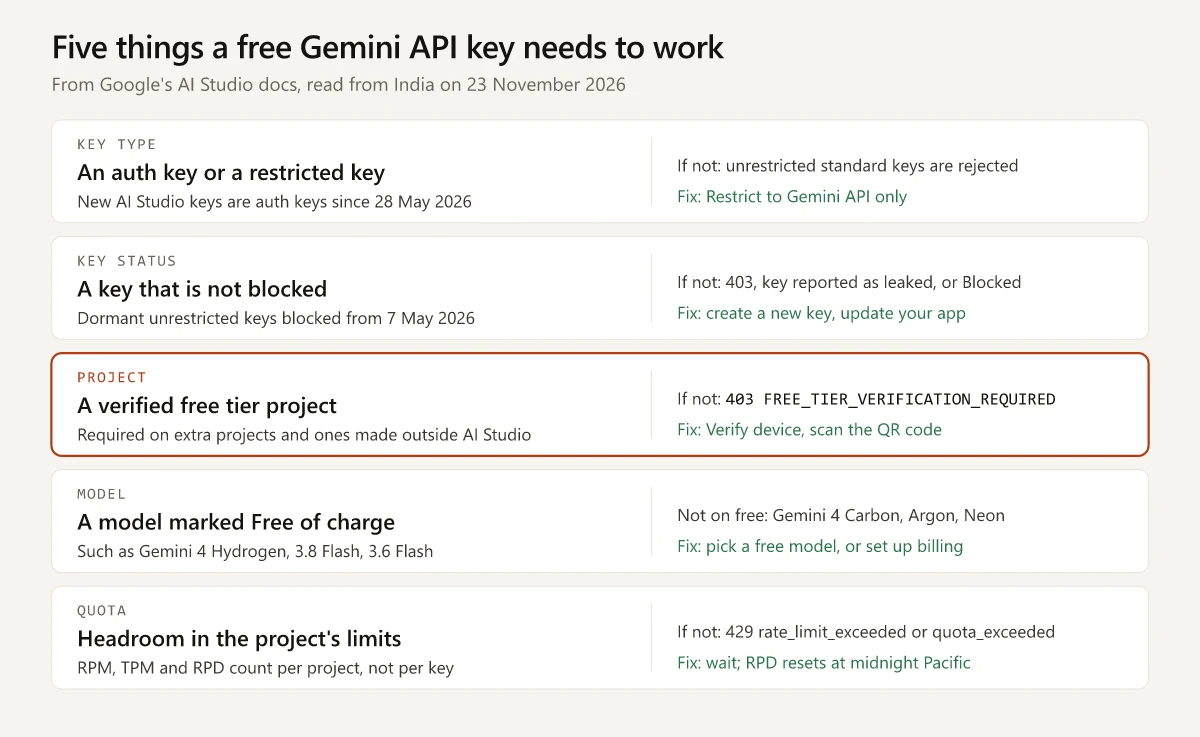
Project 123456789012 must be verified before it can use the Gemini API Free tier. Verify the project at https://aistudio.google.com/verify?project=123456789012, or set up billing at https://aistudio.google.com/billing to use the paid tier instead. Learn more at https://ai.google.dev/gemini-api/docs/verification.It comes back as 403 with FREE_TIER_VERIFICATION_REQUIRED, per Google’s project verification page. A Gemini API key free of charge is quick to get: Google’s API key page says you can “start building in less than 5 minutes”. As of November 2026, though, Google’s docs set four rules around that key: new keys are auth keys, unrestricted standard keys are rejected, dormant unrestricted keys are blocked, and some free projects must be verified with a phone.
My reading of Google’s docs is that the free tier belongs to the Google Cloud project, not to the key. Rate limits are “applied per project, not per API key”, and the verification page says “Creating a new API key in the same unverified project does not bypass verification.” So when a free key fails, look at the project first. I read every page cited here from India on 23 November 2026; recheck them before you build on a number.
How to get a free Gemini API key in Google AI Studio (November 2026):
- Sign in at aistudio.google.com with a Google Account (Google says AI Studio is for users aged 18+) and accept the Terms of Service. New users get a default Google Cloud project and an API key created for them.
- Open the API Keys page from the dashboard, or click Create API key to add a key to a project. Keys created there since 28 May 2026 are auth keys.
- If the project shows Verification needed, click Verify project, then Verify device, and scan the QR code with an Android phone or iPhone.
- Store the key in the
GEMINI_API_KEYenvironment variable, never in your code or repo. - Call a model the pricing page marks “Free of charge”, such as
gemini-4-hydrogen.
How to Get a Gemini API Key for Free, Step by Step
Every step below comes from Google’s API key docs and its billing page, which describe the screens by name.
Your First Key and Project
- New account: “If you are a new user, Google AI Studio automatically creates a default Google Cloud project and API key after you accept the Terms of Service.” You can rename that project in the Projects view.
- Existing Google Cloud account: AI Studio does not create a default project. Open the Dashboard from the left panel, select Projects, click Import projects, pick the project and click Import, then create a key on the API Keys page.
- A further key: click Create API key “and follow the dialog to add a key-project pair to the table.”
Two limits on the page: you can create a maximum of 10 projects at a time from the AI Studio Projects page, and the API keys and Projects pages show at most 100 keys and 50 projects. If Create API key is greyed out with “You do not have permission to create a key in this project”, you lack IAM permissions on that project; the docs suggest asking an admin for a role such as Project Editor, or creating a new project “that is not associated with an organization.”
Where to Keep the Key
Google’s recommended option is an environment variable: “Set the environment variable GEMINI_API_KEY or GOOGLE_API_KEY.” The client libraries pick either one up, and “If both are set, GOOGLE_API_KEY takes precedence”, which explains a key that seems to be ignored. On Windows, the docs walk you through Environment Variables in System Properties and say to open a new terminal session afterwards.
The same page’s security rules: never check keys into Git, and “Do not hardcode API keys directly in web or mobile apps”, because keys in client-side code “can be extracted by users.” The image script in calling Google’s image model from a script with Claude Code reads its key from an environment variable in the same way.
Is a Gemini API Key Free? What the Free Tier Includes
Yes: the key costs nothing, and the free tier gives free input and output tokens on a list of models, in exchange for your content being used to improve Google’s products. The free card on Google’s API pricing page lists four lines:
- “Limited access to certain models”
- “Free input & output tokens”
- “Google AI Studio access”
- “Content used to improve our products”
The paid card answers each one: “Higher rate limits for production deployments”, “Batch API (50% cost reduction)”, “Access to Google’s most advanced models” and “Content not used to improve our products”. Each free model’s table repeats the data split in a row called “Used to improve our products”: Yes on the free tier, No on paid.
On 23 November 2026, Google’s India plan page, fetched from India, listed Google AI Studio as “No cost to start”, with “Input and output tokens at no cost”, “Gemini Developer API access” and “Content used to improve our products”. India is on Google’s list of available regions for the API.
Using the AI Studio web app is also free: the pricing page’s notes say “Google AI Studio usage is free of charge in all available regions”, and the billing FAQ adds that it stays free “unless users link a paid API key for access to paid features.”
Groq also has a free tier, with limits that apply to the whole organization rather than to each key, and the Groq API key guide lists them model by model. The xAI pages read on 24 November 2026 mention no free API tier for Grok, and the Grok API key guide covers its prepaid credits and the rule for Indian cards.
Gemini API Free Tier Models as of 23 November 2026
Each model on the pricing page has a Free Tier column that reads either “Free of charge” or “Not available”. For the text models, here is the standard (interactive) tab as I read it, with paid prices per million tokens in US dollars:
| Model (API id) | Free tier tokens | Search grounding on free tier | Paid input / output, per 1M tokens |
|---|---|---|---|
Gemini 4 Carbon (gemini-4-carbon) | Not available | Not available | $2.00 / $10.00 through 30 November 2026, then $4.00 / $20.00 |
Gemini 4 Argon (gemini-4-argon) | Not available | Not available | $2.00 / $10.00 through 30 November 2026, then $4.00 / $20.00 |
Gemini 4 Neon (gemini-4-neon) | Not available | Not available | $3.00 / $15.00 |
Gemini 4 Hydrogen (gemini-4-hydrogen) | Free of charge | Not available | $1.50 / $7.50 |
Gemini 3.8 Flash (gemini-3.8-flash) | Free of charge | Not available | $0.75 / $3.75 through 31 December 2026, then $1.50 / $7.50 |
Gemini 3.6 Flash (gemini-3.6-flash) | Free of charge | Not available | $0.75 / $3.75 through 31 December 2026, then $1.50 / $7.50 |
Gemini 3.5 Flash-Lite (gemini-3.5-flash-lite) | Free of charge | Not available | $0.30 / $2.50 |
Gemini 3.1 Flash-Lite (gemini-3.1-flash-lite) | Free of charge | Not available | $0.25 / $1.50 |
Gemini 3.1 Pro Preview (gemini-3.1-pro-preview) | Not available | Not available | $2.00 / $12.00 (prompts up to 200k tokens) |
Gemini 3 Flash Preview (gemini-3-flash-preview) | Free of charge | Not available | $0.50 / $3.00 |
Gemini 2.5 Pro (gemini-2.5-pro), deprecated; routes to 3.8 Flash from 1 Dec 2026 | Free of charge | Not available | $1.25 / $10.00 (prompts up to 200k tokens) |
Gemini 2.5 Flash (gemini-2.5-flash), deprecated; routes to 3.5 Flash-Lite from 1 Dec 2026 | Free of charge | Free up to 500 RPD, shared with Flash-Lite | $0.30 / $2.50 |
Gemini 2.5 Flash-Lite (gemini-2.5-flash-lite) | Free of charge | Free up to 500 RPD, shared with Flash | $0.10 / $0.40 |
Text input prices shown; audio input costs more on some models. Several “Not available” grounding cells carry a footnote reading “Can be tested in Google AI Studio”.
What the table means for a free key:
- Gemini 4 Hydrogen is the newest free model: Google’s release notes for 12 November 2026 say it is “Available on the free tier”. Google’s own API key examples call
gemini-4-hydrogen. - Gemini 2.5 Pro and 2.5 Flash still show “Free of charge”, but Google deprecated both on 2 November 2026. Per the deprecations page, they are “no longer available to select in Google AI Studio”, API access is limited to users who have used them before, and from 1 December 2026 requests route to Gemini 3.8 Flash and Gemini 3.5 Flash-Lite. A new key should start on a current model.
- Free Search grounding (up to 500 requests a day) is listed only for Gemini 2.5 Flash and 2.5 Flash-Lite. With 2.5 Flash deprecated, that means 2.5 Flash-Lite for a new key, which Google says “is not deprecated and remains available through the API until further notice.” Every other text model in the table shows “Not available” for it on the free tier.
Outside the text models, the free tier column also reads “Free of charge” for Gemini 3.5 Transcribe, Gemini 3.8 Live, Gemini 3.8 Flash TTS, Gemini Decision 1, both Gemini Embedding models, the Robotics ER 2 previews and Gemma 4. It reads “Not available” for Genie 4, Gemini Omni Flash, Lyria, Gemini 2.5 Pro Preview TTS and every Nano Banana image model; Nano Banana 2 vs Pro sets out what those image models cost per image on the paid tier.
Gemini API Key Free Tier Limits
Google’s rate-limit page measures three things: requests per minute (RPM), input tokens per minute (TPM) and requests per day (RPD). Going over any one of them triggers a rate-limit error. The rules that matter for a free key:
- “Rate limits are applied per project, not per API key.” A second key in the same project shares the same quota.
- “Requests per day (RPD) quotas reset at midnight Pacific time.”
- “Rate limits are more restricted for experimental and preview models.”
- Failed requests still count: the billing FAQ says a 400 or 500 error is not charged, “However, the request will still count against your quota.”
The page no longer prints a free-tier number for most models. It says your limits “can be viewed in Google AI Studio” and links to the rate-limit screen inside the app, which needs a sign-in. Outside the Batch API section, the page prints a per-model limit table for only three models. Gemini Omni Flash and Genie 4 read “Not supported” on Free; Gemini Decision 1 is the one free model with printed numbers:
| Gemini Decision 1, free tier | Limit |
|---|---|
| Requests per minute | 200 |
| Tokens per minute | 50,000 |
| Requests per day | 10,000 |
So “unlimited” does not exist on the free tier: every free project has RPM, TPM and RPD caps, and the daily cap resets at a fixed time. When you hit one, the API errors page returns 429 with rate_limit_exceeded (per-minute) or quota_exceeded (daily), and the fix is to wait, not to make a new key in the same project.
Why a Free Gemini API Key Fails in 2026
Google’s API key page, billing page and verification page set the rules a free key now runs into, and they date some of them and not others:
| Date | Change, in Google’s words |
|---|---|
| 23 March 2026 | Prepay and Postpay billing plans “start taking effect” |
| 7 May 2026 | ”the Gemini API blocks unrestricted API keys that have been dormant for an extended period”; they show a Blocked tag |
| 28 May 2026 | ”all new API keys created in Google AI Studio are automatically created as auth keys” |
| No date given | ”The Gemini API rejects requests from unrestricted standard keys”; standard keys “that have explicit restrictions applied continue to work” |
| No date given | Mobile device verification “on some free tier projects and accounts” |
Auth keys are bound to a Google Cloud service account, restricted to the Gemini API by default, and come with “fast-acting leaked key enforcement”. The verification row is the one behind the error at the top of this page.
Errors a Free Key Returns, and the Fix for Each
| What you see | What it means | Fix, per Google’s docs |
|---|---|---|
403 with FREE_TIER_VERIFICATION_REQUIRED, or Verification needed | The project must pass a phone check before it can use the free tier | Verify the project (steps below), or set up billing |
| ”Your API key was reported as leaked. Please use another API key.” | Google blocked the key | Create a new key on the API Keys page and update your app |
| Blocked tag on an old key | A dormant unrestricted key, blocked since 7 May 2026 | ”generate a new key or use an existing restricted key” |
| Unrestricted label on a standard key | The API rejects it | Hover the label, click Add restrictions, select Restrict to Gemini API only, click Restrict key |
| Free tier unavailable on the project | The project is not eligible for the free tier | A new key in the same project “won’t resolve the error”; link a billing account |
429 rate_limit_exceeded or quota_exceeded | The project hit a per-minute or daily limit | Wait and retry; RPD resets at midnight Pacific |
401 authentication | The key is missing, invalid or expired | Check the key and the environment variable |
On 23 October 2026 a user on Google’s developer forum posted that all three of their projects showed “The Gemini API free tier is not available for this project. Please set up billing to upgrade to the paid tier.”, and that creating a new project had not helped. The thread had no reply when I read it. Google’s troubleshooting guide says “Not all Google Cloud projects or accounts are eligible for the Gemini API free tier” and gives billing as the way forward.
One check that misleads: the same guide says a 200 OK from models.list “doesn’t guarantee that inference calls” are enabled, because that endpoint only checks that the key exists. Test with a real generation call. This is the REST example on Google’s API key page, with your key in place of YOUR_API_KEY:
curl "https://generativelanguage.googleapis.com/v1beta/interactions" \
  -H 'Content-Type: application/json' \
  -H "x-goog-api-key: YOUR_API_KEY" \
  -H "Api-Revision: 2026-05-20" \
  -X POST \
  -d '{
    "model": "gemini-4-hydrogen",
    "input": "Explain how AI works in a few words"
  }'
How to Verify a Free Tier Project With Your Phone
Google requires verification “for the free tier on additional projects or projects created outside Google AI Studio”, and separately for an account when AI Studio “detects unusual activity”. The steps, per the verification page:
- Open the link in the error message, or click Verify project on the Projects page. You need the Owner or Editor role on the project.
- Click Verify device.
- Scan the QR code with your Android phone or iPhone camera and follow the prompt on the phone.
- Wait for “Project verified”, then retry the request or click Get API key.
The check is done “without sharing a phone number or installing an app”. An Android phone needs Google Play services, and rooted phones or phones with unlocked bootloaders “do not pass”; an iPhone needs iOS 16.4 or later with App Clips turned on. “Desktop computers, emulators, and virtual devices cannot complete verification”, SMS and voice calls are not supported, and each phone can verify only a limited number of projects or accounts within a rolling period.
Free Gemini API Key vs Paid Tier: The $5 Step
When the free tier is not enough, or a project cannot get it, Google’s billing page describes the move: “linking a billing account and prepaying to add a minimum of $5 (or equivalent in other currencies) of credits to your account.” Click Set up billing next to the project on the API Keys or Projects page. During purchase, the UI shows “the minimum pre-purchase amount that is required for your region and tier level”; Google’s docs print no rupee figure, so check the amount on that screen. “Paid tier projects do not require project verification.” Anthropic’s API also bills against prepaid credits: requests on a Claude key spend Claude Console credits, as set out in my guide to getting a Claude API key. OpenAI’s API is prepaid too: creating a key costs nothing, and usage is billed from prepaid credits, as OpenAI API key costs and steps sets out.
The tier ladder after that, from the rate-limit page:
| Usage tier | How you qualify | Billing tier cap | Spend limit per 10 minutes |
|---|---|---|---|
| Free | Active project or free trial; some projects need verification | N/A | N/A |
| Tier 1 | Set up and link an active billing account | $250 | $10 |
| Tier 2 | Paid $100 + 3 days from first successful payment | $2,000 | $200 |
| Tier 3 | Paid $1,000 + 30 days from first successful payment | $20,000 - $100,000+ | $200 (same as Tier 2, per the page) |
What the $5 does and does not buy, per the billing and troubleshooting pages:
| What happens | Google’s words |
|---|---|
| Credits expire | ”credits expire 12 months after their purchase date”; non-refundable unless you switch to a Postpay account |
| A zero balance stops every key | At $0, all API keys in all projects on that billing account stop with 402 Payment Required; projects “aren’t automatically downgraded to the Free Tier.” |
| Free quota does not carry over | ”Upgrading a project to the paid tier doesn’t unlock free-tier quota.” |
| The $300 Google Cloud welcome credit does not apply | It “can’t be used towards the Gemini API or AI Studio”; since March 2026 Gemini API costs are “specifically excluded” from the Google Cloud Free Trial, and a free trial account stays on the free tier until you upgrade it |
| You can go back | Disabling billing on a project returns it to the free tier, though “Some projects may need project verification” first |
Once billing is linked, the billing page says “Tiers, rate limits, and billing account caps are all determined at the billing account level”, shared by every project linked to that account. That differs from the rate-limit page, which says limits apply per project. Not every account is asked to prepay, either: setup step 5 says some accounts are “Given the choice between Prepay and Postpay billing plans”, or assigned Postpay for an interim period.
Google One’s India plans page listed “AI Studio with expanded limits to prototype, experiment and build with our Gemini 4 Neon model and Nano Banana Pro” as a Google AI Pro benefit on 23 November 2026, while the API billing docs describe linking a billing account as the route to the paid tiers. Google’s consumer plans are a separate purchase: their rupee prices next to ChatGPT’s are in ChatGPT Go vs Gemini by price tier. If you were looking for Google’s coding agent rather than the API, it has a free weekly quota and five-hour refreshes on Google AI Pro and Ultra, covered in Antigravity’s pricing by Google plan in India. In Cursor, Gemini 4 models bill per token on Premium and above, while paid Google AI Pro includes them in Antigravity’s quota, as set out in Antigravity vs Cursor.
A Gemini API Key Free Tier Lives in the Project
The key is the easy part; the free tier is decided by the Google Cloud project it sits in. On the free tier, verification, eligibility and rate limits are checked per project, so a new key in the same project does not reset any of them. Before you debug code, open the Projects page in AI Studio and read the project’s tier and status column.
Frequently Asked Questions
Is the Gemini API key free?
Yes. Creating a key in Google AI Studio costs nothing, and the free tier gives free input and output tokens on the models Google's pricing page marks Free of charge, with your content used to improve Google's products. Gemini 4 Carbon, Argon and Neon, Gemini 3.1 Pro Preview, the image models and higher limits need a linked billing account, usually with a minimum $5 prepay, as of November 2026.
What are the Gemini API free tier limits?
Limits are set per Google Cloud project, not per key, across requests per minute, tokens per minute and requests per day, and the daily quota resets at midnight Pacific time. Google's rate-limit page now prints numbers for only a few models; the rest appear on the rate-limit page inside AI Studio.
Is there an unlimited free Gemini API key?
No. Every free tier project has rate limits and a daily quota. Shared keys posted in public lists are someone else's project, and Google's troubleshooting page says it blocks keys reported as leaked from calling the Gemini API.
Why does my Gemini API key return 403 FREE_TIER_VERIFICATION_REQUIRED?
The key's Google Cloud project needs mobile device verification before it can use the free tier, which Google requires on additional projects and projects created outside AI Studio. Click Verify project in AI Studio, scan the QR code with an Android phone or iPhone, or set up billing to use the paid tier instead.