Claude API Key: Where to Get One When You Pay for Claude
No Claude plan comes with a Claude API key, Pro and Max included. Create one in the Claude Console in five steps, pick an expiry, add credits and handle a leak.
If you pay for Claude Pro or Max and open claude.ai’s Settings to find your Claude API key, you will not find one there. What a Max or Ultra subscriber finds there instead, after seven days on the plan, is an API credits section with a “Link organization” button, and that button points at a separate product: the Claude Console. Anthropic’s API key docs say API keys for the Claude API, “also called Anthropic API keys”, “live in the Claude Console”, on the API keys page at platform.claude.com/settings/keys.
So treat the Console as a second account with its own wallet. Your plan pays for chat and Claude Code inside its usage limits; a key spends Console credits, and that usage “is never charged to your Claude plan”, in the words of Anthropic’s monthly API credits article. Every fact below comes from Anthropic’s docs and help center as read on 23 November 2026, and Anthropic changes key types, expiry rules and tiers often, so check the linked page before you rely on a detail.
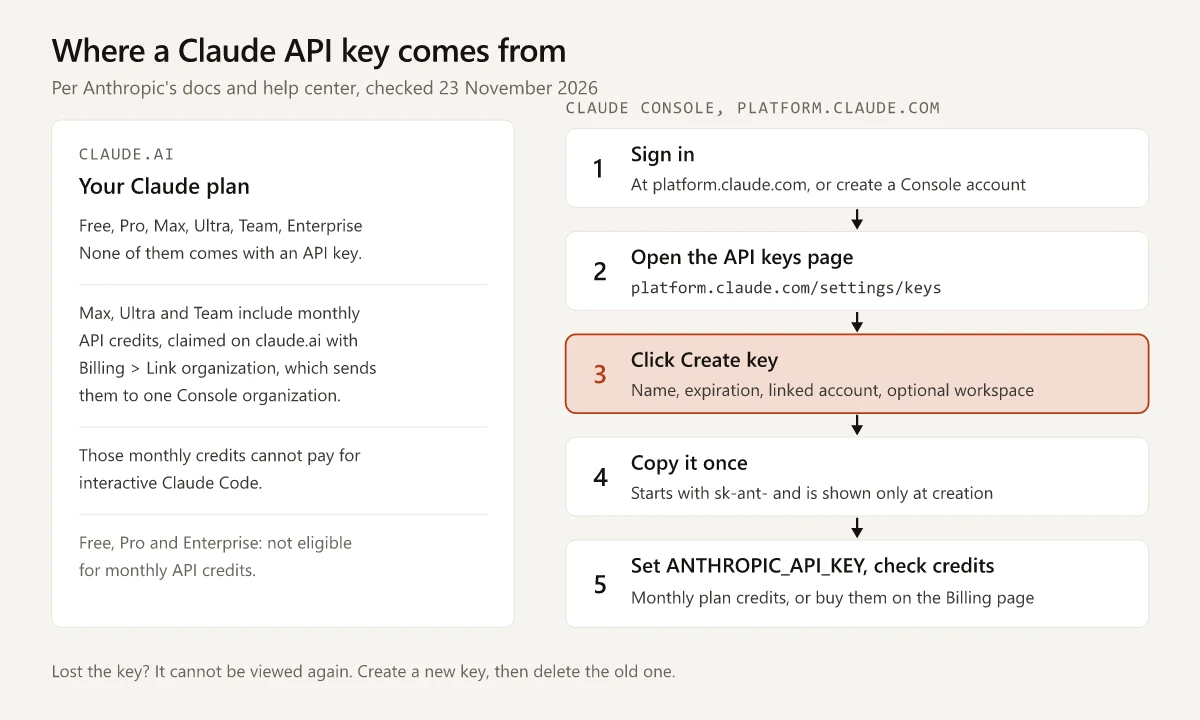
The five steps, in short:
- Sign in to the Claude Console at platform.claude.com, or create a Console account.
- Open the API keys page:
platform.claude.com/settings/keys. - Click Create key, then set a name, an expiration and a Linked account (yourself or a service account), and optionally a workspace. A key made without a workspace has to send an
anthropic-workspace-idheader on every request. - Copy the key, which starts with
sk-ant-, into a password or secrets manager. The Console shows it only once. - Set it as
ANTHROPIC_API_KEY, and make sure the organization has credits: monthly credits from a linked Max, Ultra or Team plan, or credits bought on the Billing page.
Does a Claude Subscription Include an API Key?
No. Anthropic’s help article on separate API billing says “A paid Claude subscription enhances your chat experience, and the Claude API is billed separately”, and calls the Claude Console “our developer platform providing API keys”. The same article adds that Max, Ultra and Team plans “include monthly credits for the Claude API”.
OpenAI and xAI split their bills the same way. OpenAI bills ChatGPT and its API separately, and the OpenAI API key guide sets out which ChatGPT plans include monthly API credits. xAI shares one account between Grok and its API but bills them separately, so a key made in the xAI Console runs on the team’s prepaid credits, as how to get a Grok API key explains.
Account by account, as of 23 November 2026:
| Your account | Comes with an API key? | Monthly API credits? | Can those credits pay for interactive Claude Code? | Where the key is made |
|---|---|---|---|---|
| Free | No | No | n/a | Claude Console |
| Pro | No | No | n/a | Claude Console |
| Max | No | Yes | No | Claude Console, in the organization you link |
| Ultra | No | Yes | No | Claude Console, in the organization you link |
| Team | No | Yes, pooled for the team | No | Claude Console, in the organization an Owner links |
| Enterprise | No | No; not eligible | n/a | Claude Console |
| Console account only, no plan | You create it | No; you buy credits | Purchased credits do cover Claude Code | Claude Console |
Sources: the monthly API credits article linked in the intro, which says “Free, Pro, and Enterprise plans aren’t eligible”, that the offer “appears after you’ve been on an eligible plan for seven days”, and that the credits don’t apply to “Interactive Claude Code in the terminal, IDE, desktop, or web” or “Extra usage in Claude, Claude Code, or Claude Cowork”, and the API billing article, which says “Purchased credits cover API access, playground usage, and Claude Code.”
What that means for a subscriber:
- The claude.ai link step only routes credits. On claude.ai, a Max or Ultra subscriber goes to Settings > Billing, and a Team Owner to Organization settings > Billing, then selects “Link organization” in the API credits section. The credits land in that Console organization, and you still create the key on its API keys page.
- You can link only one Console organization, and Anthropic says “You can’t change the linked organization yourself”, so pick the one you plan to build in. The article’s tip is to sign in to the Console with the same email you use on claude.ai.
- The credit amounts per plan sit in my plan-by-plan Claude price table, and the Team pooling and claim rules in my Claude Team seat math.
- The desktop app is on the subscription side (paid plans “give subscribers access to Claude on the web, desktop, and mobile”), and the same article names the Console as the place “providing API keys”, so look for the key there, not in the app.
- Usage credits inside claude.ai are a different balance from Console credits. The four ways back from a Claude usage limit cover that one.
- New monthly API credits stop if you cancel the plan, and what cancelling a Claude subscription does to credits you already claimed is worth reading before you drop Max, Ultra or Team.
How to Get a Claude API Key in the Claude Console
Every key starts on the API keys page in the Console, and the Create key form there asks for more than a name. These are the fields and choices as Anthropic’s API key docs and API authentication page list them.
If you are also wiring up Google’s models, a Gemini API key comes from Google AI Studio instead, and the free Gemini API key steps cover its free tier and the phone check some projects need. Groq, an inference provider, makes its keys per project at console.groq.com, and the Groq API key guide lists its free plan limits by model.
The Create Key Form, Field by Field
| Field | Your choices | What Anthropic’s docs say |
|---|---|---|
| Name | Your own label | The create step says only to “name the key” |
| Expiration | 3 hours, 1 day, 7 days, 30 days, a custom duration, or Never | ”Expiration is set at creation time and cannot be changed afterward.” An organization’s maximum-expiration policy can remove Never |
| Linked account | Yourself, or a service account | Yourself makes a personal key; a service account makes a key “for anything shared” |
| Workspace | Optional | Keys created for a specific workspace “only work in that workspace”, and their requests can omit the workspace ID |
The API authentication page suggests Never “for keys you store in a secrets manager and rotate yourself”.
If the Create Key Button Is Disabled
The get-api-key page says a disabled Create key button means “your role might not allow you to create keys there”, and the fix is to ask an organization admin to change your role or to create a service account key for you. On an organization set up for Claude Code, Claude Code’s authentication docs list two invite roles for Console members:
- Claude Code role: “users can only create Claude Code API keys”
- Developer role: “users can create any kind of API key”
Personal, Service Account or Workspace Key: Which Type to Pick
The key type decides whose identity the key acts as and when it stops working. From Anthropic’s key types table:
| Key type | Acts as | Stops working when | Use it for |
|---|---|---|---|
| Personal key | You, with your roles and permissions | You lose access to the organization; archived keys are not restored if you are re-invited | Your own development and scripts |
| Service account key | A service account an admin creates | The service account is archived | CI pipelines, production services, agents, anything shared |
| Workspace key (legacy) | No one; it belongs to the workspace | It expires, is disabled or deleted, or its workspace is archived | Existing integrations only; Anthropic says to prefer the other two |
My rule from that table: if anyone other than you will run the code, ask for a service account key. Anthropic warns that “A shared personal key acts as one person and breaks when they leave.”
Key Expiration: Reminder Emails and the 401
From the key expiration section of Anthropic’s API authentication page:
- Anthropic emails the key’s creator 7 days before expiry for keys made with a lifetime of at least 14 days, and 1 day before for keys with a lifetime of at least 7 days. Shorter-lived keys “expire without a warning email”.
- After expiry, requests return a
401 authentication_error, and “expired keys cannot be reactivated”. Create a new key. - The Console’s API keys table shows each key’s expiration, so check it before a demo or a scheduled job runs on an old key.
A 3-hour or 1-day key suits a one-off test, such as trying a prompt in a notebook. For anything that runs unattended, a 30-day key needs a calendar reminder as well as the email.
How to Set Up and Test Your Claude API Key
Anthropic’s SDKs read the key from the ANTHROPIC_API_KEY environment variable. The CLI setup page gives these lines for keeping it across sessions:
# bash (use ~/.zshrc for zsh)
echo 'export ANTHROPIC_API_KEY=sk-ant-api03-...' >> ~/.bashrc
source ~/.bashrc
# Windows
setx ANTHROPIC_API_KEY "sk-ant-api03-..."On Windows, open a new terminal after setx; the page says the change takes effect there. Then make one request to confirm the key works. Direct HTTP calls send the key as Authorization: Bearer <key>, per Anthropic’s API key docs, and the API authentication page says the API also accepts the legacy x-api-key header. If you skipped the workspace in step 3, every request also needs the anthropic-workspace-id header with a wrkspc_ ID from the Workspaces page:
curl https://api.anthropic.com/v1/messages \
  -H "Authorization: Bearer $ANTHROPIC_API_KEY" \
  -H "anthropic-version: 2026-10-21" \
  -H "content-type: application/json" \
  -H "anthropic-workspace-id: wrkspc_..." \
  -d '{"model": "claude-opus-5-5", "max_tokens": 1024, "messages": [{"role": "user", "content": "Hello, Claude"}]}'
Drop the anthropic-workspace-id line for a workspace-scoped key. Errors that point at the key setup rather than your code, from the workspace section of the API authentication page and the rate limits page:
| You see | Likely cause | Fix |
|---|---|---|
400 invalid_request_error: “This API key is not scoped to a workspace, so this request must include the anthropic-workspace-id header with the ID of the workspace to use.” | A personal or service account key made without a workspace | Send anthropic-workspace-id with a wrkspc_... ID from the Workspaces page, or make a workspace-scoped key |
401 authentication_error | An expired key; the docs also return 401 for browser requests from organizations that block CORS | Check the key’s expiration on the API keys page and create a new key |
429 rate_limit_error with enforced_spend_limit_reached | Your organization hit its tier’s monthly spend cap | Wait for 00:00 UTC on the 1st, or request a higher tier |
| 400 starting “You have reached your specified API usage limits” | A spend limit you set yourself | Raise or remove the limit on the Spend limits page |
Two placement rules. Keep the key on a server, because the API authentication page warns that “Anyone who uses a webpage can read an API key in that page’s code”, so a browser front end should call your back end, which holds the key. And if you put the key into Claude Code, it outranks your claude.ai login; what an API key switches off in Claude Code covers that trade before you set it.
Paying for Claude API Use: Credits, Auto-Reload and Spend Caps
A key with no credits behind it cannot make calls. Anthropic’s API billing article says “If you run out of credits, you can no longer call the API or use the playground until you add more.” To buy them:
- Log in to the Console with an Admin or Billing role.
- Go to the Billing page at
platform.claude.com/settings/billing. - Click “Buy credits”, enter the amount and confirm. Purchased credits are available immediately.
The billing rules worth knowing before you pay, from the API billing article:
- Credits “expire one year from the purchase date”, and “All credit purchases are non-refundable.”
- Only successful calls are billed: “Failed requests aren’t charged.” A request that was on track to succeed is still charged if your client disconnects or times out mid-request.
- Auto-reload buys credits when your balance falls below a threshold you set. If your balance is already at or below that minimum when you turn it on, you are charged at once “to bring your balance up to the target, plus applicable taxes”.
- Max, Ultra and Team monthly credits are spent before purchased credits, for the usage they cover.
- Claude Startups credits apply to the first-party Claude API through the Claude Console, not to AWS, Google Cloud or Azure, though the Claude Startups program stopped taking applications on 13 October 2026.
Spend caps by usage tier, from the rate limits page linked above:
| Usage tier | Monthly spend cap |
|---|---|
| Start | $500 |
| Build | $1,000 |
| Scale | $200,000 |
| Custom | No cap; arranged with an account team |
New organizations “may start in the Evaluation tier, with limits below the standard limits”, which rise as usage history builds. Your own lower limit goes on the Spend limits page at platform.claude.com/settings/spend-limits, and Anthropic’s key safety article calls spend and rate limits, and auto-reload limits on standard accounts, a safeguard against “unexpected usage due to leaked keys or errant scripts”.
For readers in India: Anthropic’s API pricing page says “All prices are in USD”, and none of the Anthropic pages I read for this post lists a rupee price or a GST rate for API credits. The plan side, where a rupee price does appear at some checkouts, is in my Claude Pro price in India breakdown. Per-token prices by model are in my Claude Sonnet vs Opus vs Haiku cost guide. Whether the “free credits to test the API” that new users receive come with an amount or an expiry is covered in my check of every zero-cost Claude Code route.
Lost, Leaked or Expired Key: What to Do
| Situation | What Anthropic’s docs say | Do this |
|---|---|---|
| You lost the key | ”If you lose a key, you can’t view it again in the Console” | Create a new key, update every place that read the old one, then delete the old key |
| The key may have leaked | Revoke it: on the API keys page, open the three-dot menu next to the key and select “Delete API key” | Delete it, create a new key, and read the Logs and Usage pages for calls you did not make |
| You pushed it to a public GitHub repo | Through GitHub’s secret scanning partner program, “Anthropic automatically deactivates the exposed API key” | Expect the key to stop working; make a new one and remove the old one from the repo’s history |
| You want to pause a key | ”Disable is reversible”, and Re-enable returns it to active | Disable rather than delete while you investigate |
| The key expired | ”Expired keys can only be deleted” | Delete it and create a new key |
Sources: Anthropic’s API key docs, the key management section of the API authentication page, and the key safety article, which also suggests rotating keys on a schedule, “for example, every 90 days”, and using separate keys for development, testing and production.
Anthropic’s Consumer Terms forbid sharing an “Anthropic API key”, a line my guide to Claude student discounts in India quotes in full, so a key someone else hands you is not a free route.
Your Claude API Key Lives in the Console, Not in Your Plan
Whatever you pay for on claude.ai, the key comes from the Console, and the Console’s credits, tier and spend limit decide what the key can do. Before you write any code, open platform.claude.com/settings/keys, create a key with an expiration you will remember, and set a spend limit below your tier’s cap.
Frequently Asked Questions
Where do I find my Claude API key?
In the Claude Console, on the API keys page at platform.claude.com/settings/keys. The Console shows the full key only once, when you create it, so if you did not save it you cannot view it again and need to create a new key.
Can I get a Claude API key with a Claude Pro plan?
Yes, but the plan does not supply it or pay for it. Anthropic's help center says the Claude API is billed separately from a paid Claude subscription, so you create the key in a Claude Console account and buy prepaid credits there. Pro is not eligible for the monthly API credits that Max, Ultra and Team plans include.
Is the Claude API key free?
Creating a key costs nothing, but every request spends Console credits billed in USD. Max, Ultra and Team plans include monthly API credits, and those credits cannot pay for interactive Claude Code.
What does a Claude API key look like?
Anthropic's docs say the full key starts with sk-ant-, and their examples show the form sk-ant-api03- followed by the secret. SDKs read it from the ANTHROPIC_API_KEY environment variable, and direct HTTP requests send it in an Authorization: Bearer header.
How long does a Claude API key last?
As long as the expiration you pick when you create it: 3 hours, 1 day, 7 days, 30 days, a custom duration, or Never, and it cannot be changed later. An expired key returns a 401 authentication_error and cannot be reactivated, so you create a new one.