OpenAI API Key Free? The $5 Minimum and Who Gets Credits
Is an OpenAI API key free? Creating one costs nothing, but usage is prepaid from $5. Steps, usage tiers and which ChatGPT plans get API credits (Nov 2026).
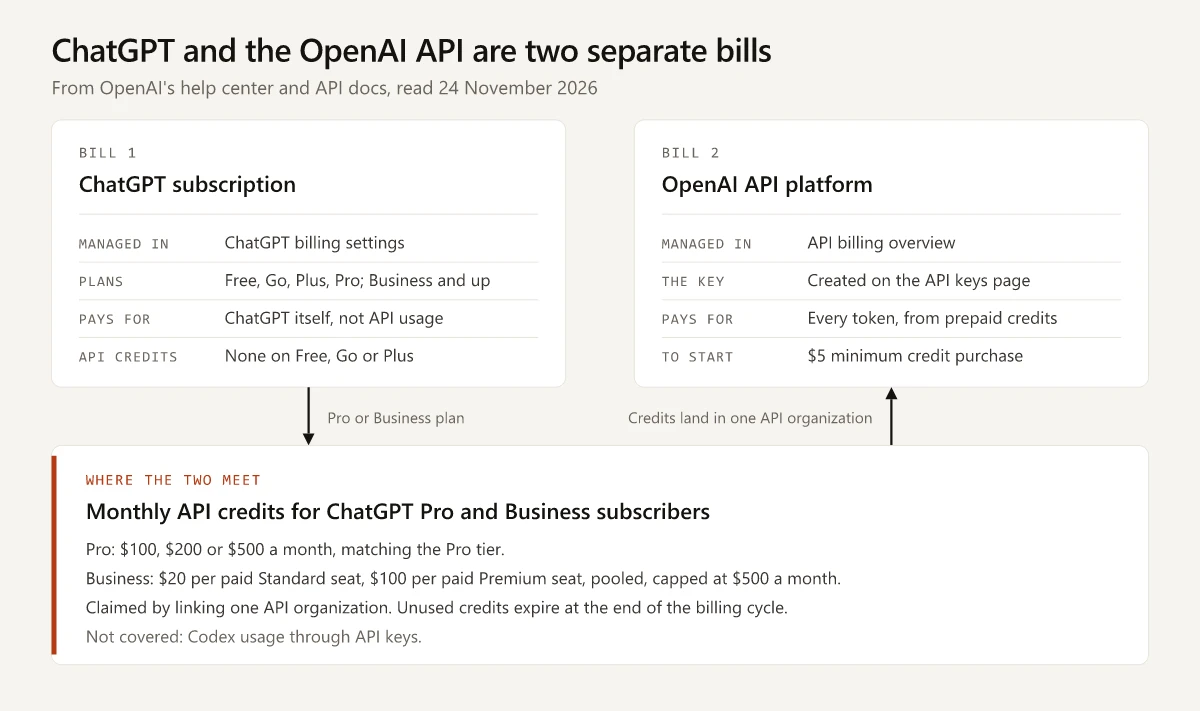
ChatGPT and the OpenAI API are two separate bills, which is why the question “is an OpenAI API key free” has a two-part answer. OpenAI’s billing help article says “ChatGPT and the API platform have separate billing systems”, and that API credits “are associated with an API organization”. A key is a credential for that organization. It comes with access to whatever credit balance the organization holds, and it comes with none of the usage a Go or Plus subscription pays for: “API usage is billed separately from your ChatGPT subscription.”
I read OpenAI’s help center, API docs and pricing page on 24 November 2026, and my view is that the key is the wrong thing to price. No OpenAI page I read puts a fee on a key. The price sits on every token the key sends and receives, paid from prepaid credits. OpenAI’s help center says the subscriber credit benefit may change or be removed, and prices and tiers can change too, so recheck the linked page before you rely on a number.
Free or paid? Creating a key costs nothing; using it does. As of 24 November 2026, OpenAI bills API usage per token from prepaid credits, with a $5 minimum purchase and a $10 default. Its docs list free monthly API credits for eligible ChatGPT Pro and Business subscriptions: $100 to $500 a month on Pro, and $20 or $100 per paid Business seat, pooled up to $500.
How to get one, in short:
- Sign in to OpenAI’s API Platform at platform.openai.com.
- Open the API keys page,
platform.openai.com/api-keys, and create a key with an expiration date. - Copy the secret key at once: the full key “is only shown when you create it”.
- Put credits behind it. Buy them in the API billing overview ($5 minimum), or claim the monthly credits on an eligible Pro or Business subscription.
- Set the key as
OPENAI_API_KEYand run the request in OpenAI’s quickstart.
Is an OpenAI API Key Free? What OpenAI Charges For
The key is free to create, and every call it makes is priced. OpenAI’s key help article says “You can create and manage your API keys on the API key page” and mentions no charge, and the API pricing page bills tokens, tool calls and storage, with no fee for creating or holding a key.
What costs money and what does not, as of 24 November 2026:
| Item | What OpenAI’s pages say | Where |
|---|---|---|
| Creating a key | No fee listed | Key help article; API pricing page |
| Each request | Charges “depend on the models and features you use, including token usage and any applicable tool or storage charges” | Billing help article |
| Starting paid usage | ”The minimum purchase is $5, and the default amount is $10.” | Prepaid billing article |
| Monthly subscriber credits | Pro and Business only; amounts in the plan table below | API credits guide, next section |
| Research grants | ”up to $1,000 of OpenAI API credits” for approved researchers | Researcher Access Program FAQ, covered below |
| Moderation model | omni-moderation-latest is listed as “Free” | API pricing page |
The prepaid billing article also says “New API accounts use prepaid billing”, so a new account buys credits before it uses the API.
OpenAI API Key Free Credits by ChatGPT Plan
OpenAI’s API credits guide opens with “Eligible ChatGPT Pro and Business subscriptions can claim free API credits as part of their subscription benefits.” Set against each ChatGPT plan, the API side looks like this as of 24 November 2026:
| ChatGPT plan | Monthly API credits (OpenAI docs) | API payment method needed to use them? | What the API side still costs |
|---|---|---|---|
| Free | None; named as an ineligible plan | n/a | All usage, from purchased credits |
| Go | None; named as an ineligible plan | n/a | All usage, from purchased credits |
| Plus | None; named as an ineligible plan | n/a | All usage, from purchased credits |
| Pro ($100 tier) | $100 | No | Usage past the month’s credits |
| Pro ($200 tier) | $200 | No | Usage past the month’s credits |
| Pro ($500 tier) | $500 | No | Usage past the month’s credits |
| Business Standard | $20 per paid Standard seat, pooled | No | Usage past the pool, which is capped at $500 per workspace per month |
| Business Premium | $100 per paid Premium seat, pooled | No | Usage past the same pool and cap |
| Enterprise, Edu | None; “ChatGPT Enterprise is not eligible for this benefit” | n/a | All usage, on your API billing |
Sources: the guide’s credit table, its line “No API payment method required: You can use the API with active free credits”, and its note that downgrading to “an ineligible ChatGPT plan, such as Plus, Go, or Free” removes the link. OpenAI’s help center article on the benefit adds that “Enterprise, Edu and legacy Codex seats are not established eligible plans or seats for this offer.”
The rules behind the credit column, from the same two pages:
- The paid subscription must be “at least seven days old”, and “Free trials and complimentary subscriptions don’t qualify.”
- You must own both sides, the ChatGPT subscription or Business workspace and the API organization receiving the credits, and use the same email address on both accounts.
- Pro subscribers claim in ChatGPT under Settings > Billing, Business owners in the workspace’s billing settings or the Admin Console, and either plan can claim from Billing on the API Platform. One subscription or workspace links to one API organization.
- Business workspaces that pay annually upfront get the full year’s grant in one issuance, which expires at the end of the annual billing cycle; the guide gives the shared workspace cap as $500 per monthly billing cycle or $6,000 per annual billing cycle.
- The first grant is prorated, and “Unused credits expire at the end of the billing cycle and don’t roll over.”
- Free credits are spent before purchased ones. With none of either left, “API requests fail with HTTP
429and error codecredit_balance_exhausted.” - “Codex usage through API keys is not supported by this benefit”, and the credits “also don’t increase your ChatGPT or signed-in Codex usage limits”.
- The help center article says availability “also depends on the enabled cohort and country”, and that “The benefit may change or be removed in the future.”
What separates the three Pro tiers on the ChatGPT side is in my Go vs Plus vs Pro comparison, and the ChatGPT caps these credits leave untouched are in ChatGPT usage limits by plan. Codex is the case to plan for: these credits do not cover a Codex session signed in with an API key. My Codex pricing breakdown covers that route, along with the rupee figure ChatGPT’s Pro card showed for these credits from India on 22 November 2026.
Anthropic splits plan and API billing the same way, with a different list of plans that get monthly credits: where a Claude API key comes from when you pay for Claude. xAI keeps Grok plans and its API on separate bills as well, and getting a Grok API key from the xAI Console covers the prepaid credits that API runs on.
Can You Get a ChatGPT API Key From ChatGPT?
OpenAI’s key help article points to the API key page on the API Platform. The credits guide mentions a second route among its next steps: the OpenAI Developers Plugin in ChatGPT can “securely create API keys directly in ChatGPT”. Whichever screen makes the key, the billing help article’s rule holds: API usage is billed separately from the subscription, so paying for Plus does not pay for API calls.
How to Get an OpenAI API Key, Step by Step
Each step comes from OpenAI’s developer quickstart, its API keys guide and the help articles linked above.
Create the Key and Pick Its Type
The quickstart’s first instruction is to “create an API key in the dashboard”, with a link to platform.openai.com/api-keys. The API keys guide then sorts credentials by who runs the code:
| Who runs the code | Credential the guide recommends | Why, in the guide’s words |
|---|---|---|
| You, on your own machine | Your user account and a project API key | ”Requests use your access to the project.” |
| A deployed application, scheduled job or CI workflow | A project service account and its API key | ”The workload has an identity separate from an individual developer.” |
| Automation that creates projects or manages keys | An Admin API key | ”Organization management uses separate administrative endpoints and permissions.” |
The guide’s warning for teams: “Don’t share one developer’s key across a team or use that person’s identity as the permanent identity of a production application.”
On expiry, OpenAI’s production best practices say “We strongly recommend setting an expiration date when you create a project API key and establishing a regular key rotation process.” Administrators can also enforce a maximum key lifetime for an organization or project.
Store It in OPENAI_API_KEY
The quickstart gives one line per system:
# macOS / Linux
export OPENAI_API_KEY="your_api_key_here"
# Windows
setx OPENAI_API_KEY "your_api_key_here"“Each OpenAI SDK automatically reads your API key from the system environment.” OpenAI’s key safety article notes that a setx value “will apply to future cmd prompt windows”, so open a new window before you test. The same article’s placement rules:
- “Never deploy your key in client-side environments like browsers or mobile apps.” Route requests through your own backend server.
- “Never commit your key to your repository”, whether the repository is public or private.
- Use a separate key per person. The article says new members invited from the Members page get “their own unique key upon sign-in”.
Run One Request
This is the quickstart’s Python test, after pip install openai:
from openai import OpenAI

client = OpenAI()

response = client.responses.create(
    model="gpt-6.2-astra",
    input="Write a one-sentence bedtime story about a unicorn.",
)

print(response.output_text)
The sample calls gpt-6.2-astra. For a first test I would swap in gpt-6-luna, which the pricing table below puts at one-eightieth of Astra’s rate on both input and output (my arithmetic). For direct HTTP calls, the API reference overview says to send the key as Authorization: Bearer followed by the key.
Lost or Leaked Keys
- Lost: the key help article says “If you lose it or did not save it, create a new key and update your application to use the new key.”
- No longer needed: “select the trash can icon next to it on the API key page; deleted keys cannot be used”. The API reference adds that “Revocations of an API key take effect within a few seconds.”
- Leaked: the key safety article says to “rotate your key immediately from the API Keys page” and to review the Usage page for activity that is not yours.
What the $5 Minimum Buys in API Usage
OpenAI’s API pricing page quotes “Prices per 1M tokens.” Three Standard rows at short context (up to 272K input tokens), read on 24 November 2026, and what a small request costs on each:
| Model | Input per 1M tokens | Output per 1M tokens | One request (1,000 input + 500 output tokens) | Requests from a $5 purchase | Requests from $100 of credits |
|---|---|---|---|---|---|
gpt-6.2-astra | $8.00 | $40.00 | $0.028 | 178 | 3,571 |
gpt-6.1-terra | $1.00 | $5.00 | $0.0035 | 1,428 | 28,571 |
gpt-6-luna | $0.10 | $0.50 | $0.00035 | 14,285 | 285,714 |
The last three columns are my arithmetic from the two rate columns: 1,000 input tokens plus 500 output tokens at each rate, then $5 and $100 divided by that cost and rounded down. The request size is an illustration, roughly a short prompt and a paragraph of reply, with no cached input and no tools. $100 is the full-month credit grant on the Pro $100 tier.
Beyond those three rows:
- Built-in tools bill on top of tokens. The pricing page lists web search at “$10.00 / 1k calls” plus search content tokens at model rates.
- The page’s Batch table lists lower rates for the same three models.
Prepaid Credit Rules: Expiry, Refunds and Auto-Reload
| Rule | OpenAI’s words |
|---|---|
| Expiry | ”Purchased credits expire after one year.” |
| Refunds | ”Credits are non-refundable unless required by law or contract, or an approved exception applies.” |
| Auto-reload | ”It is turned on by default during setup. Turn it off if you do not want automatic credit purchases.” |
| Recharge size | ”The minimum recharge amount is $5.” |
| Monthly recharge limit | ”A recharge limit is not an API usage limit.” It caps automatic purchases, not the credits you already hold |
| Running out | ”API access may not stop immediately after your credits run out.” The overage shows as a negative balance, deducted from your next purchase |
If you are only testing, I would turn auto-reload off at setup and add a hard cap. OpenAI’s spend limits guide gives the path: Organization limits, then Edit spend limit under Spend, enter a Monthly spend limit, turn on Enforce a hard limit and select Save. A spend alert alone only sends a notification, and even a hard limit has slack: “Enforcement is not instantaneous, so recorded spend can slightly exceed the configured amount.”
OpenAI API Usage Tiers: Free, Build, Launch and Grow
Your purchases also set your tier. OpenAI’s rate limits guide says “The three paid usage tiers are Build, Launch, and Grow. Your organization’s usage tier upgrades automatically as its total credit purchases reach each threshold.”
| Tier | Qualification | Usage limit |
|---|---|---|
| Free | ”User must be in an allowed geography” | $100 / month |
| Build | $5 in total credit purchases | $500 / month |
| Launch | $100 in total credit purchases | $5,000 / month |
| Grow | $500 in total credit purchases | $200,000 / month |
The usage limit column is a monthly ceiling on usage, not money OpenAI gives you: the guide calls it the “approved monthly usage limit for each organization”.
What the table means for a new key:
- The $5 minimum purchase equals the Build qualification (“$5 in total credit purchases”), and the guide says tiers upgrade automatically as purchases reach each threshold. If the Limits page still shows Free after a top-up, the guide points to an Upgrade tier button in its Usage Tiers section.
- The guide’s Standard rate-limit table has rows for Build, Launch and Grow and none for Free. On Build it lists 5,000 requests per minute and 1,000,000 tokens per minute for the Astra, Sol and Terra models. Your own numbers are on the Limits page under Settings > Organization.
- A tier is not model access: “A model’s rate-limit entry does not confirm access for your organization, project, or API key.”
- The thresholds count “total credit purchases”. The help center article on subscriber credits says only that “Your usage tier will update automatically as you qualify for higher tiers”, and neither page says whether a claimed grant counts as a purchase, so check the Limits page after you claim.
Is There a Free Trial Credit for New API Accounts?
No OpenAI page cited in this post states a starting credit amount for a new account, so plan for the $5 purchase.
- The Free tier row is a usage limit, the ceiling OpenAI sets on an organization’s monthly usage, not a credit balance, and the Standard rate-limit table has no Free row.
- The prepaid billing article says “If your account has free credits, those are used before purchased credits”, without saying who gets them.
ChatGPT API Key Price in India
Every rate on the API pricing page and every credit amount in the tables above is in US dollars; the pricing page I fetched from India on 24 November 2026 showed dollars only. The OpenAI docs and help articles I read for this post print no rupee price and no GST rate for API credits, so I am not converting anything here. Check the amount in the API billing overview before you confirm a purchase. India is on OpenAI’s supported countries and territories list. The subscription bill is the one with published rupee prices, set out in every ChatGPT plan in rupees.
Errors That Point at the Key or Its Balance
OpenAI’s error codes guide separates a bad key from an empty balance:
| You see | Cause, per OpenAI | Fix |
|---|---|---|
| 401 - Incorrect API key provided | ”The requesting API key is not correct.” | Check the key and the environment variable, or generate a new key |
| 401 - You must be a member of an organization to use the API | ”Your account is not part of an organization.” | Ask the organization’s manager for an invite, or contact OpenAI |
| 403 - Country, region, or territory not supported | You are calling from an unsupported country, region or territory | Check the supported countries list |
429 with credit_balance_exhausted | ”Your organization has no prepaid credits remaining.” | Add credits in the API billing overview |
429 with organization_usage_limit_exceeded | The organization reached its OpenAI-assigned usage limit | Request a higher approved usage limit on the Limits page |
429 with organization_spend_limit_exceeded or project_spend_limit_exceeded | A hard spend limit you set | Raise or remove the limit |
| 429 - Rate limit reached for requests | ”You are sending requests too quickly.” | Pace requests and follow the Retry-After header |
For billing errors the guide says to read error.code, because “The broader error.type can still be insufficient_quota” for any of the billing codes above. A retry loop will not help either: “Retrying billing, spend, or quota errors won’t restore API access.”
Free Key Lists, Student Offers and Research Grants
Public lists of “free” keys are not a route. The key safety article says “The sharing of API keys is against the Terms of Use” and “OpenAI does not support the sharing of API keys”, and it describes a compromised key as one that lets a person “gain access to your account quota, without your consent”. A key from a list spends someone else’s quota, and OpenAI’s advice to that owner is to rotate it at once.
The routes OpenAI’s own pages do describe:
| Route | Who it is for | What OpenAI’s page says |
|---|---|---|
| Subscriber credits | ChatGPT Pro and Business subscribers | Monthly credits per the plan table above |
| Researcher Access Program | ”Researcher(s) with an active affiliation to an academic institution or other research organization”, and nonprofits doing research | ”up to $1,000 of OpenAI API credits”, valid for 12 months; applications are reviewed “once every 3 months (in March, June, September, and December)“ |
| Student offer | ”verified university students in the United States and Canada" | "$100 in credits to use in Codex”, per OpenAI’s student offer terms, which answer “Are these API credits?” with “No. These are ChatGPT credits”, used by signing in to Codex with ChatGPT (“An API key alone is not eligible.”) |
The research row is from OpenAI’s Researcher Access Program FAQ, which says the program funds “the study of responsible AI deployment, risk mitigation, and societal impacts” and that applicants “must be based in countries supported by the OpenAI API”. The FAQ does not mention students. Its eligibility line is written for researchers with an institutional affiliation, and it says applications are reviewed for “the relevance of the research proposal”.
If the goal is to learn how an API call works without paying anything, Google’s Gemini API has a free tier with its own rate limits and, on some projects, a phone check. My steps for a free Gemini API key cover it. Groq, an inference provider with an OpenAI-compatible API, also has a Free tier, and the Groq API key guide lists its free plan limits per model.
OpenAI API Key Free to Create, Paid on the API Bill
An OpenAI API key costs nothing to create, and the bill behind it belongs to the API platform, whatever you pay for ChatGPT. That bill starts at a $5 credit purchase unless a Pro or Business subscription or a research grant has already put credits in the organization. Before you create a key, decide which of those balances it will spend, turn auto-reload off if you are only testing, and set a hard monthly spend limit. Then open the API keys page.
Frequently Asked Questions
Is the OpenAI API key free?
Creating a key has no price on OpenAI's pages, but using it is billed per token from prepaid credits, with a $5 minimum purchase as of 24 November 2026. OpenAI's docs list free monthly API credits for eligible ChatGPT Pro and Business subscriptions: $100 to $500 a month on Pro, and $20 or $100 per paid Business seat, pooled up to $500.
Is the ChatGPT API key free with ChatGPT Plus?
No. OpenAI's help center says API usage is billed separately from your ChatGPT subscription, and its API credits guide names Plus, Go and Free as ineligible plans. The monthly API credits go to eligible Pro subscriptions and Business workspaces.
How do I get an OpenAI API key?
Sign in to OpenAI's API Platform, open the API keys page at platform.openai.com/api-keys, create a key with an expiration date and copy it at once, because the full secret key is shown only at creation. Then add credits in the API billing overview and set the key as the OPENAI_API_KEY environment variable.
What is the ChatGPT API key price in India?
OpenAI prices the API in US dollars per million tokens, and the OpenAI pages I read on 24 November 2026 print no rupee price and no GST rate for API credits. The minimum credit purchase is $5, and India is on OpenAI's list of supported countries and territories.
Is there a free OpenAI API key for students?
Not as API credits. OpenAI's student offer gives verified university students in the United States and Canada $100 in Codex credits, and its terms say these are not API credits. The Researcher Access Program offers up to $1,000 of API credits to researchers affiliated with an academic institution or research organization. Sharing API keys is against OpenAI's Terms of Use, so a key from a public list is not a free route.