Instagram Character Limit: Bio, Caption, DM, and Who Says So
Meta prints the Instagram character limit for a bio (150), a caption (2,200) and a note (60), but counts API-sent DMs in bytes, so Hindi fits 333. Sources dated.
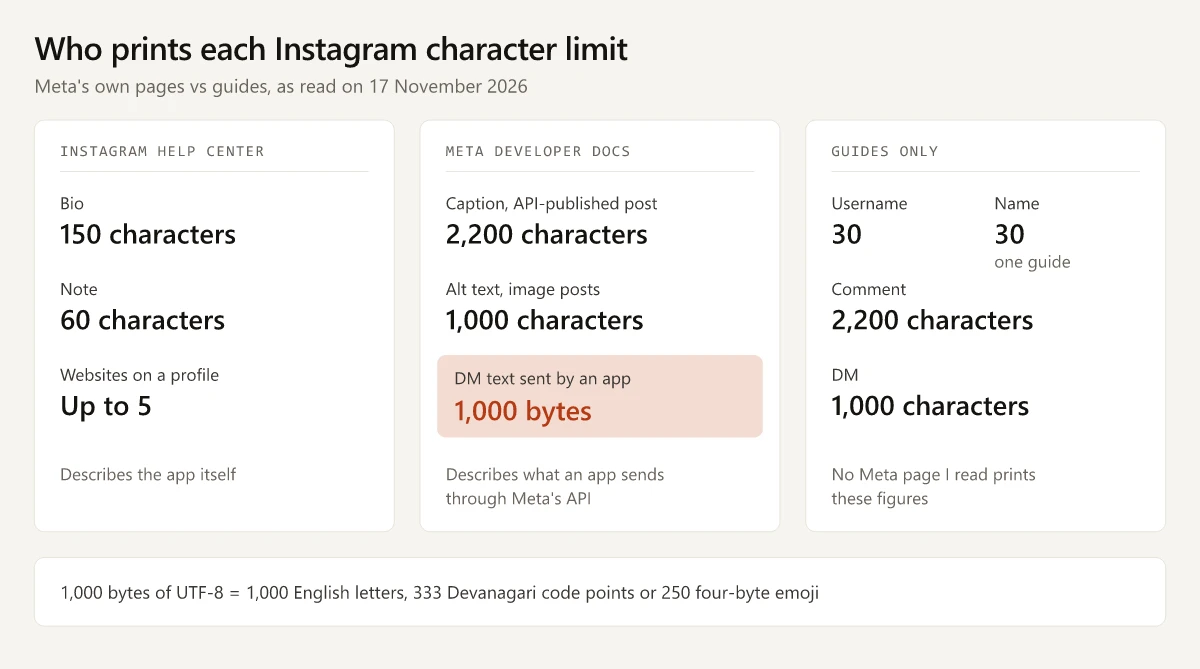
Every Instagram text-length limit I found on Meta’s own pages on 17 November 2026 counts characters, with one exception: a direct message sent through Meta’s API. Meta’s Instagram messaging API page, updated 28 September 2026, says “Message text must be UTF-8 and be a 1000 bytes or less.” In English that is 1,000 letters. In Hindi it is 333 Devanagari code points, a third of the English figure.
So the useful question for each Instagram field is which page prints the number. Six fields have a Meta sentence behind them, quoted below with its page; username, name and comment have only guide figures.
| Field | Limit | Meta’s words (read 17 November 2026) | Page |
|---|---|---|---|
| Bio | 150 characters | ”You can write a bio of up to 150 characters on your Instagram profile.” | Add a bio to your Instagram profile |
| Note | 60 characters | ”Enter a note of up to 60 characters.” | Share a note with others on Instagram |
| Websites on a profile | Up to 5 | ”You can add up to 5 websites to your Instagram profile.” | Add a website to your Instagram profile, Android version |
| Caption | 2,200 characters | ”Maximum 2200 characters” | IG User Media reference, updated 28 September 2026 |
| Alt text (image posts) | 1,000 characters | ”Alternative text, up to 1000 character, for an image.” | Same IG User Media reference |
| DM text sent through the API | 1,000 bytes | ”Message text must be UTF-8 and be a 1000 bytes or less.” | Instagram messaging API page, updated 28 September 2026 |
| Username | 30 (NapoleonCat, Outfy) | None | No Meta page I read |
| Name | 30 (Outfy only) | None | No Meta page I read |
| Comment | 2,200 (NapoleonCat, Outfy) | None | No Meta page I read |
| DM typed in the app | 1,000 characters (NapoleonCat, Outfy) | None | No Meta page I read |
What Is the Instagram Character Limit?
There are several, one per field: 150 for a bio, 2,200 for a caption, 60 for a note and 1,000 for alt text, plus a 1,000-byte cap on DM text an app sends. Those are the figures Meta’s own pages print. Username, name and comment figures come from third-party guides.
The websites figure sits in the device versions of its article (I read the Android one), and the article says the feature “isn’t available on computers”.
Instagram Caption Character Limit: 2,200
The 2,200 is the caption parameter of Meta’s IG User Media reference, described as “A caption for the image, video, or carousel” a tool publishes through the API. The same sentence also caps hashtags and @-tags, which my breakdown of the Instagram hashtag limit covers.
What the caption figure does and does not tell you:
- It is the one caption number on a Meta page that I read. The Help Center articles I read for this post (bio, notes, websites, profile information, sending messages) print no caption length.
- It describes the API field. A caption typed in the app has no separate Meta figure on those pages.
- Reels use the same field. The page’s Reels container example (
media_type=REELS) sends the samecaptionparameter that carries the 2,200 cap. - How much shows before “more” is a guide figure. NapoleonCat says “Captions longer than 125 characters get cut off”, and no Meta page I read gives a cut-off.
Write the hook inside the first 125 characters and the full caption inside 2,200, and the draft clears both NapoleonCat’s cut-off and Meta’s API maximum.
Instagram Bio Character Limit: 150, and Five Links
The bio article gives the steps: go to your profile, click Edit profile, write in the Bio box and click Submit. It also warns: “Please keep in mind that anyone can see your bio.”
The links that sit under a bio have their own count, set in the website article: up to 5, added under Edit profile, then Links, then Add link. The same article says “anyone, on or off Instagram, can see your websites”.
The bio article does not say whether spaces, line breaks or emoji count toward the 150. Replug’s guide says the 150 “Includes spaces, emojis & punctuation”.
Instagram Username and Name Character Limit: No Meta Figure
No Instagram Help Center article I read prints a length for a username or a name. Meta’s article on changing profile information covers the steps and the rules around a change, with no number:
- You can change your name and username in Accounts Center under Profiles, or with Edit profile on your profile.
- “If your account reaches a lot of people, your username change may need to be reviewed.”
- “Your followers may be notified of your username change.”
- Meta is “gradually updating people to Meta Accounts”, so you may see Meta Account settings in place of Accounts Center.
A separate Help article on profile name eligibility for Meta Verified creators limits how often a verified creator can change the name (“You can update your profile name twice every 14 days” on Instagram), and also gives no length. Threads borrows your Instagram handle, which the Threads character limit post traces to Meta’s 2023 launch post.
The guides disagree on whether a number exists at all:
| Guide | Username | Name | Date on the page |
|---|---|---|---|
| NapoleonCat, Jasiek Pokrop | 30 | Not given | 10 January 2025 |
| Outfy, Kelina Chakma | 30 | 30 | Last updated 10 September 2026 |
| Replug, Muhammad Ahsan Jamal | ”Not published" | "Not published” | Published 18 July 2025, last edited 13 October 2026 |
Replug’s position matches what I found on Meta’s pages. Treat 30 as the guides’ figure, and let the app’s username field tell you when a handle is too long.
Instagram Comment Character Limit: Guides Say 2,200
NapoleonCat says “Instagram allows up to 2,200 characters per comment”, and Outfy’s table gives a comment 2,200 characters. Meta’s IG Media comments reference, updated 20 October 2026, describes the comment parameter as “The text to be included in the comment.” and states no length.
The only cap on that page is about reading comments, not writing them: the endpoint “Returns a maximum of 50 comments per query.” The guides’ 2,200 matches the caption figure, and no Meta page I read applies it to comments. Replies to a Story get no figure either: no Meta page I read gives a length for them.
Instagram DM Character Limit: 1,000 Bytes, Not 1,000 Characters
The rule sits under “Send a text message” on the messaging API page and covers the /<IG_ID>/messages endpoint, which an app calls to send a DM. Typing a DM in the app is a different route, and Instagram’s Send a message article gives it no length; its one content rule is that a message request to someone not connected to you “can only contain text”.
A byte is not a character once you leave plain English. Under the UTF-8 standard, RFC 3629, a code point takes 1 to 4 bytes depending on its range. My arithmetic on Meta’s 1,000-byte cap, with byte counts I took from Node’s TextEncoder on 17 November 2026:
| Text | UTF-8 bytes each | Most that fit in 1,000 bytes |
|---|---|---|
| English letter, digit or space | 1 | 1,000 |
| e with an acute accent | 2 | 500 |
| Devanagari letter or vowel sign (Hindi, Marathi) | 3 | 333 |
| Rupee sign ₹ | 3 | 333 |
| Fire emoji (U+1F525) | 4 | 250 |
| Red heart emoji (U+2764 plus variation selector U+FE0F) | 6 | 166 |
Hindi words cost more than their letter count suggests, because the virama that joins a conjunct and each vowel sign are code points of their own. The Hindi word for thank you, dhanyavad, is 7 code points in Devanagari and 21 bytes, the same 21 bytes as the English line “Thanks for your order”.
A worked example for a brand that replies in two scripts: an order update with 400 English characters (400 bytes) and a 200-code-point Hindi summary (600 bytes) fills the 1,000 bytes with 600 characters. The same 1,000 bytes in English alone would hold 1,000. If a tool sends your DMs through Meta’s API, budget Hindi replies in bytes (WhatsApp’s API counts differently; see the WhatsApp character limits Meta publishes). The method, with a script that counts bytes, is in how YouTube’s Data API counts descriptions in bytes. Tools that automate DMs charge for that separately from Meta’s limits; Interakt’s plans, including an Instagram-only Starter tier with no per-message charge on Instagram, are one example.
Instagram Notes and Alt Text Limits
A note stays at 60 characters, and the notes article adds that “You can share up to 1 note with others on Instagram” and that it shows at the top of the inbox and on your profile “for up to 24 hours”.
Alt text through the API works on a single image or an image inside a carousel only. The IG User Media reference adds “Reels and stories are not supported.” and says Meta “introduced the new alt_text field for image posts” on March 24, 2025. For how to write the text itself, I set out the rules for web images in writing alt text that also helps SEO.
Does the Instagram Character Limit Count Spaces and Emoji?
Meta’s bio and notes articles do not say how they count, so draft as if every space, line break and emoji counts. The two counting systems a writer runs into treat them differently:
- In UTF-8, the encoding the DM rule names, a space is 1 byte and the fire emoji is 4.
- JavaScript’s string length, which a counter built on it returns, counts “UTF-16 code units”, per MDN’s String length reference. A space is 1 there, and an emoji outside the basic range, such as the fire emoji, is 2.
So a counter that uses string length and one that counts code points disagree by one for every such emoji in a draft. I have not tested how the app counts; when a draft lands within a few characters of 150 or 60, paste it into the field before you finalise it.
Meta’s Figures vs Three Guides, Field by Field
The three guides above agree with Meta on the bio and the caption and split on everything else. Each figure as its page showed it on 17 November 2026:
| Field | Meta’s page | NapoleonCat (10 January 2025) | Outfy (updated 10 September 2026) | Replug (edited 13 October 2026) |
|---|---|---|---|---|
| Bio | 150 | 150 | 150 | 150 |
| Caption | 2,200 | 2,200 | 2,200 | 2,200 |
| Username | None found | 30 | 30 | ”Not published” |
| Name | None found | Not given | 30 | ”Not published” |
| Comment | None found | 2,200 | 2,200 | ”Not published” |
| DM | 1,000 bytes, API-sent text | 1,000 characters | 1,000 characters | 1,000 bytes, citing Meta’s API |
| Note | 60 | Not given | Not given | 60 |
| Alt text | 1,000, API image posts | Not given | Not given | 1,000, citing Meta’s API |
NapoleonCat and Outfy also still print 30 hashtags per post, a figure Instagram replaced with 5 in December 2025, as the hashtag post linked above sets out. Replug is the one guide of the three whose figures in this table all match Meta’s pages. It notes that emoji and accented letters take more than a byte, and gives no count for Hindi or any other Indian script. Facebook’s guides drift from Meta’s pages the same way, as the Facebook character limit by field shows for Page descriptions.
Write to the Instagram Character Limit Meta Prints
Limits change, and Meta is gradually moving people from Accounts Center to Meta Accounts, so recheck the bio, notes and API pages behind each Instagram character limit every quarter.
If you send Instagram DMs in Hindi or any non-Latin script through a tool built on Meta’s API, count each reply in bytes against Meta’s 1,000.
Frequently Asked Questions
What is the Instagram caption character limit?
2,200 characters. Meta's IG User Media reference, updated 28 September 2026, gives the caption of a post published through its API a maximum of 2200 characters. The Instagram Help Center articles I read on 17 November 2026 print no caption figure.
What is the Instagram bio character limit?
150 characters. Instagram's Help Center article Add a bio to your Instagram profile says you can write a bio of up to 150 characters, and that anyone can see it.
What is the Instagram DM character limit?
Meta prints one figure, and it is in bytes: message text an app sends through the Instagram API must be UTF-8 and 1000 bytes or less. That fits 1,000 English letters but only 333 Devanagari code points. Guides print 1,000 characters for DMs typed in the app.
What is the Instagram username character limit?
Guides such as NapoleonCat and Outfy print 30 characters. No Instagram Help Center article I read on 17 November 2026 prints a username or name length.
Does the Instagram character limit include spaces?
Meta's bio article does not say how it counts. A space is one character in UTF-8 and in JavaScript's string length, so count spaces when you draft. Many emoji count as two in counters built on JavaScript's string length.