Facebook Character Limit: What Meta States, Field by Field
Guides put the Facebook character limit at 63,206 per post, yet no Meta page I read states it. Here is each field, Meta's own figure, and who prints the rest.
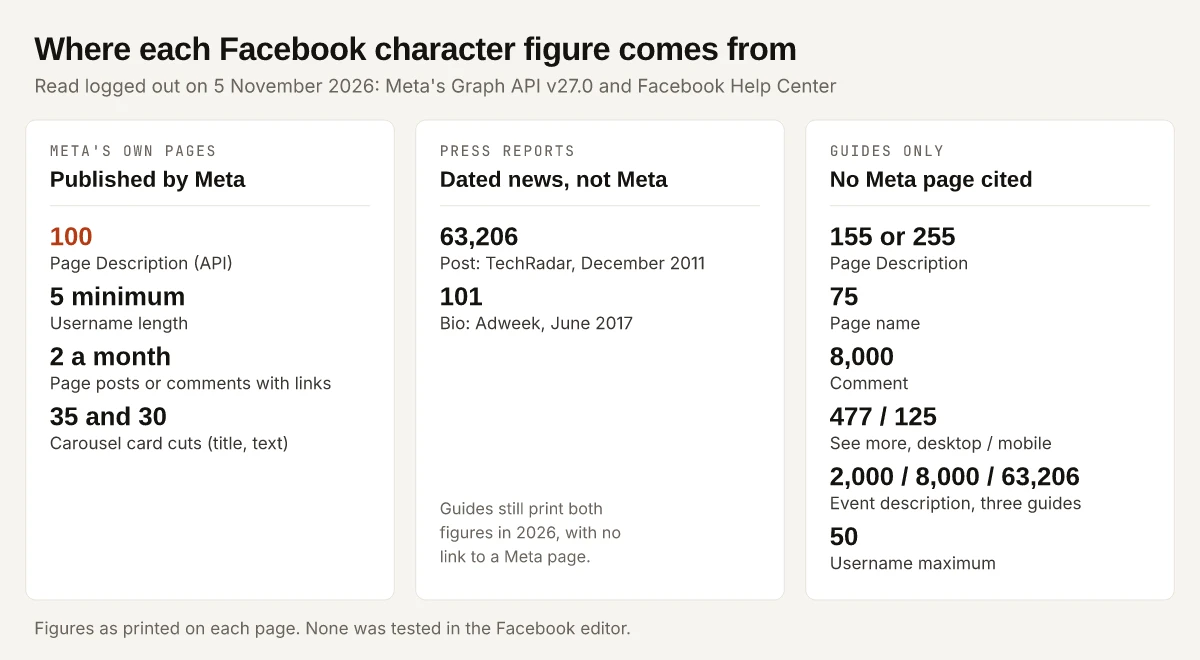
Every guide to the Facebook character limit I read on 5 November 2026 gives the same number, 63,206 characters per post, and none of the four links a Meta page for it. The figure traces to a TechRadar report of 1 December 2011 that quoted a wall post by the software engineer who set it, while Meta’s own Graph API Page Feed reference, at version 27.0, describes a post’s message as “The main body of the post” and gives it no maximum. So I sort every Facebook figure below by who prints it, and count a figure as Meta’s only when a Meta page states it.
The other figures in those guides follow the same pattern: none of them cites a Meta page. Sorted that way, the Page description is the field to fix first, because Meta’s Graph API Page reference gives it 100 characters, while the guides print 155 or 255.
Guides put the Facebook post limit at 63,206 characters, a figure reported in December 2011; the Meta developer pages I read state no post maximum. Their one maximum for these fields is 100 characters for a Page’s Description. Bio 101, Page name 75 and comment 8,000 come from guides, not from any Meta page I read.
What Is the Facebook Post Character Limit?
No Meta page I read states one; 63,206 is a 2011 press figure that guides still print. TechRadar’s Marc Chacksfield reported the change on 1 December 2011 and gave the limit’s earlier change that March:
| When | Post limit reported | Source |
|---|---|---|
| Before March 2011 | 500 | TechRadar, 1 December 2011 |
| March 2011 | 5,000 | TechRadar, 1 December 2011 |
| December 2011 | 63,206 | TechRadar, 1 December 2011 |
The odd number has its own arithmetic. TechRadar quotes software engineer Bob Baldwin: “I set the exact limit to something nerdy. Facebook … Face Boo K … hex(FACE) - K … 64206 - 1000 = 63206”. Read as a hexadecimal number, FACE is 64,206 in decimal, and K stands for 1,000.
What Meta’s developer pages say about post text today, as I read them logged out on 5 November 2026:
- The Page Feed reference describes
messageas “The main body of the post. The message can contain mentions of Facebook Pages”. No length. - The Page Post reference describes
messageas “The message written in the post”. No length.
Four guides that print 63,206, none of which links a Meta help or developer page:
| Guide | Author | Date on the page | What it says |
|---|---|---|---|
| TypeCount | Martin Sikula | Published 14 April 2026, updated 7 September 2026 | ”Yes, the 63,206 Limit Is Real” |
| How Many Words | How Many Words (company byline) | 12 April 2026 | ”Facebook posts can technically be up to 63,206 characters” |
| SocialRails | Matt | 15 January 2026 | ”Status update: 63,206 characters” |
| Eklipse | Ava Peterson | September 2023 | ”you can write up to 63,206 characters” |
I have not tested which figure the Facebook editor enforces, so treat 63,206 as the guides’ number. The figure that shapes a real post is the visible cut-off, covered further down.
Facebook Character Limit by Field: Meta’s Words vs the Guides
None of the four guides above sorts its figures by source, so here they are field by field: the figure guides print and who prints it, against what Meta’s own page says, read on 5 November 2026.
| Field | Figure guides print (who) | What Meta’s own page says | Status |
|---|---|---|---|
| Post | 63,206 (TypeCount, How Many Words, SocialRails, Eklipse) | Page Feed reference: message is “The main body of the post”, no length | Not on any Meta page I read |
| Text shown before “See more” | About 477 desktop, about 125 mobile (TypeCount); 477 (How Many Words, SocialRails) | No figure for post text | Not on any Meta page I read |
| Profile bio (Intro) | 101 (TypeCount, How Many Words) | User reference: about “Returns no data as of April 4, 2018” | Not on any Meta page I read |
| Profile name | 50 (TypeCount) | User reference: name is “The person’s full name”, no length | Not on any Meta page I read |
| Username | 50 (How Many Words, SocialRails); “between 5 and 50” (Eklipse) | Help Center: “Usernames must be at least 5 characters long” | Meta states the minimum only |
| Page name | 75 (TypeCount, How Many Words) | Help Center Page name guidelines: naming rules, no number | Not on any Meta page I read |
| Page Description | 155 short, 255 full (TypeCount); 255 (How Many Words, SocialRails, Eklipse) | Page reference: about maps to the Description setting, “Limit of 100 characters” | Meta: 100 |
| Page Additional Information | None given | Page reference: description maps to this setting, no length | Not on any Meta page I read |
| Page mission, company overview | 244 and 50,000 (TypeCount) | Page reference: “The company mission”, “The company overview”, no length | Not on any Meta page I read |
| Comment | 8,000 (TypeCount, How Many Words, Eklipse) | Comments reference: message is “The comment text”, no length | Not on any Meta page I read |
| Event description | 2,000 (How Many Words); 8,000 (TypeCount); 63,206 (SocialRails) | Event reference: description is “Long-form description”, no length | Not on any Meta page I read |
| Carousel link card title and description | None given | Page Feed reference: “typically be truncated after 35 characters” and “after 30 characters” | Meta: display cut, not a maximum |
The Meta pages behind the table, so you can recheck them:
- Graph API references, all at version 27.0: Page, Page Feed, Page Post, Comments, Event and User. Each is linked once, in the intro or in the section that covers its field.
- Facebook Help Center articles, read at their m.facebook.com addresses: Guidelines for Facebook Page names, Guidelines for creating a custom username, and About links in organic Facebook Page posts and comments, each linked once in the section that covers it.
- The Help Center’s “Your Profile” and “Pages” topic pages returned HTTP 500 errors to my logged-out requests at m.facebook.com, and the www.facebook.com/help addresses return a script shell with no article text in the HTML. A Help article I could not reach could still carry a number.
X works the other way: it publishes its counting rules in an open-source library and config file anyone can run, and how X weighs its 280 by script shows the method. Meta’s Instagram API does print a caption maximum, which my Instagram hashtag limit breakdown quotes from Meta’s IG User Media reference.
Facebook Page Description: 100 in Meta’s Docs, 155 or 255 in Guides
Meta’s Page reference describes the about field this way: “Information about the Page. … This value maps to the Description setting in the Edit Page Info user interface. Limit of 100 characters.” The field names are easy to swap, so here is the mapping as the reference prints it:
| API field | Setting it maps to | Length Meta states |
|---|---|---|
about | Description, in Edit Page Info | ”Limit of 100 characters” |
description | Additional Information, in Edit Page Info | None |
mission | ”The company mission. Applicable to Companies” | None |
company_overview | ”The company overview. Applicable to Companies” | None |
Two cautions before you treat 100 as the editor’s hard stop. First, this is an API field document, and I have not typed into the Facebook editor to see where it cuts. Second, the same reference says “all classic Pages will be migrated to the New Pages Experience”, so the screen you see may not carry the “Edit Page Info” label the reference names.
The guides do not agree with each other either. TypeCount splits the field into a 155-character short description and a 255-character full one; How Many Words, SocialRails and Eklipse print 255.
A worked example, counted with JavaScript’s string length:
| Draft description | Characters | Under Meta’s 100? | Under the guides’ 155 and 255? |
|---|---|---|---|
| ”Small-batch espresso, pastries baked every morning and free Wi-Fi. Open 7am to 7pm, every day.” | 94 | Yes | Yes |
| The same, plus “of the week, with a garden” before the full stop | 121 | No | Yes |
Write to 100 and the description fits under all three figures in circulation. A draft built to 255 from a guide’s table runs 155 characters past Meta’s documented 100.
Facebook Bio Character Limit: 101 and a 2017 Source
Adweek printed 101 in a how-to by Brandy Shaul, published 23 June 2017: “The Bio can contain up to 101 characters, and it will always be public.” The same piece notes that on a computer “the Bio field is called ‘Intro’”.
Where 101 stands on 5 November 2026:
- TypeCount gives the profile Intro 101 and says profiles get “101 for the About text” as well.
- How Many Words gives “Bio / About” 101 and says it “applies to personal profiles”.
- SocialRails lists “About section: 101 characters shown” under Facebook Pages, so even the field the 101 belongs to differs between guides.
- Meta’s User reference lists the user
aboutfield with one line: “Returns no data as of April 4, 2018.” So the User reference gives no bio length either.
Names follow the same split. TypeCount says a profile name gets 50 characters, and Meta’s User reference describes name only as “The person’s full name”. For usernames, Meta’s username guidelines state a floor and a character set, and no ceiling:
- “Usernames must be at least 5 characters long.”
- Usernames may use only the letters A to Z, the digits 0 to 9 and periods.
- Periods and capitals do not make a username unique: Meta’s example treats johnsmith55, John.Smith55 and john.smith.55 as the same name.
The 50-character username maximum in How Many Words and SocialRails is not on that page. If you write a LinkedIn profile alongside this one, LinkedIn’s limits have the same gap between official pages and guides, set out in who states each LinkedIn character limit.
Facebook Page Name Character Limit: Rules With No Number
TypeCount and How Many Words both print 75 characters for a Page name. Meta’s Guidelines for Facebook Page names give rules and no length. Page names can’t include:
- Terms or phrases that may be abusive or violate someone’s rights.
- The word “official”, unless the Page is the official Page of a brand, place, organization or public figure.
- Improper capitalization, or all capital letters “except for acronyms”.
- Symbols or unnecessary punctuation.
- Descriptions or slogans; the guidelines point those to the Page’s About section.
- Any variation of “Facebook” or “Meta”.
Page names also “can’t consist only of” a single general word (the example is Pizza) or a general geographic location (New York). The rule a marketer trips over is the slogan one: Meta’s own best-practice example, Hungry Bear Coffee, fits the guidelines, while the same name with a tagline after it breaks them at any length.
Facebook Comment Character Limit, and the Link Limit on Pages
TypeCount, How Many Words and Eklipse give a comment 8,000 characters. Meta’s Comments reference describes message as “The comment text” and says a published comment needs a message, an attachment or a source. It states no length.
The limit Meta does publish for Page posts and comments counts links, not characters. Its Help article About links in organic Facebook Page posts and comments says “you can include links in up to 2 organic posts or comments per month”, and opens with “Limits on posts and comments with links may not apply to all Pages.” Its table, as of 5 November 2026:
| Meta One plan | Posts or comments with links per month |
|---|---|
| Free (no subscription) | 2 |
| Essential | 2 |
| Advanced | 8 |
| Expert | 20 |
| Max | Unlimited |
The same article says the default limit resets on the 1st of each month, unused link posts do not carry over, and these links do not count:
- Additional links in the comments of a post where you have already included a link.
- Links to Meta technologies, including Facebook, Instagram, WhatsApp and Threads.
- Links for affiliate partners connected through Facebook’s affiliate partnerships.
- Links in ads.
What the Meta One plans cost, and how they relate to Meta Verified, is covered in my Meta Verified price breakdown. The preview image a link post pulls in is an image-size question, and my OG image size reference lists what Facebook’s own pages say about it.
How Much of a Facebook Post Shows Before See More?
Meta publishes no cut-off for post text on any page I read. The guides’ figures:
| Guide | Desktop | Mobile | Other note |
|---|---|---|---|
| TypeCount | ”roughly the first 477 characters" | "around 125 characters" | "Attach an image and the visible text shrinks even further” |
| How Many Words | ”The 477-character truncation threshold” | Not given | ”roughly 3 to 4 lines of text” |
| SocialRails | ”~477 characters” | Not given | None |
The only display cuts Meta documents in these references belong to carousel link posts, where the Page Feed reference allows a “Minimum 2 and maximum of 5” link cards and says each card’s title “will typically be truncated after 35 characters” and its description “after 30 characters”. Those are display cuts, and Meta’s word is “typically”.
The decision rule I would write to: put the hook, and any reason to tap the link, inside the first 125 characters. That sits inside every figure the guides give, so it holds whichever of them is right. If the same post goes to LinkedIn with an image, the file specs differ, and my LinkedIn post size reference has them.
Facebook Event and Group Limits: Three Guides, Three Numbers
The event description shows how far the guides drift apart:
| Guide | Event description limit it prints |
|---|---|
| How Many Words | 2,000 |
| TypeCount | ”First few lines (8,000 max)“ |
| SocialRails | 63,206 |
Meta’s Event reference describes description as “Long-form description” and gives no number. For groups, How Many Words and SocialRails print 75 characters for a group name and SocialRails prints 3,000 for a group description; I read no Meta page on group fields, so I cannot place either against a Meta figure.
Recheck the Facebook Character Limit Each Quarter
Meta’s Graph API references carried version 27.0 on 5 November 2026, so check the version number first when you come back. The lines to recheck are the about field’s “Limit of 100 characters”, the Page name guidelines, and the link counts in the Page links article. Limits change; recheck each one against the Meta page above before you rely on it.
Until a Meta page says otherwise, the Facebook character limit worth writing to is the one Meta prints: 100 characters for a Page Description and at least 5 for a username. Treat 63,206, 101, 75 and 8,000 as the guides’ figures. Rewrite your Page Description to 100 characters this week.
Frequently Asked Questions
What is the Facebook post character limit?
Guides print 63,206 characters, a figure TechRadar reported on 1 December 2011. Meta's Graph API Page Feed reference describes the post message as the main body of the post and states no maximum, as of 5 November 2026.
What is the Facebook bio character limit?
Guides print 101 characters for the profile Intro, the figure Adweek gave in June 2017. No Meta page I could read on 5 November 2026 states it, and Meta's Graph API has returned no data for the user about field since 4 April 2018.
What is the character limit for a Facebook Page description?
Meta's Graph API Page reference gives the about field, which maps to the Description setting in Edit Page Info, a limit of 100 characters. TypeCount prints 155 and 255, and How Many Words, Eklipse and SocialRails print 255.
What is the Facebook comment character limit?
Guides from TypeCount, How Many Words and Eklipse print 8,000 characters. Meta's Graph API Comments reference describes the message field as the comment text and gives no length.
How many characters show before See more on Facebook?
Meta publishes no cut-off for post text on the pages I read. TypeCount says about 477 characters on desktop and about 125 on mobile, so a hook that ends inside 125 characters clears both claims.