LinkedIn Headline Character Limit: 220, and Who Says So
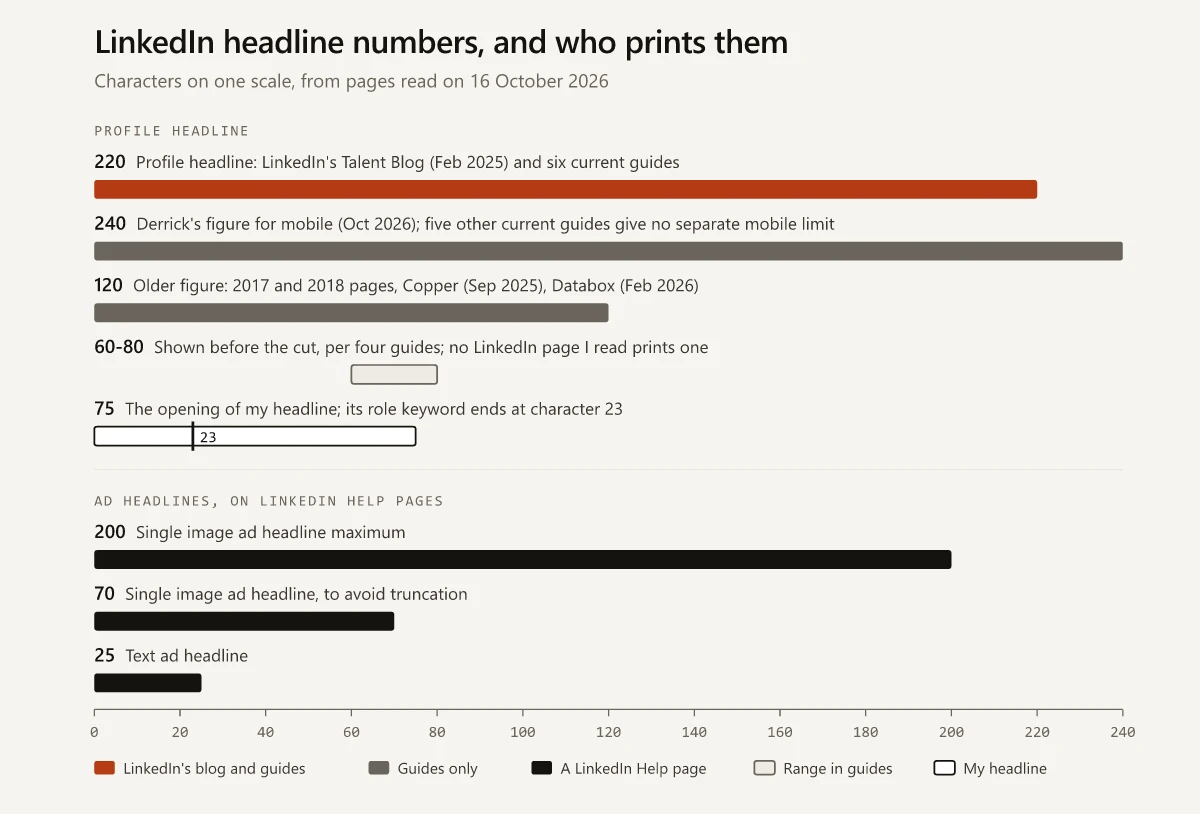
The LinkedIn headline character limit is 220 per LinkedIn's own blog, yet none of 42 Help pages I read prints it. Here are the limits LinkedIn does state, dated.
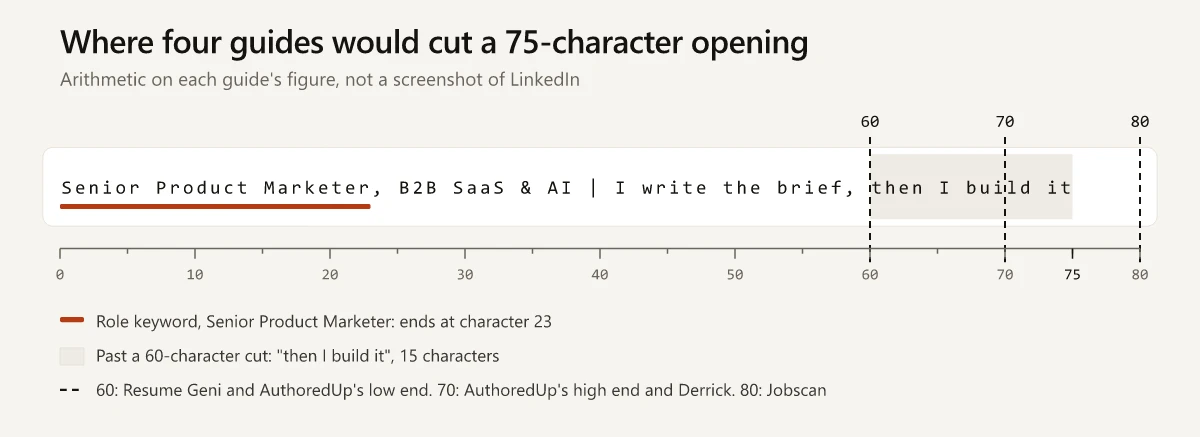
The opening of the LinkedIn headline I rewrote on 25 September 2026, “Senior Product Marketer, B2B SaaS & AI | I write the brief, then I build it”, runs to 75 characters, which is 5 to 15 more than the 60 to 70 that AuthoredUp’s guide to LinkedIn character limits says display in search results, connection requests and comment sections. LinkedIn’s own figure for the profile headline is 220, published in a February 2025 post on its Talent Blog that tells recruiters “You get 220 characters”, so the LinkedIn headline character limit has a LinkedIn source, just not on any Help page I read.
I trust a LinkedIn limit only when a LinkedIn page prints it. On that rule, 220 is safe to write to, while the figures for how much of a headline shows before the cut come from guides, and no LinkedIn page I read gives one.
What Is the LinkedIn Headline Character Limit in 2026?
220 characters. LinkedIn’s Talent Blog says so (27 February 2025), as do Linked Helper (29 September 2026) and AuthoredUp (11 August 2026), but none of the 42 LinkedIn Help pages I read on 16 October 2026 prints it. LinkedIn’s 200 is an ad headline cap; 120 is an old figure.
Linked Helper’s character limit guide is by Margarita Servar and AuthoredUp’s by Ivana Todorovic. Jobscan’s headline guide by Kelsey Purcell (published 18 November 2025, modified 14 September 2026) and Derrick’s headline guide (updated October 2026) also print 220, and Derrick adds 240 on mobile.
Older pages print 120: a May 2017 article Natalie Joan MacLellan published on LinkedIn, and a November 2018 career-coach newsletter that gave 120 on the website and 220 in the mobile app. Copper’s headline examples, dated 18 September 2025, still say “you’ve only got 120 characters”.
I read the Help pages logged out from an Indian connection. They include Edit the Introduction section on your profile, which lists Headline among the fields you can edit, and Edit the About section on your profile, which calls the headline “the text below your name on your profile”. Neither gives a number. LinkedIn’s Help search returned an HTTP 400 error to those logged-out requests, so I worked through its topic pages and links instead. Two of the pages I read link to one on enhancing your headline with LinkedIn’s Profile Writing Assistance, and that page returned a 404 logged out, so a page I could not read could still carry a number.
Limits LinkedIn States on Its Own Help Pages
These limits are stated on LinkedIn’s Help pages, quoted as I read them on 16 October 2026:
| Field | LinkedIn’s words | Help page | Last updated (as shown on 16 Oct 2026) |
|---|---|---|---|
| Post | ”Posts can contain up to 3,000 characters.” | Post and share updates | 7 days ago |
| Invitation note, length | ”Each message can be up to 200 characters” | Personalize invitations to connect | 5 months ago |
| Invitation notes per month | ”You can add a personalized message to up to three connection requests per month”; Premium members can send “unlimited personalized invitations to all their connection requests (connection request limits may still apply)“ | Personalize invitations to connect | 5 months ago |
| InMail (Premium) | “up to 200 characters in the subject line and up to 2000 characters in the body” | Send an InMail Message | 6 months ago |
| InMail in Sales Navigator | ”Add a subject line (200 character limit) and enter your message (1900 character limit).” | Send an InMail message in Sales Navigator | 10 months ago |
| Single image ad: headline | ”Use up to 70 characters to avoid truncation (200 character maximum).” | Single image ads advertising specifications | 2 months ago |
| Single image ad: introductory text | ”Use up to 150 characters including spaces, emojis, and punctuation to avoid truncation (3,000 character maximum).” | Single image ads advertising specifications | 2 months ago |
| Single image ad: description | ”Use 100 characters to avoid truncation (300 character maximum).” | Single image ads advertising specifications | 2 months ago |
| Ad name | ”Use up to 255 characters.” | Single image ads advertising specifications | 2 months ago |
| Text ad: headline and description | ”Use up to 25 characters, including spaces” and “Use up to 75 characters, including spaces” | Text Ads - Advertising Specifications | 2 years ago |
| Article SEO title and description | Stated on LinkedIn’s SEO settings page and covered in my LinkedIn newsletter vs article comparison | SEO settings for articles or Newsletters | 3 years ago |
Notes on the table:
- The two InMail pages cover different products: Premium InMail sent from LinkedIn.com allows a 2,000-character body, and Sales Navigator InMail allows 1,900, where “Signatures are limited to 150 characters, which are counted in the total number of message characters.”
- The post page suggests writing an article on LinkedIn’s publishing platform once a post would run past 3,000 characters.
- The ad name field is where a campaign naming convention for paid channels has to fit.
- Image and video sizes from the same Help pages are in my LinkedIn post size reference.
LinkedIn Profile Headline vs Ad Headline Limits
The profile headline shares its name with LinkedIn ad fields, and on the 42 Help pages I read, every headline number belongs to an ad, as with the single image and text ad figures below:
| Headline | Limit | Where LinkedIn states it |
|---|---|---|
| Profile headline, “the text below your name on your profile” | 220 | The Talent Blog post of 27 February 2025, not a Help page |
| Single image ad headline | 70 to avoid truncation, 200 maximum | Single image ads advertising specifications; LinkedIn’s Advertise on LinkedIn specs page lists 70 as a text recommendation, with no maximum |
| Text ad headline | 25, including spaces | Text Ads - Advertising Specifications |
Linked Helper’s table prints the single image ad’s “70 (max 200)” in its ads section, labelled Sponsored Content, below the profile headline’s 220, and that label is the thing to check before you copy a number from any guide. The two 70s are separate figures too: LinkedIn’s ad pages use 70 for ad headlines, while AuthoredUp’s “60-70” and Derrick’s “about 70” describe profile headlines.
Limits LinkedIn’s Help Pages Do Not State, and Where Guides Disagree
For each field below, the LinkedIn Help page that covers it gives no number, or the guides print a number that differs from it or from each other. Guide figures are as each page showed them on 16 October 2026:
| Field | LinkedIn’s Help page | What guides print |
|---|---|---|
| Profile headline | Edit the Introduction section lists Headline, with no number (8 months ago); the 220 is on LinkedIn’s Talent Blog, not a Help page | 220: Linked Helper, AuthoredUp, Jobscan, Resume Geni and Jacqueline Fisch (“As of September 2026”). Derrick: 220 on desktop, 240 on mobile. 120: Copper (September 2025) and Databox (updated February 2026) |
| Headline shown before the cut | No figure on any page I read | 60 (Resume Geni), about 60-70 (AuthoredUp), about 70 (Derrick), 80 (Jobscan) |
| About section | Edit the About section, no number (2 years ago) | 2,600 (Linked Helper, AuthoredUp). AuthoredUp shows “~300” before See more in its quick reference table and “~370” in its interactive one |
| Comment | Edit comments in your LinkedIn feed, no number (11 months ago) | 1,250 (Linked Helper, AuthoredUp). AuthoredUp says sources range from 1,250 to 1,750 and that it “verified it at 1,250 characters in testing as of March 2026” |
| Message to a connection | Send messages to connections on LinkedIn Messaging, no number (1 week ago) | 8,000 (Linked Helper, AuthoredUp) |
| Post text before see more | Post and share updates, no number | About 200 (Linked Helper); about 210 on desktop and 140 on mobile (AuthoredUp) |
| Experience description | Manage your profile Experience section, no number (2 years ago) | 2,000 (Linked Helper); “2,000 per role” (AuthoredUp) |
| Article title | Write and publish articles on LinkedIn, no number (2 months ago) | 100 (Linked Helper), 150 (AuthoredUp) |
| Invitation note | 200 characters, three notes a month, unlimited notes with Premium (connection request limits may still apply) | 300 (Linked Helper, AuthoredUp), with no monthly cap mentioned |
| InMail body | 2,000 on the Premium InMail page, 1,900 in Sales Navigator | Linked Helper prints 1,900 in its summary and table without naming Sales Navigator, and 2,000 in its InMail section; AuthoredUp prints 2,000 |
The LinkedIn About section character limit of 2,600 and the LinkedIn comment character limit of 1,250 both come from guides; no Help page I read gives either number. A note drafted to the guides’ 300 characters runs 100 over the 200 that LinkedIn’s invitations page states.
The other guides in the table are Resume Geni’s marketing manager headline guide by Blake Crosley (last updated July 2026), Jacqueline Fisch’s headline examples (25 September 2026) and Databox’s headline examples by Alexander B. Pavlinek, which still mentions “your 120-characters of LinkedIn profile headline” after its February 2026 update. Of the ten third-party pages I read, only MacLellan’s 2017 article links a LinkedIn Help page, and that link, to a page on company page character limits, now returns a 404.
How Much of a LinkedIn Headline Shows Before the Cut
None of the LinkedIn pages I read gives a number for it. Four guides do, and they disagree on the number and on the places:
| Guide | Characters it says show | Where it says the cut happens |
|---|---|---|
| Resume Geni (July 2026) | 60 | ”in search results, comments, and mobile views” |
| AuthoredUp (11 August 2026) | About 60-70 | ”in search results, connection requests, and comment sections” |
| Derrick (October 2026) | About 70 | ”in the mobile preview and in search results” |
| Jobscan (published 18 November 2025, modified 14 September 2026) | 80 | ”mobile search results and recruiter preview cards” |
None of the four links a LinkedIn Help page for its figure. Set against them, my 75-character opening would be cut like this:
| Cut at | Whose figure | Shown | Past the cut |
|---|---|---|---|
| 60 | Resume Geni; AuthoredUp’s low end | Senior Product Marketer, B2B SaaS & AI | I write the brief, | then I build it |
| 70 | AuthoredUp’s high end; Derrick | Senior Product Marketer, B2B SaaS & AI | I write the brief, then I bui | ld it |
| 80 | Jobscan | All 75 characters | Nothing of the opening |
That is arithmetic on the guides’ numbers, not a screenshot of where LinkedIn cuts my headline. The role keyword ends at character 23 and the market, “B2B SaaS & AI”, at 38, inside all four figures. The line after the separator, which I ran through a feature, benefit and value test, fits whole only under Jobscan’s 80.
LinkedIn’s page on profile appearances counts an appearance wherever your name and headline show up across LinkedIn, which my explainer on LinkedIn search appearances vs profile views breaks down by place.
LinkedIn Headline Examples for Marketers, With Character Counts
I wrote the 15 headlines below for this post as illustrations, and they are not anyone’s real profile. Each starts with the role keyword, which ends between character 11 and character 32, inside the strictest guide’s 60, and each stays under 220. Counts include spaces and separators and leave out the quote marks.
| Role | Headline (illustration) | Role keyword ends at | Total |
|---|---|---|---|
| Product marketing | ”Product Marketing Manager | B2B SaaS | Positioning, launches and sales enablement that turn a roadmap into a story buyers repeat” | 25 | 128 |
| Senior product marketing | ”Senior Product Marketing Manager | Developer Tools & APIs | Positioning, pricing and launch plans for technical buyers | Competitive intel, win-loss interviews and battlecards reps open on calls” | 32 | 194 |
| Demand generation | ”Demand Generation Manager | B2B SaaS | Paid search, LinkedIn Ads, ABM and nurture programs built around pipeline, not lead volume | HubSpot and Salesforce” | 25 | 154 |
| Content marketing | ”Content Marketing Lead | B2B SaaS | Search-led articles, research reports and newsletters that sales teams forward to buyers” | 22 | 124 |
| SEO | ”SEO Manager | Technical SEO, content strategy and Search Console reporting | Organic growth for B2B and ecommerce sites” | 11 | 119 |
| Growth | ”Growth Marketer | Onboarding, pricing-page and paid social experiments | Subscription apps” | 15 | 90 |
| Lifecycle and email | ”Lifecycle Marketing Manager | Email, in-app and SMS journeys | Activation, retention and win-back for subscription products” | 27 | 123 |
| Brand | ”Brand Marketing Manager | Brand strategy, integrated campaigns and creative direction | Consumer tech and D2C” | 23 | 109 |
| Marketing operations | ”Marketing Operations Manager | HubSpot, Salesforce and attribution | Lead routing, clean data and reports that sales and finance both use” | 28 | 137 |
| Performance marketing | ”Performance Marketing Manager | Google Ads, Meta and LinkedIn Ads | Budgets planned against pipeline and CAC payback” | 29 | 116 |
| Account-based marketing | ”Account-Based Marketing Manager | Enterprise ABM programs, intent data and field events | Planning target accounts with sales” | 31 | 125 |
| Marketing analytics | ”Marketing Analytics Manager | GA4, SQL and attribution modeling | Turning campaign data into budget decisions” | 27 | 109 |
| Social media | ”Social Media Manager | LinkedIn, Instagram and short-form video | Community-led content calendars for B2B brands” | 20 | 112 |
| Head of marketing | ”Head of Marketing | Building B2B SaaS marketing teams from first hire to Series B | Positioning, demand generation, brand and product marketing | Hiring plans, budgets and board reporting” | 17 | 187 |
| Early career | ”Digital Marketing Associate | SEO, Google Ads and GA4 | MBA (Marketing) 2026 | Open to B2B marketing roles in Bengaluru or remote” | 27 | 129 |
The same words in a different order show what the third column measures. “Helping B2B teams turn launches into stories buyers repeat | Product Marketing Manager” is 86 characters, and its role keyword ends at character 86, past all four guides’ figures. Moved to the front, the role keyword ends at 25 and the total stays 86.
How Long Should Your LinkedIn Headline Be?
Up to 220 characters, with the role keyword inside the first 60. For the total, the guides give ranges: Jobscan suggests 160 to 200 characters “to avoid truncation and maximize keyword coverage”, and Derrick suggests keeping the whole headline “between 180 and 200 characters”.
LinkedIn’s Talent Blog gives its recruiter readers different advice. Rather than “simply listing your job title (which is displayed below anyway)”, it says to “put those 220 characters to good use by showing who you are and what you’re all about”. A headline can follow both pieces of advice by opening with the role keyword and spending the characters after it on that material.
I would not pad a headline to reach a range: the only profile headline figure on any of LinkedIn’s own pages I read is the 220 cap, and neither Jobscan nor Derrick links a LinkedIn Help page for its range. Leave room after character 60 for the other job titles and terms people search for. LinkedIn’s page on the order of people search results says “Standard job titles may be boring, but they are what other members search for.”
Recheck the LinkedIn Headline Character Limit Each Quarter
LinkedIn updates these Help pages. The post page’s stamp read “7 days ago” on my check, and the invitations page, the row the guides contradict, read “5 months ago”. A Help page could also start printing a profile headline number, which would give 220 a Help page source.
Until then, the LinkedIn headline character limit of 220 rests on a blog post, and the figures for the cut rest on guides. Write to 220, keep the role keyword inside the first 60 characters, and treat any other limit missing from the first table as a guide’s claim until a Help page prints it. Start by counting where the role keyword ends in your own headline.
Frequently Asked Questions
Is the LinkedIn headline limit 120 or 220 characters?
220. LinkedIn's Talent Blog told recruiters 'You get 220 characters' in February 2025, and six current guides print 220. 120 is the older figure on 2017 and 2018 pages, and guides from Copper and Databox still repeat it.
Why does LinkedIn say 200 characters?
On the LinkedIn Help pages I read, 200 belongs to other fields, including the single image ad headline (200 maximum, 70 to avoid truncation), the personalized invitation note (up to 200 characters) and the InMail subject line (up to 200). None of them is the profile headline.
How much of a LinkedIn headline shows before it is cut?
No LinkedIn page I read on 16 October 2026 gives a figure. Guides say 60 characters (Resume Geni), about 60-70 (AuthoredUp), about 70 (Derrick) and 80 (Jobscan), so a role keyword that ends inside the first 60 characters clears all four claims.
Is the LinkedIn headline limit different on mobile?
No LinkedIn page I read gives a separate mobile limit. Derrick's guide says 220 on desktop and 240 on mobile, five other current guides give 220 alone, and a 2018 newsletter's split of 120 on the website and 220 in the app predates them.
What is the LinkedIn post character limit?
3,000 characters. LinkedIn's Post and share updates Help page says posts can contain up to 3,000 characters and points longer pieces to an article on LinkedIn's publishing platform.