YouTube Character Limit: Every Field, and Who States It
The YouTube character limit is 100 for a title and 5,000 for a description, but the Data API counts that 5,000 in bytes. Each field, with who states it.
A Hindi description written to YouTube Help’s 5,000-character figure can be three times longer than the same field allows in YouTube’s own Data API. Help’s Edit video settings page gives descriptions “a character limit of 5,000 characters”, while the Data API videos reference, last updated 3 November 2026, gives the same field “a maximum length of 5000 bytes”. The YouTube character limit for a description depends on which YouTube page you read, and on the script you write in: each Devanagari code point, letters and vowel signs alike, is 3 bytes in UTF-8.
That is why I sort every YouTube figure below by who states it. A limit counts as YouTube’s only when a YouTube Help page or the Data API reference prints it; everything else is a guide’s number, named, and for any description that is not plain English, I budget in bytes.
YouTube Help gives a video title 100 characters and a description 5,000 characters. The Data API reference repeats the 100 but counts the description as 5,000 bytes, and it, not the Help pages I read, sets tags at 500 characters in total. Comment, playlist and visible-title figures come from guides, not from the YouTube pages I read in November 2026.
What Is the YouTube Title Character Limit?
100 characters. YouTube Help’s Edit video settings page says “Video titles have a character limit of 100 characters and cannot include invalid characters.” The page does not list which characters are invalid. The Data API reference fills that in for snippet.title: “a maximum length of 100 characters and may contain all valid UTF-8 characters except < and >”.
| Title rule | YouTube Help | Data API reference |
|---|---|---|
| Maximum | 100 characters | 100 characters |
| Banned characters | ”invalid characters”, not listed | < and > |
| Unit | characters | characters |
The title is the field where both YouTube pages agree on the number and the unit: 100 characters, with no byte figure on either page. Channel mentions sit inside that budget: YouTube’s mentions Help page says “You can mention as many creators as you want as long as their names fit within the character limit.”
How much of the 100 shows before a title is cut is a different question, and YouTube does not answer it on the pages I read; the guides’ cut-off figures are compared in the last table before the byte counter.
YouTube Character Limit by Field: YouTube’s Pages vs the Guides
Read on 5 November 2026, field by field. “Not stated” means not stated on the YouTube pages I read for this post, which are linked in each section below.
| Field | YouTube Help | YouTube Data API reference | Figure guides print (who) |
|---|---|---|---|
| Video title | 100 characters | 100 characters, no < or > | 100; ~70 visible (Influencer Marketing Hub, How Many Words); ~60 on desktop (UtilHQ) |
| Video description | 5,000 characters | 5,000 bytes, no < or > | 5,000 characters (all three guides); ~157 above the fold (How Many Words); shortened at about 100 (Influencer Marketing Hub) |
| Tags | No number; “a minimal role” | 500 characters in total | 500 (How Many Words, UtilHQ) |
| Hashtags | More than 60 and all are ignored | Not stated | 15 (How Many Words) |
| Channel name | No number; change it twice in 14 days | 30 characters (brandingSettings.channel.title) | 100 (How Many Words) |
| Handle | 3 to 30 characters | Not stated | 30 (How Many Words) |
| Channel description | Not stated | 1,000 characters | 1,000 (Influencer Marketing Hub, How Many Words) |
| Channel keywords | Not stated | 500 characters in total | Not printed |
| Comment | Not stated | Not stated | 10,000 (Influencer Marketing Hub, How Many Words) |
| Playlist title | Not stated | Not stated | 150 (How Many Words) |
| Playlist description | Not stated | Not stated | 5,000 (How Many Words) |
| Shorts title | No separate figure | No separate figure | 100, ~40 on shelf tiles (How Many Words) |
The three guides, as their pages showed them:
| Guide | Byline | Date on the page | Bytes mentioned? |
|---|---|---|---|
| Influencer Marketing Hub | Koba Molenaar | November 5th, 2026 (page markup: published 2 December 2021) | No |
| How Many Words | No author named | April 29, 2026 | No |
| UtilHQ | UtilHQ Team | January 4, 2026 | No |
None of the three uses the word “byte” anywhere on its page, so a reader who writes descriptions in Hindi, Tamil or Bengali gets no warning from them. YouTube Posts have their own caption, poll and quiz limits on a separate Help page; I set those out in what YouTube publishes for post images and polls.
YouTube Description Character Limit: Characters in Help, Bytes in the API
The Data API videos reference linked above says of snippet.description: “The property value has a maximum length of 5000 bytes and may contain all valid UTF-8 characters except < and >.” YouTube Help says 5,000 characters on two pages: Edit video settings, and Tips for video descriptions, which says “The description allows a maximum of 5000 characters.”
In UTF-8, the encoding the API names, a code point costs 1 to 4 bytes. I ran each sample below through Node 22’s Buffer.byteLength on 5 November 2026. This is arithmetic on the encoding, not a test of YouTube Studio or of an API upload:
| Character | Code point | UTF-8 bytes | Most per 5,000 bytes |
|---|---|---|---|
| Latin letter A | U+0041 | 1 | 5,000 |
| e with acute accent | U+00E9 | 2 | 2,500 |
| Hindi ka (Devanagari) | U+0915 | 3 | 1,666 |
| Bengali ka | U+0995 | 3 | 1,666 |
| Tamil ka | U+0B95 | 3 | 1,666 |
| Indian rupee sign | U+20B9 | 3 | 1,666 |
| Rocket emoji | U+1F680 | 4 | 1,250 |
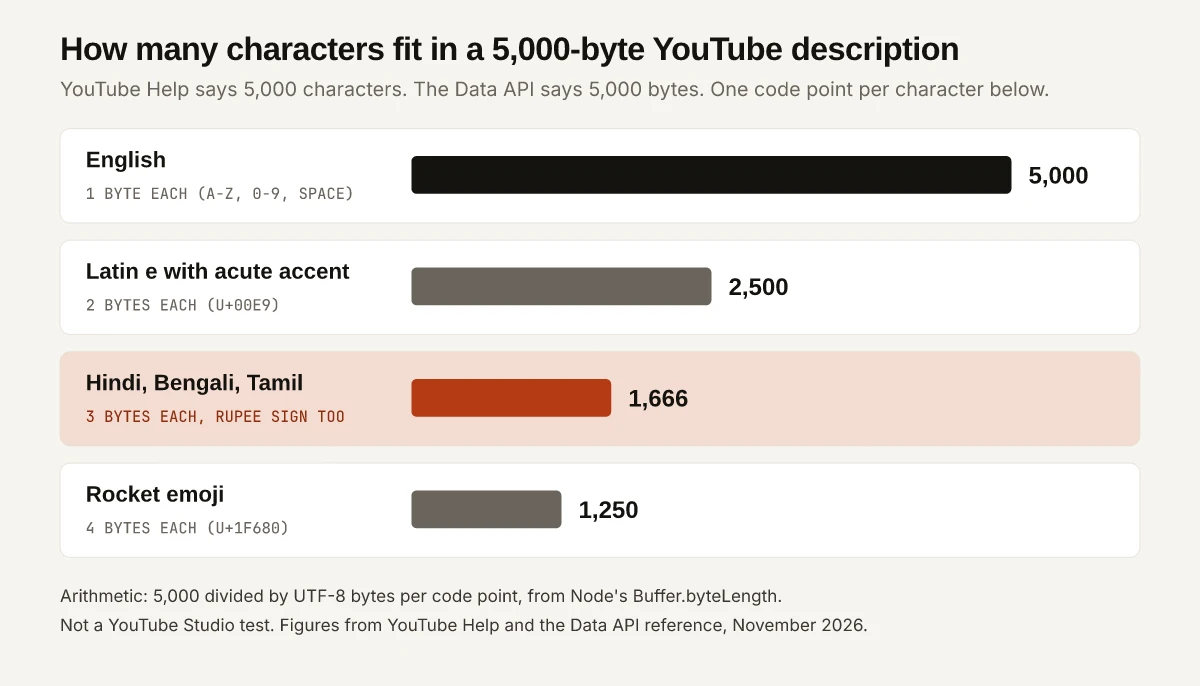
A Hindi Description Worked Through
The same arithmetic on Hindi text, with each string built from its code points so you can rebuild it:
| String | Code points | UTF-8 bytes | Fits 5,000 bytes? |
|---|---|---|---|
| namaste (U+0928 U+092E U+0938 U+094D U+0924 U+0947) | 6 | 18 | Yes |
| namaste duniya, with one space (13 code points) | 13 | 37 | Yes |
| ka (U+0915) repeated 1,666 times | 1,666 | 4,998 | Yes |
| ka repeated 1,667 times | 1,667 | 5,001 | No, 1 byte over |
| ka repeated 5,000 times, Help’s character figure | 5,000 | 15,000 | No, three times the cap |
| 2,000 English letters plus 1,000 ka | 3,000 | 5,000 | Yes, exactly at the cap |
Spaces, digits and English letters in a Hindi description cost 1 byte each, so a mixed description lands between the two extremes. The last row shows how that adds up: a 2,000-character English link block and a 1,000-character Hindi summary fill the 5,000 bytes together while holding 3,000 characters.
The API figure is written for the Data API’s video resource, the one its videos.insert and videos.update methods send; YouTube Help states characters for the description box, and I have not tested which count Studio applies. The API reference also carries a note on links in the same field: “For URLs in the description to be rendered as clickable links in the YouTube UI, the channel must meet platform-level requirements, such as channel verification or having Advanced Features enabled.”
X weighs Hindi differently again, at 1 per code point inside its 280, and how X weighs its 280 by script runs Devanagari samples through X’s own library. Threads’ API counts emoji by their UTF-8 bytes, which the Threads character limit by field sets out.
YouTube Tags Character Limit: 500, Commas and Quotes Included
The 500 comes from the Data API reference, not from the YouTube Help pages I read. The API’s snippet.tags[] entry says “The property value has a maximum length of 500 characters” and then sets two counting rules:
- “commas between items in the list count toward the limit”
- “If a tag contains a space, the API server handles the tag value as though it were wrapped in quotation marks, and the quotation marks count toward the character limit.”
The reference’s own example: “the tag Foo-Baz contains seven characters, but the tag Foo Baz contains nine characters.” Applied to a three-tag list, by my arithmetic on that rule:
| Tag | Letters and spaces | Counted as |
|---|---|---|
| youtube title limit | 19 | 21, with the two quotation marks |
| youtube tags | 12 | 14 |
| hindi | 5 | 5 |
| Commas between the 3 tags | 2 | 2 |
| Total | 42 of 500 |
Every multi-word tag costs 2 more than its visible length. YouTube Help’s Edit video settings page gives tags no number and limits their weight: “Tags can be useful if the content of your video is commonly misspelled. Otherwise, tags play a minimal role in your video’s discovery.” UtilHQ adds that “individual tags have no strict length limit”, which the API page neither confirms nor contradicts, since it gives only the list total.
YouTube Hashtag Limit: 60 in YouTube Help, 15 in a Guide
YouTube’s hashtags Help page sets the over-tagging line: “If a video or playlist has more than 60 hashtags, we’ll ignore each hashtag on that content.” It adds that “up to three hashtags that are considered most engaging will appear by your video title”, and that hashtags “don’t contain any spaces.”
| Hashtag figure | Who states it | What it says |
|---|---|---|
| 60 | YouTube Help | Over 60, every hashtag on the video or playlist is ignored |
| 3 | YouTube Help | Up to three from the description appear by the title |
| 15 | How Many Words | ”Up to 15 per video. Above 15, all hashtags are ignored.” |
| 5 | Influencer Marketing Hub | Advice: “it’s best to include no more than five” |
The 15 contradicts YouTube’s page; the 5 is advice, not a limit. Instagram sets a much lower cap, and the Instagram hashtag limit and who sets it traces each figure to its source.
Channel Name, Handle, Description and Keywords
The channel fields split across Help and the Data API channels reference:
| Channel field | Limit | Source and wording |
|---|---|---|
| Channel name | 30 characters | API, brandingSettings.channel.title: “The title has a maximum length of 30 characters.” |
| Channel name changes | Twice in 14 days | Manage your channel’s profile: “You can change your channel name twice within a 14-day period.” No length given |
| Handle | 3 to 30 characters | YouTube handles Help: “Is between 3-30 characters”, with “Han/Hangul: 1-10 characters” and “Ethiopic/Hiragana/Katakana: 2-20 characters” |
| Channel description | 1,000 characters | API, snippet.description and brandingSettings.channel.description |
| Channel keywords | 500 characters in total | API: “the 500 character limit is not a per-keyword limit but rather a limit on the total length of all keywords” |
The channel name is where a guide and YouTube disagree. How Many Words prints 100 characters; the one YouTube figure I found is the API’s 30, on a branding property, and the profile Help page gives no number. The same page warns that “Changing your name will remove your verification badge.” Channel keywords are a space-separated list, and the API says they “might be truncated” past 500 characters or if they “contained unescaped quotation marks”.
LinkedIn shows the same gap between official pages and guides for profile fields, set out in who states each LinkedIn character limit.
Comment, Playlist and Shorts Figures Found Only in Guides
These figures circulate in guides with no YouTube page behind them, on the pages I read:
| Field | Guide figure (who) | What YouTube’s page says |
|---|---|---|
| Comment | 10,000 characters: “YouTube comments may be as long as 10,000 characters!” (Influencer Marketing Hub); “Comments (10,000 characters)” (How Many Words) | The Data API comments reference describes textOriginal as “The original, raw text of the comment” and gives no maximum; the comment settings Help page covers holds and filters, not length |
| Playlist title | 150 characters (How Many Words) | The Data API playlists reference says “The playlist’s title.” with no maximum; the playlists Help page limits how many public playlists a channel creates per day, not title length |
| Playlist description | 5,000 characters (How Many Words) | “The playlist’s description.” with no maximum |
| Shorts title | 100, with “Shelf tiles show ~40 chars” (How Many Words) | Edit video settings gives one title limit, 100, with no Shorts figure |
I have not tested any of these in YouTube, so treat each as the guide’s number. For comments, 10,000 is a guide figure that no YouTube page I read confirms. Shorts earnings, a separate question from Shorts titles, are covered in the YouTube Shorts monetization requirements for India.
How Much of a Title and Description Shows Before the Cut
No YouTube page I read gives a number. Tips for video descriptions describes the description “as two parts - what viewers see before clicking ‘Show more’ on desktop or ‘more’ on mobile and what they see after”, and its advice is to “Check how your video description appears in YouTube search, on the video’s watch page, and on various mobile devices.”
The guides give numbers that do not agree:
| Cut-off | Influencer Marketing Hub | How Many Words | UtilHQ |
|---|---|---|---|
| Title, search results | 70, “visible to users” (no placement named) | ~70 | ~60 desktop, 40-50 mobile |
| Title, suggested videos | ~55 desktop, 35-45 mobile | ||
| Shorts shelf title | ~40 | ||
| Description before the cut | ”about 100 characters”; keywords in the first 157 | ~157 | 150-200; ~200 desktop, 100-150 mobile |
The decision rule I would write to: put the keyword and the reason to click inside the first 35 characters of the title, and the description’s hook and main link inside its first 100. Both sit at or under the lowest figure any of the three guides prints, so they hold whichever guide is right. The same front-load-then-trim discipline for web page titles is worked through in my SEO title examples.
Count a YouTube Description in Bytes Before You Paste It
Node’s Buffer.byteLength returns the UTF-8 byte count the Data API’s limit is written in. Save this as bytes.cjs and run node bytes.cjs:
const cp = (...c) => String.fromCodePoint(...c);
const namaste = cp(0x928, 0x92E, 0x938, 0x94D, 0x924, 0x947);
const tests = { A: 'A', namaste, rupee: cp(0x20B9), rocket: cp(0x1F680),
  ka1666: cp(0x915).repeat(1666), ka1667: cp(0x915).repeat(1667),
  mixed: 'a'.repeat(2000) + cp(0x915).repeat(1000) };
for (const [name, s] of Object.entries(tests)) {
  const bytes = Buffer.byteLength(s, 'utf8');
  console.log(name, [...s].length, 'code points', bytes, 'bytes', bytes <= 5000);
}
The output on Node 22, 5 November 2026:
A 1 code points 1 bytes true
namaste 6 code points 18 bytes true
rupee 1 code points 3 bytes true
rocket 1 code points 4 bytes true
ka1666 1666 code points 4998 bytes true
ka1667 1667 code points 5001 bytes false
mixed 3000 code points 5000 bytes true
To check a real description, replace a test string with your text, read from a file with require('fs').readFileSync('description.txt', 'utf8'). If the byte count is over 5,000, cut it before it is sent through the Data API.
Recheck the YouTube Character Limit Each Quarter
The Data API reference pages for videos, channels, playlists and comments all show “Last updated 2026-11-03 UTC”, while the YouTube Help pages I read show no update date. Limits change, so recheck each quarter, starting with the description unit (characters in Help, bytes in the API) and the clickable-links note beside it.
Until then, the YouTube character limit is 100 for a title, 5,000 characters or 5,000 bytes for a description depending on the page, and 500 for tags in total; comments and playlists have no figure on the YouTube pages I read. Run your next Hindi or emoji-heavy description through Buffer.byteLength before you schedule it.
Frequently Asked Questions
What is the YouTube title character limit?
100 characters. YouTube Help's Edit video settings page says video titles have a character limit of 100 characters, and the YouTube Data API reference gives the same 100, allowing any valid UTF-8 character except < and >, as of November 2026.
What is the YouTube description character limit?
YouTube Help says 5,000 characters. The Data API reference says 5,000 bytes, and a Hindi, Bengali or Tamil letter is 3 bytes in UTF-8, so 1,666 of them fill the API's cap. English text is 1 byte per character, so the two figures match for it.
What is the YouTube tags character limit?
500 characters in total, per the YouTube Data API reference. Commas between tags count, and a tag with a space is counted as if it had quotation marks around it. YouTube Help's Edit video settings page gives no tag number and says tags play a minimal role in discovery.
What is the YouTube comment character limit?
Guides from Influencer Marketing Hub and How Many Words print 10,000 characters. None of the YouTube Help pages or Data API pages I read on 5 November 2026 states a comment maximum, including the Data API's comments reference.
How many hashtags can you put on a YouTube video?
YouTube Help says that if a video has more than 60 hashtags, YouTube ignores every hashtag on it, and that up to three hashtags from the description can appear by the title. How Many Words prints a 15-hashtag cap that YouTube's page does not state.