WhatsApp Character Limit for Status: 700 or 139?
The WhatsApp character limit by field: what Meta's developer docs state, like About 139 and message 4,096, and which figures, like status 700, only guides print.
Is the WhatsApp status limit 700 characters or 139? typecount.com’s guide, updated 30 August 2026, says text statuses “cap out at 700 characters”, and lettercounter.org prints 700 too. timelines.ai’s character counter page says “139 characters for statuses”. Every WhatsApp character limit those guides print comes without a link to a WhatsApp or Meta page, so I read Meta’s own WhatsApp developer docs on 5 November 2026 and set the two side by side.
| Field | Guides print | What a Meta or WhatsApp page states |
|---|---|---|
| Text status | 700 (typecount, lettercounter); 139 (timelines.ai) | No figure on any page I could read |
| About | 139 (typecount, lettercounter) | 139, for a business profile set through the API |
| Message | 65,536 for the app (typecount, lettercounter) | 4,096, for a message sent through the Cloud API |
| Photo or video caption | 1,024 (typecount, lettercounter) | 1,024, for an API image or video message |
| Group description | 2,048 (typecount); 500 (lettercounter) | 2,048, for a group created through the Groups API |
The 700 status figure is the one I could not confirm on any WhatsApp or Meta page. Meta documents the WhatsApp Business Platform field by field, with an “Updated” date on each page, and I would write to those figures and treat the consumer-app numbers as guide estimates, which disagree with each other by as much as 500 against 2,048 for a group description.
WhatsApp Character Limit by Field: Guides vs Meta’s Docs
The full table, one row per field. The Meta column covers the WhatsApp Business Platform (the Cloud API), the version of WhatsApp a business sends from through code; the guides mostly describe the consumer app you type into. All pages were read on 5 November 2026, and each Meta page is linked in the section that covers its field.
| Field | App | Figure guides print | What Meta publishes (page, Updated date) | Agreement |
|---|---|---|---|---|
| Text status | Consumer | 700 (typecount, lettercounter); 139 (timelines.ai) | Not on any WhatsApp or Meta page I could read | Guides conflict |
| Photo or video caption | Consumer / API | 1,024 (typecount, lettercounter) | “Maximum 1024 characters” (Image messages, 24 Jun 2026; Video messages, 21 May 2026) | Agree |
| Message | Consumer / API | 65,536 for the app (typecount, lettercounter); 1,600 for “Business API message” (lettercounter) | “Maximum 4096 characters” (Text messages, 2 Jul 2026) | Guides conflict with Meta on the API figure |
| About | Consumer / API | 139 (typecount, lettercounter) | “between 1 and 139 characters” (Business profiles, 16 Jun 2026) | Agree |
| Business description | API | Not printed | ”Character limit 512” (Business profiles) | Meta only |
| Business address | API | Not printed | ”Character limit 256” (Business profiles) | Meta only |
| Business email | API | Not printed | ”Character limit 128” (Business profiles) | Meta only |
| Business websites | API | Not printed | ”a maximum of 2 websites with a maximum of 256 characters each” (Business profiles) | Meta only |
| Display name | Consumer | 25 (typecount, lettercounter) | No character figure on Meta’s Display names page (16 Jun 2026) | Guides only |
| Group name | Consumer / API | 100 (typecount, lettercounter) | Group subject “Maximum 128 characters” (Group management, 21 May 2026) | Differ: 100 vs 128 |
| Group description | Consumer / API | 2,048 (typecount); 500 (lettercounter) | “Maximum 2048 characters” (Group management) | typecount matches Meta |
| Channel name or description | Consumer | No figure in the guides I read | No figure on any page I read | Unknown |
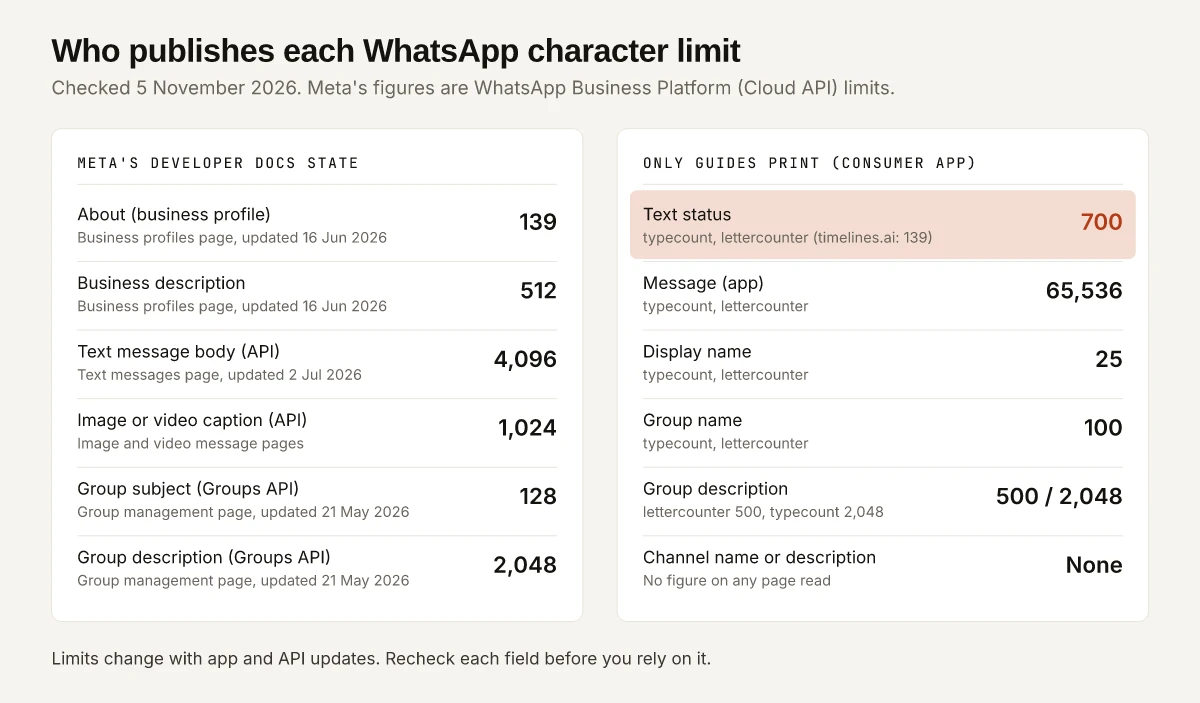
Rows marked “Meta only” are fields the Business Platform has and the guides skip. The row marked “Guides only” is a number you can still write to, as long as you treat it as the guides’ claim.
Is the WhatsApp Status Limit 700 or 139?
700 is the figure two guides give for a text status, and 139 belongs to the About field. No WhatsApp or Meta page I could read on 5 November 2026 states either number for a status.
typecount notes that the About field once carried the Status name: of the About section it says “WhatsApp used to call it Status”, and it gives that section 139 characters. timelines.ai’s page, updated 15 December 2025, applies 139 to statuses, the updates that typecount says disappear after 24 hours, and pairs it with “1,024 for bulk texts”. So typecount and lettercounter agree on 139 for the profile line under your name, and the three guides split on what a status allows.
| Guide | Date on the page | Text status | About | Byline |
|---|---|---|---|---|
| typecount.com | Published 21 Jan 2026, updated 30 Aug 2026 | 700 | 139 | Martin Sikula |
| lettercounter.org | 29 Jan 2026 | 700 | 139 | None shown |
| timelines.ai | Updated 15 Dec 2025 | 139 | Not given separately | Museyib Abdullayev |
For a status, the practical move follows from what typecount and lettercounter both print: if a text status runs long, post a photo or video and put the words in its caption, which both guides put at 1,024 characters, the same figure Meta publishes for API captions.
Business Profile Limits in Meta’s Docs: About 139, Description 512
Meta’s Business profiles page, updated 16 June 2026, lists the fields a business can set through the WhatsApp Business Profile API, with these rules:
| Parameter | Meta’s wording | What it means for your copy |
|---|---|---|
| about | ”Strings must be between 1 and 139 characters.” “String cannot be empty.” | The About text under a business’s profile image has the same 139 that typecount and lettercounter give for personal profiles |
| about, links | ”You can include hyperlinks, but they do not render as clickable links.” | A URL in About is plain text; put it in the websites field instead |
| about, formatting | ”Markdown is not supported.” | No bold or italics in About |
| description | ”Character limit 512.” | The longer business blurb in the profile; links go in websites |
| address | ”Character limit 256.” | The street address shown on the profile |
| ”Character limit 128.” | Must be in a valid email format, per the same page | |
| websites | ”a maximum of 2 websites with a maximum of 256 characters each” | Two URLs; keep a UTM-tagged link under 256 |
The page also says rendered emojis are supported in About, while emoji Unicode values “must be Java- or JavaScript-escape encoded” when sent through the API. Meta’s page does not say how many characters an emoji counts as, so leave a few characters spare if your About line uses one.
If you are also weighing the verified badge, the rupee prices for Meta Verified on WhatsApp Business in India are in a separate post, and this one stays with the text fields.
WhatsApp Character Limit per Message: 4,096 or 65,536?
4,096 characters is Meta’s published cap for a text message sent through the Cloud API. The 65,536 figure that typecount and lettercounter give for a message typed in the app is not on any WhatsApp or Meta page I could read.
| Message type | Figure | Source |
|---|---|---|
| Text message body, Cloud API | 4,096 | Meta Text messages: “Maximum 4096 characters.” |
| Image caption, Cloud API | 1,024 | Meta Image messages: “Maximum 1024 characters.” |
| Video caption, Cloud API | 1,024 | Meta Video messages: “Maximum 1024 characters.” |
| Message typed in the app | 65,536 | typecount and lettercounter; no WhatsApp page I read |
| ”Business API message” | 1,600 | lettercounter only; Meta’s Text messages page says 4,096 |
The Text messages page adds one behaviour that matters for marketers: “The WhatsApp client automatically hyperlinks URLs in the body text.” A link in a message body becomes tappable, unlike a link in About. The preview image that link pulls in is a separate spec, and WhatsApp’s link preview image row in my OG image size guide covers what Meta’s link preview page asks for.
WhatsApp’s counting method is not on any Meta page I read, and lettercounter’s FAQ says emojis count as “typically 2 or more” characters without a source. X does publish its counting rules, and how X weighs emoji, links and Hindi in its 280 shows how much a counting rule can change the real budget.
Group Name and Description: 100, 128, 500 or 2,048?
Meta’s Groups API caps a group subject at 128 characters and a description at 2,048. The guides print 100 for the group name, and split 2,048 (typecount) against 500 (lettercounter) for the description.
From Meta’s Group management reference, updated 21 May 2026:
- Create group: subject “Maximum 128 characters. Whitespace is trimmed.” Description “Maximum 2048 characters.”
- Update group settings: subject “Maximum length: 128 characters. Must not be empty if provided.” Description “Max length: 2048 characters”.
These are limits for groups a business creates through the API, and the Groups API overview, updated 15 October 2026, scopes them tightly:
| Groups API fact | Meta’s figure or wording |
|---|---|
| Who can use it | ”all businesses with an Official Business Account (OBA)“ |
| Max group participants | 8 |
| Max groups you can create | 10,000 per business number |
| Not available for | ”WhatsApp Business app phone numbers” and numbers onboarded to Multi-solution Conversations |
So 2,048 is Meta’s number for a description on an API-created group, and it matches typecount’s figure for app groups. Whether the app itself stops at 100 or 128 for a group name is not on any WhatsApp page I could read. If a group name has to work everywhere, 100 characters clears both figures.
typecount also says “links in group descriptions aren’t clickable”; Meta’s Group management page does not address links in descriptions, so treat that as typecount’s observation.
Limits No WhatsApp Page I Could Read States
WhatsApp’s Help Center at faq.whatsapp.com served page titles but no article text to a plain request on 5 November 2026: two group help articles I opened, “How to make changes to groups” and “How to create and invite into a group”, returned their titles and nothing else. A Help Center page I could not read could still state a figure, so each row below reads “not on any page I could read”, not “WhatsApp does not publish”.
| Field | Figure in guides | Status on 5 November 2026 |
|---|---|---|
| Text status | 700 (typecount, lettercounter) | Not on any WhatsApp or Meta page I could read |
| Message in the app | 65,536 (typecount, lettercounter) | Not on any WhatsApp or Meta page I could read |
| Display name | 25 (typecount, lettercounter) | Meta’s Display names page gives no character figure; it says you can change a business display name “10 times per 30-day period” |
| Group name in the app | 100 (typecount, lettercounter) | Meta’s Groups API gives 128 for API groups only |
| Channel name or description | None found | No figure on any page I read, so I print none |
lettercounter also lists a 30-second video status. That is a length in time, outside the character limits this post covers.
How to Fit Copy Into Each WhatsApp Field
Decision rules from the two tables above:
- About: write to 139. Meta’s API page, typecount and lettercounter all give 139.
- Text status: treat 700 as a ceiling that two guides print and no WhatsApp page I read confirms; move longer text into a photo or video caption.
- Business description: write to 512, and put links in the two website slots, because About does not make links clickable.
- Messages from the Cloud API: stay under 4,096 per body and 1,024 per caption; split anything longer.
- Group descriptions: 2,048 is Meta’s API cap and typecount’s app figure; if the group was created in the app and the text runs past 500, paste it into the app’s description field to check it fits before you publish the rules.
- Group names: 100 characters satisfies both the guides’ 100 and Meta’s 128.
For the same reference on other networks, LinkedIn’s 220-character headline and the limits LinkedIn states and Instagram’s 5-hashtag rule follow the same pattern of platform page first, guide second.
Recheck the WhatsApp Character Limit Each Quarter
The seven Meta pages linked here carry Updated dates from 21 May to 15 October 2026, and the profile, message and display name pages show v27.0 as the Graph API version in their samples. The consumer-app figures have no WhatsApp page behind them that I could read, so a change to one of them would leave no dated record for me to check.
Each quarter, re-read those seven Meta pages and try WhatsApp’s Help Center again; if a Help Center article becomes readable, its figure replaces the guide figure in that row. Until then, the WhatsApp character limit you can source is Meta’s: 139 for About, 512 for a business description, 4,096 for an API message, 1,024 for a caption and 2,048 for an API group description. For a text status, 700 stays a guide’s estimate, so put anything longer than a few lines in a photo caption.
Frequently Asked Questions
Is the WhatsApp status limit 700 or 139 characters?
700 is the text status figure that typecount.com and lettercounter.org print. 139 is the limit those two guides give the About field, and timelines.ai applies 139 to statuses instead. No WhatsApp or Meta page I could read on 5 November 2026 states a text status limit.
What is the WhatsApp About character limit?
139 characters. Meta's Business Profiles page, updated 16 June 2026, says About strings must be between 1 and 139 characters for a business profile set through the API, and typecount and lettercounter print the same 139 for a personal profile.
What is the WhatsApp group description character limit?
Meta's Groups API reference, updated 21 May 2026, sets a maximum of 2,048 characters for the description of a group a business creates through the API. For groups made in the app, typecount prints 2,048 and lettercounter prints 500.
How many characters can a WhatsApp message have?
Meta's Text messages page, updated 2 July 2026, says a message body sent through the Cloud API can run to 4,096 characters. Guides print 65,536 for a message typed in the app, a figure no WhatsApp page I could read states.
How long can a WhatsApp Business description be?
512 characters, per the description parameter on Meta's Business Profiles page. The same page caps the address at 256 characters, the email at 128 and each of up to 2 websites at 256.