LinkedIn Creator Mode Not Showing? It Was Removed in 2024
LinkedIn creator mode not showing is expected: LinkedIn removed it in 2024. See where each feature went, which one needs a paid plan and how to get a Follow button.
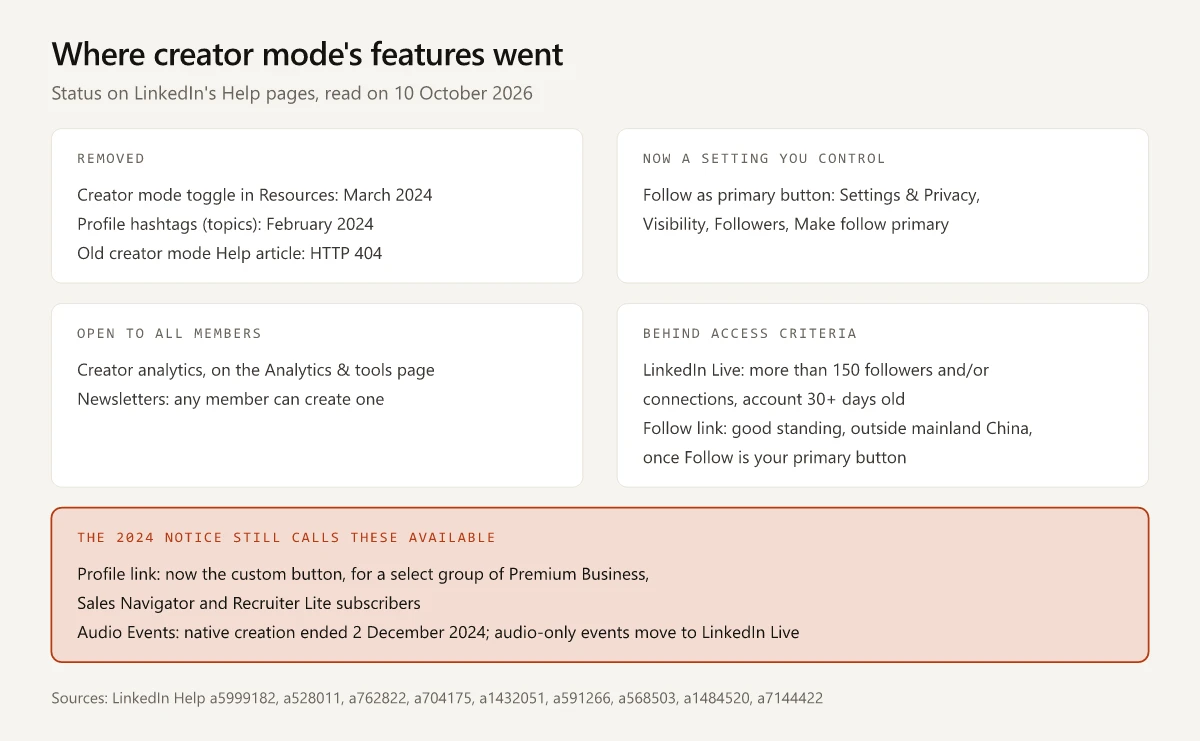
The creator mode toggle that guides still send you to, labelled “Creator mode: Off” in the Resources section of your LinkedIn profile, is the one LinkedIn’s Help notice Updates to Creator Mode scheduled for removal in March 2024. That is why LinkedIn creator mode not showing is the expected result: the features it bundled now sit in separate settings and access rules, or are gone. LinkedIn’s notice is itself out of date on two rows, so the current answer for each feature is the Help page LinkedIn keeps for it, with its Last updated stamp.
Three of the eleven creator mode guides I checked on 10 October 2026 still give the steps for turning that toggle on, the newest of them a forum answer dated 29 July 2025. A fourth guide’s address now redirects to an article that never mentions creator mode. The other seven say creator mode is gone, yet four still list Audio Events as something you can use and none names the plans the profile link now needs.
That is how LinkedIn’s own notice still reads. It calls the profile link available through a custom button that a later Help page limits to a select group of paid subscribers, and it says creator mode members keep Audio Events, whose native creation LinkedIn ended in December 2024.
Why Is LinkedIn Creator Mode Not Showing?
LinkedIn creator mode is not showing because LinkedIn removed it: its Updates to Creator Mode notice set February 2024 for removing profile hashtags and March 2024 for the creator mode toggle. The Follow or Connect choice sits in Settings & Privacy, under Visibility, Followers, Make follow primary, and changes can take up to 24 hours.
Where Each LinkedIn Creator Mode Feature Went
Each row sets a line of the 2024 notice against the page LinkedIn keeps for that feature now. I requested every page logged out on 10 October 2026, and the stamps are the relative “Last updated” dates LinkedIn printed that day.
| Creator mode feature | What the 2024 notice says | What LinkedIn’s current page says | Current page, last updated |
|---|---|---|---|
| Creator mode toggle in Resources | ”will be removed”, expected March 2024 | No current page describes the creator mode toggle | None; the old creator mode article returns 404 |
| Profile hashtags (topics) | “will be removed”, expected February 2024 | No later page found | None |
| Follow as the primary button | ”Your primary action will remain Follow unless you update it”, March 2024 | ”Turn on the toggle to display Follow as the primary action for members viewing your profile” | Manage who can follow you settings, 1 week ago |
| Follower count in your introduction | ”We’ll display the number of followers you have in your profile introduction”, with no change listed | No later page found | None |
| Connection requests also follow you | Kept “If the primary action on your profile is Follow” | Told to the sender: “you’ll automatically follow them while your invitation is pending” | Follow and connect on LinkedIn, 6 months ago |
| About section placement | ”Your About section will move to the top of your profile”, expected March 2024 | No later page found | None |
| Profile link | Available, through “Add or remove a custom button from your profile” | A custom button for “a select group” of Premium Business, Sales Navigator and Recruiter Lite subscribers | Add or remove a custom button from your profile, 9 months ago |
| LinkedIn Live | Kept for members who had it with creator mode on | ”Eligible members and Pages can create and broadcast a LinkedIn Live”, with criteria including “more than 150 followers and/or connections” and an account “created at least 30 days ago” | Create and host LinkedIn Live: Access criteria, 1 year ago |
| Audio Events | Kept for members who had it with creator mode on | Native creation ended on 2 December 2024 | Unifying Audio Events and LinkedIn Live, 2 years ago |
| Newsletter | Kept for members who had it with creator mode on | ”All LinkedIn members have access to create a newsletter on LinkedIn.” | LinkedIn Newsletter access criteria, 2 years ago |
| Creator analytics | Still reachable “from the Analytics section of your profile" | "All LinkedIn members have access to creator analytics” | View your creator analytics, 2 years ago |
| Analytics & tools | Still reachable through “the Post impressions count on the left pane of your feed” | Me icon, View Profile, then Show all in the Analytics section | Analytics and tools on LinkedIn, 6 months ago |
| Follow link | Kept for members who had it, “from Contact info" | "go to your settings page and set Follow as the primary action” first; access also needs “a good standing record on LinkedIn” and a location outside mainland China, and Learn more under the Follow link means you do not meet the criteria | Add follow link or button to your profile, 2 years ago |
| Suggested creator to follow | Still eligible “If you had creator mode on” | No later page found | None |
For the five rows marked None, LinkedIn Help searches on 10 October 2026 for “creator mode”, “profile hashtags”, “follower count”, “about section” and “suggested creators” returned no current page about the toggle, profile hashtags, a follower count in the introduction, the About section’s move to the top or suggested creators; the notice is the only Help page I found that describes them. The old article at linkedin.com/help/linkedin/answer/a522537, titled “Creator mode” in the Internet Archive’s 3 July 2023 copy, answered “404: Page Not Found”, as it did a week earlier in my comparison of LinkedIn newsletters and articles, which also covers who can start a newsletter now.
The LinkedIn Live overview, last updated 4 months ago, opens with “As of June 22, 2026, the ability to go live spontaneously is no longer available. All events must be scheduled ahead of time.” Further down, the same page still says “you can go live spontaneously or schedule your live stream in advance”, so plan around the dated note at the top.
Analytics & tools is where creator analytics landed, next to profile insights “such as profile viewers and profile appearances” and newsletter analytics for newsletter authors. For what the post numbers mean once you open them, see my guide to what counts as a good number of LinkedIn impressions; for the profile numbers, see how LinkedIn search appearances differ from profile views.
Creator Marketplace is a separate program and does not bring creator mode back. Its LinkedIn Help page, last updated 2 months ago, says it is “currently only available to a select group of members in the US and Canada” and lists eligibility factors of 12 posts in the last 90 days, 5,000 followers, 45,000 impressions in the last 90 days and an invitation to join.
Two Rows Where LinkedIn’s 2024 Notice Is Out of Date
The Profile Link Became a Premium Custom Button
Creator mode let you “add a link to the introduction section of your profile”. The notice marks that row Available and points to the custom button, and three LinkedIn pages now describe the link three ways:
| LinkedIn page | Last updated, read 10 Oct 2026 | What it says |
|---|---|---|
| Updates to Creator Mode | 2 years ago | ”You can add a link to your profile by using the feature Add or remove a custom button from your profile.” Status: Available |
| Adding website link to profile available through Premium Business plan | 1 year ago | ”We have removed the option to add a hyperlink to your profile, which was previously supported through Creator Mode and is no longer available today.” The custom button “is available to Premium Business subscribers, and Sales Navigator and Recruiter customers.” |
| Add or remove a custom button from your profile | 9 months ago | ”This feature is available only to a select group of LinkedIn Premium Business, Sales Navigator, and Recruiter Lite subscribers. This feature may be gradually available to more LinkedIn users in the future.” |
The two later pages word eligibility differently: one names Recruiter customers, the other Recruiter Lite subscribers, and only the newer one says “a select group”. I would plan around the narrower, newer wording, which means a paid subscription may still not show you the button. Where your link can go, by account:
| Your account | Where the link goes | LinkedIn’s terms |
|---|---|---|
| Premium Business, Sales Navigator or Recruiter Lite, inside the select group | A custom button labelled Visit my store, Visit my website, View my portfolio, View my blog, Book an appointment, View my newsletter or View my services, shown on your profile, in search results, in messages and in the feed | If you list services, adding it “will replace the services on your profile” |
| Any other account | Up to three websites in the Contact info section of your introduction, with no button | ”display up to three website links to your profile”, with no plan named on LinkedIn’s website help page |
Native Audio Events Creation Ended on 2 December 2024
The notice tells members who had LinkedIn Live, Audio Events and Newsletter with creator mode on that they “will still have access to these sharing tools”. It is still written in the future tense about February and March 2024. LinkedIn’s Audio Events page, linked in the table above, reads differently:
- “Since December 2, 2024, the creation of native Audio Events is no longer available.” An Audio Event scheduled to take place before 31 December 2024 could still be hosted “as usual”; one scheduled after that date had to be recreated as a LinkedIn Live event.
- “With LinkedIn Live, you can no longer host an audio-only event natively on LinkedIn.” An audio-only event now runs as a LinkedIn Live event, broadcast from a third-party streaming tool.
LinkedIn’s Sharing tools access criteria page, last updated 1 year ago, has rows for LinkedIn Live, the Follow link and Newsletter, and none for Audio Events.
How to Get a Follow Button Instead of Connect on LinkedIn
Make follow primary is the setting that carries creator mode’s Follow button today. On desktop, LinkedIn’s follower settings page gives these steps:
- Click the Me icon at the top of your LinkedIn homepage.
- Select Settings & Privacy from the dropdown.
- Select Visibility on the left pane.
- Under Visibility of your LinkedIn activity, click Followers.
- Under Make follow primary, turn the toggle on to show Follow, or off to show Connect.
On mobile, tap your profile picture, tap Settings & Privacy, tap the Visibility tab, then tap Followers in the Visibility of your LinkedIn activity section. LinkedIn notes that “Changes can take up to 24 hours to take effect.”
The same screen holds Who can follow you. Choose Everyone on LinkedIn if you want followers beyond your connections: LinkedIn warns that if you limit followers to your connections, “followers outside your network will be removed and your follower number will be the same as your total connections.”
Reasons a Profile Shows Follow Instead of Connect
| Reason | Where LinkedIn says it |
|---|---|
| Creator mode was on before the change | The notice’s Follow sentence, quoted in the feature table |
| The owner turned on the Make follow primary toggle | Manage who can follow you settings, steps above |
| Over 500 connections | Missing connect button on profile, 2 years ago: “You have over 500 connections. By default, the Connect button will be replaced with Follow” |
The Missing connect button page mixes the visitor (“You’re already connected to that member”) and the profile owner (“You’ve selected Follow as the default option”) in one list, so it does not say whose 500 connections count. And since the settings page presents Make follow primary as a toggle you turn on, I read the notice’s sentence as a carry-over for members who had creator mode on, not a default for every profile; one guide in the check below reads it the other way.
With Follow as your primary button:
- Visitors who know you can still connect: LinkedIn’s help on connecting through a Follow button says to click More in your introduction section and select Connect, and that for some members “you may be prompted to enter the member’s email address”. If you decline, the sender keeps following you until they unfollow, per the Follow and connect page.
- The Follow link sits under Sharing on socials in your Contact info, as a link or as a code snippet for a button.
Follow or Connect as Your Primary Button
A decision rule built on how LinkedIn’s Follow and connect on LinkedIn page describes the two actions:
| If the people who land on your profile | Set | LinkedIn’s basis |
|---|---|---|
| Mostly know you from your posts, and you publish on a schedule | Follow | ”Following lets you learn from someone’s content, while connecting builds a two-way relationship.” |
| Are people you work with, hire or sell to | Connect | Connections can “message each other directly and see each other’s posts and updates in your feeds” |
For sales, Taplio, one of the guides in the check below, suggests Connect plus a custom “Book a call” button. That needs the custom button, which the profile link section above shows is limited to some paid subscribers; without it, put the booking link in Contact info.
If your posts are the distribution side of a thought leadership program, or you want a Follow link for your site or email signature, the Follow row describes you. Before you switch, write down your profile analytics with the date, and take the after reading only once the window you are comparing has turned over, the same before-and-after routine as reading LinkedIn impressions on your experience after a profile edit. The 24 hours LinkedIn mentions is only how long the button can take to change.
Creator Mode Guides Checked on 10 October 2026
Dates come from each guide’s own markup, read with curl on 10 October 2026.
| Guide | Published / modified | Toggle steps | Audio Events | Profile link |
|---|---|---|---|---|
| Sprout Social, How to Use LinkedIn Creator Mode Effectively | 3 Oct 2022 / 16 Dec 2024 | Yes: “Scroll down to Resources and click on the button that says Creator mode: Off” | Not mentioned | Not mentioned |
| Metricool, LinkedIn Creator Mode: What is it and how do you activate it? | 24 Nov 2022 / 2 Aug 2024 | Yes: the Resources section, “where you will see that Creator Mode is disabled” | Listed among “new creator tools" | "buttons to link to your website or YouTube channels”, no plan named |
| jeffbullas.com forum, How to activate creator mode on Linkedin? | 29 Jul 2025 / 29 Jul 2025 | Yes, plus “your app or browser may need a quick refresh” | Not mentioned | Not mentioned |
Hootsuite, blog.hootsuite.com/linkedin-creator-mode/, now a 301 redirect to “LinkedIn for business: How to grow your brand in 2025” (published 30 Jul 2025, modified 2 Oct 2026), which never mentions creator mode | Not applicable | Not applicable | Not applicable | Not applicable |
| Guiding Tech, You Can’t Activate Creator Mode on LinkedIn Anymore | 20 Dec 2024 / 20 Dec 2024 | No | Grouped with LinkedIn Live as having “the same entry criteria”, 18 days after creation ended | Not mentioned |
| ContentIn glossary, What Is LinkedIn Creator Mode? | 22 Jul 2026 / 22 Jul 2026 | No | Among features that “remain available to eligible members without a toggle” | A “custom profile link” in the same list, no plan named |
| SocialKit, LinkedIn Creator Mode Is Gone: What Replaced It | 23 Jul 2026 / 23 Jul 2026 | No | ”Retired at the end of 2024, folded into LinkedIn Live” | Not mentioned |
| ViralBrain, What Is Creator Mode on LinkedIn? | 17 Aug 2026 / 17 Aug 2026 on the page, 21 Sep 2026 in its schema | No | Named only as a past creator mode feature | Not mentioned |
| Waalaxy, How to use LinkedIn creator mode in 2026 (free to all) | 10 Jan 2025 / 14 Sep 2026 | No | ”no longer possible to create them directly on LinkedIn” | Not mentioned |
| Taplio, Creator account on LinkedIn: what replaced creator mode | 17 Sep 2026 / 16 Sep 2026, as its markup prints them | No | ”Open to any member who meets LinkedIn’s access criteria” | Suggests “a custom button pointing to a booking link”, no plan named |
| ContentStudio, LinkedIn Creator Mode: How to build a creator presence now | 27 Apr 2023 / 24 Sep 2026 | No | Listed among tools “members may use" | "custom profile buttons”, with access that can vary by “subscription level” |
What the dates and the text show, guide by guide:
- Sprout Social’s and Metricool’s last edits are dated after March 2024, and the words removed, no longer, retired and discontinued appear nowhere in either guide’s served text.
- The forum answer was posted 16 months after the month the notice gave for the toggle’s removal.
- SocialKit and Waalaxy match LinkedIn’s Audio Events page.
- ContentIn reads the notice’s Follow sentence as a rule for every profile, writing that the primary action “now defaults to Follow unless you change it”.
- ContentIn, Taplio and ViralBrain name LinkedIn’s notice, and ContentIn and ViralBrain link it. No guide in the check links LinkedIn’s custom button page or its Audio Events page.
LinkedIn Creator Mode Not Showing? Check Each Feature’s Own Page
Any fix for LinkedIn creator mode not showing that sends you to the Resources section describes LinkedIn before March 2024. A guide built on the 2024 notice inherits its two stale rows unless it checks the feature pages, and LinkedIn’s own Help search for creator mode still puts that notice at the top of its results.
Nine of the fourteen rows in the feature table have a current Help page with its own Last updated stamp. Before you plan around a creator mode feature, open its page and read the stamp.
If your posts are what bring people to your profile, open Settings & Privacy and set your primary button to Follow.
Frequently Asked Questions
Is LinkedIn creator mode gone?
Yes. LinkedIn's Help notice Updates to Creator Mode set February 2024 for removing profile hashtags and March 2024 for removing the creator mode toggle. The Follow or Connect choice is now a setting, newsletters and creator analytics are open to all members, and LinkedIn Live and the Follow link have access criteria, while the profile link became a custom button for a select group of paid subscribers and native Audio Events creation ended.
Does LinkedIn creator mode still exist in 2026?
Not as a setting. As of October 2026, LinkedIn Help puts the Follow or Connect choice in Settings & Privacy, opens newsletters and creator analytics to all members and gates LinkedIn Live and the Follow link by access criteria. The profile link is now a custom button for a select group of Premium Business, Sales Navigator and Recruiter Lite subscribers, and native Audio Events creation ended on 2 December 2024.
Where is creator mode on LinkedIn?
There is no creator mode setting left to find or turn on. Its parts now sit in separate places: the Follow or Connect choice under Make follow primary in Settings & Privacy, creator analytics on the Analytics & tools page that opens from Show all in your profile's Analytics section, and the Follow link under Contact info on your profile.
Is LinkedIn creator mode free?
The parts that remain need no paid plan on LinkedIn's Help pages, with one exception. Newsletters and creator analytics are open to all members, LinkedIn Live and the Follow link depend on access criteria and Make follow primary is a setting, but the custom button that replaced the profile link is available only to a select group of Premium Business, Sales Navigator and Recruiter Lite subscribers.
How do I get a Follow button instead of Connect on LinkedIn?
On desktop, click the Me icon, select Settings & Privacy, select Visibility, click Followers under Visibility of your LinkedIn activity and turn on the Make follow primary toggle. On mobile, tap your profile picture, then Settings & Privacy, the Visibility tab and Followers. LinkedIn says changes can take up to 24 hours to take effect.