Search Console Branded Queries: Filter, API and Regex
Search Console branded queries exist in the Performance report and one Insights card; no API, bulk export or Data Studio doc lists a brand field. Here is the regex.
The Search Analytics API reference, last updated 11 August 2026, lets you filter by country, device, page, query and searchAppearance, and brand is not on that list. The BigQuery bulk export’s table reference and the connector page for Data Studio (formerly Looker Studio) list no brand field either, and the Generative AI report and the multimodal search type show no queries at all. Search Console branded queries exist in two places: the Branded and Non-branded options in the Performance report’s Query filter, and one card in the Insights report, both introduced in Google’s announcement of 20 November 2025.
That keeps Google’s split inside the Search Console interface. Wherever it does not reach, brand and non-brand come from a regex pattern you write and test yourself. When the brand is a person’s name, that pattern has to list each part of the name on its own: on this site’s query export, a match on my first name alone missed one of the two spellings of my name.
What Are Branded Queries in Search Console?
Branded queries in Search Console are searches that Google’s AI-assisted classifier ties to your brand: the brand name, its misspellings and variations, and products unique to your site, such as Gmail for google.com. Since 11 March 2026, every eligible site can split Performance report data into Branded and Non-branded with a filter Google announced on 20 November 2025.
To apply the filter, open the Search results Performance report, click the filter bar, choose Query, then Branded or Non-branded, as Google’s common tasks help page sets out; the option appears only on top-level properties with enough impressions. Google’s help page on dimensions and data groupings says the classifications “are for information only and don’t affect your site’s ranking in Search.”
Where Search Console Branded Queries Exist, as of October 2026
I checked each row against Google’s own page on 2 October 2026. For the API, the bulk export and the connector, the row records what each reference leaves out.
| Where you look | Branded split | What Google’s page says |
|---|---|---|
| Performance report (Search results), Query filter | Yes | The filter works “across all search types (web, image, video, and news)” (announcement) |
| Insights report, Branded and non-branded traffic card | Yes, clicks | The card shows “the breakdown of total clicks” (announcement), and Insights is “based on performance metrics from Google’s Web Search results” (Insights help) |
| URL-path property, such as example.com/blog/ | No | ”This filter isn’t available for sub-properties” (Insights help) |
| Subdomain property | No | ”only available for top level properties”, and not for “subdomain properties such as developers.google.com” (announcement) |
| Property with few impressions | No | ”This filter isn’t available for sites with a low number of impressions” (dimensions help) |
| Multimodal search type, added 24 September 2026 | No query data | ”the queries dimension isn’t available when this search type is selected” (dimensions help) |
| Generative AI performance report | No queries tab | Its tabs are pages, countries, dates and devices (report help) |
| Search Analytics API | No | Filter dimensions are country, device, page, query and searchAppearance, in a reference last updated 2026-08-11 (API reference) |
| Bulk data export to BigQuery | No | The tables carry query and is_anonymized_query fields and no brand field (table reference) |
| Data Studio connector, renamed from Looker Studio | Not documented | Site Impression and URL Impression tables; the page never mentions brand and was last updated 2026-09-30 (connector page) |
The Insights card and the Generative AI report count a narrower set of searches than the Performance filter:
- The Insights card is built on web search results, so put it next to the Performance report on a Web search type. Google’s Performance report overview now lists Web: text-based and Web: multimodal separately, and of the two, only text-based carries query data. With Image or Video selected, the Performance report is counting a different set of searches.
- The Generative AI report counts AI Overviews and AI Mode impressions, listed by page, country, date and device, so it cannot show which of them came from brand searches.
When the Branded Data Starts
| Google page | What it says about the start |
|---|---|
| Dimensions help | ”a 16-month history of data, starting from when it was first introduced in March 2025” |
| Common tasks help | ”starting from when it was first introduced on March 11, 2025” |
| Announcement | Published 20 November 2025, saying the filter “will be rolling out gradually over the coming weeks” |
| Announcement update | Dated 11 March 2026: the filter “is now available to all eligible sites” |
The common tasks help’s 11 March matches the day and month of the announcement’s 2026 update. Neither help page explains why its date falls about eight months before the announcement, so check the earliest date your property returns with the filter on before you build a year-over-year brand comparison.
How Google Decides a Query Is Branded
The announcement says the classification “is NOT based on a regular expression method of including or excluding keywords” and is “determined by an internal, AI-assisted system.” It “includes your website brand name in all languages, typos, and also queries that don’t include the brand name but refer to a unique product or service of the site.”
Google’s common tasks help page counts queries “that include your brand name, domain, or a brand-specific product or service”, and adds: “This includes common misspellings and variations.” The Insights help says “Query classification is powered by AI and may mislabel branded and non-branded queries.”
Side by side with a brand pattern, the classifier covers more kinds of query, while the pattern is the one whose rule you can read:
| Query | Google’s classifier | A brand pattern |
|---|---|---|
| The brand name as typed | Branded | Matches if the pattern lists it |
| A misspelling | Covered: Google names “typos” | Matches only the spellings you list |
| The brand in another language or script | Covered: “in all languages” | Matches only what you type |
| The domain | Branded, per the common tasks page | Matches if listed, or if a listed name is part of it |
| A unique product without the brand name | Covered, as Gmail is for google.com | Matches only the product names you add |
| A wrong call | ”some queries may occasionally be misidentified” | Returns the same rows on every run, and each match traces back to an entry you wrote |
| Where the result shows up | Performance report and Insights | UI, API, BigQuery and Data Studio |
Why the Branded Queries Filter Is Not Showing
Work down the checks in order; a “no” at checks 1 to 3 sends you to a brand pattern, and a “no” at check 4 means the view has no query data.
- Are you in the Performance or Insights report rather than the API, the BigQuery bulk export or Data Studio? None of their references lists a brand field.
- Is it a Domain or other top-level property? If not, a Domain property for the root domain “aggregates data for all subdomains, protocols, and subpaths”, per Google’s property help, and needs DNS record verification unless the site runs on a Google product such as Blogger.
- Does the site have enough impressions? None of the Google pages I read gives a threshold; the announcement asks only for “a sufficient volume of queries and impressions for our signals”.
- Is the search type Web: text-based, image, video or news?
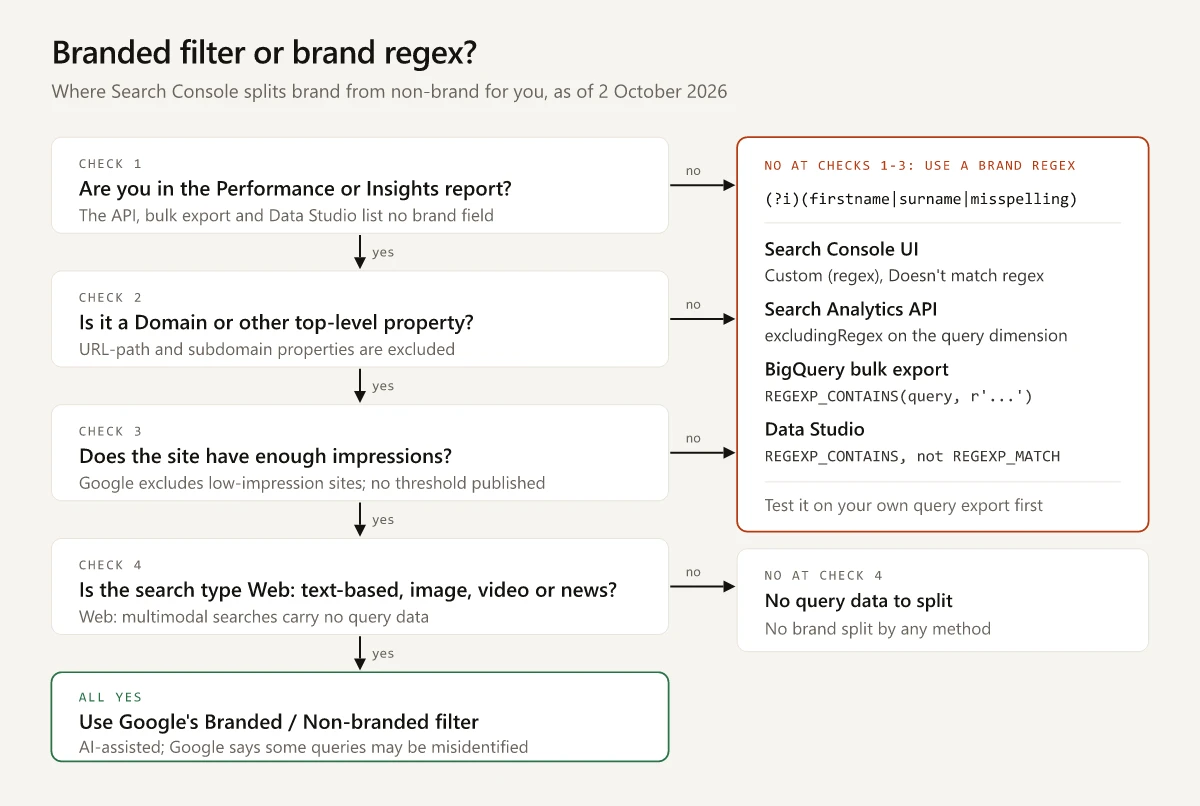
If every answer is yes and only the Insights card is missing, the rollout may not have reached you yet: the Insights help still says the card “might not appear for all eligible sites until it’s fully launched”. The multimodal search type and the Generative AI report show no queries at all, so a brand pattern has nothing to match there, and Google documents no branded split for either.
Do Branded and Non-Branded Queries Add Up to the Total?
Not necessarily. Branded and Non-branded are choices in the Query filter, and the discrepancies help page says that when filtering by page or query, the ‘match’ and ‘does not match’ totals “may not add up to the unfiltered total, due to the omission of anonymized queries and data truncation.”
None of the Google pages I read applies that rule to the branded split or exempts it, so report three numbers: Branded, Non-branded, and the gap between their sum and the unfiltered total. The rule for anonymized queries under a query filter, and how to compare rows while one is on, are in the brand step of my average-position checklist.
Testing a Brand Regex on a Personal Name
This site’s brand is my name, so its export is a small test of what a brand pattern needs to match. The data is the same Queries export behind my RE2 pattern tests: swapbiswas.com, 1 May 2025 to 31 August 2026, search type Web, 1,000 rows carrying 103,338 impressions.
I ran each pattern over those rows in a short script that uses Google’s RE2 library, ignoring case the way Search Console does unless a row says otherwise. The Queries containing rows are a case-insensitive substring check, which is how Google describes that filter. The last three rows simulate in the same script how Data Studio’s REGEXP_MATCH, a case-sensitive engine and a JSON request body would read the pattern; I have not run those tools on live data.
| Filter as written | Rows | Impressions | Missed |
|---|---|---|---|
Queries containing swapnil | 1 | 289 | sapnil biswas |
Queries containing biswas | 2 | 310 | Nothing in this export |
Custom (regex) (?i)(swapnil|sapnil|biswas) | 2 | 310 | Nothing in this export |
| The same pattern as a whole-value match, which is how Data Studio’s REGEXP_MATCH reads it | 0 | 0 | Both rows, since no query is the name alone |
Swapnil|Biswas matched case-sensitively, the RE2 default in BigQuery and Data Studio | 0 | 0 | Both rows, since none of the 1,000 queries has a capital letter |
(?i)\b(swapnil|biswas)\b in a JSON request body with single backslashes | 0 | 0 | Both rows, since JSON reads \b as a backspace character |
What the test shows about this one brand:
- The misspelled row,
sapnil biswas, carries 21 impressions and 1 click at an average position of 7.29. A first-name filter would have put 21 of the 310 brand impressions (6.8%) on the non-brand side. - The two brand rows hold 310 of 103,338 impressions, or 0.30%. The row for my name is the export’s top row by clicks and only its 60th by impressions; my sixteen-month review of ranking without backlinks shows how much of the site’s top-three click-through rate rests on it.
- Google’s Data anomalies page says “A logging error prevented Search Console from accurately reporting impressions from May 13, 2025 until April 27, 2026.” The query export has no date column, so I cannot say how many of the 310 impressions were logged before the fix.
- A pattern applied to an export reaches only the rows that made the table. The export stops at 1,000 rows and omits anonymized queries, and my long-tail breakdown of the same file measures how many clicks that leaves without a query row.
The rules I take from the test, each checked on the export or on strings I typed:
- List a first name and a surname as separate entries, so a typo in one still leaves the other to match.
- Leave
\boff name entries unless an entry is short enough to turn up inside ordinary words. On strings I typed,(?i)\b(swapnil|sapnil|biswas)\bmissedswapbiswasandswapbiswas.com, my domain written as one word, while(?i)(swapnil|sapnil|biswas)caught both. A domain needs its own entry only when no name entry already matches inside it. - Add a product name only if nobody else uses it, the way Gmail belongs to Google. One of this site’s free tools is a battlecard generator, a name that describes the tool without belonging to it: the phrase
battlecard generatormatches 2 rows with 58 impressions, and the stembattlecardmatches 36 rows with 3,614 impressions, led bybattlecard templateat 575. With the stem in the pattern, brand impressions would rise from 310 to 3,924. - Add any other-script spelling as its own entry without
\b, because RE2’s\brecognizes only ASCII word characters; the RE2 tests linked above show what that does to non-ASCII queries. - Start the pattern with
(?i). The Search Console UI ignores case anyway, and BigQuery and Data Studio do not.
Branded Queries in the API, BigQuery and Data Studio
I read the Search Analytics API, BigQuery and Data Studio (formerly Looker Studio) references below on 2 October 2026, and have not run the request, the SQL or the formula against live data.
| Where | Apply the pattern with | Case by default | Watch for |
|---|---|---|---|
| Search Console UI | Query filter, Custom (regex), then Doesn’t match regex for non-brand, per the advanced filtering help | Not case-sensitive | Queries containing takes a single string, so it cannot hold two spellings |
| Search Analytics API | A filter on dimension query with operator excludingRegex or includingRegex, which take “RE2 syntax” | Not stated for the regex operators | groupType accepts only “and”; a group where one or more filters must match is “not yet supported”, so an includingRegex pull of brand rows needs every spelling in one pattern |
| BigQuery bulk export | REGEXP_CONTAINS(query, r'...'), a partial match on the re2 library per BigQuery’s string functions reference | Case-sensitive: the RE2 syntax page lists case-insensitive as “default false” | Anonymized rows carry is_anonymized_query set to true and no query text |
| Data Studio connector | A calculated field using REGEXP_CONTAINS | Case-sensitive, per Data Studio’s regular expressions guide | REGEXP_MATCH “will only match the entire value by default”, and anonymized queries can arrive as one blank row |
For the API, this request body returns non-brand queries. In JSON, \b is the escape for a backspace character (RFC 8259), so a pattern that uses \b needs \\b there; this pattern has no backslashes at all.
{
  "startDate": "2026-07-01",
  "endDate": "2026-09-30",
  "dimensions": ["query"],
  "type": "web",
  "dimensionFilterGroups": [
    {
      "groupType": "and",
      "filters": [
        {
          "dimension": "query",
          "operator": "excludingRegex",
          "expression": "(?i)(swapnil|sapnil|biswas)"
        }
      ]
    }
  ],
  "rowLimit": 25000
}
For the bulk export, one query returns three segments and keeps anonymized rows apart instead of counting them as non-brand. The table reference says rows repeat keys and “you should almost always aggregate all your metrics”, which the SUMs do.
SELECT
  CASE
    WHEN is_anonymized_query THEN 'anonymized'
    WHEN REGEXP_CONTAINS(query, r'(?i)(swapnil|sapnil|biswas)') THEN 'branded'
    ELSE 'non-branded'
  END AS segment,
  SUM(clicks) AS clicks,
  SUM(impressions) AS impressions
FROM `your_project.searchconsole.searchdata_site_impression`
WHERE data_date BETWEEN '2026-07-01' AND '2026-09-30'
  AND search_type = 'web'
GROUP BY segment
ORDER BY clicks DESC;
For Data Studio, a calculated field on a Search Console data source:
CASE
  WHEN IFNULL(Query, "") = "" THEN "Anonymized"
  WHEN REGEXP_CONTAINS(Query, "(?i)(swapnil|sapnil|biswas)") THEN "Branded"
  ELSE "Non-branded"
END
The connector page says Data Studio may aggregate anonymized queries “into a single row with a blank value”; the IFNULL branch keeps that row out of Non-branded, as the SQL does. Without it, Data Studio’s searched CASE would hand the row to the ELSE result, which it returns when every condition is “false or NULL”.
Search Console Branded Queries Need a Regex Backup
Use Google’s Branded and Non-branded filter wherever Search Console branded queries appear, because it catches typos and product queries that a pattern matches only when you list them. Every API pull, BigQuery view, Data Studio chart and excluded property runs on a pattern you maintain, and in October 2026 neither the API reference nor the bulk export reference listed a brand field, so re-read both each quarter. Keep the tested pattern in a file next to the report that uses it.
Frequently Asked Questions
What are branded queries in Google Search Console?
They are searches that Google's AI-assisted classifier ties to your brand, including misspellings, other languages and products unique to your site. Eligible properties can filter the Performance report to Branded or Non-branded queries, and the Insights report shows a branded click breakdown.
Why is the branded queries filter not showing in Search Console?
Google excludes URL-path properties, subdomain properties and sites with a low number of impressions. The split also does not appear in the Search Analytics API, the bulk export, the Generative AI report or the multimodal search type.
Can I get branded queries from the Search Console API?
Not as a field. As of October 2026 the Search Analytics API filters by country, device, page, query and searchAppearance only, so apply your own brand pattern with the excludingRegex or includingRegex operator on the query dimension.
Is the Search Console branded filter based on regex?
No. Google says the classification is not based on a regular expression and comes from an internal, AI-assisted system that covers the brand in all languages, typos and unique products. Google also says some queries may occasionally be misidentified.
How do I filter non-branded queries without the branded filter?
Add a Query filter, choose Custom (regex), switch to Doesn't match regex and enter each part of your brand name separated by a vertical bar. Test it on an export first: on this site's exported queries, a match on the first name alone missed one of two spellings of the name.