Search Console Regex: Patterns Tested on 1,000 Real Queries
Search Console regex runs on RE2: partial matches, case-insensitive by default, no lookahead. Here is what each pattern caught in 1,000 real queries.
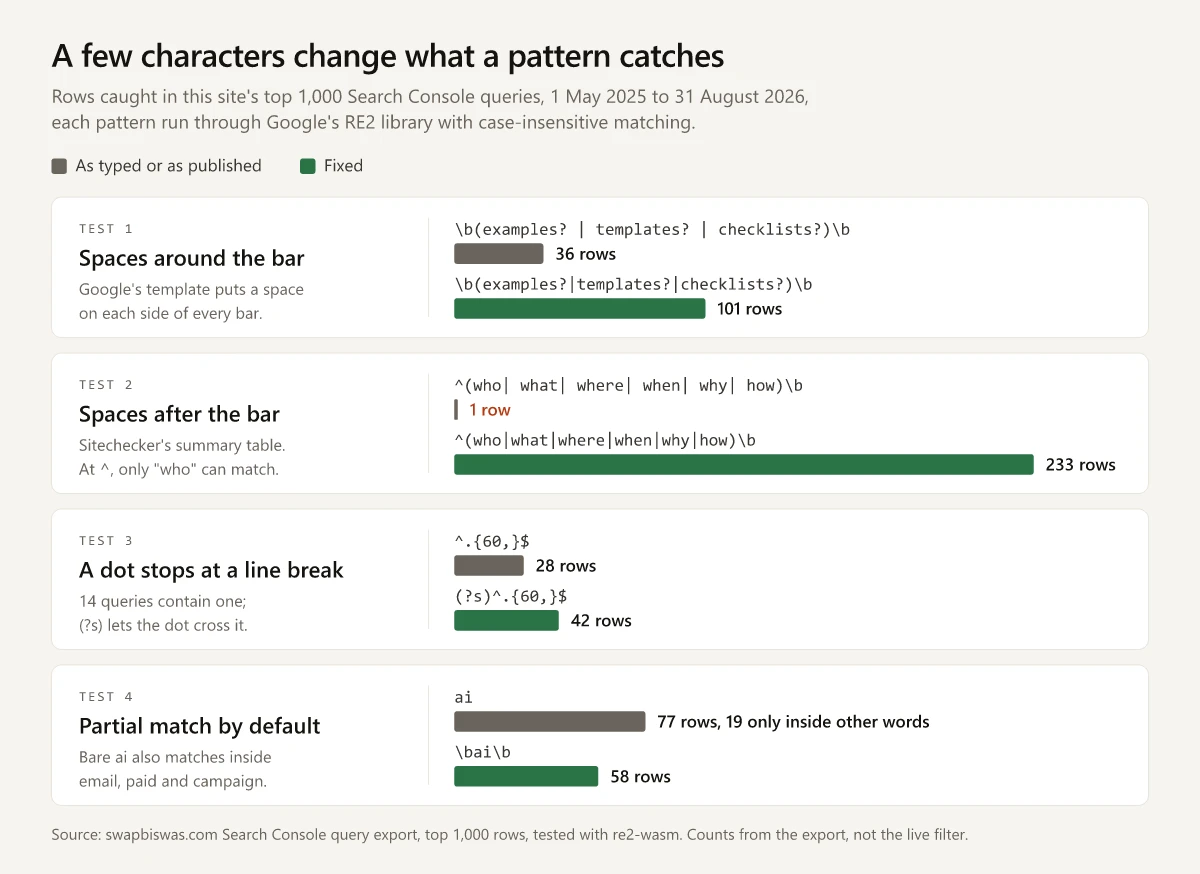
\b(examples?|templates?|checklists?)\b caught 101 of the 1,000 queries in this site’s Search Console export, worth 7,403 impressions and 2 clicks. With a space on each side of every bar, the way Google’s help page sets out a multi-value Search Console regex, the same pattern caught 36. The two rows with the most impressions, “battlecard template” and “competitive analysis example”, dropped out.
Both versions are valid RE2, so an engine runs either one without an error. That is why I think every pattern, whether you wrote it or copied it from a guide, should be run against an export of your own queries before it goes into a report: some published patterns do not compile at all, and the ones that do can still catch the wrong rows.
Search Console regex is the Custom (regex) option on the Performance report’s Queries and Pages filters. It runs Google’s RE2 syntax, matches anywhere in the string unless you anchor it with ^ or $, ignores case unless you start with (?-i), and has two modes: Matches regex and Doesn’t match regex.
Regex Patterns Tested on 1,000 Search Console Queries
Each row is one pattern, run against the 1,000 queries in the export:
| Pattern | What it catches | Rows | Impressions | Clicks |
|---|---|---|---|---|
\b(examples?|templates?|checklists?)\b | Requests for an asset: “battlecard template”, “product launch checklist” | 101 | 7,403 | 2 |
^what (is|are|does)\b|\b(meaning|means?|definition|define|stands? for|full form)\b | Definitions: “what is an seo report”, “chatgpt meaning” | 160 | 15,946 | 5 |
\b(chat ?gpt|gpt|gemini|perplexity|claude|semrush|ahrefs|ga4|google analytics)\b | Tool names, mostly ChatGPT and Google Analytics | 142 | 10,204 | 6 |
\b202[0-9]\b | A year in the query: “marketing automation best practices 2026” | 59 | 1,729 | 1 |
\bai\b | AI as a whole word: “free ai tools for marketing” | 58 | 2,212 | 1 |
\b(vs|versus|compare|comparison|difference|differ)\b | Comparisons: “aeo vs seo” | 32 | 1,724 | 0 |
\b(costs?|prices?|pricing|how much)\b | Cost and price: “seo audit cost” | 71 | 12,408 | 3 |
The export is the Queries table of the Performance report for swapbiswas.com, covering 1 May 2025 to 31 August 2026, search type Web, downloaded on 3 September 2026. I ran each pattern with a short script I built in Claude Code. It calls re2-wasm, which packages Google’s RE2 library as WebAssembly, and turns on case-insensitive matching to copy Search Console’s default. These are counts on the exported rows; none of them comes from the live filter.
Reading the rows behind each count changes what the totals mean:
- The rows overlap. The seven patterns make 623 matches from 474 distinct queries, and 101 of the 160 definition rows are also tool-name rows, such as “chatgpt stands for” and “what does cross network mean in ga4”. Adding pattern totals together double counts.
- One family can fill a pattern. 66 of the 71 cost rows contain “audit” and hold 99.1% of the pattern’s impressions, so on this site the cost pattern mostly measures the topic of my post on what an SEO audit costs. Comparisons lean the same way: 18 of the 32 rows, carrying 1,241 of the 1,724 impressions, compare AEO with SEO, the subject of my AEO vs SEO explainer. Three of the 18 spell out answer engine optimization without the acronym, so a filter on
aeoalone would miss them. Read the ten biggest rows of a pattern before you quote its total. - A
?covers spelling variants. Inside the tool pattern,chat ?gptcaught “chatgpt” (67 rows) and “chat gpt” (24 rows) as one term, because the?makes the space optional. - The tool list is this site’s vocabulary. Swap in the products your own pages cover, since the pattern finds only what it names.
The question-word, word-count and brand patterns belong in the same library, and other posts on this site already cover the segments they fall into:
^(who|what|when|where|why|how|which|is|are|can|does|do|should|will)\bfinds questions: 268 rows, 266 of them also four words or longer, which puts them inside the band in my breakdown of long-tail queries.^\S+(\s+\S+){3,}$finds queries of four or more words and reproduces that breakdown’s split exactly. It counts on\sinstead of a typed space, which matters for the line breaks covered below.- Doesn’t match regex with
sw?apnil|biswasremoves my name and its one misspelling, 2 rows. SEOTesting’s FAQ writes a brand exclusion as-.*yourbrand.*, but the leading hyphen is a character to match, so-.*biswas.*matched neither row and excludes nothing. What the row for my name does to this site’s top-three click-through rate is in 16 months of SEO without link building. BigQuery and Data Studio (formerly Looker Studio) match case-sensitively, so start the brand pattern with(?i)there, and on my export I simulated how letter case and whole-value matching can drop both brand rows.
How Do You Use the Google Search Console Regex Filter?
Open the Performance report for Search results, click + Add filter, choose Queries or Pages, pick Custom (regex) and enter an RE2 pattern; keep Matches regex to include rows or switch to Doesn’t match regex to exclude them. Google’s advanced filtering help page lists the steps as of October 2026:
- Click + Add filter in the filters row.
- Choose Queries or Pages.
- Choose Custom (regex).
- Enter the expression. For several values, Google says to “separate them with a vertical bar (|) and surround the whole expression with parentheses”, and its template,
(<value 1> | <value 2> | <value 3> | ...), puts a space on each side of every bar. Leave the spaces out, as the same page’s table of common expressions does with “New York|San Francisco”: RE2 matches a space like any other character, which is why the spaced version of the opening pattern missed “battlecard template”. - Keep the default Matches regex, or choose Doesn’t match regex to see every value except the ones you listed.
- Click Apply.
If the Performance report itself is new to you, the Search Console steps in my guide to checking SEO rankings show where it lives. Google’s help page also answers the questions that come up next:
- The regex option sits under Queries and Pages. For several devices, countries, search types or search appearance types at once, Google says you “must use a comparison (limited to two items)”.
- One plain substring needs no regex. The Queries containing and Queries not containing filters take a single string, and Google says that match “is not case-sensitive, but is otherwise exact, including any spaces”. It is the filter the brand step in my walkthrough for judging average position per query suggests for setting a brand name aside.
- Escape the dots in a Page pattern, because an unescaped
.matches any character.^https://swapbiswas\.com/blog/[^/]+/$keeps only post URLs, since\.matches a literal period and[^/]+/$allows one path segment after /blog/. - The help page also documents an experimental AI tool, visible to “a small percentage of Search Console users” with 20 requests per user per day, that turns a typed request into filters, including a “Query matching regex” filter. Google warns that it “may generate filters that don’t match your request”, so a pattern it writes needs the same row-count check as one you write.
RE2 Rules That Change What a Pattern Catches
Google’s help page states that “The RE2 syntax is used”, that default matching is a “partial match”, and that “Default regex matching is not case-sensitive”. The RE2 syntax reference covers the rest. Each rule, tested on the export:
| Rule | Where it is stated | Tested on my export |
|---|---|---|
| Partial match unless anchored | Google: a pattern “can match anywhere in the target string unless you use ^ (start of string) or $ (end of string)“ | ai caught 77 rows, 19 of them only through words like “email”, “paid” and “campaign”; \bai\b caught 58 |
| Anchors make a match exact | The same Google page | seo report caught 44 rows; ^seo report$ caught 1 |
Case is ignored unless you add (?-i) | Google: “You can prepend (?-i) to the beginning of your expression for case-sensitive matches” | (?-i)SEO caught 0 rows, and none of my 1,000 queries contains a capital letter |
| Spaces are characters | RE2 lists four flags, i, m, s and U, with no free-spacing mode; (?x) failed to compile | The opening pattern caught 36 rows written \b(examples? | templates? | checklists?)\b and 101 without the spaces |
. stops at a line break | RE2: the s flag lets . match a line break, and it defaults to false | ^.{60,}$ misses all 14 queries that contain a line break (next section) |
\b uses only ASCII word characters | RE2: \b matches “at ASCII word boundary” | On the Russian, Hindi and Finnish queries in my export, a word wrapped in \b that starts or ends with a non-ASCII letter matched nothing; the bare word matched |
On this export, (?-i) changes a result only when a pattern contains a capital letter, and then those letters match nothing; none of the 157 page URLs in the Pages table of the same download has a capital letter either. It earns its place on a Pages filter for a site whose URLs mix case, and Google’s example of the override is a URL: (?-i)AAA “will match https://example.com/AAA but not https://example.com/aaa”.
Syntax RE2 Rejects and What to Type Instead
The RE2 reference rules out each construct below, and each one failed to compile when I ran it. The error text is the RE2 library’s, from my test; I have not checked what Search Console displays for it.
| Construct | Example | RE2 error in my test | Type instead |
|---|---|---|---|
| Negative lookahead | ^(?!.*free).* | invalid perl operator | Doesn’t match regex with free |
| Lookahead | (?=.*google)(?=.*analytics).* | invalid perl operator | (?s)google.*analytics|analytics.*google |
| Lookbehind | (?<=seo )audit | invalid perl operator | seo audit |
| Backreference | (seo)\s+\1 | invalid escape sequence | Write the repeat out: seo\s+seo |
| Comment, atomic group, possessive | (?#comment)seo, (?>seo), seo++ | invalid perl operator, bad repetition operator | Remove them |
| Repeat count over 1000 | x{1001} | invalid repetition size | x{1000} or x+ |
For an exclusion, partial matching does the work: Doesn’t match regex with the bare word removes every query that contains it. On my export, free appears in 26 rows, and that filter keeps the other 974. A short word is safer wrapped as \bfree\b, which skips words such as “freelance”; on this export both forms catch the same 26 rows.
GSC Regex Mistakes in Published Guides
SEOTesting’s, Sitechecker’s and Ice Nine Online’s regex guides, all checked on 2 October 2026, publish patterns and advice that RE2, Google’s help page or the recommended testers contradict:
| Where | Published pattern or claim | What happens | Use instead |
|---|---|---|---|
| SEOTesting’s guide | ([^" "]*s){7,}? for “queries with 8 or more words” | Compiles, but without a backslash the s is the letter s rather than whitespace: 0 rows on my export | Restore the backslash: ([^" "]*\s){7,}? caught 104 rows. ^\S+(\s+\S+){7,}$ caught 106; the 2 extra rows contain a double quote, which [^" "] excludes |
| Sitechecker’s guide | ^(?!.*free).* to filter out “free”, and (?=.*google)(?=.*analytics).* for “two or more words in any order” | Both are lookaheads, which RE2 does not compile (see the table above) | That table’s replacements; the two-order version caught the same 23 rows that contain both words |
| The same guide’s summary table | ^(who| what| where| when| why| how)\b | Compiles, but each space after a bar is a character to match, and none of my queries starts with a space, so only “who” can match | Delete the spaces: 233 rows instead of 1, the form the guide’s numbered list prints |
| The same guide’s FAQ | Answers “No” to “Does GSC support case-sensitive regex?” | Google documents (?-i) for case-sensitive matches | Prepend (?-i) |
| Ice Nine Online’s guide | ”Search queries in GSC are case-insensitive, but URLs are not.” | Google says default regex matching is not case-sensitive, and its example is a URL | Prepend (?-i) when URL case matters |
| Sitechecker’s FAQ, echoed by SEOTesting and Ice Nine Online | Check a pattern in “Regex101 or Regexr” (Ice Nine: “set to RE2 flavor”) | RegExr supports JavaScript and PCRE, and Regex101 lists no RE2 flavor; JavaScript and PCRE both accept lookahead, so ^(?!.*free).* passes there and fails in RE2 | Regex101’s Golang flavor, since Go’s regexp package uses RE2 syntax, or a REGEXMATCH column in Sheets |
The Line Break Inside 14 Queries
Fourteen of the 1,000 query strings in my export contain a line break, always straight after a space, and two of them hold three. All 14 run past 75 characters, and together they carry 444 impressions and no clicks.
- RE2’s
.does not match a line break unless the s flag is on.^.{60,}$caught 28 of the 42 queries that are 60 characters or longer, and the 14 it missed are exactly the line-break rows.(?s)^.{60,}$caught all 42. .*between two words breaks the same way.^how do i.*pricingcaught nothing;(?s)^how do i.*pricingcaught the one query where “pricing” sits after the break.\salready includes the line break, because RE2 defines it as[\t\n\f\r ], so word-count patterns built on\sand\Scount these rows correctly.
The fix is four characters: start any pattern that relies on . with (?s). This is a finding about the exported strings. I have not confirmed that the live filter sees the same line breaks, so treat (?s) as a cheap precaution.
How to Test a Pattern on Your Own Export
A tester such as Regex101 shows whether a pattern matches text you paste in. An export test shows which of your own queries the pattern catches and what they are worth, and both methods below run RE2.
In Google Sheets
Google’s REGEXMATCH help page says “Google products use RE2 for regular expressions” and that “Google Sheets supports RE2 except Unicode character class matching”, so a sheet tests the same syntax. Put the exported queries in column A and add a column with:
=REGEXMATCH(A2, "(?i)\b(examples?|templates?|checklists?)\b")RE2’s default is case-sensitive, since its reference lists the i flag as “default false”, so the (?i) copies Search Console’s behavior. Filter the new column to TRUE, then read the row count, the Impressions and Clicks totals, and the top rows by impressions.
With a Script
This trimmed version of the script behind the tables reproduces their counts on my export. It needs Node.js, re2-wasm and csv-parse; csv-parse reads the line breaks inside quoted queries correctly.
// npm install re2-wasm csv-parse
// node test-pattern.js queries.csv '\b(examples?|templates?|checklists?)\b'
const fs = require('fs');
const { parse } = require('csv-parse/sync');
const { RE2 } = require('re2-wasm');

const [file, pattern] = process.argv.slice(2);
const re = new RE2(pattern, 'iu'); // i copies Search Console's case-insensitive default
const rows = parse(fs.readFileSync(file), { columns: true, bom: true });
const hits = rows.filter((r) => re.test(r['Top queries']));
const total = (col) => hits.reduce((sum, r) => sum + Number(r[col]), 0);

console.log(`${hits.length} rows, ${total('Impressions')} impressions, ${total('Clicks')} clicks`);
hits.sort((a, b) => b.Impressions - a.Impressions).slice(0, 10)
  .forEach((r) => console.log(r.Impressions, JSON.stringify(r['Top queries'])));
“Top queries” is the query column’s header in my export; change it if yours differs.
Limits of an Export Test
- Google’s help page says filtering “by query or URL can affect the report totals due to data truncation and the omission of anonymized queries”, and the export holds only the top 1,000 query rows. The long-tail breakdown linked above measures how much of this site’s traffic sits outside those rows.
- 350 of the export’s 488 days sit inside a logging error that Google’s Data anomalies page says affected impressions from 13 May 2025 until 27 April 2026, with clicks unaffected. I traced the end of that error in this site’s daily data.
Test a Search Console Regex Before You Report on It
In my test, the lookahead patterns failed to compile, so their mistake showed at once. The spaced patterns, the missing backslash and the dot without (?s) all compiled, and only a row count showed what they missed. Before a Search Console regex goes into a report, run it and one variant against your own export, then read the ten biggest rows each version caught. The first test takes one REGEXMATCH column.
Frequently Asked Questions
How do I use the regex filter in Google Search Console?
In the Performance report, click + Add filter, choose Queries or Pages, then Custom (regex), and enter an RE2 pattern. Keep the default Matches regex to include rows, or choose Doesn't match regex to exclude them.
Is Google Search Console regex case-sensitive?
Not by default. Google's advanced filtering help says default regex matching is not case-sensitive, and prepending (?-i) to a pattern makes the match case-sensitive.
Does GSC regex support lookahead?
No. Search Console uses RE2 syntax, which does not support lookahead, lookbehind or backreferences. To exclude a word, choose Doesn't match regex and enter the word; to require two words in any order, list both orders, as in (?s)google.*analytics|analytics.*google.
Can I use custom regex on pages in Google Search Console?
Yes. Google's steps offer Custom (regex) under both Queries and Pages, and matching is partial by default, so start a URL pattern with ^ and end it with $ when the whole address has to match.
Why is my regex filter not working in Search Console?
In a test on 1,000 exported queries, two typing slips cut the matches: spaces around the | character, because RE2 matches a space like any other character, and a dot without (?s), which cannot cross a line break. A lookahead such as (?!free) does not compile in RE2.