Search Console Generative AI Report: What It Counts
The Search Console generative AI report counts AI Overviews and AI Mode impressions, not clicks or queries. Tabs, filters and missing-report causes, Nov 2026.
The first thing a site owner asks on opening the Search Console generative AI report is where the clicks and the queries are. Neither is in it. The report counts one thing, impressions: how often links to your site were shown in AI Overviews and AI Mode. I read it as an impressions ledger for one slice of the Performance report’s Web search type, and nearly every confusing number in it comes from asking it a question that another Google report answers.
Google launched the report on 3 June 2026 for a subset of sites, rolled it out to all sites worldwide as of 31 August 2026, and added a multimodal search type on 24 September 2026. Everything below comes from Google’s own help pages and Search Central posts, read on 4 November 2026. Google’s launch post mentions adding metrics over time, so check the help page before you rely on any row here.
What Is the Search Console Generative AI Report?
The Search Console generative AI report, which Google’s help titles “Generative AI performance report (Search)”, is the report that counts how many times links to your site appeared in generative AI features on Google Search, currently AI Overviews and AI Mode. It shows impressions only, grouped by page, country, date or device, with a separate version for Discover.
Here is what each part of it counts, per Google’s help page for the report:
- Impressions: “how many times links to your site were shown to a user in a generative AI feature on Google Search”. It is the only metric.
- Pages tab: the final URL a generative AI feature linked to, after any redirects. Most data is assigned to the canonical URL, as in the Performance report.
- Countries tab: the country where the search originated.
- Dates tab: days, weeks or months, all in Pacific Time. The launch post also lists hourly granularity.
- Devices tab: desktop, tablet or mobile.
- Web: text-based filter: searches typed into the standard Google search bar.
- Web: multimodal filter: searches made with images, from Google Lens, Circle to Search on Android, uploaded images and Chrome image search.
- Export: downloads both the chart and the table.
The help page’s “Open the Generative AI performance report” link goes to search.google.com/search-console/performance/search-analytics/ai. Data from experiments in Search Labs is not included.
Does the Report Show Clicks, Queries or Position?
No. The help page describes impressions as the report’s default view and names no click, CTR, position or query field, and the launch post lists only Impressions, Pages, Countries, Devices and Dates. Those other numbers sit in other reports, or are not documented at all:
| You want | In the generative AI report? | Where it is instead |
|---|---|---|
| Clicks from AI Overviews and AI Mode | No | Counted in the Performance report: “Clicking a link to an external page in the AI Overview counts as a click”, and the same for AI Mode (impressions, position and clicks help) |
| Those clicks on their own | No | Not separable with any filter Google documents. Google’s dimensions help lists no AI Overview or AI Mode search appearance to filter by |
| Position | No | In the Performance report. “An AI Overview occupies a single position in search results, and all links in the AI Overview are assigned that same position” |
| The query that triggered the AI feature | No | Not documented: this report has no query dimension, and the Performance report has no AI-feature filter to pair with its queries |
| API access | No | The Search Analytics API reference, last updated 11 August 2026, lists six type values (discover, googleNews, news, image, video, web) and none for generative AI features |
The launch post states the overlap directly: the AI data “is included in the overall performance report, where it will continue to be tracked”. So an AI Overview impression shows up in this report and again inside the Performance report’s Web totals: do not add the two together.
Search Console AI Mode Impressions: How They Are Counted
Google applies its standard impression rules to both features. The impressions, position and clicks help adds a few rules specific to each:
| Rule | AI Overviews | AI Mode |
|---|---|---|
| Impression | ”Standard impression rules apply" | "Standard impression rules apply” |
| Click | A click on a link to an external page counts | A click on a link to an external page counts |
| Position | One position for the whole overview, shared by every link in it | Same method as a Search results page; carousels and image blocks follow their usual rules |
| Follow-up question | n/a | Treated as a new query, with its own impressions, position and clicks |
| Search Labs experiments | Not included | Not included |
The report’s chart adds one more rule: if two results from the same site appear in one generative AI feature, they count as a single impression in the chart total.
Web: Text-Based vs Web: Multimodal
The search type filter at the top of the report splits impressions by how the search started. Google announced multimodal reporting on 24 September 2026 for both the Search results Performance report and the generative AI report.
| Filter | What it includes | Notes |
|---|---|---|
| Web: text-based | Text queries entered into the standard Google search bar | Typed searches only |
| Web: multimodal | Searches made with images, “such as with a smartphone camera” | Google Lens, Circle to Search on Android, image uploads to Google Search and Chrome’s right-click “Search this image” |
Two details from Google’s pages:
- In the Performance report, “the queries dimension isn’t available” with the multimodal type selected, per the dimensions help. The generative AI report has no query dimension in either view.
- The announcement says you will see multimodal metrics “if your site is receiving traffic from these queries”. So an empty multimodal view can simply mean no traffic from image searches.
Why Do the Chart and Table Totals Differ?
Mostly because the chart counts by property and the Pages table counts by page. The help page says chart totals “can sometimes differ from the table totals”, usually because of that aggregation, and each view counts a little differently:
| View | Aggregated by | Effect on the number |
|---|---|---|
| Chart, no filter | Property | Two results from your site in one AI feature count as one impression |
| Chart, with a URL filter | URL | Counts for that URL only |
| Table, Countries, Devices or Dates tab | Property | Same counting rule as the chart |
| Table, Pages tab | Page | Each of your URLs in the feature counts separately, so the sum can exceed the chart |
| Table, any tab | Up to 1,000 rows | Rows beyond the limit are left out of the table “but included in the chart total” (discrepancies help) |
| Chart, newest days | Preliminary | Shown as a dotted line; can change “in the next few hours” |
Google’s About the data page gives the arithmetic with three pages from one property shown together: the property gets 1 impression, and each URL gets 1, so a Pages table would list 3. Applied to an AI Overview that links three of your pages, the chart adds 1 and the Pages tab adds 3. Reconcile the report against the Countries tab, which is aggregated by property, and use the Pages tab to rank pages.
Average position in the Performance report follows the same property-versus-page split; my average-position explainer shows how that changes a reading.
Exporting the Report
The export button downloads both the chart and the table. Two rules from the help page apply to the file:
- Values shown as ”~” or ”-” in the report, meaning not available or not a number, “will be zeros in the downloaded data”. A zero in the export can mean missing, not measured as zero.
- The 1,000-row table limit of the Performance report applies, so a site with more than 1,000 pages in AI features gets a partial page list.
The API reference above lists no type for these features, and the export button is the only way out of the report that its help page documents, as of November 2026.
Why Is the Generative AI Report Not Showing?
Google’s help page gives one usual cause and one setting to check. The usual cause: “your site hasn’t received enough impressions in generative AI features on Google Search.” The setting: you may have “excluded your site from Search generative AI features”, which the Search generative AI control does, either on the property itself or through inheritance from a parent.
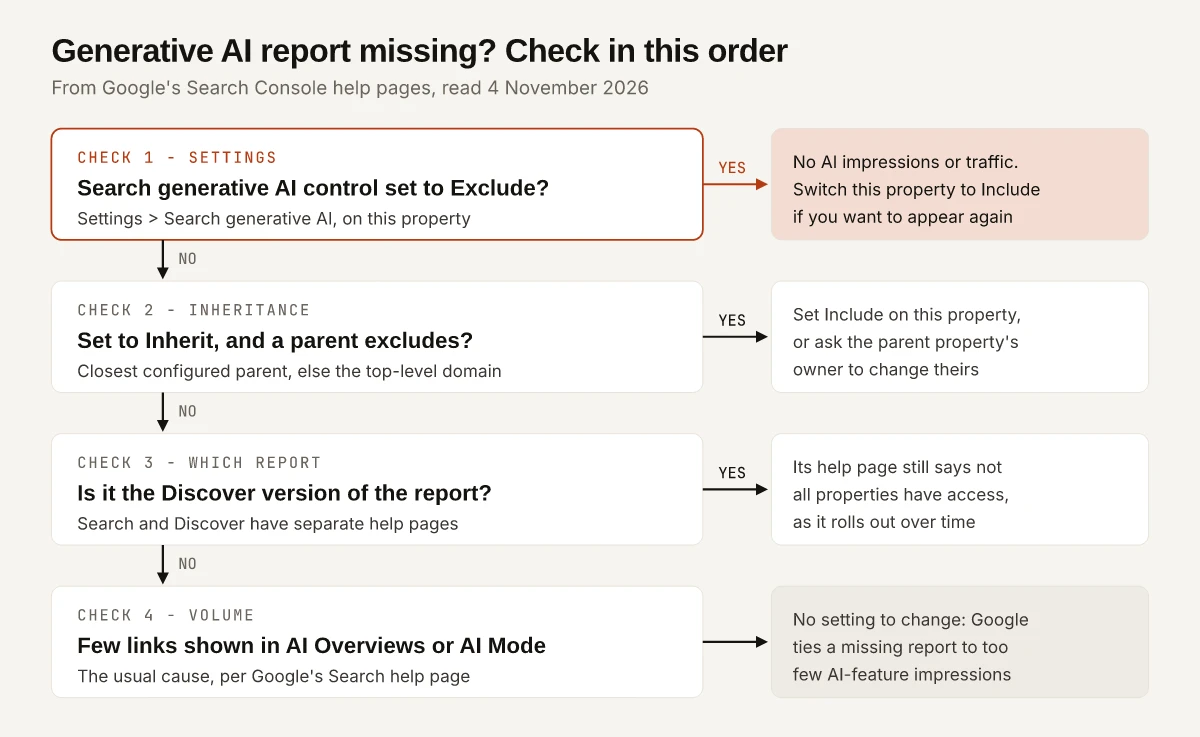
| What you see | Likely cause, per Google | What to do |
|---|---|---|
| No report, control shows Exclude | You opted the property out: “You won’t receive any traffic or impressions from these features” | Switch to Include if you want to appear; Google’s timing note (“a few days”) covers exclusion, and it gives none for re-inclusion |
| No report, control shows Inherit | The closest parent with a configured setting excludes, or the top-level domain property does | Set this property to Include, or ask the parent property’s owner to change theirs |
| Discover version missing | ”Not all properties have access to the report, as we’re rolling out over time”, per the Discover help page linked below | Wait; the Search version’s help page has no such line |
| No report, control shows Include | Too few impressions in AI features | Nothing to switch on in Search Console |
| Report open, multimodal view empty | No traffic from image searches | Check Web: text-based instead |
The Search Generative AI Control: Include, Exclude, Inherit
The control sits under Settings > Search generative AI and covers AI Overviews, AI Mode and generative AI features in Google Discover. Google rolled it out to all sites worldwide as of 31 August 2026. Its three choices:
| Choice | What Google says it does | Default for |
|---|---|---|
| Include | Your content can appear as links and help “ground AI responses”; you can receive impressions and traffic | Every property |
| Exclude | Links and content are kept out of these features, content is not used “as an input to generate an AI response”, and you get no traffic or impressions from them | Not a default |
| Inherit control from parent | The property follows its parent’s setting, and parent changes apply automatically | A property that has a parent |
Inheritance follows a fixed rule. A property inherits from its closest parent that has been set to stop inheriting, and if no parent has, from the top-level domain property. Google’s example: the URL-prefix property https://example.com/business/cats inherits the domain property example.com’s setting, unless an owner of https://example.com/business/ or https://example.com/ configured theirs. The owner of the top-level domain property sees a notification when a child property overrides the parent setting.
What the control does not do, per the same page:
- It “isn’t used as a ranking or inclusion signal affecting other parts of Search.”
- It “doesn’t affect AI training”. Google points to Google-Extended for that.
- It does not override choices for other services such as Merchant Center and Google Ads.
- It does not remove the site from Search; Google points to noindex for that.
Search vs Discover: Two Generative AI Reports
Discover has its own generative AI report, and its counting rules differ from the Search version’s in ways that change the totals:
| Search version | Discover version | |
|---|---|---|
| Tabs | Pages, Countries, Dates, Devices | Pages, Countries, Dates; the launch post lists devices “for Search results” only |
| Pages tab URL | Final URL linked, after redirects; mostly canonical | The canonical page that was the source of the information, not the landing page |
| Aggregation | Chart by property; Pages tab by page | All data by page: two results from one property in one Discover list count separately |
| Impression | Standard Search rules | Link scrolled into view; one impression per result per session |
| Chart thresholds | Not mentioned | Daily values under a threshold can be omitted from the chart but stay in the totals |
| Access | All sites as of 31 August 2026 | Same note, plus “Not all properties have access” |
Sources: Google’s Discover help page and the Search help page linked near the top of this post.
Which Google Report Answers Which AI-Traffic Question
This is the table I would keep next to the report. Each row names the report Google documents for the question and what that report cannot tell you, as of 4 November 2026.
| Your question | Report that answers it | What it cannot tell you |
|---|---|---|
| How often did AI Overviews and AI Mode show my links? | Generative AI report (Search), chart | Clicks, CTR, position, or which feature |
| Which pages appear in AI features? | Generative AI report, Pages tab | The query that triggered them |
| How many clicks came from AI Overviews and AI Mode? | Performance report, Web search type | The AI share on its own: no filter separates it |
| Which query triggered an AI Overview citing me? | None | Google documents no query dimension for these impressions |
| Did image searches put me in AI features? | Generative AI report, Web: multimodal | Queries, which Google says are not available for multimodal searches |
| How often did Discover’s AI features show my links? | Generative AI report (Discover) | Devices, which the launch post lists for Search only |
| How many visits came from ChatGPT, Gemini or Copilot? | GA4, AI Assistant channel | Visits from AI Overviews and AI Mode, which GA4 counts as Organic Search |
| What share of my AI impressions comes from brand searches? | None | The split needs query data, which this report lacks |
| Where did Copilot and Bing’s AI answers cite me? | Bing Webmaster Tools, AI Performance | Anything on Google’s features |
| Do I want to appear in these features at all? | Search generative AI control | It is a setting, with no measurement |
The GA4 row comes from Google’s default channel group page, which says the AI Assistant channel “excludes Google’s AI Overviews and AI Mode”; my comparison of Google’s AI Assistant channel pages covers which assistants that channel names. The brand row follows the same limit that keeps the Branded filter out of this report, set out in my guide to Search Console branded queries. For the Microsoft side, my read of Bing’s AI Performance report covers its citation counts and grounding queries.
Acting on the Report’s Impressions
The report gives a page list and a trend, which is enough for a few specific decisions:
| If the report shows | Do this |
|---|---|
| A page with many AI impressions | Check its facts and dates first; it is the page whose links AI features show most often |
| A page you expected that never appears | Compare it with the pages that do appear, using the content guidance in my AI Overview optimization notes |
| A fall in the chart | Compare the Performance report for the same dates: a fall in both points to a site-wide change, a fall here alone to the AI features |
| A rise in Web: multimodal | Look at the images on the pages listed in the Pages tab |
| A gap between the chart and the Pages tab | Expected: the chart counts by property, the Pages tab by page |
A fall in Performance impressions with steady clicks has its own history in Search Console, and my notes on the impressions drop date the logging error and the num=100 change behind that pattern.
Reading the Search Console Generative AI Report as an Impressions Ledger
The report tells you how often, where and on which pages Google’s AI features showed your links. For clicks, use the Performance report, where they cannot be split out; for the queries behind AI impressions, Google documents no report; for visits from chat assistants, use GA4. Google’s launch post mentions “adding additional metrics over time” and the help page expects the feature list to change, so re-read the control help and the report help each month.
Start with the Countries tab total, then rank pages on the Pages tab.
Frequently Asked Questions
Does the Search Console generative AI report show clicks?
No. Google's help page for the report describes one metric, impressions, grouped by page, country, date and device. Clicks from links in AI Overviews and AI Mode are counted in the Performance report's Web search type, and Google documents no filter that separates them there.
Why is the generative AI report not showing in Search Console?
Google says it usually means your site has not received enough impressions in generative AI features. It can also mean the property excludes itself through the Search generative AI control, either directly or by inheriting an Exclude setting from a parent property.
How are AI Mode impressions counted in Search Console?
Standard impression rules apply, per Google's help page on impressions, position and clicks. A follow-up question in AI Mode counts as a new query, and in the report's chart two results from the same site in one AI feature count as a single impression.
What is the difference between Web: text-based and Web: multimodal?
Web: text-based covers queries typed into the standard Google search bar. Web: multimodal covers searches made with images, including Google Lens, Circle to Search on Android, uploaded images and Chrome image search. Google added the multimodal type to the report on 24 September 2026.
Does excluding my site from Search generative AI features affect rankings?
Google's help page says the control is not used as a ranking or inclusion signal for other parts of Search. It removes your links and content from AI Overviews, AI Mode and generative AI features in Discover, and it does not affect AI training, which Google-Extended governs.