Claude for Excel: Who Gets It, How to Install, Limits
Claude for Excel is an add-in included with paid Claude plans at no extra fee. Check your plan, Excel build and installer first, then see the workbook size limits.

Claude for Excel is an add-in that puts Claude in a sidebar inside Excel. It comes with paid Claude plans (Pro, Max, Ultra, Team, Enterprise) at no separate fee, draws on your plan’s usage limits, and runs on Excel on the web, Windows with Microsoft 365 and Mac 16.46 or later, not Excel 2016, 2019, iPad or Android.
That answer comes from Anthropic’s Excel add-in docs and its pricing page, both read on 23 November 2026. Before you install anything, I would check three things, because they decide which route you actually have: your Claude plan, your Excel build, and whether you, your IT admin, or your IT admin through the company’s cloud platform does the install. Four of the eight “not working” causes in the troubleshooting table further down trace back to one of them.
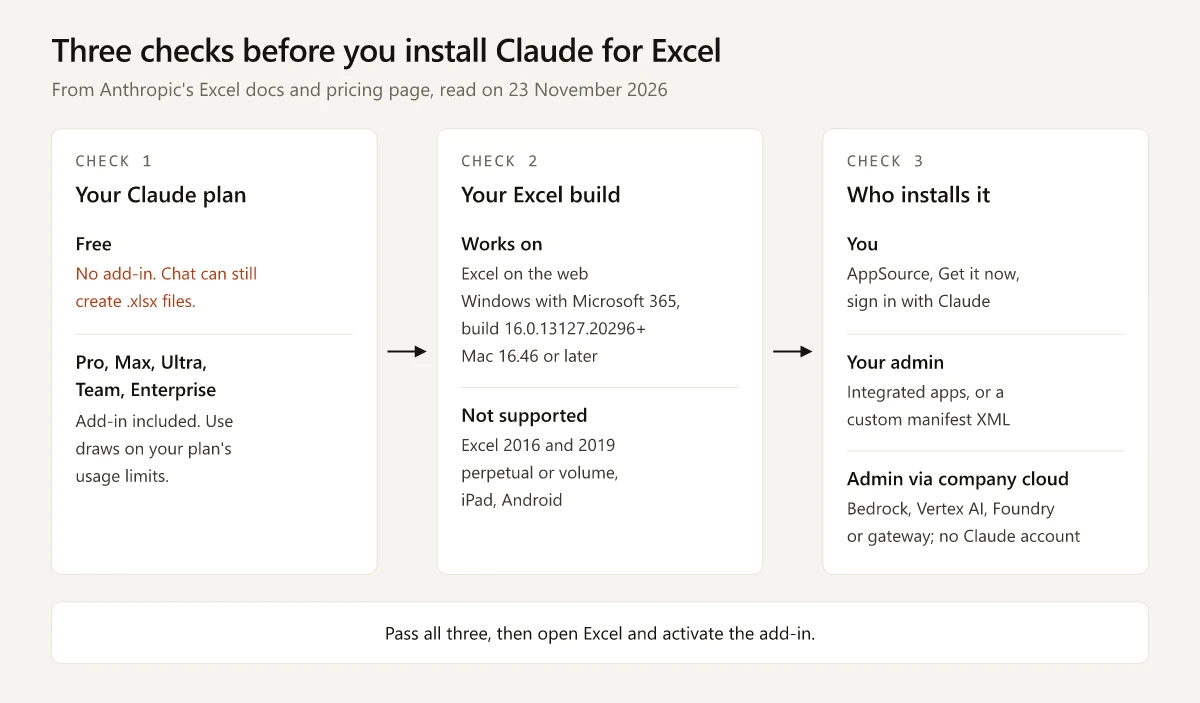
Which Claude Spreadsheet Route Do You Have?
This is the table I would read before installing, one row per situation, each tied to a line on Anthropic’s pages:
| Your situation | Route | What to do |
|---|---|---|
| Free Claude plan | No add-in | Use file creation in chat: upload a CSV, download an .xlsx (30 MB per file) |
| Pro, Max or Ultra, on a supported Excel build | Install it yourself | AppSource listing, Get it now, sign in with your Claude account |
| Team or Enterprise | Your admin deploys it, or you install it yourself | Admin uses Microsoft 365 Admin Center, Integrated apps |
| Company that has turned off “Let users access the Office Store” | Admin deploys a custom manifest | Ask IT; Anthropic publishes an Excel manifest XML file |
| Company that routes AI through Amazon Bedrock, Google Cloud Vertex AI, Azure AI Foundry or an LLM gateway | Admin deploys it with no individual Claude accounts | Models come from that platform; Skills from your Claude settings are not available there |
| Excel 2016 or 2019 perpetual or volume license | Not supported | Use Excel on the web or a Microsoft 365 build, or the chat route |
| Excel on iPad or Android | Not supported | Use a desktop or web build; iPad lacks the SharedRuntime support the add-in needs |
| Google Sheets user | Claude for Google Workspace (beta) | Install from the Google Workspace Marketplace, then Extensions, Claude, Open Claude |
| Employer pays for Microsoft Copilot with Claude switched on | Copilot in Excel, a Microsoft product | See how Anthropic’s add-in and Copilot in Excel differ |
Sources: the Excel docs, the third-party platforms page, Connectors and Skills and Claude for Google Workspace, same date.
Anthropic’s pages name the cloud platforms differently: the docs say Azure AI Foundry and Google Cloud Vertex AI, while the Microsoft 365 product page says Microsoft Foundry and Gemini Enterprise Agent Platform. The pricing page also lists Claude Sheets (beta) as No on Free and Yes on Pro, Max and Ultra, but Anthropic’s docs index had no page for it on 23 November 2026.
If Excel on the web is your only copy of Excel, Microsoft 365 prices in India covers what a free Microsoft account includes. Anthropic’s supported list attaches the Microsoft 365 subscription condition to the Windows build only and says nothing either way about a free Microsoft account on the web, so treat that combination as unconfirmed.
Is Claude for Excel Free?
No. Anthropic’s pricing comparison table marks “Claude for Microsoft 365” as No on Free and Yes on Pro, Max and Ultra, and the Excel docs name Team and Enterprise as well. Neither the Excel docs nor the Microsoft 365 product page lists a separate price for the add-in; the docs say your use “is associated with your existing Claude account and is subject to the same usage limits.”
The cheapest route in is Pro at $17 a month billed annually ($200 up front) or $20 billed monthly, before tax, on Anthropic’s pricing page as read on 23 November 2026; prices and plans change, so check that page before you buy. Every plan’s price, limits and what else each tier adds are in my guide to every Claude plan and its price, and since Excel work draws from the same pool as chat, what to do when you hit a Claude usage limit applies here too.
From India: on 23 November 2026, I loaded claude.com/pricing from an Indian connection (Cloudflare reported loc=IN) and the page showed US dollar prices only, with no rupee figure. Rupee prices exist on other checkouts, and the Claude Pro price in India by checkout sets the web, App Store and Google Play side by side.
On the Free plan, the closest route is the chat itself. Anthropic’s file creation article says code execution and file creation “is available to all Claude users (Free, Pro, Max, Ultra, Team, and Enterprise)”, that Claude can create .xlsx files and analyze uploaded CSV, TSV and other files, and that “The maximum file size is 30MB per file for both uploads and downloads.” You download the file and open it in Excel yourself; nothing runs inside your workbook.
What Is Claude for Excel?
Claude for Excel is Anthropic’s Excel add-in (often searched as the Claude Excel plugin): you ask Claude about the open workbook in a side panel, and it reads, explains and edits cells in place. The docs list what it does, including:
- Answers questions about the workbook “with cell-level citations” you can click to jump to the cell.
- Finds the root cause of errors such as
#REF!and#DIV/0. - Runs native Excel operations: sort, filter, edit pivot tables, conditional formatting and data validation dropdowns.
Details that change what you install:
- The listing the Excel docs link to is Claude for Microsoft 365, which also covers PowerPoint and Word (Outlook has a separate listing), and Anthropic’s Microsoft 365 page says “Claude for Excel, PowerPoint, Word, and Outlook are generally available on all paid Claude plans.” The PowerPoint side has its own place in my guide to making decks with Claude, and the Word side has its own section below.
- It is a different thing from the Excel skill inside the Claude app, which creates .xlsx files in a chat; that skill sits with Anthropic’s other document skills in my list of vetted Claude marketing skills.
- It is also separate from Claude in Chrome, Anthropic’s browser extension, which is limited to the same paid plans; the Claude Chrome extension’s plans, permissions and approval modes have their own guide.
- The add-in is not supported in Excel on iPad or Android, and Claude Dispatch, which sends a task from the Claude mobile app to a desktop session, is closed to new users.
- Instructions you set under Settings in the Excel sidebar apply to Excel only, separate from the ones you set in PowerPoint or Word.
The model list in the add-in is “a curated subset of the Claude models”, so it can be shorter than the list on claude.ai.
How to Install the Claude Excel Plugin (Add-In)
For yourself, the docs give three steps:
- Open the Claude for Microsoft 365 listing on Microsoft AppSource.
- Select “Get it now”.
- Open Excel, activate the add-in and sign in with your Claude account.
To find it after installing, the docs point to Home, Add-ins on Windows and Tools, Add-ins on Mac.
For an organization, the admin works in the Microsoft 365 Admin Center:
- Under Settings, Org Settings, User owned apps and services, turn on “Let users access the Office Store”.
- Go to Settings, Integrated apps, Add-ins.
- Search for “Claude for Microsoft 365” in AppSource.
- Assign it to the whole organization or to specific users or groups.
Where Office Store access stays off, the admin downloads Anthropic’s Excel manifest XML file and uploads it as a custom manifest instead. One known failure: if admin roles are activated through Microsoft Entra Privileged Identity Management (PIM), the Integrated apps page does not recognize them and deployment fails, which Microsoft tracks as ID 11126536. The docs’ workaround is an admin account with the role assigned as permanently active, and individual users can still install the add-in themselves.
The Excel Add-In on Mac, Windows and the Web
The same add-in behaves differently by platform, and the differences show up in where your chats live and how long a step can run:
| Windows | Mac | Excel on the web | |
|---|---|---|---|
| Supported build | Microsoft 365, build 16.0.13127.20296 or later | Version 16.46 or later, build 21011600 or later | Supported |
| Where to activate it | Home, Add-ins | Tools, Add-ins | Not stated |
| Wait before a step times out | 5 minutes (90 seconds for code steps) | 5 minutes (90 seconds for code steps) | 2 minutes (90 seconds for code steps) |
| Request size limit | Not stated | Not stated | 5 MB per request |
| Chat history | On the device; hit by the Version 2608 and 2609 updates (below) | Kept per Office app, in that app’s own container | Browser storage that browsers can evict; Anthropic says to “treat chat history on Office on the web as temporary” |
Sources: the Excel docs, Performance and limits and Data storage and retention, same date.
Workbook Size Limits and What It Will Not Do
The performance page gives the hard numbers. One Claude read in Excel returns at most 2,000 cells with data, so Claude reads a large sheet in several steps, and Office itself reads at most 5,000,000 cells from one range.
Anthropic also sorts workbooks by risk, measured in total used cells across all sheets:
| Total used cells | Anthropic’s band |
|---|---|
| Under 1 million | ”Works well” |
| 1 to 5 million | ”Higher risk, so narrow your requests” |
| Over 5 million | ”Use at your own risk” |
To estimate yours, press Ctrl+End on each sheet, multiply the last row by the last column number, and add the sheets together. A worked example with made-up numbers:
- Data sheet, last cell M60000: column M is 13, so 13 x 60,000 = 780,000 cells.
- Summary sheet, last cell J200: 10 x 200 = 2,000 cells.
- Total: 782,000 cells, inside the “Works well” band.
The docs warn that formatting on empty cells moves the last cell. If stray formatting pushed the Data sheet’s last cell to M400000, that sheet alone would count 13 x 400,000 = 5,200,000 cells, over the 5 million line and past the limit for a single Office read. Review, Check Performance removes formatting from empty cells, and the docs say to save a copy before running it.
What the add-in will not do, per the Excel docs:
- Data tables, and macros and VBA operations, are unsupported.
- Anthropic does not recommend it for “Final client deliverables without human review”, “Audit-critical calculations without verification” or “Models containing highly sensitive or regulated data without proper controls.”
Claude in Excel Not Working? Causes and Fixes
Each row below is a cause Anthropic’s docs name; the fix column follows the docs where they give one:
| Symptom | Cause in the docs | Fix |
|---|---|---|
| The add-in will not load at all | Excel 2016 or 2019 perpetual, iPad, Android, or a Microsoft 365 build “below the SharedRuntime threshold” | Update an old Microsoft 365 build; otherwise use Excel on the web |
| The add-in is unavailable on your Claude account | Your account is on the Free plan; the add-in is for paid plans only | Move to a paid plan, or use file creation in chat |
| It is missing from the store at work | Your organization turned off “Let users access the Office Store” | Ask IT to deploy the custom manifest |
| Admin deployment fails | PIM-activated admin roles (Microsoft ID 11126536) | Deploy from a permanently active admin role |
| Chat history and uploaded skills vanished on Windows | Microsoft 365 Version 2608 and 2609 can open the add-in on a new, empty storage folder | Do not clear the Office add-in cache; save uploaded skills with Save to claude.ai; ask IT to restore the earlier store |
| No chats on your second computer | Storage is per device and “does not sync” | Download a transcript where you need one |
| Claude reports a timeout | Office is still running the step | Wait until Office responds, save, then ask for a smaller step |
| Excel slows down or closes | Large used range, or several workbooks sharing one Excel process with up to 50 queued command batches | Close other files; name the sheet and range in your request |
Sources: the Excel docs, Performance and limits and Data storage and retention, same date. The Windows chat-history issue was live on the Excel docs page that day, with Anthropic “working with Microsoft to solve this issue”, so check the banner before you follow the restore steps.
Data Sent to Anthropic and Where Chat History Lives
When you sign in with a Claude account, the Excel docs say the add-in sends your conversations to Anthropic, “including the content Claude reads from your workbook and any files you attach.” The rest of the data-handling section:
- Inputs and outputs are deleted on Anthropic’s side within 30 days, with exceptions set out in its privacy articles.
- Chat history is stored locally in the browser storage the add-in uses (IndexedDB).
- “Clearing chat history removes only the copy in your browser.”
- The add-in does not inherit custom data retention settings and is not in Enterprise audit logs; Enterprise organizations with the Compliance API enabled get the add-in’s sessions there.
The Data storage and retention page adds that the add-in keeps the 50 most recent conversations per user, per organization, per Office app.
Anthropic’s docs also carry a prompt injection warning: “Only use Claude for Excel with trusted spreadsheets.” Downloaded templates, vendor files and data imports can carry hidden instructions, and the add-in asks you to confirm before a risky operation runs, so read those confirmations on any file that came from outside.
Claude for Word: Tracked Changes, Supported Versions and Limits
Claude for Word is the same Claude for Microsoft 365 add-in, opened in Word. Anthropic’s Word docs, read on 24 November 2026, name the same plans as the Excel docs (Pro, Max, Team and Enterprise), the same three install steps from the same AppSource listing and the same 30-day deletion and local chat history as the Excel add-in above. The Word-specific parts:
| Claude for Word | |
|---|---|
| What it reads | ”text, comments, tracked changes, footnotes, tables, and bookmarks” in the document you have open, and only that document |
| Windows | Microsoft 365 subscription, Version 2205, build 15202.10000 or later |
| Mac | Version 16.61, build 22040100 or later |
| Web | Word on the web is supported |
| Not supported | Word 2016 and 2019 perpetual or volume license, iPad, Android, and legacy .doc files, which the docs say to save as .docx first |
| Limit | 30 seconds of waiting for a Word text edit, after which “A heavy edit can time out” |
No other row in the limits table on the performance page names Word, and the page lists no page or file-size limit for a Word document.
In tracked changes mode, “Claude’s edits land as tracked revisions”: the original text shows as a deletion and the new text as an insertion in Word’s review pane. The docs describe a mode you enter and do not say it is on by default, while the Microsoft listing says “In Word, edits land as a tracked change”, so check how one small edit lands before you ask for a wide one. On comments, Claude “edits the anchored passage and replies to the thread with a note explaining what it did.”
Revisions and comment replies become part of the document. So do two add-in settings that Anthropic’s storage page says the add-in writes when its task pane opens in Excel, PowerPoint or Word: claude.fileId, a random identifier, and Office.AutoShowTaskpaneWithDocument, which asks Office to open the Claude pane with the document. Neither “holds user information or conversation content”, but they “travel with the document if it is shared, and the file shows that the add-in was used with it.” Anthropic does not recommend the Word add-in for “Final client deliverables or counterparty sends without human review” or “Litigation filings or audit-critical documents without verification.”
Check Plan, Build and Installer Before Anything Else
Claude for Excel needs a paid plan, a supported Excel build and the right installer, and four of the eight rows in the troubleshooting table trace to one of them. If the add-in is out of reach, the chat route still turns an uploaded CSV into a downloadable .xlsx on any plan. Before you ask Claude for a wide edit, press Ctrl+End on your biggest sheet and check which size band the workbook lands in.
Frequently Asked Questions
Is Claude for Excel free?
No. Anthropic's pricing page marks Claude for Microsoft 365, the add-in that includes Excel, as No on the Free plan and Yes on Pro, Max and Ultra, and the Excel docs list Team and Enterprise too. There is no separate add-in fee: the cheapest route is Pro at $17 a month billed annually or $20 monthly, before tax, as of 23 November 2026.
Does Claude for Excel work on Mac?
Yes, on Excel for Mac version 16.46 or later, build 21011600 or later. After installing, activate it from Tools, Add-ins and sign in with your Claude account. Excel on iPad and Android are not supported.
How do I download Claude for Excel?
Open the Claude for Microsoft 365 listing on Microsoft AppSource, select Get it now, then open Excel, activate the add-in and sign in with your Claude account. At work, your Microsoft 365 admin may deploy it for you from Integrated apps instead.
Why is Claude in Excel not working?
Causes Anthropic's docs describe include an unsupported Excel version (2016 or 2019 perpetual, iPad, Android, or an old Microsoft 365 build), a Free Claude plan, an organization that has turned off Office Store access, or the Version 2608 and 2609 Windows updates that hid chat history and uploaded skills.
Can Claude for Excel run macros or VBA?
No. Anthropic lists macros and VBA operations, and data tables, as unsupported capabilities. It can sort, filter, edit pivot tables, apply conditional formatting and create data validation dropdowns.
Is there a Claude add-in for Word?
Yes. Claude for Word is part of the Claude for Microsoft 365 add-in on Microsoft AppSource, the same listing as the Excel add-in, and the listing says it is generally available on all paid Claude plans. Anthropic's docs list Word on the web, Word on Windows with Microsoft 365 (Version 2205 or later) and Word on Mac 16.61 or later. It can edit in tracked changes and reply to comment threads; legacy .doc files have to be saved as .docx first.