Claude Dispatch: Who Still Has It and What to Use Instead
Claude Dispatch is closed to new users as of November 2026. See who still has it, how its single thread works, why it goes missing and which route replaces it.
As of 23 November 2026, Claude Dispatch is open to one group of people: those who already had it. Anthropic’s help article, last updated on 12 November, says “Dispatch is in limited beta on some Pro, Max, and Ultra plans, and it isn’t available to new users. If you already use Dispatch, you can keep using it for now” (Assign tasks from anywhere in Claude Cowork). The Claude Code desktop docs carry the same closure line and add that Dispatch is not available on Team or Enterprise plans.
For everyone else, that help article gives its own instruction: “If you don’t see Dispatch in the Cowork side panel, use Cowork in the cloud instead of the pairing flow described here.” So if Dispatch is missing from your sidebar, I would stop troubleshooting the pairing and pick a replacement by one question: does the work have to run on your own computer? I have not used Dispatch, and everything below comes from Anthropic’s help center and docs, read on 23 November 2026.
What Is Claude Dispatch?
Claude Dispatch is one persistent conversation in Cowork that you message from the Claude mobile app or Claude Desktop. For each task, Claude starts a Claude Code session for development work or a Cowork session for knowledge work on your desktop computer, then messages you the result. The computer must stay awake, with Claude Desktop open.
Anthropic introduced it in March 2026. Its article “Put Claude to work on your computer”, dated 23 March 2026, says “Last week, we released Dispatch” and describes computer use, which the same article announced in research preview for Pro, Max and Ultra, as working “especially well with Dispatch” (Anthropic). Cowork, the agentic side of the Claude app that Anthropic began merging into chat on 16 September 2026, has its own section in my comparison of Claude, Claude Code and Cowork. Anthropic’s merge announcement does not mention Dispatch.
Who Can Still Use Dispatch: What Each Anthropic Page Says
I read four Anthropic help and documentation pages on Dispatch on 23 November 2026 (plan prices are in my dated lineup of every Claude plan), and they did not agree on its status or its platforms:
| Anthropic page | Status line | Plans | Desktop platforms |
|---|---|---|---|
| Help article: Assign tasks from anywhere in Claude Cowork, updated 12 Nov 2026 | ”limited beta on some Pro, Max, and Ultra plans”, “isn’t available to new users” | Pro, Max or Ultra | macOS, Windows x64 or Linux |
| Claude Code docs: Sessions from Dispatch | ”Dispatch isn’t available to new users” | Pro, Max or Ultra; “not available on Team or Enterprise plans” | Not stated in that section |
| Claude Code docs: Platforms and integrations | ”Dispatch isn’t available to new users” | Not stated | Not stated |
| Cowork guide: Run tasks in the background with Dispatch | No status note | Pro, Max or Ultra | ”macOS or Windows” |
What that table means in practice:
- If Dispatch is already in your sidebar, it keeps working “for now”. The help article gives no end date.
- If it is missing, a setup guide will not add it: three of the four pages say new users cannot get it, and the help article sends you to Cowork in the cloud.
- The Cowork guide is the outlier on both counts. It has no closure note and names only macOS and Windows, while the help article also lists Linux.
How Dispatch Works: One Thread, Child Tasks, Your Desktop
If you still have Dispatch, these are the rules Anthropic documents, mostly from the Cowork guide and the help article:
| Rule | What Anthropic says |
|---|---|
| One thread | ”This thread doesn’t reset.” There is “no way to start a new thread or manage multiple threads.” |
| Routing | Coding work runs in Code “against a workspace you’ve already set up”; knowledge work runs in Cowork “in the project you specify (or your default project)“ |
| Child tasks | The agent can start many child tasks, but “Child tasks don’t spawn further children of their own.” |
| Task states | Running, Awaiting input, Awaiting answer, Completed, Error, Archived |
| Permission prompts | Forwarded to you; “If you don’t respond within ten minutes, the request is automatically denied and the task continues without that action.” |
| Computer use approvals | In Code sessions Dispatch spawned, app approvals “expire after 30 minutes and re-prompt” (desktop docs) |
| Folder settings | A Code task in a folder Cowork can reach does not use that folder’s hooks, permission rules, MCP servers, plugins or CLAUDE.md, “because a Cowork task could have changed them” |
| Tools | It uses “the same connectors, plugins, and file access you’ve already configured in Cowork” |
| Alerts | ”You’ll get a push notification on your phone when a task is done or when Claude needs your go-ahead.” |
Check the folder-settings row if you keep a tuned Claude Code project. If Cowork can also reach that folder, a Code task Dispatch starts there skips the folder’s hooks, permission rules, MCP servers, plugins and CLAUDE.md, while, in the Cowork guide’s words, “A session you start from the Code tab uses them.”
The help article also carries a safety warning about the chain from your phone to your desktop: a phone message can trigger “reading, moving, or deleting local files, interacting with connected services, controlling your browser, and using your desktop apps.” Its advice is to “Only connect these agents if you’re comfortable with what they could do, not just what you intend them to do.”
For two of the reaches that warning names, Anthropic also offers tools that work inside one app: the Chrome extension, whose permissions and approval modes are listed in the Claude in Chrome breakdown, and an Excel sidebar, covered in who gets Claude for Excel and how to install it.
Claude Dispatch vs Remote Control, Channels and Cloud Sessions
Anthropic’s platforms page compares the ways to work away from your terminal. This table adds plans and status from each route’s own page, as of 23 November 2026:
| Route | You start it from | Claude runs on | Must your computer stay on? | Plans and sign-in | Status |
|---|---|---|---|---|---|
| Dispatch | A message in the Claude mobile app or Desktop | Your machine, through Claude Desktop | Yes, awake with Desktop open | Some Pro, Max and Ultra plans; not Team or Enterprise | Closed to new users |
| Remote Control | claude.ai/code or the Claude app, connected to a running session or a claude remote-control server on your machine | Your machine (CLI, Desktop or VS Code) | Yes: “your computer has to stay on and the claude process has to keep running” | Pro, Max, Ultra, Team, Enterprise; “API keys are not supported” | Listed with no closure note |
| Channels | Telegram, Discord or iMessage, or your own server | Your machine (CLI) | Yes: “Events only arrive while the session is open” | claude.ai sign-in or a Console API key; Team and Enterprise must enable them | Research preview, “rolling out gradually” |
| Cloud session | claude.ai/code or the Claude app | Anthropic’s cloud | No: it “keeps running after you close your laptop” | Pro, Max, Ultra, Team; Enterprise users with premium or Chat + Claude Code seats | Listed with no closure note |
| Cowork in the cloud | The Claude app on desktop, web or mobile | Anthropic’s servers | No, though local folders are reachable only while Desktop is open | On web and mobile: Pro, Max, Ultra, Team (beta), Enterprise when an owner enables it | The help article’s named fallback |
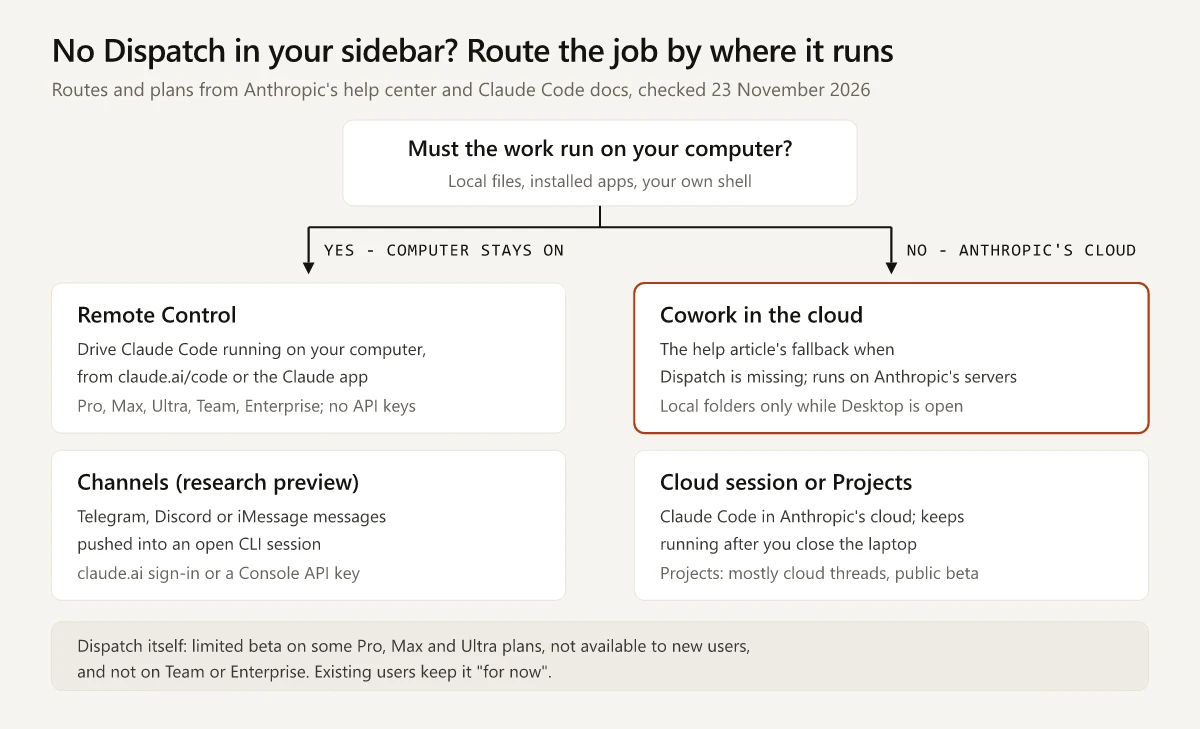
The difference between Dispatch and Remote Control is what has to be running first. Dispatch takes a phone message and decides whether to start a Code or Cowork session through Claude Desktop. Remote Control needs Claude Code already running on your computer: a session you opened, or a claude remote-control server that starts new sessions when you open them from claude.ai/code or the Claude app. Remote Control also needs a claude.ai login, so an approved ANTHROPIC_API_KEY switches it off, along with the other Claude Code features an API key costs you.
Remote Control can start with every session: the remoteControlAtStartup setting in ~/.claude/settings.json, which I have set to true, does that. The commands that differ between the VS Code extension and the CLI are in my comparison of Claude Code in VS Code and the terminal.
Which Route to Use Instead of Dispatch
Match the job you used to send through Dispatch to the documented route that covers it:
| If the job is | Use | Why, per Anthropic’s docs |
|---|---|---|
| Knowledge work from your phone: research, a document, a folder to sort | Cowork in the cloud | The help article names it as the fallback; new sessions on Pro, Max and Ultra run in the cloud, and connected folders are reachable while Desktop is open |
| A coding task you start from your phone and walk away from | A cloud session at claude.ai/code | It runs on Anthropic’s cloud and suits a repo “you don’t have cloned” |
| A stream of tasks fed into one conversation that starts a session per task | Claude Code Projects, if your account has them | ”one ongoing conversation where Claude coordinates a stream of related work”, in public beta on Pro, Max and Ultra and “rolling out gradually” |
| Steering a Claude Code session already running on your machine | Remote Control | Execution and files stay on your machine |
| Reacting to a chat message or a CI alert in an open session | Channels | Events reach a session you already have open |
| The same job every morning or every week | A scheduled task or a routine | Compared by reach and trigger in my guide to Claude routines and scheduled tasks |
Projects is the row closest to Dispatch’s shape, since both put one conversation in front of many sessions. The differences, from the Projects docs: its threads are usually cloud sessions rather than work on your desktop, a thread runs on your computer when you ask Claude to run it there, and if Projects is in neither the sidebar nor its More menu, “the rollout hasn’t reached your account yet” and Anthropic offers a waitlist. These Claude Code Projects at claude.ai/code are separate from the Projects in Claude chat, which my post on Claude Projects and Skills covers.
For the push that told you a Dispatch task had finished, Remote Control has its own phone pushes, and my guide to Claude Code notifications when a task is done sets out each route to a phone.
Dispatch Missing or Not Working: What Anthropic Documents
Rows one to three explain a missing Dispatch entry, and the first two are account conditions with no fix, so check them first. Row four is a note that the help article’s steps may not match your app. Rows five to seven explain tasks that stall or skip actions once Dispatch is there:
| Condition | What Anthropic says | What to do |
|---|---|---|
| Your account never had Dispatch | ”it isn’t available to new users” | Pick a route from the table above |
| You are on a Team or Enterprise plan | ”not available on Team or Enterprise plans” | Remote Control or cloud sessions, once your organization allows them |
| An app is out of date | The help article requires “The most recent version” of Claude Desktop and of the Claude mobile app; “Existing mobile app users will need to update” | Update both apps |
| The Dispatch help article’s steps may look different | With the new combined Claude app, “some steps in this article may look different” | Look for Dispatch in the side panel, where the Cowork guide places it |
| The computer is asleep or Desktop is closed | ”Your computer must be awake and the app must be open for Claude to work on tasks” | Wake the machine and reopen Desktop |
| You run Linux | ”Computer use isn’t available in the Linux beta” | File, connector and plugin tasks still work |
| A permission prompt sat unanswered | Denied after ten minutes, and the task continues without that action | Answer prompts from your phone within ten minutes |
Rows three to seven apply only if Dispatch was already on your account.
Claude Dispatch in November 2026: Check the Sidebar First
So I would not spend an evening on Claude Dispatch pairing steps. If the Dispatch entry is not in the side panel, decide whether the job must run on your computer, and the route table above names the replacement for each answer.
Open the Claude Desktop side panel and look for Dispatch before you read any setup guide.
Frequently Asked Questions
Is Claude Dispatch still available?
Only to people who already had it. As of 23 November 2026, Anthropic's help center says Dispatch is in limited beta on some Pro, Max and Ultra plans and is not available to new users, and that existing users can keep using it for now.
What is the difference between Claude Dispatch and Remote Control?
Dispatch takes a task you message from the Claude mobile app and starts a new Cowork or Claude Code session on your desktop to do it. Remote Control needs Claude Code already running on your computer, either a session you opened or a claude remote-control server, and you drive it from claude.ai/code or the Claude app. Both run on your own machine, and Remote Control is listed for Pro, Max, Ultra, Team and Enterprise plans.
Why is Dispatch not showing in Claude Desktop?
Check the closure first: Anthropic says Dispatch is not available to new users. It is also not available on Team or Enterprise plans, and it needs the latest Claude Desktop and Claude mobile apps. If it is missing, Anthropic's help article says to use Cowork in the cloud instead.
Does Claude Dispatch work on Team or Enterprise plans?
No. Anthropic's Claude Code desktop docs say Dispatch requires a Pro, Max or Ultra plan and is not available on Team or Enterprise plans.
Does Claude Dispatch work on Windows?
Yes, for existing users. Anthropic's help article lists macOS, Windows x64 and Linux for Claude Desktop, and the Cowork guide's prerequisites name macOS or Windows. On Linux, computer use is not part of the beta.