Claude Chrome Extension: Plans, Permissions and Modes
The Claude Chrome extension as of November 2026: which paid plans and browsers get it, the 17 permissions version 1.0.109 asks for, its 3 modes and common fixes.
Version 1.0.109 of the Claude Chrome extension, the build the Chrome Web Store served on 23 November 2026, asks Chrome for 17 API permissions plus host access to <all_urls>, which means every site you open. One of the 17 is debugger, and Chrome’s permissions reference lists two install warnings for it: “Access the page debugger backend” and “Read and change all your data on all websites.” Anthropic’s own explanation of that permission is that it “allows Claude to actually control your browser”, meaning clicks, typing and screenshots.
The list comes from manifest.json inside version 1.0.109, the package the Chrome Web Store’s update server returned on 23 November 2026; Anthropic’s help center, pricing page and the store listing were read the same day. The permissions are fixed the moment you click “Add to Chrome”; what you control afterwards is the approval mode, which decides how much of that reach Claude uses without asking you. The product around those permissions has changed since launch: Anthropic renamed two of the three modes, added Ultra to the plans that get the extension, and turned the side panel into a Cowork session on most plans, so anything written before those changes, Anthropic’s own 2025 launch notes included, describes an older version of the product.
In brief, as of 23 November 2026:
- What it is: Anthropic’s Chrome extension, named Claude in Chrome, which lets Claude “read, click, and navigate websites alongside you” from a side panel, from Claude Desktop or from Claude Code.
- Who gets it: paid plans only (Pro, Max, Ultra, Team and Enterprise). The Free column on claude.com/pricing says No.
- Where it runs: Google Chrome on a computer. Anthropic says it is not supported on other Chromium-based browsers or on mobile devices.
- What it asks for at install: 17 permissions plus access to all sites, with
debuggeramong them. - How much it does unasked: one of three modes, Manually approve, Automatically approve (the default in the Cowork side panel) or Skip all approvals.
- What it never does: purchases, account creation, handling card or ID data, financial trades and four more actions Anthropic blocks in every mode.
- The listing on 23 November 2026: 24,000,000 users, 3.6 out of 5 from 2K ratings, version 1.0.109, updated that day.
What Is the Claude Chrome Extension?
It is Anthropic’s browser extension for letting Claude read pages, click, type, navigate and fill forms in your own Chrome window, “with the accounts you’re already signed in to”, in the words of Anthropic’s built-in browser article. The get-started article names three places you can start a task from:
| Where you start | What it needs | What Anthropic says about it |
|---|---|---|
| The Chrome side panel | The extension only | The store listing: “Nothing else needs to be open.” |
| Claude Desktop | The desktop app, with Claude in Chrome turned on under Settings > Customize > Connectors | The connector is “disabled by default”, so you enable it for each conversation |
| Claude Code | Extension 1.0.36 or later, a direct Anthropic plan and a /login sign-in | Set up with claude --chrome or /chrome, per Claude Code’s Chrome docs |
If Claude Code is signed in with a Console API key, the Chrome connection stays off even with --chrome, and what an API key switches off in Claude Code lists it with the other features a key disables.
Who Can Use Claude in Chrome: Plans and Browsers
Every paid Claude plan includes Claude in Chrome, and the Free plan does not. On the pricing page’s comparison grids, the “Claude in Chrome” row reads No for Free and Yes for Pro, Max, Ultra, Team and both Enterprise columns. Pro starts at $20 a month before tax, and what each Claude plan costs and meters is laid out plan by plan in its own guide. Claude’s Excel add-in follows the same split, with no add-in on Free and paid plans included, and who gets Claude for Excel and how to install it adds the Excel builds it needs.
| Plan | Pricing page, 23 Nov 2026 | How the side panel runs, per Anthropic’s help center |
|---|---|---|
| Free | No | Not available |
| Pro | Yes | As a Cowork session “as the rollout reaches you” |
| Max | Yes | As a Cowork session |
| Ultra | Yes | As a Cowork session |
| Team | Yes | As a Cowork session; the extension is on by default and an owner can turn it off |
| Enterprise | Yes | The extension is on by default (off where HIPAA is enabled); the side panel runs as a Cowork session once an owner enables Cowork in the cloud, classic until then |
The Team and Enterprise defaults come from Anthropic’s admin controls article, which also gives owners site allowlists and blocklists. On browsers and devices, Anthropic’s pages do not all say the same thing:
| Browser or device | What Anthropic says |
|---|---|
| Google Chrome on a computer | Supported. The 1.0.109 manifest sets Chrome 116 as the minimum version |
| Microsoft Edge, Brave, Arc and other Chromium browsers | The install article: “not supported on other Chromium-based web browsers”. Claude Code’s docs, for Claude Code’s connection only: it “works with Google Chrome and Microsoft Edge” and detects the extension in Brave, Arc, Vivaldi and Opera |
| Phones and tablets | Not supported on mobile devices, though a Cowork side panel session can be continued in Claude Mobile |
| Firefox and Safari | The install article covers Chrome only and names neither |
Usage comes out of the same pool as everything else on the plan. Anthropic’s troubleshooting article says the extension counts against “the same plan limits that apply to Claude or Claude Code” and that browser interactions are “more compute-intensive than regular chats”, so “you can expect the extension to use more of your limit”. How the five-hour and weekly limits work is covered separately.
What the Claude Chrome Extension Asks Chrome For
The manifest of version 1.0.109 declares 17 entries under permissions and one under host_permissions. Each one is matched below to Chrome’s own warning text and to Anthropic’s reason from the permissions table in its get-started article:
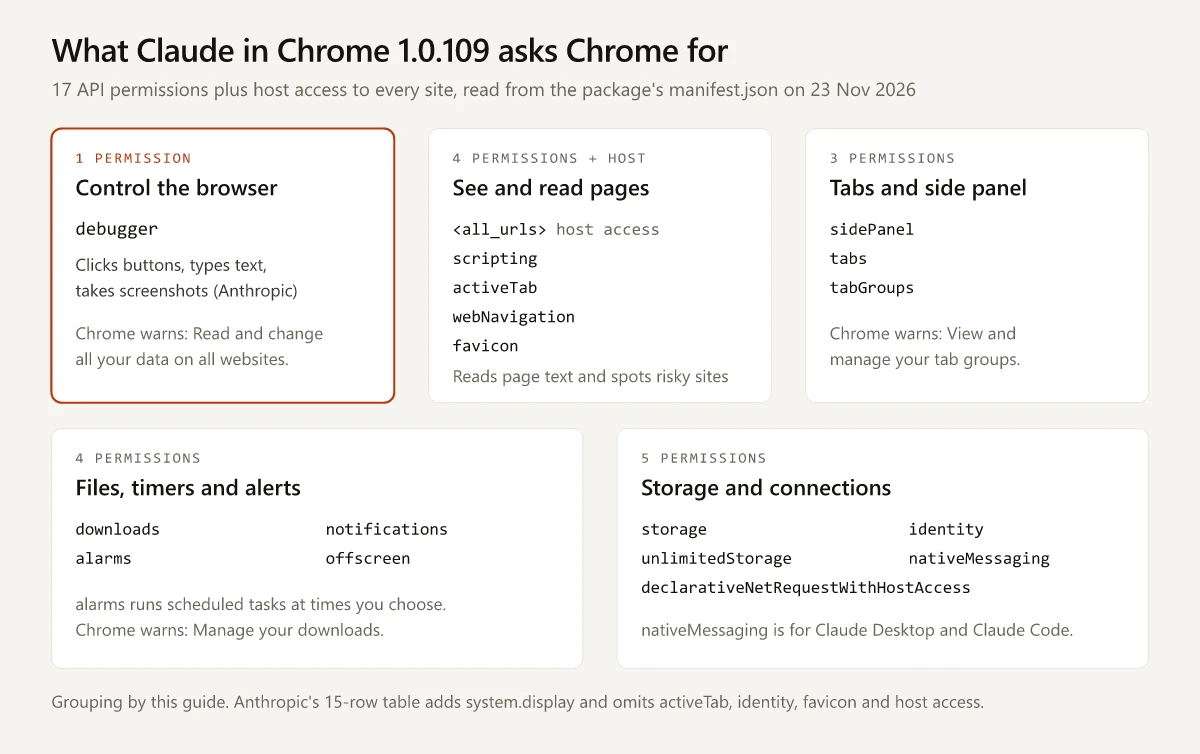
| Permission | Chrome’s install warning | Anthropic’s reason |
|---|---|---|
<all_urls> (host access) | Changes to host permissions “may trigger a warning”, per Chrome’s declare-permissions page | Not in Anthropic’s table |
debugger | ”Access the page debugger backend” and “Read and change all your data on all websites” | Clicking buttons, typing text and taking screenshots |
scripting | None listed | ”read text on webpages” |
activeTab | None; Chrome says it “does not display a permission warning” | Not in Anthropic’s table |
webNavigation | ”Read your browsing history” | To “intervene if it detects that you are on a high-risk website” |
favicon | ”Read the icons of the websites you visit” | Not in Anthropic’s table |
tabs | ”Read your browsing history” | To “open, close, and switch between browser tabs” |
tabGroups | ”View and manage your tab groups” | Keeps its tabs in “a separate group with a different color” |
sidePanel | None listed | The side panel itself |
downloads | ”Manage your downloads” | To “download files from websites and open them” |
alarms | None listed | To “run scheduled tasks at specific times you choose” |
notifications | ”Display notifications” | Alerts when it finishes a task or needs you |
offscreen | None listed | To “play notification sounds in the background” |
storage | None listed | Saves your preferences |
unlimitedStorage | None listed | To “store more data locally” |
identity | None listed | Not in Anthropic’s table |
nativeMessaging | ”Communicate with cooperating native applications” | To work with “Claude Desktop or Claude Code” |
declarativeNetRequestWithHostAccess | None listed | ”lets the extension identify itself to Anthropic’s servers” |
Chrome’s permission warnings guide adds that “the ‘tabs’ warning won’t show if the extension also requests ‘<all_urls>’”, so the dialog you see at install is shorter than this table.
Anthropic’s table has 15 rows, and it does not match the manifest one for one. It includes system.display (“know the size of your screen”), which the 1.0.109 manifest does not declare, and it leaves out activeTab, identity, favicon and the all-sites host access. This guide treats the manifest as the current list and Anthropic’s table as the explanation for most of it.
The store listing’s privacy section adds the data side: the extension handles personally identifiable information, personal communications, location, web history, user activity and website content. Anthropic’s safety article adds that Claude “takes screenshots of the tabs it’s working in”, and whatever is visible in them “becomes part of the conversation”.
Install Claude in Chrome in Six Steps
These are Anthropic’s steps from the get-started article, in order:
- Open Google Chrome on a computer.
- Go to the Claude listing in the Chrome Web Store.
- Click “Add to Chrome”.
- Sign in with your Claude account when prompted.
- Pin it: click the puzzle-piece icon, then the thumbtack next to “Claude”.
- Grant the permissions when prompted.
The Claude icon then sits in the toolbar and opens the side panel. The manifest also suggests a keyboard shortcut for “Toggle Claude side panel”: Ctrl+E, or Command+E on a Mac.
To drive Chrome from Claude Desktop instead, Anthropic’s path is your initials in the lower left corner, then “Settings”, then “Customize” and “Connectors”, then “Configure” on Claude in Chrome, and turn the toggle on. Claude in Chrome then appears in the Connectors drop-down of each chat, switched off until you turn it on for that conversation.
Claude in Chrome Approval Modes: Manually, Automatically or Skip
The mode is a drop-down on the chat input, in the side panel or in Claude Desktop, and the side panel remembers your choice for later sessions. Anthropic’s permissions guide describes the three:
| Mode | Old name | What Claude does | Default where |
|---|---|---|---|
| Manually approve | ”Ask before acting” | In the classic panel it shows a plan listing the sites it will use (“Approve plan” or “Make changes”), then works within that plan and asks only for sensitive actions or before leaving the plan; in the Cowork panel it asks before each action: “Allow all for this website”, “Allow this time only” or “Deny” | No default stated; the guide suggests switching to it for work with real consequences |
| Automatically approve | None given | Keeps working, checks each action for safety “such as checking for data exfiltration or prompt injection”, blocks what it judges unsafe, and goes back to asking at every step “If Claude keeps running into blocks” | The Cowork side panel, per the permissions guide; the general availability post says Claude in Chrome now approves safe actions automatically unless you switch this off in settings |
| Skip all approvals | ”Act without asking” | Does not pause, and “nothing checks its actions automatically”, apart from connector tools you set to “Always ask” | No default stated; Anthropic says to use it only when you “completely trust” everything involved |
Whatever the mode, the guide says Claude asks for explicit permission before:
- changing permission settings
- granting authorizations
- entering potentially sensitive information into a site
- permanent deletions, such as emptying the trash or deleting emails, files or messages
And it lists eight actions Claude will not take under any setting:
- making purchases or financial transactions
- creating accounts
- handling sensitive credit card or ID data
- downloading files from untrusted sources
- giving investment or financial advice
- executing financial trades or investment transactions
- modifying system files
- completing instructions from emails or web content
Some sites trigger a “New permissions required” prompt with three answers: “Allow this action”, “Always allow actions on this site” and “Decline”. Anthropic calls the first “the safest option”, and even after “Always allow” Claude still asks before downloading a file, entering sensitive information or granting authorizations. Approved sites are listed, and can be revoked, under the side panel’s three-dot menu > “Extension settings” > Your approved sites.
Prompt Injection, Screenshots and Blocked Sites
The safety article names prompt injection, instructions hidden in a page, email or document, as “The biggest risk facing browser-using AI tools”. Its defenses, as Anthropic lists them:
- Two classifiers: one checks incoming content for injection attempts, and the other checks every action before it runs.
- A figure for the current setup: Anthropic says its configuration “reduces attack success rates to less than 0.08%” in internal testing that combines known attack techniques, and that the risk is “not zero”.
- Adult content and known pirated content sites are blocked, and Claude “asks for permission before accessing financial sites”. The troubleshooting article lists financial services, banking, investment platforms and cryptocurrency exchanges among the default blocked categories, so the two articles disagree on financial sites.
- A recommendation to use “a separate browser profile without access to sensitive accounts”.
For organizations, Claude in Chrome is off by default where HIPAA is enabled and is “not covered under your Business Associate Agreement”, and the admin article says zero data retention is “Not supported for Claude in Chrome”. Anthropic’s 2025 pilot announcement reported a 23.6% attack success rate without its safety mitigations and 11.2% with them in autonomous mode. The help article does not tie its 0.08% figure to that pilot test, so the two numbers come from different dates and should not be compared as a trend.
The Side Panel Now Runs as a Cowork Session
On the plans marked Cowork in the plan table above, the side panel runs as a Cowork session. How Cowork sits next to chat and Claude Code is a separate question; for the extension, the get-started article lists what changes:
- Side panel conversations are saved to your history.
- A session started in the side panel can be picked up on the web, in Claude Desktop or in Claude Mobile.
- Your skills, plugins and connectors work in the panel.
Dispatch, the Cowork thread you message from the Claude mobile app, is a different way to hand Claude a task, and it is closed to new users, as who still has Claude Dispatch and what replaces it explains.
To go back, open the three-dot menu in the side panel and choose “Switch back to classic”. Recorded workflows, where you perform the steps once and Claude learns to repeat them, exist only in the classic panel.
Cowork also has a browser built into Claude Desktop that needs no extension, which the get-started article says is “rolling out gradually this week”. If you already use Claude in Chrome, it stays your preferred browser for Cowork, and you can switch under Settings > Cowork > Preferred browser.
Claude Chrome Extension Not Working: Fixes by Symptom
Each fix below is from Anthropic’s troubleshooting article unless the row names another source:
| Symptom | What to do |
|---|---|
| The store page says “Not compatible” | Update Chrome. The manifest’s minimum is Chrome 116, and Chrome’s docs say older versions see “Not compatible” in place of the install button |
| It won’t install or sign in | Confirm an active paid plan; on Team or Enterprise, ask the admin whether it is enabled; clear cache and cookies for claude.ai; sign out and back in |
| It stopped working after an update | Chrome disables an extension when an update adds a permission that carries a warning, until you accept it (Chrome’s permission warnings guide) |
| Claude can’t see the page | Refresh, check the extension is enabled and the site is permitted, and give script-heavy sites a moment to load |
| Clicks and typing misfire | Use the latest Chrome, disable other extensions, refresh and start the task again |
| Claude can’t open a site | Check the site permission; the site may be in a default blocked category or restricted by your admin |
| It won’t connect to Claude Desktop or Claude Code | Restart or update the extension; if the toggle in Desktop’s Connectors settings is inactive, restart or update Claude Desktop; restart or update Claude Code |
| The side panel looks different | It is the Cowork panel; three-dot menu > “Switch back to classic” |
| It misbehaves in Arc, Edge or Brave | Use Google Chrome; Anthropic supports the side panel only there (see the browser table above) |
Claude in Chrome Timeline, 2025 to 2026
| Date | Change | Source |
|---|---|---|
| 25 Aug 2025 | Pilot with 1,000 Max plan users | Anthropic’s pilot announcement |
| 24 Nov 2025 | Beta for all Max subscribers | Update on the same page |
| 18 Dec 2025 | Pro, Team and Enterprise added, plus the Claude Code integration | Update on the same page |
| 26 Aug 2026 | Generally available on every paid plan; actions can be approved automatically after a safety check | General availability post |
| 30 Oct 2026 | Anthropic’s editor’s note: mentions of Max in the pilot post from before this date “include what are now the Max and Ultra plans” | Pilot announcement |
| 23 Nov 2026 | Version 1.0.109 live; the permissions guide shows the “formerly” labels for the renamed modes | Store listing and permissions guide |
Anthropic’s pages disagree on two points. The safety article still calls the extension “in beta in the Chrome browser”, three months after the general availability post. On Pro, it says the Cowork side panel is “rolling out to Pro plans in the coming weeks”, the get-started article says “as the rollout reaches you”, and the troubleshooting article says the side panel “now runs as a Claude Cowork session” on Pro.
Pick the Approval Mode Before the First Task
Every paid plan installs the same Claude Chrome extension manifest, version 1.0.109, so the only lever left after “Add to Chrome” is the mode drop-down. For “work with real consequences”, Anthropic’s permissions guide says to stay close or consider “switching back to ‘Manually approve.’” Set Manually approve in the mode drop-down before you open any site that holds money or sends messages as you.
Frequently Asked Questions
Is the Claude Chrome extension free?
No. Claude in Chrome needs a paid Claude plan. As of 23 November 2026, claude.com/pricing marks it No on Free and Yes on Pro, Max and Ultra, with Pro from $20 a month before tax.
Does Claude in Chrome work in Edge, Brave or Arc?
Anthropic's install article says Claude in Chrome is not supported on other Chromium-based browsers. Claude Code's docs go further for Claude Code's own connection: it works with Chrome and Microsoft Edge and detects the extension in Brave, Arc, Vivaldi and Opera.
Is there a Claude in Chrome app for mobile?
No. Anthropic says Claude in Chrome is not supported on mobile devices. On plans where the side panel runs as a Cowork session, a session started in Chrome can be picked up later in Claude Mobile.
What permissions does Claude in Chrome need?
The manifest of version 1.0.109 declares 17 permissions, among them debugger, tabs, downloads, scripting and nativeMessaging, plus host access to all URLs. Chrome's warning for debugger includes: Read and change all your data on all websites.
Why is Claude in Chrome not working?
Anthropic's first checks are an active paid plan, an admin who has enabled it on Team or Enterprise, the latest Chrome, other extensions turned off and permission granted for the site. A store page that says Not compatible can mean Chrome is older than version 116, the minimum the manifest sets; update Chrome first.