Make a PowerPoint With Claude Code: /slides, Skill or Script
To make a PowerPoint with Claude Code, run /slides if your account passes its gates, or write a .pptx with Anthropic's pptx skill or a tested python-pptx script.
/slides <your brief>Anthropic’s Claude Code commands reference says /slides will “Make a new presentation as a Claude Slides artifact filled from your brief.” As of October 2026, it is one of the three ways to make a PowerPoint with Claude Code that this guide compares. The other two, Anthropic’s pptx skill and a script you commit, write the .pptx file into your repo.
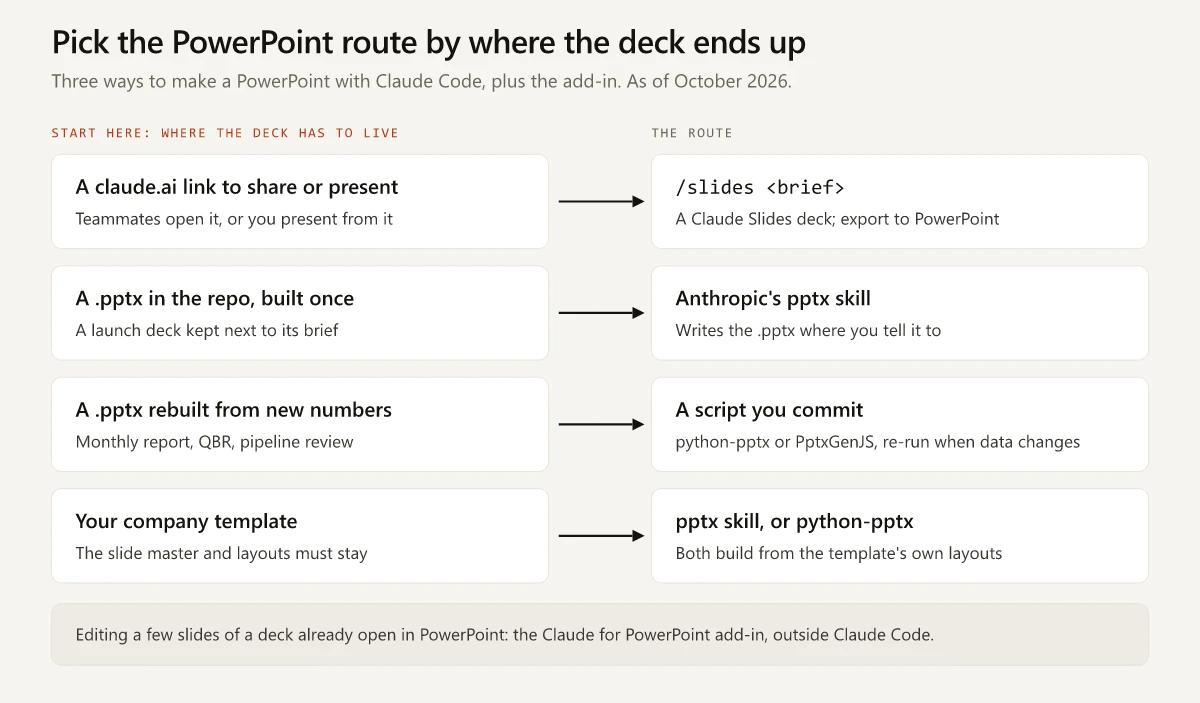
I’d pick between them by where the finished deck has to end up, the test from my Claude vs Claude Code guide applied to decks. For a deck, that test has two answers: a link people open, or a .pptx file. For a .pptx, a second question splits the skill from the script: is the deck built once or rebuilt from new numbers? The company template is a constraint on top, and the pptx skill and a python-pptx script can both build from it. Pairing a deck with the wrong route adds a manual step, such as an export and a re-commit, every time the deck changes.
Short answer: To make a PowerPoint with Claude Code, run /slides <brief> in v2.1.265 or later, signed in through /login on Pro, Max or Team, or Enterprise once an Owner enables the Slides template. Claude builds a claude.ai deck you edit in a desktop browser and export to PowerPoint. For a .pptx in your repo, use the pptx skill or a script.
How to Make a PowerPoint With Claude Code Using /slides
These steps follow the Make a slide deck section of Anthropic’s artifacts docs and the help center guide to artifacts, both checked on 2 October 2026:
- Update Claude Code to v2.1.265 or later.
claude -vprints the version andclaude updateinstalls the latest (CLI reference). Both act on the standalone CLI, while the VS Code extension’s chat panel runs its own bundled copy (VS Code docs). - Sign in with
/loginon your claude.ai account. IfANTHROPIC_API_KEYis set in your environment, Claude Code uses the key once you approve it, and an API-key session cannot publish. Turn off “Use custom API key” in/config, or remove the variable (unset ANTHROPIC_API_KEYin bash,Remove-Item Env:\ANTHROPIC_API_KEYin PowerShell) and restart Claude Code from that shell;/statusshows which credential is active (authentication docs). - Write a brief that says what the deck covers and who it is for, which is what the docs ask for. I would add the slide count and the one action the audience should take after the last slide.
- Run the command, for example
/slides a launch update on the new pricing page for the sales team, 8 slides. With no brief, Claude asks what the deck should be about before it creates anything. - Open the link in a desktop browser. Edit any slide directly or ask Claude to change it, and present from the same page. The iOS and Android apps can view the deck in the Artifacts tab, while editing needs the web or desktop app.
- Export or share it. Click Export for a PowerPoint or PDF file. A new artifact is visible only to you until you share it from the Share control.
Ctrl+] reopens the session’s latest artifact, and in a later session /artifacts lists everything you own (Claude Code v2.1.208 or later). The rest of the built-in commands, with the marketing job each one fits, are in my Claude Code commands cheat sheet.
Feed /slides From Files in Your Repo
The brief does not have to hold the content. Anthropic’s artifacts docs say Claude builds a page “from anything your session can reach, including your codebase,” and fills a template “from your request and from what the session already has.” Name the source files in the brief:
/slides a launch update for the sales team, built from docs/launch-brief.md and data/trial-signups.csv, 8 slides, ending on what reps say differently on MondaySharing and Branding Your Claude Code Slides
| Question | Answer as of October 2026 |
|---|---|
| Who can open it once shared? | On Pro and Max, anyone signed in to Claude who has the link, or people you invite by email (beta). On Team and Enterprise, people in the organization, people outside it you invite by email (beta; on by default on Team, off on Enterprise until an Owner turns it on), and anyone with the link once an Owner turns on External sharing or allows that artifact |
| Can it follow your brand? | Decks can use a design system, which “captures your colors, typography, components, and layout patterns, so Claude applies them to every new design and deck.” Ask Claude in a chat to build one from your brand deck (beta; off on Enterprise until an Owner turns it on) |
Anthropic’s help center says every viewer needs a Claude account, even with the link, while the Claude Code docs say a public link opens with no sign-in. Plan for the stricter rule: send an exported .pptx or PDF to anyone without an account. For comments, share inside the organization or invite people by email; public-link viewers can’t comment, and the help center says invitees can’t either while the deck is also shared by link.
Sources: the artifacts docs on sharing, Anthropic’s help center article on sharing artifacts and its design system setup guide.
Claude Code /slides Requirements as of October 2026
Every gate below comes from the /slides row of the commands reference, the artifacts docs (mostly their availability table) or, for the last row, the skills and settings references. If one fails, /slides does not appear in the / menu or does not run the Slides skill.
| Gate | What the docs require | How to check or fix it |
|---|---|---|
| Version | Claude Code v2.1.265 or later | claude -v, then claude update |
| Plan | Pro, Max, Team or Enterprise; on Team and Enterprise, artifacts are on by default and an Owner can turn them off | /status shows the account the session uses |
| Sign-in | A session backed by a claude.ai account through /login; “Sessions using an API key, gateway token, or cloud-provider credential cannot publish” | Turn off “Use custom API key” in /config, or remove ANTHROPIC_API_KEY (and ANTHROPIC_AUTH_TOKEN or an apiKeyHelper, which also outrank /login) and restart; then run /login and confirm in /status |
| Model provider | The Anthropic API; the command is unavailable on Amazon Bedrock, Google Cloud’s Agent Platform, Microsoft Foundry and Claude Platform on AWS | Check your shell and the env block of your settings files for CLAUDE_CODE_USE_BEDROCK, CLAUDE_CODE_USE_MANTLE, CLAUDE_CODE_USE_VERTEX, CLAUDE_CODE_USE_FOUNDRY or CLAUDE_CODE_USE_ANTHROPIC_AWS |
| Organization policy | Customer-managed encryption keys (CMEK), HIPAA and Zero Data Retention are not enabled for the organization, and Claude Code can load the organization’s policy from api.anthropic.com | Ask your admin. Behind a proxy, VPN or web filter, ask IT to let api.anthropic.com through |
| Slides template | In beta; on by default on Pro, Max and Team; on Enterprise an Owner turns it on under Organization settings > Artifacts | Ask an Owner |
| Surface | The Claude Code CLI, or the Claude desktop app version 1.13576.0 or later; off by default in the Agent SDK, GitHub Action and MCP-server contexts | Run it in the CLI or the desktop app. The VS Code extension’s chat panel runs a subset of commands, so if /slides is missing there, run claude in VS Code’s integrated terminal, which needs the standalone CLI install |
| Artifact settings | Artifacts not turned off by the Artifacts row in /config, "enableArtifact": false, CLAUDE_CODE_DISABLE_ARTIFACT=1, CLAUDE_CODE_DISABLE_NONESSENTIAL_TRAFFIC or Artifact in permissions.deny | /config, your settings files and your environment |
| Skill settings | /slides is a bundled skill: disableBundledSkills or CLAUDE_CODE_DISABLE_BUNDLED_SKILLS=1 removes it, a skillOverrides entry of "slides": "off" hides it, and a skill of your own named slides replaces it | /skills and your settings files |
The provider variables come from the environment variables reference, and the skill keys from the settings reference. My own CLI reports v2.1.283, so the version row is the one I can tick on my machine. The other eight rows depend on the account, its organization, the machine and the session, and two people on the same version can see different / menus.
Can Claude Code Make a .pptx File in Your Repo?
Yes, through Anthropic’s pptx skill or a script you commit. The skill suits a deck you build once, and the script suits a deck you rebuild from new data.
Anthropic’s PPTX Skill in Claude Code
If you sign in with a claude.ai account, Claude Code v2.1.273 or later syncs the skills enabled on that account, Anthropic’s built-in ones included, with no setup (skills docs). Anthropic’s help center lists PowerPoint generation among those built-in skills. Run /skills and look for it under claude.ai sync before you install anything; if it is missing, turn it on in your skills settings on claude.ai. Sessions on an API key or a cloud provider don’t sync, and there the plugin is the route.
The pptx skill also ships in Anthropic’s document-skills plugin with the docx, xlsx and pdf skills, per the plugin manifest. Install it with /plugin marketplace add anthropics/skills, then /plugin install document-skills@anthropic-agent-skills, and read the license note in my vetted list of Claude marketing skills before you build a company deck skill around it.
The repo’s SKILL.md, the copy the plugin installs, last changed on 17 July 2026 and assigns each job a method:
| Job | What the skill tells Claude to do |
|---|---|
| Create a new deck | Write a PptxGenJS script |
| Edit a deck or build from a template | Unzip the .pptx, edit ppt/slides/slideN.xml, zip it again |
| Read a deck | Pull the text with markitdown, or render a labeled thumbnail grid of every slide |
| Charts | ”Keep charts native”: PowerPoint charts through addChart(), with images reserved for types PowerPoint has no native form for |
| Check the result | Read the extracted text for missing content and leftover placeholder words, run the bundled validator, then render every slide to an image and inspect it |
The repository README warns that what you get from Claude “may differ from what is shown in these skills,” so a synced copy can behave differently from this table. It also shows the trigger: mention the skill by name. A marketing version:
Use the pptx skill to build a 10-slide launch deck from docs/launch-brief.md.
Start from templates/company-template.pptx and use its layouts. Keep every chart native.
Save it as decks/launch-update.pptx.
What the SKILL.md means for a local Claude Code session:
- Its dependency line lists PptxGenJS from npm,
markitdown, Pillow, defusedxml and lxml from pip, LibreOffice, and Poppler’spdftoppm. The file treats PptxGenJS as preinstalled; in a local session every one of those runs on your computer, and the slide-image check needs LibreOffice andpdftoppminstalled. - Its safe-font list is Arial, Calibri, Cambria, Times New Roman, Courier New, Bookman Old Style and Century Schoolbook. For other fonts it warns that “the preview of that font is approximate”, so open a deck set in your brand font in PowerPoint before it goes to sales.
A Deck Script You Commit, in Python or JavaScript
A script fits the deck that returns on a schedule with new numbers: a monthly marketing report, a QBR or a quarterly pipeline review. Claude Code writes the script once, and you commit it with its data file and re-run it whenever the data changes. A prompt for that first session:
Write scripts/build_deck.py with python-pptx. Open templates/company-template.pptx,
use its title, bullet and title-only layouts, chart data/signups.csv as a native
column chart, and save decks/monthly-update.pptx. Run it and fix any errors.
The two libraries split on templates. The python-pptx docs say it “only lets you make changes to existing presentations” (Working with Presentations), and every slide it adds is based on one of that deck’s layouts, which makes your company template the natural starting file. PptxGenJS builds the deck in code and defines its slide masters with defineSlideMaster() (PptxGenJS slide master docs), and it is the library the pptx skill uses for new decks.
Install python-pptx with pip install python-pptx, which also installs XlsxWriter, the package its charts depend on (install docs). The minimal script below runs as written on python-pptx 1.0.2 with a template in the standard PowerPoint layout order (title slide 0, title and content 1, title only 5). On another template, swap 0, 1 and 5 for its own layout numbers; the list after the script shows how to find them.
# scripts/build_deck.py: rebuilds decks/monthly-update.pptx from the company template and a CSV
import csv
from pathlib import Path

from pptx import Presentation
from pptx.chart.data import CategoryChartData
from pptx.enum.chart import XL_CHART_TYPE
from pptx.util import Inches

# Your company template, saved as .pptx with every slide deleted
prs = Presentation("templates/company-template.pptx")
title_slide, bullets, title_only = (prs.slide_layouts[i] for i in (0, 1, 5))

slide = prs.slides.add_slide(title_slide)
slide.shapes.title.text = "Monthly Marketing Update"
slide.placeholders[1].text = "Product marketing"

slide = prs.slides.add_slide(bullets)
slide.shapes.title.text = "What shipped"
body = slide.placeholders[1].text_frame
body.text = "New pricing page is live"
body.add_paragraph().text = "Launch email sent to trial users"

with open("data/signups.csv", newline="") as f:
    rows = list(csv.DictReader(f))
chart_data = CategoryChartData()
chart_data.categories = [r["month"] for r in rows]
chart_data.add_series("Trial sign-ups", [int(r["signups"]) for r in rows])

slide = prs.slides.add_slide(title_only)
slide.shapes.title.text = "Trial sign-ups by month"
slide.shapes.add_chart(XL_CHART_TYPE.COLUMN_CLUSTERED, Inches(1), Inches(1.6),
                       Inches(8), Inches(4.8), chart_data)

Path("decks").mkdir(exist_ok=True)
prs.save("decks/monthly-update.pptx")
It reads a two-column data/signups.csv (month,signups) and writes a three-slide deck: a title slide, a bullet slide and a native column chart. The chart data reference says the chart’s data table is “written to an Excel worksheet”, and in the output file that worksheet is a workbook embedded behind the chart.
Before the first run:
- Save your company template with every slide deleted, so the output holds only the slides the script adds. Skip python-pptx’s built-in default, which is “a 4x3 aspect ratio presentation”; the company template carries its own slide size.
- If the company template is a .potx, save it as a .pptx. The python-pptx loader checks the file’s content type and stops a .potx with a “not a PowerPoint file” error.
- Find your company template’s layout numbers. The python-pptx slides guide says to open the deck in Slide Master view and “count down from the top, starting at zero.” Then list each layout’s placeholder numbers with
[(p.placeholder_format.idx, p.name) for p in layout.placeholders], becauseslide.placeholders[1]raises a KeyError on a layout without placeholder 1. - Assign
run.textwhen the script edits text that is already styled. The pptx skill’s notes saytext_frame.textcollapses a paragraph into “a single unstyled run”.
My LinkedIn and X banners and this site’s OG images are already rendered from code in the repo. The banners are HTML rendered to PNG at 2x, and the build renders an OG image for every post with Satori, resvg and sharp; both sit in the repo lane of my Claude Design vs Claude Code comparison. A deck script is the same habit pointed at a .pptx: the script and its CSV are text in git, and the deck is output you can rebuild.
Claude Code PowerPoint Routes by Where the File Ends Up
The table applies the destination test to every route, including the add-in that runs outside Claude Code:
| Where the deck has to end up | Route | Why it fits | Watch for |
|---|---|---|---|
| A link your team opens or presents from | /slides | The deck starts on claude.ai with editing, sharing and presenting in one place | The /slides gates above, and viewers without a Claude account |
| A .pptx someone emails, made once | /slides, then Export | One export at the end | A fresh export after every edit, and a check in PowerPoint that text and charts are editable: the Anthropic pages cited here name the export formats, not what the .pptx contains |
| A .pptx committed next to its brief in the repo | pptx skill | It writes the file to the path you name | LibreOffice and pdftoppm for the slide-image check |
| A .pptx rebuilt from new numbers each month or quarter | A committed python-pptx or PptxGenJS script | The same structure every run, with changes visible in the script and the CSV | Layout and placeholder numbers per template |
| The company template, slide master intact | pptx skill on the template file, or python-pptx on a .pptx copy | Both build from the template’s own layouts | A .potx has to be saved as .pptx for python-pptx |
| A few edits to a deck already open in PowerPoint | Claude for PowerPoint, outside Claude Code | Anthropic’s add-in docs list “pinpoint edits to specific slides without regenerating entire decks” | A paid plan and a supported PowerPoint build |
When the deck has to sit on the company template’s own slide master, with its locked layouts and legal footer, build on that file rather than on a Claude Slides design system.
Claude Slides and Claude for PowerPoint Outside Claude Code
/slidesfills the same Claude Slides template you can start from a chat. Anthropic launched Claude Slides on 16 September 2026, in beta on paid plans, with downloads as PowerPoint or PDF (Anthropic’s announcement).- Claude for PowerPoint is an add-in that runs inside PowerPoint and is generally available on Pro, Max, Team and Enterprise; it reads “the slide master, layouts, fonts, and color scheme in your deck” (Use Claude for PowerPoint).
Make a PowerPoint With Claude Code: Decide Where It Lands First
/slides is the right start when the deck lives at a link. For a .pptx, the pptx skill fits a deck built once and a committed script fits one rebuilt from fresh data. On the company template, the skill or a python-pptx script builds from its own layouts.
Write the deck’s destination, and whether it gets rebuilt, on the first line of your next brief.
Frequently Asked Questions
Can Claude Code make a PowerPoint?
Yes, by at least three routes as of October 2026. The /slides command builds a Claude Slides deck on claude.ai that exports to PowerPoint or PDF, Anthropic's pptx skill writes a .pptx file into your repo, and a python-pptx or PptxGenJS script you commit rebuilds a .pptx each time it runs.
Why doesn't /slides show up in Claude Code?
Anthropic's commands reference says /slides needs Claude Code v2.1.265 or later, a session where artifacts are available and an account with the Slides template, which an Owner has to turn on for Enterprise. Artifacts need a Pro, Max, Team or Enterprise plan, a /login sign-in rather than an API key, the Anthropic API rather than a cloud provider such as Amazon Bedrock, and an organization policy that Claude Code can load from api.anthropic.com. If the command is missing from the VS Code extension's chat panel, which shows a subset of commands, run claude in VS Code's integrated terminal.
Does /slides create a .pptx file?
It creates a Claude Slides deck on claude.ai rather than a file in your repo. You edit it in a desktop browser and export it to PowerPoint or PDF from there. For a .pptx written into your repo, use Anthropic's pptx skill or a script.
What is the Claude PowerPoint skill (pptx)?
It is Anthropic's skill for creating, reading and editing .pptx and .potx files. The public copy of its instructions has Claude write new decks as PptxGenJS scripts, edit templates through their slide XML, and render every slide to an image to inspect it. In Claude Code it can sync from your claude.ai account (v2.1.273 or later) or come with the document-skills plugin.
Can Claude use my company's PowerPoint template?
Yes. The pptx skill builds from a template by editing its slides, a python-pptx script adds slides from the template's own layouts once it is saved as a .pptx, and the Claude for PowerPoint add-in reads the slide master inside PowerPoint. A Claude Slides deck can instead use a design system (in beta), which you can ask Claude in a chat to build from your brand deck.