Claude Research vs Web Search: Which Mode for Which Job
Claude Research vs web search, checked October 2026: the tool calls each mode runs, how long Research takes, which plans get it, and fixes when it fails.
Anthropic answers Claude Research vs web search with two numbers. Web search is “best for straightforward, factual queries that can be answered with one or two tool calls”, and Research is “optimal for comprehensive information gathering requiring five or more tool calls over 1-3 minutes”, per its help article on when to use web search, extended thinking and research, last updated 2 June 2026.
As of October 2026 the controls around those numbers have changed. Accounts on the new Claude experience have no web search toggle, and thinking cannot be turned off in the Claude app on Sonnet 5.5, Opus 5.5, Fable 5.1 or Opus 5. Even the timing is contested: a 2025 Anthropic announcement puts advanced Research runs at five to 45 minutes, against the 1-3 minutes in the when-to-use article. The tool-call count is the part that has held, so it is the test I trust first for any marketing question.
Every vendor fact below comes from Anthropic’s pages, the Claude pricing page among them, re-checked on 3 October 2026. For how Research stacks up against ChatGPT’s deep research, see my Claude vs ChatGPT comparison for marketing work.
What Is the Difference Between Claude Research and Web Search?
Web search handles questions that one or two tool calls can answer, replies in the chat with citations, and works on every Claude plan, Free included. Research handles questions that need five or more tool calls over minutes, can also read connected Gmail, Calendar and Docs, returns a cited report, and needs a paid plan.
| As of 3 October 2026 | Web search | Research | Thinking (extended thinking) |
|---|---|---|---|
| Anthropic’s rule | Questions “one or two tool calls” can answer | ”five or more tool calls over 1-3 minutes" | "complex reasoning tasks that don’t require recent info from the web” |
| What it reads | The live web, plus pages you link (web fetch) | The web plus Gmail, Google Calendar and Google Docs “when connected” | Used on its own, only what is already in the chat |
| What you get back | A reply with citations and source links | ”a longer final report” with citations | A reply with an expandable “Thinking” section |
| Plans | Every plan, Free included | Pro, Max, Team and Enterprise | Not on the pricing grid; set in the model menu |
| Turn it on, previous experience | ”+” button, then “Web search” (a checkmark shows) | ”+” button, then “Research” (a blue indicator shows), with web search on | Model menu, then the “Thinking” or “Extended” toggle |
| Turn it on, new Claude experience | Nothing to turn on | /deep-research, or ”+” then “Research” | Model menu, still in the same place |
| Cost to your limits | Counts toward usage limits | ”can use up your limits faster” | Higher effort uses “more tokens” |
Sources: Enable and use web search (updated 28 September 2026), Use research on Claude (updated 2 June 2026), Change the model, effort and thinking settings (updated 28 September 2026), Claude Cowork and chat are one Claude (updated 16 September 2026) and the pricing page’s plan grid.
“Previous experience” is the phrase Anthropic’s merge article uses for the app as it worked before Cowork and chat became one. The same article gives the test: on a Pro or Max plan, if your message box still shows “Chat” and “Cowork” options, “you don’t have it yet.” The rest of what the merge moved is in the Claude vs Claude Code breakdown.
Claude Research vs Web Search for Marketing Jobs
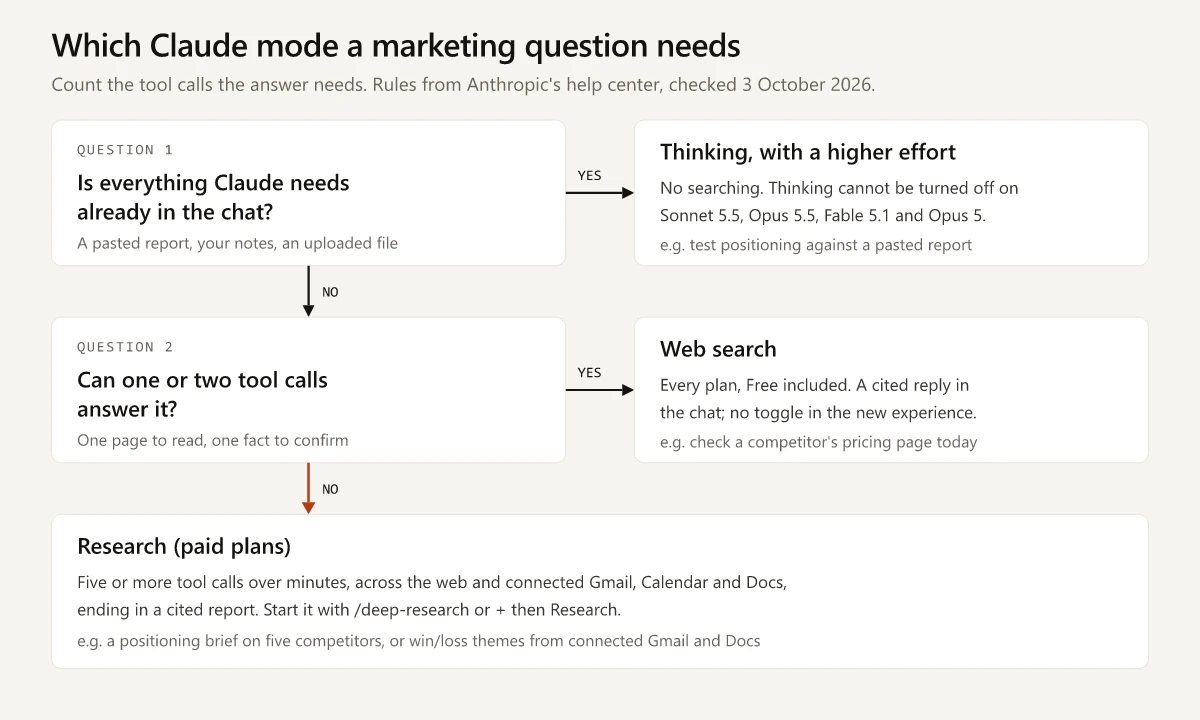
Anthropic’s examples for each mode map onto a product marketer’s month; the right-hand column quotes the example or rule each row rests on:
| Marketing job | Mode | Why, in Anthropic’s terms |
|---|---|---|
| Check a competitor’s pricing page today | Web search | ”getting info about a specific company” is a web search example, and a pasted URL lets web fetch read “the full content” |
| Scan a competitor’s launch news this week | Web search | ”retrieving recent news headlines” is a web search example |
| Trace one stat to its original page before it goes in a deck | Web search | One or two tool calls: find the page, open it |
| Positioning brief on four or five competitors | Research | ”compare business competitors” is a Research example |
| Refresh last year’s battlecard with current web facts | Research | ”update outdated internal documents with info from the web” |
| Win/loss themes from connected Gmail threads and Google Docs notes | Research | It searches “your internal context (such as Gmail, Google Calendar, and Google Docs when connected)“ |
| Launch plan that pairs competitor intel with your own specs and positioning docs | Research | Anthropic’s April 2025 Research launch post gives this as its marketing example |
| Pressure-test a positioning statement against an analyst report you pasted | Thinking, higher effort | No web needed; Claude should “think harder” about what it already has |
| Market-entry memo that needs both facts and judgment | Research with thinking | Anthropic pairs them for “researching emerging technologies for a business proposal” |
The win/loss row assumes you already have interview notes to read; my six-stage win-loss process covers how to collect and code them. If the competitor briefs feed a standing program, my competitive intelligence analysis framework covers the cadence and the sources to watch.
Build Anthropic’s steering phrases into the Research prompt. The Research article’s FAQ suggests “Claude, please use the research tool to…” when Claude does not seem to be researching, and “Pull relevant context from [relevant internal knowledge source]” when it skips your connected Google apps:
Claude, please use the research tool to compare how [Competitor A], [Competitor B]
and [Competitor C] position [category] on their homepages, pricing pages and docs.
Pull relevant context from the Google Docs in [folder] for our own positioning.
Return one table per competitor (headline claim, target buyer, pricing model,
proof points) with a citation on every row, then list where we differ.
How Long Does Claude Research Take?
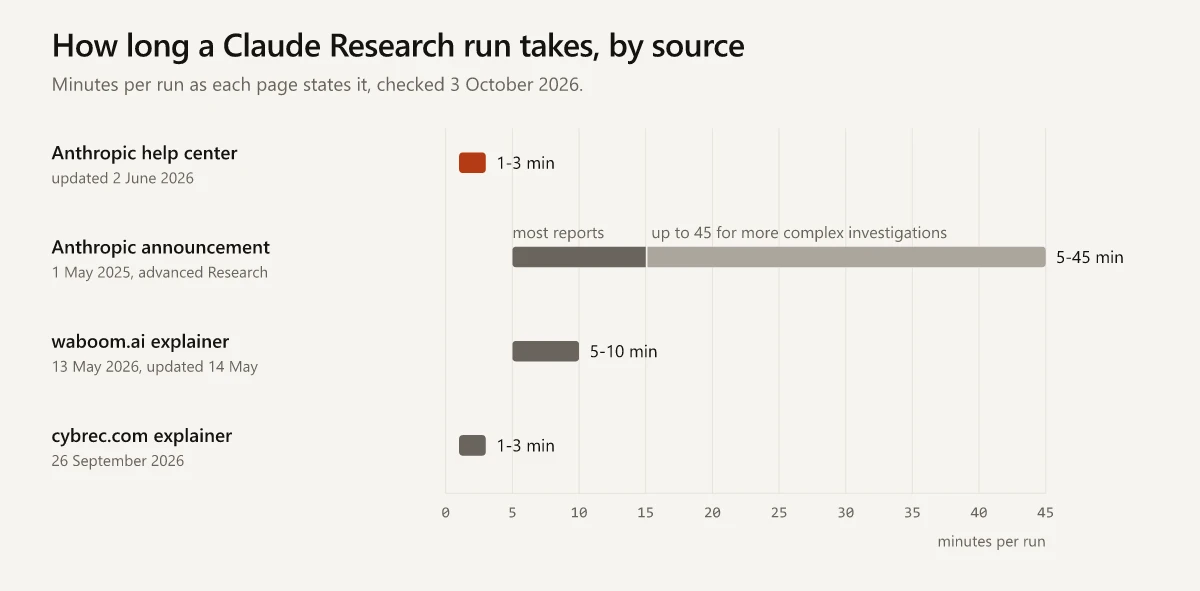
Anthropic’s pages give two different answers, and two third-party explainers of this comparison split between them.
| Source | Date | What it says about a Research run |
|---|---|---|
| Anthropic help center, the when-to-use article | Updated 2 June 2026 | ”five or more tool calls over 1-3 minutes” |
| Anthropic help center, the Research article | Updated 2 June 2026 | ”thorough answers in minutes” |
| Claude can now connect to your world, Anthropic | 1 May 2025 | ”anywhere from five to 45 minutes”; “most reports complete in five to 15 minutes” |
| waboom.ai explainer by Leonardo Garcia-Curtis | 13 May 2026 (updated 14 May 2026) | “five to ten minutes being normal” |
| cybrec.com explainer by Piotr Kaluzny | 26 September 2026 | ”five or more searches over one to three minutes” |
The 2025 range belongs to what Anthropic then called “an advanced mode that searches the web, your Google Workspace, and now your Integrations too”. The current Research article describes a single feature and never uses the word “advanced”, and neither page says which range a run today should match.
Web search gets no figure from Anthropic at all: its article says only that “Search times may vary based on query complexity.” The waboom.ai explainer is the one page in the table that times it, at “roughly 10 to 30 seconds”.
How I would plan around the gap:
- If the answer has to land while someone waits, on a call or in a meeting, make it a web search question.
- Start Research before you need the report. In the new Claude experience, Anthropic says “More involved tasks keep running in the cloud even if you close your laptop or leave the page”, and its example of such a task is “Research the top project management tools for small teams and write up a comparison. I’ll check back later.”
- Leave slack for a run at the long end of the 2025 range when the brief has many competitors or connected sources, since Anthropic tied that end to “more complex investigations”.
Claude Research vs Extended Thinking in October 2026
The when-to-use article treats extended thinking as a separate choice: it is “best if you don’t want to search the web or use integrations, but just want Claude to think harder about your query to figure out the answer.” That choice still exists, but the control for it has changed. Anthropic’s model, effort and thinking settings article says the model menu next to the send button “controls three settings”, the model, the effort level and thinking, and that “Thinking and effort are separate settings.”
| Model you pick | Can thinking be turned off in the app? | What to change for a harder question |
|---|---|---|
| Sonnet 5.5, Opus 5.5, Fable 5.1, Opus 5 | No: “Thinking cannot be turned off” on these | Raise the effort level |
| Sonnet 5, Fable 5, Opus 4.7, Opus 4.6, Sonnet 4.6 | Yes, with the “Thinking” (or “Extended”) toggle under “Effort” | Turn thinking on, raise effort, or both |
| Models missing from the effort list, such as Haiku 4.5 | Yes, with the “Extended” toggle | Turn “Extended” on |
The effort levels, in Anthropic’s words:
- Low and Medium “work well for routine tasks and stretch your usage further”.
- High “offers the best overall balance of quality and speed”.
- Extra high (xhigh) is “designed for long-running coding and agentic tasks” and needs Opus 4.7 or newer.
- Max is “best for tasks requiring the deepest possible reasoning and most thorough analysis”.
Each step up has a price: “Higher effort means more thorough responses, but they take longer and use more tokens, so you’ll reach your usage limits faster.”
On those four always-thinking models, Research vs extended thinking becomes Research vs a higher effort level. Pick Research when the answer needs sources Claude does not have yet, and raise effort when the sources are already in the chat. Anthropic also backs running both, since combining them “allows Claude to both plan its approach thoughtfully and execute comprehensive information gathering”. To compare Sonnet 5.5 and Opus 5.5 by job and price, see the Sonnet vs Opus price-per-job comparison.
Is Claude Research Free? Plans as of October 2026
No. Here is the pricing page’s comparison grid, checked 3 October 2026:
| Plan | ”Ability to search the web" | "Research” |
|---|---|---|
| Free | Yes | No |
| Pro | Yes | Yes |
| Max 5x and Max 20x | Yes | Yes |
| Team | Yes, once an Owner enables it | Yes |
| Enterprise (self-serve or sales-assisted) | Yes, once an Owner enables it | Yes |
The Team and Enterprise caveat comes from the web search article: “An Owner or Primary Owner must first enable web search for the entire workspace in Organization settings > Capabilities.” Research itself runs on the web, Claude Desktop and Claude Mobile.
Research and web search count toward the same usage limits as any chat, per the Research article and the web search article. What draws from the shared pool, and the ways back when it runs out, are in my guide to Claude usage limits.
Free accounts get usage tips of their own in the web search article. It warns that when you share a link to a long article, “the entire article is retrieved into Claude’s context window”, and that asking Claude “to summarize a 10,000-word article will use substantially more of your context window than a regular web search query.” Paste the section you need instead of the link, or decide whether you need “the full analysis or just key points” before you share the URL. In the previous experience the same article also suggests you “disable web search to conserve your usage” in chats that do not need current information.
Claude Research Not Working or Not Available: The Fix List
Causes and fixes come from the help articles linked under the three-mode table and the Google Workspace connectors article (updated 1 October 2026).
| Symptom | Cause | Fix |
|---|---|---|
| No “Research” under the ”+” button | The pricing grid shows Research as “No” on Free | Use web search, or move to a paid plan |
| Research is on but web search is off (previous experience) | “You must have web search turned on for research to function." | "+” button, then “Web search”; look for the checkmark |
| No web search option on a Team or Enterprise account | Web search is off for the whole workspace | An Owner or Primary Owner turns it on in Organization settings > Capabilities |
| Both are on and Claude still does not research | Claude has not picked up the research tool, a case the Research article’s FAQ covers | Prompt “Claude, please use the research tool to…” |
| Research ignores your Gmail or Google Docs | The connector is off, or on Team and Enterprise an Owner has not enabled it | ”+” button, hover over “Connectors”, turn on Gmail, Google Calendar and Google Drive (Drive is the connector that searches Google Docs; authenticate with your Google account first), then prompt “Pull relevant context from [relevant internal knowledge source].” |
| The web search toggle has disappeared | The new Claude experience has no toggle: “Claude searches the web when it helps” | Nothing to switch on; start Research with /deep-research or ”+” then “Research” |
| An incognito chat looks like the old app | Incognito chats “open in the previous experience” | Check the web search toggle inside that chat |
| Claude answers from memory instead of searching | Claude decides when a question needs the web; in the previous experience the toggle may also be off | Put “Search the web” or “Use web search” in the prompt, the wording the web search article suggests |
| Research is still running after three minutes | Runs can last well past 3 minutes (see the duration table above) | Let it run, or stop or redirect it: in the new experience the merge article says “you can stop or redirect Claude while it works”, and tasks keep running if you leave the page |
| A limit stops the run partway | Research sessions “can use up your limits faster” | Check Settings > Usage to see which limit ran out |
Web Search and Research Outside the Claude App
In Claude Code, /deep-research <question> is a bundled workflow that “runs only when you invoke it”, per Anthropic’s Claude Code commands reference. I build this site with Claude Code, and the full Claude Code command list puts that workflow beside the other built-in commands, along with the per-session web search cap that subagents share.
On the Claude API, web search is a separate tool priced at $10 per 1,000 searches (“$10 / 1K searches” on the pricing page), a figure that “Doesn’t include input and output tokens required to process requests”.
Claude Research vs Web Search Comes Down to the Tool-Call Count
Claude Research vs web search will keep shifting at the level of toggles and menus, as the new Claude experience shows. The count from the when-to-use article still sorts most jobs: one or two tool calls is web search, five or more is Research, and a question that needs no new sources goes to thinking, which on the four always-thinking models means a higher effort level.
Count the tool calls your next competitor brief needs before you pick a mode.
Frequently Asked Questions
Is Claude Research free?
No. As of 3 October 2026, Claude's pricing page marks Research as No on the Free plan and Yes on Pro, Max 5x and Max 20x, and Anthropic's Research article lists Pro, Max, Team and Enterprise. Web search is on every plan, Free included.
Why is Claude Research not working?
On the Free plan there is no Research option at all. Anthropic's Research article says you must have web search turned on for Research to function: in the previous experience, switch it on under the + button, and on Team and Enterprise an Owner or Primary Owner has to enable web search in Organization settings > Capabilities. If Research is on and Claude still does not research, prompt it with 'Claude, please use the research tool to...', or in the new experience start the run with /deep-research.
What is the difference between Claude Research and extended thinking?
Research gathers information: five or more tool calls across the web and connected apps, ending in a cited report. Extended thinking, used on its own, reasons harder over what is already in the chat without searching; you can also combine it with Research. As of October 2026, thinking cannot be turned off in the Claude app on Sonnet 5.5, Opus 5.5, Fable 5.1 or Opus 5, so on those models you raise the effort level instead.
How long does Claude Research take?
Anthropic's help center says five or more tool calls over 1-3 minutes. Its 1 May 2025 announcement of an advanced Research mode said five to 45 minutes, with most reports finishing in five to 15, so plan for minutes rather than seconds.
Where is the web search toggle in Claude?
In the previous experience it sits under the + button in the lower left of the chat window, and a checkmark shows when it is on. In the new Claude experience, rolling out to Pro and Max since 16 September 2026, there is no toggle: Claude searches the web when it helps, and you start Research with /deep-research or the + button.