Customer Enablement: Definition, Components, Where It Fits
Customer enablement explained: what it is, how it differs from onboarding, sales enablement, and customer success, plus the components of a real program.
Customer enablement is the ongoing system that teaches customers to get more value from your product - through education, documentation, in-product guidance, and community - so they adopt more of it, expand, and renew. It runs across the entire post-sale relationship, not a fixed window, and it is delivered one-to-many rather than one CSM at a time.
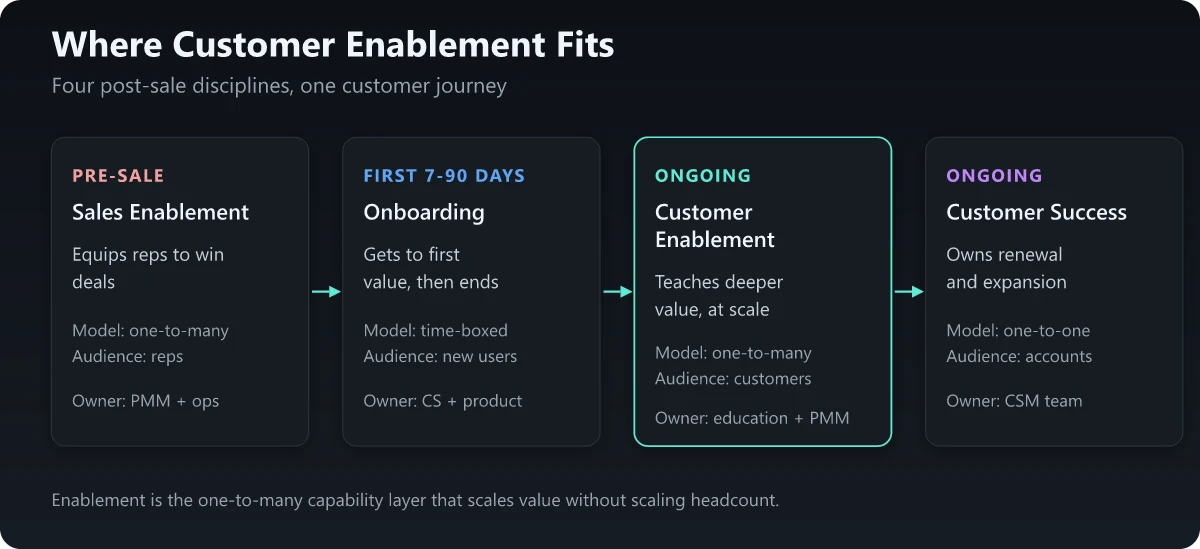
Most articles on this topic blur customer enablement into onboarding or customer success until the word means nothing. Here is the distinction I hold to as a PMM: onboarding gets a customer to first value and stops, customer success owns the relationship and the renewal, and customer enablement is the reusable capability layer underneath both - the docs, courses, and in-product guidance that teach every customer to self-serve value at scale. Get that boundary right and you can actually staff, measure, and fund the thing. Blur it and enablement quietly becomes nobody’s job.
What Is Customer Enablement?
Customer enablement is the ongoing practice of building customers’ skills, confidence, and independence with your product so they reach outcomes without needing a human every time. It is a capability system, not an event.
Three things make it distinct:
- It is continuous. There is no “done.” A customer who mastered the core product last quarter is a beginner at the feature you shipped this quarter.
- It is one-to-many. A good help article, course, or in-app walkthrough serves every customer who hits that moment. That leverage is the entire point.
- It targets self-sufficiency. Success is measured by what the customer can now do alone, not by how many tickets your team closed for them.
The strategic reason it matters: expansion and renewal are downstream of capability. A customer using 3 features of a 15-feature product has almost nothing to renew for and no reason to expand. Enablement is how you move them from 3 to 9 without adding headcount for every account.
Customer Enablement vs Onboarding vs Sales Enablement vs Customer Success
These four disciplines share a customer but do completely different jobs. Confusing them is the root cause of most “who owns this?” arguments in a post-sale org.
| Discipline | When | Job to be done | Delivery model | Typical owner |
|---|---|---|---|---|
| Sales enablement | Pre-sale | Equip reps to sell and win deals | One-to-many (to reps) | Product marketing + sales ops |
| Onboarding | First 7-90 days | Get the customer to first value | Hybrid, time-boxed | Customer success + product |
| Customer enablement | Entire lifecycle | Teach customers to get more value, alone | One-to-many (to customers) | Customer education + PMM |
| Customer success | Entire lifecycle | Own the relationship, renewal, expansion | One-to-one (CSM per account) | Customer success |
Read the table down the “delivery model” column and the picture snaps into focus. Sales enablement and customer enablement are both one-to-many content-and-training functions - they just point at different audiences. Customer success is the one-to-one relationship layer. Onboarding is the time-boxed on-ramp that hands the customer from the sales-enablement world into the enablement-and-success world.
The practical takeaway: if a task scales with content and gets reused across your whole base, it is enablement. If it requires a named human to sit with one specific account, it is success. That single rule resolves most ownership disputes. Of the four, onboarding is the one most often run from memory rather than from a document, so give it a time-boxed plan with one accountable owner per step before you try to draw the enablement boundary around it.
Customer Enablement vs Customer Success (The One People Get Wrong)
Customer enablement and customer success are the pair most often used as synonyms, and they are not.
- Customer success owns outcomes and the commercial relationship: health scores, QBRs, renewal forecasts, expansion plays, churn risk. It is inherently account-specific and headcount-bound - one CSM can only carry so many accounts.
- Customer enablement owns capability at scale: the academy, the docs, the in-app guidance, the community. It is reused across every account and does not scale with headcount the way success does.
The relationship between them is the whole argument for investing in enablement. Enablement is the leverage that lets a customer success team cover more accounts without hiring in a straight line. When customers can self-serve answers, learn new features on their own, and troubleshoot from documentation, each CSM spends their scarce one-to-one time on the accounts and moments that genuinely need a human. Cut enablement and every one of those moments lands in a CSM’s inbox instead.
What “Customer Success Enablement” Actually Means
Search “customer enablement” and you will trip over “customer success enablement,” and the two get confused constantly. They are different things.
- Customer enablement equips your customers - the users who bought the product.
- Customer success enablement equips your CSMs - the training, playbooks, content, and account insight that make your customer success team effective. It is sales enablement’s logic applied to the post-sale team.
If you are hiring, budgeting, or writing a job description, the distinction is not pedantic. One role builds courses and docs for users. The other builds playbooks and onboarding for your internal CS org. Naming the wrong one gets you the wrong candidate.
The Components of a Customer Enablement Program
A real program is not one help center. It is six components that reinforce each other, usually adopted in roughly this order as the customer base grows.
| Component | What it is | Why it earns its place |
|---|---|---|
| Knowledge base + docs | Searchable articles, guides, references | Deflects the highest-volume, lowest-value questions first |
| Education + certification | Structured courses, an academy, credentials | Turns power users into internal champions and advocates |
| In-product guidance | Tooltips, checklists, contextual walkthroughs | Teaches at the exact moment of need, zero context-switch |
| Community | Forum, Slack/Discord, user groups | Customers answer each other; scales past what you can staff |
| Feedback loops | Structured capture of confusion and requests | Feeds product and content; see voice of the customer |
| Adoption metrics | Instrumentation of who uses what, how deeply | Tells you which enablement actually changed behavior |
Named public examples make this concrete rather than abstract:
- Salesforce Trailhead is a certification-grade education program that turned learning Salesforce into a career credential customers pursue on their own.
- HubSpot Academy does the same for marketing and CRM skills, and doubles as a demand-generation engine.
- Notion’s template gallery and help center lean on documentation and community so heavily that most users never contact support to get advanced value.
Start where the leverage is highest. For almost every team that is docs plus in-product guidance - they scale fastest and deflect the most low-value work. Education, certification, and community come next, once you have enough customers for that investment to pay back.
How to Build a Customer Enablement Program in 5 Steps
To build a customer enablement program: name one owner, rank your top 10 self-service failures by cost rather than volume, ship documentation and in-product guidance for those 10 first, baseline your adoption and deflection metrics before launch, then add education and community once volume justifies the investment.
Step 1: Name one owner before you build anything
Whether that owner is a PMM wearing a second hat or a full customer education function depends on your stage, and the section further down on where enablement sits in the post-sale org walks through the three common answers. The starting question is narrower than staffing: ownership has to be written down somewhere a new hire could find it.
Three things make ownership real rather than nominal:
- A named person in a document. Not a team, not a working group, not a shared responsibility. A name.
- A budget line. Enablement funded out of whatever is left at the end of a quarter is enablement that disappears in the first bad quarter.
- One accountable metric. Pick a single number from Step 4 and put it in that person’s goals.
Distributed ownership is how enablement dies quietly. Work that belongs to everyone’s spare capacity never reaches anyone’s calendar, and the help center rots one unshipped update at a time.
Step 2: Rank your top 10 self-service failures by cost, not volume
Every product has a set of moments where a customer tries to solve something alone and fails. Those moments are your enablement targets. The instinct is to rank them by ticket volume and start at the top, which sorts by the wrong variable.
Rank by cost instead. Gartner’s February 2024 cost benchmarks put the median cost per contact at $1.84 for self-service and $13.50 for assisted channels, so a failure that escalates to a human carries roughly seven times the unit cost of one that resolves on its own. A low-volume failure that always ends in a support engineer’s queue can outweigh a high-volume one customers mostly muddle through.
The counterweight is that deflection only pays when the content actually resolves the issue. Gartner’s survey of 5,728 customers, conducted in December 2023, found that only 14% of customer service issues are fully resolved in self-service, and that the most common reason for failure, in 43% of cases, was that customers could not find content relevant to their issue. That second figure is the enablement brief in one line: the usual gap is missing or unfindable content rather than an unwilling customer.
So the ranking rule is cost-weighted failure, not raw count. Take your top 10 and write them down as failure modes in the customer’s own words, not as feature names.
Step 3: Ship docs and in-product guidance for those 10 first
The components table above puts docs and in-product guidance highest on speed to leverage, which is exactly why they come before anything with a curriculum attached. A course takes a quarter to build and a week to go stale. An article and a tooltip take days.
Work the ranked list from Step 2 in order and ship two things per failure mode: one piece of documentation that answers it completely, and one in-product prompt that surfaces that answer at the moment the customer hits the wall. The pairing is the point. Documentation nobody can find at the moment of need reproduces that 43% failure mode inside your own help center.
Resist starting an academy here. Education is Step 5 for a reason. It is the highest-effort component, and building it before you know which 10 things customers actually fail at means building the wrong curriculum very well.
Step 4: Baseline four metrics before launch, not after
The most common measurement mistake in enablement is starting to track adoption the same week you launch the thing meant to improve it. With no before, there is no after, and the program spends its first renewal cycle unable to prove it did anything.
Record all four of these before the first article ships. The metrics themselves get more depth in the retention section below; what matters here is the timing and the segmentation.
| Metric | What to record at baseline | What good movement looks like |
|---|---|---|
| Feature adoption depth | Average number of features actively used per account, split by tenure | The average climbs and the gap between best and worst cohorts narrows |
| Self-service resolution rate | Share of questions resolved with no human touch, per failure mode from Step 2 | Rises fastest on the specific failure modes you shipped content against |
| Time-to-competency | Days from first login to a new user completing a core task unassisted | Shortens, and varies less across accounts |
| Support ticket deflection | Ticket volume per account per month for your top 10 failure modes | Falls on the 10 you targeted while total volume holds flat or grows |
Segment every one of these by cohort. Aggregate numbers hide the comparison you most need, which is whether accounts that arrived after the program launched behave differently from the ones that arrived before it.
Step 5: Add education and community once volume justifies it
Salesforce Trailhead and HubSpot Academy get cited so often that teams mistake them for a starting point. They are an end state. Both sit on top of an enormous installed base, where the fixed cost of producing a course amortizes across hundreds of thousands of learners. At 40 customers that arithmetic does not work, and the same effort spent on documentation returns more.
The signal to start is repetition at scale: the same capability gap appearing across enough accounts that one-to-one teaching is visibly consuming CSM hours, and a feature set stable enough that the course will not need rewriting every quarter. Community has a similar threshold. A forum with too few active customers is a room where questions go unanswered, which costs more trust than having no forum at all.
The direction of travel supports the eventual investment. A Gartner survey of 265 customer service and support leaders, conducted in April and May 2025, found that self-service portals, live chat and knowledge management systems will overtake phone and email as the most valuable customer service technologies by 2027. Build toward that. Just do not open with it.
How Customer Enablement Drives Retention and Expansion
Enablement is not a cost center you tolerate. It is the mechanism that connects product usage to revenue.
The chain is direct:
- Enablement raises capability. The customer learns a feature they were not using.
- Capability raises adoption. They actually use it, and it becomes part of their workflow.
- Adoption raises stickiness. A workflow-embedded product is expensive to rip out.
- Stickiness drives renewal and expansion. More usage justifies the renewal and opens the door to more seats or tiers.
This is why enablement belongs in the same conversation as lifecycle marketing and retention, not filed away as a support subfunction. The customers who get the most value are the ones who were taught to find it, and they renew, expand, and refer at a different rate than the ones left to figure it out alone.
The measurement that matters is not “how many courses did we publish” or “how many articles are in the knowledge base.” It is behavior change:
- Feature adoption depth - how many features an average account actively uses, tracked over time
- Self-service resolution rate - share of questions answered without a human touch
- Time-to-competency - how long until a new user can complete a core task unassisted
- Certification or course completion among active accounts, correlated with retention
- Support ticket deflection tied to specific content you shipped
If an enablement investment does not move one of these, it was content for content’s sake.
Where Customer Enablement Sits in the Post-Sale Org
Ownership varies by company stage, and pretending there is one right answer helps no one.
- Early stage: enablement is a hat, not a team. A PMM or the founding CS hire writes the docs and records the walkthroughs between other jobs.
- Growth stage: a dedicated customer education or enablement owner appears, usually building the academy and the in-product guidance layer while PMM feeds messaging and positioning.
- Scale stage: customer education becomes its own function with instructional designers, a community manager, and a metrics owner, sitting alongside (not inside) customer success.
The non-negotiable at every stage is a single named owner. Customer enablement shares the fate of onboarding: “everyone contributes” reliably becomes “no one runs it.” One person owns the capability layer, or it decays into a stale help center nobody trusts.
The Bottom Line
Customer enablement is the ongoing, one-to-many system that teaches customers to get more value on their own - and it is a distinct discipline, not a synonym for onboarding or customer success. Onboarding gets them to first value and hands off. Customer success owns the relationship one account at a time. Customer enablement is the reusable capability layer underneath both, and it is the only one of the three that scales value delivery without scaling headcount in lockstep.
Fund it, name an owner, and measure it by behavior change rather than content volume, and it becomes the quiet engine behind adoption, retention, and expansion. Leave it undefined and it becomes the thing everyone assumes someone else is doing, right up until the renewal conversation reveals that no one was.
Frequently Asked Questions
What is customer enablement?
Customer enablement is the ongoing system that teaches customers to get more value from a product so they adopt more of it, expand, and renew. It runs across the entire post-sale relationship through education, documentation, in-product guidance, community, and certification. Unlike onboarding, which ends once a customer reaches first value, enablement is continuous - it keeps raising what the customer is capable of doing on their own.
What is the difference between customer enablement and customer success?
Customer success owns the relationship and the commercial outcome - health scoring, renewals, expansion, and risk management, usually one CSM per account. Customer enablement owns the capability - the scalable education, docs, and in-product guidance that teach every customer to self-serve value. Success is high-touch and account-specific; enablement is one-to-many and reused across the whole base. Strong enablement is what lets a success team cover more accounts without hiring linearly.
What is customer success enablement?
Customer success enablement is a different thing from customer enablement, and the two get confused constantly. Customer success enablement equips your CSM team - the training, playbooks, and account insight that make CSMs effective. Customer enablement equips your customers directly. One points at your staff, the other points at your users.
What are the components of a customer enablement program?
A working program has six components: a knowledge base and documentation, structured education (courses, certification, an academy), in-product guidance and tooltips, a customer community, feedback loops back into product, and adoption metrics that tell you what is actually landing. Most teams start with docs and in-product guidance because they scale fastest, then add education and community as the customer base grows.
Is customer enablement the same as customer onboarding?
No. Onboarding is the finite process that gets a new customer to first value in the first 7-90 days, then hands off. Customer enablement is the ongoing system that keeps deepening a customer's capability for the entire life of the account. Onboarding is a phase; enablement is permanent infrastructure that onboarding plugs into.
How do you build a customer enablement program?
Start by naming one owner with a budget line and a single accountable metric. Rank your top 10 self-service failure moments by cost rather than raw ticket volume, since an escalation to a human costs several times what a self-served answer costs. Ship one help article and one in-product prompt for each of those 10 before building any course. Baseline your adoption and deflection metrics before launch. Add education and community only once customer volume justifies the fixed cost.