How to Remove a Connection on LinkedIn Without Them Knowing
How to remove a connection on LinkedIn from a profile, the Connections page or the app, what the other person is told, and when unfollowing is the better choice.
You cleared a pile of invitations on your phone, tapped Accept a few times too fast, and now a stranger sits among your 1st-degree connections, able to message you and see your updates in their feed. Here is how to remove a connection on LinkedIn from your Connections page, without opening their profile, in the four desktop steps LinkedIn Help’s Remove a connection page gives:
- Click the My Network icon at the top of your LinkedIn homepage.
- Under your profile name, click the link that displays your number of connections.
- Click the More icon next to the connection and click Remove connection.
- Click Remove in the Remove Connection pop-up window.
LinkedIn’s note under the steps: “When you remove a connection, they won’t be notified.”
Of the two ways to step back from a connection without ending all contact, removal is the heavier one, and I would only use it when the 1st-degree link itself is the problem: a stranger you accepted by mistake, or someone who should not be able to message you for free. If what bothers you is their posts, unfollow instead. It keeps the connection and you can undo it, with one catch LinkedIn prints on its unfollow page (a524326): re-following sends them a notification. Every rule below carries its LinkedIn Help answer ID, as of November 2026, so you can check it against the current page.
How to Remove a Connection on LinkedIn: All Three Routes
LinkedIn Help gives two desktop routes and one mobile route. The menu labels below are exactly as the page wrote them on 17 November 2026, when it read “Last updated: 2 years ago”:
| Step | Desktop, from their profile | Desktop, from your Connections page | LinkedIn app (Mobile steps) |
|---|---|---|---|
| 1 | Navigate to the connection’s profile | Click the My Network icon at the top of your LinkedIn homepage | Go to the profile of the member you’d like to remove |
| 2 | Click More or the More button in the introduction section | Under your profile name, click the link that displays your number of connections (LinkedIn’s example: “465 connections”) | Tap the More button or the More icon |
| 3 | Select Remove Connection | Click the More icon next to the connection and click Remove connection | Tap Remove connection |
| 4 | Status changes to Connection Removed | Click Remove in the Remove Connection pop-up window | Tap Remove connection in the pop-up window to confirm |
The desktop profile route has no confirmation pop-up in LinkedIn’s steps; the other two do. Help’s mobile steps start from the profile only. The app does have a Connections page (My Network, Manage my network, Connections, per a541865), but Help does not document removing anyone from it. If you see no More option next to a name there, use the desktop Connections page route instead.
How to Remove a Connection on LinkedIn Without Visiting Their Profile
Use the Connections page route in the middle column above. It works from your Connections page, so you never open their profile.
That matters because opening a profile is a profile view, and depending on your viewing mode it can show your name in their Who Viewed Your Profile list. If you prefer the profile route, switch your profile viewing mode first; my LinkedIn private mode guide covers what private mode shows them and what it costs a free account.
Two LinkedIn Help pages give different paths to the same Connections page, as of November 2026:
- Remove a connection (a541617): My Network icon, then the link under your profile name that shows your connection count.
- Send messages to connections on LinkedIn Messaging (a541865): My Network icon, then Connections under Manage my network on the left pane.
If one path is not on your screen, try the other. The two pages were last updated far apart (a541617 “2 years ago”, a541865 “1 month ago” on 17 November 2026).
Does LinkedIn Notify Someone When You Remove a Connection?
No. The notes on a541617 say the person you remove won’t be notified, and the note covers every route above.
No notification does not mean nothing changes on their side. These are the effects LinkedIn documents, so these are the ways they could find out:
- Degree badge. “Connections you remove will no longer be 1st-degree connections and won’t appear in your Contacts section.” On their screen your name stops showing 1st. Which degree it shows next depends on whom you both know; the guide to what 1st, 2nd and 3rd mean on LinkedIn has the definitions.
- Messaging. LinkedIn’s messaging page says “You can only message your connections.” After removal, a free account needs a message request (coworkers and group members) or InMail, which “requires a Premium subscription”.
- Recommendations and endorsements. “After removing a connection, any recommendations or endorsements between you and that person will be withdrawn.” If they gave you a recommendation, it leaves your profile, and theirs loses yours.
I would expect the last one to be the easiest to spot, because a recommendation is a visible block of text on a profile. If someone wrote you one that you want to keep, unfollow them instead of removing them.
What Changes After You Remove a Connection
The rest of what LinkedIn Help says about the aftermath, with the gaps marked:
| After removal | What LinkedIn Help says | Help answer |
|---|---|---|
| Contacts section | They “won’t appear in your Contacts section” | a541617 |
| Whether you still follow them | Not stated on the remove page | a541617 |
| Reconnecting | Not described step by step; the page assumes a connection can be “reestablished” | a541617 |
| Bulk removal | Not offered on the page: every route removes one person. At the 30,000-connection cap you must remove some before you can send or accept invitations (the degrees guide linked above covers the cap) | a541617, a567364 |
The row I would act on is “Whether you still follow them”. LinkedIn treats following and connecting as separate states: its Follow and connect page (a702683) says that on profiles where Follow is the main button, connecting through the overflow menu makes you follow the person while the invitation is pending, and if they decline “you’ll continue following them unless you manually unfollow.” The remove page is silent on following, so after a removal, open My Network, then People I Follow under Manage my network, and check whether their name is still there.
Endorsements sit on skills, so a removal can lower the endorsement count beside a skill. My guide on adding and ordering skills on LinkedIn covers where endorsements show and how to hide them.
Remove a Connection vs Unfollow vs Block: Side by Side
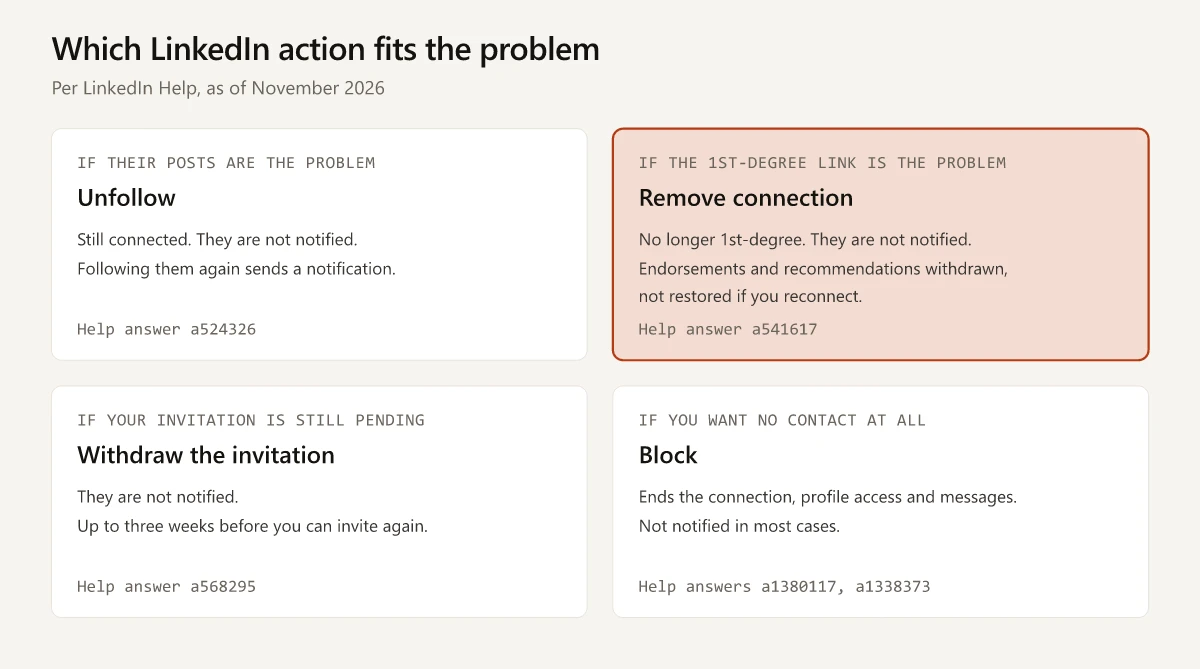
The four ways to step back from someone on LinkedIn, side by side, from LinkedIn Help:
| Action | Still connected? | You still see their posts? | Are they notified? | Endorsements and recommendations | How to undo | Help answer |
|---|---|---|---|---|---|---|
| Remove connection | No, no longer 1st-degree | Not stated by LinkedIn Help | ”they won’t be notified” | Withdrawn, not restored if you reconnect | A new invitation, which they must accept | a541617 |
| Unfollow | Yes, “you’ll remain connected” | No, “won’t see their updates" | "They won’t be notified” | Not mentioned on the page | Follow again, and they “will receive a notification” | a524326 |
| Withdraw a sent invitation (not yet accepted) | Never were | Not stated by LinkedIn Help | ”The recipient will not be notified” | None exist yet | A new invitation after up to three weeks | a568295 |
| Block | No, the block ends the connection | No, neither of you sees the other’s shared content | Not in most cases | Theirs on your profile removed | Unblock in Settings & Privacy; recommendations cannot be reinstated | a1380117, a1338373 |
Blocking cuts far more than a removal: profiles, messages and suggestions too. The steps, the one exception to the no-notification rule and how unblocking works are in my guide to blocking someone on LinkedIn.
How to Unfollow a Connection Instead
LinkedIn’s Follow or unfollow people page (a524326), “Last updated: 2 months ago”, gives three desktop routes:
| Route | Steps |
|---|---|
| From their profile | Click More or the More button in the introduction section of their profile, then select Unfollow from the dropdown |
| From a post in your feed | Click the More icon on the upper right of the post, then click Unfollow [name] from the list |
| From the People I Follow page | Click the My Network icon, click People I Follow under Manage my network on the left pane, then click Following under the person’s name. It changes to Follow |
The feed and People I Follow routes never open their profile.
The rule that makes unfollow the safer test: “If you’re connected to a person and choose to unfollow them, you’ll remain connected, but won’t see their updates. They won’t be notified that you’ve unfollowed them. LinkedIn members will receive a notification if you begin following them again.”
To follow someone again on desktop, the page’s path is the Me icon, Settings & Privacy, then People you unfollowed under Account preferences > Site preferences, and Follow next to their name. Do it only if you are fine with them seeing a notification.
Withdraw a Pending Request Instead of Removing
If the person has not accepted yet, there is no connection to remove. LinkedIn’s Withdraw an invitation page (a568295), “Last updated: 1 year ago”, says you can withdraw “any time before it’s accepted”:
- Click the My Network icon at the top of your LinkedIn homepage.
- In the Invitations section, click Show all (if you have pending invitations you received) or Manage next to No pending invitations.
- Click the Sent tab under Manage invitations.
- Click Withdraw next to the invitation, then Withdraw in the confirmation pop-up.
- The recipient is not notified.
- Up to three weeks before you can send the same member a new invitation.
How to Remove a Connection on LinkedIn and Keep What You Need
Before you remove a connection on LinkedIn, ask what you want gone. For their posts, unfollow from the feed and leave the connection alone; it is silent and reversible as long as you do not mind a notification when you follow again. For the 1st-degree link, use the Connections page route so you skip their profile, accept that recommendations and endorsements between you are gone for good, and then check People I Follow. For a request they never answered, withdraw it.
Open your Connections page, not their profile.
Frequently Asked Questions
Does LinkedIn notify someone when you remove them as a connection?
No. LinkedIn Help's Remove a connection page says that when you remove a connection, they won't be notified. They can still notice the effects: you are no longer a 1st-degree connection, and any recommendations or endorsements between you are withdrawn.
Do endorsements come back if you reconnect on LinkedIn?
No. LinkedIn Help says that after you remove a connection, recommendations and endorsements between you are withdrawn and will not be restored if the connection is reestablished. Ask for a new recommendation after you reconnect if you want one back.
How do I remove multiple connections on LinkedIn at once?
LinkedIn Help describes removal one connection at a time, from a profile or from the More icon next to each name on your Connections page, and the page gives no bulk option. At the 30,000-connection cap, LinkedIn says you can't send or accept new invitations until you remove some.
How do I cancel a pending connection request on LinkedIn?
Withdraw it from the Sent tab under My Network, Invitations; the steps are in the withdraw section above, and the recipient is not notified.
What is the difference between removing a connection and unfollowing on LinkedIn?
Removing ends the 1st-degree connection and withdraws endorsements and recommendations. Unfollowing keeps the connection and only hides their updates from your feed. Neither notifies the person, but LinkedIn says members get a notification if you begin following them again.