CFBR Meaning on LinkedIn: What It Is and Does It Work
CFBR meaning on LinkedIn: Commenting For Better Reach. What the comment claims, what LinkedIn's spam and feed pages say about it, and what to write instead.
The CFBR meaning on LinkedIn is Commenting For Better Reach: the four letters people type under layoff announcements, job-search posts and referral requests to push the post into more feeds. It runs into a line on LinkedIn’s own Spam help page, which lists “Excessive, irrelevant, or repetitive comments or messages” among its examples of spam and says “We may remove or limit the distribution of content designed to artificially increase engagement through misuse or misrepresentation of LinkedIn’s features.”
The two CFBR guides I read in full, from Linked Helper (a LinkedIn automation vendor) and OutX, both say the comment helps reach, and neither links a LinkedIn page for that claim. LinkedIn does publish what its feed ranks on and what it limits, so I set the claims against those pages below, and on LinkedIn’s text a bare CFBR is a weak way to help someone who just lost a job: a sentence with a name, a company or a referral in it does what CFBR promises and matches none of LinkedIn’s spam examples.
What Does CFBR Mean on LinkedIn?
CFBR means Commenting For Better Reach, also written “Comment For Better Reach” or #CFBR. A commenter leaves it under a post, usually a layoff announcement, a job search or a referral request, to say they are commenting only so that LinkedIn shows the post to more people. The comment adds no information beyond that.
Both guides above place it on posts like these. Linked Helper says CFBR is “often used to spread important news, such as posts about mass layoffs.” OutX goes further and tells recruiters that “Job postings with CFBR comments are more likely to reach qualified candidates”, without a source for the claim.
CFBR Full Form and Spellings
The full form is Commenting For Better Reach. Case does not matter, and #CFBR is the same acronym as a hashtag. The one variant that changes the meaning is the spelled-out request:
| Written as | What the writer is saying |
|---|---|
| Comment for better reach | ”Please comment so this post reaches more people” |
That request form is the one Linked Helper’s guide describes in what it calls “one of the well-known best cases on social media”, in which “people were encouraged to like, share, and… comment for better reach.”
CFBR Claims vs What LinkedIn Publishes
I fetched each LinkedIn page below logged out from an Indian connection on 31 October 2026. None of them mentions CFBR by name (a text search of each page for “CFBR” and “better reach” returns nothing), so the right-hand column is LinkedIn’s general rule set against the specific claim a guide makes.
| Claim in a CFBR guide | What LinkedIn publishes |
|---|---|
| ”Comments are more heavily weighted by LinkedIn’s algorithm than likes or shares” (Linked Helper) | The feed relevance page lists “How often a post is viewed or engaged with” as a signal. It gives no weight for any signal and the word “likes” does not appear on it |
| ”While any comment helps, meaningful comments carry more weight than simple ones” (OutX) | LinkedIn agrees conversation quality counts: the same page lists “How constructive or professional the conversation is” as a separate signal, publishes no weight for it, and says its algorithms “filter out or taper distribution of low-quality and unsafe content" |
| "It’s generally considered acceptable to leave comments just for reach” (Linked Helper) | The Spam help page lists “Excessive, irrelevant, or repetitive comments or messages” as an example of spam |
| ”CFBR itself isn’t spam, but overusing it or using it inappropriately can be seen as low-value engagement” (OutX) | LinkedIn’s line has no single-use exemption. The Professional Community Policies say “Don’t do things to artificially increase engagement with your content”, with no carve-out for a single acronym |
| Mass or automated CFBR comments (Linked Helper’s guide has a section titled “Using Linked Helper for Mass Commenting to Save Time”) | The commenting help page says “if we detect excessive comment creation or use of an automation tool, we may limit the visibility of those comments” |
Each LinkedIn page showed its own age on the writing day: the Spam page read “Last updated: 2 years ago”, the feed relevance page “6 months ago” and the commenting page “4 months ago”. The Professional Community Policies page shows no date. The old Spam page address (answer 137372) now redirects to answer a1338787, which is the one linked here.
What LinkedIn Says in CFBR’s Favour
LinkedIn’s feed page does count engagement. Among the content signals it lists “How often a post is viewed or engaged with”, so a CFBR comment is engagement in LinkedIn’s own wording. What LinkedIn does not publish is how a bare CFBR scores against a full sentence, a reaction or a repost.
OutX makes the same admission inside its own guide: “LinkedIn never disclosed its algorithm.” The same guide’s FAQ still says comments “carry more weight in LinkedIn’s algorithm than likes”, with no source.
Does CFBR Work on LinkedIn?
None of LinkedIn’s help and policy pages I checked says a CFBR comment raises a post’s reach, and none gives a figure for how much a comment moves distribution. Here is what those pages do state:
- A comment is engagement, and engagement is a listed feed signal (feed relevance page).
- The quality of the conversation is a separate listed signal: “How constructive or professional the conversation is.”
- Repetitive or irrelevant comments are a listed spam example, and LinkedIn “may remove or limit the distribution” of content designed to inflate engagement through misuse or misrepresentation of its features (Spam page).
- Excessive or automated commenting can get the comments themselves limited (commenting help page).
- Depending on severity, LinkedIn “may limit the visibility of certain content, label it, or remove it entirely” (Professional Community Policies).
My verdict, staying inside those sentences: one CFBR from a real connection under one post is engagement LinkedIn counts, and it adds nothing to the signal LinkedIn calls a constructive conversation. The same CFBR pasted across dozens of posts, or posted by a tool, sits close to the Spam page’s “repetitive comments” example and the commenting page’s automation rule. Any guide that prints a reach figure for CFBR is not quoting LinkedIn.
If you want to judge whether a post’s reach moved after a wave of comments, compare it with LinkedIn impression benchmarks by follower band rather than with a guide’s promise.
Is Commenting CFBR Spam, Good or Bad?
A single CFBR is not named as spam on LinkedIn’s Spam page or in its Professional Community Policies, and the word CFBR appears on none of the pages above. The pattern around it is a closer match, and the rows below run from no match to a direct one:
| What you do | Closest LinkedIn wording |
|---|---|
| Leave one CFBR under a friend’s layoff post | No direct match; it is a low-information comment |
| Paste CFBR under many posts in a session | ”Excessive, irrelevant, or repetitive comments or messages” |
| Ask readers to CFBR your own post | ”Widely circulated ‘chain letter’-type content, requesting likes, reactions, and shares” (it does not name comments) |
| Agree in a group chat to CFBR each other | ”don’t agree with others ahead of time to like or re-share each other’s content” |
| Run CFBR through an auto-commenting tool | ”use of an automation tool, we may limit the visibility of those comments” |
What to Write Instead of CFBR
The person posting wants a job, a referral or an introduction. A comment helps when it moves one of those forward, and LinkedIn’s help pages describe the features that do it. LinkedIn’s mentions help page says “Connections or other members mentioned get notified about the post or comment”, and its repost help page says you can “add your own ideas or questions to share with your network.” If a recruiter’s name will not come up after you type @, the fixes for a LinkedIn tag that will not work cover the two causes LinkedIn Help names: the member’s mention setting and its limit on mentioning people you are not connected with.
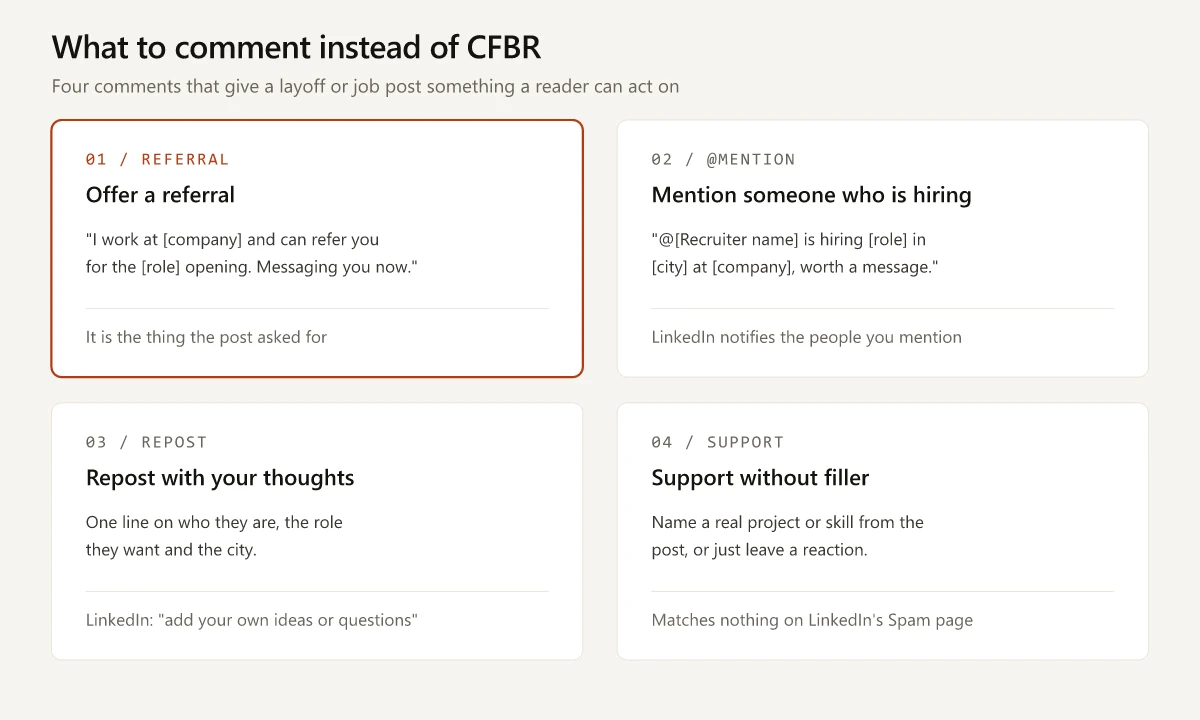
| If you can… | Write something like | Why it helps more than CFBR |
|---|---|---|
| Refer them where you work | ”I work at [company] and can refer you for the [role] opening. Messaging you now.” | It is the thing the post asked for |
| Name someone who is hiring | ”@[Recruiter name] is hiring [role] in [city] at [company], worth a message.” | LinkedIn notifies the person you mention, so the post reaches someone who can act |
| Vouch from shared work | ”I worked with [name] on [project] at [company]. They ran [specific task].” | A named project tells a recruiter what CFBR cannot |
| Only widen the audience | Repost with your thoughts: one line on who they are, the role they want and the city | A repost with context puts the post in front of your network with a reason to read it |
| Offer nothing specific | A reaction, or one line of support that names something real from the post | Honest, and it matches nothing on the Spam page |
Keep it short. Comment boxes have a character cap, and LinkedIn’s commenting help page does not print the number (the guide figures and their sources are in the LinkedIn character limits post). If your repost carries an image or a document, check LinkedIn’s image and document specs first.
If You Wrote the Layoff or Job Post
Commenters can only be specific if the post is. Give them a request they can meet in one comment:
- The role titles you want, the city or “remote”, and when you can start.
- Two or three company names where a referral would help.
- One line asking for an introduction to a named team, instead of asking for CFBR.
If strangers start commenting and you want them to keep seeing your updates, set Who can follow you to Everyone on LinkedIn and, if you like, make Follow your primary button (how, step by step), so they can follow without a connection request.
CFBR Meaning in Hindi
In Hindi, CFBR means the same as in English. The acronym is used as-is in Hindi and Hinglish comment threads, and it says: I am commenting so that more people see this post. There is no separate Hindi expansion.
Turn the CFBR Meaning Into a Real Comment
The CFBR meaning, Commenting For Better Reach, describes a comment that adds engagement and nothing else, and LinkedIn’s pages give a named referral or mention more to work with. Next time a former colleague posts that they were laid off, type the name of one person you know who is hiring.
Frequently Asked Questions
What does CFBR mean on LinkedIn?
CFBR means, and its full form is, Commenting For Better Reach (also written Comment For Better Reach or #CFBR). People leave it under a LinkedIn post, usually a layoff announcement, a job search or a referral request, to say they are commenting only so the post is shown to more people.
Is commenting CFBR spam?
LinkedIn does not name a single CFBR as spam. Its Spam page lists 'Excessive, irrelevant, or repetitive comments or messages' as spam, so the same CFBR pasted across many posts, or posted by a tool, matches LinkedIn's wording.
What is the CFBR meaning in Hindi?
There is no separate Hindi meaning. CFBR is the English acronym used as-is in Hindi and Hinglish posts, and it says the same thing: I am commenting so that more people see this post.
Does CFBR work on LinkedIn?
LinkedIn's help and policy pages say nothing about a CFBR comment raising a post's reach. Its feed help page lists engagement as a signal next to how constructive the conversation is, and its Spam page lists excessive, irrelevant or repetitive comments as spam.
What should I comment instead of CFBR?
Write one sentence a reader can act on: a referral offer at a named company, an @mention of a recruiter or hiring manager who fits the role, or a repost with a line on who the person is and what they want next. LinkedIn's help page says people you mention are notified.