What Does 3rd Mean on LinkedIn? 3rd, 3rd+ and Out of Network
What does 3rd mean on LinkedIn? Someone linked to one of your 2nd-degree connections. Here is what 3rd+ covers and what each label lets you do, per LinkedIn Help.
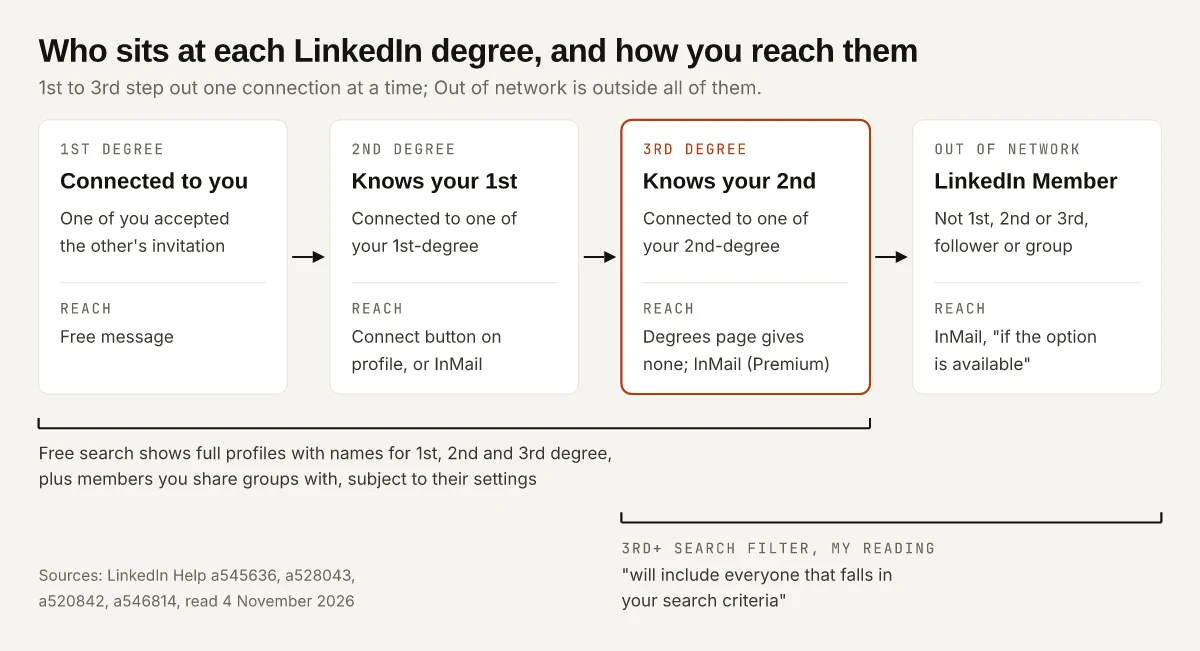
Ask what does 3rd mean on LinkedIn and you can get an answer that treats “3rd” and “3rd+” as one label. Pathofex’s guide, for one, says you will find 3rd+ written next to people “that are not part of your network but are the ones that are connected to your 2nd connection”, which is LinkedIn’s definition of plain 3rd-degree, except that LinkedIn counts 3rd-degree connections as part of your network. LinkedIn’s own degrees of connection page never prints “3rd+” at all. The one LinkedIn Help page I found that uses it, 2nd and 3rd degree connections in search, says that filtering by 3rd+ “will include everyone that falls in your search criteria”.
Say a search for a product marketer at a company you want to join returns a name with “3rd” beside it. The degrees page tells you who that person is, someone connected to one of your 2nd-degree connections, and then stops: it gives a way to reach your 1st-degree connections, 2nd-degree connections, group members and out-of-network members, and none for the 3rd-degree row. So the useful answer is what the label lets you do next, and the table below takes every cell from a LinkedIn Help page I read on 4 November 2026, with the cells LinkedIn leaves blank marked as blank.
What Does 3rd Mean on LinkedIn?
3rd on LinkedIn means a 3rd-degree connection: someone connected to one of your 2nd-degree connections, so two people sit between you. LinkedIn shows “a 3rd degree icon next to their name in search results and on their profile”. Only connections can be messaged, so outside a shared group or employer, reaching them takes InMail (Premium) or their Open Profile.
Every category on LinkedIn’s degrees page, plus the 3rd+ filter and Open Profile, and what each one lets you do, as of November 2026:
| Label | Who it is, in LinkedIn’s words | Free message? | Connect? | Paid or other route | Source |
|---|---|---|---|---|---|
| 1st | ”People you’re directly connected to because you’ve accepted their invitation to connect, or they’ve accepted your invitation” | Yes: “You can contact them by sending a message on LinkedIn” | Already connected | Not needed | a545636 |
| 2nd | ”People who are connected to your 1st-degree connections” | No: “You can only message your connections” | Yes, “by clicking the Connect button on their profile page” | InMail with Premium | a545636, a541865 |
| 3rd | ”People who are connected to your 2nd-degree connections” | No, same rule | LinkedIn Help does not say | InMail with Premium | a545636, a541865, a546814 |
| 3rd+ | A search filter option, not a degree on the degrees page: it “will include everyone that falls in your search criteria” | Decided by the person’s actual degree | Decided by the person’s actual degree | Decided by the person’s actual degree | a528043 |
| Group member | ”People who are considered part of your network because you’re members of the same group” | Two pages disagree (see the table further down) | LinkedIn Help does not say | InMail with Premium | a545636, a541865 |
| Follower | ”People who choose to follow your public updates in their LinkedIn feed” | Not by following: it “doesn’t create a 1st-degree connection or enable direct messaging” | Following creates no connection, so their degree decides | InMail with Premium | a545636, a545734 |
| LinkedIn Member (Out of Network) | “LinkedIn members who fall outside the categories listed above” | No | No: “You’re out of network” is on LinkedIn’s list of reasons you won’t see the Connect button | ”If the option is available, you can also send them an InMail” | a545636, a548094 |
| Premium member with Open Profile, at any degree | Open Profile “allows anyone on LinkedIn to contact a Premium member for free, even if they’re not in the sender’s network” | Yes, within a cap LinkedIn does not publish: it limits “the number of Open Profile messages you can send in a given time period” | Their degree decides | Not needed | a545663, a544787 |
Source codes are LinkedIn Help answer IDs: a541865 (messaging connections), a546814 (send an InMail), a545734 (build your network), a548094 (missing Connect button), a545663 (Open Profile) and a544787 (Open Profile messages). Every InMail row also depends on the recipient: “You can’t message a member if they’ve chosen not to receive InMail message in their message preferences settings.” How many InMail credits each plan includes is on my breakdown of what each Premium plan adds.
What Does 3rd+ Mean on LinkedIn?
3rd+ is the third option on LinkedIn’s Connections filter in people search. The search help page says “you can refine your search results by 1st, 2nd, and 3rd+ degree connections by using the Connections filter at the top of your search page”, and that filtering by 3rd+ “will include everyone that falls in your search criteria”.
I read that as 3rd-degree members plus everyone further out, out-of-network members included. The page does not use the words “out of network”, so that reading is mine. What the two Help pages leave unexplained:
- The degrees page (it read “Last updated: 5 years ago” on 4 November 2026) defines 1st, 2nd and 3rd-degree, followers, group members and Out of Network, and the string “3rd+” appears nowhere on it.
- The search page (“Last updated: 3 years ago”) uses 3rd+ only as a filter option. It does not say whether a profile can carry a 3rd+ badge, or how to tell a 3rd-degree result from an out-of-network one inside that filter.
One clue sits on a third page. LinkedIn’s search results page for free and Premium members says a free account’s results include “Full profiles with names of everyone within your network (1st, 2nd, 3rd degree connections, as well as members you share groups with, subject to their visibility settings)”. Out-of-network members are missing from that list, and the degrees page names them “LinkedIn Member”, with “limited visibility” on some profile fields. LinkedIn does not say exactly which fields, so I would not guess beyond that.
1st, 2nd and 3rd on LinkedIn: What Each Degree Means
Degrees count the people between you and someone else, and they are always relative to you: the same person can be your 3rd and a colleague’s 1st.
| Degree | Path from you | What it opens up, per LinkedIn Help |
|---|---|---|
| 1st | You and them | Messaging, and their Contact Info section, which is “only visible to your 1st-degree connections” (What people can see on your profile) |
| 2nd | You, a 1st-degree connection, them | The Connect button, and shared connections: “all members who have connections in common with you can see those shared connections” (same page) |
| 3rd | You, a 1st-degree, a 2nd-degree, them | A full profile with their name in search, “subject to their visibility settings”, and the 3rd degree icon |
You can see a 1st-degree connection’s own connections by clicking “[Number] connections” below their profile picture, unless they have hidden them (View your connection’s connections). That list is your 2nd-degree network, one connection at a time.
Can You Message a 3rd-Degree Connection on LinkedIn?
Not for free, unless they are a Premium member with Open Profile. LinkedIn’s messaging page says “You can only message your connections” and “If you’re not connected, you can send an InMail message (requires a Premium subscription).” The one free exception on that page is for “coworkers or group members you’re not connected to”, who can get a message request.
The conditions that apply to an InMail, from LinkedIn’s InMail Messages page and Send an InMail page:
- A Basic (free) account “must upgrade to a Premium account to use InMail message”.
- The recipient can opt out of InMail in their message preferences, and then you cannot send them one.
- If they have Open Profile turned on, “you can message them for free”.
- “You can receive InMail message credits back if a recipient accepts your InMail message.”
- Premium InMail credits “can’t be used to send InMail messages on Sales Navigator or LinkedIn Recruiter”.
InMail and the invitation note each have character limits, which my list of LinkedIn’s published character limits quotes from the same Help pages.
Can You Connect With a 3rd-Degree Connection?
LinkedIn Help does not say you cannot. The degrees page names the Connect button only for the 2nd-degree row and says nothing either way for 3rd-degree. The Missing connect button page (a548094) lists six reasons the button can be absent, and a 3rd-degree connection is not one of them:
| Reason Connect is missing | What to do, per LinkedIn Help |
|---|---|
| Your primary email is unconfirmed or bounced | Confirm it; “You need a primary email address to send connection invitations” (Various ways to connect) |
| Already connected, or a request already sent | The page gives no step |
| Over 500 connections, or Follow chosen as the default | Connect moves: with over 500, “it’ll appear in the dropdown when you click the More button”; where Follow is the primary option, Various ways to connect says “select More and then select Connect" |
| "You’re out of network” | Follow, join a relevant group or send an InMail (Alternatives to inviting someone to connect) |
Two more steps can appear when you do send the invitation. LinkedIn may ask “How do you know [member name]?”, and choosing “We don’t know each other” means “you may be prompted to send a message first to establish a relationship”, which “could include sending an InMail message”. On some profiles with a Follow button, “you may be prompted to enter the member’s email address to connect with them” (Connect using a follow button). Why a profile shows Follow in the first place, and how to change your own, is in where creator mode’s Follow button went.
Where LinkedIn’s Help Pages Disagree on Degrees
Three answers change depending on which LinkedIn Help page you open. The “Last updated” labels are as the pages showed them on 4 November 2026:
| Question | One page says | Another page says |
|---|---|---|
| Can you message a group member you are not connected to? | Degrees page (5 years ago): “You can contact them by sending a message on LinkedIn or directly through the group.” | Messaging page (4 weeks ago): “To reach coworkers or group members you’re not connected to, send a message request.” |
| Can you buy more InMail credits? | Missing connect button page (2 years ago): “you can always purchase up to 10 more” | Send an InMail page (7 months ago): “It’s not possible to purchase additional InMail message credits outside of the monthly allotment.” |
| What does 3rd+ cover? | Degrees page: no “3rd+” anywhere | Search page (3 years ago): the filter “will include everyone that falls in your search criteria” |
When two Help pages conflict, I would plan on the more recently updated one, which here means a message request for group members and no extra InMail credits for sale.
What Else the Degree Changes on LinkedIn
The label next to a name also changes what you see of each other’s posts, profiles and search results:
| Where it shows up | What LinkedIn says | Source |
|---|---|---|
| People search order | ”Closer connections, such as a 2nd-degree connection compared to a 3rd-degree connection, improve the likelihood your profile may appear in searches.” Results are personalized, so what search appearances and profile views each count is the better check | a521944 |
| Connections only posts | ”visible to only 1st-degree connections of the post author”, which is also why a saved post can stop opening | a523141 |
| Posts set to Anyone | May appear on “The homepage of your 2nd or 3rd-degree connections if re-shared, commented on, or liked by your 1st-degree connections” | a523141 |
| Mentions | LinkedIn “may limit your ability to mention members you’re not connected with”; the tag troubleshooting table covers what to do | a525082 |
| Network size | ”LinkedIn members can have up to 30,000 1st-degree connections”; followers are unlimited, and at 30,000 “Follow will become the default option on your profile” | a567364 |
| Free search results | ”A maximum of 250 results per search or 25 pages of search results” | a520842 |
How to Find 2nd and 3rd-Degree Connections in Search
LinkedIn’s search help gives the route in one line, and the steps around it come from the connections pages:
- Search for a name, title or company in the Search bar at the top of any LinkedIn page.
- Use “the Connections filter at the top of your search page” and pick 1st, 2nd or 3rd+.
- To work through 2nd-degree people one connection at a time, open a 1st-degree connection’s profile and click “[Number] connections” below their profile picture.
- To see only your own connections with filters, LinkedIn’s View your connections page points to My Network, then Connections, then Search with filters.
Remember the cap from the table above: a free search stops at 250 results, so a 3rd+ search on a broad title will not show everyone it matches.
What Does 3rd Mean on LinkedIn Before You Reach Out
Before you reach out, the label next to a name decides your first move:
| If the label is | Your first move |
|---|---|
| 1st | Message them |
| 2nd | Connect from their profile, with a note if you have one left this month (LinkedIn caps notes on free accounts) |
| 3rd | Connect if you know them, otherwise follow, join a relevant group or use InMail |
| 3rd+ in a filter | Open the profile to see the real degree before you plan anything |
| LinkedIn Member | InMail if the option is offered; there is no Connect button |
| Premium member with Open Profile, any degree | Message them free |
LinkedIn’s own advice on its Follow and connect page is to “Only send invitations to people you know and trust”, so when a 3rd-degree name belongs to a stranger, I would follow them or send an InMail before any invitation. What does 3rd mean on LinkedIn, then, is two people between you and, unless they run Open Profile, no free message. Check the “Last updated” line on any Help page you rely on: on 4 November 2026 the degrees page read “5 years ago” and the messaging page “4 weeks ago”.
Frequently Asked Questions
What does 3rd+ mean on LinkedIn?
3rd+ is the option on LinkedIn's Connections search filter, next to 1st and 2nd. LinkedIn's search help says filtering by 3rd+ will include everyone that falls in your search criteria. My reading is 3rd-degree members plus anyone further out, but LinkedIn does not spell that out, and its degrees of connection page does not use the term.
Can you message a 3rd-degree connection on LinkedIn for free?
Not from a free account, unless the person is a Premium member with Open Profile turned on. LinkedIn's messaging help says you can only message your connections, that coworkers or group members you are not connected to can get a message request, and that otherwise you can send an InMail message, which requires a Premium subscription.
Can you connect with a 3rd-degree connection on LinkedIn?
LinkedIn Help does not rule it out. Its degrees page names the Connect button only for 2nd-degree connections, and its missing Connect button page lists out-of-network members among the cases with no button, but not 3rd-degree connections.
What does LinkedIn Member mean on LinkedIn?
LinkedIn Member is LinkedIn's label for out-of-network members: people who are not 1st, 2nd or 3rd-degree connections, followers or fellow group members. Some fields of their profiles have limited visibility, and LinkedIn says you can send them an InMail if the option is available.
How many connections can you have on LinkedIn?
Up to 30,000 1st-degree connections, per LinkedIn's network size limit page. Followers are unlimited, and once you reach 30,000, Follow becomes the default option on your profile and you cannot send or accept new invitations until you remove some connections.