How to Turn Off AI Overview in Google: Every Method Ranked
How to turn off AI Overview in Google Search: Google says the feature cannot be switched off, so each workaround is sorted by what Google's help pages say.
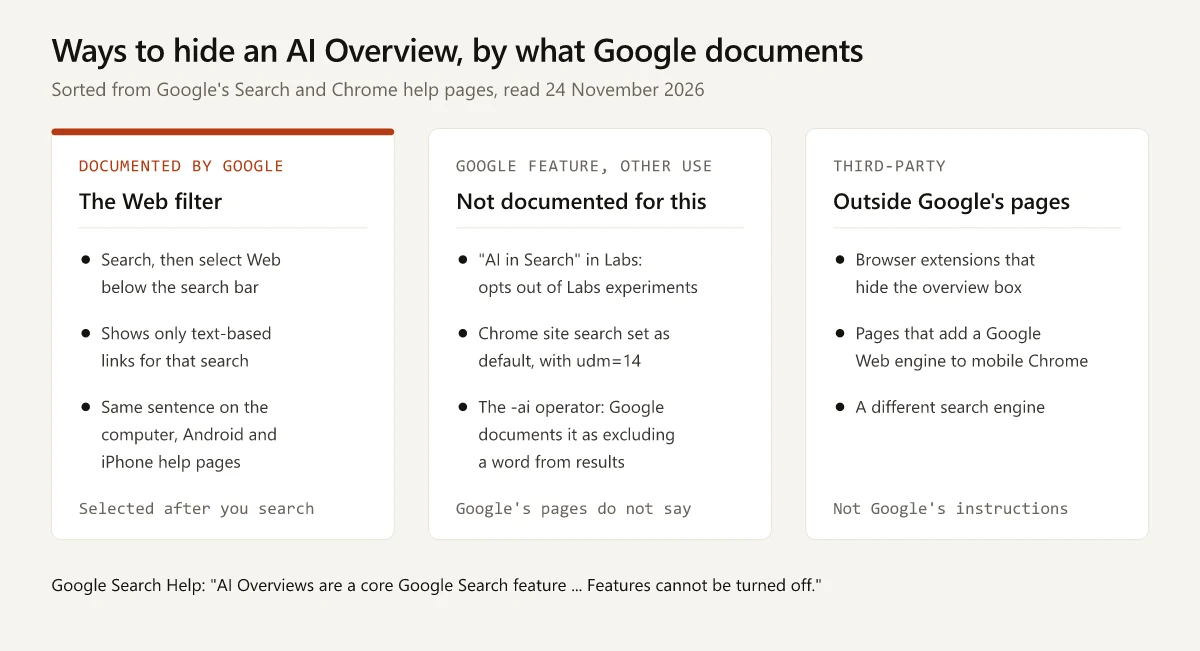
Google documents no off switch. If you searched for how to turn off AI Overview, the sentence that settles it sits on Google’s own Search Help page for AI Overviews: “AI Overviews are a core Google Search feature, like knowledge panels. Features cannot be turned off.” The next two sentences give the one route Google offers: “However, you can select the Web filter after you perform a search. This filter displays only text-based links without features like AI Overviews.”
The Labs toggle, udm=14, the -ai trick and the extensions are workarounds, and they do not all remove the same thing. I sort them by one test: is the method written on a Google help page, and does that page say it removes AI Overviews? A method that passes is one Google describes in writing. A method that fails rests on a URL parameter, an operator or a page layout that Google’s help pages never describe for this purpose.
I read every Google page cited below from India on 24 November 2026. The AI Overviews page opens with a banner saying Google is “currently updating settings for Google Search services” and that the settings it describes “may not match your current experience”, so read every menu name here as of November 2026.
How to Turn Off AI Overview: The Short Version
- You cannot switch AI Overviews off in Google Search. Google’s help page says features cannot be turned off.
- For one search: run it, then select Web in the filters below the search bar. If Web is not there, Google says to use the “All” option to check the other filters.
- For every address-bar search in Chrome on a computer: add a custom site search and choose Make default. Guides supply an address containing
udm=14, which Google’s help pages do not mention. - On Android and iPhone: the Web filter is the same tap.
- “AI in Search” in Labs opts you out of Labs experiments. Google’s page does not say it removes AI Overviews.
- Adding -ai is not reliable, per Proton and Cybernews. Extensions hide the box on the page without any Google help page behind them. Switching search engine leaves Google Search, and its AI Overviews, behind.
Can You Turn Off AI Overviews in Google Search?
No. From the same page, checked on its Computer, Android and iPhone & iPad versions:
- The sentence is identical on all three versions, under the heading “Show only web links in Google Search”.
- AI Overviews are listed as available “To all users” in a long list of countries and territories that includes the United States and India.
- The page warns that “AI Overviews can and will make mistakes” and asks for feedback through thumbs up and thumbs down icons at the bottom of each overview.
Every Method, Sorted by What Google Documents
The third column is the one I would read first. “Google’s pages do not say” means I looked for the answer on the linked page and it is not there.
| Method | Removes the AI Overview? | Documented by Google? | Sticks across searches? |
|---|---|---|---|
| Web filter | Yes, for that search: Google says it shows “only text-based links without features like AI Overviews” | Yes, on the AI Overviews page and on Refine Google searches | Google’s pages do not say. Proton’s guide says you repeat it “for every new search” |
| Chrome custom site search set as default | Guides say yes. Cybernews: “it often skips AI Overviews” | In part. Chrome’s help documents custom site search and Make default. Neither that page, the AI Overviews page nor the Refine page mentions udm=14 | Per Proton, for “every default search you run from Chrome’s address bar”. Google’s pages do not say |
| ”AI in Search” toggle in Labs | Google’s page does not say so. It opts you out of Labs AI experiments | The toggle, yes. Removing AI Overviews, no: the same page says features cannot be turned off | It is an account toggle that needs you signed in with Incognito mode off |
| -ai after the query | Not reliably, per Proton and Cybernews | Not documented as affecting AI Overviews. Google documents the minus sign as leaving a word out of results | No. It is typed per search, and Proton and Cybernews both say it does not work every time |
| Browser extension | Hides it on the page, per Engadget and Built In. Engadget: the response is still generated | Not on Google’s help pages | Cybernews says they “might break” if Google changes the page |
| A page that adds a “Google Web” engine to mobile Chrome | Per tenbluelinks.org, it adds udm=14 to Google searches | Chrome’s help documents the list of recently visited engines it relies on. The page itself is third-party | Google’s pages do not say |
| A different search engine | Leaves Google Search | Chrome’s help documents changing the default engine | Yes, it becomes your default |
Use the Web Filter, the Route Google Documents
Google’s Refine Google searches page says “After you perform a search, filters appear below the search bar.” The steps:
- Run your search in Google.
- Look at the filters below the search bar. Google’s examples of filter types are Books, Forums, Images, Maps, News, Shopping, Short Videos, Videos and Web.
- Select Web.
- If you cannot find it, Google’s instruction is to “use the ‘All’ option to check others that are available”.
What Google’s pages say about the filter, and what they leave out:
| Question | Google’s page |
|---|---|
| What does Web show? | ”The ‘Web’ filter contains text-based links to websites.” |
| Will Web be in the same place each time? | Not promised: “The exact filters and the order in which they appear is dynamic.” |
| Is there another way to reach filters? | ”Filters are also available through Advanced Search.” |
| Does the choice carry over to the next search? | Google’s pages do not say |
| Does it work on a phone? | The Android and iPhone & iPad versions of the AI Overviews page carry the same Web filter sentence |
Guides describe the screen differently from Google. Proton’s guide, last updated 11 August 2026, and a Tom’s Guide article from 17 May 2024 both send you to a More menu to find Web, where Google’s page points to “All”. Tom’s Guide, which called it “Google’s new Web tab”, also wrote that the filter removes “AI summaries, ads, answer boxes, and more”. Google’s own sentence promises less: links “without features like AI Overviews”.
Make Web Results the Default in Chrome on a Computer
Chrome’s help page documents a custom site search that you can set as the default for the address bar. Its steps:
- Open Chrome and select More > Settings at the top right.
- On the left, select Search engine > Manage search engines and site search.
- To the right of “Site search”, select Add.
- Fill in three fields: “Search engine” (a label), “Shortcut” (the text you type in the address bar) and “URL with %s in place of query”.
- Select Add. Then, to the right of the new shortcut, select More > Make default.
Google’s documentation stops at what goes into that third field. Chrome’s help explains the method for any search engine (do a search, copy the address of the results page, replace the search term with %s) and its example is http://www.google.com/search?q=%s. The guides supply an address with one extra parameter:
| Guide | Date | Address it gives |
|---|---|---|
| Engadget | 13 June 2025 | {google:baseURL}search?udm=14&q=%s |
| Proton | Updated 11 August 2026 | https://www.google.com/search?q=%s&udm=14 |
| Cybernews | 19 August 2025 | {google:baseURL}search?q=%s&udm=14 |
Before you rely on it:
- Cybernews says of udm=14: “It’s not officially documented, but it often skips AI Overviews.”
- The setting is Chrome’s address-bar search engine, so it covers searches you type there.
- Chrome’s help says “In some countries, custom site searches aren’t able to be set as default for Guest profiles.”
- On a work or school computer, Chrome’s help says “your network admin may choose a default search engine or manage your search engines for you.”
- To undo it, pick another default under Settings > Search engine > Change (documented on the same Chrome page), then Delete or Deactivate the shortcut.
How to Turn Off AI Overview on iPhone, Android, Safari and Firefox
The Web filter is on Google’s results page, and Google’s Computer, Android and iPhone & iPad help pages carry the same sentence about it. Making it the default depends on the browser:
| Where | What the vendor’s help page documents | What guides add |
|---|---|---|
| Any browser on Android or iPhone | The Web filter after a search, and the Labs toggle under Labs > Manage (Google’s Android and iPhone pages) | Nothing needed |
| Chrome on Android | Settings > Search engine under “Basics”, then pick an engine. “Your recently visited search engines are added as options.” No custom address field is listed | tenbluelinks.org says visiting it and running one Google search adds a “Google Web” option under Recently visited |
| Chrome on iPhone and iPad | More > Settings > Search engine, with the same “recently visited” sentence | The same tenbluelinks.org route. Engadget sends phone readers there |
In Safari and Firefox, use the Web filter per search. This post does not cover changing their default engine.
tenbluelinks.org explains its own mechanism: an OpenSearch file “instructing your browser to add URL parameter udm=14 to all Google Searches”. It adds that Chrome “will show ‘tenbluelinks.org’ as the source where it got the instructions, but all your search queries will be sent directly to Google, not this website.” The page carries no publication date and names its author only through a link to an X account, so treat its instructions as its own. Cybernews, for its part, says adding a custom search engine manually “isn’t supported in Chrome mobile”.
The Labs Toggle on Google’s Page Today: AI in Search
Google’s AI Overviews page has a section titled ‘Turn off “AI in Search” in Labs’. The steps it gives:
| Device | Steps on Google’s page |
|---|---|
| Computer | Open any browser. Be signed in to your Google Account with Incognito mode turned off. At the top of the browser, click New tab. At the top of the page, click Labs > Manage. Toggle “AI in Search” off |
| Android, iPhone or iPad | Open any browser. Be signed in with Incognito mode turned off. At the top, tap Labs > Manage. Toggle “AI in Search” off |
The page describes “AI in Search” as “our testbed for innovation”, the place to “try new AI features, experiments, and ideas in Search”, and says: “To opt-out, turn off ‘AI in Search’ in Labs.” So the toggle is an opt-out from experiments. Nothing in that section says it removes AI Overviews from ordinary results, and the “cannot be turned off” sentence is on the same page.
Older guides use a different label:
- Engadget, on 13 June 2025, quoted a note from Google’s Labs help: “Turning off ‘AI Overviews and more’ in Search Labs will not disable all AI Overviews in Search. AI Overviews are part of Google Search like other features, such as knowledge panels, and can’t be turned off.”
- Cybernews, on 19 August 2025, still tells readers to switch off “AI Overviews and more”.
- The words “AI Overviews and more” are not on Google’s page today. The Labs help address those guides link (support.google.com/websearch/answer/13572151) redirected to the AI Overviews page when I loaded it on 24 November 2026.
You may also have no Labs icon. Google’s Search Labs availability page says Labs “is currently available to a limited number of people” in the countries it lists, which include the United States and India.
Does Adding -ai Remove the AI Overview?
Not reliably, and Google does not document it for that purpose. Google’s operator list says: “To exclude words from your search: Enter - in front of a word that you want to leave out”, with the example [jaguar speed -car]. The Refine Google searches page that holds that list does not mention AI Overviews anywhere.
| Source | What it says about -ai |
|---|---|
| Google, Refine Google searches | Documents the minus sign as leaving a word out of results |
| Proton, updated 11 August 2026 | ”Your search results should appear without AI Overviews, but this isn’t always guaranteed.” |
| Cybernews, 19 August 2025 | ”it doesn’t consistently work. In most cases, it won’t stop AI Overviews from appearing.” |
By Google’s own definition, -ai also leaves the word “ai” out of your results, which matters when the search is about AI.
Extensions and Other Search Engines
Neither route appears on Google’s AI Overviews page, so I list what the guides say and recommend no product.
- Extensions hide the overview on the page. Built In’s guide says they “detect that page element, then remove it from displaying before the page fully renders”. Engadget says of one such extension: “It’ll still generate the response, you just won’t see it.”
- They can break. Cybernews says the approach “depends on the structure of the search page” and adds: “For now, I can’t recommend a specific trusted extension.”
- Another search engine is a browser setting. Chrome’s help documents it under Settings > Search engine > Change. What another engine shows in its results, AI features included, is set by that engine, so check its own help pages.
Related Google Settings That Leave AI Overviews On
Google’s Search services settings page, linked from the banner on the AI Overviews page, documents two settings that touch AI responses. Neither is described as removing an AI Overview, and the article itself does not use the term.
| Setting | What Google says | Where it is |
|---|---|---|
| Search Services History | It “includes things like your searches, info from sites you visit with Search services, and generative AI responses”. With it off, “your future activity won’t be used to train Google’s generative AI models, unless you provide feedback” | myactivity.google.com/search-services/settings |
| Personalized Recommendations | Covers “Personalized AI responses: AI-powered features can provide answers that are specifically relevant to your interests or previous searches” | Google Account > Data & privacy > Personalization settings, or google.com/search-personalization |
Google says these settings “are rolling out gradually over the next few months” and that until they reach you, Web & App Activity still controls history and personalization for Search services.
Neighboring controls are separate. The same page says Search services history does not include “services that save history under other settings, such as Chrome, Gemini Apps, Google Assistant, and YouTube”, so clearing Gemini history is its own job. And if the summaries bothering you are in Gmail, Google’s AI Overviews help page does not cover them.
Work and School Accounts: The Admin Setting Leaves AI Overviews On
A Google Workspace administrator can turn the Search and Assistant service off for an organization. Google’s admin help says what happens then: “Users can still use some Search features, including Lens, AI Mode, and AI Overviews, without using information from their account or saving information to it.” It compares that to “the experience for a user who’s signed out of their account”.
Schools are getting a different default. On 3 November 2026, Google announced that access to Gemini, Gemini Notebook, Gemini in Classroom and Google Search “will be entirely off for K-12 student accounts until school administrators explicitly turn them on”, with specifics to follow “in the coming months”.
Chalkbeat reported the same day that Chris Phillips, Google’s vice president and general manager of education, said: “If a school is not comfortable with that and simply wants AI off, then they have the choice to not have search on at all.” If your account is managed, ask the administrator which of these applies before changing anything in your browser.
Can You Turn Off Google AI Mode?
Google’s AI Mode help page describes no setting that removes AI Mode. What it does document:
- Three ways to open it: go to google.com/ai, enter a question at www.google.com and tap AI Mode, or tap AI Mode on the Google app’s home screen.
- An “AI Mode” experiment in Search Labs for early access to “experimental advanced capabilities”, available “to users 18 and above”.
- Deleting AI Mode history: open AI Mode history, then Delete for one search or Delete all.
AI Mode is something you open, with one exception the AI Overviews page describes for mobile: selecting “Show more” at the bottom of an AI Overview and typing a follow-up in the “Ask anything” bar continues the conversation in AI Mode.
Site Owners Have an Exclude Control, Searchers Do Not
Google’s Search generative AI control lets a site owner choose Exclude, which keeps that site’s links and content out of AI Overviews and AI Mode. If your goal is the opposite one, being cited, start with what Google says earns a citation in an AI Overview.
It does not switch the overview off for anyone searching. Google’s page says “Content from other sites will still be available in those features, and it may appear similar to yours.”
Where the control sits in Search Console, its Include, Exclude and Inherit choices and its inheritance rules are in my guide to the Search Console generative AI report. The click-through figures behind the zero-click worry are in my post on AI and the future of SEO.
How to Turn Off AI Overview: Which Route Fits You
How to turn off AI Overview depends on who you are. For a searcher, the answer is the Web filter. For these three cases the route is different:
| If you | Use | Source |
|---|---|---|
| Care about what Google saves from AI responses | Search Services History and Personalized Recommendations | Google’s Search services settings page |
| Use a school or work account | Your administrator | Google’s admin help |
| Run a website | The Search generative AI control | Search Console help |
Google’s own answer is a filter, and it is the method whose behavior Google has written down. The AI Overviews page says its settings are being updated, so re-read it before you rebuild a browser setup around a guide from 2024 or 2025. Start with the Web filter.
Frequently Asked Questions
Can you turn off AI Overviews on Google?
No. Google's Search Help page says AI Overviews are a core Google Search feature and that features cannot be turned off. The route the same page gives is the Web filter, which you select after a search to see text-based links without features like AI Overviews.
How do I turn off AI Overview in Google Chrome?
Chrome's help pages describe no AI Overview setting. Chrome's help documents adding a custom site search and choosing Make default, and guides from Engadget, Proton and Cybernews give a Google address containing udm=14 for it. Google's help pages do not mention udm=14, so treat it as a workaround that can change.
How do I turn off AI Overview on iPhone or Android?
Run the search, then tap the Web filter below the search bar. Google's Android and iPhone help pages carry the same sentence as the computer page: features cannot be turned off, and the Web filter shows only text-based links. Chrome's mobile help page lists no field for a custom search address.
Does turning off AI in Search in Labs remove AI Overviews?
Google's help page does not say it does. It describes 'AI in Search' as its testbed for new AI features and experiments and says turning it off opts you out. The same page says AI Overviews are a core Search feature that cannot be turned off.
How do I turn off Google AI Mode?
Google's AI Mode help page describes no setting that removes AI Mode. It lists three ways to open it, explains how to delete AI Mode history, and describes an optional AI Mode experiment in Search Labs for users 18 and above.