LinkedIn Open to Work: Who Sees It and How to Hide It
LinkedIn Open to Work has three visibility options. Here is who sees each, what your employer's recruiters see, how to turn it off and what LinkedIn can't promise.
LinkedIn Open to Work lets you pick one of three audiences, as LinkedIn Help described them on 31 October 2026. All LinkedIn Members “also includes recruiters and people at your current company” and adds the #OpenToWork photo frame; Recruiters only means “People using LinkedIn Recruiter only”; Visible only to you uses your preferences to tailor your job recommendations. For the option people choose to keep a search quiet, LinkedIn adds that it takes steps to hide your status from Recruiter users at your current company, “but we can’t guarantee complete privacy.”
LinkedIn’s privacy page for shared career interests explains that the hiding is a match on a company number, and that there is “a small chance” a recruiter at your current employer or an affiliated company sees your preferences anyway. That makes Recruiters only a reduced audience with a documented failure mode, and I would choose between the three options by asking what it costs you if your employer finds out, rather than by which label sounds private.
LinkedIn changed the main Help page four days before I wrote this, so labels can move; the source table near the end gives each page’s own update note, and every quote here comes from those pages as served logged out in India on 31 October 2026.
Who Can See LinkedIn Open to Work?
Who sees it depends on the one visibility setting in the Open to Work form: every LinkedIn member, only people using LinkedIn Recruiter, or only you. Here is each option as LinkedIn Help words it:
| Visibility option (LinkedIn’s label) | Who can see it | #OpenToWork photo frame | Recruiter users at your current company | India-only fields |
|---|---|---|---|---|
| All LinkedIn Members | ”This also includes recruiters and people at your current company” (a507508) | Yes: “It also adds the #OpenToWork photo frame” | Inside the audience, by the option’s own definition | Recruiters only |
| Recruiters only | ”People using LinkedIn Recruiter only” (a507508) | No: a recruiters-only candidate appears in Recruiter search, “however, the #OPENTOWORK photo frame won’t display” (Recruiter Help a419131) | LinkedIn takes “steps to prevent” them seeing it, “but we can’t guarantee complete privacy” (a507508) | Recruiters only |
| Visible only to you | You. “Your job preferences are used for LinkedIn to tailor your job recommendation” (a507508) | No: the steps add the frame only “If you choose to share with all LinkedIn members” | The page lists no recruiter audience for this option | ”visible to recruiters only, regardless of your Open To Work visibility setting” |
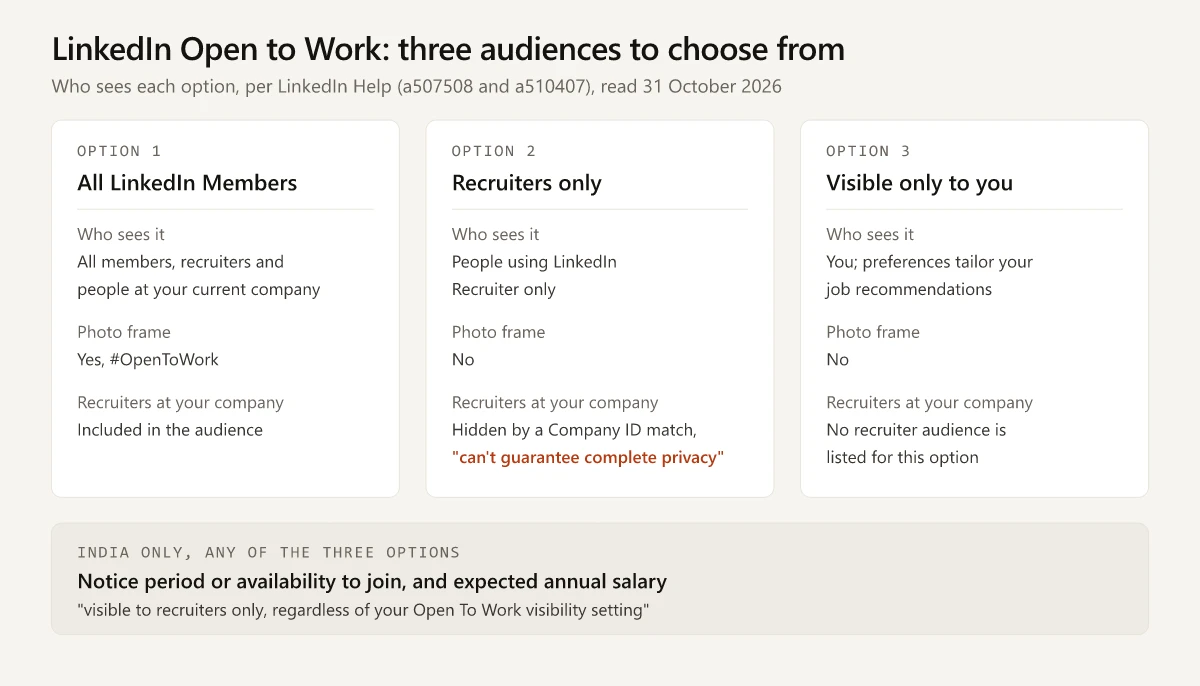
Two details in that table are easy to miss:
- The profile-page steps on a507508 mention two choices only (“whether all LinkedIn members or only recruiters can see”). Visible only to you appears in the page’s opening list of options but not in those steps, so if the profile form shows only two choices, use the Jobs tab Preferences route below, where Visibility is its own field.
- “Recruiters” here means people using LinkedIn Recruiter, LinkedIn’s hiring product. A recruiter or hiring manager browsing ordinary LinkedIn without it is outside the Recruiters only audience and sees your status only under All LinkedIn Members. Neither a507508 nor a510407 mentions Recruiter Lite.
How to Turn LinkedIn Open to Work On and Off
On desktop, LinkedIn Help (a507508) gives these steps to turn it on:
- Click the Me icon at the top of your LinkedIn homepage.
- Click your Profile card.
- Click the Open to button.
- Click Finding a new job.
- Fill in the pop-up, including who can see that you are open to work.
- Click Save.
To turn it off on desktop:
- Click the Me icon, then your Profile card.
- Click the Edit icon on the Open to Work box at the top of your profile.
- Click Delete. LinkedIn says “You can re-enable it at any time, but your previous preferences won’t be saved.”
If the button label differs, the page carries a tip: “Some members may see Choose what you need in your next job instead of Open to Opportunities.” The job titles you enter in the form are separate from your headline, which has its own character limit and truncation rules.
On the LinkedIn Mobile App
The app path on the same Help page:
- Tap your profile photo, then tap your Profile card.
- Tap the Open to button in your introduction card at the top of your profile.
- Tap Finding a new job, fill in the screen that appears, and tap Save.
- To remove it later, open your Profile card again, tap the Edit icon on the Open to work box, and tap Delete.
From the Jobs Tab Preferences
LinkedIn documents a second desktop route that shows every field in the form:
- Click the Jobs tab.
- In the left-hand rail, click Preferences.
- Click the arrow next to Open to work.
- Set Job titles, Location types, Locations, Start date, Employment types and Visibility (“who can view you’re open to work”). In India, the same list adds notice period or availability to join and expected annual salary.
- Click Save.
Remove the Photo Frame but Keep Open to Work
LinkedIn’s profile photo frames page handles the frame alone. Click the Me icon, click View profile, click your profile photo, then click Frames. Under Remove existing frame it lists these choices, which LinkedIn says vary depending on the existing frame:
- “Remove ‘Open to Work’ from profile”, which removes the feature completely.
- “Share ‘Open to Work’ with recruiter only”, which keeps your status for recruiters and drops the public frame.
- “Remove this frame and the jobs you have showcased on profile.”
Confirm with Save/Remove. The frame sits on your profile photo, so if you are changing the photo at the same time, my guide to AI profile picture prompts that keep your real face covers why the source image should be square when LinkedIn shows it in a round frame.
Can Your Current Employer See Open to Work?
With All LinkedIn Members, yes: LinkedIn says that option includes people at your current company. With Recruiters only, LinkedIn tries to hide your status from Recruiter users at your company and says the attempt can fail.
Here is how the hiding works, from the shared career interests page (a510407):
| Step | LinkedIn’s words |
|---|---|
| Which company counts as yours | ”the current company on your LinkedIn profile marked as I am currently working here” (a507508) |
| How it matches recruiters | ”comparing a unique number (Company ID) assigned to the current employer listed on your profile with the Company ID for recruiters on our network” |
| Who else is hidden | Recruiters at “a company affiliated with that current employer based on our platform mapping” |
| What can go wrong | LinkedIn can’t guarantee “that every company is accurately identified, or that affiliated companies are accurately mapped”, or “that every recruiter has an up-to-date and correct Company ID” |
| The result it states | ”there’s a small chance that your career interest preferences will be visible to a recruiter at your current employer or an affiliated company” |
Two practical reads of that table:
- Tick the right role. The rule keys on the position marked I am currently working here. Neither Help page says what happens when no current role is marked, so check that box on your present job before you choose Recruiters only.
- Outside recruiters are checked against their own employer. The match compares Company IDs, and neither page mentions recruitment agencies, so an agency recruiter working for your employer is not covered by any rule LinkedIn states.
How you appear when you look at a recruiter’s or a colleague’s profile is a separate setting from Open to Work, explained in my guide to LinkedIn private mode and the three profile viewing modes.
What Recruiters See When You Are Open to Work
LinkedIn’s privacy page lists what it shares with Recruiter users “if you’ve provided it”:
- “Flag you as open to hearing about new opportunities”
- “Job titles or roles you’re interested in”
- “If you’re open to full-time or contract opportunities”
- “Date you flagged yourself as open to new opportunities”
The last item means a recruiter can see how long your status has been on. Resume files you save on LinkedIn have their own recruiter setting, Share resume data with recruiters, which my guide to adding a resume to LinkedIn and who sees each copy covers. The Recruiter side of the feature is on Recruiter Help a419131:
| Where a Recruiter user sees it | What LinkedIn says |
|---|---|
| Search results | An Open to work entry “under Spotlights at the top of the search results page” |
| Profile card in results | ”Open to work” at the bottom; hovering shows “the information they opted to share with recruiters” |
| Your profile | Open to work “in the dropdown below Summary” |
| Pipeline alert | ”If a sourced candidate is in your project’s pipeline and updates their LinkedIn profile to be open to work, you’ll receive a notification in Recruiter” |
| Search filter | The Open to work option on a filter term is “available in Recruiter only”, per the Recruiter and Recruiter Lite filter page |
LinkedIn says that sharing your interests and preferred location helps “your profile show up in search results when recruiters look for suitable job candidates” (a507508). Your own profile analytics count search appearances, and my breakdown of search appearances vs profile views covers what that number does and does not count.
When you apply rather than wait to be found, LinkedIn’s Easy Apply rules add a daily limit that resets at the end of the UTC day, and an application cannot be withdrawn once it is sent.
LinkedIn’s Open to Work page links to its safe job search page under Related tasks. That page tells you to look for “A verification badge” on a recruiter’s profile and to be cautious of “Requests for payment”. For a profile located in India, the identity route to that badge is LinkedIn’s DigiLocker check; workplace routes such as a work email also exist.
Open to Work in India: Notice Period and Expected Salary
If you are open to work in India, a507508 says “You can specify notice period or availability to join and expected annual salary. This information is visible to recruiters only, regardless of your Open To Work visibility setting.”
| Detail | What the page says, or does not |
|---|---|
| Fields | Notice period or availability to join; expected annual salary |
| Who sees them | Recruiters only, “regardless of your Open To Work visibility setting” |
| LinkedIn’s reason | Notice period “helps recruiters understand when you can start”; salary “helps recruiters to assess alignment with their roles” |
| Required? | The page says you “can specify” them and does not call them required |
| Hidden from your employer’s recruiters? | The current-company rule on a510407 covers “career interests”; that page does not mention salary or notice period |
Read literally, “regardless of your Open To Work visibility setting” includes Visible only to you, and the page does not carve that option out. If you picked Visible only to you to keep your search private, leave the salary field empty. This is a reading of a logged-out Help page: I did not see the form itself, so whether LinkedIn shows these fields to you depends on what your account displays.
Delete, Go Quiet or Start a New Job: How LinkedIn Responds
| What you do | What LinkedIn says happens | Source |
|---|---|---|
| Click Delete | The feature turns off; “your previous preferences won’t be saved” when you turn it back on | a507508 |
| Stop replying to recruiter InMails | ”we’ll email you to confirm that you’re still open to work. If we don’t receive confirmation, we’ll automatically remove the #OpenToWork feature from your profile until you manually enable it again” | a507508 |
| Leave two recruiter InMails in a row unanswered | LinkedIn says candidates “receive a reminder to respond to InMail messages from recruiters if they haven’t responded to two consecutive InMail messages” | a419131 |
| Start a new position | LinkedIn says members who start a new position are “prompted to turn off their signal if they’re no longer open to work” | a419131 |
| Pick “Share ‘Open to Work’ with recruiter only” under Frames | The public frame goes; recruiters keep seeing your status | a566495 |
Delete is the step to think about first: your job titles, locations and other preferences go with it. If you only want a break from the public frame, the Frames route switches you to recruiters only instead of deleting the feature.
Is LinkedIn Open to Work Good or Bad?
It is good when the people who must not know are outside the audience you pick, and risky when they are inside it. This table applies LinkedIn’s documented rules to common situations; it is guidance from the Help pages, not a hiring outcome anyone has measured:
| Your situation | Setting that fits LinkedIn’s rules | Why, from the Help pages |
|---|---|---|
| Employed, and your employer must not find out | Visible only to you, or leave it off | Recruiters only carries “a small chance” of showing to your own employer’s recruiters (a510407). In India, also leave notice period and expected salary empty, because LinkedIn shows those to recruiters whatever the setting (a507508) |
| Employed, and some risk is acceptable | Recruiters only, with your current role ticked | The hiding keys on the role marked I am currently working here (a507508) |
| Employed, and your employer already knows | All LinkedIn Members | The current-company rule stops mattering, and this option reaches people who are not Recruiter users |
| Laid off or between jobs | All LinkedIn Members, with I am currently working here unticked on the job you left | It is the option that reaches members who are not Recruiter users and adds the frame (a507508) |
| Freelance or contract work | Either shared option, with Employment types set | Recruiters are shown “If you’re open to full-time or contract opportunities” (a510407) |
| Not able to answer recruiter messages for a while | Delete it, or expect LinkedIn to remove it | Unanswered InMails lead to a confirmation email, and to automatic removal if you don’t confirm (a507508) |
Open to Work Not Showing? Causes LinkedIn Documents
| What you see | Cause on LinkedIn Help | What to do |
|---|---|---|
| No Open to button | Some members see “Choose what you need in your next job” instead (a507508) | Use that button, or the Jobs tab Preferences route |
| No frame on your photo | You chose Recruiters only or Visible only to you; the frame comes only with all members | Switch visibility to All LinkedIn Members, or pick the frame under Frames (a566495) |
| A friend cannot see it | Recruiters only and Visible only to you exclude ordinary members | Expected; change visibility if you want them to see it |
| Your status disappeared | Automatic removal after unanswered recruiter InMails and an unconfirmed LinkedIn email, or a Delete | Turn it on again and re-enter your preferences |
| A recruiter says you are missing from their spotlight | The spotlight “may not be available if no candidates who fit your search criteria” have opted in (a419131) | Check that your job titles and locations match the roles you want |
Sources and Last-Updated Dates
The Help pages behind this post, with their own “Last updated” notes on 31 October 2026:
| Page | Last updated |
|---|---|
| Let recruiters know you’re Open to Work (a507508) | 4 days ago |
| Privacy for shared career interests (a510407) | 8 months ago |
| Change Your Profile Photo Frames (a566495) | 2 years ago |
| View candidates who are open to work in Recruiter (a419131) | 2 years ago |
| Filter search results in Recruiter and Recruiter Lite (a414281) | 2 months ago |
| Search for jobs confidently and safely (a9551007) | 1 year ago |
Choose Your LinkedIn Open to Work Audience Before You Save
LinkedIn Open to Work is three audiences, and the middle one rests on a Company ID match that LinkedIn itself says can miss. Decide what it would cost you if your employer saw it, set your current role’s I am currently working here box correctly, and then pick the audience on the form’s visibility line before you click Save.
Frequently Asked Questions
Who can see Open to Work on LinkedIn?
It depends on the visibility you pick. LinkedIn Help lists All LinkedIn Members, which includes recruiters and people at your current company and adds the #OpenToWork photo frame; Recruiters only, meaning people using LinkedIn Recruiter; and Visible only to you, where your preferences tailor your job recommendations.
Can my current employer see Open to Work on LinkedIn?
With All LinkedIn Members, yes: LinkedIn says that option includes people at your current company. With Recruiters only, LinkedIn takes steps to hide your status from Recruiter users at the company you mark I am currently working here, but says it can't guarantee complete privacy.
How do I remove Open to Work on LinkedIn?
Click the Me icon, click your Profile card, click the Edit icon on the Open to Work box at the top of your profile, then click Delete. LinkedIn says you can re-enable it at any time, but your previous preferences won't be saved.
Is Open to Work on LinkedIn a good idea?
It depends on who must not see it. Because LinkedIn says it can't guarantee complete privacy under Recruiters only, Visible only to you or leaving it off is the safer choice if your employer finding out would cost you (in India, leave the notice period and salary fields empty too). If you are between jobs, All LinkedIn Members is the option that reaches your network and adds the photo frame.
What does Open to Work mean on LinkedIn?
It is a LinkedIn feature that records the job titles, locations, start date and employment types you want and, depending on the visibility you pick, tells recruiters or every member that you are open to new job opportunities. The #OpenToWork photo frame appears only when you share with all LinkedIn members.