How to Delete Gemini History, and What Google Still Keeps
How to delete Gemini history on a computer, Android or iPhone with Google's new History menu, plus public links, memory summary and what Google keeps afterwards.
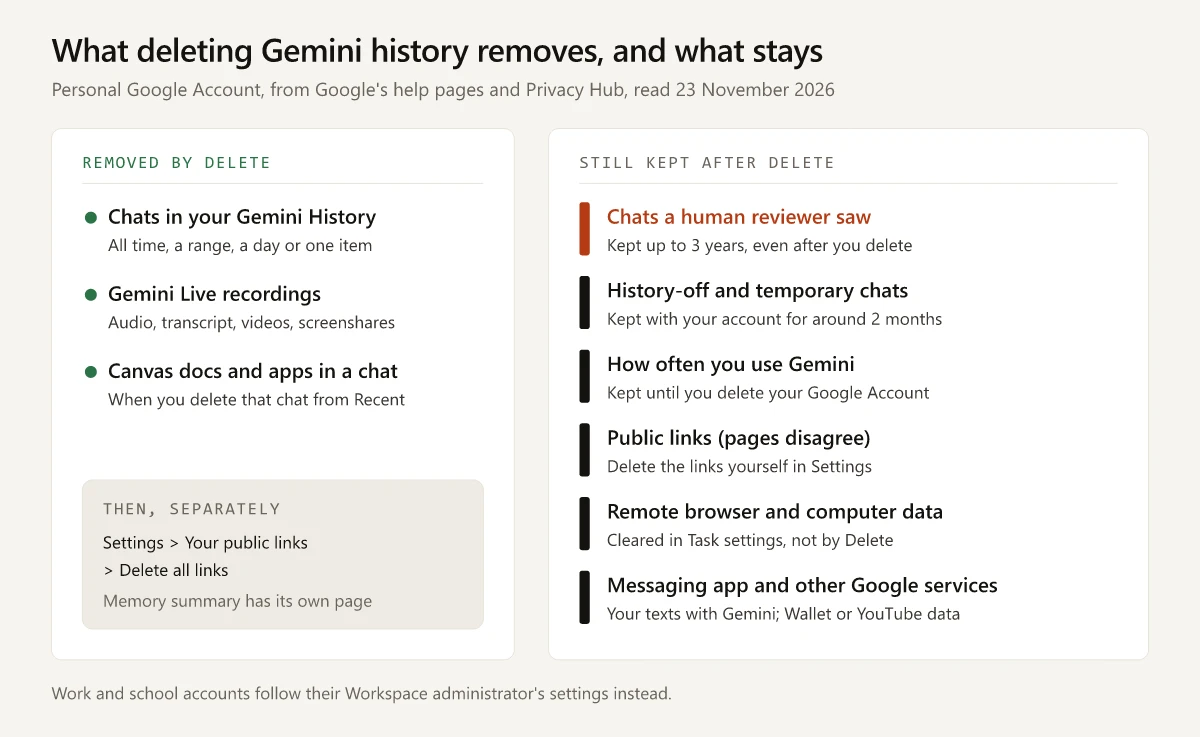
Deleting your Gemini chats does not remove everything Google holds about them. Chats a human reviewer has seen are kept for up to three years, chats you had with History turned off are kept for around two months, and data such as how often you use Gemini is kept until you delete your Google Account, according to Google’s Gemini Apps Privacy Hub. So how to delete Gemini history comes down to where you clear it: the History page, your public links, the memory summary and Task settings each hold a piece.
Google renamed these menus between 31 October and 23 November 2026: older guides that say Keep Activity and 72 hours describe the earlier screens (see the old-names table below).
I would treat Delete, then All time, as one of four cleanups rather than the whole job, and I would not count on it to reach a chat you shared or a chat a reviewer already saw. Every menu path below is quoted from Google’s help pages, read from India on 23 November 2026, for a personal Google Account.
How to Delete Gemini History: The Short Version
- On a computer, go to gemini.google.com and click Settings > History, or open myactivity.google.com/product/gemini.
- In the Android or iPhone app, tap Menu > your Profile picture or initial > Gemini History.
- Above your history, choose Delete > All time (or Last hour, Last day or Custom range).
- Delete the public links to any chat you shared: Settings > Your public links > Delete all links.
- Clear what Gemini remembers about you: Settings > Personal Intelligence > Memory summary, or turn Memory off.
- Stop new history piling up: turn History off, or set auto-delete to 3 months.
Steps 1 to 3 and 6 come from Google’s Manage & delete your history in Gemini Apps page, step 4 from its Share your chats page, and step 5 from its memory summary page.
What Gemini Keeps After You Delete History
This is the table I would want before pressing Delete. Each row is Google’s wording or a close paraphrase, from the pages named in the last column:
| What it is | What happens when you delete your Gemini history | Google page |
|---|---|---|
| The history items you pick | ”We immediately start the process of removing it from the product and our systems” | Manage & delete your history |
| Gemini Live audio, transcript, videos and screenshares | Deleted along with that history item | Manage & delete your history |
| Canvas docs and apps made in a chat | Deleted when you delete that chat from pinned and recent chats | Recent chats page |
| Public links to shared chats | Google’s manage and share pages disagree; delete links yourself (see Public Links below) | Both pages |
| Chats seen by human reviewers | ”Not deleted when you delete your history. Instead, they are retained for up to three years” | Privacy Hub |
| Temporary chats and chats with History off | ”Retained with your account for around two months” | Privacy Hub |
| Usage data, such as how often you use Gemini | Kept “until you delete your Google Account” | Privacy Hub |
| Data saved by other Google services (Wallet, YouTube) | Not deleted; those services follow their own policies | Privacy Hub |
| Remote browser and remote computer data | Not deleted; it stays until a period of inactivity or until you clear it in your Task settings in Gemini (the Privacy Hub gives no menu path) | Privacy Hub |
| Your texts with Gemini in a messaging app or carrier | Not deleted | Privacy Hub |
| Instructions (called “Saved info” in some regions) | “Remains saved until you choose to delete it” | Privacy Hub |
The Privacy Hub adds two lines worth reading before you rely on any of this: Google keeps “some data for longer when necessary for legitimate business or legal purposes”, and your Gemini settings “don’t control processing of your chats to create anonymized data to improve Google services”.
Google Search keeps a separate record: Google’s page on Search Services History says it excludes Gemini Apps, and AI Overviews in Search cannot be turned off at all, as my post on turning off AI Overview shows from Google’s help page.
How to Delete Gemini History on a Computer
Google’s manage page gives two routes to the same list:
- Go to gemini.google.com.
- At the bottom, click Settings > History. The page also links myactivity.google.com/product/gemini as a direct route.
- Pick what to delete from the options below.
| To delete | Click |
|---|---|
| Everything | Above your history, Delete > All time |
| The last hour or day | Delete > Last hour or Last day |
| A date range | Delete > Custom range |
| One day | Next to the day, Delete all history from [day] |
| One item | Next to the item, Delete history item |
Items that hold Gemini Live data show an icon below them: audio, a screen-sharing icon for shared screen frames, or a video icon for camera frames. Google’s page says you can open Details to view or download that data first.
Delete Gemini History on Android and iPhone
The Android and iPhone versions of the same help page (Android, iPhone) give the same Delete options with a different path in:
| Where you use Gemini | Path to your history |
|---|---|
| Gemini mobile app (Android or iPhone) | At the left, tap Menu > your Profile picture or initial > Gemini History |
| gemini.google.com in a phone browser | At the top, tap Menu > Settings > History |
| Any browser | myactivity.google.com/product/gemini |
From there, tap Delete > All time, or Last hour, Last day, Custom range, a day or a single item, as on a computer.
The Android page carries one extra line: if you use Gemini in Google Messages, the related chat has its own delete steps. That matches the Privacy Hub row above, where deleting Gemini history does not delete your texts with Gemini in a messaging app.
Delete a Single Chat From Recent
The sidebar is the quicker route for one conversation. Google’s recent chats page says a chat you delete from pinned and recent chats is deleted from Gemini History too, along with Canvas docs and apps created in it.
- Computer: open the side panel (click Menu if it is hidden), hover over the chat, then click More > Delete.
- Mobile app: tap Menu, then under “Recent” touch and hold the chat and tap Delete.
Two details from the same page. A branched chat is separate: deleting the original does not delete the branch, and deleting the branch does not delete the original. And the sidebar delete needs History on for a personal account; on a work or school account, Google says “you can’t delete chats”.
Public Links Need Their Own Delete
If you ever shared a Gemini chat, delete its public link yourself. Google’s two pages disagree on what happens to it. The manage page says “If a shared chat is deleted, it doesn’t delete the related public link.” The share page says links stay public “for as long as the associated chat is saved in your Gemini History”, and that if any part of the chat is deleted, “the public link is also deleted.” Deleting the link directly settles it either way.
On a computer: Settings > Your public links, then Delete public link next to one link, or Delete all links for every one. On a phone, the share page gives the same steps for gemini.google.com in the browser (Menu > Settings > Your public links).
What deleting a link does, per the share page:
- Anyone who opens it gets a message that the chat no longer exists and is sent to gemini.google.com.
- Posts on other sites that contain the link stay up; you delete those on that site.
- The chat stays in your own Gemini history until you delete it there.
- If someone continued your shared chat with Gemini, their copy stays in their Gemini history.
How to Delete Gemini History and Memory
The memory summary has its own page and its own controls, separate from Gemini History. Google’s memory summary page says you can use it to “view, edit, and delete what Gemini Apps understands about you”, and lists four requirements: a personal account, age 18 or older, History on and Memory on. For now it is “not available in the EEA, Nigeria, Switzerland, or the United Kingdom”, and only in the mobile app and at gemini.google.com.
| To | Where |
|---|---|
| See the summary | Settings > Personal Intelligence > Memory summary (computer: Settings is at the bottom left; app: tap Menu first). The Privacy Hub also names the prompt “What do you know about me?” |
| Remove a detail | Open the summary and use a prompt; Google’s example is “Remove my old phone number from your memory.” |
| See what changed and when | Memory history, at the top right of the summary |
| Stop Gemini learning about you | Settings > Personal Intelligence, then turn Memory off |
Three more stores sit next to memory in the Privacy Hub:
- Past chats used for personalization: “To stop Gemini from personalizing your experience using info from a past chat, delete that chat.”
- Task memories can be viewed, edited and deleted, but “the action that created that memory may still be stored in your Gemini history”.
- Chats imported from other AI platforms are saved in your History, and you can delete them one by one or “bulk delete all imported chats associated with the .zip file used to import them”.
Turn Off History, Auto-Delete and the Training Boxes
These settings control what Gemini saves from now on, and all four sit under Settings > History on the manage page.
| Setting | Default | Options and notes |
|---|---|---|
| History | ”If you’re 18 or over, History is on by default” | Near the top, click On, then Turn off or Turn off and delete history. Chats are still saved with your account “for around two months” and do not appear in Gemini History |
| Auto-delete | History older than 18 months is deleted | Click “Deleting history older than … months” or “Choose an auto-delete option”, then pick 3, 18 or 36 months or Don’t auto-delete history |
| ”Chat content including text & attachments" | "On by default if you are over 18” | Controls whether Google trains generative AI models on your chat content. Needs History on. The step text on the same page names the checkbox “Chat content including text & uploads" |
| "Audio and Gemini Live videos & screenshares” | Off by default | A separate checkbox for voice and Live recordings |
In the mobile app, the training checkboxes are under Menu, then Settings, then History under “Data & privacy”.
Turning History off has a cost. Google’s page lists only Device assistance, Gemini Notebook, Messages, Phone and WhatsApp as the connected apps still available. Google’s skills help page, still using the old name, says “skills can’t access Google Workspace services like Google Calendar and Google Drive while Keep Activity is off”; my explainer on Gems turning into skills covers what skills replace.
For a single private conversation, a temporary chat avoids most of this. Google’s Gemini Apps help page puts it next to New chat (click Temporary chat), says it is for personal accounts only, and the Privacy Hub says temporary chats “are not used to train Google’s AI models” but are still kept with your account for around two months.
Old Names in Older Guides: Keep Activity and 72 Hours
If a guide or video sends you to a menu you cannot find, it is probably describing the October interface. On 31 October 2026, my LinkedIn headshot prompt post recorded the Privacy Hub calling the switch Keep Activity and keeping history-off chats for 72 hours. On 23 November 2026 the same hub, stamped “Last updated: November 23, 2026”, says History and “around two months”. A delete guide by Lilach Bullock still told readers to turn off Keep activity and quoted 72 hours when I read it on 23 November 2026. The left column comes from those two pages:
| Older wording | Google’s wording on 23 November 2026 |
|---|---|
| Keep Activity, in Gemini Apps Activity | History, in Gemini History (Settings > History) |
| History-off chats kept for 72 hours | Kept “for around two months” |
| Keep Activity decides training use | History plus a separate “Chat content including text & attachments” checkbox |
Google’s own pages have not all caught up: the temporary chat section of its help page still says a temporary chat “won’t appear in your Gemini Apps Activity”, and the skills page still says Keep Activity.
Work and School Accounts
On a work or school account, the manage page says “your Gemini History settings are controlled by your Google Workspace administrator”, and you “may not be able to change your retention settings or see how long your chats are retained for”. Google’s work and school page adds that these users “cannot delete chats or create public links for chats” in the Gemini mobile app.
Gemini in Gmail, Docs, Drive, Sheets and Slides keeps a separate, app-specific history. Google’s Workspace history page gives these steps:
- Open the app and click Ask Gemini at the top right, then More options at the top left.
- Under “History”, hover over a conversation (or click View all conversations), click More, then Delete.
- For automatic deletion, click Settings > History, choose 3, 18 or 36 months or Manual deletion only under “Delete after”, and click Apply. Only inactive conversations are deleted automatically.
The same page says a deleted conversation “is permanent and can’t be undone”, that history is “kept forever” by default on work and school accounts unless the administrator sets a period, that a disabled Delete means the administrator “has turned off your ability to delete your history”, and that the administrator “can’t recover or access deleted conversations”. That page also lists which accounts get this history; which Google AI plans put Gemini inside Gmail is covered in my ChatGPT Go vs Gemini comparison.
Can You Recover Deleted Gemini Chats?
No route is published: none of the Gemini History, recent chats, Privacy Hub or Workspace history pages I read for this post describes a way to restore a deleted chat. The Workspace page calls deletion “permanent”, and the manage page says removal starts immediately.
If you might want a chat later, export it first. The Privacy Hub’s “export your information” link goes to Google Takeout. A branched copy of a chat also survives deleting the original, per the recent chats page.
ChatGPT separates the same stores: deleting a chat there does not delete a separate saved memory, and deleting ChatGPT chats, memory or the whole account maps each of its controls.
Delete Gemini History Permanently: The Full Cleanup
So the full answer to how to delete Gemini history is four places, in this order:
- Settings > History > Delete > All time, or the app’s Gemini History page.
- Settings > Your public links > Delete all links.
- Settings > Personal Intelligence > Memory summary: remove details, or turn Memory off.
- Task settings in Gemini, if you used Gemini tasks: clear remote browser and remote computer data there. The Privacy Hub names Task settings but does not give the menu path.
Then set auto-delete to 3 months, or turn History off. Chats a reviewer has already seen stay for up to three years whatever you delete. The Privacy Hub does say you can request the removal of content under Google’s policies or applicable laws. For anything sensitive from here on, open a temporary chat first.
Frequently Asked Questions
How do I delete all my Gemini history at once?
On a computer, go to gemini.google.com, click Settings, then History, and above your history click Delete, then All time. In the Android or iPhone app, tap Menu, your profile picture or initial, then Gemini History, and tap Delete, then All time. You can also do it at myactivity.google.com/product/gemini.
How do I delete Gemini history permanently?
Choose Delete, then All time, under Settings, History, then remove your public links under Settings, Your public links, and clear your memory summary. Google's Privacy Hub says chats a human reviewer has seen are kept for up to three years and chats from when History was off are kept for around two months, and deleting your history does not remove those copies. The Privacy Hub says you can request the removal of content under Google's policies or applicable laws.
How do I delete Gemini history and memory?
Delete the chats under Settings, History, then open Settings, Personal Intelligence, Memory summary and remove details with a prompt such as 'Remove my old phone number from your memory.' To stop Gemini learning about you, turn Memory off under Settings, Personal Intelligence. Google says memory summary is not available in the EEA, Nigeria, Switzerland or the United Kingdom.
Can I recover deleted Gemini chats?
Google's Gemini History, recent chats, Privacy Hub and Workspace history pages describe no restore option. For Gemini in Workspace apps, Google says a deleted conversation is permanent and can't be undone, and for Gemini History it says removal starts immediately. Export what you want to keep with Google Takeout before you delete.
Why can't I delete Gemini history on my work account?
On a work or school account, your Google Workspace administrator controls Gemini History settings. Google's work-account page says those users cannot delete chats or create public links in the Gemini mobile app, and in Gmail or Docs a disabled Delete button means the administrator turned deletion off.