Is Notion AI Free? What Each Notion Plan Includes
Is Notion AI free? Only as a trial on Free, Plus and the student plan; Notion includes AI on Business and Enterprise. Plan prices and App Store rupees, Nov 2026.
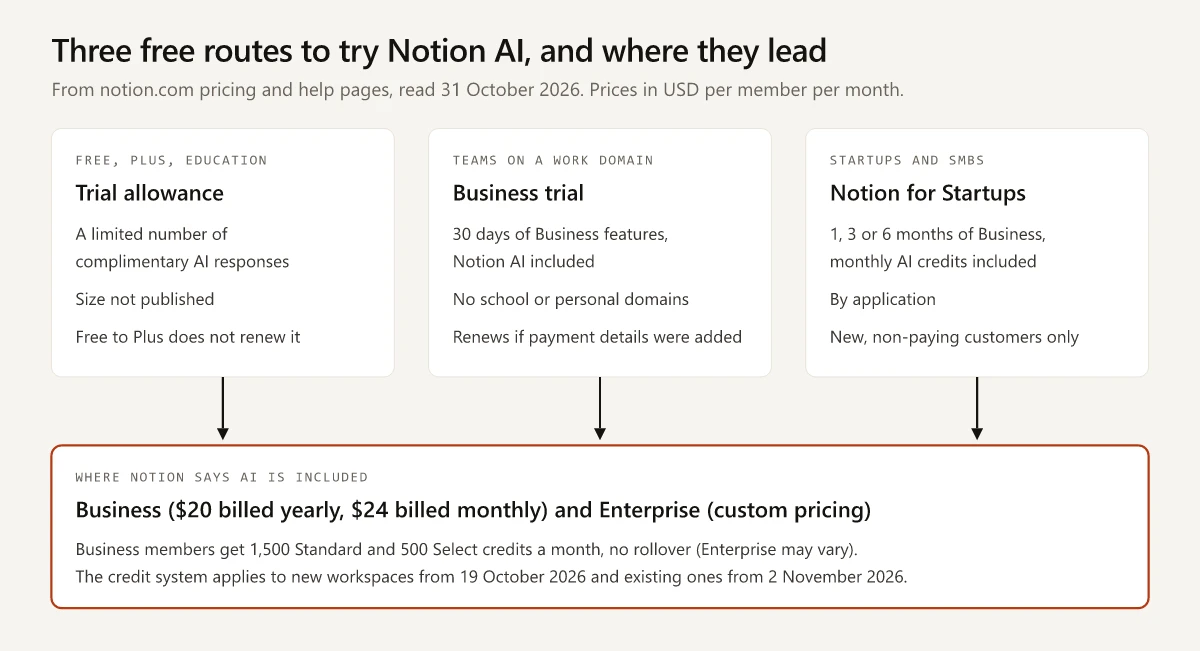
Notion gives Free and Plus users “a limited number of complimentary AI responses so they can try Notion AI features out”, and as of November 2026 none of Notion’s pricing or help pages says how many. Notion AI itself, in the help center’s words, “is available on Business and Enterprise Plans”, so Notion AI is free only as a trial.
The trial allowance matters less than which of Notion’s other free routes you qualify for. A team on a work email domain can get 30 days of Business with AI included, a university student gets a free plan whose AI stays at trial level, and a startup can apply for up to six months. For two of those three routes, the email on your account is the test: Notion’s Business trial excludes educational and personal domains, and the Education Plan needs a school email as the account’s main address.
Is Notion AI Free?
Not for ongoing use. Notion includes AI on its Business and Enterprise plans. The Free Plan, the Plus Plan and the free student plan get a trial allowance of complimentary AI responses whose size Notion does not publish, and moving from Free to Plus does not renew it. Teams on a work domain can trial Business free for 30 days.
Here is what Notion’s pricing page showed as of November 2026 (rechecked on 4 November). Notion changes prices and limits often, so check the linked page before you pay. The page opens on yearly billing, so its cards show $10 and $20; the monthly-billed prices come from the price data embedded in the same page’s HTML.
| Plan | Billed monthly (per member) | Billed yearly (per member) | Notion AI, in Notion’s words | Students |
|---|---|---|---|---|
| Free | $0 | $0 | ”Trial of Notion AI” | Anyone can sign up |
| Plus | $12 a month | $10 a month ($120 a year) | “Trial of Notion AI” | Free as the Education Plan, 1 member only |
| Business | $24 a month | $20 a month ($240 a year) | Notion Agent, AI Meeting Notes, Enterprise Search (Beta) | The Business trial excludes school email domains |
| Enterprise | Custom pricing | Custom pricing | Everything in Business, plus “Zero data retention with LLM providers” | Not part of the Education Plan |
The same page also shows:
- The comparison table marks Notion Agent (chat, generate, autofill, translate), Meeting notes and Research mode as “Limited Trial” on Free and Plus.
- Custom Agents are “Free to try, then $10 per 1,000 monthly Notion credits.”
- The banner says “Save up to 20% with yearly”. On Plus and Business the yearly saving works out to 16.7% by my arithmetic ($144 against $120 a year on Plus, $288 against $240 on Business), so neither plan reaches the 20%. The 20% matches the monthly price measured against the yearly one ($12 is 20% more than $10), not the saving.
The four plan names follow a common SaaS ladder, which I broke down in how SaaS companies name their pricing tiers.
Notion AI Pricing in India: USD on the Web, Rupees in the App Store
Notion’s pricing page labels its prices “Price in USD”. As of November 2026, neither that page nor Notion’s plan help page mentions India, local currencies, tax or GST, so the dollar figures above are Notion’s USD list, not a confirmed India price. The pricing page’s FAQ says Notion accepts “all major credit and debit card brands”, and its plan help page adds Apple Pay and Google Pay, with payments processed by Stripe.
Rupee prices appear on Apple’s India App Store listing for Notion, which showed these four in-app purchases as of November 2026 (unchanged from 31 October).
| In-app purchase, as Apple lists it | Price |
|---|---|
| Notion - Plus Monthly | ₹1,199 |
| Notion - Plus Yearly | ₹11,900 |
| Notion Business | ₹2,499 |
| Notion Business | ₹24,900 |
The listing does not name the billing period for the two Business rows. Grammarly names its App Store plan differently from its web plans, Premium in the app against Pro or Plus on the web, which the Grammarly price check for India maps checkout by checkout. Notion’s plan help page describes mobile upgrades only from Free to Plus, limited to one-member workspaces and managed through the Apple App Store or Google Play. Plus has only the AI trial, so a Plus upgrade on an iPhone at ₹1,199 a month does not unlock Notion AI.
Notion AI Free Limit: What the Trial Allowance Covers
Notion’s trial usage page opens with “Everyone can try Notion AI for free.” It gives no number for the allowance, and neither the AI FAQ (“a limited number”) nor the pricing page (“Limited Trial”) fills that gap. What the pages do define:
| Question | Notion’s answer | Source |
|---|---|---|
| What counts as one response? | Every AI action that returns a response: creating content, editing, AI blocks, adding an autofill property, asking a question | Trial usage page |
| Does “Try again” count? | Yes, “Anytime you click Try again, that counts as an additional AI response” | Trial usage page |
| Does upgrading to Plus reset it? | No: “Upgrading from the Free Plan to the Plus Plan doesn’t renew your available Notion AI usage” | Change your plan |
| Can trial users generate images? | The AI FAQ says “AI image generation is available on Business and Enterprise plans” | AI FAQ |
| What is the trial for? | ”Notion AI usage on the Free and Plus Plans is limited and intended for trying Notion AI” | Change your plan |
The practical rule: if you plan to judge Notion AI by the trial, run it on the job you would pay for, such as a summary of a real meeting page or an autofill on a real database. Not every AI tool leaves the number out: Suno states its free allowance as 50 credits a day, as the breakdown of whether Suno AI is free shows.
What Happens When the Notion AI Trial Runs Out
Once the allowance is spent, the trial page says you “will see a message that an upgrade to the Business or Enterprise Plan is necessary to continue using AI features”, and that a workspace owner on desktop has to make that upgrade (Notion’s plan help page also allows upgrades from the web). The other end-of-AI cases on Notion’s help pages:
| Situation | What Notion says happens | Source |
|---|---|---|
| Trial allowance used up on Free or Plus | AI features need an upgrade to Business or Enterprise | Trial usage page |
| A Business member runs out of Standard or Select credits | Those features “pause until your next monthly reset”, unless an admin allows Notion credits | Manage your AI credits |
| A Business workspace downgrades to Free or Plus | ”All existing Custom Agents are switched off, but not deleted” | What happens when I downgrade |
| A Business trial is cancelled | The workspace moves to Free at the end of the trial, or straight back to Plus if the trial started on Plus | Paid plan trials |
If the trial runs out and a Business seat is not in the budget, my roundup of free AI tools for marketing covers free tiers of other writing assistants.
The 30-Day Business Trial Includes Notion AI
For a team, this is the Notion AI free trial that includes the full feature set. Per Notion’s paid plan trials page:
- What you get: “For 30 days, the Business Plan trial gives users access to all features in the Business Plan”, and the list starts with “Notion AI, including AI Meeting Notes, Research Mode, Notion AI connectors, and more”.
- Who can start it: teams that “use a professional domain and aren’t already on a Business or Enterprise Plan”, from Notion’s web or desktop app.
- Who cannot: “If you’re using an educational domain or a personal domain, your team won’t be eligible”. A Gmail address or a college email does not qualify.
- When it ends: if you entered payment details, Notion auto-renews into a paid Business subscription; if you did not, it asks you to confirm the upgrade.
- One limit inside the trial: the AI FAQ says “Business trials may not have access to the model picker.”
Is Notion AI Free for Students?
No, the free Education Plan keeps Notion AI at trial level. Notion’s pricing FAQ says “The Plus Plan (with a 1-member limit) is free for students and educators”, and the pricing table gives Plus only a “Trial of Notion AI”. The Education Plan help page lists guests, uploads and 30-day page history, and its plan description does not mention Notion AI.
What the Education Plan needs from you, in Notion’s terms:
- Who qualifies: students and educators at accredited colleges and universities listed in the World Higher Education Database. K-12 students and educators are not eligible.
- Which email: a school email that is the main email on your Notion account. A school email added as an extra address does not count, a personal address such as gmail.com does not qualify, and Notion does not accept student IDs instead.
- How long: no set end date, as long as you verify your school email once a year. If you cannot, the workspace and its content move to the Free Plan.
- Group work: the individual plan allows one member and up to 100 guests. Student organisations can apply for a multi-member Education Plan.
- The trap: “Upgrading it to a Plus, Business, or Enterprise plan permanently ends that workspace’s Education eligibility.” Each school email can also claim the offer only once.
So for a student on a school email, neither free route includes AI beyond the trial: the Education Plan carries the trial only, and the Business trial excludes educational domains. Other tools treat students differently. Figma, for one, gives verified learners its Professional plan free (my Figma student plan breakdown has the details), and my guide to which Claude routes a student in India can use covers Claude.
How Much AI the Business Plan Includes
Notion’s credit pages give Business and Enterprise members a monthly AI allowance. Notion’s 19 October 2026 announcement put new customers on this credit system that day and said “Existing customers move over on November 2”. As of November 2026, the credit help pages give no start date and describe the allowance below as what Business and Enterprise plans include.
| Credit type | What it covers | Included per member each month |
|---|---|---|
| Standard | Work where Notion picks the model (Auto), including Notion Agent on Auto, writing, translation, AI blocks and formulas | 1,500, no rollover |
| Select | Picking a model yourself, or a Custom Agent you set up for your own use | 500, no rollover |
| Notion credits | Usage beyond Standard or Select (if an admin allows it), high credit consumption models, workspace-funded Custom Agents | None included; bought by the workspace |
Notion adds that “Your included amount may vary depending on your plan and purchase arrangement,” and that AI Meeting Notes start drawing on Standard credits on 1 December 2026, at about 10 credits for a one-hour meeting.
To size 1,500 Standard credits, Notion’s own estimates on Auto are 5 credits for a simple task (polishing an email), 10 for a medium one (writing a work report) and 25 for a complex one (drafting a performance review). At those estimates, my arithmetic gives about 300 simple, 150 medium or 60 complex tasks per member per month. Notion says actual use varies.
Extra Notion credits cost $10 per 1,000 billed monthly, or $13 per 1,000 as annual credits, which in-product billing sells only to annual Business and Enterprise plans, per What are Notion credits?.
Notion for Startups and Third-Party “6 Months Free” Pages
Search results for free Notion AI also surface third-party pages offering “6 months free”. The terms that govern them sit on Notion’s own startups page, which lists three tiers, each “including monthly AI credits”:
| Applicant | Free Business Plan | Main conditions |
|---|---|---|
| Startup affiliated with a Notion partner | 6 months | A code from the partner, fewer than 100 employees, a public company website and company email, new and non-paying |
| Startup without a partner | 3 months | Meets Notion’s startup criteria and can be verified |
| SMB, service business or team under 10 employees | 1 month | Also the fallback when Notion cannot verify startup status |
The page names “consultancies, agencies, and companies under 10 employees” among those who receive the 1-month trial, says an offer can be redeemed once, and applies it to new Business Plans only, not Enterprise. A partner’s code matters only for the 6-month tier, and the partner has to be on the list Notion links from its startups page, so check that list before you hand your details to a landing page. Notion’s page sets the eligibility for every tier. Notion’s free-to-paid path is a familiar product-led growth case, which I covered in product-led growth examples.
Which Notion Plan to Pick for AI
| You are | Start on | Notion AI you get | Watch for |
|---|---|---|---|
| Solo writer on a personal email | Free | Trial allowance only | Plus does not renew the trial, and the Business trial needs a work domain |
| University student or teacher | Education Plan (free) | Trial allowance only | Upgrading the workspace ends Education eligibility for good |
| K-12 student | Free | Trial allowance only | Not eligible for the Education Plan |
| Small team on a work domain that needs AI | 30-day Business trial | Full Business AI during the trial | It renews into paid Business if you entered payment details |
| Team on Plus with a work domain | Business trial from Plus | Full Business AI during the trial | Cancelling returns you to Plus straight away |
| Startup under 100 staff, not yet paying | Notion for Startups | 1 to 6 months of Business with monthly AI credits | An offer can be redeemed once; partner code for the 6-month tier |
For a team that converts, the cost is per member: a five-person team on Business pays $1,200 a year billed yearly, against $1,440 billed monthly ($24 x 5 x 12), by my arithmetic from the prices above.
Is Notion AI Free for You? Check Your Account Email First
For most people Notion AI is free only until an unpublished allowance runs out, so the choice that matters is which free route you can open before spending it: the Business trial needs a professional domain on the team, the Education Plan needs a school email set as the account’s main email, and the startups program needs an application.
Before you spend a single trial response, check the main email on your Notion account.
Frequently Asked Questions
Is Notion AI free?
Only as a trial. As of November 2026 Notion's help center says Notion AI is available on the Business and Enterprise plans, while Free and Plus users get a limited number of complimentary AI responses to try it. Notion does not publish how many.
Is Notion AI free for students?
Not beyond the trial. Students and educators at accredited colleges and universities get Notion's Education Plan free, which Notion's pricing FAQ describes as the Plus Plan with a 1-member limit, and Plus carries only a trial of Notion AI. K-12 students and personal email addresses are not eligible for the Education Plan.
What is the Notion AI free limit?
Notion does not publish a number. Its trial page counts every AI action that returns a response, and every Try again click, as one response, and its plan help page says moving from the Free Plan to the Plus Plan does not renew the allowance.
Which Notion plan includes AI?
Business, at $20 per member per month billed yearly or $24 billed monthly, and Enterprise, which the pricing page lists as "Custom pricing" (Notion's plan help page says organisations under 100 employees can upgrade to it from their settings). Under Notion's credit system, which existing customers were due to join on 2 November 2026, each member gets 1,500 Standard and 500 Select AI credits a month as standard, and Notion says the amount can vary by plan and purchase arrangement.
How much is Notion in India?
Apple's India App Store lists Notion in-app purchases in rupees, including Plus Monthly at ₹1,199 and Plus Yearly at ₹11,900, as of November 2026. Notion's own pricing page lists Plus at $10 and Business at $20 per member per month billed yearly, labelled "Price in USD", and does not mention India, GST or local currencies.