Pricing Tier Names: What 41 SaaS Pricing Pages Use
I counted the pricing tier names on 41 live B2B SaaS pricing pages. The full audit table, what the free and top rungs are called, and how to rename one safely.
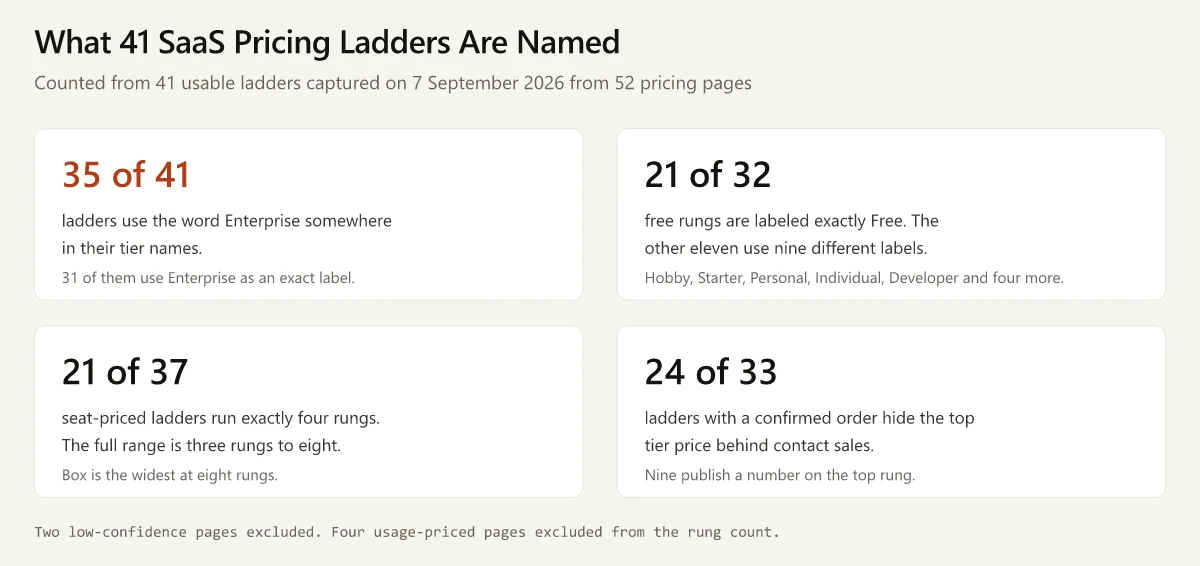
On 7 September 2026 I fetched the pricing pages of 52 B2B SaaS companies and wrote down every tier label that came back. 35 of the 41 usable ladders use the word Enterprise somewhere in their pricing tier names, and 31 use it as an exact label. The next most repeated exact labels are Free on 21 ladders, Business on 10, and Standard, Team and Starter on 7 each.
That convergence is the interesting part. Forty-one companies with different products, different buyers and different price points arrived at heavy overlap on six words: Enterprise, Free, Business, Standard, Team and Starter. Those words are doing routing work rather than brand work, and the overlap is tight enough that the vocabulary reads as inherited.
The audit table below is the full analysis set, company by company, with the caveats attached. After it, the four questions that decide a tier name: who the name routes to sales, what it costs to change once it is live, what the top rung’s label tells a procurement team about your flexibility, and which constraints kill a name after it has already shipped.
Structure sits elsewhere. How many rungs, which features go in which one and how far apart the prices sit are covered in good-better-best pricing, and the model underneath the ladder is in the seven B2B SaaS pricing models. This post is about the label.
What Should You Name Your Pricing Tiers?
Name each rung for the buyer who qualifies for it and for how they are supposed to buy it. Seven rules. The first three come from the audit; the rest come from what a rename costs.
- Give the free rung a label that needs no click to interpret. Free does that. Hobby, Starter and Developer also say who it is for, and they cost a click.
- Reserve one word for the sales-assisted rung and use it consistently. Enterprise is the convention in this set, appearing somewhere in 35 of the 41 ladders I captured.
- Do not reuse one word at two heights. Miro’s Starter is a paid rung and Loom’s Starter is the free one; inside a single portfolio, that collision is a support ticket.
- Make every rung answer “am I this?” before it answers “what do I get?”. Features go in the comparison table underneath.
- Write the name into a four-column comparison table on a phone before you approve it. If it truncates, it is too long.
- Check the shortlist against a trademark database, because the distinctive names are the ones a prior registration can block.
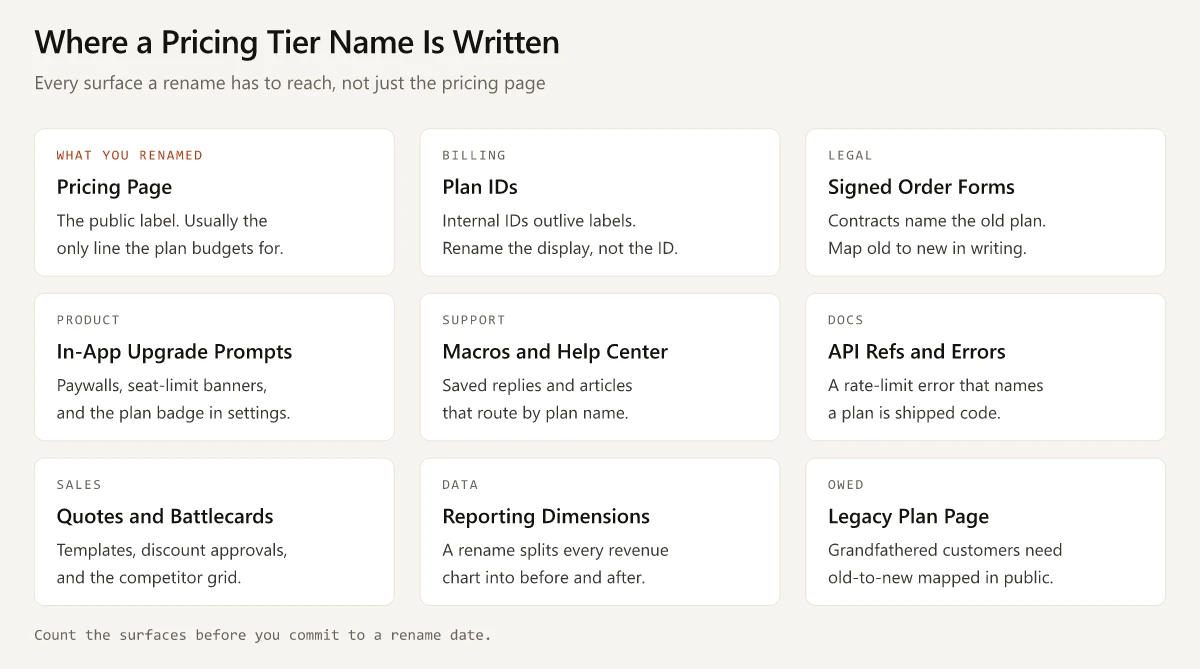
- Treat a rename as nine surfaces. The pricing page is the cheapest of them.
How I Counted the Pricing Tier Names
The method was one automated fetch per pricing page on 7 September 2026, no retries, no alternate URLs when a page redirected off-host.
- 52 URLs were queued. 43 returned tier names. 9 failed. The failures were three HTTP 403 refusals (GitLab, Canva, Pipedrive), four cross-host redirects that were not followed (lambdatest.com, hotjar.com, docusign.com, segment.com), one parser header overflow (Webflow) and one page that returned only a navigation shell with no plan cards (Zoom).
- Two more rows were dropped as low confidence. The Atlassian Jira page truncated mid-fetch, so neither its prices nor its top-rung treatment could be confirmed. Cloudflare returned a usage-based developer-platform page with per-service free allowances rather than a named plan ladder. Both are excluded from every count in this post.
- That leaves 41 ladders as the analysis set. Every number here describes those 41.
- Four of the 41 are usage-priced rather than seat-tiered (Stripe, Twilio Flex, MongoDB Atlas and Datadog), so they are excluded from rung-count arithmetic and included everywhere else. Rung counts are computed on the remaining 37. Twilio Flex’s rungs name pricing models, not a good/better/best ladder, so its top-rung cell holds the last paid model listed and is counted that way in the top-rung totals.
- Eight rows carry an order caveat. For Mailchimp, Dropbox, Ahrefs, Semrush, BrowserStack, Sauce Labs, Typeform and Datadog, the capture recorded the labels as a set but could not confirm the on-page left-to-right sequence. I make no claim about which rung is highest for those eight, so the top-rung columns are blank and the top-rung counts run on 33 ladders.
- Four pages were geo-served in Indian rupees (Slack, Mailchimp, Stripe, Grammarly). Tier names are unaffected by geo, and no price from those four is quoted anywhere in this post. Outside this capture, Lovable’s and Replit’s pricing pages showed dollars when I loaded them logged out from India on 10 October 2026, and both apps list rupee prices on Apple’s India App Store, which I set against the web for Lovable’s Pro and Business plans and for Replit’s Core plan. Grammarly’s rupee prices by checkout, and how its Premium, Pro and Plus names map to them, are in the Grammarly price in India breakdown.
These are 52 pages I chose, weighted toward developer tools, collaboration software and marketing platforms. It is not a random sample of B2B SaaS and the percentages should not be read as market shares. It is a census of one hand-picked set, which is enough to show what the conventions are and not enough to say how common they are across the category.
The Pricing Tier Names Audit: 41 Live Ladders
Companies marked “unordered” have the order caveat above. Companies marked “usage” price by consumption instead of by seat.
| Company | Tier names as captured | Free rung label | Top rung | Top rung price shown |
|---|---|---|---|---|
| 1Password | Teams Starter Pack / Business / Enterprise | none | Enterprise | contact sales |
| Ahrefs (unordered) | Lite / Standard / Advanced / Enterprise / Starter / Ahrefs Free | Ahrefs Free | - | - |
| Airtable | Free / Team / Business / Enterprise Scale | Free | Enterprise Scale | contact sales |
| Amplitude | Free / Plus / Growth / Enterprise | Free | Enterprise | contact sales |
| Asana | Personal / Starter / Advanced / Enterprise | Personal | Enterprise | contact sales |
| Auth0 | Free / Essentials / Professional / Enterprise | Free | Enterprise | contact sales |
| Box | Individual / Personal Pro / Business Starter / Business / Business Plus / Enterprise / Enterprise Plus / Enterprise Advanced | Individual | Enterprise Advanced | contact sales |
| BrowserStack (unordered) | Team / Team Pro / Team Ultimate / Volume / Enterprise / Desktop / Desktop & Mobile | none | - | - |
| Buffer | Free / Essentials / Team | Free | Team | numeric price shown |
| Calendly | Free / Standard / Teams / Enterprise | Free | Enterprise | numeric price shown |
| ClickUp | free forever / unlimited / business / enterprise | free forever | enterprise | contact sales |
| Datadog (usage, unordered) | Free / Pro / Enterprise / DevSecOps Pro / DevSecOps Enterprise | Free | - | - |
| Dropbox (unordered) | Plus / Standard / Advanced / Basic Free / Enterprise | Basic Free | - | - |
| Figma | Starter / Professional / Organization / Enterprise | Starter | Enterprise | contact sales |
| Freshworks (Freshdesk) | Growth / Pro / Enterprise | none | Enterprise | numeric price shown |
| GitHub | Free / Team / Enterprise | Free | Enterprise | numeric price shown |
| Grammarly | Free / Plus / Enterprise | Free | Enterprise | contact sales |
| Hootsuite | Standard / Professional / Advanced / Enterprise | none | Enterprise | contact sales |
| HubSpot (Marketing Hub) | Free / Starter / Professional / Enterprise | Free | Enterprise | numeric price shown |
| Intercom | Essential / Advanced / Expert / Fin AI Agent | none | Expert | numeric price shown |
| LaunchDarkly | Developer / Foundation / Enterprise | Developer | Enterprise | contact sales |
| Linear | Free / Basic / Business / Enterprise | Free | Enterprise | contact sales |
| Loom | Starter / Business / Business + AI / Enterprise | Starter | Enterprise | contact sales |
| Mailchimp (unordered) | Standard / Premium / Essentials / Free | Free | - | - |
| Miro | Free / Starter / Business / Enterprise | Free | Enterprise | contact sales |
| Mixpanel | Free / Growth / Enterprise | Free | Enterprise | contact sales |
| monday.com | Free / Basic / Standard / Pro / Enterprise | Free | Enterprise | contact sales |
| MongoDB (usage) | Free / Flex / Dedicated | Free | Dedicated | numeric price shown |
| Netlify | Free / Personal / Pro / Enterprise | Free | Enterprise | contact sales |
| Notion | Free / Plus / Business / Enterprise | Free | Enterprise | contact sales |
| Postman | Free / Solo / Team / Enterprise | Free | Enterprise | numeric price shown |
| Sauce Labs (unordered) | Live Testing / Virtual Device Cloud / Real Device Cloud / Enterprise Level / Sauce Mobile App Distribution | none | - | - |
| Semrush (unordered) | SEO / Starter / Pro+ / Advanced / Enterprise | none | - | - |
| Sentry | Developer / Team / Business / Enterprise | Developer | Enterprise | contact sales |
| Slack | Free / Pro / Business+ / Enterprise+ | Free | Enterprise+ | contact sales |
| Stripe (usage) | Standard / Custom | none | Custom | contact sales |
| Twilio Flex (usage) | Free trial / User + usage / Named user pricing / Active user hour pricing / Agent Copilot | Free trial | Active user hour pricing | numeric price shown |
| Typeform (unordered) | Free / Basic / Plus / Business / Growth Flow / Talent / Enterprise | Free | - | - |
| Vercel | Hobby / Pro / Enterprise | Hobby | Enterprise | contact sales |
| Zapier | Free / Professional / Team / Enterprise | Free | Enterprise | contact sales |
| Zendesk | Support Team / Suite Team / Suite Professional / Suite Enterprise + Copilot | none | Suite Enterprise + Copilot | contact sales |
Four labels in that table I would re-check before quoting them verbatim anywhere important. ClickUp’s names came back entirely lowercase, which is more likely a CSS text transform on the cards than the true label casing. Dropbox’s “Basic Free” may render as a plan called Basic with a price of Free. Loom’s third rung was captured as “Business + AI” with a note that the card also reads “Loom AI”. Zapier’s second rung came back as “Professional (Pro)”, so the on-page label is one of those two. Everything else in the table is as the page returned it.
Where the row is the whole product line, the capture took the table the URL defaults to: Freshdesk for Freshworks, Marketing Hub for HubSpot, Work Management for monday.com, Atlas for MongoDB, Infrastructure for Datadog, Live for BrowserStack. Add-ons priced separately (Zendesk’s Copilot add-on, Ahrefs’ Brand Radar prompt packages, Intercom’s Proactive Support Plus) are excluded from the tier lists. A tier name also says nothing about what the rung gates: Notion’s Free / Plus / Business / Enterprise ladder reads like any other, yet only Business and Enterprise include Notion AI, per my breakdown of what each Notion plan gets for AI.
The Free Rung: Only 21 of 32 Are Called Free
32 of the 41 ladders carry a free rung. Only 21 of those label it exactly Free. The other eleven use nine different labels:
| Company | Free rung label | What the label says |
|---|---|---|
| Vercel | Hobby | This is for side projects, not production |
| ClickUp | free forever | The price, plus a promise about the price |
| Loom | Starter | This is the beginning of a ladder |
| Dropbox | Basic Free | A plan name and a price, joined |
| Box | Individual | One person, not an account |
| Twilio Flex | Free trial | This expires |
| Ahrefs | Ahrefs Free | The price, carrying the company name |
| Sentry | Developer | This is for one engineer |
| LaunchDarkly | Developer | Same word, same reason |
| Figma | Starter | This is the beginning of a ladder |
| Asana | Personal | Not for a team |
Sentry and LaunchDarkly both name the free rung Developer, and both sell to engineers. The capture recorded Sentry’s Developer plan as described for solo devs on small projects and limited to one user, which is the name doing its job: it states the audience and implies the seat limit before anyone opens the feature table.
Starter is the word to watch, because it appears in nine of the 41 ladders and does not sit at a consistent height. In Loom and Figma it is the free rung. In Miro, Asana and HubSpot it is the first paid rung. In Box it is a compound (Business Starter) and in 1Password it is part of a bundle name (Teams Starter Pack). A buyer who arrives expecting Starter to mean the free rung is right on Loom and Figma and wrong on Miro, Asana and HubSpot.
Four of those eleven still carry the word somewhere: ClickUp’s free forever, Dropbox’s Basic Free, Twilio Flex’s Free trial and Ahrefs Free. So 25 of the 32 free rungs put the price in the label, and seven do not - Hobby, Starter at Loom and Figma, Individual, Developer at Sentry and LaunchDarkly, and Personal. Those seven pricing pages have to say the price twice, once in the label’s implication and once in the number, and their paid search and comparison-site copy has to carry the translation too.
Enterprise Appears in 35 of the 41 Ladders
35 of the 41 ladders use the word Enterprise somewhere, and 31 of those use it as a plain standalone label. Four use only a decorated version:
- Airtable: Enterprise Scale
- Sauce Labs: Enterprise Level
- Slack: Enterprise+
- Zendesk: Suite Enterprise + Copilot
Box and Datadog also run a decorated form alongside the plain one. Box runs Enterprise, Enterprise Plus and Enterprise Advanced as three separate rungs inside one eight-rung ladder, and Datadog’s Infrastructure table carries both Enterprise and DevSecOps Enterprise.
Among the 33 ladders whose order the capture confirmed, five top rungs avoid the word entirely: Stripe (Custom), Buffer (Team), MongoDB Atlas (Dedicated), Intercom (Expert) and Twilio Flex, whose rungs name pricing models. Buffer tops out at a self-serve price with no sales-assisted rung at all.
The same column shows what the word is doing. 24 of those 33 confirmed top rungs hide the price behind contact sales; nine publish a number. On the pages I captured, Enterprise routes more than it segments: it marks the rung with a salesperson attached to it. That is my read of the pattern rather than something the pages say. It is also why the word is cheap to copy: 35 of the 41 ladders already use it, which makes it the category default for the sales-assisted rung.
The Top Rung’s Name Signals Whether the Price Is Negotiable
An unpriced Enterprise rung tells a procurement team that the number gets set in a conversation, which is an invitation to open that conversation by negotiating. The nine ladders in my capture that publish a number on the top rung are making a different offer. Four of them sort into three treatments:
| Treatment | Example from the capture | What it tells the buyer |
|---|---|---|
| Full public seat price on every rung | Intercom (Essential $29, Advanced $85, Expert $132 per seat/month) | Every seat price is public, and every one is a floor: each plan also bills from $0.99 per Fin outcome, and Advanced and Expert carry a Get a demo button. |
| Public number plus a sales CTA | Calendly Enterprise (“Starts at $15k/yr” with a Talk to sales button); Postman Enterprise ($49/user/month billed annually, with a Contact Sales button) | The floor is fixed. The conversation is about scope. |
| Numeric floor only | HubSpot Marketing Hub Enterprise (“Starts at $3,600/mo”) | Qualify yourself out before you book the call. |
Freshdesk publishes a number on every rung including the top, and Intercom carried no free rung at all on the day I captured it. All of these prices are as the pages rendered on 7 September 2026 and pricing changes; the treatments outlast the figures.
The decision is what you want a buyer to do before they reach a human. Hiding the number buys negotiating room and costs you the buyers who will not start a conversation without a range. Publishing a floor filters the pipeline and pins your opening position in public. Neither is wrong, and the name and the number have to agree: an Enterprise rung with a published floor reads as a real product, while an Enterprise rung with a published floor and a “custom pricing” footnote reads as a company that has not decided. For what the gap between rungs does to the buyer’s reference price, see B2B SaaS pricing psychology, which covers the anchoring mechanics this post deliberately leaves alone.
Pricing Tier Names Are a Routing Mechanism
Before a tier name is a positioning statement it is an instruction, and it has to answer three questions in the moment a buyer scans the card:
- Am I in this rung? Which organization, team size or role qualifies.
- How do I buy it? Card now, or a conversation first.
- What happens when I outgrow it? Which rung is next and roughly what triggers the move.
A name that answers the first and lies about the second is where pricing pages leak. If the rung is called Team and self-serve checkout will not sell above 25 seats, a 40-seat buyer picks Team, reaches the card form, hits a wall and has to start over in a sales queue they were not expecting. The name promised self-serve. The system requires a quote. Nothing on the page told them.
The test takes ten minutes. Write this sentence once per rung, out loud, filling both blanks:
If you are ______, buy ______.
Where the sentence will not fill in, one of three things has gone wrong.
- Two rungs fit the same blank. The names describe intensity instead of audience, so the buyer picks by price and you have no idea whether they picked right.
- The blank needs a feature to fill it. “If you need SAML, buy Business” is a feature gate wearing a name. It works, but it means the buyer cannot self-select without opening the comparison table, so the table is the product and the name is decoration.
- The answer contradicts the checkout. The name says buy and the system says call. Fix the checkout or fix the name, but do not ship a page that disagrees with itself.
Several ladders in the capture route by need instead of by intensity. Sauce Labs names rungs after what you are testing on (Live Testing, Virtual Device Cloud, Real Device Cloud), so the label sorts buyers by what they need to test on. Zendesk splits the prefix from the size (Support Team, Suite Team, Suite Professional), so the first word picks the product line and the second picks the scale. Figma runs two routing layers at once: the tier name sorts the organization, and the seat type inside each tier (Full, Dev, Collab, at $16, $12 and $3 per month on Professional as captured) sorts the individual. Those pages take longer to skim and leave less for the buyer to guess.
If your rungs do not sort buyers cleanly, look upstream at the value metric before you touch the words. How to create a pricing strategy covers picking that metric before the packaging, and it is the right place to start if the sentence test fails on every rung at once.
Renaming a Live Tier: What the Label Is Wired Into
A rename is not a repricing. Moving customers onto restructured tiers with different features and prices is a separate project with its own migration rules, and changing what you charge has its own sequence in how to announce a price increase. This section is the cost of changing only the word, with the price and the feature set held constant.
That cost is usually underestimated because the pricing page is the only surface anyone can see.
Three of the nine surfaces below - support macros, API strings and sales collateral - are the same ones a product rename touches, and I have priced that wider blast radius in naming the product itself. What follows concentrates on the surfaces specific to a billing plan: the plan ID, the signed contract, the in-app upgrade prompt, the reporting dimension and the legacy plan page.
The Rename Sequence
Work it in this order, because each step creates the input for the next.
- Separate the display name from the plan ID. Billing systems key subscriptions to an ID. If your ID and your display string are the same field, splitting them is the first engineering ticket and everything else waits on it. In most billing systems the ID is the join key for historical invoices, so renaming it orphans past subscriptions.
- Get legal to pull every contract that names the plan. Expect order forms and MSAs that grant “the Business plan” not to follow the word to a new rung on their own. Ask legal for a written old-to-new mapping and, for anything material, an amendment or a notice.
- Publish a legacy plan page before you change the pricing page. Grandfathered customers need a public URL that maps their plan name to the current one. Without it, every renewal call opens with a customer describing a plan you no longer sell.
- Ship the in-product strings on the code train. Paywall copy, seat-limit banners, the plan badge in account settings, upgrade emails and any error string that names a plan are code. They ship on the engineering release train, whatever date marketing has in the calendar.
- Update support macros and help center articles the same day. Search traffic for the old name usually persists for months, so keep the old-name articles alive with the new name in the body instead of deleting them. Other sites keep an old plan name in circulation too: when I checked Canva’s India prices against third-party guides, one guide still quoted a per-user Teams price, though Canva’s pricing FAQ says Canva Teams is closed to new sign-ups.
- Add a mapping layer to reporting before the switch. A renamed plan otherwise splits every revenue-by-plan chart into a before and an after, and finance will ask about it in the first monthly review.
- Reissue sales collateral last, when the names are frozen. Quote templates, discount approval matrices, battlecards and the competitor comparison grid all carry the plan name, and rework on a name that is still moving is wasted twice.
The rename date is the date the last surface changes, and the pricing page is rarely the last one. Set it accordingly, and tell the exec who asked for the rename what the nine-surface number is before anyone commits to a launch.
When a Rename Is Worth It
The cost is worth paying in three cases. The name misroutes buyers, which the sentence test above will surface. The name collides with a trademark or with another product in your own portfolio. Or the rung’s audience changed, which is a packaging decision arriving disguised as a naming one. If the only argument is that the current name feels weak, the migration buys nothing you can measure.
The Constraints That Kill a Tier Name Late
Each is cheap to run before launch and expensive to discover afterwards.
Trademark
The common tier names are the hardest ones to own. The USPTO places words that “merely describe some aspect of your goods or services” at the weak end of its spectrum and states that weak trademarks “are hard to protect against competitors and often are not federally registrable”, with descriptive marks “only registrable in certain circumstances, such as your trademark gaining distinctiveness through extensive use in commerce over many years” and generic terms not federally registrable at all. Starter, Business, Pro and Enterprise sit in that zone, which is what you would expect of words that appear as exact labels on 7, 10, 6 and 31 of the 41 ladders I captured.
The risk runs the other way. A coined or arbitrary tier name is the registrable kind, and the registrable kind is also the kind a prior registration can block in your class. Run any distinctive shortlist through the USPTO trademark search and your equivalent registries in the markets you sell in, before the name reaches a pricing page and a billing system. Naming a rung is a smaller version of the same problem as naming the product itself, and it deserves the same clearance step.
Translation
Decide explicitly whether plan names get localized, because the default in most stacks is that they do not. If they do not, the English word ships as-is into every market your pricing page serves, and coined words, idioms and anything that reads as slang are the risky end of the shortlist. A name that is fine in English can be an unfortunate homophone somewhere you sell. Before approving a shortlist, get each candidate read aloud by a native speaker in every market on your pricing page, and check what the word does to line length in German and to character count in Japanese.
Abbreviation
The name has to survive being cut down by someone else. Review sites, comparison articles, procurement spreadsheets and your own mobile comparison table can all truncate it, and none of them will ask permission. Compound labels like “Business + AI” and “Suite Enterprise + Copilot” read cleanly on a wide pricing card and lose the appended half in a narrow column. Write each candidate into a four-column table at 375px wide and see what survives. Then write it into a sentence a salesperson would say on a call, because a name that needs a qualifier every time it is spoken will get shortened by the field whether you approve or not.
Pricing Tier Names Examples: Six Schemes and What They Signal
Almost every ladder in the capture uses one of six naming schemes, or mixes two. Twilio Flex is the exception: its rungs name pricing models instead of plans. The scheme is the real decision, and the specific words follow from it.
| Scheme | What it tells the buyer | Examples from the capture | Use it when |
|---|---|---|---|
| Organization shape | Which unit is buying: a person, a team, a company | GitHub (Free / Team / Enterprise), Airtable (Free / Team / Business / Enterprise Scale), Postman (Free / Solo / Team / Enterprise) | Seats or org size is your value metric |
| Named persona | Which individual the rung is for | Sentry and LaunchDarkly (Developer), Vercel (Hobby), Box (Individual, Personal Pro), Asana (Personal) | The free or entry rung has a specific user you can name |
| Intensity | More of the same thing, further up | Hootsuite (Standard / Professional / Advanced), monday.com (Free / Basic / Standard / Pro / Enterprise), Linear (Free / Basic / Business / Enterprise) | Rungs differ by limits rather than by audience |
| Capability | What the rung lets you do | Sauce Labs (Live Testing, Virtual Device Cloud, Real Device Cloud), BrowserStack (Desktop, Desktop & Mobile) | Buyers self-select by need, not by budget |
| Product-line prefix | Which product first, then which size | Zendesk (Support Team, Suite Team, Suite Professional), Datadog (Pro, Enterprise, DevSecOps Pro, DevSecOps Enterprise), Box (Business / Business Plus, Enterprise / Enterprise Plus / Enterprise Advanced) | One pricing page carries several products |
| Adjective | Very little on its own | Amplitude and Mixpanel and Freshdesk (Growth), ClickUp (unlimited), Intercom (Expert), Mailchimp (Premium) | The comparison table is doing the work and the name only has to be distinct |
Organization shape and named persona are the two schemes that answer “am I this?” without a click, which is the property I would optimize for. Intensity and adjective schemes push the decision into the feature table, which is fine when the table is short and expensive when it is not. Framer runs a plain Free, Basic, Pro and Enterprise ladder, and its names tell a team little about the bill: in the team setup I priced, Framer’s editor seats and add-ons cost more than the Pro plan itself. The mixed schemes (Zendesk, Box, Datadog) are the honest answer for a multi-product pricing page, and they cost you the one-word column header.
Whichever scheme you pick, apply it to every rung. A ladder that opens with a persona (Developer), continues with an org shape (Team), and finishes on an adjective (Premium) is asking the buyer to change how they read the row three times.
Start With Your Own Pricing Tier Names
Open your pricing page and write “If you are ______, buy ______” once for each rung, then check the answer against what your checkout will actually sell. The rung where the sentence will not fill in, or where the answer contradicts the checkout, is the one costing you buyers today, and it is worth fixing before you argue about whether any of the pricing tier names sound premium enough. The audit table above is there to borrow from: 41 live ladders, captured on one day, with the caveats attached so you can check my counting.
Frequently Asked Questions
What are common SaaS pricing tier names?
Across the 41 usable ladders in my 7 September 2026 capture of live B2B SaaS pricing pages, the most repeated exact labels were Enterprise (31 companies), Free (21), Business (10), Standard (7), Team (7), Starter (7), Pro (6) and Advanced (6). Enterprise appeared somewhere in the tier names of 35 of the 41.
Should I call my free plan Free?
In that capture, 32 of the 41 ladders had a free rung and 21 of those labeled it exactly Free. The other eleven used nine different labels including Hobby, Starter, Personal, Individual, Developer and Basic Free. A named rung tells the buyer who it is for; the word Free tells them what it costs without a click.
Why do SaaS companies name the top tier Enterprise?
On the pricing pages I captured, the word carries a routing instruction more than a brand promise. Of the 33 ladders whose rung order was confirmed, 24 hid the top tier price behind contact sales, so on those pages Enterprise marks the rung with a salesperson attached.
How do I rename a pricing tier without breaking things?
Rename the display string, not the billing plan ID, and treat the pricing page as one of nine surfaces rather than the whole job. The others are plan IDs, signed order forms, in-app upgrade prompts, support macros and help center articles, docs and error strings, sales quote templates, reporting dimensions, and a public legacy-plan page for grandfathered customers.
How many pricing tiers do most SaaS companies use?
Among the 37 seat-priced ladders in my capture, 21 ran exactly four rungs. The full range was three to eight, with Box the widest at eight. Ladder length is a packaging decision rather than a naming one, so read that spread as context and pick your own rung count.