LinkedIn Account Restricted: Causes and How to Get Back In
LinkedIn account restricted? See the four causes LinkedIn names, the route back for each, how the Persona ID check works, and what to do if your ID is unsupported.
Which of LinkedIn’s four reasons does your notice point to? When a LinkedIn account restricted notice gives a reason, that reason decides the route back. A content restriction is reviewed from a prompt, an automation restriction ends at a time LinkedIn already set, and profile or identity restrictions send you through an ID check run by a company called Persona.
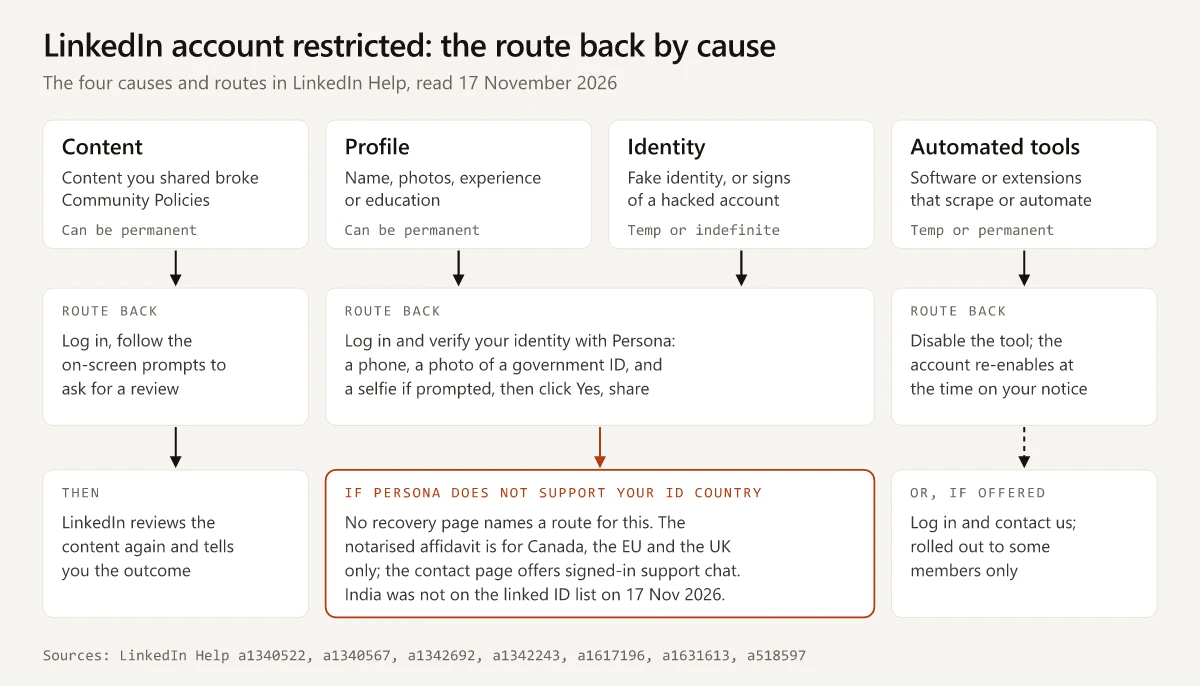
The four causes and the route back for each, from LinkedIn’s Account restrictions page:
- Content violations: log in and “follow the onscreen prompts to ask us to revisit our decision”.
- Profile violations: log in and “follow the onscreen steps to verify your identity”.
- Identity violations, including a suspected hack: the same identity check.
- Automated tools violations: disable the tool; the account is re-enabled at the time on your suspension notice.
I read every LinkedIn Help page cited below from India on 17 November 2026, and this guide uses only those pages, LinkedIn’s User Agreement and one third-party scam write-up. The part I would check before anything else is the ID route: the list of accepted IDs that LinkedIn’s recovery page links to did not name India when I read it. If you hold an ID from a country that list leaves out, know before you start the upload that LinkedIn’s pages name no recovery route for it outside Canada, the EU and the UK, apart from the general signed-in support chat.
Why Is My LinkedIn Account Restricted? The Four Causes LinkedIn Names
LinkedIn’s page opens: “Access to your account may be restricted if you violate our Professional Community Policies.” It then says the reasons “may include” four: content, profile, identity and automated tools violations. The page showed “Last updated: 2 years ago” when I read it. Each cause in its own words:
| Cause | What LinkedIn says triggers it | Your route back | Help page |
|---|---|---|---|
| Content | A violation of the Professional Community Policies in content you shared | Log in, follow the on-screen prompts; LinkedIn will “review the content again and let you know the outcome” | a1340522 |
| Profile | Your Name, Profile Photo, Background Photo, or Experience or Education. “If you repeatedly add violating content to your profile, we may restrict access to your account.” | Log in and verify your identity | a1340522 |
| Identity | A profile that is “intentionally fraudulent” or does not reflect your true identity, or signs that someone else has taken over the account | Log in and verify your identity | a1340522 |
| Automated tools | ”third-party software or browser extensions that scrape, modify the appearance of, or automate activity on LinkedIn’s website” | Disable the software; wait for the time on your notice | a1340522, a1340567 |
The power to restrict sits in LinkedIn’s User Agreement (effective November 3, 2025). Section 3.4 says “LinkedIn reserves the right to restrict, suspend, or terminate your account if you breach this Contract or the law or are misusing the Services”. Section 2.1 adds one rule that matters while you wait: you agree “you will only have one LinkedIn account” and that “you are not already restricted by LinkedIn from using the Services”. Read together, those two promises mean a second account opened during a restriction would break both.
LinkedIn Account Temporarily Restricted or Permanent: What LinkedIn Says About Time
No LinkedIn page I read says how many days a restriction lasts. What the pages do say:
| Cause | What LinkedIn says about time |
|---|---|
| Automation | ”Your account will then automatically be re-enabled at the time specified on the suspension notification” (a1340567). Automated activity “can result in temporary or permanent restriction of your account” (a1340522). The time is on your notice, so screenshot it before you close the screen. |
| Identity | ”access to your account may be restricted either temporarily or indefinitely”, depending on the type of violation |
| Content | Some violations “may result in permanent account restriction after a single violation” |
| Profile | For “certain egregious violations” LinkedIn “may permanently restrict your account after a single violation”; its examples are child sexual abuse material, terrorism, extremely violent content and egregious sexual harassment |
How to Verify Your Identity With Persona
Profile and identity restrictions both point to Verify your identity to recover account access (“Last updated: 2 weeks ago” on 17 November 2026). LinkedIn says recovery runs “through Persona, LinkedIn’s identity verification provider”, and that you need a smartphone to photograph your ID. The steps, as of November 2026, in the page’s order:
- Follow the prompts during the log in process. On a desktop computer, scan the QR code on screen with your phone; if you started on a phone, there is no QR code.
- Select the country that issued your government ID.
- Agree to Persona’s Identity Service Terms of Use and Persona’s Privacy Policy.
- Allow camera access if your phone asks.
- If prompted, take a photo of yourself.
- Select your government ID type.
- Take a clear photo of your valid government-issued ID card, driver’s license or passport. The page adds: “Accepted documents may vary by country” and “Documents such as library or school ID cards cannot be used for verification.”
- Click Yes, share to let Persona send the result to LinkedIn.
What changes hands, per the same page:
| Detail | |
|---|---|
| What Persona sends LinkedIn, with your consent | Verification result; full name; year of birth; city, state/province, country; ID type and issuer; a redacted copy of the ID “with only the full name and face portrait being visible” |
| What LinkedIn says it does not receive | ”your biometric data or numbers, expiry dates, or issue dates associated with your ID” |
| How long LinkedIn keeps it | ”only while your account issues are being resolved”; the data is “generally permanently deleted within 14 days of submission” |
| What it may keep longer | ”non-identifying data about your ID for fraud prevention purposes” |
Why the Persona Check Fails
LinkedIn’s ID verification troubleshooting tips (“Last updated: 2 months ago”) list the failure reasons for account recovery:
| Failure | What LinkedIn says | What to do |
|---|---|---|
| ID type | Use a government-issued ID; library or school ID cards “cannot be used” | Switch to a passport, driver’s license or state or national ID |
| Illegible ID | Persona needs “a clear, complete, and well-lit photo” with “all four corners” captured | Retake in daylight with no glare |
| Unsupported Country ID | ”Persona does not currently support the country that issued your identification document” | See the next section |
| Selected country mismatch | The selected country must match the country of the ID | Restart and pick the issuing country |
| Selfie image | Face visible, well-lit, no glare | Retake facing a light source |
| Devices | ”You will be able to capture your ID only through a mobile device” | Use the QR code to move to your phone |
| Data sharing is declined | Recovery cannot finish unless you click “Yes, share” | Repeat and accept the sharing step |
| Minors | ”LinkedIn does not allow members below 16 years old” | No route |
Unsupported Country ID: India and Other Countries Persona Does Not List
Check your country here before you start the upload. Inside its tip box, the recovery page links “this list of ID types accepted by Persona”, which is LinkedIn’s Identity verification via Persona page. What that page said on 17 November 2026:
- It groups supported countries by region, and India is not on it; a search of the page for “India” returned nothing.
- Its Asia list includes Bangladesh, Japan, Singapore, Nepal (NFC-enabled passports “issued in or after 2022”) and Pakistan (“ICAO compliant passports issued in or after 2023”). Most entries are NFC-enabled passports.
- For the United States it lists “Passport, Driver’s license, State IDs”.
- It says LinkedIn is “actively working on expanding to more countries in the upcoming months”.
Two caveats keep this from being a verdict. That list page is written for the identity badge on your profile, and LinkedIn’s Persona troubleshooting page for the badge says its tips do “not apply to regaining access to a locked or compromised LinkedIn account”. The recovery page itself says accepted documents “may vary by country”. So LinkedIn’s pages neither say an Indian ID will fail recovery nor say it will pass. What they do name is the failure message, “Unsupported Country ID”, and one alternative, the affidavit. Beyond that, the only channel LinkedIn’s pages offer is its general contact page, which no recovery page names for this case and which requires you to be signed in:
| Route | Who LinkedIn says can use it | How |
|---|---|---|
| Affidavit of Identity | ”used only in Canada, the EU and the UK” | Print it, sign it before a Notary Public, then attach it to your support case or reply to your LinkedIn Customer Representative’s email with it |
| Signed-in support chat | Not stated for ID recovery; the page requires you to be signed in | LinkedIn’s contact page says you must be signed in, then click Contact us and Chat with support; the help assistant offers “options to connect to our support team” if you need more help |
If you are in India, do not confuse this with DigiLocker. DigiLocker is the route to the identity badge, which the DigiLocker verification guide for India covers step by step. LinkedIn’s Account restrictions, automated activity, recovery and recovery troubleshooting pages do not mention DigiLocker at all, so none of them offers the badge as a way back in.
LinkedIn Account Restricted for Automation: Disable the Tool, Then Wait
LinkedIn’s Automated activity on LinkedIn page (“Last updated: 2 months ago”) gives three actions:
- Review and disable the software or extension that automates activities. LinkedIn’s uninstall browser extensions page has the menu steps for Chrome, Edge, Firefox and Safari.
- For a second look, “log in and contact us”. LinkedIn adds: “This feature is being gradually rolled out and is currently available only to some LinkedIn members.”
- Change your password on a regular basis.
What counts as automation is spelled out on LinkedIn’s Prohibited software and extensions page: “crawlers”, bots, browser plug-ins or extensions “that scrape, modify the appearance of, or automate activity”, plus “fake accounts or fake engagement” and “any tools or services that try to manipulate LinkedIn’s content algorithms”. The User Agreement’s section 8.2 bans using “bots or other unauthorized automated methods to access the Services, add or download contacts, send or redirect messages, create, comment on, like, share, or re-share posts”. The same Help page warns that members using these tools “risk having their accounts restricted or shut down”.
The page draws no line between “safe” and “unsafe” tools, so I do not either. If what you wanted was posts going out on a timetable, LinkedIn has a built-in scheduler, and my guide to scheduling a LinkedIn post covers where it sits on desktop, the app and a company Page.
Restricted After a Post or a Profile Edit
For content, if you believe what you posted complies, the route is the one in the table above. The page gives no other appeal form for content.
For a profile, the page names a smaller step before a restriction: “We may remove certain parts of your profile, such as photos, if they don’t comply with our policies.” Restriction follows when you “repeatedly add violating content”. Before you put a removed photo back up, check it against LinkedIn’s rules; if it is an AI headshot, my guide to AI LinkedIn profile pictures and the likeness rule quotes the policy line on images that are not your likeness. If you believe the restriction was an error, the route is the Persona check above.
Restricted Because LinkedIn Suspects a Hack
The Account restrictions page says that “if we find signs that your account has been compromised or taken over by another person or entity, we may take proactive measures to restrict your account to protect your information”. If your restriction came with no reason you recognise, check this cause first; the route back is the same identity check.
LinkedIn’s Report a compromised account page adds the steps around it:
- Submit the “Report Unauthorized Account Access or Changes” form, with your profile URL if you have it.
- If you can still log in: change your password to one “not used anywhere else”, turn on two-factor authentication, review your active sessions, and check the email addresses and phone numbers on the account.
- Afterwards, review recent connections, posts and social actions for anything you did not do.
If your problem is a forgotten password or a lost email address rather than a restriction, the reset and no-email routes are in the locked-out section of my guide to closing or hibernating a LinkedIn account.
Is the “LinkedIn Account Temporarily Restricted” Email Real?
Assume a restriction email with a button is a scam until LinkedIn itself shows you the restriction. LinkedIn’s Phishing content page says “LinkedIn will never ask you for your password or ask you to download any programs”, and its first sample phishing email carries the subject “Account Suspended” and claims “a temporary limitations has been placed on your Linkedin account”.
PCrisk documented a scam email (published 25 February 2026) with the subject “Action Required: Linkedin Access Temporarily Restricted”, a “Verify Account” button, and the line “This verification link will expire in 24 hours for security purposes.”
What to do with one:
| Step | Source |
|---|---|
| Do not click; open linkedin.com or the app yourself and see whether a restriction screen appears | My rule: none of the LinkedIn restriction pages I read tells you to click a link in an email; they route you through logging in, a Help Center form or a wait |
| LinkedIn names three sending addresses as genuine: linkedin_support@cs.linkedin.com, linkedin@e.linkedin.com and linkedin@el.linkedin.com | Phishing content |
| Forward the suspicious email to phishing@linkedin.com | Phishing content |
| Ignore anyone selling LinkedIn phone support: LinkedIn says “We don’t offer a phone number for customer support”, that “Some websites advertise LinkedIn phone support for a fee”, and that it does not charge for customer support; the channels it does offer, from signed-in chat to India’s Grievance Officer Form, are listed in my guide to LinkedIn customer service | Contact us |
| If you already entered your password on the fake page, follow the compromised-account steps above | Report a compromised account |
Before You Appeal a LinkedIn Account Restricted Notice, Match the Route to the Cause
Each cause on LinkedIn’s Account restrictions page has its own route back: a review prompt for content, the Persona check for profile and identity, a wait plus a possible second look for automation. If your country is missing from the Persona list LinkedIn links, as India was on 17 November 2026, and the upload returns “Unsupported Country ID”, stop retrying and try LinkedIn’s signed-in support chat, the one channel its contact page offers. Before you do, screenshot your LinkedIn account restricted notice so you can quote its exact wording in the chat.
Frequently Asked Questions
How long does a LinkedIn temporary restriction last?
LinkedIn Help gives no general duration. For automation restrictions it says that once you disable the tool, your account is re-enabled at the time specified on the suspension notification; for identity violations it says access may be restricted either temporarily or indefinitely.
Can a LinkedIn account be permanently restricted?
Yes. LinkedIn's Account restrictions page says some violations of its Professional Community Policies may result in permanent account restriction after a single violation, and it can permanently restrict an account after one egregious profile violation.
How do I unrestrict my LinkedIn account without an ID?
It depends on the cause. A content restriction is reviewed through on-screen prompts after you log in, and an automation restriction lifts at the time on your notice after you disable the tool. For profile and identity restrictions, the only alternative to the Persona ID upload that LinkedIn's recovery pages name is a notarised Affidavit of Identity, for members in Canada, the EU or the UK only. Beyond that, LinkedIn's contact page offers support chat to signed-in members, but no recovery page names it for this case.
Is the 'LinkedIn account temporarily restricted' email real?
Treat any such email with a link as suspect. LinkedIn's phishing page says LinkedIn will never ask for your password or ask you to download programs, and asks you to forward suspicious emails to phishing@linkedin.com. Check your status by opening LinkedIn yourself, not through the link.
Why is my LinkedIn account restricted for no reason?
Under its Identity violations heading, LinkedIn describes a restriction where you broke no rule: if it finds signs that your account has been compromised or taken over, it may restrict the account to protect your information. The route back is to log in and verify your identity.