LinkedIn Customer Service Number: The Real Routes to Help
LinkedIn customer service has no phone number. Here is each real route by account type, from LinkedIn Help on 23 November 2026, plus India's grievance form.
“We don’t offer a phone number for customer support.”
That line, from the “Important to know” box on LinkedIn’s own Contact LinkedIn customer support page, settles the LinkedIn customer service number question before you search any further.
LinkedIn customer service has no phone number. It runs through the signed-in Help Center: click Contact us, then Chat with support, and an AI help assistant answers before offering options to reach the support team. Premium members can ask for a live consultant, and some Premium Career and Business subscribers get an English-only phone callback.
With no number to call, your account type decides which channel you use: a free member, a Premium subscriber, a Recruiter customer, someone locked out and an India resident with a grievance each get a different one, and the India route is a form that loads without signing in.
I read LinkedIn’s support pages on 23 November 2026 without signing in, and this guide uses only those pages. The Help pages I loaded in a browser that day carried a notice that LinkedIn is updating its navigation and “rolling this out gradually”, so menu names on your screen may differ.
Is There a LinkedIn Customer Service Number?
No. LinkedIn publishes no customer service phone number, and its contact page warns about anyone who sells one. What the box says, line by line, as of November 2026 (the page showed “Last updated: 3 months ago”):
| What LinkedIn’s contact page says | What it means for you |
|---|---|
| ”We don’t offer a phone number for customer support.” | A “LinkedIn customer care number”, “toll free” line or “24/7 helpline” on a third-party site is not LinkedIn’s |
| ”Some websites advertise LinkedIn phone support for a fee. These websites are in no way affiliated with LinkedIn” | Do not pay anyone to reach LinkedIn |
| ”we don’t charge for customer support” | LinkedIn charges nothing for support itself, though some routes below (Premium chat and phone, Sales Navigator, Recruiter, ads) come with a paid product |
| ”we’ll never ask you for your password or access to your computer” | A caller who asks for either, or for remote access, is not LinkedIn |
The one phone route LinkedIn’s pages describe is a callback for some Premium subscribers, covered in the Premium section below.
If a fake “support” email or call already got your password, the steps for a compromised account and the three sender addresses LinkedIn names as genuine are in my guide to a restricted LinkedIn account.
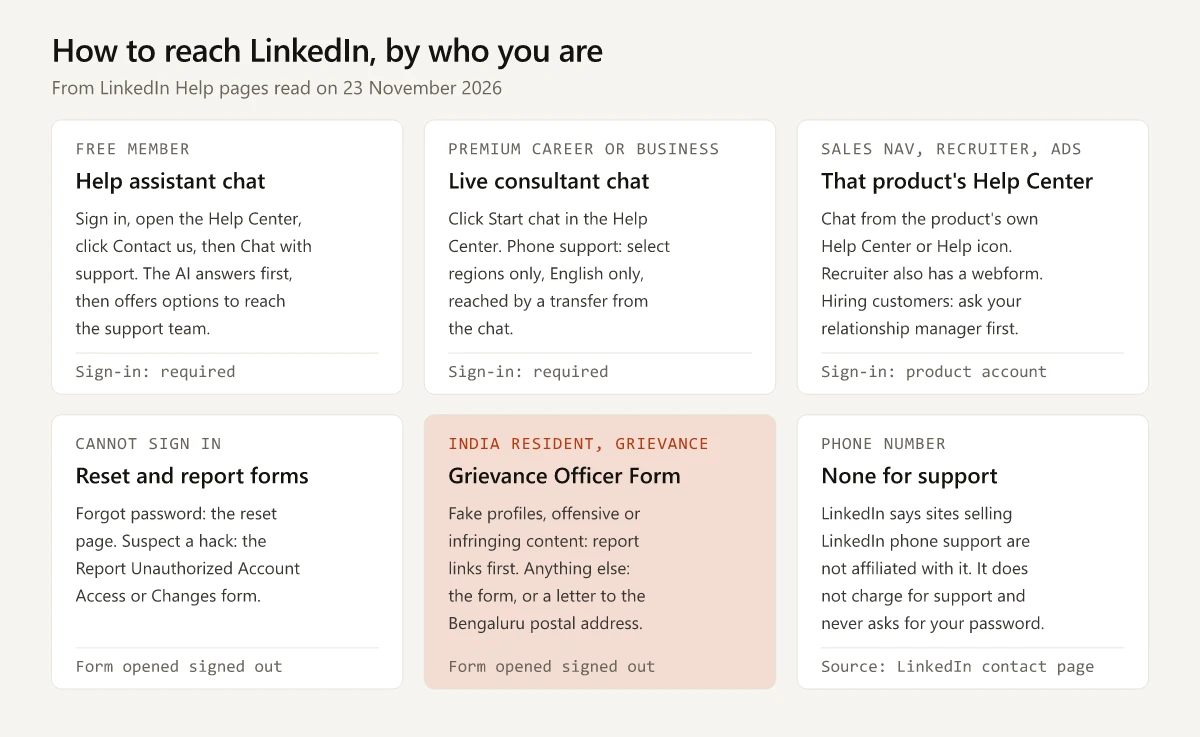
How to Reach LinkedIn, by Who You Are
Every row comes from a LinkedIn page I read on 23 November 2026. The “last updated” labels are as the pages showed them that day.
| Who you are | Channel | Sign-in needed? | Can you reach a person? | LinkedIn page |
|---|---|---|---|---|
| Free (Basic) member | Help assistant chat in the Help Center, then “options to connect to our support team”; a support ticket answered by email | Yes | Through support team options or an emailed ticket; LinkedIn names live consultants only for Premium and paid-product buyers | Contact support page (updated 3 months ago); Premium chat page (2 years ago) |
| Premium Career or Premium Business | Start chat, then a live consultant; phone callback in select regions | Yes | Yes, a live consultant; phone only where offered | Premium phone support page (10 months ago) |
| Sales Navigator user | Start chat in the Sales Navigator Help Center, or Chat with support from the Help icon | Yes, with “an active Sales Navigator plan” | Yes, through the support team options | Sales Navigator support page (6 months ago) |
| Recruiter or hiring customer | Your relationship manager first; Recruiter Help webform; Live chat at the bottom of the Help Center | Product account | Yes, a Customer Support representative | LinkedIn’s hiring support page; Recruiter Help contact page (2 years ago) |
| Advertiser (Campaign Manager) | Help icon in Campaign Manager, then Chat with support | Yes, in Campaign Manager | Yes, “Advertisers can also chat with a consultant through Campaign Manager” | Campaign Manager support page (2 years ago); AI-assisted help page (2 months ago) |
| LinkedIn Learning user | Chat with support on the Learning Help page, which “may not always be available” | Yes, in Learning | Sometimes | Learning support page (4 years ago) |
| Locked out (lost password or suspected hack) | Password reset page; Report Unauthorized Account Access or Changes form | No; the form opened signed out | Through the form | Account access help page and the hiring support page |
| India resident with a grievance | Report links first, then the India Grievance Officer Form or a letter to a Bengaluru address | No; the form opened signed out | Through the form | India Grievance Officer page (4 months ago) |
How to Contact LinkedIn Support as a Free Member
The steps on LinkedIn’s contact page, in its order:
- Go to the LinkedIn Help Center.
- Sign in. “You must be signed in to your LinkedIn account to contact our customer support team.”
- Scroll to the bottom of a Help Center article or the Help Center homepage, click Contact us, then Chat with support.
- Ask your question or describe the issue in the chat window.
- The help assistant answers from LinkedIn sources, links to more detail and may ask follow-up questions. “If you need additional help, you’ll be given options to connect to our support team.”
LinkedIn’s AI-assisted help page says the help assistant runs on a large language model and that its answers “could potentially be limited or contain some inaccuracies”, so follow the links it gives before you act on an answer about your account. The same page says the assistant “can only answer questions about the product from its respective help center”: ask about Sales Navigator in the Sales Navigator Help Center, not the main one.
When I fetched the general contact form at linkedin.com/help/linkedin/ask from India, signed out, it redirected to the LinkedIn sign-in page.
LinkedIn Support Email: A Ticket, Not an Address
None of the contact pages above lists an email address you can write to. Email enters at two points:
- LinkedIn’s Premium chat page adds a note: “Basic (free) account members can create a support ticket to receive support via email.”
- After you contact LinkedIn through the Help Center, “You should get an automated response email from LinkedIn Customer Service”, per its page on updates to your inquiry. To follow up on desktop, that page says to click your profile photo in the Help Center and select View your support cases; in the app, go to Settings, Help Center, the More icon, then View your support cases. That page showed “Last updated: 5 years ago”, so the menu names on your screen may differ.
LinkedIn Support for Premium Members: Live Chat and Phone Callbacks
Premium adds a live consultant on request and, for some subscribers, a phone call. LinkedIn’s contact page says “Premium members can also speak to a live consultant from help assistant”, and Premium members can click Start Chat on the right pane or at the bottom of a Help Center page.
The phone route, from LinkedIn phone support for Premium members:
| Detail | What the page says |
|---|---|
| Who | ”We’re gradually making this experience available in select regions for Premium Business and Premium Career subscribers, and you might not have access to it at this time.” |
| Which regions | Not named; a search of the page for “India” returned nothing |
| Language | ”Phone support is only available in English.” |
| How you get there | Through the chat: “Your chat session will end when you’re being transferred to phone support.” |
| Your number | ”LinkedIn will not be saving the phone number you provided for Premium phone support.” |
| If the call drops | The consultant makes “one attempt to call you back”, then leaves a voicemail pointing you to the chat and sends a follow-up email |
| Recording | Agreeing to the call means consenting to it “being recorded for quality and training purposes” |
So a Premium subscriber in India cannot tell from LinkedIn’s pages whether the callback is offered to them.
Two LinkedIn pages disagree on chat languages. The contact page (updated 3 months ago) says “Live chat is currently available in English, French, German, Portuguese, Spanish, Dutch, and Italian.” The older customer service chat for Premium members page (updated 2 years ago) says live chat “is currently only available in English”. I would go by the newer page and expect English if your language is not on its list.
If you are thinking of buying Premium for this, check the price first: LinkedIn’s own pages show no rupee price until you sign in, as LinkedIn Premium’s cost in India sets out, and the phone callback is not promised in any named region.
Ask the Assistant for a Consultant
For anyone who has “purchased a product from LinkedIn”, the AI-assisted help page gives the phrase to type in the chat: “transfer to a consultant” or “I need to talk to someone”. LinkedIn says it will ask a few follow-up questions before the transfer, and that the chat shows an indicator when you are talking to a live consultant rather than the AI.
Sales Navigator, Recruiter, Ads and Learning Support
LinkedIn’s contact page says it has “dedicated teams for each LinkedIn product” and links a separate help route for Recruiter, Sales Navigator, Marketing Solutions, Learning, Pages and Talent Insights.
- Sales Navigator: sign in to the LinkedIn account linked to your Sales Navigator account, then click Start chat at the bottom of a Sales Navigator Help Center page, or select Chat with support from the Help icon inside Sales Navigator. The page says you “must have an active Sales Navigator plan”. If you are having trouble accessing Sales Navigator, it says to sign in to LinkedIn, visit the Help Center and click Contact us.
- Recruiter and hiring products: LinkedIn’s hiring support page says “If you’re a current customer, the first step is to reach out to your relationship manager”, then mentions the “Live chat” link at the very bottom of the Help Center, adding that “Live chat - unavailable” means coming back later. Recruiter Help also has a webform under Contact Us, where you can attach a screenshot.
- Campaign Manager (ads): sign in to Campaign Manager, click the Help icon in the upper-right corner, search, and click Chat with support if you need more help.
- LinkedIn Learning: the Help link sits in the footer of the Learning homepage; the chat on the right of the Help page “may not always be available”.
Contact LinkedIn Support Without Logging In
This is the route people search for when they are locked out, and the one LinkedIn’s main contact page cannot serve. Here is what each route did signed out on 23 November 2026, and where LinkedIn links the reset page:
| Route | Signed-out result | What it is for |
|---|---|---|
| Contact form (linkedin.com/help/linkedin/ask) | Redirected to sign-in | General questions |
| Report Unauthorized Account Access or Changes form | Loaded with its fields and a Submit button in a signed-out browser | A hacked or taken-over account, yours or someone else’s |
| India Grievance Officer Form | Loaded with its fields and a Submit button in a signed-out browser | India residents, issues the report links do not cover |
| Password reset | Not loaded; linked from the hiring support page under “Trouble signing into your LinkedIn account” | A forgotten password |
I loaded both forms without signing in and did not submit either, so I cannot say what happens after Submit. The unauthorized-access form itself says it is “only” for unauthorized access or changes, and points people who lost their two-factor device or their email address to separate articles. The reset and lost-email routes are written up in the locked-out section of the LinkedIn account deletion and hibernation walkthrough.
If you can sign in but your account is restricted, a contact form is not the first step. The contact page itself points restricted members to its account restrictions article, and the route back depends on which of LinkedIn’s four causes your notice names (the restricted-account guide linked above covers each).
LinkedIn Customer Care in India: The Grievance Officer Route
India residents have one route that other members do not. LinkedIn’s Grievance Officer and Nodal Contact Person for India page (the old answer ID 129239 redirects there; “Last updated: 4 months ago”) names a Grievance Officer and gives a contact address that is “only for the purposes of receiving communications addressed to LinkedIn Corporation”. The address, with the city spelled as the page spells it:
LinkedIn Technology Information Private Limited
Memphis North
Bagmane Capital, KR Puram - Marathahalli Outer Ring Road
Bangaluru, Karnataka - 560048
For reporting profiles or asking for content removal, the page says “The best and quickest way” is its report links, which cover four kinds of issue. Use those first:
- Fake profiles
- Inaccurate information on another member’s profile, such as employment or education
- Inappropriate or offensive content in your feed
- Alleged copyright or trademark infringement, or defamatory content
For anything else, the page says a resident of India can “write to the postal address above or complete the India Grievance Officer Form”. When I loaded that form in a signed-out browser on 23 November 2026, it asked for first name, last name, email, “Are you a resident of India?”, a detailed description, an optional attachment and your typed full name as a digital signature. It also says a LinkedIn representative “may need to access your account, including, as needed, your messages and settings” to answer.
The same page lists one email address, linkedin_takedown@luthra.com, and limits it to court orders from Indian courts and directions from Indian government authorities about content takedown. LinkedIn says it “is not monitored for general grievances, user complaints, or any other types of requests”, so it is not a LinkedIn support email.
Billing Questions and Refunds
A charge question still goes through the routes above, but LinkedIn’s Unrecognized charges page lists checks to run first: compare your purchase history with the charge, check whether a current or former employee, family member or friend used your payment method, whether a Premium free trial or promotion ended, and whether your bank placed an authorization hold. Corporate billing questions have their own section of the Help Center.
Refunds depend on who billed you. Apple, Google Play and LinkedIn each handle their own, which cancelling LinkedIn Premium by billing channel sets out, including the Premium FAQ line on contacting customer support for an immediate cancellation.
Pick the LinkedIn Customer Service Route Before You Search for a Number
There is no LinkedIn customer service number to find, so pick your row in the route table above and go straight to that channel; if you live in India and the report links do not fit, that is the Grievance Officer Form. Have your profile URL and a screenshot of the error ready before you open the chat. If you need to find that URL, how to share your LinkedIn profile link shows where to copy it on desktop and in the app. The same public profile URL goes in a resume header, and adding LinkedIn to your resume covers the PDF exports that leave that link dead.
Frequently Asked Questions
Does LinkedIn have a customer service phone number?
No. LinkedIn's Contact LinkedIn customer support page says it does not offer a phone number for customer support and that sites advertising paid LinkedIn phone support are not affiliated with it. The one phone route it documents is a callback for Premium Career and Premium Business subscribers in select regions, in English only, reached by a transfer from the Help Center chat.
What is the LinkedIn support email address?
LinkedIn's contact pages list no email address you can write to. LinkedIn says free members can create a support ticket to receive support via email, and that you should get an automated response email after contacting it through the Help Center. The one email address on its India grievance page is for court orders and government takedown directions only.
How do I contact LinkedIn support without logging in?
The general contact page needs you to sign in. Two forms opened in a signed-out browser on 23 November 2026: Report Unauthorized Account Access or Changes, for a suspected hack, and the India Grievance Officer Form, for India residents. A forgotten password goes through the reset page.
Is there a LinkedIn customer care number in India?
LinkedIn publishes none. For India residents its Grievance Officer page gives a postal address in Bengaluru and an India Grievance Officer Form for issues its report links do not cover; fake profiles, inaccurate profile details, offensive content and copyright, trademark or defamation claims go through those report links first.
How do I talk to a real person at LinkedIn?
Sign in, open the Help Center, click Contact us, then Chat with support. LinkedIn says the help assistant offers options to connect to its support team if you need more help, and that members who bought a paid product can type a phrase like 'transfer to a consultant' to reach a live consultant.