LinkedIn Ad Library: What Each Ad Page Shows and Hides
The LinkedIn Ad Library is free and needs no login. See what one ad page shows, why only EU-targeted ads list impressions and targeting, and a 5-step rival review.
LinkedIn says its Ad Library shows impressions, targeting and the dates an ad ran for ads aimed at the European Union “to comply with the law”, so the fullest records in the LinkedIn Ad Library belong to EU-targeted ads. Anyone can search it without logging in: I opened the search page and two ad detail pages without signing in, from India, on 25 October 2026, and each one loaded with the ad preview, format, advertiser and payer.
That split decides how I would use the library for competitor research. Every ad in it is a creative record you can read. Only an EU-targeted ad is also evidence of reach and audience, so a rival that never targets the EU shows you its copy and nothing about who saw it.
What Is the LinkedIn Ad Library?
The LinkedIn Ad Library is a free, public database at linkedin.com/ad-library of ads that have run on LinkedIn after June 1, 2023. Each entry shows the ad preview, format, advertiser, payer and whether it is restricted. Ads targeted to the EU also show impressions, targeting parameters and run dates.
Those facts, and the rules people searching for the LinkedIn ads library usually ask about, come from LinkedIn’s Ad Library Help page, which read “Last updated: 8 months ago” when I opened it on 25 October 2026. Its rules, in brief:
| Question | LinkedIn’s answer |
|---|---|
| What is in it | ”ads that ran on LinkedIn after June 1, 2023” |
| How long an ad stays | ”for one year after their last impression on LinkedIn” |
| When a new ad appears | ”shortly after the ad receives its first impression” |
| Fields on every ad | Ad preview, ad format, advertiser name, payer name, whether the ad is restricted |
| Search fields | Company or advertiser name, payer name, keyword, country, date range |
| Extra search for EU-targeted ads | A “More” button adds impression range and ad targeting parameters |
| Restricted ads | ”we don’t display the ad preview, advertiser name, or payer name” |
There is also an Ad Library API, which LinkedIn calls “a vetted product” that needs an approved developer app and a member token. You do not need it to read ads one at a time.
Do You Need an Account? The Logged-Out Check
No. LinkedIn’s own Ad Library FAQ says “Anyone can explore the Ad Library, with or without a LinkedIn account.” I checked from an Indian connection on 25 October 2026, without signing in to anything:
- The library home page returned the search form with every filter, and a search URL returned a results list.
- A keyword search for “hubspot” returned 55,481 matching ads, sorted newest first.
- Both ad detail pages I use below loaded in full.
- A command-line request got a 403 error, and after I had opened about twenty LinkedIn pages within a few minutes, one request came back as a Cloudflare “Sorry, you have been blocked” page.
So open it in an ordinary browser, and if pages start failing after a burst of clicking, slow down. Those counts and errors are what I saw on one day; LinkedIn can change access, filters or limits without notice.
How Far Back the LinkedIn Ad Library Goes
LinkedIn gives two rules, and the search form adds a third limit that the Help page does not mention:
- Start date: ads that ran after June 1, 2023. The API page says the same for API searches: ads “created on or after June 1, 2023”.
- Retention: an ad stays for one year after its last impression, per the Help page. So an ad whose last impression was in March 2025 would have dropped out by April 2026.
- The date picker: on 25 October 2026 the custom range field read “We only allow search for ads created on or after October 25, 2025”. Its preset ranges were Last 30 days, This month, This year and Last year. That conflicts with the library’s own FAQ, which says you can search ads created on or after June 1, 2023; on 25 October 2026 the picker enforced the later date.
The practical reading for a competitor review: the date filter reaches only ads created in the last year, and an ad drops out a year after its last impression, so expect roughly the last year of a rival’s ads, plus any older ad that was still running in the past year. You cannot rebuild a 2024 campaign from it.
Impressions and Targeting Appear Only on EU-Targeted Ads
The Help page says it plainly: “For ads targeted to the European Union, the Ad Library shows additional information to comply with the law, including information about ad impressions, ad targeting, and the dates the ad ran.” LinkedIn’s companion page, Ad Library targeting parameters and impressions, spells out what that extra information contains:
- Estimated total impressions, and an impression breakdown by country, “rounded to the nearest percent”, with anything under 1% shown as “<1%”.
- The main targeting parameters the advertiser selected, each marked as used for inclusion, exclusion or both. The possible parameters are language, job, education, company, location, audience (matched audiences), age, gender, demographic, member interests and traits, predictive audience and audience expansion.
- Impressions outside the targeted countries can appear. LinkedIn’s explanation is that targeting can use the location on a member’s profile, while the member may be travelling or have an out-of-date profile.
The search filters follow the same rule. Under “More filters”, both the impressions range filter and the targeting parameters filter carry the note “This filter will only show ads from EU region.” Apply either one and every ad without EU targeting drops out of your results.
One LinkedIn Ad Page, Field by Field
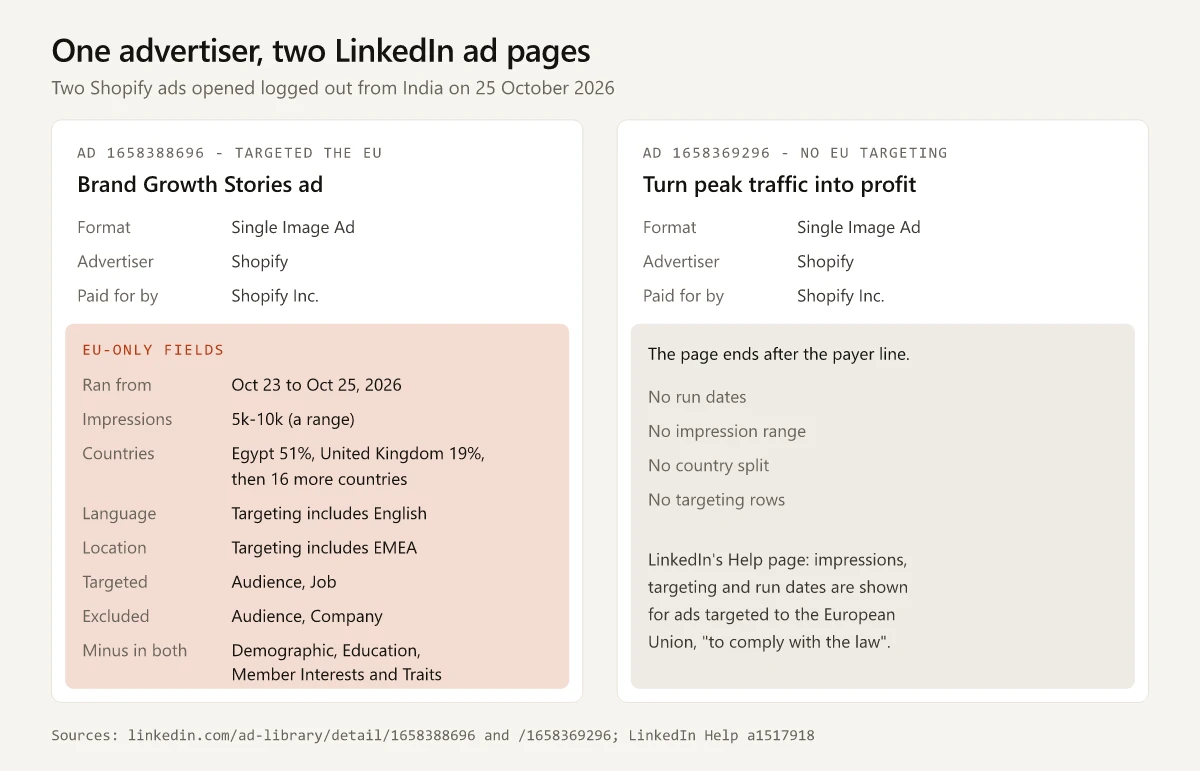
I picked Shopify because it is a large advertiser selling software to businesses and its ads came up in an ordinary keyword search. On 25 October 2026 I opened ad 1658388696, a single-image ad promoting a customer story about KARL LAGERFELD’s move to Shopify, logged out from India. This is exactly what came back:
| Field on the page | What it showed | How to read it |
|---|---|---|
| Ad preview | The intro text, the headline “Brand Growth Stories: KARL LAGERFELD’s move to Shopify” and a Learn more button | The offer and the call to action, as members saw them |
| Note under the preview | ”Please note that this ad may have multiple versions” | The preview is one version; mobile and desktop can differ |
| Format | Single Image Ad | The ad format, as LinkedIn labels it |
| Advertiser | Shopify | The company named as the advertiser |
| Paid for by | Shopify Inc. | The payer, which LinkedIn lists separately from the advertiser |
| Ran from | Oct 23, 2026 to Oct 25, 2026 | EU-only field; an end date of the day you check suggests the ad is still live |
| Total impressions | 5k-10k | EU-only field; a band, never an exact count |
| Country | 18 countries: Egypt 51%, United Kingdom 19%, Saudi Arabia, Turkey and United Arab Emirates 5% each, then Spain 4% and 12 more | EU-only field; most impressions here landed outside the EU |
| Language | ”Targeting includes English” | One of two parameters shown with a value |
| Location | ”Targeting includes EMEA” | The other; the EU sits inside this region |
| Targeted / Excluded grid | Audience: targeted and excluded. Job: targeted. Company: excluded. Demographic, Education, Member Interests and Traits: a minus sign in both columns | Yes-or-no marks only: you learn that company targeting was used to exclude, never which companies |
Then I opened ad 1658369296, another Shopify single-image ad, from a company search for Shopify, headlined “Turn peak traffic into profit” with a Download button. Its page showed the preview, “Single Image Ad”, “Advertiser Shopify” and “Paid for by Shopify Inc.”, and ended there: no run dates, no impressions, no country split and no targeting grid.
One more detail from the “salesforce” keyword search matters for anyone counting a rival’s activity: the same KARL LAGERFELD creative appeared under at least four separate ad IDs, and their impression bands read 5k-10k, 5k-10k, 5k-10k and 1k-5k with different country splits. Count creatives and IDs separately, or one campaign will look like four.
How to See Competitors’ LinkedIn Ads in 5 Steps
This is the review I would run per competitor, sized for about 15 minutes. It sits inside a wider content review; for the full method, including SEO, distribution and gap-finding, use the six steps in my content marketing competitor analysis guide.
- Search by company, then by keyword. Put the rival’s name in “Company or advertiser” to see what they run. Then put it in “Keyword”, which can surface other advertisers’ ads that name them. LinkedIn does not say which fields the keyword matches, and my “salesforce” search also returned ads whose visible text never names Salesforce. A keyword search for “salesforce” on 25 October 2026 returned 85,984 ads, and the first page included a post promoted by Shopify about moving a cosmetics brand “from Salesforce Commerce Cloud to Shopify”. Log ads like this as competitor-displacement messages: they show which rival a vendor is trying to pull customers from.
- Filter by country and date. The Shopify company search returned 5,444 ads; adding the United States country filter cut it to 3,206. Set the date to “Last 30 days” first to see the newest ads, then widen to “This year”.
- Note the format and the offer for each ad. Each result card carries a format label: I saw Single Image Ad, Video Ad, Document Ad, Message Ad and Event Ad on 25 October 2026. Write down the headline, the button (Learn more, Download, Register) and what is being offered. One Message Ad in the “hubspot” results displayed its template text, starting “Hi %FIRSTNAME%”, merge field and all.
- Open the EU detail pages for reach and audience. Use More filters, then Impressions range, to narrow to EU-targeted ads, and open each one. Note the impression band, the top three countries and which targeting rows are ticked. Two ads with the same creative but different job or company rows suggest the rival is testing audiences.
- Log what you saw, with the date and the ad URL. One row per ad: date checked, ad URL, advertiser, payer, format, headline, button, offer, run dates, impression band, top countries, targeting rows. Your own log, with the URL and the date, is the record that lasts. Each logged ad can feed the Positioning and Takeaway columns of the competitive analysis template, one row per rival.
If the rival runs account-based campaigns, the Company row is the one to watch. LinkedIn’s targeting page says it covers company name, size, industry, revenue and similar fields, so a tick there means the ad was aimed at, or kept away from, a defined set of companies. Pair the Company row with the creative: an ad that names an industry or a short list of brands points to a one-to-few play, a generic one to one-to-many (see these ABM campaign examples). Label it a guess in your notes.
What LinkedIn’s Ad Library Cannot Tell You
None of these appears in the fields LinkedIn’s Help pages list or on the two ad pages I opened:
- Spend: no budget, bid or cost figure appears. An impression band multiplied by a CPM you picked is your assumption, not their budget, so I would leave spend out of a competitor brief rather than estimate it.
- Clicks, CTR, leads or conversions: the only performance figure is the impression band.
- Exact impressions: 5k-10k is as precise as it gets.
- Targeting or run dates for ads with no EU targeting: the non-EU Shopify ad above showed neither.
- Targeting values beyond language and location: the grid shows that company targeting was used to exclude, and names no company, job title or audience.
- The preview, advertiser and payer of a restricted ad: LinkedIn withholds all three.
- Which version members saw: the preview is one version of an ad that “may have multiple versions”.
For the image and video sizes behind the creatives you collect, see LinkedIn’s post and ad file specs, and for turning a log like this into a recurring briefing, the cadence in competitive intelligence analysis.
LinkedIn vs Meta vs Google Ad Transparency Libraries
B2B rivals often run on all three, and each library opens a different slice. Every cell below comes from the owner’s own page, read on 25 October 2026: LinkedIn’s Help page and targeting page, Meta’s Ad Library tools page (dated 24 August 2023), and Google’s Ads transparency policy page (the version served for Austria) and Ads Transparency Center, plus my own logged-out visit to each search page that day.
| Meta Ad Library | Google Ads Transparency Center | ||
|---|---|---|---|
| Login to search | Not needed (checked from India) | Not needed: results loaded logged out, with a “Log in” link | Not needed for search; its FAQ asks “Why am I required to sign in to see some ads?” |
| What is in it, and for how long | Ads that ran after June 1, 2023, kept one year after the last impression | ”all active ads”; EU-delivered ads “archived for one year upon the delivery of their last impression”; social issue, election and political ads “stored in the Ad Library for 7 years” | Ads an advertiser ran “during a certain time period”; the date filter showed “Any time”, and the policy page gives no retention period |
| Impressions or reach | EU-targeted ads only: a band plus a country split | ”more information” for ads that deliver an impression in the EU; reach for social issue, election and political ads | ”Total number of recipients for each ad”, for ads served in certain countries or regions |
| Targeting | EU-targeted ads only: main parameters, included or excluded | EU-delivered ads: “more information” (per Meta’s tools page), shown in each ad’s “EU transparency” panel; a researcher-only Ad Targeting dataset covers social issue, election and political ads | ”Targeting information”, for ads served in certain countries or regions |
| Spend | Not shown | Shown for social issue, election and political ads | Not among the fields the policy page lists; election ads have a separate Political Advertising Transparency Report |
| Search by | Company or advertiser, payer, keyword, country, date | Keyword or advertiser | Advertiser or website name, filtered by date and targeted location |
Across all three, the extra disclosure is tied to a region or to political ads, and none of the pages I read lists spend for an ordinary commercial ad. For B2B research, LinkedIn’s payer field and its job and company targeting rows are the parts I would use most.
When the LinkedIn Ad Library Is Not Working
Most “not working” moments I hit on 25 October 2026 had a plain cause:
| Symptom | Likely cause | What to do |
|---|---|---|
| A 403 error or a blank page | The request did not look like a normal browser | Open it in a regular browser window, not a link previewer or script |
| ”Sorry, you have been blocked” | Many pages opened quickly | Wait a few minutes, then continue at a normal pace |
| A rival’s older ads are missing | The one-year retention rule, or the date picker’s start date | Clear the date filter and search by company; an ad stays a year after its last impression, but the custom date range only reaches ads created on or after the date the picker states |
| Impression or targeting filters return few results | Those filters show only ads from the EU region | Clear them to see non-EU ads |
| An ad with no preview or advertiser | A restricted ad | Nothing to recover; LinkedIn withholds those fields |
Treat the LinkedIn Ad Library as two records in one tool: a creative archive for every ad and a reach-and-targeting record only for EU-targeted ones. Open your closest rival’s EU-targeted ads this week and log the impression band and targeting rows with each ad URL.
Frequently Asked Questions
Is the LinkedIn Ad Library free?
Yes. LinkedIn's Help page calls it a publicly available database of ads that have run on LinkedIn, and on 25 October 2026 its search and ad detail pages loaded for me without signing in, from an Indian connection.
Do you need a LinkedIn account to use the Ad Library?
No. LinkedIn's Ad Library FAQ says: Anyone can explore the Ad Library, with or without a LinkedIn account. On 25 October 2026 the search page and individual ad pages at linkedin.com/ad-library loaded without signing in, from an Indian connection. Use an ordinary browser, because non-browser requests can get a 403 error.
How far back does the LinkedIn Ad Library go?
LinkedIn says it includes ads that ran after June 1, 2023, and keeps each ad for one year after its last impression. On 25 October 2026 the search date picker read: We only allow search for ads created on or after October 25, 2025.
Can you see how much a company spends on LinkedIn ads?
No. Spend is not among the fields LinkedIn's Help page lists, and no spend figure appeared on the ad pages I opened. Ads targeted to the EU show an impression range and a percentage split by country instead.
Why can't I see impressions in the LinkedIn Ad Library?
LinkedIn shows impressions, targeting and run dates only for ads targeted to the European Union. An ad with no EU targeting shows its preview, format, advertiser and payer, and the page stops there.