LinkedIn Impressions on Your Experience: What It Means
LinkedIn impressions on your experience most likely maps to Impressions per section in Profile engagement. Find it on desktop or mobile and see what LinkedIn omits.
On desktop, the number sits four steps from your feed: click the Me icon, click View profile, scroll to the Analytics section and click Search Appearances. The block to read there is called Profile engagement, and its Impressions per section line is where LinkedIn impressions on your experience most likely show up.
The phrase reads like a notification. Type “impressions on your experience” into Google in the US and autocomplete suggests “you have impressions on your experience at” (checked 2 October 2026), yet none of the eleven LinkedIn Help pages on profiles and analytics I read that day uses the phrase.
In those pages, LinkedIn names the Profile engagement block in one sentence of text and shows it in one sample screenshot, with no counting rule for any number in it. So I read the Experience line one way: as a share, compared across readings taken 90 days apart. A raw count can rise just because the whole profile drew more attention, so on its own it cannot show whether Experience gained ground.
What Are LinkedIn Impressions on Your Experience?
LinkedIn impressions on your experience most likely means the Experience line under Impressions per section. LinkedIn’s Search Appearances help says: “Profile engagement: This includes Total impressions, Total clicks, Average viewing time, and Impressions per section.” In LinkedIn’s own sample of the block, Experience is one line with a percentage.
LinkedIn’s View your profile Search Appearances article gives the path for desktop and for the mobile app, as of October 2026. On desktop:
- Click the Me icon at the top of your LinkedIn homepage.
- Click View profile.
- Scroll down to the Analytics section.
- Click Search Appearances.
- Read the Profile engagement block: Total impressions, Total clicks, Average viewing time and Impressions per section. LinkedIn’s sample panel labels the first three Impressions, Clicks and Avg view time.
On the mobile app, the steps are:
- Tap your profile picture.
- Tap your profile photo again to open your profile.
- Scroll down to the Analytics section.
- Tap Search appearances.
- Read the same Profile engagement block.
LinkedIn’s sample of the block, in its help article on profile appearances vs profile views, carries a Premium label, so a free account may not show it.
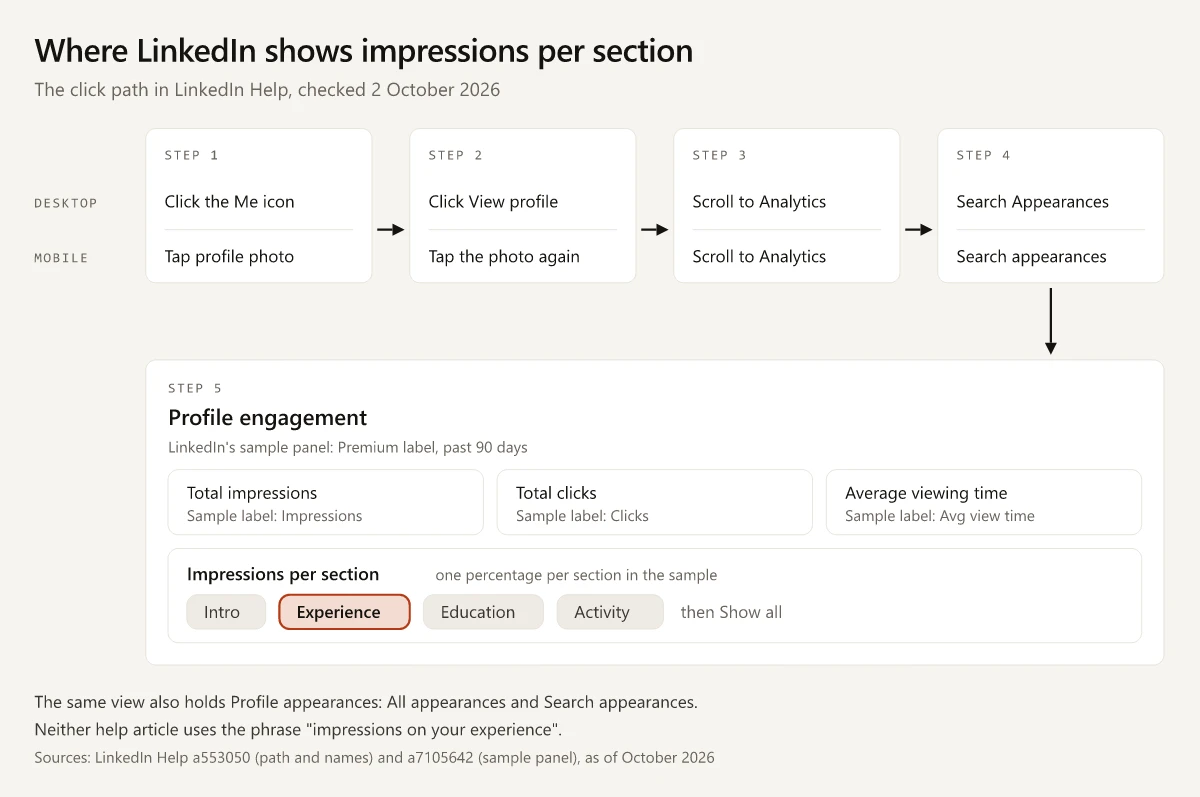
A second LinkedIn article, on profile search appearances, says you can also open the feature “From your notifications or email”. It does not list which notifications, so it neither confirms nor rules out that the experience notification opens this view.
LinkedIn Profile Engagement: Four Numbers, No Definitions
That sample is captioned “How viewers are engaging with your profile over the past 90 days” and prints a change marked “past week” under Impressions, Clicks and Avg view time. Each number supports a limited use until LinkedIn publishes a definition:
| Number | What LinkedIn publishes | How I would use it |
|---|---|---|
| Total impressions | The name; no counting rule | Whether the whole profile drew more attention between two readings |
| Total clicks | The name; nothing on what a click opens | Direction between two readings |
| Average viewing time | The name, and minutes and seconds in the sample (1m 23s); no per-visit or per-viewer basis | Direction, read next to the Experience share |
| Impressions per section | The name, and one percentage per section in the sample: Intro 30%, Experience 25%, Education 20%, Activity 20%, then Show all | The Experience percentage, compared across readings |
The four sections in the sample add up to 95%, with Show all for the rest, so I read each percentage as that section’s share of all section impressions, not the share of visitors who reached it. On that reading, and unlike a scroll map, where a percentage is the share of visitors who scrolled that far, 25% for Experience does not mean a quarter of visitors reached Experience. The figures are LinkedIn’s illustration, not a benchmark.
The same view holds a second block, Profile appearances, with All appearances and Search appearances. I compare those with profile views in LinkedIn search appearances vs profile views.
Which LinkedIn Impression Number Are You Looking At?
Match what you saw to where LinkedIn shows it before you read anything into it:
| What you saw | Where LinkedIn shows it | What LinkedIn documents |
|---|---|---|
| ”Impressions on your experience”, the wording people search | Most likely a notification | No help page I read uses the phrase |
| Impressions per section | Search Appearances, Profile engagement block | The name, and a sample listing a percentage per section |
| Total impressions | Search Appearances, Profile engagement block | The name, and a sample captioned for the past 90 days |
| Search appearances, profile views | Search Appearances and Who’s viewed your profile | Compared in the search appearances guide above |
| Post impressions | Each post’s analytics | Defined in LinkedIn’s post analytics help; my guide to LinkedIn impression benchmarks compares them with members reached |
| Post notifications | Notifications after you post, including at 3 and 7 days | LinkedIn’s VP of Product Management, Gyanda Sachdeva, said members would get notifications “when your posts drive profile viewers or new followers, alongside impressions” (Search Engine Journal, 18 August 2025) |
| A job change shared with your network | Your network’s feed, notifications or email | Sharing it “may generate a post in your network’s feed, an in-app notification, or an email notification” (Share profile updates), with no impressions figure mentioned |
The two post rows are the ones to rule out first. A post notification reports impressions on a post, and a shared job change can turn an update to your experience into a feed post; both are about the feed, while Impressions per section is about your profile. To tell them apart, tap the notification and note where it lands: if it opens a post’s analytics, it was a post notification, and if it opens Search Appearances, read Profile engagement.
What LinkedIn Does Not Document About Experience Impressions
As of 2 October 2026, the eleven LinkedIn Help pages I read leave these questions open, or answer them only in a sample screenshot. Only two of them show the block at all: the Search Appearances article in one sentence and the appearances vs views article in a sample screenshot. Four, on member analytics, Analytics and tools, creator analytics and the profile level meter, do not mention Profile engagement at all.
| Question | What the help pages say |
|---|---|
| What counts as one section impression? | Nothing for profiles; the impression counting rules compared in the benchmarks guide above cover Page posts and Sponsored Content |
| Does the notification’s number match the Experience line? | Nothing; no page I read mentions the notification |
| Is Experience split by position, as the “at” in the searched wording suggests? | Not in LinkedIn’s sample, which shows one Experience line; no page says whether positions can be broken out |
| What date range does Profile engagement cover? | No window in the help text; LinkedIn’s sample panel says “over the past 90 days” |
| Does it need Premium? | LinkedIn’s sample panel carries a Premium label and sits directly below a box reading “This feature is currently available only for Premium Business subscribers”, on a page that also says Premium members see “behavioral insights like time spent on your profile and profile sections clicked”. The Search Appearances article lists the block with no plan note and the Basic vs Premium comparison does not mention it, so no page says outright whether free members see it |
| How often does it refresh? | A schedule is given for search appearances data and none for Profile engagement |
| Does a shared job change feed the notification? | Nothing; the Share profile updates page does not mention impressions |
| Do your own profile visits count? | Nothing for profiles |
LinkedIn does document a paid-plan rule for another part of the profile: the link that creator mode once let you add to your introduction is now a custom button for a select group of Premium Business, Sales Navigator and Recruiter Lite subscribers, as I show in what happened to creator mode’s profile link.
How to Read LinkedIn Impressions on Your Experience After a Profile Edit
The profile search appearances article advises: “Monitor changes in your Search appearances data after profile updates to see if visibility improves.” The same before-and-after reading works for Profile engagement:
- Before you edit, record every number in Profile engagement with the date: Total impressions, Total clicks, Average viewing time and the value on each Impressions per section line.
- Save the exact text you are replacing next to those numbers. It is the rule from my message testing examples: store the exact stimulus text next to every score, since a result without its stimulus cannot be reused six months later.
- Edit one section at a time if you want to know which change moved the number. LinkedIn’s Edit your profile help has you click the Edit icon to the right of the section you want to change.
- Record the block again once its window has turned over: 90 days after the edit, if your block carries the 90-day caption of LinkedIn’s sample. A reading one week after the edit would still hold about 83 days from before it; in between, note the past-week change the sample prints under its top three numbers.
- Compare the Experience percentage across the two readings. If your block shows a count per section instead, divide the Experience count by Total impressions at each reading and compare those shares.
The share matters because a count can rise while the section loses ground. With illustrative numbers:
| Reading (illustrative) | Total impressions | Experience share | Experience count, if the share is of Total impressions |
|---|---|---|---|
| Before the edit | 400 | 20% | 80 |
| 90 days after the edit | 640 | 15% | 96 |
Total impressions rose by 60% and the implied Experience count by 20%, while the Experience share fell by 5 points. The profile drew more impressions after the edit, and a smaller share of them landed on Experience.
Before you judge the edit:
- Note what you posted between the two readings, because a post that sends people to your profile changes who is looking at it.
- On a profile with a few dozen impressions per reading, a handful of impressions moves the share by several points, so treat a small move as noise until a later reading shows the same direction.
The Experience Share in a Section Rewrite
LinkedIn impressions on your experience can show whether a rewrite of that section won a larger share of the attention your profile gets. LinkedIn defines none of the numbers in the block, so compare the share with your own earlier 90-day reading rather than with anyone else’s profile.
Record your Profile engagement block before your next edit.
Frequently Asked Questions
What does impressions on your experience mean on LinkedIn?
LinkedIn's analytics help does not define the phrase. It most likely refers to the Experience line under Impressions per section, in the Profile engagement block of Search Appearances, and LinkedIn's own sample of that block shows Experience as one line with a percentage.
Where do I find impressions per section on LinkedIn?
On desktop, click the Me icon, click View profile, scroll to the Analytics section and click Search Appearances. On mobile, tap your profile picture, tap it again, then tap Search appearances under Analytics. Impressions per section sits in the Profile engagement block there, and LinkedIn's sample of that block carries a Premium label, so a free account may not show it.
What is LinkedIn profile engagement?
Profile engagement is a block in the Search Appearances view of your profile analytics. LinkedIn's help lists Total impressions, Total clicks, Average viewing time and Impressions per section without defining them, and its sample panel, labelled Premium, is captioned 'How viewers are engaging with your profile over the past 90 days'.
Are LinkedIn profile impressions the same as profile views?
No. Profile views count the people who visited your profile, and LinkedIn's help says Who's viewed your profile shows visitors from the last 90 days on a free account. Profile impressions sit in the Profile engagement block of Search Appearances, as Total impressions and Impressions per section, and LinkedIn does not say how either is counted.
Why did LinkedIn say I have impressions on my experience?
LinkedIn's profile analytics help does not say what triggers that notification. It says the search appearances feature opens from your notifications or email without listing which notifications, and the Profile engagement block there lists Impressions per section, the closest documented match for your Experience section.