Product Sunset: A 90-Day Playbook and Comms Plan (2026)
A product sunset playbook from a PMM: the notice period matrix by customer tier, a 90-day comms plan, the announcement template, and how to protect renewals.

The message lands in a Slack channel you were added to twenty minutes ago. Engineering is retiring the legacy reporting module in Q4. Finance has already booked the saving. Someone types: “PMM can own comms, right?” That is how most product marketers meet a product sunset.
The decision gets made somewhere else, and what arrives on your desk is a deadline attached to a live revenue base.
Here is the position I will defend for the rest of this post: a product sunset is a retention campaign with a hard end date, and the most expensive mistake teams make is treating notice as one date for everybody. A customer on a signed multi-year contract, a customer who built an integration against your API, and a dormant free account are three different risks with three different price tags. Send all three the same email on the same morning and you convert a housekeeping exercise into a renewal crisis.
Most writing on sunsetting a product answers “should we kill it?” That is a well-covered product management question. This is the other half of the job: the call has been made, and somebody has to run the wind-down without torching the base.
How to sunset a product: the short answer
There are eight steps to sunset a product, and the order matters more than the calendar:
- Read the contracts first. Legal sets the notice floor before marketing sets the calendar.
- Tier the affected customers by revenue at risk multiplied by switching cost, not by logo size.
- Set a notice period per tier, using published vendor lifecycle policies as your benchmark.
- Ship the migration path before the announcement, so the notice points at something real.
- Publish one dated end of life announcement across email, in-app, docs and the status page on the same day.
- Call the top accounts inside 14 days, before they hear it from a support macro.
- Track revenue at risk weekly against cohort migration targets.
- Shut down in stages: end of sale, feature freeze, read-only, off, then a data export window.
What a product sunset actually is
Legal, engineering and support each use these words to mean different things, and a customer reading your notice will pick whichever interpretation suits them.
| Term | What it means internally | What the customer experiences |
|---|---|---|
| Deprecate a product or version | Officially discouraged, still fully working | A warning in the docs, console, or API response |
| End of sale | You stop selling it, existing customers keep it | Nothing changes until end of life |
| Sunset | An announced, dated wind-down with a migration path | Notice, a countdown, and a replacement to move to |
| Product end of life (EOL) | The date support, fixes and SLAs stop | No more patches, no more guarantees |
| Decommission | Infrastructure is switched off | Requests fail, the UI is gone |
| Product retirement, product discontinuation | Umbrella business terms for all of the above | Depends entirely on which stage you are in |
The business case for product retirement is usually stronger than teams admit. Pendo’s 2024 software benchmarks, built on anonymized data across 6,800 of its customers, found that 6.4% of features are driving 80% of clicks in the average product. Everything outside that slice still gets documented, supported, security-patched and priced into a tier. A disciplined product end of life process is how that overhead gets recovered.
Which is why the “should we?” debate is not where the risk lives. The risk lives in the six weeks after the decision.
Step 1: Read the contracts before you pick an end of life date
The notice period your legal team will approve is rarely the one your engineering team wants. Settle that conflict in week one, before anyone circulates a product sunset plan with dates in it.
Pull these clauses for every affected account:
- Notice of changes to the services. Many enterprise agreements carry an explicit commitment. AWS, for example, states in its customer agreement that it will provide at least 12 months prior notice before discontinuing a material functionality of a generally available service that a customer is using.
- Auto-renewal and notice-to-non-renew dates. Announcing a sunset four weeks before an auto-renewal hands the customer a clean exit.
- Service continuity and data portability. If you sell into the EU, the EU Data Act has applied since 12 September 2025. Article 25 requires cloud contracts to include a maximum notice period for initiating a switch that “shall not exceed two months”, a “mandatory maximum transitional period of 30 calendar days” during which the service keeps running, and “a minimum period for data retrieval of at least 30 calendar days” after that. Where 30 days is technically unfeasible, the provider must justify it within 14 working days and offer an alternative period of no more than seven months.
- Published lifecycle or deprecation commitments. If you have ever published one, you are bound by it in practice even where you are not bound by it in law.
Step 2: Tier the customer base before you write a word
This is the step that separates a controlled product sunset from a churn event. One list of affected accounts is not a plan. Four tiers is.
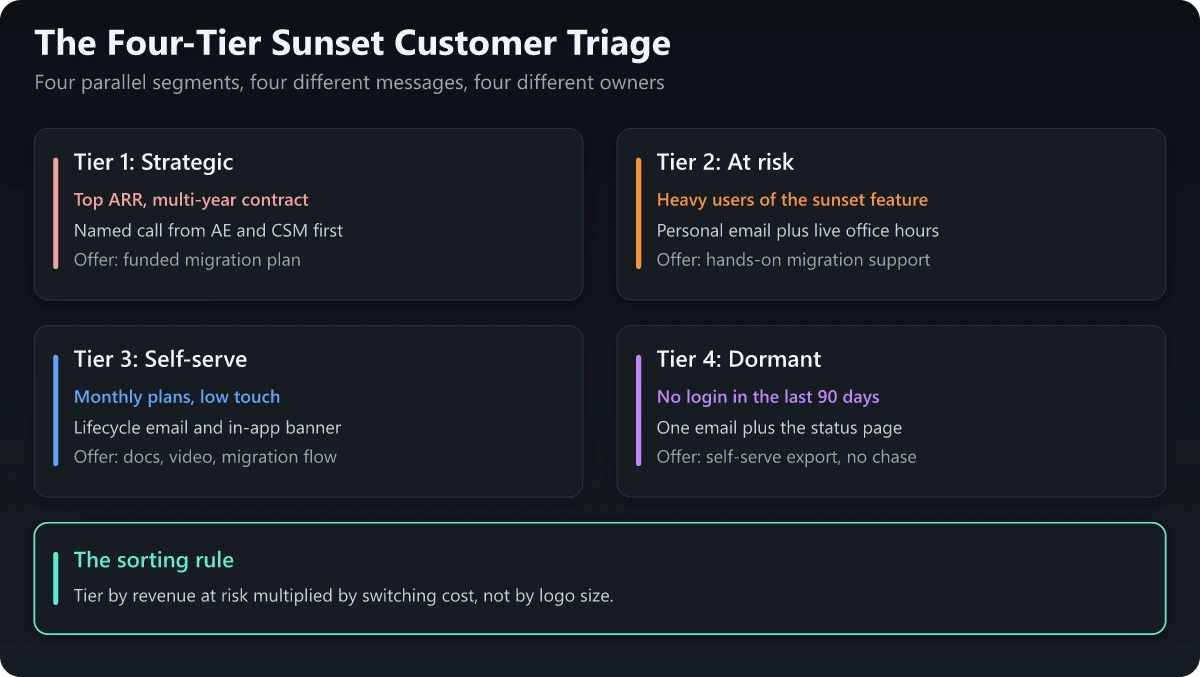
| Tier | How you identify it | Channel | Owner | Offer |
|---|---|---|---|---|
| 1. Strategic | Top ARR band, multi-year or custom contract, executive relationship | Named call, then a written notice | AE plus CSM | Funded migration plan, named engineer, commercial goodwill |
| 2. At risk | Heavy usage of the sunsetting feature in the last 90 days, renewal inside the notice window | Personal email from a human, plus live office hours | CSM | Hands-on migration support, extended timeline on request |
| 3. Self-serve | Monthly or low-ACV annual plans, low-touch | Lifecycle email sequence plus in-app banner | Lifecycle marketing | Docs, a walkthrough video, an in-product migration flow |
| 4. Dormant | No login or no API call in 90 days | One email plus the public status page | Automated | Self-serve export only, no chase sequence |
The sorting rule I hold to: tier by revenue at risk multiplied by switching cost, not by logo size. A mid-market account that wired your product into its billing pipeline is a harder save than a bigger logo using the feature once a quarter. Usage data beats the CRM here every time.
Tier 4 earns its own note: chasing dormant accounts costs real money and support load for revenue that is already gone. Let them go cleanly, with an export link.
Step 3: Set the notice period with the sunset notice period matrix
The question nobody answers and every operator asks first. Here is the matrix I would defend in a planning review, sourced underneath.
The Sunset Notice Period Matrix
| Customer type | Minimum notice | How they hear it first | Migration support | Clause to check first |
|---|---|---|---|---|
| Enterprise, multi-year contract, GA product | 12 months | Named call, then a countersigned letter | Funded plan and a named technical owner | Notice-of-changes and service-continuity clauses |
| Self-hosted or on-premise deployment | 24 to 36 months | Roadmap briefing a year before public notice | Version support windows plus migration tooling | Support-term and version-support commitments |
| Mid-market annual contract | 6 to 12 months, never inside the renewal window | CSM email, then in-app and docs | Templated migration plan, group office hours | Auto-renewal date and notice-to-non-renew |
| Self-serve monthly | 90 days | Lifecycle email plus in-app banner | Docs, video, in-product migration flow | Terms-of-service change clause |
| Free tier or trial | 60 to 90 days | Email plus changelog and in-app notice | Self-serve export only | Usually excluded from lifecycle guarantees |
| Public API or developer platform | 12 months, versioned | Changelog, deprecation headers, email to key integrators | Old and new versions running side by side | Your published deprecation policy |
| EU cloud or data processing customers | Contract must allow switching to start on no more than two months notice | Written contract terms, in advance of signature | 30-day transitional period plus 30-day retrieval | EU Data Act, Article 25 |
Where these floors come from:
- 12 months for paying enterprise customers is the de facto industry floor. AWS commits to it contractually, Microsoft’s Modern Lifecycle Policy promises “a minimum of 12 months’ notification prior to ending support if no successor product or service is offered”, and Google Maps Platform states that its deprecation period is typically 12 months from announcement to decommissioning.
- Longer for infrastructure and self-hosted software. Microsoft typically offers a notification period of up to 3 years before discontinuing support across most Azure product categories. Atlassian decided in 2020 to discontinue support for its server products starting February 15, 2024, giving self-hosted customers more than three years to move.
- Shorter for free tiers, and that is explicitly sanctioned. Microsoft’s 12-month commitment carves out “free services or preview releases” by name, and the Azure three-year subset excludes free and preview products too. In practice, Heroku announced on 25 August 2022 that it would stop offering free product plans starting 28 November 2022, roughly 95 days of notice.
- Consumer products move faster still. Microsoft announced on 28 February 2025 that Skype would retire on 5 May 2025, about 66 days, with automatic account and contact migration into Teams doing the heavy lifting.
Two caveats. These are floors, not targets: matching the legal minimum is how you win the argument with legal and lose the renewal. And notice length trades off against migration effort. A short window with an automatic migration path, as in the Skype case, lands better than a long window where the customer rebuilds everything by hand.
Step 4: Build the migration path before you announce
An announcement without a destination is a churn invitation. Before Day 0, five things need to exist:
- The replacement, generally available. Not in beta, not behind a flag, not “coming in Q1”.
- A migration guide with a real time estimate. If it takes a customer eight hours, say eight hours.
- A data export route that works without a support ticket, and a stated retention window after shutdown.
- The commercial answer. If the replacement sits in a higher tier, that pricing decision is made and documented before Day 0. Sales gets asked on day one.
- An escalation path with a named owner, not a shared inbox.
This is customer enablement work, and it is what gets cut when the timeline slips. Cutting it turns a 90-day program into a 180-day one.
Step 5: Write the end of life announcement
An end of life announcement that misses any of these nine elements becomes a support ticket. Use this skeleton for the sunset email, the in-app notice and the docs banner alike.
1. WHAT is ending        Exact product, plan, feature or API version name
2. WHEN                  End of sale date, end of support date, shutdown date
3. WHY                   One honest sentence, no corporate fog
4. WHO is affected       "You are receiving this because your account uses X"
5. WHAT REPLACES IT      Named product, with a link, available today
6. HOW TO MOVE           Migration guide, realistic time estimate, who to ask
7. YOUR DATA             What is retained, for how long, how to export it
8. WHAT WE ARE DOING     Office hours, migration credits, extended support
9. WHO TO CONTACT        A named human and a channel, not "contact support"
Three rules for the copy itself:
- Put the date in the subject line and the first sentence. People skim EOL notices for the deadline and nothing else.
- Do not bury the shutdown behind a benefits paragraph. Leading with how excited you are about the new experience reads as evasion and gets screenshotted.
- Write the tier-1 version as a letter, not a broadcast. Different opening, same nine elements, sent by a person the customer already knows.
Publish the EOL announcement everywhere on the same day: email, in-app, changelog, docs, status page, and the pricing page if a plan is affected. Staggering it is how a customer finds out from a competitor’s sales rep instead.
Step 6: Run the 90-day product sunset program
Ninety days is the working default for a self-serve or mid-market sunset. For enterprise and API tiers, stretch the same six phases across the longer notice window without reordering them. A product EOL date that moves twice costs more credibility than one set six weeks later and held.
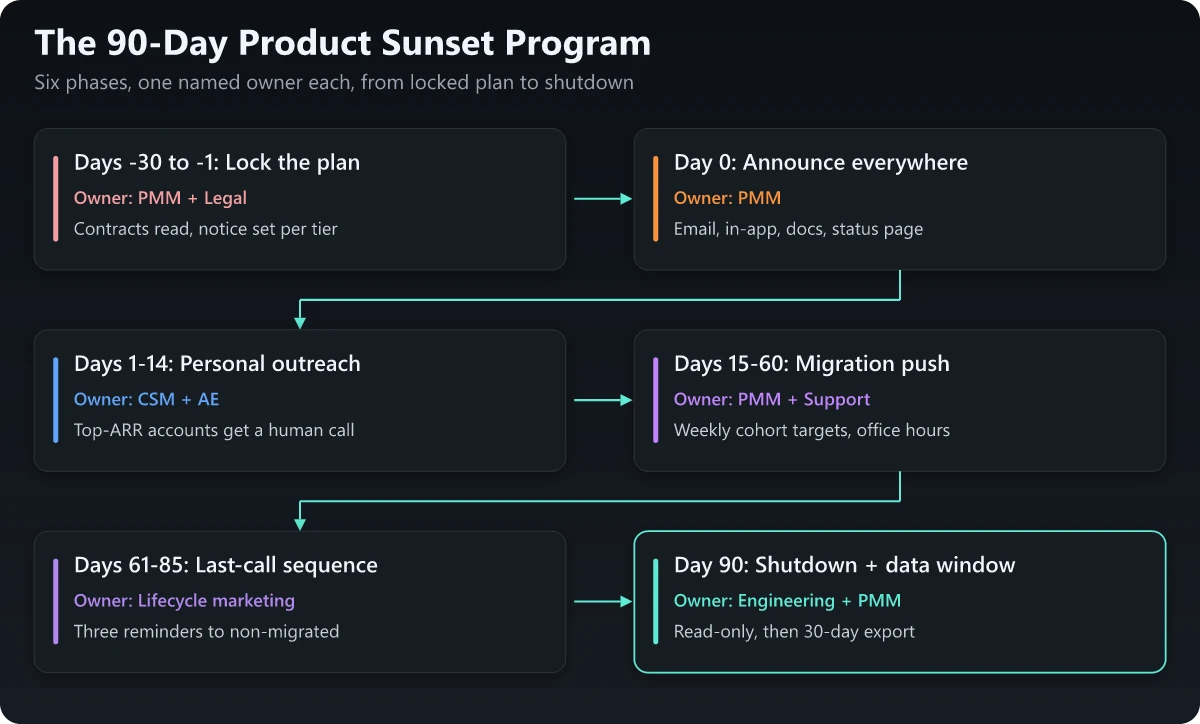
| Phase | Window | Owner | Output |
|---|---|---|---|
| Lock the plan | Days -30 to -1 | PMM plus Legal | Contract review complete, notice set per tier, every asset drafted and approved |
| Announce | Day 0 | PMM | Email, in-app, docs, changelog and status page all live before 10am |
| Personal outreach | Days 1 to 14 | CSM plus AE | Every tier-1 and tier-2 account contacted by a named human |
| Migration push | Days 15 to 60 | PMM plus Support | Weekly cohort targets, live office hours, migration guide iterated on real tickets |
| Last-call sequence | Days 61 to 85 | Lifecycle marketing | Three escalating reminders to non-migrated accounts, plus an in-app interstitial |
| Shutdown and data window | Day 90 | Engineering plus PMM | Read-only first, then off, with the export window running past the shutdown date |
The staged shutdown at the end matters more than it looks. Going read-only for a week before switching off catches the accounts that ignored every email, and it converts a hard outage into a recoverable surprise.
Step 7: Track revenue at risk weekly, not at the end
Run the migration as a campaign with a conversion target. A support queue tells you who complained; a revenue-at-risk tracker tells you what you are about to lose.
Build one row per affected account with these fields:
- Account name and ARR
- Usage of the sunsetting feature in the last 30 days
- Tier (1 to 4)
- Renewal date, flagged if it falls inside the notice window
- Migration status: not started, in progress, complete, at risk, churned
- Owner and next action, with a date
Then report three numbers every week, to the same audience, in the same format:
- ARR migrated as a percentage of total ARR at risk
- Accounts migrated as a percentage of affected accounts
- ARR in the “at risk” bucket, with the top five named
Set cohort targets up front: tier 1 migrated by Day 45, tier 2 by Day 60, tier 3 by Day 80. A slipping target is the trigger to add support, not to send another email. Same discipline as any other product marketing metrics program, with a countdown attached.
Step 8: Arm sales and CS for the renewal conversation
The layer nobody writes about. On Day 0 your AEs start taking calls that were booked as renewals and are now churn conversations. Give them the answers before the announcement.
| What the customer says | What loses the renewal | What holds it |
|---|---|---|
| ”We built our whole workflow on this" | "The new version is much better” | Map their specific workflow to the replacement on the call, then send it in writing |
| ”How do we know the replacement will not be sunset too?" | "We have no plans to do that” | Point at your published deprecation policy and the notice period it guarantees |
| ”Our contract runs another 14 months” | Improvising a commercial answer | The pre-agreed position: continued support to term, or a credit, decided before Day 0 |
| ”We do not have engineering time this quarter" | "The deadline is fixed” | The pre-approved extension criteria and who signs them off |
| ”We are going to evaluate alternatives” | Defensiveness | Book the migration working session on the call, and flag the account as at-risk that day |
Ship a one-page migration brief, a five-line email template and the grid above into the enablement channel the day before launch. It is standard sales enablement strategy work with a much shorter shelf life, so keep it to one page.
Publish a deprecation policy so you never have this fight again
Every argument in this post gets easier if the rules were published before the decision. A deprecation policy is a short public page that states:
- The notice period you commit to, by product stage and customer type
- What “generally available”, “beta” and “preview” mean for lifecycle guarantees
- How you announce: which channels, and how far ahead
- What happens to customer data after shutdown, and for how long
- Which categories are explicitly excluded (free tiers and previews, usually)
AWS, Microsoft and Google all publish theirs. The useful part is not the promise, it is the exclusions. Microsoft names free services and preview releases outright, and AWS scopes its 12-month commitment to functionality it makes generally available, which draws the same line from the other side. That kind of sentence is the most useful one in the document: it lets you sunset a free tier in 90 days without breaking a promise. Write yours while nothing is being retired, and end of life product management stops being a fire drill. Policies drafted mid-sunset always read defensively.
Three product sunset mistakes I flag in review
- Announcing on a Friday, or inside a renewal window. Both guarantee the news lands when nobody senior is available to answer it.
- Letting support answer the “why” before marketing has. The first honest sentence about why you are sunsetting a product should come from you, in the notice, not from a help-desk macro three days later.
- Treating the shutdown date as the finish line. The export window, the docs redirects and the pricing-page cleanup all run past it, and they are what auditors and search crawlers see.
Running a product sunset without losing the base
Sunsetting a product is a retention program: a fixed deadline, an owned funnel, and a number attached. Product marketing is the function best positioned to run it, because every lever that protects the number is a comms or enablement lever. The launch-side mirror of this work is well understood, and if you have read the risks of launching a new product, the same de-risking discipline applies in reverse.
The claim I opened with is the one worth taking away. There is no such thing as “the notice period” for a product sunset. There is one for a contracted enterprise account, another for a self-serve monthly subscriber, and another again for a developer with your API in production. Set them separately, source them against what serious vendors actually commit to, publish the policy that makes the next one routine, and run the wind-down like the retention campaign it is.
Frequently Asked Questions
What does it mean to sunset a product?
Sunsetting a product means announcing a dated end to it and running a managed wind-down: customers get notice, a migration path, and a data export window before the product stops working. It is different from quietly deprecating a feature, which discourages use but leaves it running.
How much notice should you give before a product end of life?
It depends on the customer, not the product. Major cloud vendors commit to at least 12 months for generally available services that paying customers actively use. Free tiers get far less: Heroku gave about 95 days before ending its free product plans, and Microsoft gave about 66 days before retiring Skype. Set the notice period per customer tier and check the contract before you pick a date.
What is the difference between deprecation and end of life?
Deprecation is the announcement that a product or version should no longer be used, and it starts a clock. End of life is the date at the end of that clock when support stops. Decommissioning is when the thing actually stops responding.
What should an end of life announcement include?
Nine things: what is ending, the exact end of life date, why, who is affected, the replacement, the migration path, what happens to customer data, the support you are offering, and a named contact. Anything missing turns into a support ticket.
Who owns the product sunset process in a SaaS company?
Product owns the decision and the engineering timeline. Product marketing usually owns the wind-down program: customer tiering, the announcement, the migration comms, sales enablement, and the revenue-at-risk tracking. Legal owns the contractual notice floor.