Claude Code Memory: CLAUDE.md, MEMORY.md and What Loads
Claude Code memory has two layers: CLAUDE.md files you write and auto memory Claude writes. See where each lives, what loads and a real index with no CLAUDE.md.
When I counted on 26 September 2026, the repo behind this site held 159 published blog posts, nine free tools and no CLAUDE.md. I checked the repo root, the repo’s .claude folder, the parent folder and ~/.claude in my home directory, and none of the four held a CLAUDE.md. Every session still starts with house rules in reach, such as WebP-only images and never pushing to main without asking. What carries them is the other half of Claude Code memory.
That half is auto memory: a folder of notes Claude writes for itself, fronted by a MEMORY.md index that loads at the start of every session. My position after running a content site this way is that for one person’s project, a well-kept index does most of what a CLAUDE.md would, and the upkeep that matters is catching stale facts. The real index this site runs on, measured and taken apart below, went stale in three places.
What Is Claude Code Memory?
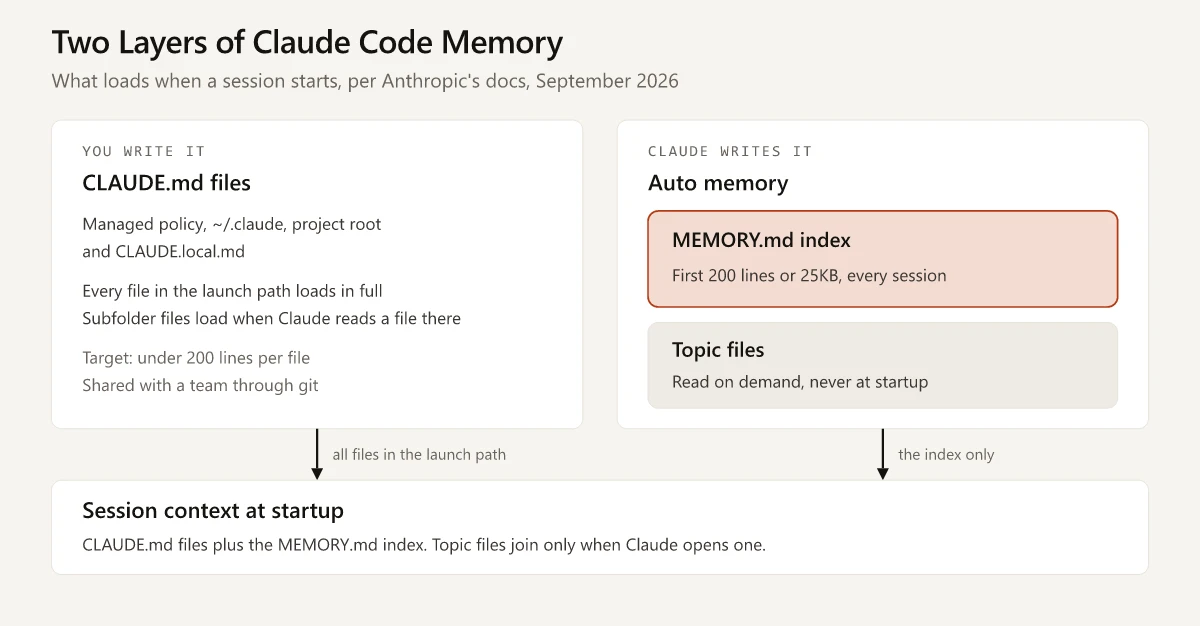
Claude Code memory is two sets of markdown files loaded at the start of every session. CLAUDE.md files hold instructions you write, and each one in the launch path loads in full. Auto memory holds notes Claude writes itself under ~/.claude/projects/<project>/memory/, where the first 200 lines or 25KB of a MEMORY.md index load and topic files are read on demand.
Auto Memory vs CLAUDE.md
Anthropic’s memory documentation calls the two “complementary” and treats both as context rather than enforced configuration. Here is how they differ, taken from that page and the subagent docs:
| CLAUDE.md files | Auto memory | |
|---|---|---|
| Who writes it | You | Claude |
| What it holds | Instructions and rules | Learnings, preferences, corrections you gave |
| Where it lives | Managed, user, project or local paths (next section) | ~/.claude/projects/<project>/memory/ |
| What loads at session start | Every CLAUDE.md in the launch path, in full; files over 4 MiB are skipped | First 200 lines or 25KB of MEMORY.md; topic files only when opened |
| Recommended size | Under 200 lines per file | One line per memory in the index |
| How it is shared | Through git, for a project file | It is not: machine-local, one folder per repository |
| Reaches subagents | Yes, except built-in Explore and Plan, and subagents set to omitClaudeMd | No; only a forked conversation inherits it |
| Best for | Build commands, conventions, project layout | Corrections, preferences, context Claude cannot read from the files |
CLAUDE.md Location and Load Order
A CLAUDE.md file can sit at four scopes. The docs list them from broadest to most specific, which is also the order they appear in context:
| Scope | Location | Who it applies to |
|---|---|---|
| Managed policy | macOS /Library/Application Support/ClaudeCode/CLAUDE.md; Linux and WSL /etc/claude-code/CLAUDE.md; Windows C:\Program Files\ClaudeCode\CLAUDE.md | Everyone on the machine, set by IT |
| User | ~/.claude/CLAUDE.md | You, in every project |
| Project | ./CLAUDE.md or ./.claude/CLAUDE.md | Your team, through git |
| Local | ./CLAUDE.local.md, added to .gitignore | You, in this project only |
How loading works, per the same memory docs page:
- Claude Code reads CLAUDE.md and CLAUDE.local.md from the folder you launch in and every folder above it.
- The files are concatenated rather than overriding each other: the filesystem root comes first, the launch folder last, and CLAUDE.local.md follows CLAUDE.md at each level.
- A CLAUDE.md inside a subfolder loads only when Claude reads a file in that subfolder.
@path/to/fileimports expand at launch, up to four hops deep, so an import tidies a file without shrinking what loads.- Files in
.claude/rules/load at launch unless apaths:glob in their frontmatter scopes them to matching files. - A repo with an
AGENTS.mdand no CLAUDE.md,.claude/CLAUDE.mdor CLAUDE.local.md at or above the launch folder gets its AGENTS.md read instead, from Claude Code v2.1.277 on.
To see what loaded in a session, run /context and look under Memory files.
Where Claude Code Memory Is Stored: The MEMORY.md Location
Auto memory lives outside the repo, at ~/.claude/projects/<project>/memory/. The docs say the <project> part is derived from the git repository, so every worktree and subfolder of one repo shares a single memory folder. I run Claude Code inside VS Code on Windows 11, where this repo at C:\Website\portfolio maps to %USERPROFILE%\.claude\projects\c--Website-portfolio\memory\.
Inside, the layout follows the documented design. Each file records its type in a type frontmatter field, and the filename prefixes below are a naming convention:
~/.claude/projects/<project>/memory/
  MEMORY.md          index, one line per memory, loads every session
  user_*.md          your role, expertise and working preferences
  feedback_*.md      corrections you give Claude, approaches you confirm
  project_*.md       ongoing work and decisions not visible in code or git
  reference_*.md     where to find things outside the project
Ways to manage it, all from the auto memory section of the docs:
/memorylists your CLAUDE.md and memory file locations, toggles auto memory and has an option to open the auto memory folder; selecting a file opens it in your editor.- Telling Claude “remember that the API tests require a local Redis instance” saves to auto memory; “add this to CLAUDE.md” writes the instruction file instead.
"autoMemoryEnabled": falsein a project’s settings turns it off for that project, andCLAUDE_CODE_DISABLE_AUTO_MEMORY=1turns it off through the environment.autoMemoryDirectoryinsettings.jsonmoves the folder; the value must be an absolute path or start with~/.- Memory files are excluded from the transcript cleanup sweep, so they stay until you or Claude edit or delete them.
- The folder is machine-local: the docs say its files are not shared across machines or cloud environments.
Auto memory’s index handling has changed several times since the feature arrived, so any limit you read about has a version attached. From the Claude Code changelog:
| Version | Change to auto memory |
|---|---|
| 2.1.59 | ”Claude automatically saves useful context to auto-memory. Manage with /memory” |
| 2.1.83 | The MEMORY.md index truncates at 25KB as well as 200 lines |
| 2.1.186 | Claude is reminded to compact the index when it nears the size limit |
| 2.1.210 | A write that leaves the index over its read limit returns an explicit error instead of truncating in silence |
| 2.1.214 | Memory files gain an ISO modified timestamp in their frontmatter |
The built-in commands above are only the memory-related ones; the rest are in my Claude Code commands reference.
Anatomy of Auto Memory Files With No CLAUDE.md
This is the memory behind swapbiswas.com, measured on 26 September 2026, for the Astro site I migrated from WordPress with Claude Code. The structure is the part worth copying.
| Piece | Measured | When it loads |
|---|---|---|
MEMORY.md index | 133 lines, 15,011 bytes | Every session |
| Topic files | 23 | When a task needs one |
| Largest topic file, the keyword research log | 924 lines | Only when relevant |
| CLAUDE.md | None in the four locations checked | Not applicable |
The 23 topic files split across the four types the docs define:
| Type | What the docs say it holds | Files here |
|---|---|---|
| user | Your role, expertise and working preferences | 2 |
| feedback | Corrections you give Claude and approaches you confirm | 5 |
| project | Ongoing work, deadlines and decisions Claude cannot derive from the code or git history | 8 |
| reference | Where to find information outside the project | 8 |
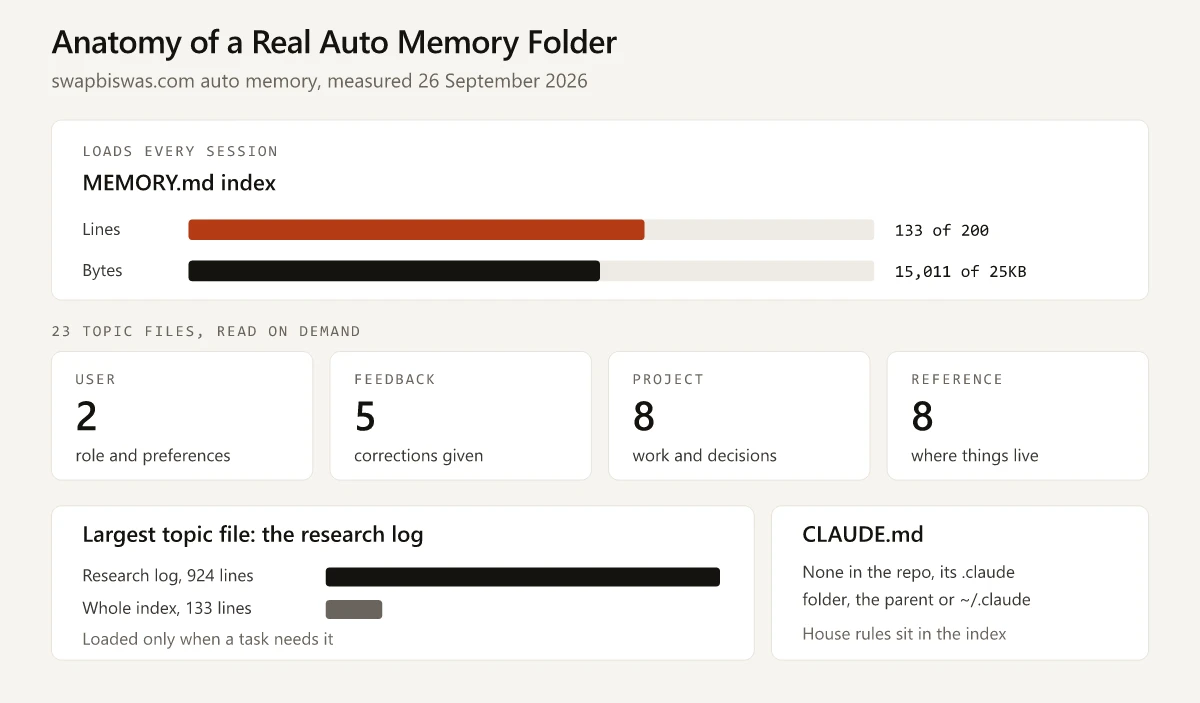
What the numbers show:
- The index uses 133 of its 200 lines, about two-thirds, and 15,011 bytes of 25KB, roughly 60%. Nothing gets cut at load.
- The research log alone runs 924 lines, about seven times the whole index. Written into
MEMORY.md, it would push the index past 1,000 lines, and the docs say everything beyond the cap is dropped on the next load. - 16 of the 23 topic files are project or reference types. The memory is mostly state and pointers to where things live, with 5 feedback files holding corrections.
The index carries one line per topic file, so Claude knows the research log exists without loading it. Besides those pointers, it holds house rules as inline notes under their own headings, WebP-only images among them, and those inline lines are how the rules reach every session without a CLAUDE.md. The topic files hold the rest, including research lessons and a keyword backlog with a review ledger.
What Goes in the Index, a Topic File or CLAUDE.md
The docs give a sorting rule for CLAUDE.md: keep it to facts Claude should hold in every session, and move multi-step procedures or rules for one part of the project into a skill or a path-scoped rule. Applied to both layers, it gives this table:
| The fact | Put it in | Reason |
|---|---|---|
| A rule every contributor follows (build command, 60-character titles) | Project CLAUDE.md | Git shares it; auto memory never leaves your machine |
| A house rule for a project only you work on (WebP-only images) | Inline in the MEMORY.md index, or CLAUDE.local.md | Both load every session; inline lines count against the index caps |
| A correction you gave Claude once and never want to give again | Auto memory, feedback type | This is the job the docs assign to feedback memories; if you find yourself typing it a second time, the docs say to add it to CLAUDE.md |
| A one-line pointer such as “pricing-research.md: read before pricing work” | MEMORY.md index | Costs one of the 200 lines and saves loading the file |
| A long log, ledger or backlog | Topic file | Read on demand, so it costs nothing until a task needs it |
| A number that changes with every publish (post count, rankings) | Nowhere, or a topic file with a date | Claude can count files on disk, and a stored count goes stale |
| A multi-step procedure | A skill or a slash command | A Claude skill loads only when invoked or relevant |
| A rule for one file type or folder | .claude/rules/ with a paths: glob | Loads only when Claude reads a matching file |
| API keys and account credentials | None of them | Every layer is plain text on disk |
Memory Rot: Three Places This Index Went Stale
Auto memory saves a fact once and keeps it until you or Claude edit it. The docs say Claude skips anything it can derive from the codebase, and they describe no step that re-checks a stored number later. Three facts in this memory went stale. The first two are recorded as corrections; the third is still there:
| What memory held | What replaced it | How it surfaced | Date |
|---|---|---|---|
| The site’s Domain Rating was 11 | Domain Rating 13 | Re-measured in Ahrefs | 2026-09-12 |
| A verdict that the new-URL keyword well was dry, after 84 candidates across two research cycles and none looked winnable for a top-three ranking | Overturned: a new method, answering long-tail sub-questions with Search Console measurements, shipped 12 posts from one 30,000-row Ahrefs export | The method changed and produced posts | 2026-09-16 |
| A total post count for the site | Still stale in the index; the repo held 159 published posts when I counted on 26 September 2026 | Visible against the files on disk | Not yet corrected on 26 September 2026 |
The first two corrections sit next to the facts they replaced, dated, so any older note that still says DR 11 reads as out of date. The third shows the limit of the docs’ rule: a post count is exactly the kind of fact Claude could derive from the files, and it got stored anyway.
What I take from those three rows:
- Store every measured number with its source and date (“DR 13, Ahrefs, 2026-09-12”). The
modifiedtimestamp added in v2.1.214 stamps a whole file, and only one that already has frontmatter; an index without frontmatter gets none, so each line still needs its own date. - Write a correction next to the value it replaces rather than deleting the old value in silence.
- Tag a verdict with the method behind it. The dry-well verdict described one way of choosing keywords, and a different method overturned it.
- Do not count on the size reminder for cleanup. The near-limit reminder is where the docs have Claude Code tell Claude to “merge or drop stale entries”, and it fires only when the index nears a cap; a stale line takes no more space than a current one.
How to Write a CLAUDE.md File for a Marketing Project
This project runs without one, so the steps below come from the docs rather than from a file I maintain:
- Run
/initin the repo. It scans the project and writes a starting CLAUDE.md with the build commands and conventions it finds; if a file exists, it suggests improvements instead of overwriting. - Cut what Claude can read from the files on its own, such as folder listings and dependency lists. From v2.1.206,
/doctorproposes these trims for a checked-in CLAUDE.md. - Write rules concrete enough to check. The docs contrast “Use 2-space indentation” with “Format code properly”; for marketing, “Titles: 60 characters maximum” beats “keep titles short”.
- Pull longer references in with
@imports, knowing they still load at launch. Material that should load only when relevant belongs in a skill or a path-scoped rule. - Put personal preferences in
CLAUDE.local.mdand add it to.gitignore. - Start a fresh session and run
/contextto confirm the file appears under Memory files.
Here is an illustrative CLAUDE.md for a marketing content repo. It is an example written for this post, not a file from this project:
# Marketing site: project instructions

## Commands
- Build the site and search index: npm run build
- Local preview: npm run dev

## Where things live
- Blog posts: src/content/blog/{slug}.md
- Post images: public/assets/blog/{slug}/ (WebP only)
- Keyword map: research/keyword-map.csv
- Brand voice: @docs/brand-voice.md

## House rules
- Titles: 60 characters maximum, primary keyword first
- Meta descriptions: 140-165 characters
- No em-dashes; use " - " or rewrite the sentence
- Every image: WebP, explicit width and height, alt text that serves its purpose on that page
- Every statistic links to the page that states it

## Never
- Commit API keys; they live in environment variables
- Push to main without asking; main deploys to production
Each block answers a question Claude would otherwise ask or guess, and the whole file is 22 lines against the 200-line target. The “Where things live” block points at files it would otherwise hunt for; if you do not have a keyword map yet, start with retrofitting an SEO keyword map onto published posts from a Search Console export. The image rule asks for alt text written for the page, since alt text should serve the purpose an image has on its page. The brand voice doc arrives through an @ import, which keeps the CLAUDE.md short but still loads the whole voice doc at launch.
Signs a Project Needs a CLAUDE.md as Well
Auto memory alone stops covering you when any of these holds:
- A second person, or a second computer, works in the repo. Auto memory is machine-local, and a project CLAUDE.md travels with git.
- You hand work to subagents. Every custom subagent, and every built-in one except Explore and Plan, loads the CLAUDE.md hierarchy unless its definition opts out, while the main conversation’s auto memory reaches only a forked subagent.
- A rule has to hold on every run. Both layers are context, and the docs point to a PreToolUse hook when an action must be blocked regardless of what Claude decides.
- The repo has an AGENTS.md and you want Claude-only rules on top of it. A CLAUDE.md that imports
@AGENTS.mdand adds them below the import keeps one shared file.
Claude Memory in the Claude App Is a Separate Feature
The phrase “claude memory” covers several different features, and the files above are one. Two others share the name: the memory feature in the Claude apps, described in Anthropic’s help article on chat search and memory, and the memory tool in the Claude API, described in the memory tool docs. A fourth, memory stores for Claude Managed Agents, is in beta (memory stores docs). As of September 2026, the first three compare like this:
| Claude Code memory | Claude app memory | API memory tool | |
|---|---|---|---|
| Where you use it | Claude Code | Claude on the web, Claude Desktop and Claude Mobile | Your own application on the Claude API |
| Storage | Markdown files on your machine | Your Claude account, viewed in Settings, then Memory | Storage you control; Claude requests file operations under a /memories path and your code executes them |
| Who writes it | You (CLAUDE.md) and Claude (auto memory) | Claude saves individual topics as you chat, and you can ask it to remember something | Claude, through tool calls your handler carries out |
| Default | Auto memory on | On for Free, Pro and Max; off on Team and Enterprise until an owner turns it on | Used only when you add the tool to a request |
| Scope | One memory folder per repository | Each project gets its own memory space and summary | Whatever store your handler serves |
| How to edit it | /memory or any text editor | Settings, then Memory, then Topics | Your own code |
The app also lets paid plans (Pro, Max, Team and Enterprise) ask Claude to search past conversations, which is retrieval over chat history rather than stored memory.
Start With the Index You Already Have
This site’s house rules reach each session without a CLAUDE.md because the auto memory index loads every time and holds them inline, well under both caps. Its weak spot is the stale number, not the missing instruction file. That index is the part of Claude Code memory most worth your time, since it already loads whether or not you have looked at it. Open the auto memory folder from /memory and put a source and a date next to the first number in your MEMORY.md.
Frequently Asked Questions
Where is Claude Code memory stored?
Auto memory is stored on your own machine, in a memory folder under ~/.claude/projects/ whose name is derived from the git repository's path. It holds a MEMORY.md index plus one topic file per memory. CLAUDE.md files sit in the project root or its .claude folder, in ~/.claude/ for personal rules, and at a managed-policy path for organization rules.
What is the difference between CLAUDE.md and auto memory?
You write CLAUDE.md and Claude writes auto memory. CLAUDE.md holds instructions, loads in full and can be shared through git. Auto memory holds learnings and corrections, stays on one machine, and only the first 200 lines or 25KB of its MEMORY.md index load at the start of a session.
How long can a MEMORY.md file be?
As of September 2026, Claude Code loads the first 200 lines or the first 25KB of MEMORY.md, whichever comes first. Anything past that point is not loaded at session start, so longer notes belong in topic files that Claude opens when a task needs them.
Where should I put a CLAUDE.md file?
Put team rules in CLAUDE.md or .claude/CLAUDE.md at the project root and commit the file. Personal rules for every project go in ~/.claude/CLAUDE.md, and private notes for a single project go in CLAUDE.local.md, which you add to .gitignore.
Is Claude Code memory the same as memory in the Claude app?
No. Claude Code memory is a set of markdown files on your computer. Memory in the Claude app is an account feature managed under Settings, then Memory. It is on by default for Free, Pro and Max plans and off by default on Team and Enterprise plans until an owner turns it on.