Claude Code Compact vs Clear: What Each Keeps and Drops
Claude Code compact vs clear: /compact keeps a task going and /clear starts fresh. See what each one keeps, how to undo a clear and the auto-compact defaults.
When Claude Code compacts a conversation, it brings back your project-root CLAUDE.md, auto memory, plan-mode plan, recent files and invoked skills, but not the skill listing: the one-line descriptions Claude reads to decide which skill fits a request. Anthropic’s context window docs state it in the page’s interactive timeline: “Unlike the rest of the startup content, this listing is not re-injected after /compact.” For anyone who runs a lot of skills, that omission changes the Claude Code compact vs clear choice.
My own setup has files in both groups. I build and maintain this site with the Claude Code extension in VS Code on Windows 11. The house rules live in an auto memory index with no CLAUDE.md, which compaction re-injects from disk. The repo also carries 20 third-party design skills at project level, 18 of which sit in the skill listing next to my user-level skills, and compaction drops those listing entries.
My reading of Anthropic’s docs, mapped onto that setup: /clear loses less than its name suggests, because the files that hold your standing rules reload either way, and /compact earns its cost only when the next step needs decisions that exist nowhere but in the conversation. Every table below was checked against Anthropic’s Claude Code docs on 2 October 2026; my Claude Code CLI reported v2.1.283 on 1 October.
Claude Code Compact vs Clear: Which Should You Run?
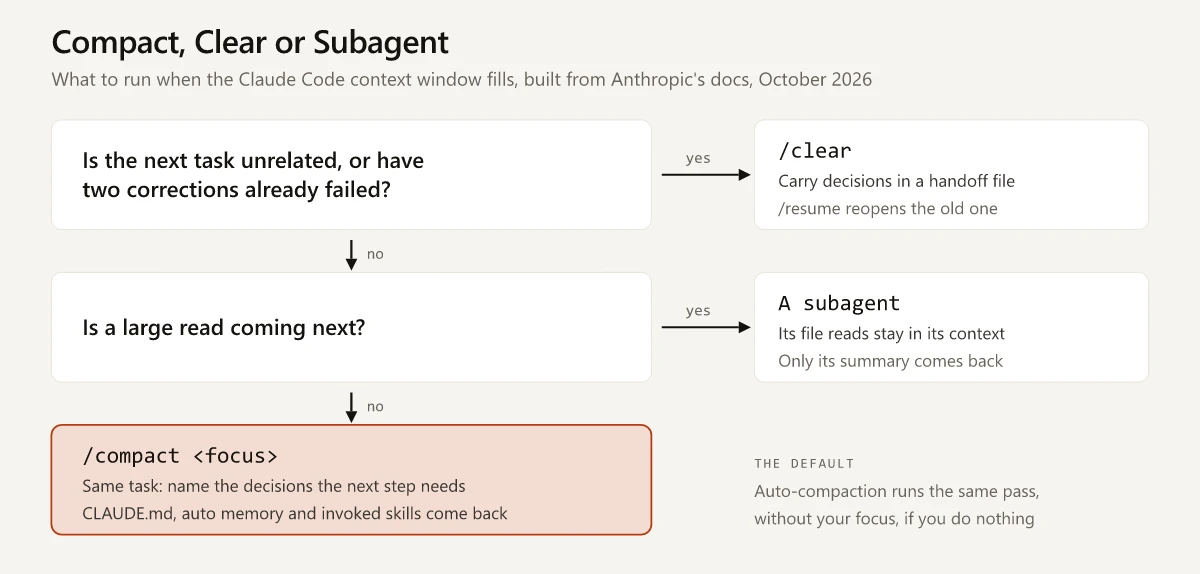
Run /compact to keep working on the same task: it swaps the conversation for a summary and reloads CLAUDE.md, auto memory and invoked skills, but not the skill listing. Run /clear between unrelated tasks or after two failed corrections: it starts an empty conversation, and /resume brings the old one back.
This table extends the /compact and /clear rows of my Claude Code commands cheat sheet with what each option keeps:
| Option | What it keeps | What it drops | Can you get the old state back? | Use it when |
|---|---|---|---|---|
/compact | A structured summary; project-root CLAUDE.md, auto memory and the plan-mode plan, re-injected from disk; up to five recent files; invoked skills, up to 5,000 tokens each and 25,000 in total | The skill listing; path-scoped rules and nested CLAUDE.md files until Claude reads a matching file; full tool output | No undo is documented; run /branch first if you want an uncompacted copy | The task continues and the window is filling |
/compact <focus> | The same, with the summary steered toward what you name | The same | The same | You know which decisions the next step needs |
/rewind, then Summarize from here or Summarize up to here | The messages on the other side of the point you select, in full | The selected stretch, condensed into a summary | Partly: files are untouched, and the original messages stay in the session transcript, so Claude can still reference them | A long stretch at the start or end of the conversation is what filled the window |
/clear [name] | Nothing from the conversation; CLAUDE.md, auto memory and the skill listing load as in a new session | The whole conversation, from context | Yes: /resume, or the rewind menu’s previous-session entry in the same Claude Code process | The next task is unrelated, or two corrections have failed |
| A subagent | Your conversation as it is, plus the subagent’s summary | Nothing of yours; the subagent’s file reads stay in its own context | Nothing to undo | A large read where you need the answer, not the text |
The commands reference gives the same split (“To free up context while continuing the same conversation, use /compact instead”), and the best-practices guide sets the threshold for clearing: “After two failed corrections, /clear and write a better initial prompt incorporating what you learned.” The checkpointing docs explain both summarize options and how to steer the summary. The same menu holds the restore actions for code, the conversation or both, and I list the reasons a code restore comes back empty or partial with a fix for each.
What /compact Re-Injects, Re-Reads and Drops
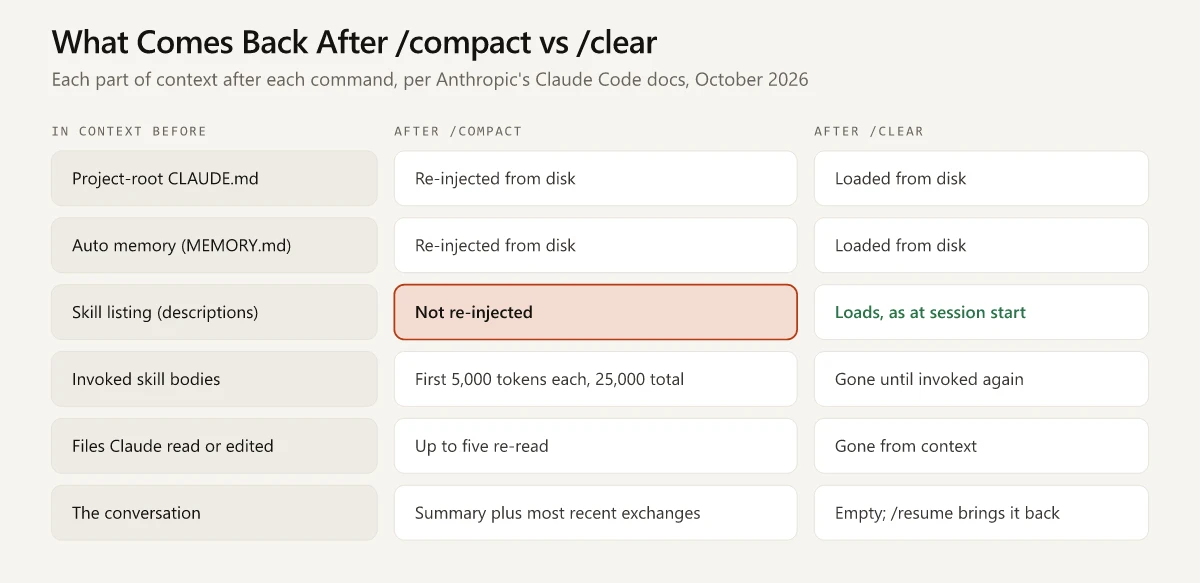
Anthropic’s what survives compaction table sorts everything in context by how it was loaded, and the docs say auto-compaction “works the same way” as a manual /compact. Condensed, with a skill-listing row added from the same page’s interactive timeline:
| What was in context | After /compact or auto-compaction |
|---|---|
| System prompt and output style | Both still apply |
| Project-root CLAUDE.md and unscoped rules | Re-injected from disk |
Auto memory (MEMORY.md) | Re-injected from disk |
| The plan Claude wrote in plan mode | Re-injected from disk |
| Skill listing (names and descriptions) | Not re-injected |
| Invoked skill bodies | Re-injected, up to 5,000 tokens each and 25,000 in total; oldest dropped once the total is exceeded |
| Files Claude read or edited | Up to five re-read, most recently modified first; a file over 5,000 tokens returns as a path only |
| Path-scoped rules and nested CLAUDE.md files | Summarized away; they reload when Claude next reads a matching file |
| Earlier messages, tool output and context that hooks added | Condensed into one structured summary; the sessions docs say your most recent exchanges stay |
SessionStart hooks that match the compact source | Run, with their output added to the compacted context |
How that maps onto the Claude Code setup behind this site:
- No CLAUDE.md exists in the repo or my user folder, so the auto memory index carries the house rules, and the table above puts it in the re-injected group.
- Eighteen of the 20 project-level design skills, plus the user-level skills, lose their listing entries after a compaction; each is still a
/nameaway, because typing a skill’s name invokes it whether or not its description is in context. The other two setdisable-model-invocation: true, so the listing never includes them. - No hooks are configured, so no SessionStart hook adds anything back after a compaction.
The fix for each gap, from Anthropic’s own pages:
| Gap after compaction | Fix from the docs |
|---|---|
| The skill listing is gone | Type the skill’s name; for a skill Claude stopped following, the skills docs say to “invoke the skill again to restore its full content” |
| A long SKILL.md came back truncated | Put the most important instructions near the top of the file, since truncation keeps its start |
| A path-scoped rule disappeared | ”drop the paths: frontmatter or move it to the project-root CLAUDE.md” |
| An instruction from early in the conversation got lost | Move it into CLAUDE.md, or add a “Compact Instructions” section there, per how Claude Code works |
If you installed a library of Claude marketing skills, the listing gap is the one to plan for. How the listing is budgeted and trimmed in the first place is covered in what a Claude skill loads and when. A skill that never appeared in the listing is a separate problem, and my guide to the name-only and user-only skill states shows which settings hide a skill, or only its description, from that listing.
Both commands also reload CLAUDE.md and auto memory from disk. Anthropic’s prompt caching page says project-root and user-level CLAUDE.md files are read once at session start, and “The new content loads on the next /clear, /compact, or restart.” Until one of those three happens, an edit to either file does not apply.
What /clear Keeps and How to Reopen a Cleared Conversation
/clear starts a new conversation with empty context, and /reset and /new are its aliases. The commands reference describes it as starting “fresh on a new task while keeping project memory,” and Anthropic’s Claude Code 101 lesson says of it, “This removes everything,” which holds for the conversation history.
What a clear brings back is the startup content. Claude Code’s glossary says “Running /clear starts a new session”, and Claude “sees skill descriptions at session start”, per the how Claude Code works page. Put together, the skill listing that a compaction drops is back after a clear, along with CLAUDE.md and auto memory:
Anthropic’s help article on models, usage and limits in Claude Code warns that “/clear cannot be undone”, but the Claude Code docs document a way back: the sessions docs say “Claude Code saves the previous conversation.”
The routes back to a cleared conversation:
| Route back | How it works | Works when |
|---|---|---|
/resume | Opens the session picker, or /resume <name> reopens a conversation by ID or name | After you exit too, since sessions are saved to local transcript files |
| Rewind menu | Its top entry reads /resume <session-id> (previous session) after a /clear | Same Claude Code process only, until you exit or resume another session |
/clear <name> | Labels the conversation you are leaving, as in /clear release-prep, so the picker shows that name | Any time; the new conversation starts unnamed |
| Session history in VS Code | A button at the top of the Claude Code panel; search by keyword or browse by time, and a click resumes the conversation with its full message history | In the extension panel |
Clearing is also the cheaper move. Anthropic’s costs page says “compacting a large context is itself a large request,” and “When you want a fresh start instead of continuity, /clear costs nothing.” The prompt caching page adds that while the cache is warm, a mid-session /compact “costs a fraction of what the context size suggests”, so the expensive case is compacting after a break longer than the cache lifetime. The costs page also suggests /rename before clearing; the sessions docs add that a plain /clear carries that name into the new conversation, so /clear <name> is the cleaner way to label the one you leave.
Claude Code Context Limit Reached: What Each Message Means
When the context window is full and a request no longer fits, the API’s Prompt is too long error usually reaches an interactive session as one of the first three rows below, per Anthropic’s errors reference. Longer forms keep the Prompt is too long · wording, and the last two rows appear when compaction itself cannot help:
| The line you see | What it means | What to run |
|---|---|---|
Context limit reached · /compact or /clear to continue | The conversation plus attached files exceed the model’s context window | /compact to keep the task going, /clear to start fresh |
Context limit reached · /clear to continue | The same condition, with DISABLE_COMPACT set, which turns off automatic and manual compaction | /clear; /compact stays off while the variable is set |
Context limit reached · /compact or /clear to continue · auto-compact is off · /config to turn it on | Auto-compact is off in your user settings, where the /config toggle writes autoCompactEnabled | Turn it back on, or run /compact yourself before the window fills |
Prompt is too long · automatic compaction failed: <the underlying error> | Auto-compaction ran and failed on another error, such as an unavailable model or an authentication failure | Resolve the named error first; /compact fails on the same error until you do |
Not enough messages to compact. after /compact, or a Prompt is too long · line about a single exchange | The conversation is a single exchange, so nothing earlier can be summarized; that prompt plus what Claude Code sends with every request (system prompt, tool definitions, memory files) fills the window | /clear, then resend with less pasted text or smaller attachments, or cut tool definitions with /mcp disable <name> |
The errors page also says auto-compact is on by default and “normally prevents this error”. If you hit it anyway, /context shows what is filling the window: system prompt, tools, memory files and messages.
Claude Code Auto Compact: Defaults and the Settings That Change Them
Where auto-compaction triggers depends on your model and configuration, per the default auto-compact thresholds as of 2 October 2026. With no auto-compact window set, Claude Code compacts at the model’s context limit, except in cases such as these:
- Models running with a native 1M window compact before it fills, at about 967K tokens by default. On the Anthropic API that group includes Sonnet 5 and 5.5, the Fable models, and Opus 4.7 and later.
- Sonnet 4.6 and Opus 4.6 without extended context compact at the 200K boundary, and so do Opus 4.8 and later when they run with a 200K window, such as on Amazon Bedrock, Google Cloud’s Agent Platform and Microsoft Foundry.
- Setting
CLAUDE_CODE_DISABLE_1M_CONTEXT=1makes native-1M models compact at the 200K boundary too. - Sessions in Claude Code on the web compact as the conversation approaches the model’s limit.
My user settings choose the opus alias, which the model aliases table resolves to Opus 5.5 on the Anthropic API, and set neither autoCompactEnabled nor autoCompactWindow, so nothing in my settings moves those defaults.
The controls, from the env vars reference, the auto-compact window section and the autoCompactEnabled setting:
| Control | What it does | Watch for |
|---|---|---|
/autocompact 500k | Sets the window from 100K to 1M tokens, saves it as autoCompactWindow in user settings and applies it to the current session | Needs v2.1.221 or later; /autocompact auto returns to the window tuned for your model |
--autocompact at launch | Overrides the saved window for one launch without changing it | claude --autocompact auto runs the tuned window even when a value is saved |
CLAUDE_CODE_AUTO_COMPACT_WINDOW | Sets the window and takes precedence over the command, the flag and the setting | Plain integers only: 500k reads as 500 and clamps to the 100K minimum |
CLAUDE_AUTOCOMPACT_PCT_OVERRIDE | Triggers auto-compaction at a percentage (1-100) of the window | Only lowers the trigger, since the docs say it “can’t raise the threshold”; applies only in sessions that compact before the model’s limit |
Auto-compact toggle in /config, or DISABLE_AUTO_COMPACT=1 | Turns off automatic compaction; the toggle writes autoCompactEnabled to user settings and the variable overrides it | Manual /compact keeps working |
DISABLE_COMPACT=1 | Turns off automatic and manual compaction | The context-limit line then names only /clear |
On timing, Anthropic’s prompt caching guide advises running /compact “at a natural break in your work, such as between tasks, instead of waiting for auto-compaction to trigger mid-task.” That fits the rule above when the next task builds on this one; when it does not, /clear is the cheaper break.
A single response that drags right after a model switch, or after a break longer than the cache lifetime, points to the prompt cache rebuilding, and the turn after it is quick again; I list what breaks Claude Code’s prompt cache and what keeps it in a separate guide.
Compact or Clear in a Keyword Research or Site Audit Session
Anthropic’s examples come from coding, such as /compact focus on the auth bug fix; the same rules apply to keyword research and site audits run through Claude Code.
Mid-Research: Compact With a Focus That Names What to Keep
A long research session fills the window with search results, page fetches and tool output, while the part the next step needs is a short list of decisions. Name those decisions in the focus instruction:
/compact keep the keyword shortlist with volumes and sources, the rejected keywords with a one-line reason each, and the open questions; drop raw search results and page textThe rejected list belongs in that instruction: without it, the summary may keep the winners and lose the reasons the other options were ruled out. If you invoked a research skill earlier in the conversation, its first 5,000 tokens come back, unless skills you invoked more recently have used up the 25,000-token total.
Research to Building: Write a Handoff File, Then Clear
When the research ends and the next job is building, such as fixing the internal links an audit found, the research conversation becomes clutter for the build. Carry the decisions in a file instead:
- Ask Claude to write
research/handoff.mdwith the target, the sources checked with dates, the options rejected and why, and the first file to change. - Run
/clear audit-research, so the research conversation keeps a name in the/resumepicker. - Start the build with “Read research/handoff.md, then fix the first item on its list.”
A file on disk survives /clear word for word, and a decision held only in the conversation does not. Anthropic’s best practices end a spec the same way, and so does the brief step in my seven-step site build from brief to deploy. If Claude misreads the brief twice in the build session, clear again and restate the brief with the correction in it.
Compact and Clear in the Claude Code VS Code Extension
The extension’s chat panel shows context use without a command. From Anthropic’s VS Code guide, as of 2 October 2026:
| In the chat panel | What it does |
|---|---|
| Context indicator in the prompt box | Shows how much of the context window you are using; “Claude automatically compacts when needed, or you can run /compact manually” |
| Prompt cache clock beside it | Counts down the prompt cache’s remaining time; right after a compaction it turns red and shows no minutes until the next response, “because the cache doesn’t cover the compacted conversation yet” |
Ctrl+N on Windows and Linux, Cmd+N on Mac | Starts a new conversation, but only with Claude focused and enableNewConversationShortcut set to true; the default is false |
/compact and /clear | Both run in the panel; Anthropic’s changelog for v2.1.136 lists a fix for MCP servers disappearing “after /clear in the VS Code extension” |
Screen reader users get an announcement when Claude Code starts compacting. The other differences between the panel and running claude in a terminal, including which commands the panel offers, are in my comparison of Claude Code in VS Code and the terminal.
The Claude App Handles a Full Context Window Differently
The Claude app’s help articles describe no compact or clear command for chats. Anthropic’s context window help article, updated 28 September 2026, says that on paid plans with code execution enabled, “When your conversation approaches the context window limit, Claude summarizes earlier messages to make room for new content,” and that conversations which trigger this “use more of your usage limit.” The same article says “Your full chat history is preserved so Claude can reference it,” and that you may notice Claude “organizing its thoughts” while this runs. It also lists each model’s window for chat, Claude Code and Cowork, so check sizes there. A context limit and a usage limit are separate limits: Anthropic’s usage and length limits article says “usage limits control how much you can use Claude across all your conversations, while length limits control how long any single conversation can become,” and the five-hour usage reset is covered in Claude vs Claude Code. If you hit the usage limit instead, first check whether the session or the weekly limit is full, since that sets the order of the options when a Claude usage limit runs out.
Claude Code Compact vs Clear: Decide by What the Next Step Needs
The Claude Code compact vs clear choice comes down to what the next step needs from the current conversation. Your standing rules come back either way, from CLAUDE.md or the auto memory index on disk. What /compact adds is a summary of decisions. What it costs is a summarization request, largest after a break, and the skill listing, which /clear brings back with the rest of the startup content. If the next step needs those decisions, compact with a focus that names them; if it needs only your files and rules, clear.
Have Claude write research/handoff.md before your next /clear.
Frequently Asked Questions
Should I compact or clear in Claude Code?
Compact when the next step continues the same task and needs decisions made in the conversation. Clear when the next task is unrelated, or after two failed corrections. Both reload CLAUDE.md and auto memory, a clear also brings back the skill listing that compaction drops, and /resume reopens a cleared conversation.
Is /compact the same as starting a new session in Claude Code?
No. /compact keeps you in the same conversation with a summary in place of the history, while /clear starts a new conversation with empty context. Anthropic's cost docs add that /clear costs nothing, while compacting a large context is itself a large request, most of all after a break long enough for the prompt cache to expire.
What does Context limit reached mean in Claude Code?
It is how an interactive session shows the Prompt is too long error: the conversation plus attached files exceed the model's context window. Run /compact to keep going or /clear to start fresh. If the line names only /clear, the DISABLE_COMPACT variable is set.
When does Claude Code auto compact?
With no auto-compact window set, at the model's context limit, with documented exceptions: models with a native 1M window compact at about 967K tokens by default, and some setups compact at a 200K boundary. The /autocompact command sets a window from 100K to 1M tokens, as of October 2026.
Does /compact keep my CLAUDE.md and skills?
It re-injects the project-root CLAUDE.md, auto memory and the bodies of skills you invoked, keeping the first 5,000 tokens of each within 25,000 in total. It does not re-inject the skill listing, and path-scoped rules return only when Claude reads a matching file.