Claude Code Rewind Not Working? What It Can and Can't Undo
Claude Code rewind not working? Match your symptom to Anthropic's exact error text, rewind from the CLI or VS Code, and use git or a redeploy for what it can't undo.
Claude Code rewind cannot undo the files npm run build writes on this site before Astro starts. The prebuild step runs node scripts/gen-image-variants.mjs as a shell command, and Anthropic’s checkpointing docs say file modifications made by Bash commands “cannot be undone through rewind.” That script writes resized WebP copies of new or changed blog diagrams, deletes copies whose source is gone and rewrites src/data/image-manifest.json, every time the build runs.
I build and maintain this site with the Claude Code extension in VS Code on Windows 11. Claude Code runs npm run build as its check after a change, step 4 of my seven-step site build with Claude Code, and every push to main is a production deploy on Vercel. On that setup I treat /rewind as the top rung of an undo ladder, with git and a redeploy below it. When rewind looks broken, ask first which rung the change sits on, because several of the symptoms below are changes that never reached the rewind rung at all.
The menu labels and error strings on this page are quoted from Anthropic’s Claude Code docs as they read on 3 October 2026, when claude --version on my machine printed 2.1.283.
How to Rewind in Claude Code
Run /rewind (aliases /checkpoint and /undo) or press Esc twice on an empty prompt, select the prompt to return to, then pick one of six actions, such as Restore code. In the VS Code extension, hover over a message to reveal the rewind button instead.
This page expands the /rewind row of the Claude Code commands cheat sheet.
Claude Code captures the state of your code before each prompt that starts a turn. The menu lists every prompt you sent in the session, apart from messages that joined a running turn, and the two surfaces label their options differently:
| What you want back | CLI rewind menu | What it does, in Anthropic’s words | VS Code hover option |
|---|---|---|---|
| Files and conversation | Restore code and conversation | ”revert both code and conversation to that point” | Fork conversation and rewind code: a new conversation branch, with files reverted |
| Conversation only | Restore conversation | ”rewind to that message while keeping current code” | Fork conversation from here: a new branch, “keeping all code changes intact” |
| Files only | Restore code | ”revert file changes while keeping the conversation” | Rewind code to here: keeps “the full conversation history” |
| Context space | Summarize from here | ”compress the conversation from this point forward into a summary” | Not one of the three hover options |
| Context space, recent turns kept | Summarize up to here | ”compress the conversation before this point into a summary, keeping later messages intact” | Not one of the three hover options |
| Nothing | Never mind | ”return to the message list without making changes” | None |
What the table leaves out:
- After Restore conversation or Summarize from here, the prompt you selected returns to the input box, ready to edit and resend.
- The extension’s two conversation options start a new branch, one of several ways the VS Code extension differs from the terminal.
- Summarizing doesn’t change files on disk, and Anthropic says it works “like a targeted
/compact”. A side-by-side table of what/compact,/clearand both summarize options keep shows where each one fits.
Claude Code Rewind Not Working: Symptom, Cause and Fix
Most causes below come from Anthropic’s checkpointing page and the rewind warnings and errors in its errors reference; a row that relies on another page links it in the cell. Find the line that matches what you see:
| Symptom | Cause | Fix |
|---|---|---|
Esc twice erases your typed text and no menu opens | The prompt had text, and “double Esc clears it instead of opening the menu” | The prompt is now empty: press Esc twice again (or type /rewind) to open the menu, then press Up after you finish there to recall the draft from input history |
| You can’t find rewind in the VS Code chat panel | The extension puts rewind on a hover button, and its / menu shows a “Subset” of commands | Hover over the message you want to go back to and click the rewind button |
| The two Restore code options are missing | ”The two code restore options appear only when the selected checkpoint has tracked file changes to revert” | If files did change after that point, checkpoints didn’t capture the change (a shell command, a subagent, an edit outside the session, or checkpointing turned off); use the ladder below |
| A prompt you sent is missing from the list | You queued it while Claude worked, it joined the running turn, and Claude Code “doesn’t create a checkpoint for it” | Rewind to the prompt that started that turn, which undoes the whole turn, including work done before your message arrived |
No files were restored: N files failed (backup missing, or the file could not be updated) | The snapshots are gone, deleted by the retention sweep “by default about 30 days after the session last saved one” or never copied into a fork, for example on a full disk; or Claude Code could not write the file | Restore from git or ask Claude to reverse its edits, since running /rewind again “fails the same way”; fix file permissions if a write was blocked; raise cleanupPeriodDays for future sessions |
Restored the code, but skipped N files | A tracked path is or became a symlink, hard link or other non-regular file, its directory changed since the checkpoint, or its snapshot can’t be safely read | Turn on /debug before the next restore; the log at ~/.claude/debug/<session-id>.txt names each skipped path. Reverse those edits yourself or ask Claude to |
| The rewind ran, but files a command wrote, moved or deleted are unchanged | ”Checkpointing does not track files modified by Bash commands” | git restore <path> for tracked files; git clean -nd <path> lists new untracked files and folders before anything is removed |
| A subagent’s edits survive the rewind | Claude Code “usually doesn’t capture” subagent edits, including a forked skill running in the background (the default) and a background /code-review --fix run | Revert them with git; a forked skill set to background: false is the exception, and its edits rewind as usual |
| Your own edits, or another session’s, are not reverted | Manual changes and edits from concurrent sessions “are normally not captured, unless they happen to modify the same files as the current session” | Git, or Local History in VS Code’s Timeline view for files you saved in the editor |
You ran /clear and want the earlier conversation back | /clear started a new conversation, and Claude Code kept the previous one | In the same Claude Code process, select /resume <session-id> (previous session) at the top of the rewind menu; after you exit, use /resume |
/rewind can’t restore code in any session | File checkpointing is off: the Rewind code (checkpoints) toggle in /config sets fileCheckpointingEnabled to false, or CLAUDE_CODE_DISABLE_FILE_CHECKPOINTING=1 is set | Turn both back on, since “whichever of the two turns it off, the other can’t turn it back on” |
| An older version reported a clean rewind, but some files did not change | Before v2.1.260, Claude Code “silently skipped files whose backups were missing”; before v2.1.216, /rewind wrote and deleted through links without reporting a partial restore | Run claude update, then compare the files with git |
The No files were restored row is the one you can hit when you resume a session whose last snapshot is more than about 30 days old, under the default setting. After the sweep, /rewind “still lists its checkpoints”, so the menu looks normal until the restore fails. Local History is not guaranteed either: VS Code says, “Depending on your settings, every time you save an editor, a new entry is added to the list.”
The Undo Ladder for a Site That Deploys From Main
Anthropic built checkpoints for “quick, session-level recovery” and adds: “For permanent version history and collaboration, continue using version control, such as Git, for commits, branches, and long-term history” (checkpointing docs). For a marketer whose site goes live from main, I turn that advice into four rungs, each reaching changes the rung above it cannot.
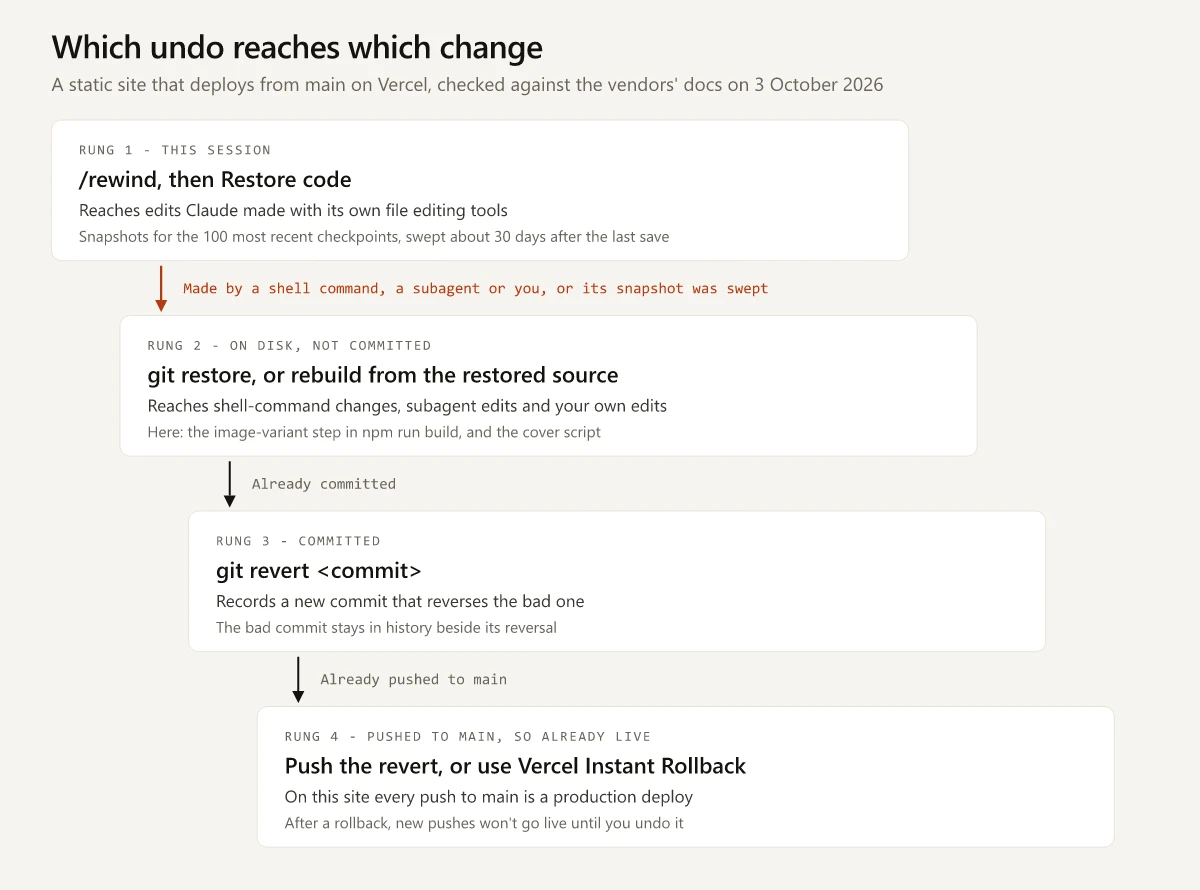
The same ladder as a table, with this repo’s build-time image step and its cover script as the shell-command examples:
| Rung | Change | Captured by a checkpoint? | Undo that reaches it |
|---|---|---|---|
| 1 | Claude edits a file with its file editing tools, such as an Astro component or a script | Yes, within the 100 most recent checkpoints of the session | /rewind, then Restore code |
| 2 | npm run build runs gen-image-variants.mjs, which writes 660 pixel WebP variants (and 1320 pixel ones for wide sources) and rewrites the image manifest | No, it runs as a shell command | Undo the source change, then build again; the manifest and existing variants are committed, so git restore resets them, while variants made for a new diagram are untracked and need git clean |
| 2 | node scripts/assign-blog-covers.cjs rewrites the img and img_alt lines in post frontmatter | No, it runs as a shell command | Commit your own edits before running it, then git restore src/content/blog reverts its rewrite of every committed post; --dry reports how many posts would change without writing |
| 2 | A subagent, or a forked skill in the background, edits files | Usually not | Git |
| 2 | You edit a file in VS Code, or another Claude Code session does | Normally not | Git, or Local History for files saved in the editor |
| 3 | A commit, pushed or not | Not a checkpoint question | git revert <commit> |
| 4 | A push to main | Already live | Push the revert as a new deploy, or use Vercel’s Instant Rollback |
The two script rows need different undos. gen-image-variants.mjs rebuilds its output from the files it reads, and its own header comment says staleness “is decided by a content hash”, so once the source diagram is back, the next npm run build rewrites the variants and manifest to match.
The cover script picks a painting from each post’s categories and writes img and img_alt into every post where its pick differs. Each pick depends on the posts sorted before it, so one new post can change the cover on older ones. The re-run described in my alt text audit rewrote the alt text on existing posts across the corpus in one pass. git restore will “Restore specified paths in the working tree with some contents from a restore source”, which overwrites your own uncommitted edits in those paths too, so commit before any script touches a folder you are also editing.
For the commit rung, git revert will “record some new commits to reverse the effect of some earlier commits”, so the bad commit stays in history beside the one that undoes it.
On Windows, Anthropic’s tools reference lists PowerShell as its own shell tool beside Bash. The checkpointing docs say “Only direct file edits made through Claude’s file editing tools are tracked”, so I put a command Claude runs through PowerShell on the second rung too.
Undo a Bad Deploy From Main
Every push to main on this site starts a production deploy, a loop laid out in the build write-up linked above. Two undos reach a bad deploy: push a revert, or use Instant Rollback as Vercel’s Instant Rollback docs, last updated 7 July 2026, describe it:
| Undo | How it works | Watch for |
|---|---|---|
Push a git revert | A normal production deploy of the reverted code | Waits for a new build |
| Instant Rollback | Points your domains back to an earlier production deployment; Vercel says “The rollback happens instantaneously” | Hobby users “can roll back to the immediately previous deployment”; afterwards, “new pushes to your production branch won’t go live automatically” |
If the live site is broken, use both, in this order:
- Roll back, so the earlier deployment serves your domains again.
- Push the revert.
- Click Undo Rollback and promote the revert’s deployment, which turns automatic production deploys back on.
vercel promotedoes the same from a terminal.
To keep Claude Code from reaching this rung without you, ask rules on git push (one for Bash, one for PowerShell) make it stop for approval on a plain push; my permission-prompt checklist has the rules and their limit.
How Long Claude Code Keeps Checkpoints
From the automatic tracking notes and the .claude directory reference:
- Claude Code keeps file snapshots for the 100 most recent checkpoints in a session. Discarding an older checkpoint deletes any snapshot file that no remaining checkpoint references, except each file’s first snapshot, which the VS Code extension uses as the baseline for its session diffs.
- Checkpoints are saved with the conversation, so
/rewindstill works after/resume. - The snapshots live in
~/.claude/file-history/<session>/. Deleting that folder by hand costs you “Checkpoint restore for past sessions”, andclaude project purge(renamedclaude purgein v2.1.288, newer than the 2.1.283 this page was checked on) removes a project’s per-sessionfile-history/entries along with its transcripts. - The retention sweep deletes a session’s snapshots about 30 days after the session last saved one, which is the default for
cleanupPeriodDays.
The cleanupPeriodDays entry takes a whole number of days, rejects 0, works in any settings file, and for long retention suggests “a large value such as 3650”. A 90-day window looks like this:
{
  "cleanupPeriodDays": 90
}
The same setting decides how long session transcripts stay, so a longer window also keeps plaintext transcripts on disk for longer; the sweep deletes them “without showing a message”. Anthropic’s plaintext storage note says “Transcripts and history are not encrypted at rest” and lists lowering cleanupPeriodDays as a way to reduce exposure.
cleanupPeriodDays is not set in my ~/.claude/settings.json, this repo’s .claude/settings.json or its .claude/settings.local.json (checked on 3 October 2026), so the 30-day default applies here. When I matched this repo’s session transcripts to their snapshot folders that day, the oldest folder still on disk had last been written on 3 September 2026, 30 days before the check.
Make a Rewind Reversible Before You Run It
Anthropic recommends a rewind over a correction when an answer goes wrong. Its errors reference says “rewinding usually works better than replying with corrections” and, two sentences later, “Correcting in-thread keeps the wrong attempt in context, which can anchor later answers to it.”
The checkpointing page describes no way to redo a restore, so set up the way back before choosing one:
- Look first. In the CLI,
/diffshows the changes in your working tree, with aCurrentview and, once Claude has edited files, one view per turn. The interactive mode docs say “These turn views come from Claude’s file edits rather than from git, so a change Claude makes through a shell command appears only underCurrent.” A file listed underCurrentwith no turn view needs a git undo. - Commit the current state. With it in git,
git restorecan bring back anything a code restore reverted that you wanted to keep. - Branch the conversation. Per Anthropic’s branching docs,
/branchcopies the conversation and switches you into the copy, and “The original is unchanged on disk and remains in the session picker”. The rewind errors entry adds that a fork gets copies of the original session’s snapshots.
Find the Rung Before You Reach for Claude Code Rewind
Claude Code rewind covers Claude’s own file edits in one session, for about 30 days after the session last saved a snapshot. The prebuild image step sits on the second rung with every other shell command and manual change, and a push to main sits on the fourth. When a restore disappoints, name the change’s rung first, then use the undo that reaches it. Commit before Claude runs your next script.
Frequently Asked Questions
How do I undo the last change in Claude Code?
Run /rewind or press Esc twice on an empty prompt, select the prompt that asked for the change, and choose Restore code. That reverts edits Claude made with its file editing tools. Changes made by shell commands or most subagents need git instead.
Why is Claude Code rewind not restoring my files?
Usually the change was never tracked: checkpoints miss files changed by Bash commands, most subagent edits and edits made outside the session. If the restore fails with 'No files were restored', the snapshots are missing (for example, the retention sweep deleted them about 30 days after the session last saved one) or Claude Code could not write or delete the file.
How long does Claude Code keep checkpoints?
Claude Code keeps file snapshots for the 100 most recent checkpoints in a session, and its retention sweep deletes them about 30 days after the session last saved one. Raise cleanupPeriodDays in a settings file to keep them longer; the same setting controls how long transcripts are kept.
Can you undo a rewind in Claude Code?
Anthropic's checkpointing page describes no way to redo a restore. Commit before you rewind so git can bring back any files you wanted to keep, and run /branch first if you also want the original conversation back, which stays in the session picker for /resume.
How do I rewind in the Claude Code VS Code extension?
Hover over a message in the chat panel to reveal the rewind button, then choose Fork conversation from here, Rewind code to here, or Fork conversation and rewind code. The CLI's /rewind menu has six actions, including two that summarize the conversation.