How to Add Certificate in LinkedIn and Which Section to Use
How to add certificate in LinkedIn: LinkedIn Help's desktop and app steps, which section fits each certificate, what to enter, and how to skip the network update.
Which LinkedIn section does your certificate belong in, and will saving it post an update to everyone you know? Those two questions decide how to add certificate in LinkedIn more than the click path does. LinkedIn’s own Help pages answer the first, and say less than you might expect about the second.
Take a LinkedIn advertising certification from LinkedIn’s free Marketing Academy. Its Marketing Academy FAQ says the exam is 60 questions in 60 minutes with a 75% pass mark, the certification “expires in two years”, and its Add to profile button opens LinkedIn’s “Add license or certification” settings with six fields filled in automatically. A class you took for your degree fits LinkedIn’s description of Courses instead, and a scholarship fits Honors & awards. I would match each certificate to LinkedIn’s one-line description of a section first, then check the Share with network toggle before clicking Save, because that toggle and the Share profile updates setting are the controls LinkedIn’s Help page gives for notifying your network.
How to Add Certificate in LinkedIn on Desktop
LinkedIn Help’s path is Me, View Profile, Add profile section, then Licenses & certifications, which its Add sections to your profile page lists under Recommended. Enter the certificate’s details in the pop-up window, set the Share with network toggle, and click Save. The entry is visible on your profile as soon as you save it.
- Click the Me icon at the top of your LinkedIn homepage, then click View Profile.
- Click Add profile section in your introduction section.
- Open the Recommended group and select Licenses & certifications. LinkedIn’s page says to click the section “and select the subsection, if applicable.”
- Enter the details in the pop-up window. The six fields LinkedIn’s Marketing Academy FAQ lists for this form are in the next section.
- If you want no update sent, switch off the toggle in the Share with network section, which LinkedIn’s Share profile updates page describes for edits made “from a computer”.
- Click Save.
The Six Certificate Fields LinkedIn’s Marketing Academy Lists
None of the live LinkedIn Help pages I read lists the fields of the certificate form. The field names come from LinkedIn’s Marketing Academy FAQ, which lists the fields its own Add to profile button fills in the “Add license or certification” settings: Name, Issuing organization, Issue date, Expiration date, Credential ID and Credential URL. What goes in each, with my advice in the middle column:
| Field | What I would enter | What LinkedIn’s pages say |
|---|---|---|
| Name | The certificate’s title exactly as printed on it | First of the six fields in the Marketing Academy FAQ |
| Issuing organization | The body that issued it, picked to match its LinkedIn Page where it has one | Issuers with a LinkedIn Page can build an Add to Profile button (a528030) |
| Issue date | The date on the certificate | One of the six fields |
| Expiration date | The lapse date, if the certificate has one | Marketing Academy certifications expire after two years |
| Credential ID | The certificate or credential number | When you change your name, “your certificate number and verify link stay the same” (Marketing Academy FAQ) |
| Credential URL | The issuer’s verification link for that certificate | The “verify link” in the same answer |
LinkedIn’s add-sections page says only to enter “the required information”, and none of the pages I read marks which of the six fields are required. The Marketing Academy FAQ sends readers to a Help page called Managing Licenses & Certifications (answer a567169) for more. That page returned 404 Not Found in every URL variant I requested on 4 November 2026, so check the form on your own screen for which fields it insists on.
Where Does This Certificate Go on LinkedIn?
An exam-based or issuer-verified certificate goes in Licenses & certifications, which LinkedIn’s Your LinkedIn profile page describes as “Certifications, licenses, or clearances you’ve attained.” Coursework, awards and test results each have a section of their own. The quoted lines below are LinkedIn’s; which certificate goes where is my advice:
| Certificate you have | Section I would use | Group in Add profile section | LinkedIn’s words on that section |
|---|---|---|---|
| A professional licence, such as an accountancy or nursing licence | Licenses & certifications | Recommended | ”Certifications, licenses, or clearances you’ve attained.” |
| A vendor certification you sat an exam for, such as a cloud provider’s exam or a Marketing Academy certification | Licenses & certifications | Recommended | Same |
| An online course certificate with a verification link | Licenses & certifications | Recommended | Same; a528030 uses Coursera Verified Certificates as its example of a certification with its own Page |
| A LinkedIn Learning Certificate of Completion | Added from Learning History (see the LinkedIn Learning section) | n/a (Learning route) | LinkedIn says LinkedIn Learning “is not accredited” |
| A class you took as part of a degree or diploma | Courses | Recommended | ”Adding your body of coursework can help your education to stand out.” |
| A prize, scholarship or merit certificate | Honors & awards | Additional | ”Show off your hard-earned awards.” |
| An entrance exam or language test result | Test scores | Additional | ”List your scores on tests to highlight high achievement.” |
| The certificate file itself, as a PDF or image | Featured | Recommended | ”Media that you can upload, for example your images, documents, presentations, and videos” (a550399) |
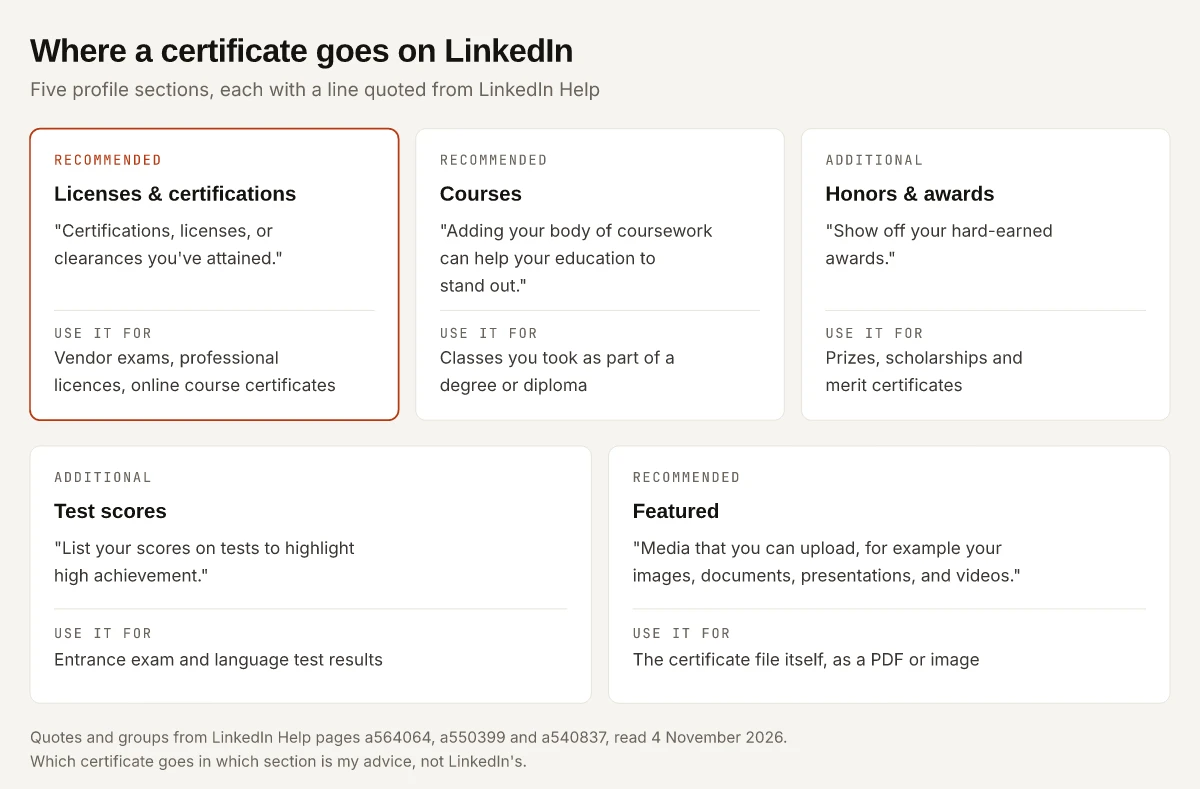
A Licenses & certifications entry carries the details; Featured holds the file. The Featured steps, and who can download a file you put there, are in my guide to adding a resume to LinkedIn, which uses the same section.
Draftly’s guide, dated 24 February 2025, says “LinkedIn ranks profiles with detailed credentials higher in search results” without citing LinkedIn. The search line LinkedIn does publish, on a564064, is about Skills: a relevant list “improves your likelihood to be found in others’ searches.” None of the LinkedIn pages I read says the same of Licenses & certifications.
How to Add Certificate in LinkedIn Without Posting
LinkedIn’s Share profile updates page (a529062), last updated two months before I read it, gives two places to stop the announcement:
- While you edit on a computer: “the toggle in the Share with network section” of the form.
- In settings: click the Me icon, select Settings & Privacy, click the Visibility tab, and under Visibility of your LinkedIn activity click Share profile updates, then switch the toggle Off. LinkedIn says “Your changes will be saved automatically.”
What the setting covers, in LinkedIn’s words from the same page:
| Question | LinkedIn’s answer (a529062) |
|---|---|
| Which changes does it name? | “job changes, education changes, and work anniversaries”; certifications are not named |
| What does a shared update look like? | It “may generate a post in your network’s feed, an in-app notification, or an email notification” |
| Does every edit notify people? | ”Even if you’ve enabled sharing, some types of profile edits won’t generate notifications to your network” |
| Does turning it off hide the certificate? | No: “Anyone that views your profile will see your edits as soon as you save them, even if you haven’t chosen to notify your network” |
| How long does an automated update stay? | “up to 90 days”, after which the post and its comments and reactions are deleted |
| Can I fix it after saving? | ”Editing or deleting the update after adding it may affect the notification generation” |
| Where can I check what was sent? | “the Recent Activity section on your profile”, though automated update posts “don’t appear in the Posts tab” of that page |
The toggle governs the announcement, and the certificate stays visible either way. Draftly’s guide tells readers to “uncheck the ‘Share with network’ box” and says this “ensures” the certification will not appear as a notification. LinkedIn’s page says Off will “stop sharing your profile edits”, and it never says whether adding a certification generates a notification in the first place. I would switch the setting off before saving, then look at Recent Activity.
To announce the certificate instead, write your own post with the certificate image attached rather than counting on an automated update. Image and document specs for that post are in my LinkedIn post size guide.
Add a Certification on the LinkedIn App
LinkedIn’s add-sections page (a540837) gives one mobile path:
- Tap your profile picture.
- Tap your profile photo again to access your profile.
- Tap Add section in your introduction section.
- Tap Recommended and select Licenses & certifications.
- Enter the required information on the page.
- Tap Save.
a529062 describes the in-form toggle only for edits made from a computer. On the app, I would turn sharing off first: tap your profile photo, then Settings & Privacy, tap Visibility, and under Visibility of your LinkedIn activity tap Share profile updates and switch it Off.
A certificate file is the other mobile catch. LinkedIn’s media file types page, which covers media samples on your profile, lists these rules:
- Formats: PDF, PowerPoint, Word, JPG/JPEG, PNG and GIF (a GIF shows only its first frame).
- “The file size may not exceed 100 MB”, with a 300-page limit.
- “Documents cannot be uploaded from mobile devices”, so a certificate PDF goes up from a computer.
Add a Certificate From Coursera or Another Issuer’s Button
Issuers can put an Add to Profile button into “emails, websites, and social media posts”, per LinkedIn’s FAQ for that button (a528030), last updated two years before I read it. What the FAQ says it does:
| Detail | LinkedIn’s words (a528030) |
|---|---|
| What the button does | It “allows you to easily add professional certifications and education degrees to your profile” |
| Autofill | ”The certification and degree information doesn’t autofill, but you can add the relevant information directly” |
| No LinkedIn account yet | The member is “taken to a signup page” and can add the certificate “within same flow” |
| Who can build one | Any company or school with a LinkedIn Page, free, with “no approval process” |
| Logo shown | ”only the logo featured on your Page”; for a different logo it says to create a Page for the certification, and points to Coursera Verified Certificates as an example |
The Marketing Academy FAQ, which carries no last-updated date, describes its own button differently: “The fields fill with the certificate settings automatically.” a528030 says buttons made on LinkedIn’s Add to Profile microsite no longer autofill, and neither page says whether the Marketing Academy button is one of them. For a Coursera certificate or any other outside issuer, keep the certificate open and type the details in yourself.
Some issuers verify through a separate badge platform. Anthropic’s Claude exams, for example, award a Credly badge on a pass, as my Claude certifications guide explains; a badge page like that is what I would paste into Credential URL.
How to Add a LinkedIn Learning Certificate
LinkedIn Learning certificates reach your profile from Learning, through a route of their own. The desktop steps, from LinkedIn’s Add Learning Certificates of Completion page (last updated four months before I read it):
- Log in to LinkedIn Learning.
- Click your profile picture in the upper right corner and select My Library, or select My Library on the left side of the screen.
- Click Learning History under My Library.
- Click More (…) to the right of the course title.
- Select Add to profile from the dropdown.
- In the confirmation pop-up, check the Share with network box only if you want “to send an update about your course completion”, and pick Connections or Individuals under Share with.
- Click Add to Profile.
The same page adds that you cannot add a course you have not completed, that you can unselect skills you do not want, and that a profile already listing over 100 skills cannot take more. Once added, the button in Learning History reads On your profile.
What LinkedIn says about the certificate itself:
| Question | LinkedIn’s answer | Source |
|---|---|---|
| Is it accredited? | ”LinkedIn Learning is not accredited.” It “only reflects that they initiated the course on LinkedIn Learning” | a598944 |
| How do you earn one? | Generated “when LinkedIn Learning detects that all the videos in the given course or learning path have been completed”; assessments and exercise files are not required | a598944 |
| Who can download one? | Learners with an active Learning subscription, Premium Career, Premium Business, Sales Navigator Professional or Recruiter Lite, and members using unlocked Microsoft Certifications courses; library patrons cannot | a598944 |
| Which courses have none? | Series courses such as weekly tips, individual videos and collections | a598944, a705867 |
| What if the subscription ends? | “you will still have access to your Learning history and Certificates of Completion”, but no new courses until you renew | a705867 |
| Which date does it show? | “the first completion date” | a700836 |
Premium Career is one of the Premium plans a598944 lists as able to download Certificates of Completion, and my LinkedIn Premium price breakdown covers what it costs in India.
LinkedIn Learning’s Help pages describe three different credentials, and its credentials FAQ separates the last two:
| Credential | How you get it | What LinkedIn says |
|---|---|---|
| Certificate of Completion | Watch every video in a course | Not accredited (a598944) |
| Professional Certificate | Pass an unproctored assessment on LinkedIn Learning | ”Third parties issue all Professional Certificates”; after passing, “learners can add their new credential to their LinkedIn profile” |
| Certification | Pass an exam “proctored by a third party”, taken off LinkedIn Learning | Learning offers prep courses; the off-platform exam’s cost is not included in a Learning subscription |
A Certification you passed elsewhere goes into Licenses & certifications under the issuer’s name, using the desktop steps above.
Should a Certification Go After Your Name?
I would keep it out of the name field. LinkedIn’s name page puts your name in First Name and Last Name boxes on the Edit intro pop-up, and my LinkedIn verification guide explains why a name field reading “Priya Sharma, MBA” would not match the name DigiLocker holds. If one credential matters to every visitor, put its short form in your headline, which has a 220-character limit of its own.
Expired and Renewed Certificates
The Marketing Academy FAQ shows how an issuer handles renewal. To stay certified “you’ll need to retake the current version of each exam”, and you can take it 22 months after you earned the certification, two months before it expires.
None of the LinkedIn pages I read says how a profile displays an entry once its expiration date passes. My rules for the entry:
- When you renew, edit the existing entry’s Issue date and Expiration date rather than adding a second copy.
- When a licence lapses and you will not renew it, delete the entry or keep its Expiration date as printed rather than clearing it.
- For a certificate with no expiry, leave Expiration date empty instead of guessing one.
LinkedIn Help Pages Behind This Guide
Every LinkedIn step and quote above comes from pages read logged out on 4 November 2026. I describe no signed-in screen, and LinkedIn renames menus, so match each label to what your account shows. Each page’s “Last updated” note that day:
| Page | Last updated |
|---|---|
| Add sections to your profile (a540837) | 2 years ago |
| Your LinkedIn profile (a564064) | 2 hours ago |
| Share profile updates (a529062) | 2 months ago |
| Add to Profile button FAQs (a528030) | 2 years ago |
| Media file types supported on your profile (a1516731) | 3 years ago |
| Manage featured samples of your work (a550399) | 3 years ago |
| Add Learning Certificates of Completion and Skills to your profile (a704787) | 4 months ago |
| Certificates of Completion FAQ (a598944) | 1 year ago |
| Certificates of Completion overview (a705867) | 1 year ago |
| Download Certificates of Completion (a700836) | 11 months ago |
| Professional Certificates and credentials FAQ (a1433885) | 11 months ago |
| Last name visibility (a1338854) | 3 months ago |
| Managing Licenses & Certifications (a567169) | 404 Not Found |
The Marketing Academy FAQ shows no last-updated date.
Pick the Section Before You Add Certificate in LinkedIn
How to add certificate in LinkedIn comes down to two choices you make before Save: the section whose LinkedIn description fits the certificate, and the Share profile updates setting. For an exam-based certificate that means Licenses & certifications with the credential ID and verification link filled in, and the toggle off unless you want the update. Open the certificate, copy its credential ID, then add the entry.
Frequently Asked Questions
How do I add a certification on LinkedIn without posting?
Switch off the toggle in the Share with network section while you edit your profile on a computer, or go to Settings & Privacy, Visibility, Share profile updates and switch it Off before you save. LinkedIn notes that anyone who views your profile still sees the edit as soon as you save it.
How do I add a certificate on the LinkedIn app?
Tap your profile picture, tap your profile photo again, tap Add section, choose Licenses & certifications under Recommended, enter the details and tap Save. LinkedIn's media page says documents cannot be uploaded from mobile devices, so attach a certificate PDF from a computer.
Which section should a certificate go in on LinkedIn?
Licenses & certifications, which LinkedIn describes as certifications, licenses, or clearances you've attained, fits exam-based and issuer-verified certificates. Coursework from a degree fits Courses, prizes fit Honors & awards, and exam results fit Test scores.
Are LinkedIn Learning certificates accredited?
LinkedIn says they are not: its Help page states that LinkedIn Learning is not accredited and that a Certificate of Completion is not the same as a degree program or a software certification program. The certificate is generated when you finish every video in a course.
Do you keep LinkedIn Learning certificates after your subscription ends?
Yes. LinkedIn says that if your LinkedIn Learning subscription expires you still have access to your Learning history and Certificates of Completion, but you cannot open new courses or videos until you renew.