LinkedIn Saved Posts: Where to Find Them and What Exports
LinkedIn saved posts sit under Saved Items on desktop and behind your profile picture in the app, and LinkedIn's data download gives each one's saved date and URL.
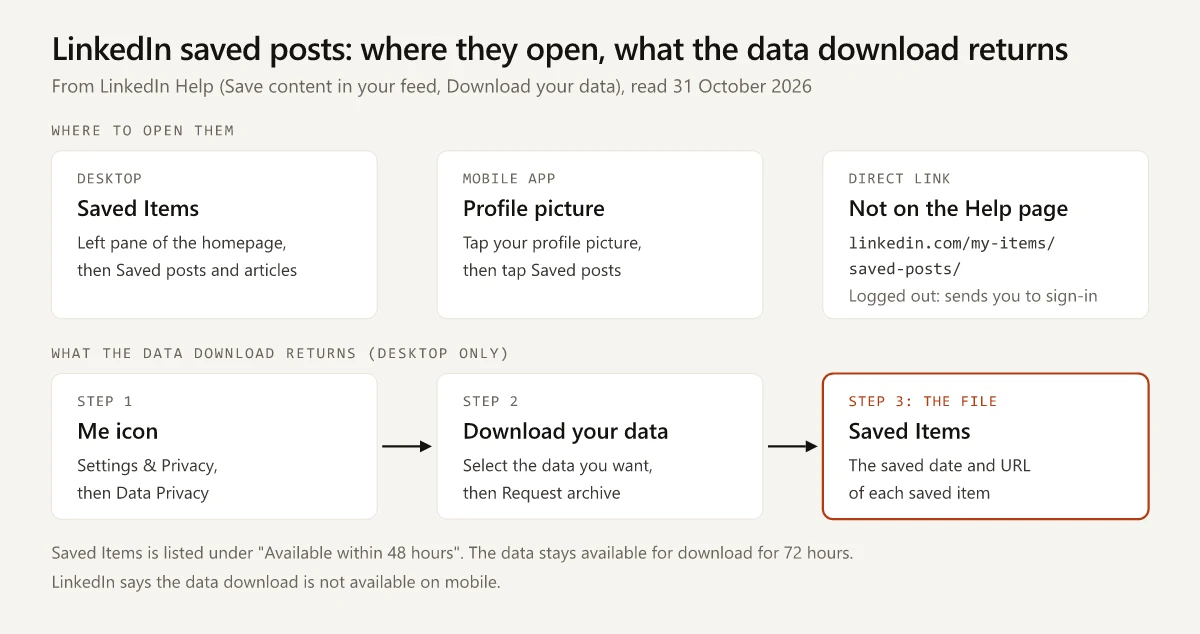
The Saved Items file in LinkedIn’s data download holds two things per item, the date you saved it and its URL: it “Contains the saved date and URL of a post, article, or other content”, according to LinkedIn’s Download your data page read on 31 October 2026, which files it under data “Available within 48 hours”. The LinkedIn saved posts themselves live in two places, per LinkedIn’s Save content in your feed page: on desktop, “Saved Items on the left pane of your LinkedIn homepage”, and in the app, “Tap your profile picture, then tap Saved posts.”
Put those two pages side by side and a save is a bookmark to someone else’s post: the Saved Items archive hands back the post’s address and the date you saved it, and neither page says the file includes the post’s words. So if a saved post matters to you, I would copy what you need out of it when you save it, and use the archive as an index.
| Surface | Path to your saved posts | Source |
|---|---|---|
| Desktop browser | Saved Items on the left pane of the homepage, then Saved posts and articles | Save content in your feed |
| LinkedIn mobile app | Tap your profile picture, then tap Saved posts | Save content in your feed |
| Right after saving | A banner “that includes a link to View Saved Posts” (lower left on desktop, top or bottom of the screen in the app) | Save content in your feed |
| Direct link | linkedin.com/my-items/saved-posts/ (not on LinkedIn Help; logged out it sends you to sign-in) | Logged-out check from India, 31 October 2026 |
How to Find Saved Posts on LinkedIn, Step by Step
The Save content in your feed page carries a “Last updated: 2 years ago” stamp, so the labels below are LinkedIn’s own, but your layout may name them slightly differently. It opens with the scope: “You can save posts and articles you view in your feed from your LinkedIn desktop website or from the LinkedIn mobile app.”
On desktop:
- Click the More icon on the upper right of the post you want to keep.
- Click Save from the dropdown. A banner briefly appears on the lower left with a link to View Saved Posts.
- Later, click Saved Items on the left pane of your LinkedIn homepage.
- Click Saved posts and articles from the list under Saved items.
In the LinkedIn mobile app:
- Tap the More icon at the upper right of the post.
- Tap Save. A banner briefly appears at the top or bottom of the screen with a link to View Saved Posts.
- Later, tap your profile picture, then tap Saved posts.
The direct address that third-party guides pass around, linkedin.com/my-items/saved-posts/, does not appear on that Help page. When I requested it logged out from an Indian connection on 31 October 2026, LinkedIn answered with a 302 redirect to its sign-in page, with the saved-posts address carried in the redirect. I did not see the page signed in, so treat the link as a shortcut LinkedIn has not documented and can change.
How to Unsave a Post on LinkedIn
Unsaving happens inside the same list. LinkedIn’s desktop steps: open Saved posts and articles, “Click the More icon on the upper right of the content you want to unsave, and then click Unsave. The content is unsaved.” In the app, open Saved posts from your profile picture, tap the More icon on the item and tap Unsave.
The page describes one item at a time and mentions no bulk option. LinkedIn’s saved-jobs page is the only one of the Help pages I read that addresses bulk removal, and it is about jobs: “Currently, there is no way to unsave multiple jobs at once.”
What You Can and Cannot Do With LinkedIn Saved Posts
This table answers each question only from the Help page cited in its row. Where a page is silent, the cell says so instead of guessing.
| Question | What LinkedIn Help says | Page |
|---|---|---|
| Can I save posts and articles? | Yes, on desktop and in the mobile app | Save content in your feed |
| What can’t I save from the feed? | ”You won’t be able to save jobs recommended for you, follow recommendations, work anniversary and profile change updates on your feed.” | Save content in your feed |
| Can I save a job? | Yes, with the Save button on the job details page, into a separate Saved list in Job tracker; “The maximum number of jobs that a member can save at any given point is 2000” (saved and archived jobs) | Saved jobs |
| Is there a cap on saved posts? | Not stated; the 2,000 cap on the saved-jobs page is for jobs | Save content in your feed |
| Can I unsave? | Yes, More icon, then Unsave, one item at a time | Save content in your feed |
| Can I search my saved posts? | Not documented; the save page describes no search for the list | Save content in your feed |
| Can I export them? | Yes, from a desktop browser; the Saved Items file holds “the saved date and URL” of each item | Download your data |
| Can I export from the app? | No: “This feature is currently not available on mobile.” | Download your data |
| Does the author see who saved? | Not documented; post analytics define Saves as “The number of times members saved your post” | Post analytics |
| Is the author notified? | Not stated on the save page or the analytics pages | Save content in your feed, Post analytics |
Saving courses is covered by a separate LinkedIn Learning Help page, linked under Learn more on the save page.
Newsletter editions are not named on the save page, but each edition is published as an article (my comparison of LinkedIn newsletters and articles), and articles are what the page says you can save.
Can You Export LinkedIn Saved Posts?
Yes, through the Saved Items archive in LinkedIn’s Download your data tool, and the result is a list of links with dates. The steps on the Download your data page, which was “Last updated: 4 weeks ago” when I read it:
- Click the Me icon at the top of your LinkedIn homepage.
- Select Settings & Privacy from the dropdown.
- Click Data Privacy on the left rail.
- Under the How LinkedIn uses your data section, click Download your data.
- Select the data you want (Saved Items is its own category) and click Request archive.
What the page says about the file and the timing:
| Detail | LinkedIn’s wording |
|---|---|
| Saved Items contents | ”Contains the saved date and URL of a post, article, or other content.” |
| Category group | Listed under “Available within 48 hours” |
| Delivery, per the page’s intro | ”If you select a specific type of data, we’ll email you within minutes. If you select the larger download, you’ll receive an email within 24 hours.” |
| How long you can download it | ”The data will be available for download for 72 hours.” |
| Device | ”This feature is currently not available on mobile.” |
| Whose data | ”LinkedIn will only provide your own personal data and not that of other members.” |
| Saved jobs | A separate Saved Jobs file, listed under “Available within 10 minutes”, with the date saved, job title, company name and job posting URL |
The intro and the category table give different timings for a single category, and the page does not reconcile them, so plan for 48 hours and be pleased if the email comes sooner. Download within the 72 hours, or you will have to request the archive again.
Third-party browser extensions that export or copy saved posts exist. This guide does not cover them; the archive above is the route LinkedIn documents.
Do Authors See Who Saved Their LinkedIn Post?
LinkedIn Help does not say an author can see who saved a post, and it does not say they cannot. The save page never mentions authors or notifications, so any guide that answers this in either direction is going beyond the Help pages cited here.
What the analytics pages do document is a count:
- Post analytics for your content lists “Saves - The number of times members saved your post” under Social engagement, next to reactions, comments, reposts and sends.
- The same page says “Your post analytics are private to you”, and View post analytics for your content says “Only you can view your post analytics.”
- The Post analytics page says that for content other than videos and articles, “discovery and social engagement counts are available for 1,000 days” (video analytics are kept 365 days, article analytics two years).
So, from what LinkedIn documents, an author sees a Saves count, not names. Compare that with profile views, where LinkedIn spells out what an owner sees about each viewer in its three profile viewing modes; for saves, no Help page I read describes a per-person view at all. If you post on LinkedIn yourself and want to know how saves sit next to impressions and reach, my guide to what counts as a good number of LinkedIn impressions covers the analytics side.
LinkedIn Saved Posts Disappeared? Check These First
No LinkedIn Help page I read names a cause for a saved post vanishing from the list. Several pages document things that can put a post out of your reach, and those are the checks worth making before you assume a bug:
| What you see | What LinkedIn Help documents | What it does not say |
|---|---|---|
| The Saved Items link is not where an older guide put it | The current desktop path is the left pane of the homepage (Save content in your feed) | Where earlier layouts placed it |
| A saved job is missing from saved posts | Jobs live in Job tracker, under the Saved tab (Saved jobs page) | Nothing to reconcile; they are separate lists |
| One saved post is gone | Authors can delete their posts: “Click Delete post from the dropdown. Click Delete to confirm.” (Delete a post) | What your saved list shows after the author deletes it |
| You can no longer open a saved post | Posts can be “Connections only - visible to only 1st-degree connections of the post author” or limited to a group’s members (Post visibility), and LinkedIn says the author cannot change a post’s visibility after sharing it, so this applies when you are no longer a 1st-degree connection or a group member | Whether a save survives losing access |
| Saves from an account you closed | ”If you close your account, you’ll no longer have access to your LinkedIn account data” (Download your data) | Whether saves carry over to a new account |
Before anything else, open the list from both documented routes, desktop and app, and compare them. And if a specific post matters, request the Saved Items archive and check whether the post’s URL still opens.
If an older guide’s screenshot shows Saved Items somewhere else, use the paths in the table at the top; LinkedIn moves menus, as it did when it removed creator mode in 2024.
How to Keep a Saved Post You Cannot Afford to Lose
LinkedIn changes these menus, so I would recheck the paths above each quarter. What I would do:
- Copy the text you need into your own notes when you save the post, with the author’s name and the post URL.
- Request the Saved Items archive from a desktop browser when your list grows long, and download it within 72 hours.
- Unsave what you have already copied, so the list stays short enough to scroll, since the save page documents no search for it.
LinkedIn saved posts are a reading list, and the Saved Items archive is its index. Copy the words of any post you need to keep.
Frequently Asked Questions
Where are saved posts on LinkedIn?
On desktop, LinkedIn Help says to click Saved Items on the left pane of your LinkedIn homepage, then Saved posts and articles. Right after you save something, a banner also shows a link to View Saved Posts.
How do I find saved posts on the LinkedIn app?
LinkedIn Help's mobile steps are: tap your profile picture, then tap Saved posts. The same list is where you unsave, from the More icon on each saved item.
Can I export my LinkedIn saved posts?
Yes, from a desktop browser: Me, Settings & Privacy, Data Privacy, Download your data. LinkedIn describes the Saved Items file as containing the saved date and URL of each post, article or other content, lists it under data available within 48 hours, and says the feature is not available on mobile.
Does LinkedIn notify someone when you save their post?
LinkedIn Help does not say. Its save page never mentions authors or notifications, and its post analytics page describes Saves only as the number of times members saved a post, so the documented author view is a count.
Why did my LinkedIn saved posts disappear?
LinkedIn Help names no cause for a saved post vanishing. It does document that authors can delete their posts, that some posts are visible only to connections or group members, and that a closed account loses access to its data.