Claude Code Statusline: Setup, Fields and 2026 Changes
Set up a Claude Code statusline with /statusline or your own script, see what its JSON gained in 2026, where the bar draws, and the fixes when it is not showing.

A Claude Code statusline runs a shell command you choose: Claude Code sends it the session’s data as JSON on stdin, shows what it prints to stdout in a bar below the prompt, and runs it again after each new assistant message, a finished /compact and a few other events, once 300 ms pass with no further change. Since v2.1.80, released on 19 March 2026, that JSON has also carried rate_limits: the percentage of your five-hour and seven-day plan limits used so far on Pro and Max, and when each window resets.
Before you write the script, check the release you run, because the context percentage, plan usage, effort and prompt cache fields all arrived in 2026, and where you run Claude Code, because Anthropic documents a statusLine script only for the terminal. I build this site in the Claude Code extension for VS Code on Windows 11; neither my user settings file nor this repo’s settings files set statusLine, and my standalone CLI reported v2.1.283 on 15 October 2026.
The rules, fields and versions below come from Anthropic’s status line docs, its other Claude Code docs pages and its changelog, read on 16 October 2026. The Windows scripts were tested that day by piping the docs’ own sample JSON into them, without touching my settings.
What Is a Claude Code Statusline?
Claude Code’s status line is a customizable status bar below the prompt that shows whatever a script you choose prints. The script receives JSON about the session on stdin, such as model, context used, cost and plan usage, and runs locally without using API tokens.
To set one up:
-
Run
/statuslinewith what you want to see, such as/statusline show model name and context percentage with a progress bar. With no description,/statuslineauto-configures from your shell prompt, per Anthropic’s commands table. Or add astatusLineblock to~/.claude/settings.jsonthat points at a script. -
Test the script on its own by piping sample JSON into it. On macOS or Linux, the docs’ test line is:
echo '{"model":{"display_name":"Opus"},"workspace":{"current_dir":"/home/user/project"},"context_window":{"used_percentage":25},"session_id":"test-session-abc"}' | ./statusline.shOn Windows, use the line in the Windows section below.
-
Save, then send a message. Claude Code “reloads settings automatically and runs your script as soon as you save the file”, and fields such as
rate_limitsfill in only after the first API response.
The manual block, as Anthropic’s docs print it:
{
  "statusLine": {
    "type": "command",
    "command": "~/.claude/statusline.sh",
    "padding": 2
  }
}| Field | What it does |
|---|---|
type | Always "command" |
command | A script path or an inline shell command |
padding | Extra horizontal spacing in characters; default 0 |
refreshInterval | Re-runs the command every N seconds on top of the events, minimum 1; for a clock, or git state that subagents change while the session is idle |
hideVimModeIndicator | true hides the built-in vim mode text when your script prints vim.mode itself |
/statusline hands the job to a built-in subagent, statusline-setup, which Anthropic’s subagents page lists as running on Sonnet. Claude Code then writes a script into ~/.claude/ and updates your settings, and may ask you to approve the file edits. To remove the bar, run /statusline delete (or clear, or remove it), or delete the statusLine key. The rest of the built-in commands a marketer reaches for are in the Claude Code commands cheat sheet.
Refresh Triggers and Output
Claude Code runs the script when a session starts or resumes, then again when:
- A new assistant message arrives
/compactfinishes- The permission mode changes, or vim mode toggles
- You change the
commandin yourstatusLinesettings - A
refreshIntervaltimer elapses, if you set one - A
rate_limitswindow reaches itsresets_attime, or a warm prompt cache reaches itsexpires_attime
A trigger that arrives while the script is still running cancels that run. The bar hides during the help menu and permission prompts. A script can print several lines, ANSI colors and OSC 8 links, and since v2.1.153 it gets COLUMNS and LINES for the terminal size, which tput cols cannot read because Claude Code captures the output.
Where the Claude Code Status Line Shows, and Where It Does Not
Anthropic’s statusline page describes “a customizable bar at the bottom of Claude Code” and never mentions the VS Code extension, the desktop app, claude -p or the Agent SDK. Its other pages fill in the rest, as of 16 October 2026:
| Where you run Claude Code | A statusLine script | A mod’s status line |
|---|---|---|
claude in a terminal, including VS Code’s integrated terminal | Yes: a bar below the prompt | Yes, from v2.1.287 |
| The VS Code extension’s chat panel | Not documented in the VS Code guide, whose extension-vs-CLI table has no status line row | Yes, “above the prompt box”, from extension 2.1.299 in a session that fetches feature flags |
| The Code tab in Claude Desktop | Not documented on the desktop page; for plan usage, the error reference points Desktop users to “the usage ring” next to the model picker | Yes, from v2.1.286, except in WSL sessions |
claude -p and the Agent SDK | Not documented; -p runs Claude “non-interactively, without an interactive prompt”, per the best practices page | Hooks run, but nothing a mod draws appears |
The mod column comes from the “Where mods run” table in Anthropic’s mods overview.
- The VS Code guide’s answer for any CLI-only feature is to “run
claudein VS Code’s integrated terminal”, which needs the standalone CLI because the extension does not addclaudeto your PATH; the CLI there reads the same~/.claude/settings.json. The guide also offers terminal mode, the CLI-style interface behind the extension’s Use Terminal setting, without saying whether a status line shows there. The other differences between the panel and the CLI are in my comparison of Claude Code in VS Code and the terminal. - Hannah Stulberg’s March 2026 Substack guide says the status line is “only available in the Claude Code Command Line Interface CLI - not the VS Code or Cursor extensions”. That sentence is the guide’s; Anthropic’s pages do not put it that way.
A Status Line Script vs a Mod
The mods overview separates the two: “Settings hooks, skills, status lines, and MCP servers work from outside Claude Code: each one runs a script, or gives Claude text or tools. A mod runs inside Claude Code, so it can do things they can’t.”
statusLine script | Mod | |
|---|---|---|
| What it is | Any command: JSON in on stdin, text out on stdout | JavaScript or TypeScript event handlers inside a plugin |
| What it draws | Lines below the prompt, in the terminal | Panes, toasts and a status line in the terminal, the Desktop app and the VS Code panel; a band above the prompt in the terminal and the Desktop app |
| Its status line | Your script’s output, re-run on events | $.ui.status(text), “One line under the prompt that stays until you change it”, starting with a warning sign and the mod’s name (mods API); the VS Code panel cuts it at 200 characters or two rows (drawing in the panel) |
| Version | The setting dates from v1.0.71 in August 2025; each field has its own floor | Terminal v2.1.287, Desktop app v2.1.286, VS Code extension 2.1.299 |
| What it can reach | Listed under “What runs outside the sandbox” on the sandboxing page, with “your full access" | "A mod is code that runs with your permissions”: your files, processes, network requests, secrets and session |
| How to stop it | /statusline delete, or remove the key | Disable its plugin in /plugin |
Anthropic’s sample token-weather mod “draws a forecast of your context window above the prompt”. A v2.1.283 CLI, like mine, is four releases short of the terminal’s v2.1.287 floor for mods, so on my machine a mod would start with updating Claude Code. For a context or usage readout in the terminal, the script is the smaller tool: no plugin to install, and one settings key to remove.
What the Claude Statusline Gained in 2026
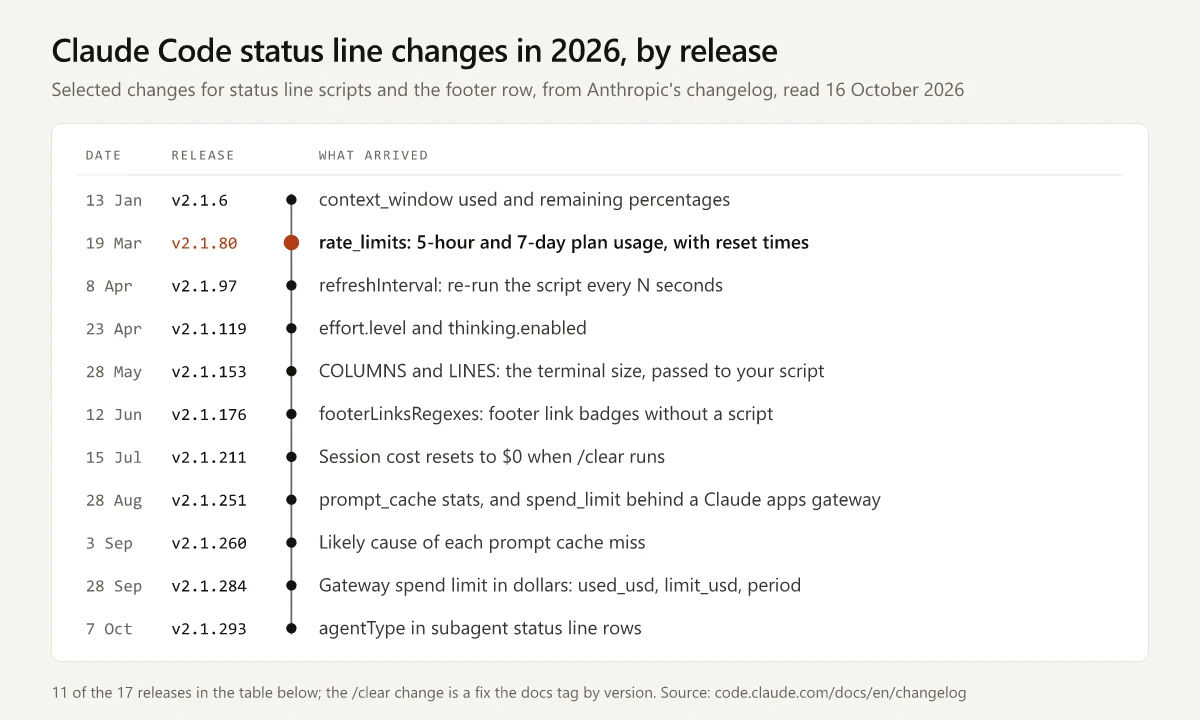
The status line additions in Anthropic’s changelog for 2026, plus the two fixes the docs page tags by version:
| Release | Date | What arrived |
|---|---|---|
| v2.1.6 | 13 Jan | context_window.used_percentage and remaining_percentage |
| v2.1.47 | 18 Feb | workspace.added_dirs, the folders added with /add-dir |
| v2.1.69 | 5 Mar | worktree, in a worktree session |
| v2.1.80 | 19 Mar | rate_limits: 5-hour and 7-day used_percentage and resets_at |
| v2.1.97 | 8 Apr | The refreshInterval setting, and workspace.git_worktree |
| v2.1.119 | 23 Apr | effort.level and thinking.enabled |
| v2.1.145 | 19 May | GitHub repo and pull request details |
| v2.1.153 | 28 May | COLUMNS and LINES environment variables |
| v2.1.176 | 12 Jun | footerLinksRegexes, link badges in the footer without a script |
| v2.1.211 | 15 Jul | Session cost resets to $0 after /clear (a fix) |
| v2.1.214 | 18 Jul | Reasoning effort in the subagentStatusLine input |
| v2.1.234 | 17 Aug | GitLab merge requests in the pr fields, marked by pr.kind |
| v2.1.243 | 25 Aug | The modelPricing managed setting, so cost uses contracted rates |
| v2.1.251 | 28 Aug | The prompt_cache object, and rate_limits.spend_limit behind a Claude apps gateway |
| v2.1.260 | 3 Sep | last_miss_cause and miss_causes, the likely cause of each cache miss; workspace.repo for GitLab projects in nested subgroups (a fix) |
| v2.1.284 | 28 Sep | Spend limit in dollars: used_usd, limit_usd and period |
| v2.1.293 | 7 Oct | agentType in the subagentStatusLine input |
The docs page and the changelog disagree on one tag. The page says the subagent effort field “Requires Claude Code v2.1.213 or later”; the changelog has no 2.1.213 release and lists the addition under v2.1.214.
Three 2026 Guides Checked Against the Changelog
- Hannah Stulberg’s Substack guide (13 March 2026) came out six days before v2.1.80 added
rate_limits, and it reads plan usage by callinghttps://api.anthropic.com/api/oauth/usagewith the OAuth token from~/.claude/.credentials.jsonor the macOS keychain. A search of the full Claude Code docs text on 16 October 2026 found no mention of that endpoint, whilerate_limitsarrives on stdin with no token handling. - Daniel Mackay’s dandoescode guide (1 April 2026) says rate-limit data “was missing until Claude Code v1.2.80 shipped”; the changelog lists
rate_limitsunder v2.1.80. Its script “handles both macOS and Linux date formatting”, with no Windows route, and “The 7-day rate limit line is in the script but commented out”. - Andrew Connell’s guide (6 June 2026) has install steps for macOS, Linux, WSL, Git Bash, cmd.exe and PowerShell, and shows both usage windows.
None of the three mentions refreshInterval, effort, prompt_cache, footerLinksRegexes, subagentStatusLine or mods.
Claude Code Status Line Fields: Estimated or Reported, Always or Plan-Gated
| Field | What it holds | Estimate? | Present when |
|---|---|---|---|
model.display_name | The model’s display name, such as Opus | No | Always |
workspace.current_dir, also cwd | The working directory; the docs prefer workspace.current_dir | No | Always |
context_window.used_percentage | Share of the context window used, counting input tokens only | No, it is from the last API response, so /context can read higher | Can be null early in a session |
cost.total_cost_usd | Session cost in US dollars | Yes: “computed client-side at list price unless a modelPricing table is in effect. May differ from your actual bill.” | Always; resets to $0 when /clear starts a new session |
effort.level | low, medium, high, xhigh or max, including mid-session /effort changes | No | Absent when the model does not support effort |
rate_limits.five_hour, rate_limits.seven_day | used_percentage from 0 to 100, and resets_at in Unix epoch seconds | No | claude.ai Pro and Max subscribers, “only after the first API response”; each window can be absent, and Claude Code “drops a window once its resets_at time passes” |
rate_limits.spend_limit | Use of a gateway spend limit, with dollar fields from v2.1.284 | The dollars are the gateway’s estimate, up to about five minutes older than the percentage | Behind a Claude apps gateway with a spend limit |
prompt_cache | warm, hit_ratio, misses, expires_at and the cause of the last miss | Partly: counts come from the API’s responses, and last_miss_cause is “the likely cause”; subagent requests are not counted | After the main conversation’s first API response |
pr.number, pr.url, pr.review_state | The open pull request, or GitLab merge request, for the branch | No | Only while one is open |
session_name | The name from /rename or the --name flag, or the AI-generated title | No | Absent when there is neither |
vim.mode | NORMAL, INSERT, VISUAL or VISUAL LINE | No | Only with vim mode on |
On the rate-limit fields:
- The docs list only claude.ai Pro and Max subscribers and users behind a Claude apps gateway with spend limits, and name no Team or Enterprise plan and no API key there. If a session might be signed in with a key, the credential check in my API key vs subscription comparison shows which login it uses.
- The percentages are the same five-hour and weekly limits that my guide to Claude usage limits covers plan by plan, including what to do when one runs out.
The prompt_cache fields mirror the Prompt cache (main) line in /usage; what turns a warm cache cold is in the slow-session breakdown.
Claude Code Statusline Examples for Windows
On Windows, the docs’ Windows configuration section says “Claude Code runs status line commands through Git Bash when Git Bash is installed, or through PowerShell when Git Bash is absent.” It adds:
- Write the path in
commandwith forward slashes. Git Bash consumes unquoted backslashes, and “the command fails without a visible error”. The~shorthand also works and expands to your Windows home folder. - Call a PowerShell script through
powershell, which the docs say works whichever shell Claude Code routes the command through. The block below adds-ExecutionPolicy Bypassto the docs’ version, for a machine that still has Restricted, the execution policy Microsoft sets by default on Windows clients:
{
  "statusLine": {
    "type": "command",
    "command": "powershell -NoProfile -ExecutionPolicy Bypass -File C:/Users/you/.claude/statusline.ps1"
  }
}
The docs’ PowerShell example prints the folder, model and context percentage. This version adds effort and both plan-usage windows with local reset times, and skips the context, effort and plan-usage parts when those fields are absent:
# statusline.ps1: folder, model, context, effort and plan usage
$d = $input | Out-String | ConvertFrom-Json
$out = "$(Split-Path $d.workspace.current_dir -Leaf) [$($d.model.display_name)]"

if ($null -ne $d.context_window.used_percentage) {
    $out += " | ctx $([math]::Round($d.context_window.used_percentage))%"
}
if ($d.effort.level) { $out += " | effort $($d.effort.level)" }

# 5-hour and 7-day windows: Pro and Max, after the first response; each can be absent
function Get-Window($win, $label, $format) {
    if ($null -eq $win.used_percentage) { return '' }
    $reset = [DateTimeOffset]::FromUnixTimeSeconds([long]$win.resets_at).ToLocalTime()
    return " | $label $([math]::Round($win.used_percentage))% to $($reset.ToString($format))"
}
$out += Get-Window $d.rate_limits.five_hour '5h' 'HH:mm'
$out += Get-Window $d.rate_limits.seven_day '7d' 'ddd HH:mm'

Write-Host $out
Piping the docs’ full sample JSON (their “Full JSON schema” block) into it on 16 October 2026, in Windows PowerShell on Windows 11, printed:
directory [Opus] | ctx 8% | effort high | 5h 24% to 21:30 | 7d 41% to Thu 21:30Both resets_at values in that sample fall at 16:00 UTC, and the script prints local time, 21:30 on a machine set to India time. Fed the docs’ shorter test JSON, which has no rate_limits or effort, it printed project [Opus] | ctx 25%.
To test a script the same way, this line works in both Git Bash and PowerShell:
echo '{"cwd":"C:\\Users\\you\\project","model":{"display_name":"Opus"},"workspace":{"current_dir":"C:\\Users\\you\\project"},"context_window":{"used_percentage":25},"session_id":"test-session-abc"}' | powershell -NoProfile -ExecutionPolicy Bypass -File C:/Users/you/.claude/statusline.ps1It is the docs’ one-line sample with Windows paths: a cwd field added and workspace.current_dir set to the same folder. That sample has no cwd, while both of the docs’ Windows scripts read it: fed the sample as printed, their PowerShell script printed [Opus] ctx: 25% with an empty folder name and wrote a Split-Path “Cannot bind argument to parameter ‘Path’ because it is null” error to stderr, and their Git Bash script printed [Opus] after an empty folder name. With cwd added, both printed the folder name, project.
- jq: the docs’ Bash examples use it, and it is “a command-line JSON parser you may need to install”. The docs’ Git Bash example reads the JSON with
grepinstead, and their Python and Node versions need no jq. - Node: the Stulberg guide’s Windows route is a Node.js script, on the premise that “Node.js is already installed (Claude Code runs on it)”. Anthropic’s setup page says even the npm package “downloads a native binary that doesn’t use your Node.js at runtime”, so run
node --versionbefore you pick a Node script.
Git Bash or PowerShell as Claude Code’s own shell, and the errors each one throws, are compared in the WSL vs Windows guide.
Three Ways to Get a Claude Statusline
| Route | How it works | What runs on every refresh | Fits |
|---|---|---|---|
/statusline | Describe the bar in plain English; Claude Code writes a script into ~/.claude/ and edits your settings, asking you to approve the edits if it needs permission | That script | A first status line, or a copy of your shell prompt |
| Your own script | Start from one of the docs’ examples (Bash with jq, Python, Node; PowerShell and jq-free Git Bash on Windows) or the PowerShell script above | Your script and nothing else | You want every field to be one you chose and can read |
| A third-party builder | ccstatusline opens a configuration screen with npx -y ccstatusline@latest; statusline.sh generates “a self-contained bash or PowerShell installer”; Anthropic’s page also names starship-claude | The builder’s code | Themes, widgets and powerline styles without writing code |
Before you install a builder:
- The command runs as you, with the full access the sandboxing row above describes, and an
npxorcurlinstaller makes that command someone else’s code. Read what it installs before you run it. - Startup cost repeats. ccstatusline’s README says “The status line command runs once per repaint, so what it costs to invoke is paid over and over”, and publishes its own timings, “Measured on Windows with a warm cache, median of five runs of
--version”.
| Command, as measured in ccstatusline’s README | Median |
|---|---|
bunx -y ccstatusline@latest | 633 ms |
bunx -y ccstatusline@2.2.27 | 202 ms |
npx -y ccstatusline@latest | 1082 ms |
npx -y ccstatusline@2.2.27 | 1135 ms |
The README’s answer is the “Pinned global install” option in its setup flow, which writes "command": "ccstatusline" and, in the README’s words, “avoids the resolution entirely” under bunx and npx alike. Anthropic’s docs state the cost on Claude Code’s side: “Slow scripts block the status line from updating until they complete.”
Claude Code Status Line Not Showing or Not Working
Match the symptom to a row. Causes and fixes come from Anthropic’s status line troubleshooting, settings reference, environment variable list and changelog as of 16 October 2026, plus Microsoft’s execution policy docs for the PowerShell row.
| Symptom | Cause | Fix |
|---|---|---|
| Blank in one folder only | The folder is not trusted; since v2.1.232 (13 August 2026) each nested git repository “now requires its own trust confirmation” | Restart and accept the trust dialog; claude --debug logs Status line command skipped: workspace trust not accepted |
| Blank everywhere | The script exits with a non-zero code, prints nothing, or prints to stderr; for a .ps1 script, PowerShell’s execution policy can also block it | Output shows “only after the script exits with code 0”; run the script by hand with the test line above |
| Blank on Windows, with no error | Backslashes in the command path, consumed by Git Bash | Forward slashes |
A .ps1 test stops with “running scripts is disabled on this system” | PowerShell’s execution policy; Microsoft calls Restricted “The default execution policy for Windows client computers” | Add -ExecutionPolicy Bypass before -File, in the test line and in the command; Microsoft says a policy set this way “affects only the current session and child sessions”. Anthropic’s environment variable list describes a process-scope bypass for PowerShell that Claude Code spawns itself; read with the docs’ Windows routing sentence, a status line gets that bypass only where Git Bash is absent, so keep the flag in your command; CLAUDE_CODE_POWERSHELL_RESPECT_EXECUTION_POLICY=1 turns it off, and it never overrides Group Policy |
| Gone without a warning | allowManagedHooksOnly in your organization’s managed settings, disableAllHooks set to true outside managed settings, or a --safe-mode start; Claude Code then “skips your value without warning” | Set that disableAllHooks to false or remove it, start without --safe-mode, or ask your administrator about allowManagedHooksOnly; under these gates only a managed statusLine runs, and if managed settings set disableAllHooks, no status line runs at all |
| Missing in the VS Code chat panel | The VS Code guide documents no statusLine in the panel | Run claude in the integrated terminal, or use a mod (extension 2.1.299 or later) |
| Dashes or empty values | Fields can be null before the first API response | Fallbacks in the script, such as // 0 in jq; restart if values stay empty after several messages |
No rate_limits | Not on Pro or Max, no API response yet, or the window passed its resets_at | Send a message, then check the plan and the login |
| 5-hour or 7-day usage above 100%, or a pre-reset figure after a reset | Bugs fixed in v2.1.299 (14 October 2026) and v2.1.243 (25 August 2026); a spend_limit above 100% is documented: the gateway limit was exceeded | Update to v2.1.299 or later |
Context percentage lower than /context | The bar uses the last API response; /context adds an estimate for newer messages | Expected; the two match again after the next response |
| Output cut off on the right | Outside fullscreen rendering, notifications share the row and can truncate it | Shorter output, sized with COLUMNS |
| Stale or laggy | A slow command such as git status in a large repository | Cache slow calls in a file keyed by session_id, as the docs’ caching example does |
esc to interrupt and other footer hints gone | A custom status line “stops showing most of the footer’s keyboard hints” | Remove the statusLine to get the hints back; if link badges were all you wanted from the bar, the docs point to footerLinksRegexes instead, which needs no script |
The changelog contradicts that last row: its v2.1.169 entry (8 June 2026) reads “Fixed footer hints (e.g. ‘esc to interrupt’) not showing for users with a custom statusline”, and no later footer-hint entry reverses it. Check your own footer after you add a bar.
To see why a script misbehaves, run claude --debug, which logs its stderr on every run and its exit code on the first run in a session. Anthropic’s environment variable list adds that CLAUDE_CODE_DEBUG_LOG_LEVEL=verbose includes “full status line command output” in the debug log.
Claude Code Statusline: Check the Version and the Surface First
A Claude Code statusline runs a short script, but your release sets which fields exist, and where you run Claude Code decides whether the bar shows at all: in VS Code, the documented routes are the integrated terminal and, from extension 2.1.299, a mod’s status line.
Run claude --version, then pick your fields from the 2026 rows your release already has.
Frequently Asked Questions
How do I add a status line in Claude Code?
Run /statusline with a description of what to show, such as /statusline show model name and context percentage with a progress bar, and Claude Code writes a script into ~/.claude/ and updates your settings. Or add a statusLine block, with type set to command and a script path, to ~/.claude/settings.json; Claude Code runs it as soon as you save the file.
Why is my Claude Code status line not showing?
Check where you run it first: Anthropic's VS Code guide documents no statusLine for the extension's chat panel, so run claude in VS Code's integrated terminal. Then check that the folder is trusted, that the script exits with code 0 and prints to stdout, and on Windows that the command path uses forward slashes, because Git Bash consumes backslashes. With allowManagedHooksOnly, your own disableAllHooks or a --safe-mode start, Claude Code skips your status line without a warning unless a managed one is deployed.
Does the status line work in the VS Code extension?
Anthropic's VS Code guide does not mention the statusLine setting, and its advice for CLI-only features is to run claude in VS Code's integrated terminal, where the CLI reads the same settings file. From extension 2.1.299, a plugin that contains a mod can draw a status line above the chat panel's prompt box, in sessions that fetch feature flags.
Can the status line show my usage limits?
Yes, on Pro and Max plans. Since v2.1.80 the JSON includes rate_limits, with the percentage used and the reset time of the five-hour and seven-day windows. It appears only after the first API response, and each window can be absent.
What can a Claude Code status line display?
Whatever your script prints from the session JSON: model, folder, context window percentage, estimated session cost, effort level, plan usage, prompt cache state, and pull request or worktree details. Output can run to several lines, with ANSI colors and clickable OSC 8 links.