Why Is Claude Code So Slow? Find Which Kind of Slow First
Why is Claude Code so slow? One slow turn is a prompt cache rebuild, every turn is effort, model or conversation length, and a slow machine is CPU or memory.
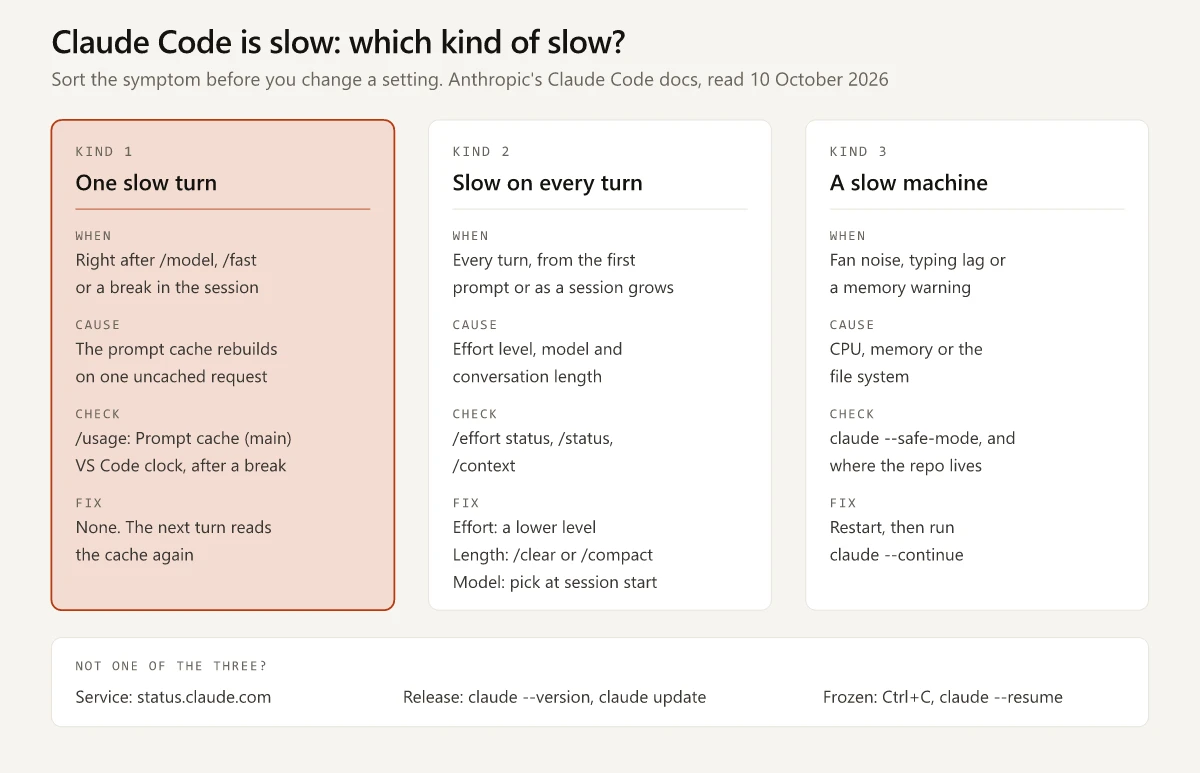
I split “why is Claude Code so slow” into three kinds of slow before I look for a fix, because the fix is different for each:
- One slow turn. A single response drags right after you switched model, turned on fast mode or came back from a break, and the turn after it is quick again.
- Slow on every turn. Responses take long turn after turn, either from the first prompt of a new session or more and more as a long session grows.
- A slow machine. The fan spins up, typing lags or a memory warning appears, and the cause is local: CPU, memory or the file system.
In a slow session the tempting move is to change a setting on the spot: switch to a smaller model or lower the effort. Anthropic’s prompt caching page says “some actions invalidate the cache and make the next response slower and more expensive while it rebuilds”, and its list of those actions opens with switching models.
The rule I take from that page is to name the kind of slow before touching a setting, and to pick the model when a session starts. Effort is the exception: on Opus 5.5, Sonnet 5.5, Haiku 5.5 and Fable 5.1 with a subscription or an API key, the same page says a change keeps the cache, so there it can come down mid-session.
I build this site with the Claude Code extension in VS Code on Windows 11. My standalone CLI reported v2.1.283 on 10 October 2026, and every docs quote below was read that day.
Why Is Claude Code So Slow?
Claude Code is slow on your side when the prompt cache is rebuilding, when a high effort level, a larger model or a long conversation stretches every turn, or when the machine is short of CPU or memory. A cache rebuild slows the one turn after a model switch, an effort change on most models, fast mode or a break.
Match what you see to a row, and if the slowdown started today, begin at the service and release rows. Each check is a documented command or indicator, and the slash commands are in my Claude Code commands cheat sheet.
| What you see | Likely cause | Check first | Fix | Costs extra? |
|---|---|---|---|---|
One response drags right after /model or /fast (or after /effort, on the models the cache table marks yes) | Prompt cache rebuild (one slow turn) | In the CLI, /usage and its Prompt cache (main) line | Nothing: the next turn reads the cache again | No |
| A response drags right after a break | Cache expired (one slow turn) | Before you send, the same line reads cold and the VS Code prompt cache clock is red; afterwards the line shows one more miss with its time | Expected once the cache lifetime has passed | No |
/compact itself takes a while | The summary being written (one slow step) | Whether the cache was still warm; a cold one means the full history is re-read | Nothing: Anthropic says the turn after a compaction “is not the slow part” | No |
| Every response is slow from the first prompt, with long thinking | Effort level (every turn) | The effort level beside the model name: the session header in the CLI, the model name button in VS Code | A lower effort level: at once on Opus 5.5, Sonnet 5.5, Haiku 5.5 or Fable 5.1 with a subscription or an API key, where the change keeps the cache; otherwise when the session starts | No |
| Responses get slower as a long session goes on | Conversation length (every turn) | /context | /clear between tasks, /compact at a break | No |
| Output arrives slowly once it starts | Standard output speed (every turn) | /fast | Fast mode, on Opus models | Yes |
| Claude Code is slowing down the computer: fan noise, typing lag or a memory warning | CPU or memory (slow machine) | Whether usage drops under claude --safe-mode | Restart, then claude --continue | No |
| Search is slow or misses files in WSL | Cross-file-system reads (slow machine) | Whether the repo sits under /mnt/c/ | Move it to the Linux file system, or run natively on Windows | No |
A Retrying in Ns countdown, or a 529 Overloaded error | The service, your network or a rate limit | The label before the countdown, then status.claude.com | For a 529, wait or /model to another model | No |
| Slow or frozen since an update | A regression in your release | claude --version, or /status in the VS Code panel, against the changelog | claude update for the standalone CLI | No |
| No reaction to any key | A hang | Ctrl+C | Restart, then claude --resume | No |
The last three rows sit outside the three kinds: the service, the release and a hang. The retry and 529 wording is from Anthropic’s error reference.
One Slow Turn: What Breaks the Prompt Cache
Every message you send is a new API request that re-sends the full context: the system prompt, your project context, every earlier message and every tool result. Prompt caching lets the API reuse the unchanged start of that request, and Anthropic’s page says “The match is exact, so a change anywhere in the prefix recomputes everything after it.”
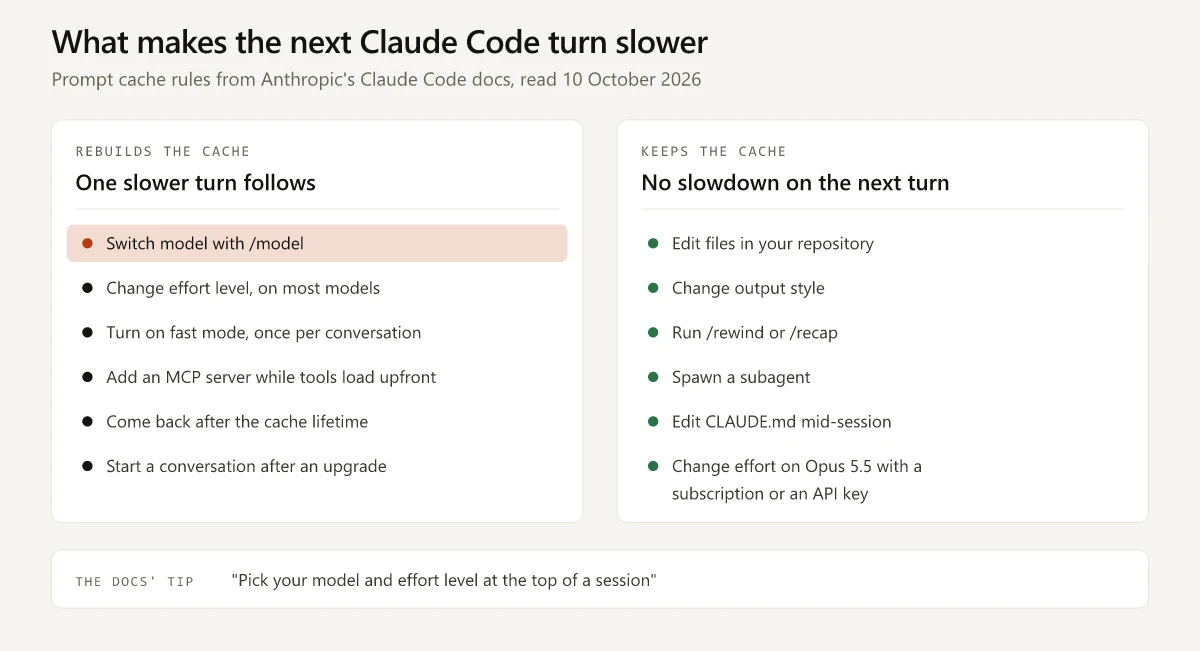
The page lists nine actions that invalidate the cache and describes the result as “a one-time slower, more expensive turn, after which the new prefix is cached.” The table lists them, plus two timing cases from the same page: a break and a resumed session.
| Action | Slower next turn? | Anthropic’s wording | How to avoid it |
|---|---|---|---|
Switching models with /model | Yes | ”the next request reads the entire conversation history with no cache hits” | Choose the model when the session starts; while the cache is warm, /model asks you to confirm |
A model switch you did not type: opusplan toggling plan mode, a skill whose frontmatter names another model, automatic model fallback | Yes | With opusplan, “each plan-mode toggle is a model switch and starts a fresh cache” | Know which of these your setup uses |
| Changing effort level | On most models, yes; on Opus 5.5, Sonnet 5.5, Haiku 5.5 and Fable 5.1 with an API key or a Claude subscription, no | On those four, “changing effort keeps the cache” | Elsewhere, including Amazon Bedrock and Google Cloud’s Agent Platform, set effort at the start |
| Turning on fast mode | Yes, once per conversation | ”the first request Claude Code sends with fast mode on reads the entire conversation history with no cache hits” | Turn it on at the start of a session |
| Connecting or removing an MCP server | Only when tools load upfront; with tool search, the default on supported models, no | ”adding a definition invalidates the cache, and so does removing one on purpose” | Leave tool search on |
| Enabling or disabling a plugin | Depends on what the plugin provides | ”Claude Code never invalidates the cache for a plugin’s skills, commands, agents, hooks, monitors, or themes”; its MCP servers follow the MCP row | /reload-plugins warns before a full re-read |
Denying an entire tool, such as a bare Bash deny rule | Only when tool search is unavailable or disabled | ”Claude Code removes the definition from the next request, which invalidates the cache” | Scoped rules such as Bash(rm *) “don’t change which tools Claude sees” |
/compact | The compaction is the slow step; the turn after it “is not the slow part” | While the cache is warm, the request “spends most of its time generating the summary” | Compact at a natural break, while the cache is still warm |
| Many images or PDFs in one conversation | Yes, each time Claude Code drops a batch of the oldest ones | ”you see one slower turn per batch rather than one with each new screenshot” | Nothing to change |
| Upgrading Claude Code | The opening turn of the next conversation you start | ”the first conversation you start after an upgrade builds its cache from the top” | Updates apply on the next launch, never mid-session |
| Coming back after a break | Yes, once the cache lifetime has passed | ”the first turn back after stepping away can be noticeably slower” | On an API key, a cloud provider or usage credits, set promptCacheTtl to 1h (v2.1.242 or later), at a higher cache write rate; a subscription within plan usage already gets one hour |
| Resuming an old session | Yes, for whatever has expired | ”Claude Code sends the whole conversation again” | Nothing avoids that request |
The cache lifetime of the main conversation depends on billing:
- On a Claude subscription within plan usage: one hour
- On usage credits, an API key or a cloud provider: five minutes
My comparison of an API key and a subscription login shows how to tell which credential a session is using, and a separate guide covers what /compact and /clear each keep and drop.
When the resume dialog appears on Pro or Max, Anthropic’s sessions page says the next request “processes the full history once no matter which of the dialog’s options you pick”, and resuming from a summary only shortens the requests after it.
Actions That Keep the Cache
The same page lists actions that keep the cache, so none of these forces a rebuild:
- Editing files in your repository
- Changing permission mode, unless
opusplanturns a plan-mode toggle into a model switch - Changing output style
- Invoking a skill or command, unless its frontmatter names a different model
- Running
/recapor/rewind - Spawning a subagent
- Editing CLAUDE.md mid-session, though the edit does not apply until the next
/clear,/compactor restart
CLAUDE.md edits are on that list, and with tool search on, the page says an MCP server connecting or disconnecting mid-session “doesn’t disturb anything already cached”. If a guide tells you either one cost you the cache, check it against this page.
How to Confirm a Cache Miss
| Where | What to read | What it tells you | Version |
|---|---|---|---|
| CLI | /usage, then the Prompt cache (main) line in the Session block | Requests so far, the share of input tokens served from cache, misses with the time of the last one, expected rebuilds such as a compaction (counted apart from misses), and whether the cache is warm or cold | v2.1.251 or later |
| CLI | The likely cause text on that line, for example likely cause: tool definitions changed | What Claude Code identified as the cause of the last miss | v2.1.260 or later |
| VS Code panel | The prompt cache clock, a clock icon next to the context indicator | Minutes left before the cache expires; when the icon turns red, “expect a slower, more expensive response to your next message while the cache rebuilds” | v2.1.296 fixed the clock reading warm after the panel caught up on messages late, for example after the display was off |
The /usage line is documented under prompt cache statistics and covers the main conversation only.
In the VS Code panel the clock is the check: the VS Code guide describes /usage there as an Account & usage dialog and mentions no prompt cache line. The clock is a timer for the cache lifetime, and the guide states its limit: “Apart from compaction, the actions that invalidate the cache don’t reset the clock, so it can still show minutes left after you switch models.”
Slow on Every Turn: Effort, Model and Fast Mode
Anthropic’s models overview gives each model a comparative latency label, with a note (markdown version) that says: “Actual latency depends on prompt length, output length, and thinking effort.” The table lists what you control for each:
| What sets the speed | Anthropic’s wording | Where to read yours | Faster choice | What it costs |
|---|---|---|---|---|
| Thinking effort | ”Lower effort is faster and cheaper for straightforward tasks, while higher effort provides deeper reasoning for complex problems.” | The session header beside the model name, /effort status, or the model name button in VS Code | A lower level: /effort medium in the session, or claude --effort medium at launch | ”potentially lower quality on complex tasks” |
| Model | Comparative latency: Fable 5.1 Slower, Opus 5.5 Moderate, Sonnet 5.5 Fast, Haiku 5.5 Fastest | /status | A smaller model: claude --model sonnet at launch, or /model before the first prompt | Capability on hard tasks |
| Conversation length | ”Claude Code sends your full conversation with every request” | /context, or the context indicator in VS Code | /clear between tasks, /compact at a break | Whatever the summary leaves out |
| Output speed | Fast mode makes Opus “up to 2.5x faster at a higher cost per token” | /fast | Fast mode | A higher per-token price, billed outside plan limits |
| Hooks, if you have any | ”By default, hooks block Claude’s execution until they complete.” | /hooks; the /doctor checkup looks for slow hooks; from v2.1.296, --debug logs the duration of command hooks on tool calls, prompts, SessionStart and Stop, per the changelog | "async": true on long-running hooks | An async hook cannot block or control what Claude does |
Sources: the effort level docs, the costs page, the hooks reference, the /doctor checkup and the fast mode page.
When to change model and effort:
- Model: when a session starts. The caching page’s own tip reads “Pick your model and effort level at the top of a session”, and a smaller model picked mid-session costs one uncached turn before it saves any time. Which model suits which job is a cost question too, and my Claude Sonnet vs Opus vs Haiku comparison prices it per job.
- Effort: mid-session without that cost on the four models the cache table names, with a subscription or an API key. Elsewhere, set it at the start as well.
Thinking cannot be turned off on Opus 5.5, Sonnet 5.5, Haiku 5.5 or the Fable models, so on those the effort level is the control. I would keep a lower level for simple tasks, because Anthropic’s own pages describe a cost at both ends:
- At the top, the docs warn that
max“may show diminishing returns and is prone to overthinking”. - Lower down, an April 2026 engineering post says the testing behind Anthropic’s March 2026 change of default found that “medium effort achieved slightly lower intelligence with significantly less latency for the majority of tasks”.
- The same post calls that change “the wrong tradeoff”: Anthropic reverted it on 7 April, after users said they would rather “default to higher intelligence and opt into lower effort for simple tasks”.
For conversation length, the closest public measurement I found is Aakash Ahuja’s analysis of his own session transcripts: across 74,493 assistant turns on client versions 2.1.187 through 2.1.222, it reports a median turn of 1.1 seconds in a fresh session under 25K tokens of context and 3.5 seconds at around 150K. Those numbers come from releases older than today’s.
Fast Mode Costs Extra on Every Plan
Fast mode is the one setting in this section that adds to the bill. Anthropic’s fast mode page calls it a research preview whose “feature, pricing, and availability may change based on feedback”, so read this table as the terms on 10 October 2026:
| Term | Fast mode as documented |
|---|---|
| Models | Opus 5.5 (the fast mode default from v2.1.280), Opus 5 and Opus 4.8; “It is not available on Sonnet, Haiku, or other models.” |
| Speed | The API reference specifies “up to 2.5x higher output tokens per second” and says the gain is “focused on output tokens per second (OTPS), not time to first token (TTFT)“ |
| Price per million tokens, input and output | $8 and $40 on Opus 5.5, against $4 and $20 at standard speed; $10 and $50 on Opus 5 and Opus 4.8, against $5 and $25 |
| On Pro, Max, Team and Enterprise | ”available via usage credits only and not included in the subscription rate limits”; it “draws directly from usage credits, even if you have remaining usage on your plan” |
| Before it turns on | Usage credits must be on, or /fast reports “Fast mode requires usage credits”; Team and Enterprise need an Owner to enable it; a Claude Console organization pays per token and needs access provisioned |
| Not available on | Amazon Bedrock, Google Cloud’s Agent Platform, Microsoft Foundry and Claude Platform on AWS |
| Charge when you enable it | ”you pay the full fast mode uncached input token price for the entire conversation context”, once per conversation |
| How to toggle | /fast in the CLI (Space, then Enter) or "fastMode": true in user settings; the VS Code extension offers a Toggle fast mode command when the selected model supports it; by default the choice “persists across sessions” |
The speed and price rows also draw on the API’s fast mode reference and pricing page. On each supported model the fast price is double the standard one.
Whether it helps depends on where your wait is. The documented gain is in how fast output is generated, so a wait before anything appears, such as a cache rebuild, falls outside what the API reference promises. For the billing side, see how Claude usage credits are bought, capped and billed.
My Settings File on 10 October 2026
I read my user settings file, ~/.claude/settings.json, for the keys that affect speed:
| Key | What the file holds | Effect, per Anthropic’s docs |
|---|---|---|
model | "opus" | New sessions start on the latest Opus, which the model aliases table maps to Opus 5.5 on the Anthropic API, the model labelled Moderate for latency |
modelSettings | xhigh for claude-opus-5-5 and for claude-opus-5 | A session on either model starts at xhigh, two levels above the medium default of Opus 5.5 |
fastMode | Not set | No saved fast mode preference in this file |
hooks | None | No hooks are configured in my settings files |
My settings map from 30 September recorded medium for Opus 5.5 in the same file, and on 10 October it reads xhigh. The file holds the level and no record of what saved it.
Anthropic documents how a level becomes a saved default:
- In the terminal, confirming with
Enterin the/effortslider or the/modelpicker makes Claude Code “save the level as your default and apply it in later sessions”, while pressingsapplies it “to this session only” (v2.1.257 or later). - In the VS Code picker, “When you pick a level other than
max, Claude Code saves it for the current model as your default”.
A level saved either way, even one raised for a single hard task, stays for every later session on that model until it is lowered.
Nothing in that file is tuned for speed, and the modelSettings line asks for deeper reasoning than the model’s default. The docs’ own advice for Opus 5.5 points the other way: “start at medium rather than carrying over the level you used on Opus 5”.
A Slow Machine Is a Separate Problem
Anthropic’s troubleshooting page files “High CPU or memory, slow responses, hangs, search not finding files” in one symptom row and routes it to its Performance and stability section, which covers “resource usage, responsiveness, and search behavior”. Its high CPU or memory steps are:
- “Use
/compactregularly to reduce context size.” - “Close and restart Claude Code between major tasks”
- “Consider adding large build directories to your
.gitignorefile” - “Restart with
claude --safe-modeto check whether a plugin, MCP server, or hook is the source.”
The same section sets a memory threshold: “If a session’s heap memory passes 2.5GB, a critical memory usage warning appears.” The fix is to restart and run claude --continue, which resumes the conversation in a fresh process.
claude --safe-mode is the isolation test. The CLI reference says it starts a session in which customizations do not load, among them CLAUDE.md, skills, plugins, hooks, MCP servers, custom commands and agents, output styles, status line commands and auto memory, while “Authentication, model selection, built-in tools, and permissions work normally”. The flag arrived in v2.1.169 on 8 June 2026, per the changelog.
The troubleshooting step tests resources: “if usage drops”, one of those customizations was the source, and the debug your configuration page has the check for each. The page does not offer safe mode as a test of response speed, so I would treat a faster-feeling safe-mode session as a hint to confirm with /mcp and /hooks.
By that list, a safe-mode session in this repo would start without my auto memory index, my custom commands, the 20 project-level design skills, my user-level skills and the Ahrefs MCP server, and without the one plugin my user settings enable. All but the plugin are described under the Claude Code setup behind this site.
On Windows, Check Where the Repo Lives
Running Claude Code inside WSL against a repo under /mnt/c/ is the documented slow path: Anthropic’s WSL search note describes disk read penalties across file systems. Where to keep the repo, and the claude doctor reading that stays OK while this happens, are in my WSL vs Windows comparison.
This site’s repo sits on the C: drive and I run Claude Code natively, so that penalty does not apply to my setup.
Why Is Claude Code So Slow Today? Check the Service, Then the Release
When a session was fine yesterday and drags today, look outside your settings first: at Anthropic’s service and at the release you are running.
Service Status
Anthropic’s status page is status.claude.com, and the older status.anthropic.com address redirected there when I checked on 10 October 2026. Claude Code also shows in the session when a request is waiting on the service or on your network:
| What Claude Code shows | What the error reference says it means | What to do |
|---|---|---|
A Retrying in Ns countdown with an attempt x/y count beside the spinner | Claude Code “retries transient failures up to 10 times with exponential backoff before showing you an error” | Read the label before the countdown, which names the network, a TLS handshake or a rate limit when one of those is the cause; for a 529 overload, the line under the countdown names status.claude.com |
API Error: Repeated 529 Overloaded errors, or Opus is experiencing high load, please use /model to switch to Sonnet | ”The API is temporarily at capacity across all users”; a 529 “is not your usage limit and doesn’t count against your quota” | Try again in a few minutes, or run /model, “since capacity is tracked per model” |
A Waiting for API response line that ends with check your network | No data has arrived for 20 seconds; “The request hasn’t failed yet” | If it shows on every attempt, treat it as a network issue |
These messages are documented under automatic retries and the 529 entry. The model switch in the 529 row is still a model switch, so the caching rule applies and the next request re-reads the conversation with no cache hits. I would take that single slower turn on a model with capacity over waiting on one without.
13 Releases, 46 Entries That Mention Slowness
My standalone CLI was on v2.1.283 when the newest entry in Anthropic’s Claude Code changelog was v2.1.296, dated 9 October 2026, with 13 releases listed after mine.
I searched those 13 for entries containing the words slow, hang, freeze, stall or stuck, or a form of them such as slowest, hung or frozen: 46 entries matched, 41 of them fixes and 5 improvements. By word, 15 mention a freeze, 11 a stall, 10 something slow, 8 a hang and 2 something stuck.
It is a word match, so it also catches entries where a slow component set off a different bug, such as the v2.1.296 fix for a prompt “being run twice” when the background service was slow to answer. The changelog also covers more than the terminal, so some of the 46 concern Slack, Chrome or cloud sessions. These five match symptoms in the terminal or the VS Code panel:
| Version | Date | Changelog entry | Symptom it matches |
|---|---|---|---|
| v2.1.285 | 29 September | ”Fixed every file Read, Write and Edit stalling for ten minutes and then being skipped when the editor stops responding to the extension’s automatic save before the tool runs” (VS Code) | A file edit in VS Code that never finishes |
| v2.1.285 | 29 September | ”Fixed the chat panel stalling when a long session trims its oldest rows” (VS Code) | The panel stalls late in a long session |
| v2.1.288 | 2 October | ”Fixed LSP tool calls hanging indefinitely when a language server uses dynamic capability registration or stops responding; requests now time out after 60s” | A turn stuck on one tool call |
| v2.1.290 | 5 October | ”Fixed slow or failed startup since 2.1.285 under SDK hosts such as the VS Code extension when managed settings deny reads of many paths on a slow filesystem (notably Windows drives under WSL)“ | Slow or failed startup in VS Code when managed settings deny reads of many paths and the repo is on a slow file system, such as a Windows drive under WSL |
| v2.1.295 | 8 October | ”Fixed the terminal freezing, with ctrl+c ignored, when a response ran to tens of thousands of lines” | A frozen terminal that ignores Ctrl+C |
The v2.1.290 row names the release that introduced the slowdown it fixes: “since 2.1.285”. For the setups it describes, that regression ran from the 29 September release to the 5 October one, and the fix arrived as an update.
Before changing a setting on a slow day, run claude --version, compare it with the changelog and update. How you update depends on the install:
claude updateapplies an update at once and follows your release channel. Thestablechannel serves a version that is “typically about one week old”, so a few releases behind can be by design.- A WinGet install does not auto-update by default; it upgrades with
winget upgrade Anthropic.ClaudeCode. - The VS Code panel runs its own bundled copy of the CLI, so read its version with
/status.
Inside a session, the /doctor checkup reports whether a newer version is available on your release channel.
Claude Code Slow in VS Code: What the Extension Attaches
The extension’s chat panel runs its own bundled copy of the CLI, so the three kinds of slow apply to it too. What is specific to VS Code is what the extension adds to each message. Per the VS Code guide:
| What gets added | Anthropic’s wording | How to turn it off |
|---|---|---|
| Your selection | ”When you select text in the editor, Claude can see your highlighted code automatically.” | Click the X on the selection indicator in the prompt box footer |
| The file open in the editor | ”Claude also sees which file you have open in the editor, even when nothing is selected, and the prompt box shows its name.” | Turn off the Attach Open File setting (claudeCode.attachOpenFile, v2.1.271 or later); then “only your selected text is added” |
| With the CLI in the integrated terminal | ”the CLI includes your current editor selection and the path of the active file as context on each prompt you send” | A Read deny rule for a sensitive file |
Speedify’s video page on this question, titled “Why Is Claude Code Getting Slower? The VS Code Plugin Reads Every Open File”, says the plugin “actually reads all your open tabs and sends them with every prompt”. This page does not test what the extension transmits.
What Anthropic’s guide documents is narrower: the selection and the one file open in the editor, with a setting to switch the second off. On 10 October 2026 the guide said nothing about sending other open editor tabs, and its one mention of a slower response is the prompt cache clock. It ties neither attachment to response speed.
The panel’s own checks:
/statusshows the Claude Code version the panel runs (v2.1.280 or later), which can differ fromclaude --versionin a terminal.- When Claude is waiting on a command or a subagent, Run in background below its tool call lets it carry on: “Claude stops waiting and continues the turn” (v2.1.287 or later).
- Under Claude Code never responds, the guide’s steps are to check your internet connection, start a new conversation, and run
claudefrom the terminal “to see if you get more detailed error messages”. That step needs the standalone CLI installed.
Claude Code Stuck Thinking or Not Responding
A turn that is taking so long it looks dead can be in any of these states, and the screen tells them apart:
| What you see | What is happening | What to do |
|---|---|---|
| The spinner runs and thinking continues | Claude is reasoning, and a higher effort level means longer reasoning | Wait, or press Esc to interrupt and redirect |
| One tool call never returns | A command or a subagent is still running, or an MCP server has not answered | For a command or a subagent in VS Code, Run in background; in the CLI, Esc |
A Waiting for API response line or a Retrying in Ns countdown | The request is waiting on the service or your network | Check status.claude.com, then the messages in the Service Status table |
| In VS Code, the agent count’s dot shows a subagent waiting for your permission | The task is paused for your answer | Answer the prompt; my guide to repeat permission prompts covers the settings |
| Nothing reacts to the keyboard | Claude Code has hung | Esc, then Ctrl+C, then a restart |
The documented recovery, from Anthropic’s hangs and freezes section and interactive mode shortcuts:
- Press
Esc. It stops “the current response or tool call mid-turn so you can redirect”, and “Claude keeps the work done so far.” - Press
Ctrl+C“to attempt to cancel the current operation”. - If the interface is still unresponsive, close the terminal and restart.
- Run
claude --resumein the same directory. The docs are explicit: “Restarting doesn’t lose your conversation.” - Run
/doctorfor “an automated check of your installation, settings, extensions, and context usage”, orclaude doctorfrom your shell if Claude Code will not start.
Anthropic has described long thinking from its own side: the same April 2026 post says that with high as the default on Opus 4.6, the model “would occasionally think for too long, causing the UI to appear frozen”. A session that sits in thinking at a high effort level may be working as configured, so the effort level is the setting to read before anything else.
Name the Kind of Slow Before You Change a Setting
Asked “why is Claude Code so slow”, I start with three kinds of slow on your side, and the reflex of switching model mid-session is the documented cause of the first.
Before you change anything in a slow session, read the cache state: the Prompt cache (main) line in the CLI’s /usage, or the prompt cache clock in VS Code.
Frequently Asked Questions
Why is Claude Code slow today?
Check status.claude.com first: when the API is at capacity, Claude Code retries and then shows a 529 Overloaded error that names that page. If the service is fine, compare claude --version (or /status in the VS Code panel) with Anthropic's changelog and update: its 13 releases from v2.1.284 to v2.1.296 (28 September to 9 October 2026) hold 46 entries that mention something slow, hung, frozen, stalled or stuck, some of them outside the terminal.
Why is Claude Code slow in VS Code?
The extension's chat panel runs its own bundled copy of the CLI, so the same three kinds of slow apply to it. As of October 2026, Anthropic's VS Code guide says the extension adds your selection and the file open in the editor to your messages, and a prompt cache clock beside the context indicator turns red once the cache has likely expired.
Why is Claude Code slow on Windows?
If you run it inside WSL on a repo stored under /mnt/c/, Anthropic documents disk read penalties across file systems that return fewer search matches. Move the repo to the Linux file system or run Claude Code natively on Windows. On native Windows, work through the same triage as on any other platform.
Why is Claude Code stuck thinking?
Long thinking at a high effort level can be Claude Code working as configured, so read the effort level beside the model name first. Press Esc to interrupt the turn and redirect it; Anthropic's docs say Claude keeps the work done so far.
Why is Claude Code not responding?
If nothing reacts to the keyboard, press Ctrl+C to cancel the current operation, then close the terminal, restart and run claude --resume in the same directory; Anthropic's docs say restarting doesn't lose your conversation. In VS Code, the guide's steps are to check your internet connection, start a new conversation and run claude from a terminal for more detailed errors.