Claude Design vs Claude Code: Which to Use for Marketing
Claude Design vs Claude Code for marketers, checked September 2026: which deliverables finish on the canvas, which belong in a repo, and how the handoff works.
The last export option Anthropic lists for Claude Design is Handoff to Claude Code (Get started with Claude Design). Anthropic’s tutorial says choosing it bundles “the project’s design files, chat, and a README”, then gives you a prompt with the bundle’s URL to paste into Claude Code (Anthropic’s Claude Design prototyping tutorial). Claude Design vs Claude Code divides at that click: a visual gets decided on the Claude Design canvas, then turns into files in your repo in Claude Code.
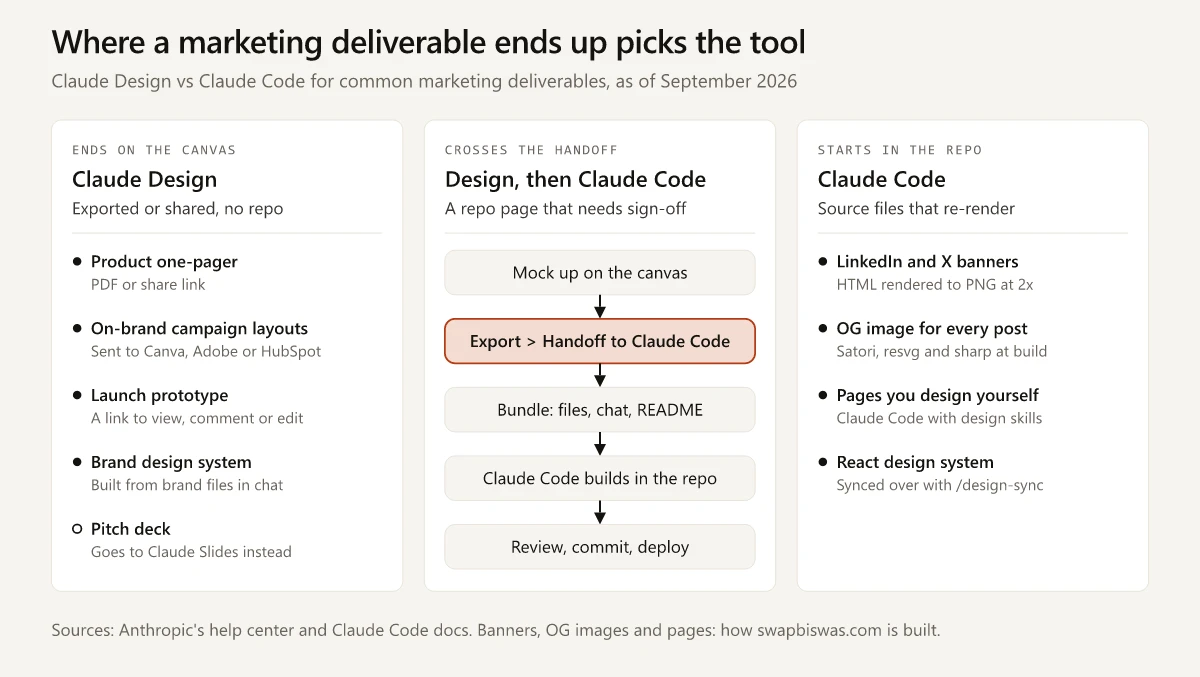
Most marketing deliverables never need the handoff. A one-pager or a launch prototype finishes on the canvas as a PDF or a share link, and an on-brand campaign layout goes on to Canva or Adobe. Banners and OG images that have to re-render start in a repo and stay there, as mine do in Claude Code. Among the jobs below, the handoff is for one: a page that needs sign-off on a canvas before it ships from your site’s repo.
What Is the Difference Between Claude Design and Claude Code?
Claude Design turns a brief into a visual you refine on a canvas and hands back a file or a link, while Claude Code works on the files in your repo and hands back changed files. Anthropic’s overview says Claude Code “reads your codebase, edits files, runs commands, and integrates with your development tools” (Claude Code overview).
Side by side, from Anthropic’s pages as checked on 30 September 2026:
| Claude Design | Claude Code | |
|---|---|---|
| What it makes | ”designs, interactive prototypes, one-pagers, and other visual work” | Edits to the files in your repo, plus the commands it runs |
| Who it is for | Designers, plus “founders, product managers, and marketers” without a design background | Anyone whose work is files in a repo, developer or not |
| Where you open it | Claude chat, the Artifacts tab, claude.ai/design or /design in Claude Code; iOS and Android can ask and view, not edit | Terminal, IDE, desktop app or browser |
| What it reads | Your brief, screenshots, DOCX, PPTX and XLSX files, a linked codebase, design files | Your repo, your shell, git and the MCP servers you configure |
| What you get back | A canvas at a shareable link; a .zip, PDF, PPTX or standalone HTML file; or a send to one of the 15 tools on its send-to list | Changed files, a build, and a commit if you ask for one |
| Handoff direction | Export, then Handoff to Claude Code | /design-sync sends a React design system the other way |
| Plans | Beta on Pro, Max, Team and Enterprise | Every paid plan |
| Usage | ”the same usage limits as the rest of Claude” | The same pool |
Sources: the Claude Design help center guide, the Claude Design launch post for audience and file inputs, and Claude’s pricing page, which says “Claude Code is included in all paid plans.”
Claude Code reads screenshots too, pasted with Ctrl+V (Alt+V on Windows and WSL) or given as a file path, and my guide to pasting screenshots into Claude Code lists the paste key by surface.
Claude Design is also a different product from the Design plugin on Claude’s plugin marketplace, an Anthropic-made plugin you install in Cowork for “design critique, UX writing, accessibility audits, research synthesis, and dev handoff” (Design plugin page).
Claude Design vs Claude Code for Marketing Deliverables
Anthropic’s Claude Code artifacts docs send mockups to /design: “To mock up a UI, a screen flow, a landing page, or a poster rather than build a page, run /design” (Claude Code artifacts docs). For marketing work I apply the test from the routing guide for Claude vs Claude Code, where the finished file has to live, and the answers sort into the lanes in the diagram below.
| Deliverable | Route | Why | Where it ends up |
|---|---|---|---|
| Product one-pager for sales | Claude Design | Anthropic’s product page uses it as an example: turn a proposal into a one-pager and “export it as a PDF” | A PDF or a share link |
| Pitch or sales deck | Claude Slides, from chat or /slides in Claude Code | The Claude Design admin guide says presentations “now have their own tool, Claude Slides” | PowerPoint or PDF |
| Campaign visuals and social posts built from brand layouts | Claude Design, then a tool on its send-to list | The launch post has marketers making “social media assets, and campaign visuals, then loop in designers to polish” | Canva, Adobe or HubSpot |
| Clickable prototype for launch sign-off | Claude Design | People you share it with can view, comment on or edit it, and the launch post pitches prototypes you can test “without code review or PRs” | A link |
| Landing page someone outside the repo must approve first | Claude Design mockup, then Handoff to Claude Code (or /design in one Claude Code session) | A brand designer or sales lead comments on the canvas link, and the handoff carries the approved version to the repo | Your repo and host |
| Landing page you design and ship yourself | Claude Code with a design skill (my route) | Review happens in the repo, so there is no canvas step; the skills worth installing are in my vetted list of Claude marketing skills | Your repo and host |
| LinkedIn and X profile banners | Claude Code (my route) | I design mine as HTML rendered to PNG at 2x (the current LinkedIn banner reads “A marketer who builds.”), so a new headline is a text edit and a re-render | PNG files |
| OG image for every blog post | Claude Code (my route) | The template is code in the repo Claude Code maintains, and the build renders one image per post with Satori, resvg and sharp, with no design session | The build output |
| Brand design system | Claude Design from chat, or /design-sync from Claude Code | Chat suits “brand design systems with fonts, colors, and guidelines”; /design-sync reads React components | Settings > Design systems |
If a one-pager’s copy is not written yet, draft it in my product one-pager template before you open either tool.
When a pitch or sales deck has to end up as a .pptx in your repo instead of a Claude Slides link, my guide to PowerPoint routes in Claude Code compares /slides with Anthropic’s pptx skill and a script you commit.
For the OG image row, this site’s build renders every card at 1200 x 630, and my platform-by-platform check of OG image size and tags shows that size meets the Meta, LinkedIn and WhatsApp specs.
Sources: the Claude Design product page, the Claude Design admin guide, the launch post, the help center guide for sharing, Set up your design system in Claude Design, and the Claude Code commands reference for /slides.
For the brand design system row, what you upload decides the output. Anthropic’s setup guide says “A finished landing page or marketing site tells Claude more about your brand’s feel than a color palette alone”, so upload real pages next to your brand guidelines rather than the palette file on its own.
Photos and illustrations sit outside both tools. Anthropic says “Claude doesn’t generate photos or illustrations the way image-generation tools do” (Anthropic’s article on whether Claude can produce images), and the painted covers on this blog came from a Gemini image model. That generated imagery, image-based ad variants included, goes to an image model, and the images and ad creative section of my Claude vs ChatGPT comparison says which one to start in. Images that need no image model, such as diagrams, charts and /design exports, account for four of the six routes in my guide to Claude Code image generation.
How the Claude Design Handoff to Claude Code Works
Steps 1 to 5 follow Anthropic’s Claude Academy tutorial on prototypes and the export list in the help center guide cited above; step 6 is my addition for marketing pages.
- Link the codebase before you design. The Import button takes a GitHub repo or local directories, and on a large repo the tutorial suggests attaching folders without the
.gitandnode_modules/folders. - Name components and record decisions in the chat. Names you use in the conversation “carry through to the handoff”, and a decision typed with its reason “becomes context for implementation”.
- Ask Claude to show “empty states, error states, loading states, and different data volumes” before you export. The help center also suggests saying early whether a design must work on mobile, tablet and desktop, which a landing page usually must.
- Click Export, then Handoff to Claude Code, and pick Send to local coding agent or Send to Claude Code Web. The web option starts a cloud session, which “runs on cloud infrastructure instead of on your machine” (Claude Code on the web).
- If you picked the local option, paste the prompt into Claude Code. The bundle’s README is the file “which tells the model to interpret the designs”, and the tutorial says the prompt also works in a “coding agent of your choice”. The help center says Claude Code then continues “from your existing work instead of starting over from a screenshot.”
- Check the page before it deploys. A landing page that has to rank must reach Google as rendered HTML, and my vibe-coded website SEO guide has a two-minute check for that. This site goes to production on every push to
main, so the check happens before the push. The full build record, stack and deploy loop included, is in how I built this site with Claude Code.
How to Use Claude Design With Claude Code: /design and /design-sync
The canvas also opens from inside Claude Code. These entries in the Claude Code commands reference connect the two tools:
| Command | What the reference says it does | Needs |
|---|---|---|
/design [brief] | Drafts “UI mockups, screen flows, landing pages, or posters as artboards on one canvas”, published as a Claude Design artifact; each artboard exports as PNG or PDF | Claude Code v2.1.265 or later, a session where artifacts are available, the Design template available on your account, and a claude.ai sign-in (“Sessions using an API key, gateway token, or cloud-provider credential cannot publish”, per the artifacts availability rules) |
/design-login | Authorizes design-system access for /design-sync with your claude.ai account | A claude.ai account |
/design-sync [hint] | Converts your repo’s React design system and uploads it to Claude Design; a first sync “can take a few hours on a large repo” | The Anthropic API and claude.ai; unavailable on Amazon Bedrock, Google Cloud’s Agent Platform, Microsoft Foundry and Claude Platform on AWS, or through a Claude apps gateway |
Run inside Claude Code, the handoff shrinks to one session. The week 34 digest describes it: “Open it, pick an artboard, and tell Claude which option to implement.”
The commands reference describes /design-sync as converting a React design system, though the help center’s getting-started guide also lists GitHub repos, design files and raw uploads as design-system sources. A site with no React component library, such as one built only on Astro templates, can also build its design system in chat from brand files, decks or Figma files, or link its repository at claude.ai/design (Set up your design system in Claude Design).
The rest of the built-in commands are in my Claude Code commands cheat sheet.
What Changed in Claude Design Since the April 2026 Launch
A Claude Design vs Claude Code comparison written at launch routes work differently from the product you open today. The dated changes that affect routing:
| Date | Change | Source |
|---|---|---|
| 17 April 2026 | Launched as an Anthropic Labs research preview on Claude Opus 4.7 for Pro, Max, Team and Enterprise, with a handoff bundle “that you can pass to Claude Code with a single instruction” | Anthropic launch post |
| 17 June 2026 | Design-system import rebuilt; /design and /design-sync announced for Claude Code; usage limits shared with “the rest of your work with Claude, including Claude Code”; Lovable, Replit, Vercel and Wix named on the connector list | Claude blog update |
| 17-21 August 2026 | /design becomes a research-preview skill that brings Claude Design’s artboard workflow into the Claude Code CLI and desktop app, built on artifacts: “Pick one, tweak it, then have Claude implement it” | Claude Code week 34 digest |
| 16 September 2026 | ”Claude Design now works inside your conversations too”, announced with the new Claude Docs and Claude Slides, all three in beta on paid plans | Anthropic’s Cowork and chat announcement |
Claude Design vs Lovable, Replit and Other App Builders
Lovable and Replit are on Claude Design’s send-to list, next to v0, Base44, Netlify and Vercel (Get started with Claude Design), which puts them at the same step as Claude Code: after the canvas. Anthropic’s product page quotes both companies on building and shipping apps from Claude Design output (Claude Design product page).
Lovable also builds without the canvas. Its docs say “You describe what you want to build, and Lovable generates a working application”, and they name “Marketers building landing pages, campaign sites, and dashboards” among the people it is for (Welcome to Lovable). Publishing puts the app at a live URL, and “Lovable hosts the published app for you” (Publish your Lovable project). For an app or a campaign site, that makes Lovable an alternative to Claude Design as well as a place to send a design. From India, Lovable’s price lists are in dollars on lovable.dev and in rupees for the iPhone app, and after comparing Lovable’s two checkouts my advice is to price it on the web.
| If the output is | Send it to |
|---|---|
| A campaign page on a host from the send-to list, such as Vercel or Netlify | That host, from Claude Design’s Export menu |
| An app you want the builder to host and run | Lovable or Replit |
If you pick Replit from that table and pay from India, my guide to Replit Core’s price at each checkout shows when Apple’s India App Store costs less than replit.com and when it costs more.
If your site runs on a platform from Claude Design’s send-to list, such as Wix, HubSpot or Adobe Experience Manager, check what its send-to delivers before you plan a Claude Code handoff. The same rendered-HTML check from step 6 applies whichever builder takes the handoff.
Claude Design Plans, Usage and Limits in September 2026
| Question | Answer, as of 30 September 2026 |
|---|---|
| Which plans? | ”Claude Design is available in beta on Pro, Max, Team, and Enterprise plans”; it is on by default except on Enterprise, where an owner turns it on under Organization settings > Artifacts |
| Is the standalone app still there? | claude.ai/design “keeps working and has its own separate setting” |
| What settings does it need? | Artifacts require “Cloud code execution and file creation” to be on under Settings > Capabilities, or Organization settings > Capabilities on Team and Enterprise |
| How is usage counted? | It “previously had its own weekly allowance”; now canvas work and Claude Code sessions draw on one pool. Anthropic notes that “Complex projects with large codebases or many iterations consume more usage”, and usage credits let you keep working past your included limits |
| What are the known limits? | No version history yet; two or more people editing at once “may not work reliably”; design-system import “is only as good as its source” |
Sources: Get started with Claude Design and What are artifacts in Anthropic’s help center.
If the shared pool runs out before your next reset, my breakdown of usage credits, discounted bundles and free limit resets covers what each one costs and how to use it.
Claude Design vs Claude Code: Plan the Handoff for One Deliverable
One tool is enough for most of a launch’s assets: the canvas for what gets exported or shared, the repo for what re-renders. A landing page that someone outside the repo has to approve needs both, so it is the one deliverable to plan a handoff for.
Before your next launch, mark each item on your launch asset list as canvas, repo or handoff.
Frequently Asked Questions
What is Claude Design?
Claude Design is Anthropic's tool for making designs, interactive prototypes, one-pagers and other visual work by chatting with Claude, then refining the result on a canvas. It launched on 17 April 2026 as an Anthropic Labs research preview and, as of September 2026, is in beta on the Pro, Max, Team and Enterprise plans.
How do I hand off a Claude Design project to Claude Code?
Click Export, then Handoff to Claude Code, and pick Send to local coding agent or Send to Claude Code Web. Anthropic's Claude Academy tutorial says the bundle holds the project's design files, the chat and a README, and you get a prompt with the bundle's URL to paste into Claude Code.
Can you use Claude Design inside Claude Code?
Yes. In Claude Code v2.1.265 or later, signed in with a claude.ai account, /design drafts mockups as editable artboards and publishes them as a Claude Design artifact. /design-sync uploads a repo's React design system to Claude Design.
How much does Claude Design cost?
Nothing on top of a paid Claude plan: Anthropic's help center says Claude Design draws on the same usage limits as the rest of Claude, including Claude Code. Past those limits it is unavailable until they reset, unless you have turned on usage credits, which let you keep working. It is in beta on Pro, Max, Team and Enterprise, and on Enterprise it stays off until an owner turns it on.
Is Claude Design an alternative to Lovable?
Only in part: Lovable builds a working app from a prompt, front end and back end included, and hosts it, while Claude Design stops at the design or prototype and exports it. Lovable is also on Claude Design's send-to list, so the two can run in sequence, with the design made in Claude Design and the app built and hosted in Lovable.