Claude Code Notification When Done: Phone, Windows, VS Code
Get a Claude Code notification when done wherever you are: a bell or hook at the terminal, a dot in VS Code, and a phone push through Remote Control.
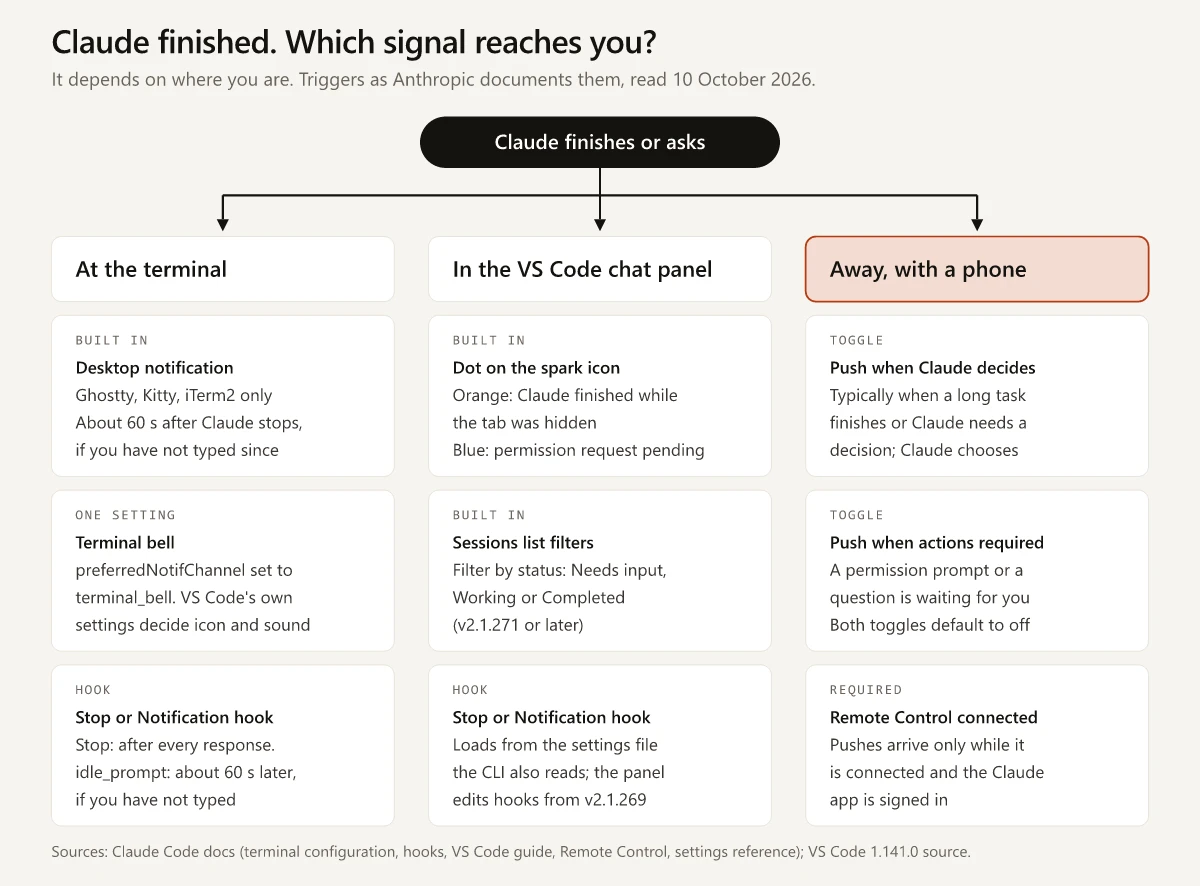
Whether a Claude Code notification when done reaches you depends on where you are when Claude stops. At the terminal it is a desktop notification in Ghostty, Kitty and iTerm2, and a bell or a hook you set up in any other terminal. In the VS Code extension’s chat panel it is an orange dot on the spark icon of a hidden tab. Away from the desk it is a push to the Claude app on your phone, which needs Remote Control connected.
Each of those fails somewhere. A sound from a Stop hook stays in the room you left. Claude Code skips the phone push while you are typing in or focused on the connected terminal. The bell that Anthropic suggests for VS Code’s integrated terminal is silent under VS Code’s default settings unless a screen reader is attached.
So for a long npm run build I would set up two signals, one for the desk and one for everywhere else, and pick each by the place it has to reach.
Claude Code Notification When Done: Signals by Place
Set preferredNotifChannel to terminal_bell and Claude Code rings the terminal bell about 60 seconds after it stops, if you have not typed. VS Code’s terminal also needs VS Code’s own bell sound turned on. A Stop hook runs after every response, and the phone push needs Remote Control connected.
The quotes in this table are Anthropic’s, as its pages read on 10 October 2026. A row with no link quotes the page linked in the row above it:
| Where you are | Signal | Fires when | Set up with |
|---|---|---|---|
| At the terminal | Built-in desktop notification | ”When Claude finishes a task or pauses for a permission prompt, and you appear to be away from the terminal” | Nothing in Ghostty and Kitty; iTerm2 needs its alert settings turned on; other terminals get none by default |
| At the terminal | Terminal bell | The same notification event | "preferredNotifChannel": "terminal_bell" in ~/.claude/settings.json, or Local notifications in /config |
A terminal session that loads your hooks; no idle_prompt timing is documented for the VS Code panel or Claude Desktop | Notification hook, idle_prompt | ”Claude finished responding about 60 seconds ago and you haven’t typed since” | A hooks block in a settings file; your command decides what you see or hear |
| Any session that loads your hooks | Notification hook, permission_prompt | In a terminal, once the prompt “has waited about six seconds”, with each keystroke deferring it; in Claude Desktop and the VS Code extension, about six seconds after Claude asks, typing or not | The same hooks block; those two hosts need v2.1.233 or later |
| Any session that loads your hooks | Stop hook | ”whenever Claude finishes responding, not only at task completion”, and not on a user interrupt | A hooks block; Stop takes no matcher |
| Agent view open in a terminal (research preview) | Notification for background sessions | ”when a local background session starts needing your input, finishes, or fails” | The same preferredNotifChannel setting; hooks get the agent_needs_input or agent_completed type (v2.1.198 or later) |
| VS Code extension chat panel | Dot on the spark icon | ”blue means a permission request is pending, orange means Claude finished while the tab was hidden” | Nothing; the guide describes it for tabs |
| Claude Desktop, Code tab | OS notification | ”when a Code session finishes a task and you aren’t currently viewing that session” | Nothing documented |
| Away, with a phone | Push when Claude decides | ”Claude decides when to push. It typically sends one when a long-running task finishes or when it needs a decision from you to continue.” | Its toggle in /config, the Claude app, and Remote Control connected |
| Away, with a phone | Push when actions required | The toggle is “for permission prompts and questions” | Its own toggle in /config, with Remote Control connected |
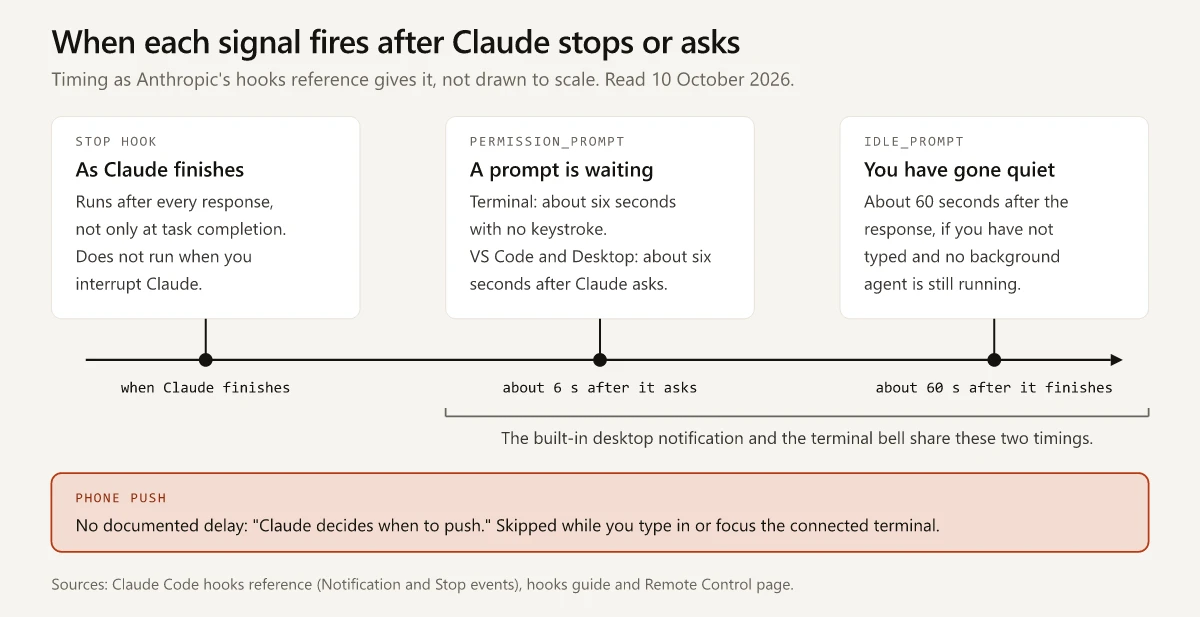
Anthropic’s hooks reference says the idle_prompt and permission_prompt types “share their timing with desktop notifications”. The built-in notification and the bell therefore arrive on the same delays: about 60 seconds after a finished response, about six seconds into a waiting prompt, and in a terminal only if you have not typed.
A Stop hook is tied to the response instead of to your typing, so it also runs after every one-line answer.
Claude Code Push Notifications on Your Phone Through Remote Control
A sound or a dot helps only while you can hear or see the machine. Once you leave it, Claude Code can push to the Claude app on your phone, and that push depends on Remote Control: “When Remote Control is active, Claude can send push notifications to your phone.”
Anthropic’s setup list, plus the connection step:
- Install the Claude app for iOS or Android. Running
/mobilein a session shows a QR code for the download. - Sign in with “the same account and organization you use for Claude Code in the terminal”.
- Accept the operating system’s notification permission prompt.
- In a terminal session, run
/configand enable Push when Claude decides, Push when actions required, or both. - Connect the session:
/remote-control(or/rc) in a running session,claude --remote-controlat launch, or Enable Remote Control for all sessions in/config.
The Push Toggles, the Remote Control Toggle and Their Settings Keys
Label in /config | Settings key | Default | What the settings reference says |
|---|---|---|---|
| Push when Claude decides | agentPushNotifEnabled | false | A push “when it decides one is worth sending, for example when a long task finishes” |
| Push when actions required | inputNeededNotifEnabled | false | A push “when a permission prompt or question is waiting for your input”, sent “only while Remote Control is connected” |
| Enable Remote Control for all sessions | remoteControlAtStartup | Unset | Connects Remote Control “automatically when each interactive session starts” |
The Remote Control page says “Beyond the two on/off toggles below, there is no per-event configuration”, and it gives no number of minutes that makes a task long enough. The same passage adds: “You can also request a push in your prompt, for example notify me when the tests finish.” For a site build, that reads:
Run npm run build, then notify me when it finishes or fails.The mechanism is a tool named PushNotification. The tools reference says it “Sends a desktop notification, and a phone push when Remote Control is connected”, and lists it as needing no permission. It does not say where that desktop notification appears.
Pushes Claude Code Skips, and Other Reasons Nothing Arrives
- You are at the keyboard: “Claude Code skips mobile push notifications while you are typing in or focused on the connected terminal.” To test a push, send the prompt and then switch away from that terminal.
- A presence file says you are at the machine:
CLAUDE_CLIENT_PRESENCE_FILE(v2.1.181 or later) names a marker file that a screen-lock listener creates when the screen unlocks and deletes when it locks, and “notifications are skipped while the file exists”. Anthropic offers it to extend the skip to “any time you are at the machine, even in another window”. /configshows No mobile registered: “open the Claude app on your phone so it can refresh its push token”.- The phone holds the push back: on iOS, “Focus modes and notification summaries can suppress or delay pushes”, and on Android, “aggressive battery optimization can delay delivery”.
- Remote Control cannot connect: it needs a claude.ai login on a Pro, Max, Team or Enterprise plan, and “API keys are not supported”. My post on what an API key switches off in Claude Code has the error text. On Team and Enterprise, an Owner has to enable the Remote Control toggle in admin settings before it works, and on Amazon Bedrock, Google Cloud’s Agent Platform or Microsoft Foundry it is not available at all.
- The computer is off or the session has ended: the phone is “a window into that local session, so your computer has to stay on and the
claudeprocess has to keep running”.
Where Remote Control is unavailable, or you want a second route to a phone, Anthropic’s docs describe these:
| Route | What Anthropic documents | Where it works |
|---|---|---|
| A hook that forwards the event | Notification hooks “are intended for side effects such as forwarding the notification to an external service”; a command hook runs a notifier command you already use, and an HTTP hook can “POST event data to a URL” | Any session that loads your hooks |
| Channels, a research preview | You “ask Claude something from your phone via Telegram, Discord, or iMessage, and the answer comes back in the same chat” | claude.ai or Console API key sign-ins; “not available on Amazon Bedrock, Google Cloud’s Agent Platform, or Microsoft Foundry”; Team and Enterprise organizations must enable it first |
| Dispatch in the Claude Desktop app | For a Code session Dispatch spawned, “You get a push notification on your phone when it finishes or needs your approval.” | Pro and Max plans; “not available on Team or Enterprise plans” |
The hooks reference lists Notification among the events that accept http handlers. This block is my arrangement of Anthropic’s HTTP hook shape for the idle notification, with a placeholder URL:
{
  "hooks": {
    "Notification": [
      {
        "matcher": "idle_prompt",
        "hooks": [
          { "type": "http", "url": "https://example.com/notify" }
        ]
      }
    ]
  }
}
The hooks guide’s HTTP hooks section says the endpoint “receives the same JSON that a command hook would receive on stdin”. For a Notification hook that JSON includes message and notification_type, plus common fields such as cwd and transcript_path, so send it to a service you run or trust.
One thing to weigh before you connect every session, from the Remote Control page’s connection and security section: “While Remote Control is connected, the session transcript, including your messages, Claude’s responses, and tool activity, is stored on Anthropic servers.”
From the VS Code extension’s panel:
- Connect: type
/remote-controlor/rcin the prompt box, or turn on Enable Remote Control for all sessions in the command menu’s Settings section (v2.1.203 or later). - Turn on the pushes: add the two push keys to the user settings file that the extension and the CLI share. The prompt box section of the VS Code guide lists the Remote Control toggle and neither push toggle, Anthropic’s own step 4 begins “In your terminal”, and the settings reference accepts both keys in any settings file.
The One Signal My Own Settings File Turns On
I build this site with the Claude Code extension in VS Code on Windows 11, with Git Bash and PowerShell as shells. On 10 October 2026 I read my ~/.claude/settings.json against the toggle table:
| Key | In my user settings file | Effect, per the settings reference |
|---|---|---|
remoteControlAtStartup | true | Each interactive session connects to Remote Control on its own |
agentPushNotifEnabled | true | Claude may send a push when it decides one is worth sending |
inputNeededNotifEnabled | Not set | Default false: no push for a waiting permission prompt or question |
preferredNotifChannel | Not set | Default auto: a desktop notification in iTerm2, Ghostty and Kitty, the bell in Terminal.app only when its audible bell is off, nothing elsewhere |
hooks | Not set, here or in the project’s two settings files | No Stop or Notification hook comes from a settings file |
The two keys set to true and the absent hooks key are already rows in my settings map for the extension and the CLI. Read against the docs, the file gives me:
- One signal that needs a setting: the push Claude chooses to send.
- No setting for a permission prompt that waits while nobody is at the machine. That belongs to the second toggle, left at its default of
false. - No local signal of its own. That depends on the terminal being one
autocovers. - No hooks, so I have not run the hook blocks on this page. Each is Anthropic’s example or my arrangement of its documented fields.
The settings reference adds that Claude Code “also reads a value left in ~/.claude.json by older versions” for the four keys above hooks in that table, so an older setup can still be active with nothing in settings.json. Look in that file too; mine held none of the four on the same day.
One more line adds the push for a waiting prompt:
{
  "remoteControlAtStartup": true,
  "agentPushNotifEnabled": true,
  "inputNeededNotifEnabled": true
}
Claude Code Notification Sound: Terminal Bell First, Then a Hook
For a sound at the desk, the terminal bell costs one line and no script, as long as your terminal turns the bell into a sound. The preferredNotifChannel setting appears in /config as Local notifications and takes these values:
| Value | What Claude Code does |
|---|---|
auto, the default | A desktop notification in iTerm2, Ghostty and Kitty; the bell in Terminal.app “only when its audible bell is off”; and “in other terminals it does nothing” |
terminal_bell | ”rings the bell character in any terminal” |
iterm2, kitty, ghostty | A desktop notification for that terminal |
iterm2_with_bell | An iTerm2 desktop notification plus the bell |
notifications_disabled | ”sends no notification”; your hooks still run |
{
  "preferredNotifChannel": "terminal_bell"
}
What the bell or the notification does next is up to the terminal:
| Terminal | What its documentation says | Setting to check |
|---|---|---|
| Windows Terminal | The bellStyle profile setting “Controls what happens when the application emits a BEL character” and defaults to "audible" | bellStyle, plus bellSound to choose the audio file |
| VS Code integrated terminal | In VS Code’s 1.141.0 source, the bell icon defaults to off and the bell sound to auto, which plays only with a screen reader attached (the two settings) | terminal.integrated.enableVisualBell and accessibility.signals.terminalBell |
| Apple Terminal (Terminal.app) | If you accepted Claude Code’s first-run terminal setup, it “turns off the audible bell” in your Apple Terminal profile; in screen reader mode it “leaves the bell setting unchanged” (terminal configuration) | Settings > Profiles > Advanced > “Audible bell” |
| tmux | By default, “desktop notifications and the progress bar never reach the outer terminal” (tmux setup) | set -g allow-passthrough on in ~/.tmux.conf |
| Over SSH | ”The desktop notification reaches your local machine over SSH”; Ghostty and Kitty forward it, and iTerm2 needs its alert settings | iTerm2: Settings > Profiles > Terminal |
An older tip sets the bell from the shell with claude config set --global preferredNotifChannel terminal_bell, as in VelvetShark’s sound-notification note, dated 15 May 2025 in its page metadata. Anthropic’s changelog records “Deprecated claude config commands in favor of editing settings.json” for v1.0.7 on 2 June 2025 and “Unshipped claude config command” for v2.0.0 on 29 September 2025. On a current version the key goes in the settings file.
Claude Code Notification Hook: Stop or Notification Event
A hook is a handler, most often a shell command, that Claude Code runs on a lifecycle event, whether or not Claude would have thought to tell you. A request written into a prompt or a skill carries no such guarantee, and my comparison of skills, hooks and the other extension types sets them side by side. The event you pick decides how often the hook interrupts you:
| You want | Event and matcher |
|---|---|
| A signal after every response | Stop |
| A signal only once you have gone quiet for about a minute, with no background agent still running | Notification with the matcher idle_prompt |
| A signal for a permission prompt left waiting | Notification with the matcher permission_prompt |
| A command the instant Claude asks for permission | PermissionRequest: “To run a hook immediately when Claude asks for permission to use a tool, use PermissionRequest instead” |
| A signal when the turn ends on an API error | StopFailure: “API errors fire StopFailure instead” |
The hooks guide’s notification example says Claude Code fires the Notification event “when Claude is waiting for input or permission”, and the reference lists 12 matcher values for it:
idle_promptandpermission_promptcover the session in front of you.agent_completedfires when a background session finishes or fails, andagent_needs_inputwhen one starts waiting on you, both while agent view is open in a terminal.elicitation_dialogandelicitation_url_dialogfire when an MCP server is waiting on you.
Anthropic’s commands for the signal itself come from that example and the terminal page:
| System | Command in Anthropic’s example | Caveat on the same page |
|---|---|---|
| macOS, notification | osascript -e 'display notification "Claude Code needs your attention" with title "Claude Code"' | It routes through Script Editor, and without notification permission “the command fails silently” |
| macOS, sound | afplay /System/Library/Sounds/Glass.aiff | None given |
| Linux | notify-send 'Claude Code' 'Claude Code needs your attention' | It “needs a desktop notification daemon, which headless servers, SSH sessions, and most containers don’t have” |
| Windows | A powershell.exe call that opens a message box, shown in full in the Windows section | ”the dialog can open behind your terminal window” |
A minimal pair for ~/.claude/settings.json, using the macOS sound command, puts one handler on Stop and one on a waiting permission prompt. An empty Notification matcher “fires on all notification types”. Anthropic’s sound example has no async field; I added it to both handlers so the sound plays in the background.
{
  "hooks": {
    "Stop": [
      {
        "hooks": [
          { "type": "command", "command": "afplay /System/Library/Sounds/Glass.aiff", "async": true }
        ]
      }
    ],
    "Notification": [
      {
        "matcher": "permission_prompt",
        "hooks": [
          { "type": "command", "command": "afplay /System/Library/Sounds/Glass.aiff", "async": true }
        ]
      }
    ]
  }
}
Details from the same pages that decide whether the hook behaves:
- Type
/hooksto confirm the hook is registered./hooksand/configare both in my Claude Code commands cheat sheet with the other built-in commands a non-developer needs. - Claude Code holds hooks back, including the ones in your user settings file, until you accept the workspace trust dialog for the folder.
- A Stop hook receives
last_assistant_message, “the text content of Claude’s final response”, so a script can put the closing line of the reply into its message. - The background hooks section says “By default, hooks block Claude’s execution until they complete”;
"async": trueon a command hook runs it in the background. - A hook has no terminal of its own to write to. To ring the bell from a hook, return the escape sequence in the
terminalSequencefield of its JSON output (v2.1.141 or later) and Claude Code emits it for you. - Anthropic’s test for a Notification hook: switch to Manual mode with
Shift+Tab, ask for something that needs permission, “then switch away from the terminal”.
If the signal you keep getting is for the permission prompt itself, reduce the prompts first; why Claude Code keeps asking for permission starts with the permission mode.
Claude Code Notification When Done on Windows
The Windows (PowerShell) tab of the notification example in Anthropic’s hooks guide is a Notification hook that calls PowerShell to open a message box:
{
  "hooks": {
    "Notification": [
      {
        "matcher": "",
        "hooks": [
          {
            "type": "command",
            "command": "powershell.exe -Command \"[System.Reflection.Assembly]::LoadWithPartialName('System.Windows.Forms'); [System.Windows.Forms.MessageBox]::Show('Claude Code needs your attention', 'Claude Code')\""
          }
        ]
      }
    ]
  }
}
What the docs say about running it:
| Topic | Documented answer |
|---|---|
| Toast or dialog | ”This command opens a dialog box rather than a notification in the corner of your screen, so the dialog can open behind your terminal window.” |
| Shell that runs the command | ”Git Bash on Windows, or PowerShell when Git Bash isn’t installed”; "shell": "powershell" on the handler chooses PowerShell (command hook fields) |
| WSL | ”powershell.exe must be available on your PATH through Windows interop” |
| Testing | ”Test the command directly in PowerShell first” |
I would keep this dialog on the Notification event, whose idle_prompt and permission_prompt types fire in a terminal only once you appear to be away; on Stop it would open after every response. Microsoft’s MessageBox reference calls it “a modal window, blocking other actions in the application until the user closes it”, and hooks block by default.
"async": true moves a command hook to the background, where Anthropic’s hooks reference says “Claude Code doesn’t enforce timeout on it”. I would add it only to a hook that ends by itself, such as a sound.
For a sound in place of the dialog, Anthropic’s page has no Windows example. This swap is mine: it calls Console.Beep, a .NET method Microsoft documents as taking a frequency in hertz and a duration in milliseconds. I have not run it as a hook, because my settings files have none (table in the phone section).
{
  "hooks": {
    "Stop": [
      {
        "hooks": [
          {
            "type": "command",
            "command": "powershell.exe -Command \"[console]::beep(880, 300)\"",
            "async": true
          }
        ]
      }
    ]
  }
}
Run the inner command in PowerShell before you rely on it. On Windows, these routes need no hook:
- Set
terminal_belland let Windows Terminal ring it. ItsbellStyledefaults to"audible", andbellSoundchooses “the audio file for the bell” when the style is"all"or"audible". Microsoft describes"all"as “the terminal will play a sound and flash the taskbar icon” and adds “When the terminal is not in focus, only the taskbar icon will flash”. The page does not say whether"audible"still sounds in an unfocused window, so try it with the window in the background before a long build. - Run the session in the Claude Desktop app’s Code tab, which sends the OS notification listed in the signals table.
The hooks guide has no toast command for Windows. The hooks reference lists OSC 9, “iTerm2, ConEmu, Windows Terminal, and WezTerm notifications”, among the escape sequences a hook can return in terminalSequence, and says no more about what Windows Terminal shows for it.
The shell a hook runs in is separate from the shell Claude uses for your commands; my guide to Claude Code on WSL vs native Windows covers Git Bash, PowerShell and WSL 2.
Claude Code Notifications in VS Code: Chat Panel and Integrated Terminal
VS Code holds two surfaces, and the documentation gives each one different signals:
| Signal | Extension chat panel | claude in the integrated terminal |
|---|---|---|
| Built in | The blue or orange dot on the spark icon, for conversations in tabs | None by default: the terminal page names “Warp or the VS Code integrated terminal” among terminals that do not receive a desktop notification |
| Bell | Not covered in the VS Code guide | terminal_bell sends the bell character; two VS Code settings decide whether you see or hear it |
| Hooks | Loaded from the same settings files; from v2.1.269 the Hooks entry in the command menu lists them and lets you add, edit or remove them | The same hooks; /hooks lists them |
The panel also has a list view of sessions that need you: the sessions list filters (v2.1.271 or later) include an Active toggle and Needs input, Working and Completed statuses.
For hooks in the panel, the hooks reference gives the extension’s timing for permission_prompt alone and says nothing about idle_prompt there, so for a done signal in the panel I would use Stop.
As of 10 October 2026, the VS Code guide documents no sound, bell or desktop notification for the chat panel. The words sound, bell and toast do not appear on that page. If you work in the panel and want to hear something, give a hook a command that makes the sound itself, such as the Console.Beep hook in the Windows section.
A hook that returns terminalSequence is a terminal route, and I would not count on it in the panel: the hooks reference says Claude Code ignores the field “in the Agent SDK”, which the same page names as how the VS Code extension hosts Claude Code.
VS Code Terminal Bell Defaults: No Icon, Sound Only With a Screen Reader
Anthropic’s terminal page says terminals such as the VS Code integrated terminal “can use a hook or set preferredNotifChannel to "terminal_bell" instead”. The setting makes Claude Code send the bell character. What VS Code does with it depends on two of its own settings, as defined in the source of 1.141.0, the newest release tag on 10 October 2026:
| VS Code setting | Default | Description in the source |
|---|---|---|
terminal.integrated.enableVisualBell | false | ”Controls whether the visual terminal bell is enabled. This shows up next to the terminal’s name.” |
accessibility.signals.terminalBell, sound | auto | ”Plays a sound when the terminal bell is ringing.”; auto is “Enable sound when a screen reader is attached.” |
Read literally, those defaults give you no icon and, without a screen reader, no sound. To turn both on, add this to VS Code’s own user settings file, which the Preferences: Open User Settings (JSON) command opens, and not to Claude Code’s file:
{
  "accessibility.signals.terminalBell": { "sound": "on" },
  "terminal.integrated.enableVisualBell": true
}
VS Code’s accessibility page gives a menu route as well: the Help: List Signal Sounds command “lists all available sounds” and lets you switch each one on or off. Microsoft’s terminal appearance page still says a yellow bell icon “is briefly shown” and names terminal.integrated.enableBell, a setting the 1.141.0 source marks “now deprecated”.
Notification Changes by Version
Dates and wording are from Anthropic’s changelog. The push row matches Anthropic’s digest for the week of 13 April 2026, and the last row closes a bug report opened on 11 September 2026.
| Version | Date | What changed |
|---|---|---|
| 2.0.73 | 19 December 2025 | VS Code: tab icon badges for pending permissions (blue) and unread completions (orange) |
| 2.1.110 | 15 April 2026 | Push notification tool added, for mobile pushes when Remote Control and Push when Claude decides are enabled |
| 2.1.141 | 13 May 2026 | terminalSequence field added to hook JSON output |
| 2.1.198 | 1 July 2026 | Background agent notifications added in claude agents: sessions that need input or finish fire the Notification hook |
| 2.1.233 | 14 August 2026 | Fixed Notification hooks not firing for permission prompts under Claude Desktop or VS Code |
| 2.1.288 | 2 October 2026 | Fixed idle_prompt hooks firing while background agents are still running |
On 10 October 2026 my CLI reported v2.1.283, which the changelog dates 25 September 2026, a week before the last row, so that build predates the idle_prompt fix in v2.1.288. The newest release listed that day was v2.1.296. The extension’s panel runs its own bundled copy of Claude Code, so check both: claude --version in a terminal, and /status in the panel (v2.1.280 or later).
Claude Code Notification Not Working: Causes and Fixes
| What happens | Documented cause | Fix |
|---|---|---|
You ran claude config set --global preferredNotifChannel terminal_bell from an older guide | The changelog entry for v2.0.0 (29 September 2025) reads “Unshipped claude config command”, after v1.0.7 deprecated it on 2 June 2025 | Add "preferredNotifChannel": "terminal_bell" to ~/.claude/settings.json, or change Local notifications in /config |
| Nothing in Windows Terminal, Warp or the VS Code terminal | With auto, “in other terminals it does nothing” | Set terminal_bell, or add a hook |
terminal_bell is set and VS Code’s terminal stays silent | VS Code’s bell sound defaults to auto and its bell icon to off | Change the two VS Code settings |
| Nothing in iTerm2 | Forwarding to the notification center is off | Settings > Profiles > Terminal: check “Notification Center Alerts”, then “Filter Alerts” and “Send escape sequence-generated alerts” |
| The signal arrives late, or not at all while you watch | The built-in notification waits until “you appear to be away” | Use a Stop hook for an immediate signal |
| The hook does not run | It is not registered, the JSON is invalid, hooks are turned off, or the folder is not trusted yet | Check /hooks; remove trailing commas and comments; look for disableAllHooks; accept the workspace trust dialog |
/hooks reads “Only hooks from managed settings run here” | Your organization set allowManagedHooksOnly | Ask your admin; user, project and local hooks do not run |
| The macOS notification command does nothing | Script Editor has no notification permission | Run the command once in Terminal, then allow Script Editor under System Settings > Notifications |
| The idle signal rings in the middle of a long task | Before v2.1.288, idle_prompt could fire while background agents were still running | Update Claude Code |
The hook rows follow the hooks guide: its troubleshooting section for /hooks, invalid JSON and allowManagedHooksOnly, and its hook-location section for disableAllHooks. The trust check is the workspace trust rule linked in the hook section.
For tmux and SSH, see the terminal table; for a missing phone push, the skip list; for the Windows dialog, the Windows section.
One Signal for the Desk, One for Everywhere Else
For a Claude Code notification when done, these are the two I would set:
- The desk:
terminal_bellin a terminal, with VS Code’s own bell sound switched on if the terminal is VS Code’s, or a Stop hook whose command makes a sound. The VS Code panel loads that hook from the same settings file. - Everywhere else: a push toggle turned on, with Remote Control connected.
Reading five keys in my own file showed that it sets Remote Control to connect at startup and turns on one of the two push toggles, and that it sets nothing for the desk. Before your next long build, open ~/.claude/settings.json and check remoteControlAtStartup, agentPushNotifEnabled, inputNeededNotifEnabled, preferredNotifChannel and hooks.
Frequently Asked Questions
How do I get Claude Code to notify me when it is done?
In Ghostty and Kitty, and in iTerm2 once its alert forwarding is on, Claude Code sends a desktop notification by default. In other terminals, set preferredNotifChannel to terminal_bell in ~/.claude/settings.json (VS Code's terminal also needs VS Code's own bell sound switched on), or add a Stop or Notification hook that runs a sound or notification command. For alerts away from your desk, turn on the push toggles in /config and connect Remote Control.
How do I get Claude Code notifications on my phone?
Install the Claude app, sign in with the same account and organization you use for Claude Code, allow notifications, then enable Push when Claude decides, Push when actions required, or both in /config. Those pushes arrive only while Remote Control is connected, which needs a claude.ai subscription login rather than an API key.
How do I make Claude Code play a sound when it finishes?
Set preferredNotifChannel to terminal_bell to ring the terminal bell, or add a Stop or Notification hook whose command plays a sound, such as afplay on macOS. As of October 2026 the bell follows the notification timing, about 60 seconds after Claude finishes if you have not typed, while a Stop hook runs after every response. In VS Code's integrated terminal the bell sound is off by default unless a screen reader is attached, so turn on VS Code's own terminal bell sound setting.
How do I get Claude Code notifications on Windows?
Anthropic's Windows example is a Notification hook that calls powershell.exe to open a message box, which the docs warn can open behind the terminal window. Hook commands run in Git Bash when it is installed and in PowerShell otherwise. For a sound with no hook, set terminal_bell; Windows Terminal's bellStyle setting defaults to audible.
Does the Claude Code VS Code extension notify you when Claude finishes?
When you use tabs, the extension shows a colored dot on the spark icon: orange when Claude finished while the tab was hidden, blue when a permission request is pending. As of October 2026, Anthropic's VS Code guide documents no sound or desktop notification for the chat panel, so use a hook or a phone push for that.