Claude Routines vs Scheduled Tasks: Run Limits and Triggers
Claude routines vs scheduled tasks now differ by what a run can reach and what can start it. See the hourly run caps and the 6 October 2026 Cowork change.
Two guides comparing Claude routines vs scheduled tasks still print per-day run caps. Ilia Karelin’s Claude Automation: Routines vs /loop vs Desktop Tasks, published 22 April 2026, warns of “a separate daily cap of 5 Routine runs per 24 hours per account”. Alex Dunlop’s comparison of Claude Code scheduled tasks and routines, published 26 August 2026, says routines are “capped at 5 automated runs per day on Pro, 15 on Max, and 25 on Team and Enterprise.”
Anthropic’s routines documentation lists no daily cap as of 2 October 2026. Each way of starting a run has an hourly limit instead: 100 scheduled runs an hour per account, 30 starts an hour per routine for Run now, API fires and re-running a one-off combined, and 100 API fires an hour per account. The same page says: “None of these hourly limits has overage.”
Anthropic’s Cowork scheduled tasks article already says “Scheduled tasks run remotely,” and on Pro and Max plans the Only on your computer option goes away on 6 October 2026. Jenny Ouyang’s comparison of Cowork scheduled tasks, routines and /loop, dated 3 May 2026, still says in its opening paragraph that “Cowork Scheduled Tasks run locally.” With a routine and a Cowork scheduled task both running on Anthropic’s servers by default, where a job runs no longer tells them apart. What still separates the four schedulers is what a run can reach and what can start it, and that is the test I would use to pick one.
Claude Routines vs Scheduled Tasks: What Is the Difference?
A Claude Code routine is a saved prompt, with GitHub repositories and connectors, that runs in Anthropic’s cloud on a schedule, an HTTP call or a GitHub event, with no permission prompts apart from some artifact actions. “Scheduled tasks” covers three other schedulers: Cowork scheduled tasks in the Claude app, which also run in the cloud but work from connectors and files saved to your Claude account; Desktop local tasks, which run on your computer; and /loop jobs, which live inside one open Claude Code session.
As of 2 October 2026:
| Cloud routine | Cowork scheduled task | Desktop local task | /loop | |
|---|---|---|---|---|
| Where it runs | Anthropic’s cloud, or your organization’s self-hosted environment | Anthropic’s cloud (“Scheduled tasks run remotely”) | Your computer | Your computer, inside one session |
| Runs with the computer off | Yes | Yes; a task that uses files on your computer needs the desktop app open | No: the app must be open and the computer awake | No: the session must be running |
| Local files | None; each run clones your GitHub repositories fresh | Files saved to your Claude account, plus connected folders while the desktop app is open | The working folder you pick | Whatever the session can read |
| Create it with | claude.ai/code/routines, Desktop’s Routines > New routine > Cloud, or /schedule in the CLI | Scheduled in the sidebar or /schedule in a Cowork task; in the new Claude experience on Pro and Max, describe it in any conversation | Desktop’s Code tab: Routines > New routine > Local | /loop [interval] [prompt] |
| What starts a run | A recurring or one-off schedule, an HTTP POST, or a GitHub pull request or release event | Hourly, daily, weekday or weekly presets, or on demand | Manual, hourly, daily, weekday or weekly presets; other timings by asking Claude | A fixed interval, or one Claude picks after each run |
| Shortest interval | 1 hour | The hourly preset | 1 minute | 1 minute |
| Permission prompts | None, apart from some artifact actions; included connectors can write without asking | The approval mode you set for the task | A permission mode per task; in Manual mode a run waits for you | Inherits the session’s mode |
| Run limits | Hourly caps per account and per routine, with no overage | None listed in the help article | None listed in the docs; a run can be skipped while its previous run is still in progress or other scheduled tasks are already running | Up to 50 tasks per session; recurring loops expire after 7 days |
| Usage | Subscription usage, “the same way interactive sessions do” | Plan usage; multi-step tasks and Auto mode use more | Plan usage, shared between Claude and Claude Code | Each fire re-runs the prompt in your session |
| Needs | Pro, Max, Team or Enterprise, signed in with a claude.ai account (routines are a research preview) | Pro, Max, Team or Enterprise | Claude Desktop 1.1.5368 or later | An open Claude Code session |
Sources: the routines docs and Cowork scheduled tasks article linked above, Anthropic’s Desktop scheduled tasks and Run prompts on a schedule pages, the help center’s Get started with Claude Cowork (updated 30 September 2026), and Use Claude Code with your Pro or Max plan for the shared usage line.
Anthropic’s own names overlap: the /loop page lives at /docs/en/scheduled-tasks and opens by calling /loop jobs “Scheduled tasks”; the Desktop app’s Routines page creates local tasks as well as cloud routines; and /schedule makes a routine in the CLI but a Cowork scheduled task when you type it inside Cowork.
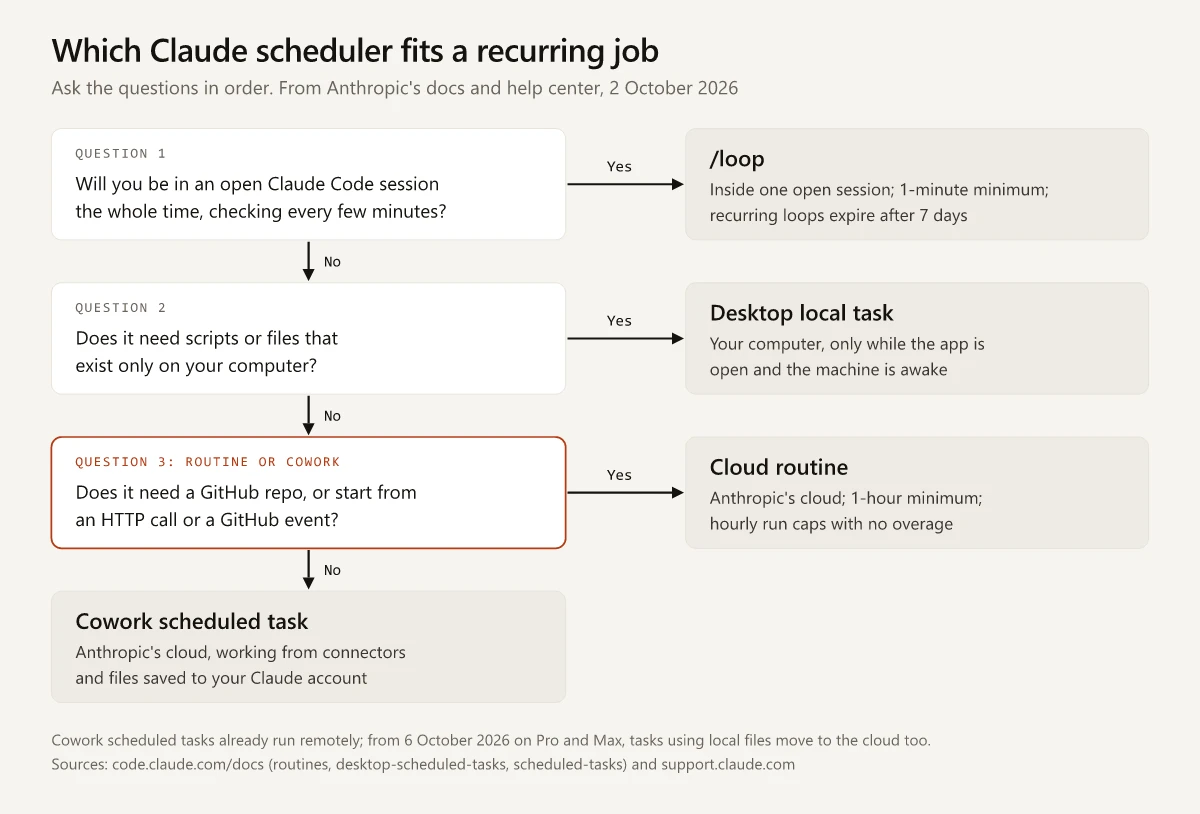
To pick one, ask these in order:
- Will you be in an open Claude Code session the whole time, checking every few minutes? Use
/loop. - Does the job need scripts or files that exist only on your computer? Use a Desktop local task.
- Does it need a GitHub repository, or must it start from an HTTP call or a GitHub event? Use a cloud routine.
- If none of those apply, use a Cowork scheduled task.
Claude Routines Limits: Hourly Caps Replaced the Daily Cap
The guides’ per-day figures match Anthropic’s own launch post, and the docs still described a daily cap on 29 September:
| Date | Anthropic page | What it says about run caps |
|---|---|---|
| 14 April 2026 | The routines launch post, still live | ”Pro users can run up to 5 routines per day, Max users can run up to 15 routines per day, and Team and Enterprise users can run up to 25 routines per day”, plus extra runs on extra usage |
| 29 September 2026 | The routines docs in the Wayback Machine’s 10:03 UTC capture | ”a daily cap on how many runs can start per account”; with usage credits turned on, runs past it continued on metered overage |
| 30 September 2026 | The routines docs in the 09:33 UTC capture | An hourly limit for each way of starting a run, with no overage |
| 2 October 2026 | The live routines docs | The same hourly table |
The current limits, from the usage and limits section of the routines docs:
| Way a run starts | Limit | Counted for | Over the limit |
|---|---|---|---|
| Scheduled runs, one-off runs included | 100 per hour | Your account | The run waits until the limit resets |
| Run now, API fires, and setting a one-off routine to run again | 30 per hour | Each routine, one count shared by the three | The action fails until the limit resets |
| Run now and setting a one-off routine to run again | 100 per hour | Your account | The action fails until the limit resets |
| API fires | 100 per hour | Your account, counted separately from Run now | The action fails until the limit resets |
| GitHub events | Hourly caps per routine and per account; the routines page gives no numbers | Events past the cap are dropped until the window resets |
Besides moving from days to hours, the switch changed how a capped run behaves:
- Usage credits no longer extend a run cap. Under the daily cap, organizations with usage credits turned on could keep running routines on metered overage. The hourly caps have none, and usage credits now come into play only when a routine hits your subscription usage limit; without them, runs are rejected until your usage window resets.
- One-off runs moved inside the cap. The 29 September capture says “One-off runs do not count against the daily routine run cap”; the current page says they “count against the same hourly limit as other scheduled runs.”
- A scheduled run past the cap now waits, while a Run now or API start past it fails.
For a weekly report, none of this binds: one scheduled run a week sits far below 100 an hour. The per-routine cap matters when another tool fires a routine once per event. A CMS that calls a social-copy routine’s endpoint for every published post would see calls 31 to 50 of a 50-post bulk import fail inside one hour, leaving 20 posts without social copy unless the CMS retries after the limit resets. Run caps also sit on top of your plan’s usage, and my guide to Claude usage limits covers that pool, its resets and usage credits.
Claude Routines vs Cowork Scheduled Tasks After 6 October
Anthropic’s Cowork articles, updated on 29 and 30 September 2026, carry this notice for Pro and Max plans: “On October 6, 2026, new Cowork tasks run in the cloud and the Only on your computer option in Settings > General will be removed. Tasks you already started on your computer stay there.” The help center’s guide to Cowork on web, desktop and mobile says scheduled tasks “move to the cloud too, including ones that use files on your computer,” and adds: “Tasks that use files on your computer need the desktop app open.”
The scheduled tasks article has not caught up in every paragraph. Its overview says scheduled tasks “can’t be tied to a folder on your computer,” while its manual setup steps still offer an optional folder and warn: “If a scheduled task requires local files or apps, it will only run locally.” On Pro and Max from 6 October, I would plan around the newer wording: the task runs in the cloud and reaches a local folder only while the desktop app is open.
A routine clones its GitHub repositories at the start of every run, works without a permission-mode picker, and pushes changes to claude/-prefixed branches unless the prompt names another. A Cowork scheduled task works from what your account already has: it gets “the same capabilities as regular Cowork tasks, including connected tools, skills, and installed plugins,” and each run is its own Cowork session whose outputs you review like any other task.
A job built from connectors and web research that ends in a report matches the uses Anthropic lists for Cowork scheduled tasks, such as daily briefings, weekly reports and “Recurring research: Track topics, competitors, or industry news on a regular cadence.”
Desktop Local Scheduled Tasks for Jobs That Stay on Your Computer
For work that has to stay on one machine, the web, desktop and mobile article points to Claude Code in the desktop app, which “runs on your computer and keeps your folders and history there.” It also warns: “Your projects and scheduled tasks don’t carry over to Claude Code.” A Cowork scheduled task you want to keep local has to be set up again as a Desktop local task: in the Code tab, open Routines > New routine > Local.
A job that runs installed scripts against files on disk belongs here, for the reason given in Claude vs Claude Code about this site’s Search Console script: its sign-in files and packages exist only on the laptop.
How a local task behaves, per the how scheduled tasks run section of Anthropic’s Desktop page:
- The app checks the schedule every minute while it is open, and each task starts a few minutes after its time, at the same offset every run.
- A run due while the computer sleeps is skipped. Keep computer awake (Settings > Desktop app > General) prevents idle sleep, but closing the lid still puts the machine to sleep.
- On wake, Desktop starts one catch-up run for the most recently missed time within the last seven days and discards older misses. The docs warn that “A task scheduled for 9am might run at 11pm if your computer was asleep all day,” so put a timing guardrail in the prompt.
- Each task has its own permission mode, and the allow rules in
~/.claude/settings.jsonapply too. In Manual mode, a run stalls at the first tool it has no permission for; the docs suggest one Run now with “always allow” on each prompt, the same allow-rule logic behind my fixes for Claude Code’s repeat permission prompts. - Runs start from your working folder as it is, “including uncommitted changes”, unless you turn on the worktree toggle.
- The prompt lives in
~/.claude/scheduled-tasks/<task-name>/SKILL.md, withnameanddescriptionin YAML frontmatter, the format a Claude skill’s SKILL.md file uses. Schedule, folder, model and on/off state are kept outside that file.
Claude Routines vs /loop
/loop is a bundled skill that runs a prompt “repeatedly while the session stays open,” per Anthropic’s commands reference, while a routine is saved to your claude.ai account and needs no session at all. /schedule, which also answers to /routines, sits next to /loop in my Claude Code commands cheat sheet. Where they differ, from the /loop page’s rules for how scheduled tasks run and the routines docs:
| /loop | Cloud routine | |
|---|---|---|
| Timing | A fixed interval in s, m, h or d (seconds round up to a minute), or a delay Claude picks between one minute and one hour after each run | Hourly, daily, weekday or weekly presets, or a cron expression set with /schedule update |
| Expiry | Recurring loops fire one final time 7 days after creation, then delete themselves | A one-off routine turns itself off after it fires; the docs give recurring routines no expiry |
| Late starts | Recurring fires land up to 30 minutes late, or up to half the interval for shorter ones | A run set exactly on the hour can start late (setup check 6 below) |
| When you step away | Fires only while Claude Code is running and idle, with no catch-up for missed fires; --resume restores unexpired tasks, except a self-paced loop | Runs in the cloud with no session open |
For a marketer, /loop fits a short watch while you work on something else:
/loop 10m check whether the keyword export in exports/ has finished, then summarize the ten largest position changesClaude Scheduled Tasks Examples for Marketing Jobs
Each row names the scheduler that fits one recurring marketing job, and why:
| Marketing job | Use | Why | Set it up so |
|---|---|---|---|
| A Monday summary of last week’s Search Console export, saved to a folder on your laptop | Desktop local task | The export exists only on your machine | Weekly preset, plus a prompt line for catch-up runs that start late |
| A weekly check of five competitors’ pricing pages | Cowork scheduled task | Anthropic lists recurring competitor research as a use | Name every URL in the prompt: Cowork’s web fetch is “limited to search results and URLs you’ve shared” |
| The same check, with each week’s notes committed to a GitHub repo you can diff | Cloud routine | It needs a repository | Allow the competitor domains in its environment first (setup check 5 below) |
| A weekday briefing from Slack, email and calendar | Cowork scheduled task | Connectors do the reading, and Anthropic lists daily briefings as a use | Weekdays preset |
| Launch copy drafted when a GitHub release is published | Cloud routine | Routines take GitHub release events; the other three have no event trigger | Choose the release published action; the draft lands on a claude/ branch for review |
| A results summary each time your email platform finishes a campaign send | Cloud routine with an API trigger | Anthropic says the endpoint works “anywhere you can make an authenticated HTTP request” | Send the routine’s bearer token and an anthropic-version: 2023-06-01 header with each call (Anthropic’s API reference marks both required; the beta header is optional), and have the prompt refer to the fire payload |
| A metrics page refreshed every Monday | Cloud routine | A scheduled run can republish an existing artifact without asking, under five conditions | Publish the page yourself first in your own organization, as a single page with no supporting files, not shared publicly or set to show viewers each new version, and with no connector calls on it |
Claude Code Routines: Setup Checks Before the First Run
- Write the prompt for an unattended run. The docs say it “must be self-contained and explicit about what to do and what success looks like,” since no one is there to answer a question mid-run.
- Pick the model in the prompt box. The routine uses that model on every run.
- Commit the skills it needs. A routine uses skills committed to the repository it clones, the same rule that keeps machine-only skills out of cloud threads in Claude’s redesigned projects.
- Trim the connectors. Every connector on your account is included by default, and Claude can use every tool from an included connector, writes included, without asking. Its actions appear as you: commits carry your GitHub user, and connector actions use your linked accounts. An MCP server added with
claude mcp addis stored in your local Claude Code config, so it stays off the list until you add it at claude.ai/customize/connectors or, for a routine with one repository, commit it in.mcp.json. - Allow the sites the prompt reads. The Default environment’s Trusted access level lets the session reach only allowlisted package registries, GitHub and cloud SDKs, and other hosts fail with
403andhost_not_allowed. For a prompt that fetches competitor or customer pages, edit the routine’s environment: set Network access to Custom, list those domains under Allowed domains, and check Also include default list of common package managers. On Pro and Max, keep API keys in API credentials, since environment variables are visible to anyone who uses the environment. - Schedule off the hour. A run set for exactly 9:00 can start several minutes late; the docs suggest a time such as 9:07.
- Run it once and read the transcript. A green status in the run list means the session started and exited without an infrastructure error; blocked network requests and failed tasks show up only in the transcript.
- Keep GitHub connected. A lapsed connection makes the routine skip runs for up to 72 hours, then switch off until you reconnect and turn it back on. A paused subscription puts routines on hold.
- Check the CLI.
/scheduleneeds a claude.ai subscription login, so a Console API key or a cloud-provider login hides the command. Adding a GitHub trigger from the CLI needs v2.1.225 or later, and asking/scheduleabout a routine’s run history needs v2.1.227 or later. On Team and Enterprise, an Owner can turn routines off for the organization, which stops existing routines and, from v2.1.227, hides/scheduletoo.
Claude Routines vs Scheduled Tasks: Choose by Reach and Trigger
Where each one runs used to be the quick answer to Claude routines vs scheduled tasks. Now it only splits the two local schedulers from the two cloud ones: from 6 October 2026 on Pro and Max, even Cowork scheduled tasks that use files on your computer move to the cloud. Between a routine and a Cowork scheduled task, I would pick by reach and trigger: a repository, an HTTP call or a GitHub event points to a routine, and a job built from connectors points to a Cowork scheduled task.
Routines are a research preview, and their run caps switched from daily to hourly between 29 and 30 September, so check the limits table on the routines page the day you set one up. Then schedule the weekly report you still build by hand.
Frequently Asked Questions
What is the difference between Claude scheduled tasks and routines?
A routine is a saved Claude Code prompt with GitHub repositories and connectors that runs in Anthropic's cloud on a schedule, an HTTP call or a GitHub event. Scheduled tasks are the other three schedulers: Cowork scheduled tasks in the Claude app, which work from connectors and account files; Desktop local tasks, which run on your computer; and /loop jobs inside one open Claude Code session.
How many Claude routines can I run per day?
As of 2 October 2026, Anthropic's routines docs list no daily cap. The limits are hourly: 100 scheduled runs per account, 30 starts per routine for Run now, API fires and one-off re-runs combined, and 100 API fires per account, with no overage on any of them. Runs also draw on your plan's usage.
Do Claude Cowork scheduled tasks run in the cloud when my computer is off?
Yes, unless the task uses files on your computer. Anthropic's help center says Cowork scheduled tasks run remotely, even when your computer is asleep or the desktop app is closed. From 6 October 2026 on Pro and Max, tasks that use files on your computer move to the cloud too, but they need the desktop app open.
What is the difference between Claude routines and /loop?
/loop re-runs a prompt inside one open Claude Code session, as often as once a minute, and recurring loops expire after seven days. A routine is saved to your claude.ai account and runs in the cloud with no session open, at most once an hour on a schedule.
Can a Claude routine access files on my computer?
No. Each run starts from a fresh clone of the GitHub repositories you select, so files that exist only on your machine are out of reach. For local files, use a Desktop local task, which runs on your computer while the Claude Desktop app is open and the computer is awake.