Can Claude Code Generate Images? 6 Routes to an Image File
Can Claude Code generate images? Not with a model of its own. Six routes checked in October 2026: four need no image model, and 812 files in my repo show the split.
Anthropic’s answer is no: none of the 46 built-in tools in its tools reference for Claude Code generates an image, as read on 10 October 2026, and its help center article Can Claude produce images? says Claude does not generate photos or illustrations as image tools do. The repo behind this site held 242 SVG diagram sources on the same day, each stored beside a WebP of the same name, and the script that converts one into the other is 28 lines long. So can Claude Code generate images? Only when something else produces the pixels: a renderer that draws them from code, or an image model.
After counting those files, my view is that most of what a content site calls an image is labels, numbers and layout that have to be exact, and that code draws those more reliably than an image model does. An image model is for the pictures no code can draw, such as the eight paintings that cover every post on this blog. The kind of image decides the route.
Short answer, checked 10 October 2026: Claude Code cannot generate an image with a model of its own. /design drafts artboards you export as PNG or PDF (v2.1.265 or later), and /artifact-diagramming guides SVG diagrams (v2.1.221 or later). Otherwise it writes code that renders the image, or calls an outside image model.
Both commands and their version floors come from Anthropic’s Claude Code commands reference, so recheck them there before you rely on either.
Can Claude Code Generate Images? Four of Six Routes Need No Image Model
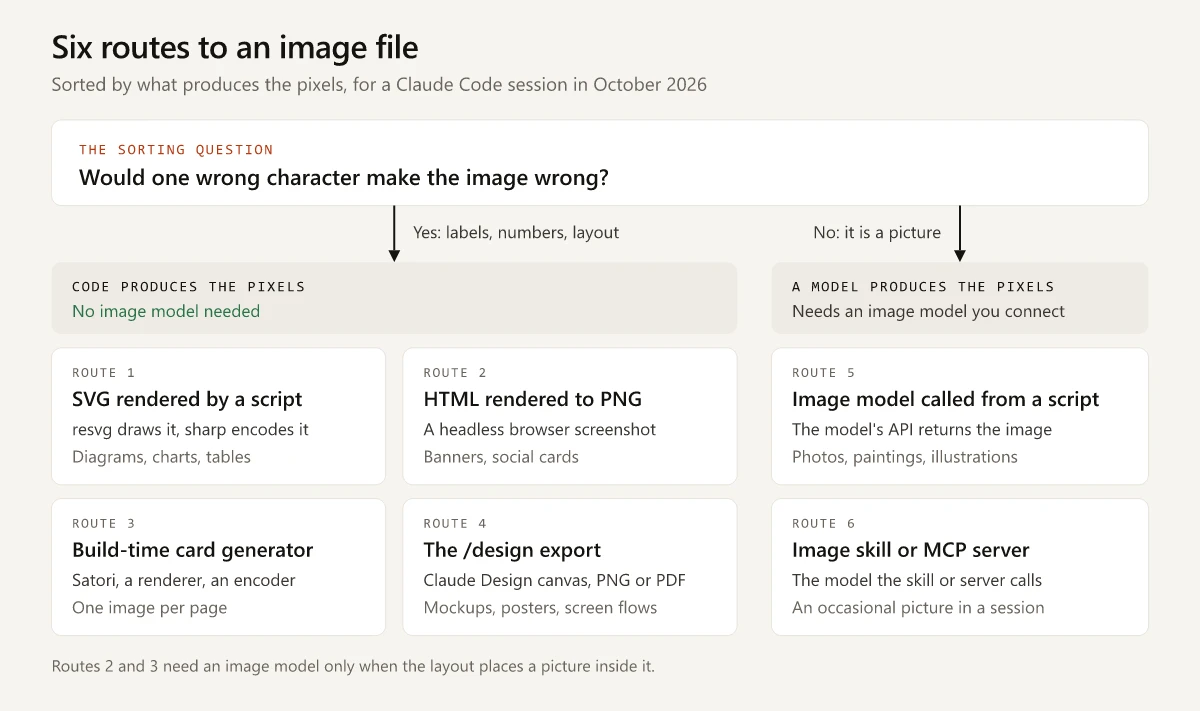
Not with a model of its own, but a Claude Code session can still lead to an image file by six routes, and four of them need no image model. The table sorts the routes by what produces the pixels, which decides what the image gets right.
| Route | What produces the pixels | Image model needed | Use it when |
|---|---|---|---|
| 1. An SVG file rendered by a script | A renderer such as resvg-js draws the SVG, and sharp encodes a WebP or PNG | No | A diagram, chart or table has labels and numbers that must be exact |
| 2. An HTML page rendered to PNG | A headless browser takes a screenshot of the page, for example through Playwright | No, unless the page places a picture | A banner or social card needs CSS layout and web fonts |
| 3. A build-time card generator | Satori converts HTML and CSS to SVG during the site build, then a renderer and an encoder finish the file | No, unless the card embeds a picture | Every page needs its own image, and it must change when the title changes |
4. The /design export | The Claude Design canvas on claude.ai, where you edit the artboards in a desktop browser and export each one as PNG or PDF | No | A mockup, screen flow or poster needs review on a canvas |
| 5. An outside image model called from a script | The model’s API returns the image and the script saves it | Yes | You need photos, paintings or illustrations that you will regenerate from saved prompts |
| 6. An image skill or MCP server | The image model that the skill or server calls | Yes | You need an occasional picture inside a session and have no script of your own to maintain |
Routes 2 and 3 say “unless” because a layout can hold a picture, and the picture then needs its own source. On cost, routes 1 to 3 run on open-source libraries on your own machine and add no per-image fee, route 4 needs a Claude plan that includes artifacts, and routes 5 and 6 are billed by the image vendor you call. Those prices change, so read the vendor’s pricing page on the day you set the route up.
Route 4’s canvas and the banner job in route 2 each get a row in my Claude Design vs Claude Code comparison, which sorts marketing deliverables between a canvas and a repo. A slide deck is a separate job with three routes, compared in how to make a PowerPoint with Claude Code.
The test I apply: if one wrong character would make the image wrong, it belongs to routes 1 to 4, and if it is a picture of something, it belongs to routes 5 and 6.
The line between routes 1 to 4 and routes 5 and 6 follows limits that an image-model vendor publishes about its own models. OpenAI’s image generation guide lists these under Limitations:
- Text rendering: the model “can still struggle with precise text placement and clarity”.
- Consistency: it “may occasionally struggle to maintain visual consistency for recurring characters or brand elements across multiple generations”.
- Composition control: it “may have difficulty placing elements precisely in structured or layout-sensitive compositions”.
A diagram is exact text, brand elements and a structured layout in one image, which puts it on the code side. Nishchay’s Indie Hackers post of 3 July 2026 reached the same split from the other direction: after image models returned garbled text and drifting brand colors, it describes having Claude write “SVG for the layout, a small script to inject the content, then a headless browser screenshots it to a pixel-perfect PNG”.
A vendor guide from Wireflow gives code output a single line: people who ask Claude Code for a logo, it says, “get an SVG or HTML mockup at best” (Wireflow, 18 July 2026). For a logo that is fair. For a diagram the SVG is the finished source file, and rendering it takes one command.
The File Audit: 242 SVG Sources, Eight Paintings
This site is an Astro blog, and its images live in the same repo as its posts. On 10 October 2026 I listed every committed file under public/assets/blog with git ls-tree, at the commit made that morning (0a69a3f), before this post and its diagrams went in. The audit is about formats: what each file is and what turned it into pixels.
| Files in the folder | Count | What turned them into pixels |
|---|---|---|
| SVG diagram sources | 242 | Nothing yet: an SVG is text |
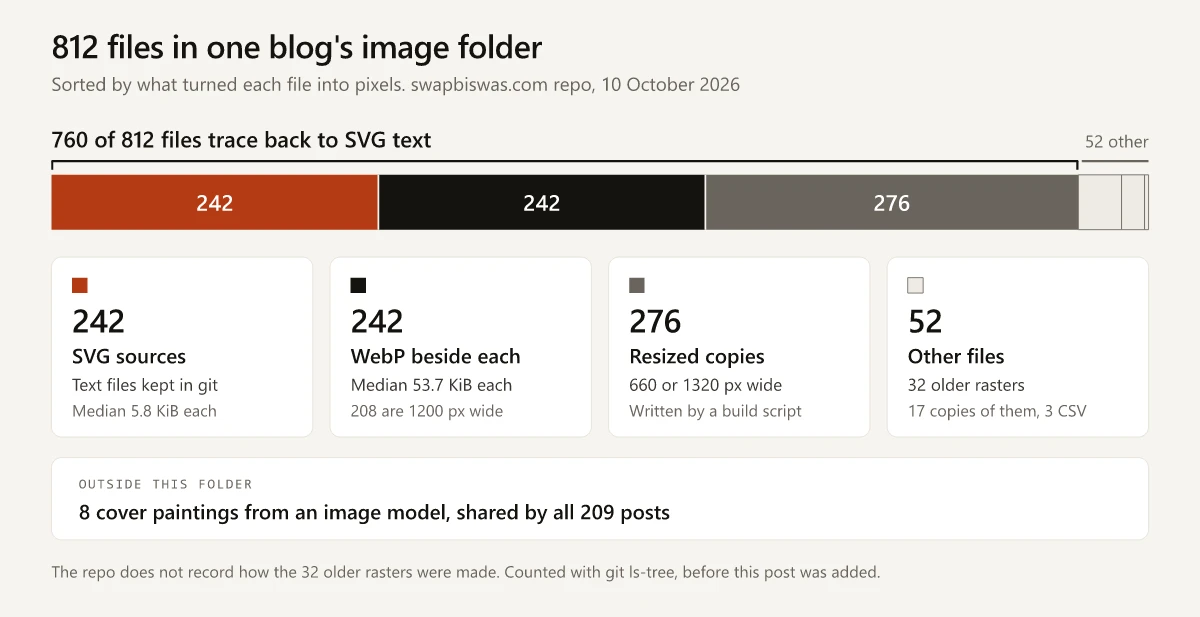
| WebP files, one beside each SVG under the same name | 242 | An SVG renderer and a WebP encoder |
| Resized copies of those WebP files, 660 or 1320 pixels wide | 276 | sharp, in a script that runs before every build |
| Older WebP and JPG files with no SVG source | 32 | Not recorded in the repo |
| Resized copies of the older WebP files | 17 | sharp, in the same script |
| CSV data files | 3 | Not images |
| Total | 812 |
760 of the 812 files (93.6%) trace back to SVG text: the sources, the WebP beside each one, and the resized copies of those WebP files. Counted as images instead of files, 242 of the 274 full-size rasters in the folder (88.3%) have an SVG source. The other 32 all arrived in the site’s first commit on 12 March 2026, and the repo does not record what produced them.
| Measure | 242 SVG sources | 242 WebP files beside them |
|---|---|---|
| Total size | 1.48 MiB | 13.10 MiB |
| Median file | 5.8 KiB | 53.7 KiB |
| Range | 3.4 to 20.8 KiB | 18.2 to 125.8 KiB |
| Dimensions | 238 use a viewBox 1400 units wide | 208 are 1200 px wide, 34 are 1800 px |
What the files themselves show:
- All 242 sources contain
<text>elements: 7,237 in total, with a median of 28 per diagram. Those are the labels an image model would have to spell and place. - None of the sources embeds a raster image, so every pixel in those WebP files comes from shapes and type.
- Every WebP has the height its SVG’s
viewBoxratio predicts, to within one pixel. - The sources add up to about 11% of the size of the WebP files beside them, and a correction to one is a text diff in git.
The 34 wider files were all committed between 12 March and 4 April 2026. In those weeks the conversion snippet in my diagram style guide used resvg-js and sharp with the width set to 1800 pixels; a commit on 7 April 2026 lowered it to 1200, and on 18 April 2026 the snippet became the script printed below.
The 34 include all five WebP files over 100 KiB. The 208 files at 1200 pixels run from 18.2 to 92.4 KiB, with a median of 51.6 KiB.
The 28-Line Script That Converts SVG to WebP
scripts/convert-svg-batch.cjs has not changed since it entered the repo on 18 April. It needs two open-source packages: resvg-js, which calls itself “a high-performance SVG renderer and toolkit” (version 2.6.2 in this repo), and sharp, a Node.js image library (0.34.5 here). Here it is, complete apart from one comment line that points to my own style guide for diagrams:
// Convert one or more SVG files to 1200px-wide WebP alongside the source.
// Usage: node scripts/convert-svg-batch.cjs <path/to/file.svg> [more.svg ...]

const { Resvg } = require('@resvg/resvg-js');
const sharp = require('sharp');
const fs = require('fs');
const path = require('path');

async function convert(svgPath) {
  const webpPath = svgPath.replace(/\.svg$/, '.webp');
  const svg = fs.readFileSync(svgPath, 'utf8');
  const resvg = new Resvg(svg, { fitTo: { mode: 'width', value: 1200 } });
  const png = resvg.render().asPng();
  await sharp(png).webp({ quality: 90 }).toFile(webpPath);
  console.log('Wrote', webpPath);
}

(async () => {
  const args = process.argv.slice(2);
  if (args.length === 0) {
    console.error('Usage: node scripts/convert-svg-batch.cjs <path/to/file.svg> [more.svg ...]');
    process.exit(1);
  }
  for (const a of args) {
    await convert(path.resolve(a));
  }
})().catch((e) => { console.error(e); process.exit(1); });
Install the two packages with npm install @resvg/resvg-js sharp, then run node scripts/convert-svg-batch.cjs path/to/diagram.svg and it writes diagram.webp beside the source.
This is a route Claude Code can take from start to finish. Anthropic’s Claude Code overview calls it an agentic coding tool that “reads your codebase, edits files, runs commands”, and the tools reference describes the three tools the route uses: Write “Creates or overwrites files”, Bash “Executes shell commands in your environment”, and Read returns PNG, JPG and other image formats “as visual content that Claude can see, not as raw bytes”. A prompt for your own repo that puts the three together:
Write assets/plan-comparison.svg: a diagram comparing our three plans, with every
label and price copied from docs/pricing.md. Run the conversion script on it,
open the WebP with the Read tool, and fix any label that overflows its box or is
cut off at an edge.
Checks worth making before the file ships:
- Fonts. The script passes no font options, and resvg-js loads system fonts unless told otherwise (
loadSystemFontsdefaults totruein its type definitions), so one SVG can render with different type on another machine. Give everyfont-familya fallback chain, or passfontFiles. - Line breaks. MDN’s reference for the SVG text element says it “does not wrap by default”, so place every line break yourself; a long label otherwise runs straight past its box.
- The rendered file. A clipped label shows in the WebP and nowhere in the SVG source, so have Claude open the output, then open it yourself.
- Format. For a PNG, replace
.webp({ quality: 90 })with.png()and change.webpto.pngin the output path.
Composites: Cards and Banners With a Painting Inside
Two more kinds of image on this site are rendered the way routes 2 and 3 describe, each with a picture inside the layout:
| Image | Route | What sets the words | The picture inside |
|---|---|---|---|
| One social card per post | 3 | Satori, resvg and sharp, when the site builds | A crop of the post’s cover painting |
| LinkedIn and X profile banners | 2 | An HTML page that a Playwright script screenshots at 2x | A painting placed in the layout |
In both rows code sets the type and the picture comes from somewhere else, so neither counts as a no-model image. The card sizes, weights and tags are in my OG image size audit. The core of the banner route is four Playwright calls inside a 152-line script:
const browser = await chromium.launch({ args: ['--disable-lcd-text'] });
const page = await browser.newPage({ viewport: { width: spec.w, height: spec.h }, deviceScaleFactor: 2 });
await page.goto(url, { waitUntil: 'networkidle' });
const shot2x = await page.screenshot({ type: 'png', clip: { x: 0, y: 0, width: spec.w, height: spec.h } });
deviceScaleFactor: 2 is what makes the render 2x, and the comment above the launch line gives the reason for its flag: “Windows otherwise bakes ClearType subpixel fringes into small text.” Between goto and the screenshot the script also waits for document.fonts.ready, so the web fonts have loaded before the capture. It then writes the screenshot buffer as the 2x PNG, and sharp resizes it to the 1x file.
On a LinkedIn banner the text also has to stay clear of the profile photo, and the photo and phone-window zones of a 1584 x 396 banner are mapped in upload pixels.
Eight Cover Paintings From an Image Model
The post covers are eight Renaissance-style oil paintings. They came from a Gemini image model through scripts/generate-art.cjs, a 79-line Node script that reads an API key from an environment variable, sends each prompt to Google’s API and saves the image that comes back. A second script of 66 lines color-grades the paintings and exports the WebP files.
At that 10 October commit the eight files are shared by all 209 posts, 25 to 27 posts each, and the eight alt strings those covers carry show what that sharing does to alt text.
Can Claude Code Generate Diagrams and Charts? What Anthropic Documents
Yes, as code: Claude Code can generate graphics such as diagrams and charts as SVG, HTML and CSS, and that is the form Anthropic’s documentation covers. What its pages said when I read them on 10 October 2026:
| Anthropic page | What it says | Date |
|---|---|---|
| The help center article on images, linked at the top | Claude “doesn’t generate photos or illustrations the way image-generation tools do”; it can “build diagrams, charts, and interactive visuals directly in your conversation”, and these are “generated using HTML and SVG”; its three paragraphs name no image model and do not mention Claude Code | Dated 16 March 2026 |
| Claude release notes | No entry announces an image model | Newest entry 7 October 2026 |
| Claude Code docs index | 221 pages; the word “image” appears once, in a line about testing a self-hosted runner image | Read the same day |
| Artifacts docs | ”Prefer SVG, or HTML and CSS, for diagrams over embedded raster images” | Read the same day |
The commands reference marks these three as bundled skills for designs, diagrams and charts (a fourth, /slides, makes decks):
| Command | What the reference says | Requires |
|---|---|---|
/design [brief] | Drafts artboards on one canvas, and “You can export each artboard as PNG or PDF” | Claude Code v2.1.265 or later, plus the artifact and template requirements in the Claude Design comparison linked earlier |
/artifact-diagramming | Loads “diagramming guidance for Claude to follow in artifacts: when a diagram helps, what to draw, and how to write inline SVG that stays legible in light and dark themes” | Claude Code v2.1.221 or later |
/dataviz [request] | ”Design guidance for charts, graphs, and dashboards”, with a palette check “for colorblind safety and contrast with a bundled script” | No version floor on its row |
An artifact is a web page on claude.ai, so on its own it is a visual and not an image file. The artifacts docs add that a page can offer a download “such as a CSV export of a table or a PNG of a chart”, and that artifacts need a Pro, Max, Team or Enterprise plan and a session signed in with /login. A session that runs on an API key cannot publish one, and what an API key turns off in Claude Code lists the features that go with it.
Reading images is the opposite direction and is built in: paste a screenshot or give Claude a file path, and pasting images into Claude Code is covered surface by surface in a separate guide.
In the Claude chat app the answer is the same: no photos or illustrations, and diagrams and charts built in HTML and SVG, a feature the help article says “is in beta on Claude web and desktop”. My Claude vs ChatGPT comparison puts that next to ChatGPT, which does generate images.
A native image feature would change the first sentence of this post. The help article and the release notes are the two pages I would recheck for one.
Claude Code Image Generation With an Outside Model: Script, Skill or MCP Server
A photo, a painting or an illustration needs a model outside Claude to produce the pixels, and Claude Code’s part is to call that model and save what comes back. This section is written from Anthropic’s and the image vendors’ documentation as read on 10 October 2026. Model names and per-image prices change often, so it names no model as a pick and quotes no price.
A Script You Commit
This is route 5, the one this site’s covers took. Google’s Gemini API image generation docs and the OpenAI guide cited earlier show the same request shape in their examples: a prompt and an API key go in, and the image comes back as base64 data that the script decodes and writes to a file. Details on those pages that affect how you use the result:
- The REST examples on each page read the key from an environment variable,
$GEMINI_API_KEYand$OPENAI_API_KEY. Keep yours there too, out of the repo and out of the prompt. - Google states that “All generated images include a SynthID watermark”.
- For words inside a picture, Google’s limitations list says Gemini “works best if you first generate the text and then ask for an image with the text”.
An Image Skill
A skill is a folder of instructions, sometimes with scripts. Anthropic’s skills docs say skills “can bundle and run scripts in any language”, and of that pattern: “The bundled script does the work while Claude handles orchestration.” A skill therefore adds a procedure, and the pixels come from whatever the procedure calls. Public skills show three shapes, each described here from its own README or SKILL.md:
| What the skill does | Public example | What produces the pixels |
|---|---|---|
| Has Claude build the image in code | Anthropic’s canvas-design example skill: “Create beautiful visual art in .png and .pdf documents using design philosophy” | Code; its SKILL.md names no image API |
| Calls an image API with your key | ai-image-gen in OpenClaudia Skills: “Generate images from text prompts via OpenAI or Stability AI” | That vendor’s image model |
| Writes art direction for a separate generator | The image-generation skills in Taste Skill: “Use with ChatGPT Images, Codex image mode, or any agent that generates images” | The generator you pair it with |
Maintainers, licenses and install commands for these libraries are in my vetted list of Claude marketing skills. Read a skill’s SKILL.md and its scripts before you hand it an API key.
An Image MCP Server
An MCP server gives Claude Code a tool it can call, and Anthropic’s MCP docs give the commands for adding one:
# a remote server
claude mcp add --transport http <name> <url>

# a local server that takes an API key
claude mcp add example --env API_KEY=your-key -- npx -y @example/mcp-server
The docs say to look in a server’s own setup instructions for a URL, a launch command or a JSON block: a URL fits the first command, a launch command fits the second, and claude mcp add-json takes the JSON. What the same page says once a server is added:
- Scope: each command “writes to local scope unless you add
--scope projector--scope user”. - Trust: “Verify you trust each server before connecting it”, and the page sends you to the Anthropic Directory for reviewed connectors, where any remote server listed can be added with
claude mcp add. - Status:
claude mcp get <name>shows whether the server connected. - Image results: “When an MCP tool returns a PNG, JPEG, GIF, or WebP image, Claude sees the image inline in the conversation”, and Claude Code “also saves the original bytes to a file” and gives Claude the path, so Claude “can then crop, convert, or reuse the full-resolution file with tools such as Bash”.
- Where the file lands: the session’s
tool-resultsdirectory under~/.claude/projects/, which sits outside your repo. Anthropic’s guide to the .claude directory lists it among the paths whose files Claude Code deletes once they are older thancleanupPeriodDays, 30 days by default, so ask Claude to copy the image into the repo. - Limits: tools that return image data stay subject to the MCP output limit, 25,000 tokens by default, and with session persistence turned off “Claude Code writes no image file”.
The file copy is recent: the docs give v2.1.283 as its floor, and the Claude Code changelog entry for that release, dated 25 September 2026, reads “images returned by MCP tools are now also saved to a file, so Bash, Read and other tools can open them”. The changelog’s newest entry on the day I checked was v2.1.296, dated 9 October 2026, and my own CLI reports v2.1.283, which is the floor. Run claude -v to see where yours sits.
A plugin that promises image generation is a package of those parts: Anthropic’s plugins overview defines a plugin as “a directory of skills, agents, hooks, MCP servers, or other components that Claude Code installs and loads as one unit”.
Can Claude Code Generate Images for Your Site? Mark Each One Exact or Picture
Claude Code cannot generate images on its own, and no Anthropic page I read on 10 October 2026 says otherwise. On this site the larger group of images is the kind code can produce: the ones whose labels, numbers and layout have to be exact. In this blog’s image folder, 760 of 812 files trace back to SVG text, while the pictures on its post covers are eight paintings from an image model.
List the images your next post or launch needs and mark each one exact or picture before you install an image skill or pay for an image API. Exact images go to routes 1 to 4, and pictures go to routes 5 and 6.
Frequently Asked Questions
Can Claude Code generate images?
Not with a model of its own. Anthropic's help center says Claude does not generate photos or illustrations as image tools do, and none of the built-in tools in the Claude Code tools reference generates an image. As of October 2026, Claude Code can write SVG or HTML and render it to PNG or WebP with a script, draft /design artboards that you export as PNG or PDF, or call an outside image model through a script, a skill or an MCP server.
Can Claude Code generate diagrams?
Yes, as code. Claude Code can generate graphics such as diagrams and charts as SVG or HTML files, and a short script built on libraries such as resvg-js and sharp renders an SVG to PNG or WebP. The bundled /artifact-diagramming skill, in Claude Code v2.1.221 or later, loads guidance for inline SVG diagrams in artifacts, and /dataviz covers charts.
Why does Claude Code say it cannot generate images?
Anthropic's tools reference listed 46 built-in tools on 10 October 2026 and none of them generates an image. Ask for the image as code instead, such as an SVG file plus a conversion script or an HTML page plus a screenshot, or connect an image model through a script, a skill or an MCP server.
Is there a free way to generate images in Claude Code?
The code routes carry no per-image fee. An SVG rendered with open-source libraries such as resvg-js and sharp, or an HTML page captured with Playwright, costs only the Claude Code usage spent writing the code. A photo or illustration still needs an outside image model, and that vendor sets its own prices and free limits.
Do I need an MCP server, a skill or a plugin for Claude Code image generation?
Not for diagrams and charts, which Claude Code writes as code. A photo or illustration needs an outside image model, and a script, a skill or an MCP server can each call one; none of them adds a model to Claude Code itself, and a plugin is a package of skills, MCP servers and other components. From Claude Code v2.1.283, an image returned by an MCP tool is also saved to a file that Claude can crop, convert or reuse.