How to Post a Job on LinkedIn for Free: Steps and Limits
How to post a job on LinkedIn for free, from LinkedIn Help in November 2026: the steps, the 14-day pause, the 10 to 30 application limit and when you must pay.
LinkedIn’s own Free vs. paid hiring tools page says you can “Post 1 free job at a time for a maximum of 30 days.” Guides repeat it as a month of reach: Workello’s LinkedIn job posting cost guide says “You can have only one free job ad active lasting 30 days, after which LinkedIn shuts it down automatically.” If you are working out how to post a job on LinkedIn for free, LinkedIn Help gives a shorter window: the post is active for up to 14 days, and it can be pulled from search after 10 to 30 applications.
To post a job on LinkedIn for free, click Jobs, then Post a free job, enter the title, write or AI-draft the description, set screening questions, and post without promoting. It must sit on a company LinkedIn Page, you get one active free post at a time, and LinkedIn pauses it after 14 days or at its application limit.
Day 30 is when an unpromoted post closes, per LinkedIn’s Post a free job page (“Last updated: 2 months ago” when I read it on 17 November 2026). Everything below comes from LinkedIn Help and LinkedIn’s Hiring Pro pricing page, read that day; LinkedIn changes these rules, so check the dates. I would plan a free LinkedIn job post as a 14-day window that can end early, and write it to get a hireable shortlist out of 10 to 30 applicants, rather than budget a month of applications.
Before You Start: When LinkedIn Will Not Let You Post for Free
The free option depends on who you are and what you are hiring for. LinkedIn’s free job posting eligibility page says “In some cases, we may require you to promote your job”, and links the cases:
| Situation | What LinkedIn Help says | Page (last updated, read 17 Nov 2026) |
|---|---|---|
| No company LinkedIn Page | ”Free job posts must be associated with your company’s LinkedIn Page.” | a517777 (2 months ago) |
| A generic company name such as “Work from Home,” “Confidential,” or “Stealth Startup” | Jobs on these pages are “required to be promoted when posting” | a1452541 (2 years ago) |
| You are a search or staffing company | Asked if it can still post free: “No, this is not possible.” | a1511845 (1 year ago) |
| A high-demand role | ”free job posting may not be available”; factors include role, location, title, description and industry | a1654647 (3 years ago) |
| Same title and company as a post in the last 7 days | ”ineligible to be posted within 7 days for free” | a1505867 (3 years ago) |
| LinkedIn would otherwise make you promote | ”in some cases” it may let you verify your identity “using a government-issued ID” and post for free | a6277412 (6 months ago) |
| LinkedIn lacks “sufficient authenticity signals” about your account | You “may be unable to post jobs on LinkedIn”; it may offer you the option to add a verification to your profile | a6277412 (6 months ago) |
If you have no Page yet, LinkedIn’s Create a LinkedIn Page article says a Page is free to create on desktop or in the iOS app, and that “Creating a LinkedIn Page is not supported on Android mobile devices.” Create the Page under the company’s real name: the generic-name rule above is one of the rules that turns a free post into a paid one.
The identity check on a6277412 links DigiLocker among its verification options, so a hirer in India may be offered that one; my DigiLocker verification walkthrough covers its steps and the reasons it fails.
How to Post a Job on LinkedIn for Free on Desktop
These are the desktop steps on a517777, in LinkedIn’s order and with its button names:
- Click the Jobs icon at the top of your LinkedIn homepage.
- Click the Post a free job button. If you are a Recruiter customer, LinkedIn may route you to a page of contract options; click Continue next to “(Your Name)‘s LinkedIn Job Posting”.
- Enter the job title and click Continue.
- Click Draft with AI to have LinkedIn Hiring Pro draft the job description, or enter your own.
- Click Continue.
- On the Job settings page, complete Screening questions, Rejection settings (filter out and reject applicants who miss must-have screening answers), Manage applicants (email updates through LinkedIn or an external website) and the #Hiring frame for your profile.
- Click Continue.
- Post the job without promoting it.
LinkedIn documents two screen differences itself. a517777 says you “may or may not see an option to add skills to your job post”, and that missing it “will not negatively impact your job.” LinkedIn’s Post a job with Hiring Pro page names the AI drafting button Start hiring with AI instead, and says Hiring Pro “is gradually being rolled out and may not be available to you.”
Applicants answer your screening questions from step 6 when they apply, and my Easy Apply guide lists what LinkedIn sends you with each application, including the applicant’s full profile.
How to Post a Job on LinkedIn for Free in the App
The mobile steps on a517777 are shorter:
- Tap the Jobs icon.
- Tap Post a job.
- Enter the job title and tap Continue.
- Add the Job Details, Job Description and Job Settings (screening questions, application collection and the hiring frame).
- Tap Free. The other option is Promoted.
a6895976 adds one app limit: Hiring Pro “can only be selected when you first post your job on linkedin.com. It is not available when posting a job via the mobile app.”
What Ends a Free LinkedIn Job Post
These are the limits LinkedIn Help puts on a free post; all but the repost rule come from a517777:
| Trigger | What happens | How to undo it | Help page (last updated) |
|---|---|---|---|
| 14 days active | ”the job is paused and you can choose to promote it or close it” | Promote it, or close it | a517777 (2 months ago) |
| Application limit, “typically … 10 to 30 applications depending on the role" | "paused and removed from search results”; a shared direct URL “will appear closed" | "To unpause your job, you must promote it.” | a517777 |
| Time since posting | Free posts “become less visible in search results over time” | None listed | a517777 |
| Day 30 without promotion | ”it will automatically close” | None: a closed job “can’t be reopened”; repost it as a new post | a517777, a518551 (6 months ago) |
| Reposting the same title and company within 7 days | ”will be required to promote it” | Wait 7 days | a1505867 (3 years ago) |
| A second free post while one is open | ”Members can have up to one free job post active at a time” | Close or promote the open post first | a517777 (2 months ago) |
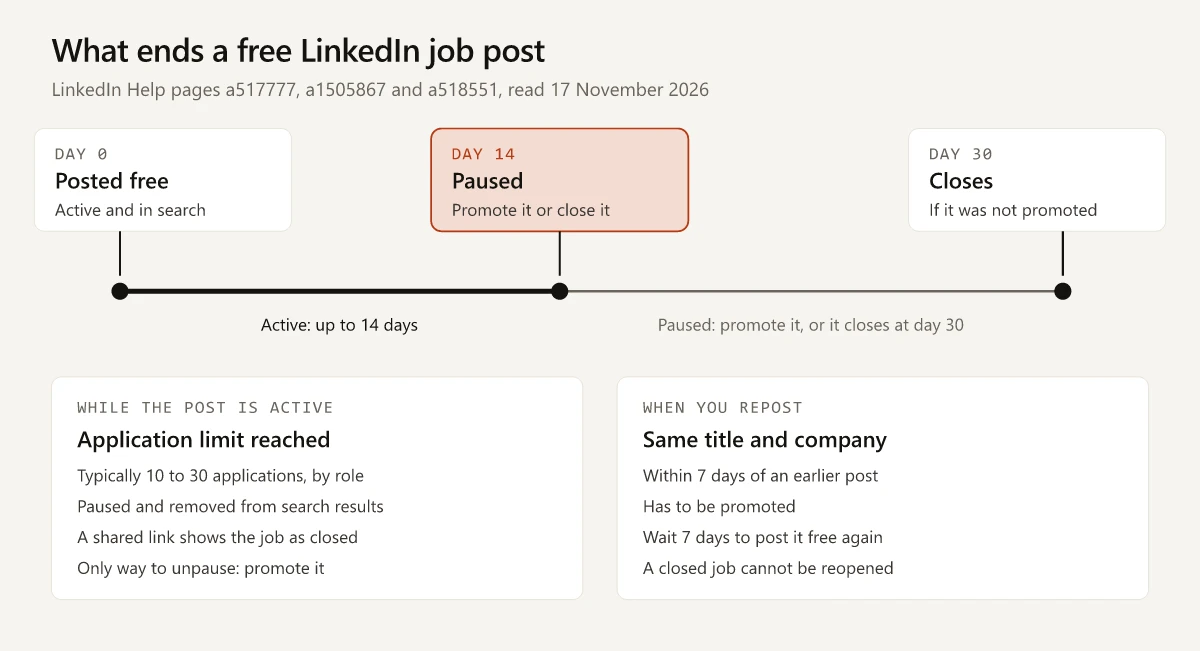
LinkedIn’s Help pages describe the application limit two ways, and LinkedIn’s free vs promoted comparison (“Last updated: 4 weeks ago”) uses both. Its free-jobs list says the job “Will remain active but will be hidden from search results” and “can still be accessed via a direct link or on your company’s job tab”; a later paragraph on the same page, like a517777, says it is paused and a shared link shows it as closed. Both versions agree it leaves search. I would not count on the direct link in your own post or newsletter staying open once the limit is hit.
Reposting carries a cost of its own. a518551 says “All applicant information gathered previously will only be associated with the closed job post”, and that “Job posts cannot be deleted. They can only be closed.”
Free vs Promoted Job Posts on LinkedIn
From a519737, which applies to jobs “posted from a personal LinkedIn account” (Recruiter jobs follow the Recruiter Help Center):
| Free job | Promoted job | |
|---|---|---|
| How many | ”One free job active at a time and a limited number of free job posts within a 30-day period” | LinkedIn’s Free vs. paid page: “Pay to promote an unlimited number of jobs at a time” |
| Search placement | Appears in search results | ”shown at the top of search results and can include a Promoted tag” |
| How long | Paused after 14 days active | Active “until you close them or will expire after 6 months” |
| Applicants | Hidden from search at the application limit of 10 to 30 | ”Can receive unlimited applicants” |
| Recommended candidates | 25 | ”Up to 350 invites” |
| InMail | None listed | ”5 InMail messages per job post to sourced candidates” |
| Applicant evaluations | ”One evaluation of a top fit applicant” | Unlimited |
| AI interviews | ”A preview of Interview AI" | "40 AI video interviews” |
| Targeting and budget | None listed | Custom audience targeting; a daily average or total budget |
a517777 adds that a promoted post may offer “additional 5 InMail credits and 5 AI interview invites (up to 100) per day for a fixed daily rate per day.” One more rule runs one way only: on LinkedIn’s Manage your promoted job post FAQ, “Once a job post has been promoted, it cannot go back to a free job.”
How Many Jobs Can You Post on LinkedIn for Free?
One at a time. LinkedIn Help allows one active free job post per member, plus “a limited number of free job posts within a 30-day period” that no page I read puts a number on.
- Several openings with different titles: post them one after another. a519737 says the one-at-a-time rule exists “To ensure a fair and equitable balance between free and paid jobs and reduce job posting abuse”.
- Several people for the same role: a1505867 answers this case directly. To post the same title for free “you’ll need to wait 7 days to post the second job and you’ll still be subject to free job limits.”
- Hiring all year: LinkedIn’s Hiring Pro pricing page points those “hiring at scale” to a contract option, LinkedIn Job Slots, and a6895976 suggests LinkedIn Recruiter to anyone “Hiring for 20+ roles this year”.
LinkedIn Job Posting Cost When You Promote
Promotion is pay per click. LinkedIn’s Promoted job posts page says “you only pay for clicks in the country in which the job is posted” (for jobs in the European Economic Area, the billing FAQ a517695 applies the rule to the EEA as a whole), and you set either a daily average budget, which runs until you close the job or for up to 6 months, or a total budget, after which the job pauses. LinkedIn’s own budget arithmetic, from the US Hiring Pro pricing page:
- Daily budget: “If you set a $10 daily budget and run a job post for 30 days, your total cost will be $300 or less, depending on reach.”
- Total budget: “If you set a $300 total budget, your job post will pause once the full $300 has been spent”.
- You are not charged for viewing your own job post, for “Multiple views from the same person”, or for “Views from people who are not signed in to LinkedIn”.
- Cost per click is “determined by dividing the total spend amount by the number of views the job has received.”
LinkedIn’s billing FAQ for promoted job posts (“Last updated: 4 weeks ago”) gives no fixed minimum: it says the minimum and maximum budget “depends on the role being promoted, applicant forecasting, and whether you’ve already promoted a job”, and that you can choose a budget below the recommended one.
That FAQ and the pricing page give different billing timings; where they differ, plan for the sooner charge (24 hours after closing, not 48):
| When your card is charged | Hiring Pro pricing page | Billing FAQ a517695 |
|---|---|---|
| After closing | ”within 48 hours of closing your job" | "within 24 hours if all jobs are closed” |
| By balance | ”as soon as you reach a $500 balance (USD specific)”; LinkedIn’s India page words it “a US$500 balance (or INR equivalent)" | "within 24 hours” at $500 or more; “For new customers, this threshold may be lower for the first few invoices” |
| By time | ”30 days from the day you posted if the job is still active" | "every 30 days from the date of your first job post” |
The By time row differs in its start date (this post versus your first job post), not in its length.
One older route is gone: LinkedIn’s pre-paid discount page still describes “a discount of up to 35%” for buying budget in advance, under a notice that reads “We’ve discontinued the ability to pre-purchase job posting credits for a discount.” On iPhone the route is different: LinkedIn’s job posting credits page says members promoting from the iOS app “need to purchase job promotion credits through Apple’s in-app purchase process”, credits that do not expire.
From India: on 17 November 2026, LinkedIn’s India Hiring Pro pricing page gave its budget examples in rupees: “If you set a ₹100 daily budget and run a job post for 30 days, your total cost will be ₹3,000 or less, depending on reach,” and a ₹3,000 total budget pauses the post “once the full amount has been spent.” The US page uses $10 and $300. These are LinkedIn’s examples, not a minimum price; set the budget at checkout and read the currency shown there. If you hire often enough to weigh Recruiter Lite, or want LinkedIn’s GST rules for purchases from India, both are in my breakdown of LinkedIn Premium cost in India.
After You Post: Share, Manage and Close
- Manage it: Jobs icon, then Manage job posts, then the job title, per LinkedIn’s Manage your posted jobs page. The Job Information tab shows applicants and views; the Settings tab filters applicants outside your country or who miss your screening qualifications.
- Share it: the #Hiring frame from step 6 marks your profile. If you also announce the opening in a feed post, @-mentioning the hiring manager sends them a notification; my guide to tagging on LinkedIn covers when a mention fails.
- Read applicants: applicants can attach a resume they saved on LinkedIn, and my guide to adding a resume to LinkedIn shows where they upload it. Candidates who have not applied may show the #OpenToWork photo frame, which appears only when they share with all members; my post on LinkedIn Open to Work explains who sees each visibility setting.
- Close it: Jobs icon, Manage job posts, the More icon next to the title, then Close job (a518551). Closing removes the post from search and stops new applications; if you collected applications on LinkedIn, you can still review the list.
Plan the Free Post Around 14 Days
If you are planning how to post a job on LinkedIn for free, work to a window of up to 14 days, which the application limit can end sooner. Before you click Post a free job, write the screening questions that turn 10 to 30 applicants into a shortlist.
Frequently Asked Questions
Can I post a job on LinkedIn for free?
Yes, one at a time. LinkedIn Help says members can have one free job post active at a time, attached to a company LinkedIn Page. LinkedIn requires promotion instead for search and staffing companies, generic company names such as Confidential, some high-demand roles, and a repost of the same title and company within 7 days.
How long does a free job post last on LinkedIn?
LinkedIn Help says a free job post stays active for up to 14 days, is then paused, and closes automatically after 30 days if you do not promote it. It can be paused earlier: when it reaches its application limit, typically 10 to 30 applications, it is removed from search results.
How many free job posts can I have on LinkedIn?
One active free post at a time, and a limited number of free posts within a 30-day period. LinkedIn Help does not publish that number. A post with the same title and company as one you posted in the last 7 days has to be promoted.
Why is my free LinkedIn job post paused?
Either it has been active for 14 days, or it has reached the free application limit, which LinkedIn says typically ranges from 10 to 30 applications. LinkedIn Help says the only way to unpause it is to promote it; otherwise you can close it.
How much does LinkedIn job posting cost in India?
A free post costs nothing. A promoted post is pay per click within a daily or total budget you set. On 17 November 2026, LinkedIn's India Hiring Pro pricing page gave its budget examples in rupees: a ₹100 daily budget for 30 days costs ₹3,000 or less, depending on reach. That is LinkedIn's example, not a minimum price.