LinkedIn X-Ray Search: Documented Operators, India Strings
LinkedIn X-ray search built on the operators Google still documents, LinkedIn's robots.txt as read on 23 November 2026, and copy-paste strings for Indian cities.
Google’s Refine Google searches Help page documents six operators: double quotes for an exact phrase, site:, the minus sign, before:, after: and filetype:. The LinkedIn X-ray search guides I read for this post also use, between them, OR, *, intitle:, inurl:, intext: and AROUND(), and none of those six is on that page. OR used to be: an archived copy of the page from 31 December 2021 told readers to put OR “between each search query”, with the example “marathon OR race”, and the copy archived on 28 December 2023 no longer had that line.
The other piece of X-ray folklore is about LinkedIn. Evaboot’s X-ray guide says “LinkedIn tightened its robots.txt in late 2023, blocking Google and Bing from indexing many public profiles.” I read LinkedIn’s robots.txt from India on 23 November 2026 and compared it with archived copies from January 2023 and March 2024. The Googlebot rules for profile pages are the same in all three, and none of them blocks /in/.
So my advice is to build every string from the operators Google still documents, treat OR and the rest as extras that can stop working without notice, and read a missing profile as the member’s setting or Google’s sampling before blaming LinkedIn’s crawl rules.
How to Do a LinkedIn X-Ray Search in Four Steps
- Type
site:linkedin.com/in/first, with no space after the colon, so results come only from LinkedIn’s profile path. - Add the job title in double quotes:
"product marketing manager". - Add the city in double quotes:
"Bengaluru". - Subtract noise with a minus sign in front of each word:
-recruiter -hiring.
Put together:
site:linkedin.com/in/ "product marketing manager" "Bengaluru" -recruiter -hiringEvery operator in that string is on Google’s Help page, which also gives the spacing rule: “Do not put spaces between the operator and your search term.”
What Is LinkedIn X-Ray Search?
LinkedIn X-ray search is a Google search limited to LinkedIn’s public profile pages with the site: operator. It reads Google’s copy of the profiles members have chosen to make public, and it never touches LinkedIn’s own search box.
Public profile URLs sit under the /in/ path (mine is linkedin.com/in/swapbiswas/), so site:linkedin.com/in/ keeps out pages on LinkedIn’s other paths. Google’s site: operator page shows a URL prefix used this way, and it also warns that site:https://www.example.com “doesn’t return the same results as” site:https://example.com/, so leave the scheme and www off unless you mean that exact prefix.
LinkedIn’s own search has limits that a Google search does not share. A free search stops at “A maximum of 250 results per search or 25 pages of search results” (LinkedIn Help a520842), and out-of-network members appear as LinkedIn Member, which I cover in what each LinkedIn connection degree lets you see.
| Route | What it searches | Limit or cost the owner states |
|---|---|---|
| LinkedIn free search | LinkedIn’s member base, through your network | 250 results per search (a520842) |
| Google X-ray search | Google’s copy of public profiles | Not every indexed profile; see the sampling row in the causes table below |
| Recruiter Lite or Sales Navigator | LinkedIn’s paid search | Paid plans; what LinkedIn does and does not publish on price is in my LinkedIn Premium cost in India breakdown |
Google Operators in an X-Ray String: Documented or Not
The table below sorts the operators I found in X-ray guides by one test: is it on Google’s Refine Google searches page? That page introduces its list as “some popular operators”, so a missing operator is one Google makes no promise about, which is different from a dead one.
| Operator | On Google’s Help page? | What it does in an X-ray string | Example |
|---|---|---|---|
site: | Yes: “Enter site: in front of a site or domain” | Limits results to profile URLs | site:linkedin.com/in/ |
"quotes" | Yes: “an exact match of a word or phrase” | Pins a title, city, company or college | "content strategist" |
- | Yes: “Enter - in front of a word that you want to leave out” | Drops pages containing a word | -recruiter -intern |
before: / after: | Yes, for “documents last updated” before or after a date | Filters on Google’s date for the page, which Google does not tie to a job date | after:2026/01/01 |
filetype: | Yes | Nothing for profiles, which are ordinary web pages | none |
OR | No; on the 2021 copy, gone from the 2023 copy | Either-or titles or city spellings | ("Bengaluru" OR "Bangalore") |
* | No | A placeholder word inside a phrase | "head of * marketing" |
intitle: / inurl: / intext: | No | Matches the page title, the URL or the body text | intitle:"designer" |
AROUND(n) | No | Two words within n words of each other | "SEO" AROUND(3) "Pune" |
AND / NOT | No | Boolean words for both terms and for exclusion; Google’s page documents the minus sign for exclusion | consultant NOT freelancer |
allintitle: / allinurl: / allintext: | No | Multi-word versions of intitle:, inurl: and intext: | none |
+ | No; the page links a community answer titled “Why was the Plus Sign (+) removed as a Search Operator?” | Removed, per the title of the community answer the page links | none |
For the rows marked No, the middle column is what X-ray guides say the operator does; Google does not describe it. Two more Google pages point the same way. Search Central’s overview of search operators lists four: filetype:, imagesize:, site: and src:. And Google’s Advanced Search page, as fetched on 23 November 2026, offered fields for “All of these words”, “This exact word or phrase”, “None of these words” and “Site or domain”, with no field for either-or words.
X-Ray Search Strings for Indian Cities and Roles
The X-ray guides I read take their examples from cities such as London and San Francisco. These strings are built for India from the operators in the table above. They are constructions, not tested result counts: I have not run them to report how many profiles each returns. The right-hand column flags anything Google does not document.
| Goal | String | Undocumented parts |
|---|---|---|
| One title in one city | site:linkedin.com/in/ "product marketing manager" "Bengaluru" | None |
| A city with two spellings | site:linkedin.com/in/ "data analyst" ("Bengaluru" OR "Bangalore") | OR, parentheses |
| Gurugram and its old name | site:linkedin.com/in/ "account executive" ("Gurugram" OR "Gurgaon") | OR, parentheses |
| Kolkata and its old name | site:linkedin.com/in/ "brand manager" ("Kolkata" OR "Calcutta") | OR, parentheses |
| Leave out recruiters | site:linkedin.com/in/ "performance marketing" "Mumbai" -recruiter -"talent acquisition" | None |
| Leave out senior roles | site:linkedin.com/in/ "UX designer" "Hyderabad" -senior -lead | None |
| Alumni of one college in one role | site:linkedin.com/in/ "IIT Madras" "product manager" "Chennai" | None |
| People who list a company | site:linkedin.com/in/ "Zoho" "customer success" "Chennai" | None |
| Entry-level candidates | site:linkedin.com/in/ "Java" "fresher" "Pune" | None |
Three rules keep these strings honest:
- For a city with two spellings, the documented-only route is two searches, one per spelling, in place of the OR line.
- A quoted company or college name matches wherever it appears on the profile, so the company row can return past employees as well as current ones.
- A quoted job title matches the words on the page, which may sit in the headline, an old role or someone’s recommendation; read each result before you contact anyone.
Free X-ray tools build this kind of string for you. Recruit’em, for one, describes itself as a way to “Easily use Google to search profiles on LinkedIn”, and its form asks for a country, a job title, locations or keywords and a current employer; the table above is a copy-paste version of the same job that you type into Google yourself.
Does LinkedIn X-Ray Search Still Work? What LinkedIn’s robots.txt Says
On 23 November 2026, LinkedIn’s robots.txt let Googlebot crawl /in/ profile URLs, as it did in January 2023 and March 2024. I read the live file from India and compared its Googlebot group with the Wayback Machine copies of 2 January 2023 and 2 March 2024:
| Rule in the file | 23 Nov 2026 | Jan 2023 and Mar 2024 copies | What it means for X-ray |
|---|---|---|---|
/in/ (public profiles) | No Disallow in the Googlebot group | Same | Googlebot may crawl profile URLs |
/pub/ | No Disallow | Same | Not blocked either |
/profile/ and /profile/view | Disallow | Same | That path is closed to Googlebot |
/search* | Disallow | Same | LinkedIn’s own search result pages are closed to Googlebot |
/authwall | Disallow | Same | The sign-in wall page is not crawled |
User-agent: __usage_ai-training | Disallow: / | Not in either copy | Added after March 2024 |
User-agent: * | Disallow: / | Same | A crawler without its own group is blocked from everything |
The Googlebot group held 109 Disallow lines on 23 November 2026, and the Bingbot group held the same 109. Between the January 2023 and March 2024 copies, the only Googlebot change was the removal of Disallow: /signup/cold-join; between March 2024 and today there was none. The file’s header still says LinkedIn “may, in its discretion, permit certain automated access to certain LinkedIn pages, for the limited purpose of including content in approved publicly available search engines.”
What this settles is narrow. robots.txt governs crawling, so it cannot tell you how many profiles Google keeps in its index or shows for a query. It does rule out one story: the archived files do not show a late-2023 robots.txt change that blocked Google from profile pages.
Why a Profile Does Not Show Up in a Google X-Ray Search
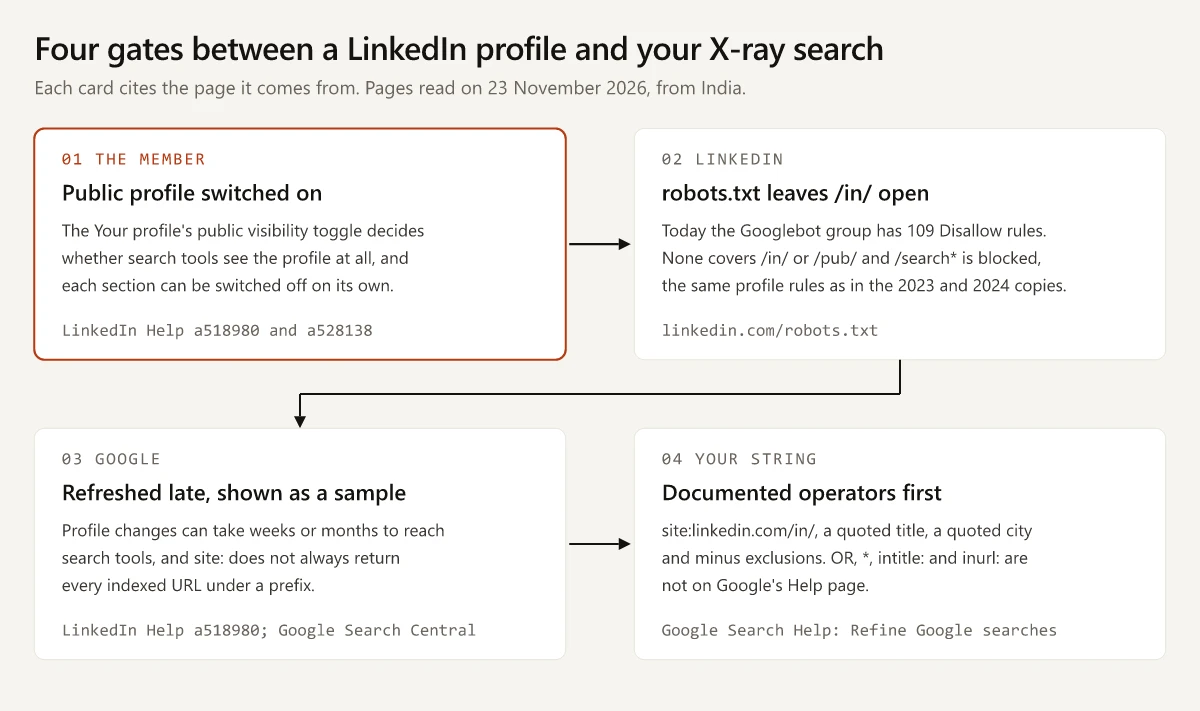
When a person you know is on LinkedIn does not appear, check these causes in order. Each comes from a LinkedIn or Google page I read on 23 November 2026:
| Cause | What the owner says | Source |
|---|---|---|
| Public profile switched off | ”Disabling your public profile hides your public profile from non-LinkedIn members or search tools results.” | LinkedIn public profile visibility (“Last updated: 2 months ago”) |
| The section you searched is hidden | Members “turn on or off the profile sections according to whether you want allow visibility on public search tools” | a518980 |
| Recent change | ”it can take several weeks or months at times for search tools like Google, Yahoo, or Bing to detect changes and refresh. LinkedIn doesn’t control that refresh process.” | a518980 |
| Google’s sampling | ”The site: operator doesn’t necessarily return all the URLs that are indexed under the prefix specified in the query” and “Bigger sites shouldn’t expect to see all their URLs in the results.” | Search Central (“Last updated 2025-12-10 UTC”) |
| New account | LinkedIn encourages new members “to complete your profile and connect with other LinkedIn members to increase activity and raise visibility to search tools” | Profile displays incorrectly in search tool results (“Last updated: 1 year ago”) |
A name search can also miss for a reason inside the profile: the Additional name field never appears on the public profile, as covered in how to change your name on LinkedIn. And if a result asks you to sign in before you can see the whole profile, that is documented too. LinkedIn’s Control your public LinkedIn profile page (“Last updated: 6 days ago”) says “people who aren’t LinkedIn members may be prompted to sign up or sign in to LinkedIn to view parts of your public profile.”
How to Make Your Own Profile Show Up in X-Ray Searches
If you want recruiters to find you this way, the controls sit in Public profile & URL on your own profile:
- Keep “Your profile’s public visibility” switched on, and turn on the sections you want search tools to see. The click path, and how to set a custom URL while you are there, is in my guide to changing your LinkedIn URL.
- Decide on the public visibility limits. LinkedIn’s a528138 page says “To make it easier for non-members to view your public profile, you can toggle the public visibility limits off”, and warns that doing so may also make it easier for unauthorized third parties and search tools to collect your public profile data.
- If Google shows an old version of your profile, LinkedIn’s a1376045 page points to Google’s Refresh Outdated Content tool and adds “LinkedIn does not control this process.”
- Before you send your profile URL to a recruiter, open it in a private browser window to see what a logged-out visitor gets; the four ways to share your LinkedIn profile link end with that test.
Closing an account works the other way round: the public profile can take up to 72 hours to come down, as set out in my guide to closing or hibernating a LinkedIn account.
Is X-Ray Searching LinkedIn Allowed?
LinkedIn’s User Agreement, effective on November 3, 2025, does not mention X-ray search by name. Three of the things members agree not to do reach how you search and what you do with the results:
- “Develop, support or use software, devices, scripts, robots or any other means or processes (such as crawlers, browser plugins and add-ons or any other technology) to scrape or copy the Services, including profiles and other data from the Services”
- “Copy, use, display or distribute any information (including content) obtained from the Services, whether directly or through third parties (such as search tools or data aggregators or brokers), without the consent of the content owner”
- “Override any security feature or bypass or circumvent any access controls or use limits of the Services (such as search results, profiles, or videos)”
My reading: open a result, read it, and contact the person through LinkedIn. Running a scraper or a browser extension over the results, or copying them into a contact list without the owner’s consent, is what the first two clauses describe. X-ray search runs on Google’s index, not on LinkedIn’s search, but the agreement does not say whether getting around the 250-result cap through Google counts as circumventing a use limit, so treat that question as open. This is a reading of the terms, not legal advice. The same agreement is why tools that claim to reveal private-mode viewers are a risk.
Build Your Next LinkedIn X-Ray Search From Three Operators
Six of the nine strings in the India table use only site:, double quotes and the minus sign, the three documented operators that do the work. Keep a documented-only version of any string that uses OR or *, since neither is on Google’s Help page. When someone you expected is missing, check their public profile setting and Google’s refresh lag before you blame robots.txt, whose Googlebot rules for /in/ matched the January 2023 copy. Start with the first row of the India string table and swap in your own title and city.
Frequently Asked Questions
What is the LinkedIn X-ray search string format?
Start with site:linkedin.com/in/, add the job title and the city, each wrapped in double quotes, then put a minus sign before any word to leave out, such as recruiter. Google's Help page says not to put a space between an operator and the search term.
Does LinkedIn X-ray search still work in 2026?
The crawl rules it depends on are in place. On 23 November 2026 the Googlebot group in LinkedIn's robots.txt had no rule blocking /in/ profile URLs, matching archived copies from January 2023 and March 2024. Results are still a sample, because Google says the site: operator does not necessarily return every indexed URL.
Why can't I find someone on LinkedIn through Google?
The member may have switched their public profile off, hidden the section you are searching for, or changed it recently. LinkedIn says changes can take several weeks or months to reach Google, Yahoo or Bing, and Google says site: results are not exhaustive.
Is there a free LinkedIn X-ray search tool?
Yes. Recruit'em, for one, describes itself as a way to 'Easily use Google to search profiles on LinkedIn'. Typing the same operators into Google yourself gives you the same kind of string with nothing in between.
Is LinkedIn X-ray search legal?
LinkedIn's User Agreement does not name X-ray search, but it bars scraping tools and copying information obtained through search tools without the content owner's consent. My reading is that opening a result and messaging the person through LinkedIn is the lowest-risk use. The agreement does not say whether using Google to get past LinkedIn's search limits counts as circumventing a use limit. This is a reading of the terms, not legal advice.